How to secure communication of roaming users using Secure Gateway Server?
Description
This document will explain you the steps involved in securing the communication of roaming users using Secure Gateway Server. Secure Gateway Server can be used when roaming agents (on the desktops) access the server through internet. It prevents the exposure of the Server directly to the internet by serving as an intermediate server between the product server and roaming agents. This ensures that the Remote Access Plus Server is secure from risks and threats of vulnerable attacks.
How Secure Gateway works?
Secure Gateway Server is a component that will be exposed to the internet. This Secure Gateway Server acts as an intermediate server between the managed roaming agents and the ManageEngine server.All communications from the roaming agents will be navigated through the Secure Gateway. When the agent tries to contact the ManageEngine server, Secure Gateway server receives all the communications and redirects to the ManageEngine server.
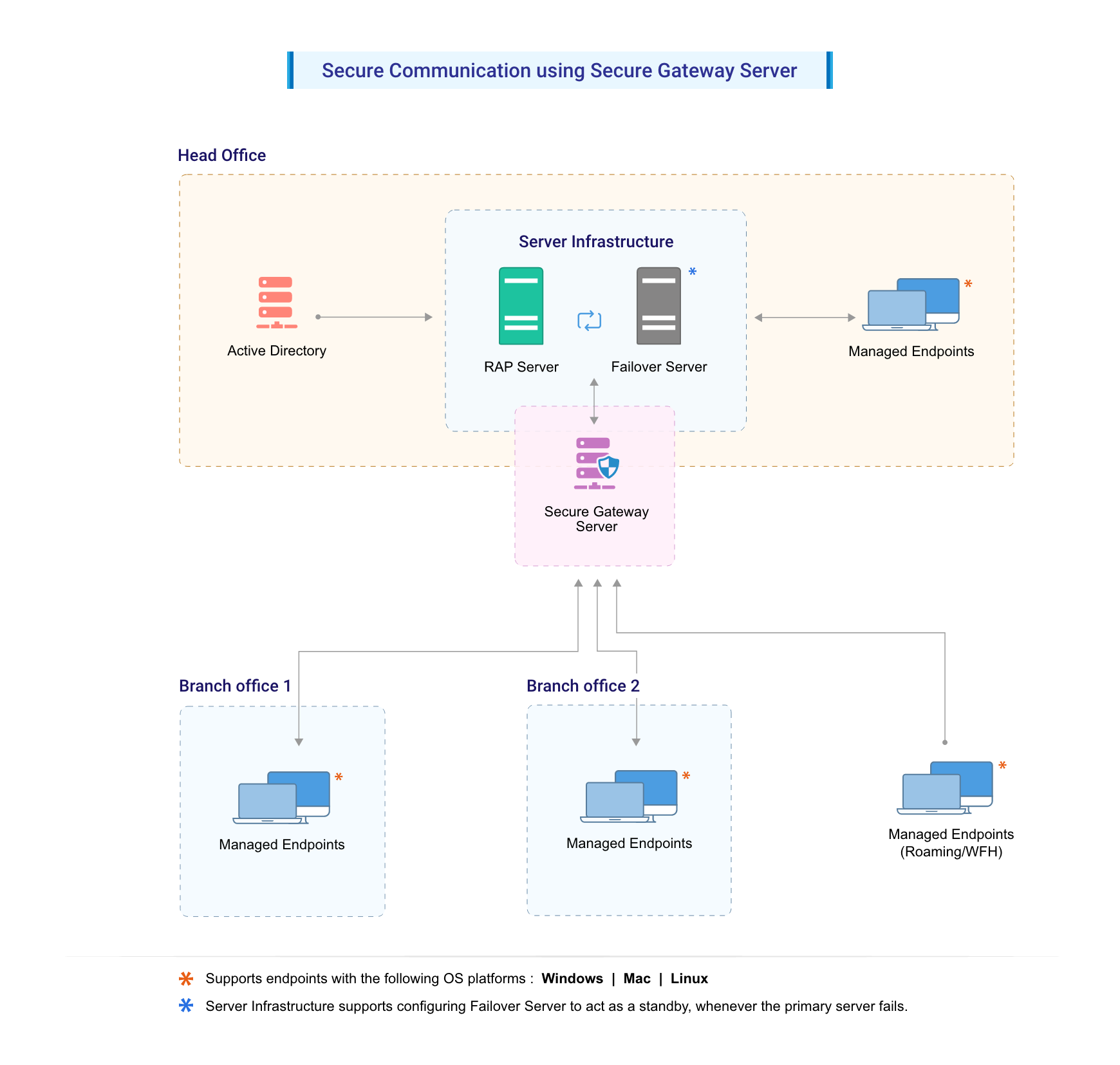
Note: Map your Secure Gateway's public IP adress and Remote Access Plus server's private IP address to a common FQDN in your respective DNS. For example, if your FQDN is "product.server.com", map this to both your Secure Gateway and Remote Access Plus server IP address. By this mapping, the WAN agents of roaming users will access the ManageEngine server via Secure Gateway (using internet) and the agents within the LAN network will directly reach ManageEngine server, hence leading to quicker resolution.
Disclaimer: For time being, voice and video call will not be supported in secure gateway server.
Software requirements for Secure Gateway Server
You can install Secure Gateway Server on any of these Windows operating system versions:
- Windows 7
- Windows 8
- Windows 8.1
- Windows 10
- Windows Server 2008
- Windows Server 2008 R2
- Windows Server 2012 R2
- Windows Server 2016
- Windows Server 2019
- Windows Server 2022
Hardware requirements for Secure Gateway Server
The hardware requirements for Secure Gateway Server include the following :
1 to 5000 computers
5001 to 9000 computers
9001 to 15000 computers
15001 to 18000 computers
18001 to 25000 computers
Above 25000 computers
Steps
To introduce Secure Gateway based communication to Remote Access Plus, follow the steps given below:
- Modify Remote Access Plus Settings
- Install and configure Secure Gateway
- Infrastructure recommendations
Modify Remote Access Plus Settings
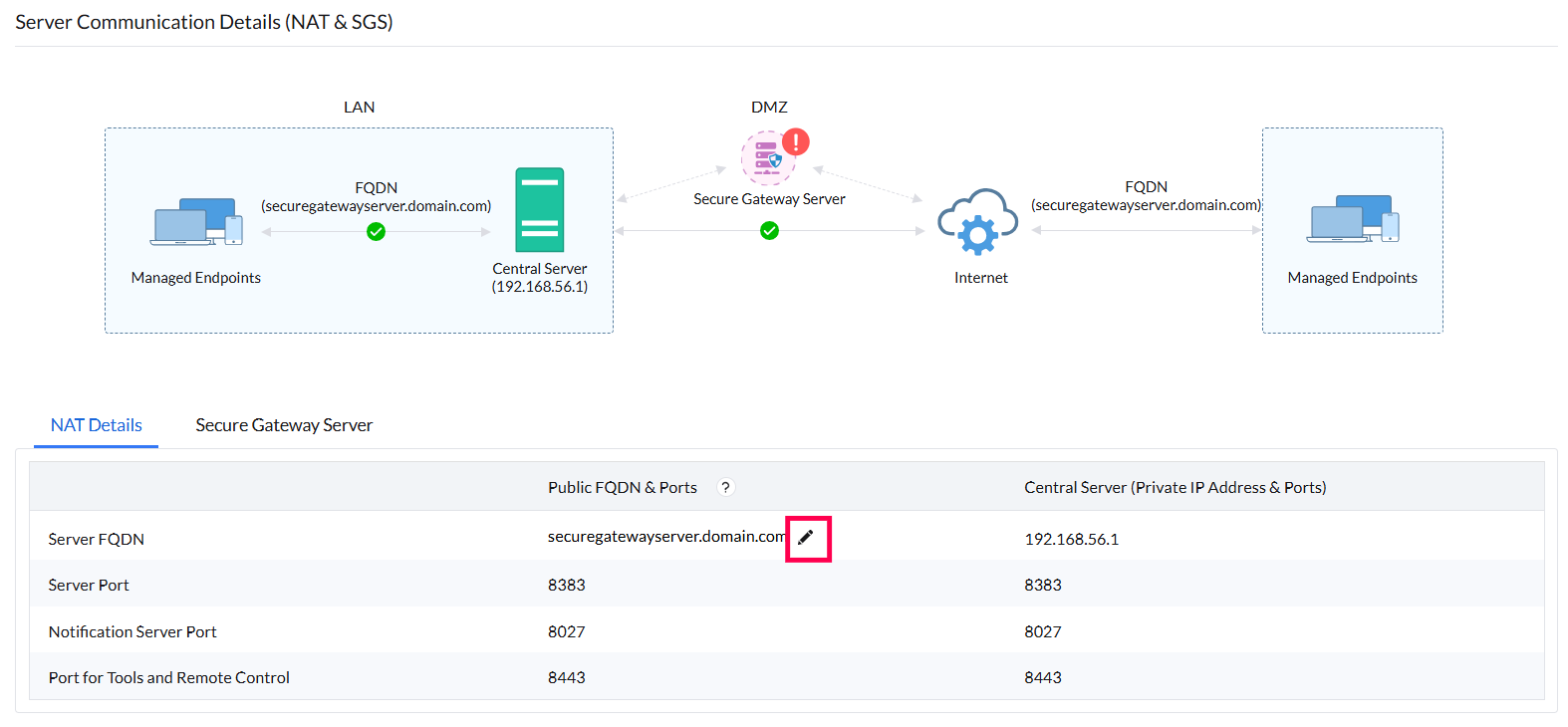
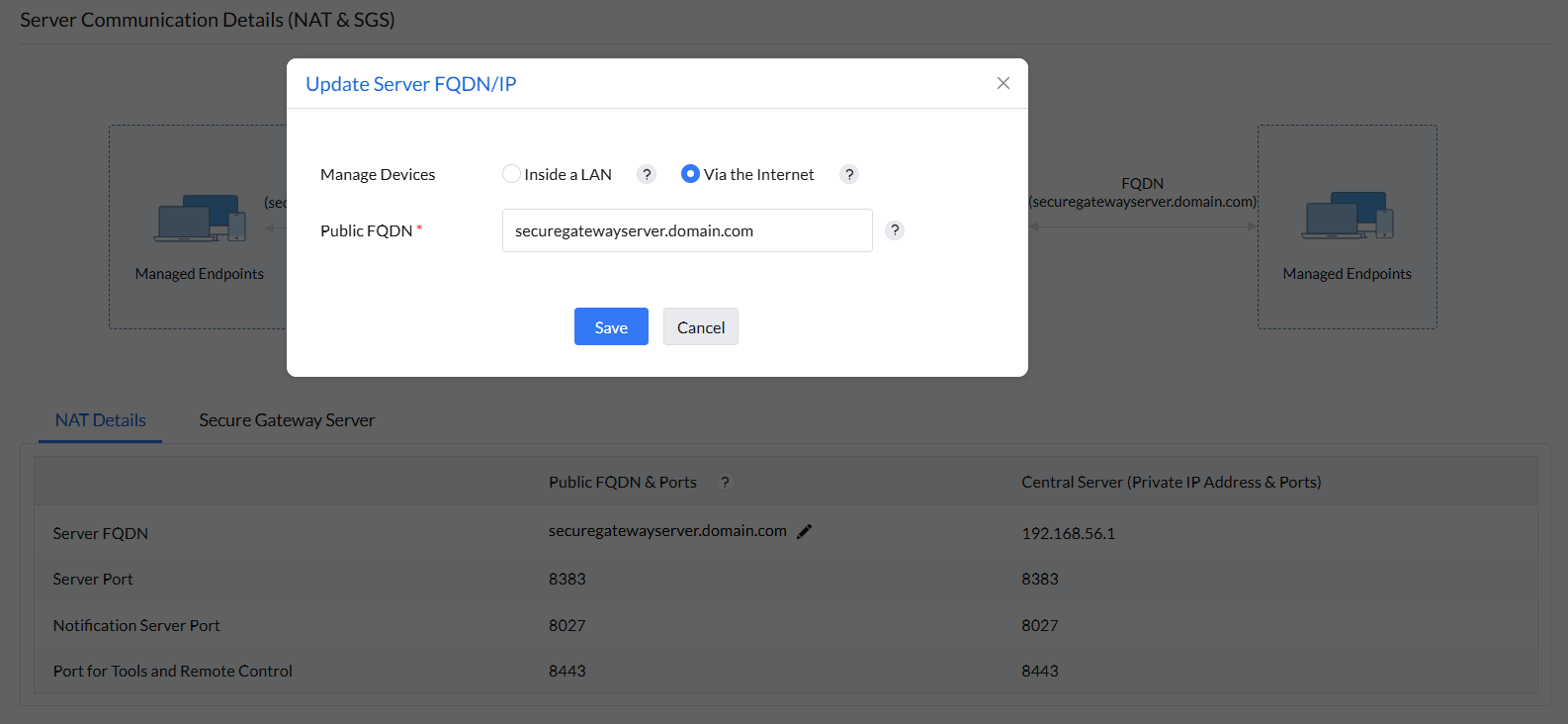
- Configure NAT settings using the Secure Gateway's public FQDN/IP address.
- On the product console, click on Admin tab -> Server Settings -> NAT Settings
- Click the edit button next to the Server FQDN under NAT device and add the details as shown below
Steps to Install and Configure Secure Gateway
- Download and install Secure Gateway on a machine in Demilitarized zone.
- Enter the following details under Setting up the Secure Gateway window, which will open after the installation process.
- Central Server Name: Specify the FQDN/DNS/IP address of the Central server. Or specify virtual IP address if Failover server is used.
- Https Port: Specify the port number that the roaming user use to contact the central server (eg: 8383). It is recommended to use the same port 8383(HTTPS) for central server in secured mode.
- Notification Server port: 8027 (to perform on-demand operations), this will be pre-filled automatically
- Web Socket Port : 8443(HTTPS), this will be pre-filled automatically.
- Username & Password: Enter Remote Access Plus user's credentials with administrative privilege.
Infrastructure recommendations
Ensure that you follow the steps given below
- Secure Gateway's Public IP address with the port 8383(https) should be provided to Remote Access Plus server for accessibility verification.
- Configure Secure Gateway in such a way, that it should be reachable via public IP/FQDN address configured in NAT settings. You can also configure the Edge Device/Router in such a way that all the request that are sent to the Public IP/FQDN address gets redirected to the Remote Access Plus Secure Gateway.
- It is mandatory to use HTTPS communication
- You will have to ensure that the following port is open on the firewall for the WAN agents to communicate the Remote Access Plus Secure Gateway.
| Port | Type | Purpose | Connection |
| 8383 | HTTPS | For communication between the WAN agent and the Remote Access Plus server using Secure Gateway. | Inbound to Server |
| 8027 | TCP | To perform on-demand operations | Inbound to Server |
| 8443 | HTTPS | Web socket port used for remote control, chat, system manager etc. | Inbound to Server |
You have now secured communication between Remote Access Plus server, WAN agents and roaming users!