Problem
While configuring WSUS settings you get an error - "WSUS console version is not equal to the WSUS Server version".
Cause
You might get this error due to the following reason:
- Patch Connect Plus installed machine does not contain the required WSUS console version
- The version of WSUS console in Patch Connect Plus installed machine is not the same as WSUS server version.
Resolution
The table given belows shows the operating systems where Patch Connect Plus can be installed based on the primary WSUS Server.
| WSUS server OS | WSUS Version | OS where Patch Connect Plus can be installed |
| Windows server 2019 | 10.0.17763.x | Windows server 2019 |
| Windows server 2016 | 10.0.14393.x | Windows 10, Windows server 2016. |
| Windows server 2012 R2 | 6.3.9600.x | Windows 8.1, Windows server 2012 R2. |
| Windows server 2012 | 6.2.9200.x | Windows 8, Windows server 2012. |
| Windows server 2008 R2 & below | 3.x | Windows 7, Windows vista, Windows XP, Windows Server 2008 R2 & below |
| Windows Server 2022 | 10.0.20348.x | Windows Server 2022 |
| Windows Server 2025 | 10.0.26100.x | Windows Server 2025 |
Follow the below steps to check for WSUS server version,
- Go to the machine where you have installed WSUS server
- Open WSUS server console
- In the left hand side, under Update Services select the WSUS server name.
Refer the below image to find the server version.
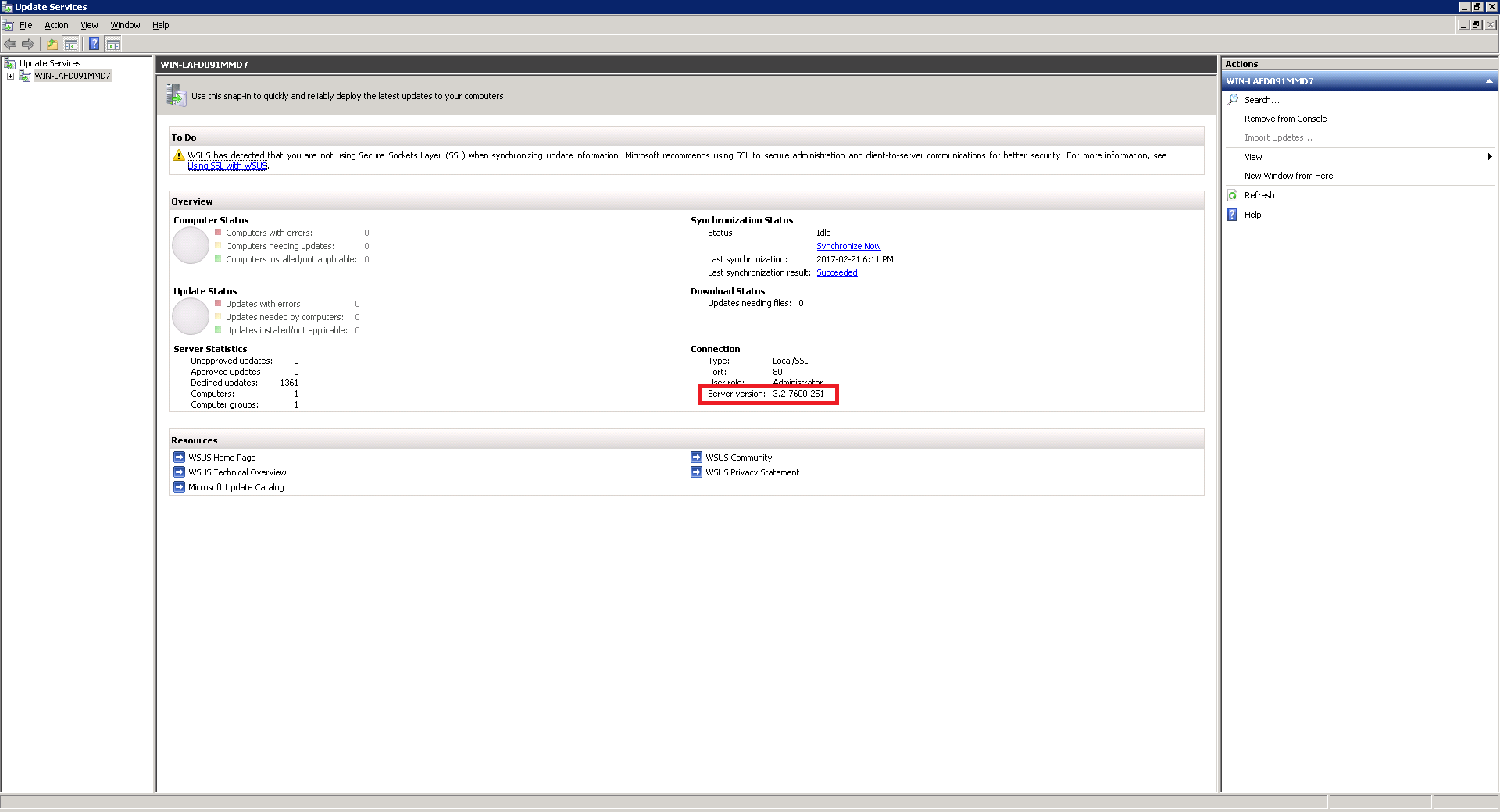
- Similarly find the WSUS console version in the Patch Connect Plus installed machine.
Now check if both the versions are matching. If not using the below data update the WSUS console version in Patch Connect Plus installed machine.
For WSUS installed in Windows server 2008 R2 and below
| Installed Update | Version |
| WSUS 3.0 (RC) | 3.0.6000.318 |
| WSUS 3.0 (RTW) | 3.0.6000.374 |
| WSUS 3.0 (SP1) | 3.1.6001.65 |
| WSUS 3.0 (SP1 + KB954960) | 3.1.6001.66 |
| WSUS 3.0 (SP2 Beta) | 3.2.7000.84 |
| WSUS 3.0 (SP2 RC) | 3.2.7085.146 |
| WSUS 3.0 (SP2) | 3.2.7600.226 |
| WSUS 3.0 (SP2 + KB2720211) | 3.2.7600.251 |
| WSUS 3.0 (SP2 + KB2734608) | 3.2.7600.256 |
In case if this problem continues, kindly Contact Support
Keywords: Third-party Patch Management, WSUS Server compatibility, Server versions