Risk indicators
In ManageEngine SecureAI, risk indicators are the individual security checks behind an AI vendor account's risk score. Each risk indicator tests the account for a specific weakness. Examples include API keys with unclear names, invitations left pending for more than a week, and workspaces whose names do not follow your naming convention.
A risk indicator that finds a problem also offers the steps to correct it. Use risk indicators to see what is pulling an account's score down, and to pass the details to whoever runs that account. They also serve as evidence during an audit that a check has been carried out.
How it works
Each risk indicator is a rule that SecureAI applies to the records it has collected for an AI vendor account. SecureAI collects those records on a data sync schedule. Most rules work through a set of records, such as every API key in the account. The indicator counts how many of those records violate the rule, and expresses that as a proportion of the set. SecureAI keeps each record it counted, along with with the reason, so that the indicator can list them.
Severity, weight, and the compliance framework mappings belong to the indicator itself and are the same wherever that indicator is applied. The indicators available depend on the AI vendor, and the delegated role governs which of them a technician sees. Weight and a failing status both feed the account risk score. The risk score computation explains how.
Prerequisites
Sign in with permissions that include AI Risk Assessment. The default Super Admin and Risk & Audit Analyst roles include it.
- Only the records that violated a rule are named. Records that were checked and found compliant are counted in the exposure figure but are not listed.
- A severity chosen in Filter By stays applied when you move to another risk category. A category can therefore appear empty when it holds no indicator at that severity.
Working with risk indicators
Risk indicators are held per account, so you choose the AI vendor and then the account before reading them. Indicators are grouped by risk category, and which categories and indicators an account carries depends on its AI vendor. Risk indicators by platform gives the full set for each AI vendor.
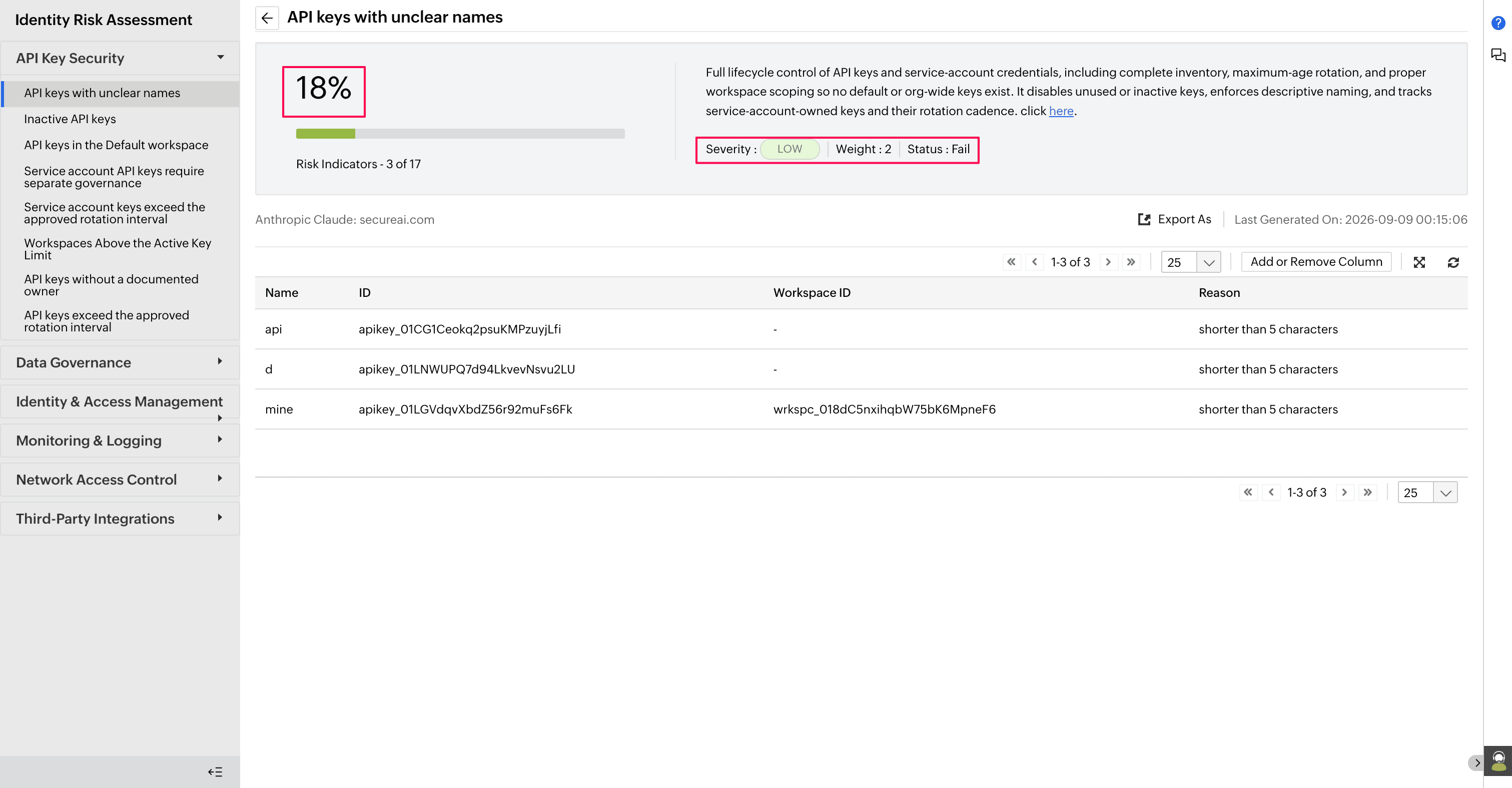
A risk category lists its indicators, and clicking one displays its details. A risk indicator gives the following values.
| Value | What it shows |
|---|---|
| Risk indicator | The name of the check. |
| Severity | How serious a violation of the indicator would be. |
| Risk Exposure | The proportion of records at fault, with the counts behind the percentage. |
| Weight | The value the risk score calculation uses for this indicator. |
| Status | The result of the last check: Pass, where no record violated the rule. Fail, where at least one record violated it. Manual, where SecureAI cannot read the setting, so you confirm it yourself. Failed to Run, where the rule could not be applied. Clicking the indicator displays the reason. |
| Description | What the indicator checks and why it matters. |
| Remediation measures | The steps that correct the problem, naming the location in the AI vendor console where each correction is made. The last measure is always the option to record an exception, where the current configuration is a documented decision in your own governance process. |
| Compliance frameworks | The frameworks to which the control is mapped. |
| Records at fault | The records that violated the rule. The columns depend on what the indicator covers. |
| Reason | Why each record violated the rule. |
Two controls act on the listing rather than on an indicator's values. Filter By narrows a listing to indicators of a single severity: Critical, High, Medium, or Low. Export As exports the records for the indicator being displayed as CSV, PDF, or XLSX, covering that indicator alone and identifying the account it was produced for.
Risk indicators by platform
The risk indicators available depend on the AI vendor. The following tables list every indicator by risk category. Clicking an indicator in the product gives what it checks, its severity and weight, and the remediation measures it carries.
Anthropic Claude
Anthropic Claude carries 45 risk indicators across six risk categories.
| Risk category | Risk indicator |
|---|---|
| Identity and Access Management | Organization Admin and Owner Count Exceeds Policy |
| Service Account and Federation Rule Ownership not Assessed | |
| Invitations Pending Longer Than Seven Days | |
| SSO Enforcement Not Assessed | |
| Primary Owner Count is Not One | |
| Workspace Admin Count Exceeds Policy | |
| Fewer Than Two Governed Admins | |
| Dormant Members | |
| SCIM Provisioning Not Assessed | |
| Federation Domain Capture Not Assessed | |
| Member Email Domains Not Assessed | |
| API Key and Credential Security | API Keys Exceed the Approved Rotation Interval |
| API Keys Without a Documented Owner | |
| Service Account API Keys Require Separate Governance | |
| API Keys in the Default Workspace | |
| Inactive API Keys | |
| API Keys With Unclear Names | |
| Workspaces Above the Active Key Limit | |
| Service Account Keys Exceed the Approved Rotation Interval | |
| Workspace and Data Governance | Workspace-Specific Spend Limit Not Configured |
| Archived Workspaces with Active Keys | |
| Empty Workspaces Not Archived | |
| Workspaces Above the Member Limit | |
| Workspace Names Do Not Follow the Naming Convention | |
| Workspace-Specific Model Rate Limits Not Configured | |
| Inactive Workspaces Not Archived | |
| Data Residency Configuration Not Assessed | |
| Usage on an Unapproved Service Tier | |
| Project-To-Workspace Mapping Not Assessed | |
| Content Safety Guardrails Not Assessed | |
| System Prompt Protection Not Assessed | |
| Logging and Monitoring | Workspace Usage Anomaly |
| Daily Cost Spike | |
| Claude Code Usage Anomaly | |
| API Key Usage Anomaly | |
| Recent Configuration Changes | |
| Per-User Usage and Cost Attribution Not Assessed | |
| Server Tool Usage Anomaly | |
| Unattributed Spend | |
| Per-User Claude Code Monitoring Not Assessed | |
| Network and Access Boundary | API Network Restrictions Not Assessed |
| TLS 1.2 Enforcement Not Assessed | |
| Third-Party App and Integration Control | Unapproved MCP Server Connections |
| MCP Tool Permission Scope Not Assessed | |
| Claude Code File, Tool, and Network Restrictions Not Assessed |
Google Gemini
Google Gemini carries 23 risk indicators across five risk categories.
| Risk category | Risk indicator |
|---|---|
| Identity and Access Management | Users Without 2-Step Verification Enforced |
| Super Admin Role Assignments | |
| 2-Step Verification Enrollment Change Auditing | |
| Suspicious Login Monitoring | |
| Admin Role Change Auditing | |
| Excess Super Admins | |
| Gemini Access Beyond Authorized Users and Organizational Units | |
| Admins Not Enrolled in the Advanced Protection Program | |
| Data and Model Governance | DLP Rule Match Monitoring |
| Gemini Data Retention Not Configured in Vault | |
| Data Localization Change Auditing | |
| Google Drive External Sharing Auditing | |
| Bulk Data Export Monitoring | |
| DLP Rules Not Covering Gemini Inputs and Outputs | |
| Logging and Monitoring | Admin Audit Log Unavailable |
| Gemini Activity Log Unavailable | |
| Alert Center Rules Not Configured | |
| Leaked Password Detection | |
| Email Forwarding Outside the Organization | |
| Network and Access Boundary | Unapproved or Noncompliant Devices |
| Third-Party App and Integration Control | External OAuth App Token Inventory |
| OAuth Token Grant and Revoke Auditing | |
| Unapproved External Apps |
GitHub Copilot
GitHub Copilot carries 46 risk indicators across eight risk categories.
| Risk category | Risk indicator |
|---|---|
| Identity and Access Management | GitHub Copilot Seat Management Not Set to Selective Assignment |
| Copilot Seats Not Assigned Through a Team | |
| Inactive Copilot Seats | |
| GitHub Copilot Plan Below Business | |
| Two-Factor Authentication Not Required Across the Organization | |
| Base Repository Permission Above Read | |
| Members Allowed to Create Public Repositories | |
| Outside Collaborators Awaiting Review | |
| Organization Admin Grants Awaiting Review | |
| Unattributed Member Invitations | |
| Team and Membership Changes Awaiting Review | |
| Bot Actors on Privileged Actions | |
| Unauthorized Verified Domain Additions | |
| Administrative Actions from Unapproved Geographies | |
| Copilot Seats Held by Unauthorized Members | |
| API Key and Credential Security | Pending Fine-Grained Personal Access Token Requests |
| Data and Model Governance | Suggestions Matching Public Code Are Allowed |
| Codespaces Policy Changes Awaiting Review | |
| Content Exclusions Not Configured for Sensitive Repositories | |
| Logging and Monitoring | Copilot Usage Metrics Unavailable |
| Code Suggestion Acceptance Data Unavailable | |
| Unusual Copilot Usage by Team | |
| IDE and Chat Usage Data Unavailable | |
| GitHub Copilot Audit Events Unavailable | |
| Unapproved Copilot Seat Changes | |
| Unapproved Copilot Policy Changes | |
| Organization Audit Log Unavailable | |
| Privileged Configuration Changes Not Captured | |
| Network and Access Boundary | IP Allowlist Disabled or Unrestricted |
| Webhooks Without TLS Verification | |
| Third-Party App and Integration Control | GitHub Apps with Excess Permissions |
| Code Security and Supply Chain | Code Security Configuration Not Enforced |
| Secret Scanning Push Protection Not Enabled | |
| Code Scanning Not Enabled | |
| Dependabot Alerts Are Disabled | |
| Untriaged Secret Scanning Alerts | |
| High- or Critical-Severity Code Scanning Alert is Open | |
| High- or Critical-Severity Dependabot Alert is Open | |
| Pull Request Review Not Enforced on the Default Branch | |
| Force Pushes Allowed on the Default Branch | |
| Commit Signatures Not Required on the Default Branch | |
| CI/CD & Automation Security | Actions Allowed to Approve Pull Requests |
| Default Workflow Token Permissions Not Read-Only | |
| All GitHub Actions are Allowed to Run | |
| Repositories With Deploy Keys | |
| Self-Hosted Runner Groups Open to Public Repositories |
Tips
- An exposure that changes between assessments with no change in the AI vendor account usually means an indicator started or stopped returning records. Compare the statuses before you investigate the account itself.
- Risk categories divide the remediation work between teams. A finding in Code Security and Supply Chain, a category only GitHub Copilot carries, is corrected by whoever runs the repositories rather than by the administrator reading the assessment.Delegate the AI Risk Assessment permission to the people who own the AI vendor accounts rather than to a central team. The reporting and the remediation then sits with the same person.