# Anonymously shared items report for SharePoint Online
Get a tenant-wide view of every file and folder shared through an Anyone link in SharePoint Online, so anonymously accessible items don't go undetected.
SharePoint Manager Plus helps you review anonymous sharing from a [centralized reporting console](https://www.manageengine.com/sharepoint-management-reporting/sharepoint-reporting-tool.html?utm_source=spmp-features&utm_medium=anonymously-shared-items-report&utm_content=in-content-links), without switching between multiple native reports or relying on PowerShell-based reporting. The Anonymously Shared Items report gives you a tenant-wide view of files and folders currently exposed through Anyone links across your SharePoint environment.
## Why you need a report to track Anyone links
An Anyone link in SharePoint Online is one of the broadest sharing mechanisms available. It does not require authentication, and Microsoft notes that "Anyone with a link" access cannot be audited to identify who used the link. The risk is not just theoretical. IBM’s [2025 Cost of a Data Breach report](https://www.bakerdonelson.com/webfiles/Publications/20250822_Cost-of-a-Data-Breach-Report-2025.pdf) found that third-party vendor and supply-chain compromises averaged USD 4.91 million per breach.
Microsoft provides site-level sharing reports and data access governance reports to help admins review anonymous sharing in SharePoint. But those native views are still split across site-level reports, governance summaries, and audit workflows. They do not provide one ready-made tenant-wide view of files and folders currently shared through Anyone links.
A report on anonymously shared items closes that gap by giving administrators a direct, tenant-wide view of items currently accessible without authentication:
- **Identify high-risk content shared without authentication:** Surface every file and folder that is currently reachable through an Anyone link and prioritize review based on the sensitivity of what has been exposed.
- **Attribute anonymous sharing to the user who created it:** Identify which internal users are generating Anyone links so you can support policy enforcement, user education, or follow-up where sharing behavior falls outside expected norms.
- [Assess exposure by access type](https://www.manageengine.com/sharepoint-management-reporting/sharepoint-permission-auditing-tool.html?utm_source=spmp-features&utm_medium=anonymously-shared-items-report&utm_content=in-content-links): Distinguish between anonymous links granting view-only access and those granting edit permissions so higher-risk shares can be reviewed first.
- **Detect forgotten anonymous links:** Find Anyone links that were created for short-term collaboration but remain active beyond their expected business need.
- **Review the effectiveness of anonymous sharing controls:** Cross-reference the report against your external sharing settings, links, sensitivity labels, and [permission configurations](https://www.manageengine.com/sharepoint-management-reporting/sharepoint-permission-reporting-tool.html?utm_source=spmp-features&utm_medium=anonymously-shared-items-report&utm_content=in-content-links) to confirm anonymous sharing is governed as intended.
## What is the Anonymously Shared Items report in SharePoint Manager Plus?
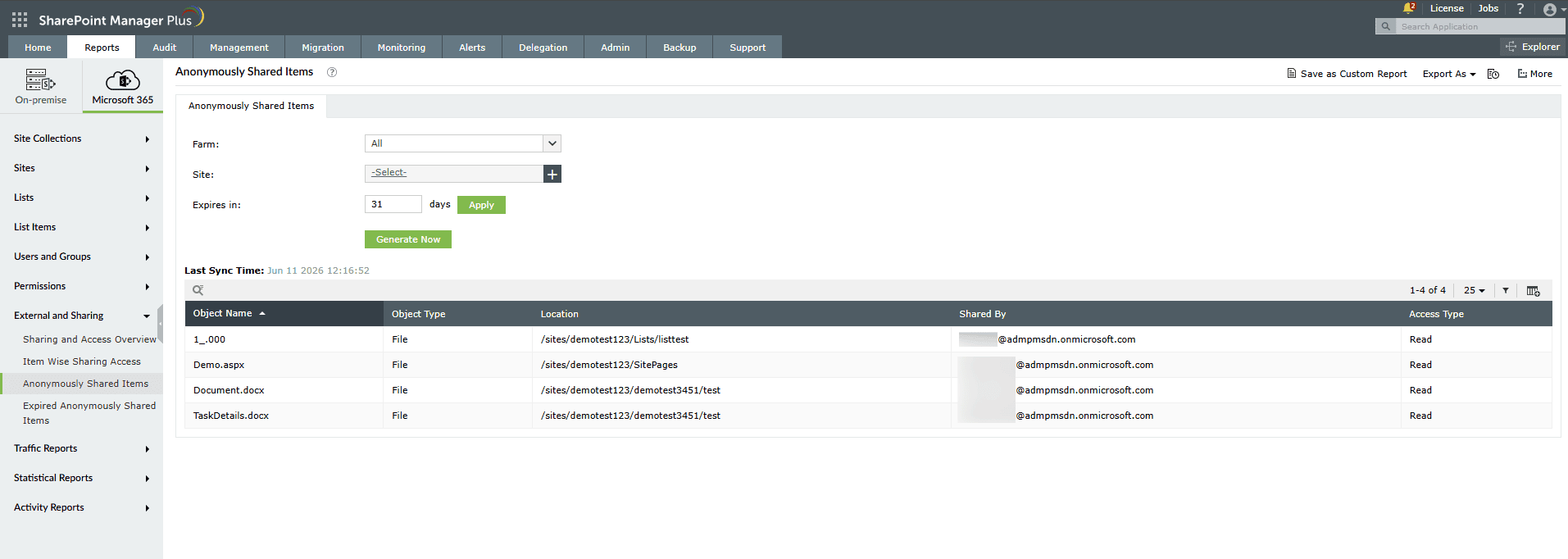
The Anonymously Shared Items report provides detailed information about every file and folder in SharePoint Online that is currently shared through an active Anyone link, meaning any person with the URL can access it without signing in. It includes the name of the shared object, its type, the location within SharePoint where it is stored, the internal user who created the anonymous link, and the level of access that link grants, giving administrators a precise view of unauthenticated exposure across the tenant.
## Compliance frameworks this report can support
Organizations across industries are subject to information security and privacy frameworks such as ISO/IEC 27001, HIPAA, NIST SP 800-53, the GDPR, and the PCI DSS, many of which require them to control unauthenticated access, enforce least privilege, and review how sensitive content is exposed.
The Anonymously Shared Items report supports these efforts by giving administrators a consolidated view of files and folders currently shared through Anyone links across SharePoint Online. This visibility can help teams support anonymous-sharing reviews, investigate oversharing, and prepare for governance or audit discussions more efficiently.
## What does the Anonymously Shared Items report show?
Using SharePoint Manager Plus, you can filter the Anonymously Shared Items report with the following fields:
- **Farm:** Select the SharePoint farm or Microsoft 365 tenant from which you want to pull anonymous sharing data.
- **Site Collection:** Narrow the report to a specific site collection to focus your anonymous sharing audit on a particular team, department, or project environment.
The Anonymously Shared Items report displays the following details for every anonymously shared item.
| Attribute | Description |
|---|---|
| Object Name | The name of the file or folder that has been shared through an active Anyone link. |
| Object Type | Indicates whether the anonymously shared object is a file or a folder within SharePoint Online. |
| Location | The full site URL or library path within SharePoint where the anonymously shared item is stored, identifying its position within the content hierarchy. |
| Shared By | The display name of the internal user who created the anonymous sharing link for the item, establishing accountability for each anonymous share. |
| Access Type | The level of access granted by the anonymous link, such as view-only or edit, indicating the degree of exposure each anonymously shared item carries. |
## Native SharePoint reporting and PowerShell versus SharePoint Manager Plus
In Microsoft 365, administrators can review anonymous sharing through site-level sharing reports and data access governance reports in the SharePoint admin center. Those native options are useful, but they are still segmented by site, report type, or governance summary. They do not provide one ready-made tenant-wide view of files and folders currently shared through Anyone links.
PowerShell scripts and audit log queries can help bridge some of those gaps, but turning raw sharing activity into a clean, tenant-wide list of active anonymous shares still requires scripting effort, formatting, and ongoing maintenance. SharePoint Manager Plus reduces that overhead by bringing this view into a single report that administrators can run, filter, export, and schedule without scripting knowledge.
## Benefits of SharePoint Manager Plus' Anonymously Shared Items report over other SharePoint reports
With SharePoint Manager Plus, your report combines the depth of PowerShell with the convenience of a centralized admin center.
| Capability | SharePoint admin center | PowerShell | The SharePoint Manager Plus advantage |
|---|---|---|---|
| **Report accessibility** | ❌
Manual filtering is required every time | ❌
Script execution is required for every run | ✅
Get one-click access to categorized reports |
| **Custom reports** | ❌ | ❌ | ✅
Create custom reports by saving granular, attribute-based conditional filters |
| **Report exports** | ✅
Reports can be exported only in CSV or JSON formats | ✅
Requires additional scripting to format and export data | ✅
Export reports in CSV, HTML, PDF, and XLSX formats |
| **Emailing reports to admins** | ❌ | ❌ | ✅
Send report emails to stakeholders and admins in preferred formats |
| **Automated report generation** | ❌
This requires technical scripting or separate complex add-ons | ❌
This requires Task Scheduler or Azure Automation | ✅
Schedule multiple reports that can be generated, filtered, emailed, and exported between defined periods automatically |
For a more detailed comparison, check out our page on [how to share files with external users in SharePoint](https://www.manageengine.com/sharepoint-management-reporting/kb/how-to-share-files-with-external-users-in-sharepoint.html?utm_source=spmp-features&utm_medium=anonymously-shared-items-report&utm_content=in-content-links).
## Features that enhance the Anonymously Shared Items report
SharePoint Manager Plus provides several built-in tools to help you act on, schedule, and distribute the findings from the Anonymously Shared Items report.
- [Automated report generation](https://www.manageengine.com/sharepoint-management-reporting/sharepoint-reporting-tool.html?utm_source=spmp-features&utm_medium=anonymously-shared-items-report&utm_content=in-content-links): Schedule the report to run daily, weekly, or monthly so anonymous sharing across your tenant is continuously tracked and new Anyone links are surfaced without requiring manual review cycles.
- **Export reports:** Download the Anonymously Shared Items report in CSV, PDF, HTML, or XLSX formats to share with security teams, data protection officers, or external auditors, and to maintain offline records for audits and compliance documentation.
- [Real-time alerts for anonymous link creation](https://www.manageengine.com/sharepoint-management-reporting/sharepoint-email-alerts-tool.html?utm_source=spmp-features&utm_medium=anonymously-shared-items-report&utm_content=in-content-links): Configure alerts to notify administrators when an Anyone link is created on a sensitive site or when the volume of anonymous shares within a site collection crosses a defined threshold, enabling rapid response before overshared content creates unnecessary risk.
- [Modify SharePoint permissions](https://www.manageengine.com/sharepoint-management-reporting/sharepoint-permission-management-tool.html#granular_permission_management): Use the report findings to review and update permissions on affected content more efficiently from the SharePoint Manager Plus interface, without switching between multiple site settings or relying on additional scripts.
- **Custom fields and filters:** Adjust the fields and filters in the Site Collection Statistics report, then save your configuration as a custom report for easy access whenever required.
## Reports that complement the Anonymously Shared Items report
If you are auditing anonymous sharing governance and unauthenticated access exposure in SharePoint Online, SharePoint Manager Plus provides several other reports that work alongside the Anonymously Shared Items report to give you a broader view of the anonymous sharing lifecycle.
- [Expired Anonymously Shared Items report](https://www.manageengine.com/sharepoint-management-reporting/expired-anonymously-shared-items-report.html?utm_source=spmp-features&utm_medium=anonymously-shared-items-report&utm_content=in-content-links): Identifies files and folders that were shared through Anyone links whose expiry date has passed, helping administrators review historical anonymous sharing and confirm that time-limited shares are no longer active.
- [External and Sharing Access report](https://www.manageengine.com/sharepoint-management-reporting/external-and-sharing-access-report.html?utm_source=spmp-features&utm_medium=anonymously-shared-items-report&utm_content=in-content-links): Surfaces every file, folder, and site shared with external users or through any type of sharing link. Use this alongside the Anonymously Shared Items report to place anonymous exposure in the context of your organization's broader external sharing footprint.
- [Item-Wise Sharing Access report](https://www.manageengine.com/sharepoint-management-reporting/item-wise-sharing-access-report.html?utm_source=spmp-features&utm_medium=anonymously-shared-items-report&utm_content=in-content-links): Provides a tenant-wide, per-item breakdown of sharing activity, including who shared each item, with whom, when, and at what access level. Use this to investigate the sharing history of an item flagged as anonymously accessible.
- [List-Wise External Users report](https://www.manageengine.com/sharepoint-management-reporting/list-wise-external-users-report.html?utm_source=spmp-features&utm_medium=anonymously-shared-items-report&utm_content=in-content-links): Identifies external users with access to specific lists and libraries, including access that originated from sharing links. Cross-referencing this with the Anonymously Shared Items report helps distinguish between anonymous-link exposure and authenticated guest access within the same content location.
- [SharePoint permissions reports](https://www.manageengine.com/sharepoint-management-reporting/sharepoint-permission-reporting-tool.html?utm_source=spmp-features&utm_medium=anonymously-shared-items-report&utm_content=in-content-links): Show how permissions are assigned across sites, libraries, folders, and items, helping you investigate whether anonymous sharing exists alongside broken inheritance, unique permissions, or other access patterns that increase exposure.
## Other features of SharePoint Manager Plus
- [SharePoint management](https://www.manageengine.com/sharepoint-management-reporting/sharepoint-management-tool.html?utm_source=spmp-features&utm_medium=anonymously-shared-items-report&utm_content=other-features): Grant, remove, or copy SharePoint permissions, and manage group members in bulk without relying on complex scripts, simplifying your SharePoint administration.
- [SharePoint reporting](https://www.manageengine.com/sharepoint-management-reporting/sharepoint-reporting-tool.html?utm_source=spmp-features&utm_medium=anonymously-shared-items-report&utm_content=other-features): Access over 140 prebuilt and custom reports for SharePoint—including permissions, site usage, content inventory, and security insights—all from a centralized dashboard.
- [SharePoint auditing](https://www.manageengine.com/sharepoint-management-reporting/sharepoint-auditing-and-monitoring-tool.html?utm_source=spmp-features&utm_medium=anonymously-shared-items-report&utm_content=other-features): Maintain a comprehensive, searchable audit trail of all activities across your SharePoint environment, including user actions, permission changes, and content modifications.
- [SharePoint alerting](https://www.manageengine.com/sharepoint-management-reporting/sharepoint-email-alerts-tool.html?utm_source=spmp-features&utm_medium=anonymously-shared-items-report&utm_content=other-features): Get real-time alerts on critical events such as permission changes, suspicious user activities, site access anomalies, and policy violations.
- [Delegated administration](https://www.manageengine.com/sharepoint-management-reporting/sharepoint-helpdesk-delegation-tool.html?utm_source=spmp-features&utm_medium=anonymously-shared-items-report&utm_content=other-features): Empower help desk technicians with granular, role-based access to perform specific SharePoint administrative tasks, without elevating native privileges.
- [SharePoint migration](https://www.manageengine.com/sharepoint-management-reporting/sharepoint-migration-tool.html?utm_source=spmp-features&utm_medium=anonymously-shared-items-report&utm_content=other-features): Simplify SharePoint migration by enabling seamless content and permission migration across sites and tenants, with minimal downtime and full visibility into migration progress.