SharePoint Manager Plus helps you review item-level content health from one place without switching between site-level reports or relying on custom scripts. The Items Statistics report, one of more than 140 SharePoint reports, gives you a centralized view of item metadata across SharePoint.
Why you need a statistical report for SharePoint list items
SharePoint lists accumulate content continuously. Items are created, modified, forgotten, and left in place long after their business value has faded. Documents can remain checked out after a project ends, and version histories can grow until a single item carries unnecessary storage overhead.
Microsoft's native SharePoint reporting surfaces useful site usage and activity metrics, but those views are still site-scoped and usage-focused. They do not provide one ready-made, tenant-wide report centered on item metadata such as the size, version history, checkout status, and last modification details. For administrators trying to govern content health, identify stale items, optimize storage, or review list complexity, native workflows quickly become fragmented.
That challenge matters even more in larger lists. Microsoft documents the 5,000-item list view threshold as an important SharePoint limit for list queries and views. Lists approaching or exceeding threshold-sensitive query patterns become harder to work with and require closer indexing and view management.
A statistical report gives administrators a more practical way to review content health across the environment:
- Detect stale content beforehand: Filter list items by the modified data to identify items that have gone untouched for months and review them for archiving, cleanup, or deletion.
- Resolve long-standing checkouts: Surface items that remain checked out and identify who has them checked out so locked content can be reviewed and released.
- Manage version growth: Identify heavily versioned items and investigate whether that version history is intentional or excessive.
- Support list performance reviews: Use item counts and structural data to identify lists that may need closer indexing, view tuning, or governance attention.
- Govern the folder hierarchy and item distribution: Use the hierarchy and child count attributes to identify deeply nested structures or folders holding unusually large volumes of content.
What is the Items Statistics report in SharePoint Manager Plus?
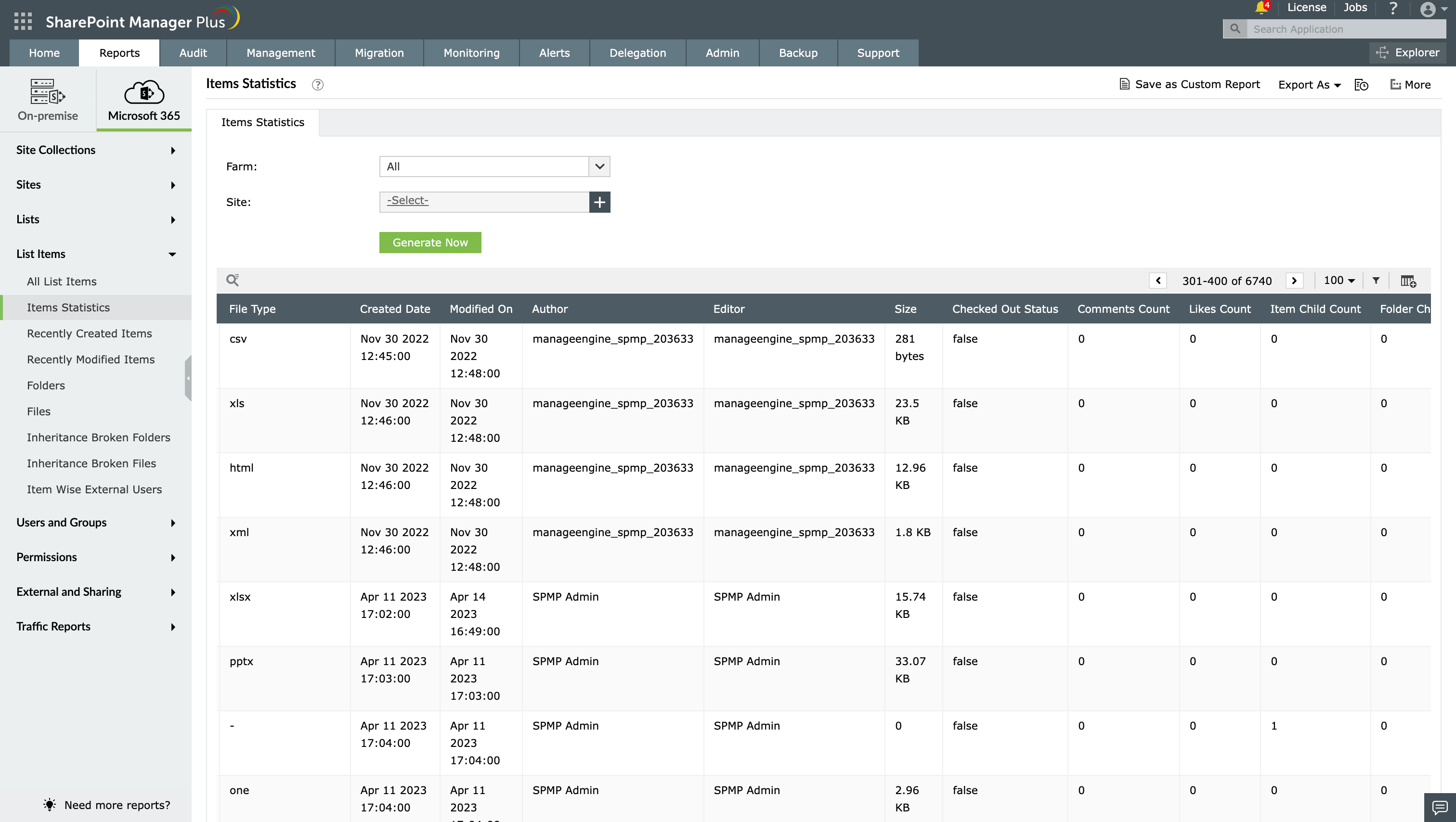
The Items Statistics report provides detailed item-level metadata for objects within SharePoint lists and libraries across your tenant. It includes who created each item and when, who last modified it, its file type and size, its checked-out status, version counts, engagement signals, the folder structure, and the hierarchy level, giving you a detailed item-level content health view from a centralized reporting console rather than from item-by-item inspection.
What does the Items Statistics report show?
Using SharePoint Manager Plus, you can filter the Items Statistics report with the following fields:
- Farm: Select the SharePoint farm or Microsoft 365 tenant from which you want to pull item-level statistics.
- Site: Narrow the report to a specific site to focus the content health audit on a particular team, department, or project environment.
The Items Statistics report displays the following details for every list item:
| Attribute | Description |
|---|---|
| Site Url | The full web address of the SharePoint site that contains the list in which the item resides |
| List Title | The display name of the list or document library that contains the item |
| Object Name | The name of the specific list item or document for which statistics are reported |
| Location | The path or folder structure within the list where the item is stored |
| Base Type | The base type classification of the list, such as a generic list or document library |
| Created By | The display name of the user who originally created the item |
| File Type | The file extension of the item where applicable, such as DOCX, XLSX, or PDF |
| Created Date | The date and time when the item was first created in the SharePoint list |
| Modified On | The date and time when the item was most recently modified |
| Author | The SharePoint metadata author field for the item |
| Editor | The display name of the user who made the most recent modification to the item |
| Size | The storage size of the item |
| Checked Out Status | Indicates whether the item is currently checked out |
| Checked By | The display name of the user who currently has the item checked out |
| Comments Count | The number of comments added to the item |
| Likes Count | The number of likes recorded on the item |
| Item Child Count | The number of child items contained within the item where it functions as a folder or container |
| Folder Child Count | The number of subfolders contained within the item where it functions as a parent folder |
| Content Version | The current version number of the item's content |
| Work Flow Version | The version associated with any workflow processing applied to the item |
| Hierarchy Level | Indicates the level within the list's folder structure at which the item exists |
Native SharePoint reporting and PowerShell vs. SharePoint Manager Plus
In Microsoft 365, administrators can review SharePoint activity through site usage reports and retrieve additional data through PowerShell or APIs. Those native options are useful, but they are still usage-focused, site-scoped, or script-driven. They do not provide one ready-made, tenant-wide report centered on item metadata such as the size, version history, checkout status, and last modification details.
Tools such as PnP PowerShell can retrieve item-level metadata, but building a tenant-wide view still requires scripting effort, pagination handling, filtering logic, formatting, and ongoing maintenance.
SharePoint Manager Plus reduces that overhead by bringing this visibility into a single report that administrators can run, filter, export, and schedule without building the workflow from scratch.
| Capability | SharePoint admin center | PowerShell | The SharePoint Manager Plus advantage |
|---|---|---|---|
| Report accessibility | ❌ Manual filtering is required every time | ❌ Script execution is required for every run | ✅ Get one-click access to categorized reports |
| Custom reports | ❌ | ❌ | ✅ Create custom reports by saving granular, attribute-based conditional filters |
| Report exports | ✅ Reports can be exported only in CSV or JSON format | ✅ Additional scripting is required to format and export data | ✅ Reports can be exported in CSV, HTML, PDF, and XLSX formats |
| Emailing reports to admins | ❌ | ❌ | ✅ Send report emails to stakeholders and admins in preferred formats |
| Automated report generation | ❌ This requires technical scripting or separate complex add-ons | ❌ This requires Task Scheduler or Azure Automation | ✅ Schedule multiple reports that can be generated, filtered, emailed, and exported at defined intervals automatically |
For a more detailed comparison, check out our page on how to audit a site collection.
Features that enhance the Items Statistics report
SharePoint Manager Plus provides several built-in tools to help you schedule reviews, distribute findings, and act on the content health insights surfaced by the Items Statistics report:
- Automated report generation: Schedule the report to run daily, weekly, or monthly so stale content, long-standing checkouts, and version growth are surfaced automatically.
- Exportable reports: Download the Items Statistics report in CSV, PDF, HTML, or XLSX format for distribution to list owners, storage managers, records coordinators, or compliance teams.
- Real-time alerts for content health thresholds: Configure alerts to notify administrators when an item's size exceeds a defined threshold, when an item remains checked out beyond a set number of days, or when version counts grow beyond approved limits.
- Content cleanup and retention reviews: Use item-level staleness data from the report, filtered by the Modified On date and engagement signals, to support archiving, cleanup, or deletion decisions on inactive content.
- Custom reports: Apply filters to adjust the Items Statistics report and refine the data, then save the customized report for easy reuse and quick generation later.
Reports that complement the Items Statistics report
If you are governing content health, managing storage, or enforcing data life cycle policies across SharePoint lists, SharePoint Manager Plus provides several reports that extend the item-level visibility delivered by the Items Statistics report:
List Item Permissions report: Gain permission and inheritance details for SharePoint list items with unique security scopes, helping you pair content health with access governance.
Site Statistics report: View structural metrics at the site level, including list and document library counts, helping you place item-level findings in the broader site context.
Site Collection Statistics report: See the storage consumption and object counts at the site collection level, helping you identify which areas contribute the most to storage growth.
Farm Statistics report: Get an overview of the farm-wide inventory and capacity, helping you understand site and site collection metrics within the broader SharePoint environment.
SharePoint site activity reports: Monitor site creation, modification, and inactivity, helping you compare item-level metadata with broader usage patterns.
Other features of SharePoint Manager Plus
- SharePoint management: Grant, remove, or copy SharePoint permissions and manage group members in bulk without relying on complex scripts, simplifying your SharePoint administration.
- SharePoint reporting: Access over 140 prebuilt and custom reports for SharePoint—including on permissions, site usage, the content inventory, and security insights—all from a centralized dashboard.
- SharePoint auditing: Maintain a comprehensive, searchable audit trail of all activities across your SharePoint environment, including user actions, permission changes, and content modifications.
- SharePoint alerting: Get real-time alerts on critical events such as permission changes, suspicious user activities, site access anomalies, and policy violations.
- Delegated administration: Empower help desk technicians with granular, role-based access for performing specific SharePoint administrative tasks, without elevating their native privileges.
- SharePoint migration: Simplify SharePoint migration by enabling seamless content and permission migration across sites and tenants, with minimal downtime and full visibility into the migration progress.