# SharePoint versioning details report
See exactly how versioning, retention, and approval are configured across SharePoint document libraries each library's settings page individually.
SharePoint Manager Plus provides a wide range of reports as part of its [SharePoint reporting capabilities](https://www.manageengine.com/sharepoint-management-reporting/sharepoint-reporting-tool.html?utm_source=spmp-feature-page&utm_medium=list-versioning-details-report&utm_content=body). These reports help administrators monitor and manage SharePoint from a centralized console. The List Versioning Details report provides a consolidated view of document library versioning configurations, helping administrators identify inconsistent settings and support recurring governance reviews.
## Why you need a List Versioning Details report
Versioning settings are often configured when a document library is created and may not be reviewed again as collaboration, recovery, and storage requirements change. Libraries with inconsistent or overly broad version limits can retain large amounts of historical content, increasing storage consumption and making version-governance decisions harder to manage.
SharePoint does not provide a single native admin-center view that consolidates versioning, draft-visibility, approval, checkout, and expiration settings across all document libraries. Administrators must review each library individually or retrieve the relevant properties through scripts and APIs.
The List Versioning Details report provides this centralized visibility, helping administrators standardize configurations and identify gaps before they affect storage, recovery, or governance processes.
- **Identify lists with versioning turned off:** Spot lists that have no version history at all, leaving no record of prior edits if content is changed or deleted by mistake.
- [Standardize version and retention limits](https://www.manageengine.com/sharepoint-management-reporting/sharepoint-versioning-settings.html?utm_source=spmp-feature-page&utm_medium=list-versioning-details-report&utm_content=body): Compare major and minor version limits across lists to catch inconsistent or overly generous configurations that drive up storage.
- **Review content-approval settings:** Confirm that lists holding sensitive or published content actually require approval before changes go live.
- [Reduce version storage bloat](https://www.manageengine.com/sharepoint-management-reporting/delete-sharepoint-version-history.html?utm_source=spmp-feature-page&utm_medium=list-versioning-details-report&utm_content=body): Find document libraries with high version limits or extended version-expiration settings and route them for storage, recovery, and lifecycle review.
- **Support governance and audit reporting:** Export or schedule the report to maintain a point-in-time record of versioning, approval, draft-visibility, and checkout settings.
## What is the List Versioning Details report in SharePoint Manager Plus?
The List Versioning Details report gives details about how version history is configured across every list in your SharePoint environment. These primarily include whether versioning and content approval are turned on, how many major and minor versions are retained, and how long those versions are kept, along with other list-level properties.
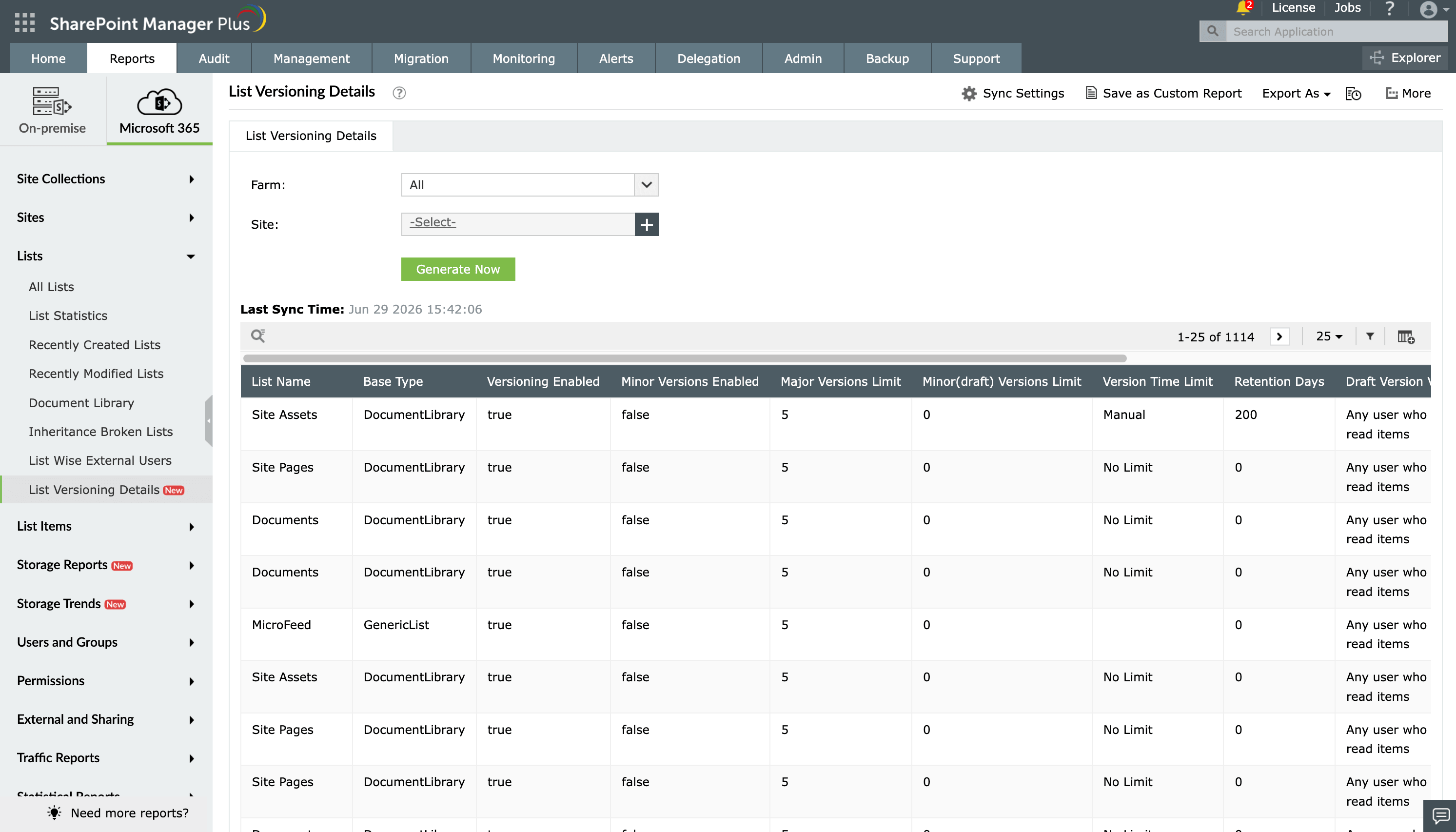
Figure 1: The List Versioning Details report in SharePoint Manager Plus.
## What does the List Versioning Details report show?
Using SharePoint Manager Plus, you can filter List Versioning Details with the following fields.
- **Farm:** Select the specific SharePoint farm or Microsoft 365 tenant whose lists you want to audit for versioning configuration.
- **Site:** Narrow the report to a specific sites to review versioning settings for the lists it contains.
The List Versioning Details report displays the following details for every list.
| Attribute | Description |
|---|---|
| *Site URL* | The web address of the SharePoint site that hosts the list |
| *List Name* | The name of the SharePoint list whose versioning configuration is being reported |
| *Base Type* | The underlying list type, such as a generic list or document library |
| *URL* | The direct web address used to access the list |
| *Versioning Enabled* | Indicates whether version history is turned on for the list |
| *Minor Versions Enabled* | Indicates whether minor versions are enabled |
| *Major Versions Limit* | The maximum number of major versions retained before older versions are trimmed |
| *Minor (Draft) Versions Limit* | The maximum number of minor versions kept per major version before they are trimmed |
| *Version Time Limit* | The maximum length of time a version is retained before it becomes eligible for trimming |
| *Retention Days* | The number of days a version is preserved under the list's retention configuration |
| *Draft Version Visibility* | Defines which users, such as authors, approvers, or all readers, can view minor/draft versions |
| *Force CheckOut Enabled* | Indicates whether users are required to check out a file before editing it, preventing simultaneous edits |
| *Required Content Approval* | Indicates whether items must be approved before they become visible to all users |
## Native SharePoint admin portals and PowerShell vs. SharePoint Manager Plus
SharePoint does not provide one native admin-center view that shows versioning, approval, draft-visibility, checkout, and expiration settings across all document libraries.
Checking these settings natively requires administrators to open each document library, navigate to its settings, and review the configuration individually. Administrators can also retrieve the relevant properties through PowerShell, REST, CSOM, or other administrative APIs.
PowerShell helps automate bulk queries, but it requires scripting knowledge, suitable permissions, output formatting, and additional automation for recurring report generation and distribution.
SharePoint Manager Plus combines centralized configuration visibility with reusable filters, formatted exports, scheduling, email delivery, and supported configuration updates.
| Capability | SharePoint admin center | PowerShell | The SharePoint Manager Plus advantage |
|---|---|---|---|
| **Report accessibility** | ❌
Manual filtering is required every time | ❌
Script execution is required for every run | ✅
Get one-click access to categorized reports |
| **Custom reports** | ❌ | ❌ | ✅
Create custom reports by saving granular, attribute-based conditional filters |
| **Report exports** | ✅
Reports can be exported only in CSV or JSON formats | ✅
Requires additional scripting to format and export data | ✅
Reports can be exported in CSV, HTML, PDF, and XLSX formats |
| **Emailing reports to admins** | ❌ | ❌ | ✅
Send report emails to stakeholders and admins in preferred formats |
| **Automated report generation** | ❌
Requires technical scripting or separate complex add-ons | ❌
Requires Task Scheduler or Azure Automation | ✅
Schedule multiple reports that can be generated, filtered, emailed, and exported between defined periods automatically |
## Features that enhance the List Versioning Details Report
SharePoint Manager Plus provides several built-in tools to help you manage, automate, and secure the data found in the List Versioning Details report:
- [Automated report generation](https://www.manageengine.com/sharepoint-management-reporting/sharepoint-reporting-tool.html?utm_source=spmp-feature-page&utm_medium=list-versioning-details-report&utm_content=body): Schedule the report to run daily, weekly, or monthly so versioning drift across lists is caught early instead of during an audit.
- **Export reports:** Download the List Versioning Details report in CSV, PDF, HTML, or XLSX formats to share with compliance teams or archive for audit records.
- [Modify versioning settings](https://www.manageengine.com/sharepoint-management-reporting/sharepoint-versioning-settings.html?utm_source=spmp-feature-page&utm_medium=list-versioning-details-report&utm_content=body): Update version limits, minor version tracking, and content approval requirements for a list, directly from the SharePoint Manager Plus interface without opening List Settings separately.
- [SharePoint alerts for changes](https://www.manageengine.com/sharepoint-management-reporting/sharepoint-email-alerts-tool.html?utm_source=spmp-feature-page&utm_medium=list-versioning-details-report&utm_content=body): Configure email alerts to notify admins on creation, modification, and deletion events across SharePoint lists and document libraries.
## Reports that complement the List Versioning Details report
If you are auditing how version history and storage are managed across SharePoint, SharePoint Manager Plus provides several other reports that complement the data found in the List Versioning Details report:
- [Storage by Version reports](https://www.manageengine.com/sharepoint-management-reporting/storage-by-version-reports.html?utm_source=spmp-feature-page&utm_medium=list-versioning-details-report&utm_content=body): Quantifies how much storage version history is consuming across lists and libraries, visualized so admins can spot where trimming or tighter limits will free up space.
- [List Permissions report](https://www.manageengine.com/sharepoint-management-reporting/list-permissions-report.html?utm_source=spmp-feature-page&utm_medium=list-versioning-details-report&utm_content=body): Details who has access to each list, useful for confirming that only the right users can approve versions or override checkout on sensitive lists.
- [Recently Modified Lists report](https://www.manageengine.com/sharepoint-management-reporting/recently-modified-lists-report.html?utm_source=spmp-feature-page&utm_medium=list-versioning-details-report&utm_content=body): Flags lists that have changed recently, helping admins spot spikes in edit activity that could be driving unexpected version growth.
- [List Statistics report](https://www.manageengine.com/sharepoint-management-reporting/list-statistics-report.html?utm_source=spmp-feature-page&utm_medium=list-versioning-details-report&utm_content=body): Gives item counts, size, and usage metrics per list, useful for correlating high version counts with lists that are simply larger or more active than others.
- [List External Users report](https://www.manageengine.com/sharepoint-management-reporting/list-wise-external-users-report.html?utm_source=spmp-feature-page&utm_medium=list-versioning-details-report&utm_content=body): Shows external users with access to a list, so admins can confirm that version history and draft content aren't exposed to accounts outside the organization.
## Other features of SharePoint Manager Plus
- [SharePoint management](https://www.manageengine.com/sharepoint-management-reporting/sharepoint-management-tool.html?utm_source=spmp-feature-page&utm_medium=list-versioning-details-report&utm_content=body): Grant, remove, or copy SharePoint permissions, and manage group members in bulk without relying on complex scripts to simplify your SharePoint administration.
- [SharePoint reporting](https://www.manageengine.com/sharepoint-management-reporting/sharepoint-reporting-tool.html?utm_source=spmp-feature-page&utm_medium=list-versioning-details-report&utm_content=body): Access over 140 prebuilt and custom reports for SharePoint—including permissions, site usage, content inventory, and security insights—all from a centralized dashboard.
- [SharePoint auditing](https://www.manageengine.com/sharepoint-management-reporting/sharepoint-auditing-and-monitoring-tool.html?utm_source=spmp-feature-page&utm_medium=list-versioning-details-report&utm_content=body): Maintain a comprehensive, searchable audit trail of all activities across your SharePoint environment, including user actions, permission changes, and content modifications.
- [SharePoint alerting](https://www.manageengine.com/sharepoint-management-reporting/sharepoint-email-alerts-tool.html?utm_source=spmp-feature-page&utm_medium=list-versioning-details-report&utm_content=body): Receive real-time alerts on critical events such as permission changes, suspicious user activities, site access anomalies, and policy violations.
- [Delegated administration](https://www.manageengine.com/sharepoint-management-reporting/sharepoint-helpdesk-delegation-tool.html?utm_source=spmp-feature-page&utm_medium=list-versioning-details-report&utm_content=body): Empower help desk technicians with granular, role-based access to perform specific SharePoint administrative tasks, without elevating native privileges.
- [SharePoint migration](https://www.manageengine.com/sharepoint-management-reporting/sharepoint-migration-tool.html?utm_source=spmp-feature-page&utm_medium=list-versioning-details-report&utm_content=body): Simplify SharePoint migration by enabling seamless content and permission migration across sites and tenants, with minimal downtime and full visibility into migration progress.