Break and restore SharePoint permission inheritance in bulk, at any level
Permission inheritance is how SharePoint keeps access consistent: Every file, folder, library, and subsite inherits permissions from its parent by default, cascading down the site collection hierarchy from the root. It works well until a document, a folder, or a whole library needs different access from everything around it, such as a confidential HR report, a legal case folder, or a project workspace with external collaborators. Then you have to break inheritance so you can assign unique permissions.
Verizon's 2025 Data Breach Investigations Report found that third-party involvement in breaches doubled from 15% to 30%, and breaking inheritance correctly—at scale—is exactly how you keep external collaborators, vendors, and contractors scoped to only what they should see. Natively, that means opening each item's Manage Access panel, clicking through to Advanced, and choosing Stop Inheriting Permissions one file, folder, or library at a time. Bulk changes usually require advanced PowerShell knowledge.
SharePoint Manager Plus, with its centralized management features, provides a granular Break or Restore Inheritance tool that applies the change across files, folders, libraries, and entire sites in one task, from a single console—including on containers that native controls refuse to touch.

Key features that simplify inheritance management
Granular scope—files, folders, libraries, or sites
Select individual documents, folders, entire document libraries, or whole sites in one task. Mix scopes freely: Break inheritance on a specific file inside one library and on an entire library in another, all in a single operation.

Break or restore from the same screen
Switch between creating unique permissions and removing them or re-inheriting from the parent in one toggle, so the full life cycle is managed in one place.
Visual cues in the object picker
The object tree grays out items that already match the operation, making them easy to spot and preventing confusion about scope. For breaking inheritance, items that don't currently inherit are grayed out; for restoring inheritance, items that already inherit are grayed out.

Common inheritance-change scenarios
Locking down confidential documents
HR files, legal case documents, or executive reports living in a general library need to break inheritance so unique permissions can be granted. Apply that change to the specific files in one task, without touching the rest of the library.
Isolating a project workspace
To restrict access to a library from the parent site's default settings, such as for external partners, acquisitions, or compliance-driven projects, break inheritance at the site or library level and assign customized permissions.
Cleaning up unnecessary unique permissions
Sites accumulate broken inheritance over time. Bulk-restore inheritance on items that no longer need custom access to simplify the permission model and reduce the number of unique security scopes.
How SharePoint Manager Plus compares with native SharePoint
| Capability | SharePoint Manager Plus | Native SharePoint (browser or PowerShell) |
|---|---|---|
| Bulk changes across files, folders, libraries, and sites | Select mixed scopes in one task. | One item at a time in the browser; scripted per object in PowerShell. |
| Break and restore in one workflow | Switch between operations with a single toggle. | Handled from separate buttons per object in the Permissions page. |
| Cross-farm and cross-tenant scope | Manage across on-premises and Online from one place. | Managed per site or tenant; separate PowerShell modules per environment. |
| Auditability | Named, described tasks tie each change to an operator. | Distributed across change logs and audit reports. |
| Delegation | Delegate to technicians without native admin rights. | Requires site owner or site collection admin rights either way. |
| Setup and skill required | Point-and-click without separate installs or scripts. | No setup for the browser; PowerShell needs modules and scripting skill. |
How to stop inheriting permissions in SharePoint
Apply an inheritance change across your environment in a few steps:
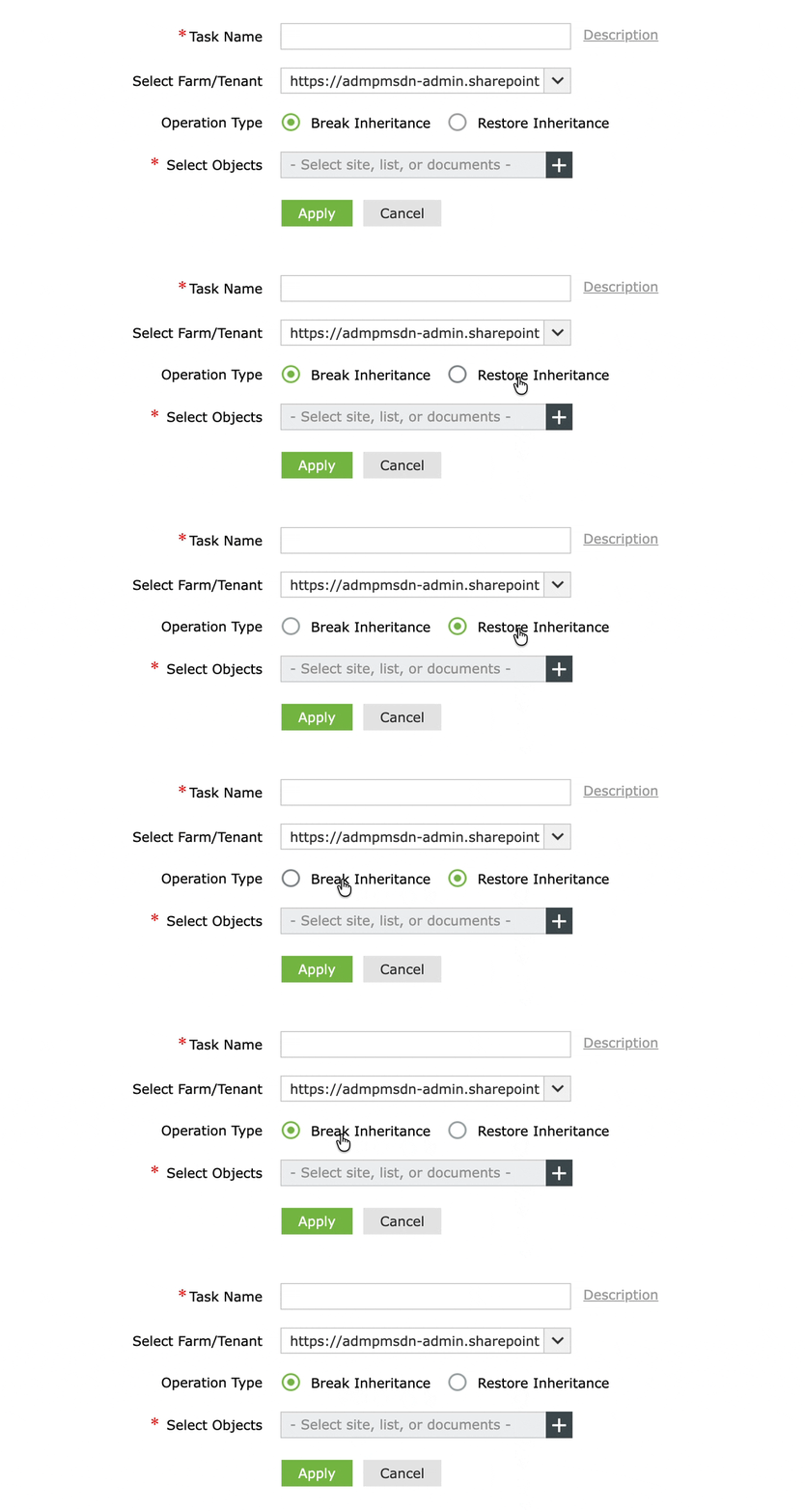
- Navigate to Management > Permission Management - Granular > Break or Restore Inheritance - Granular.
- Enter a Task Name so the operation is easy to identify and audit later. Add a description if needed.
- In the Select Farm/Tenant drop-down, choose your SharePoint farm or tenant.
- Choose Operation Type as Break Inheritance (to create unique permissions on the selected objects) or Restore Inheritance (to remove unique permissions and re-inherit from the parent).
- Click + in the Select Objects field to open the object picker. Expand sites, subsites, and libraries in the tree, and select the specific sites, lists, libraries, folders, or documents to include. You can select individual files or entire containers in the same task.
- Click Apply.
Benefits of managing inheritance with SharePoint Manager Plus
- Move faster on permission changes: Handle files, folders, libraries, and sites in one task rather than clicking through each item individually.
- Keep a clean audit trail: Named tasks with descriptions make it clear who broke or restored inheritance on what and when.
- Reduce admin dependency: Delegate routine inheritance changes to technicians without handing out site collection admin rights.
- Hybrid support for inheritance: Manage inheritance for SharePoint Online and on-premises SharePoint (2019, 2016, 2013, and Subscription Edition) from a single console.
Frequently asked questions
SharePoint creates a copy of the parent's permission set on that object, so nothing changes for existing users at first. From that point on, changes made to the object's permissions no longer affect the parent and changes to the parent no longer flow down to the object, until inheritance is restored.
Open the item's Permissions page and click Delete unique permissions (labelled Inherit Permissions in some versions). To restore inheritance across many libraries or on a mix of libraries, folders, and files at once, SharePoint Manager Plus applies the change in one task from the object picker.
You need site owner or Full Control permission on the object, since breaking inheritance is a permission-management action. To overcome this, SharePoint Manager Plus enables delegated users to perform this task without elevated native permissions.
The most common cause is the view threshold limitation: On a list, library, or folder with more than 100,000 items, native SharePoint blocks the Stop Inheriting Permissions action on the container itself (though you can still break inheritance on individual items inside it). Other causes include lacking site owner rights or a limited-access permission state applied automatically when items were shared individually.