SharePoint Manager Plus centralizes SharePoint reporting and administration in one console. The Site Trends History report enables administrators to filter historical storage and activity data by farm, site, and period, then export, schedule, and distribute the results without maintaining a separate reporting archive.
Why you need a Site Trends History report
Current storage figures show where a site stands today, but they do not always provide enough context to explain when a change occurred or how conditions evolved around a governance action.
Microsoft's SharePoint usage reports and Microsoft Graph provide historical storage and activity data for supported reporting periods. However, organizations that need longer retention, combined dated snapshots, or custom historical windows may need to preserve and process that data separately.
The Site Trends History report centralizes retained storage and activity snapshots and makes them available through site and period filters.
SharePoint Manager Plus's Site Trends History report helps administrators:
- Identify storage changes: Review dated Used Storage values to find when usage increased or decreased, then compare that period with migration, versioning, file activity, and audit records.
- Assess governance actions: Compare storage and file counts before and after cleanup, archiving, retention, or version-history changes to confirm whether the expected impact occurred.
- Review capacity trends: Track historical Storage Used % where manual limits apply to understand how utilization changed before storage-related issues arose.
- Maintain review records: Use dated observations to document how storage consumption and activity changed over time.
- Account for storage configuration: Use Allocated Storage and Storage Used % for manually managed limits, and prioritize used Storage, tenant capacity, and historical growth for automatically managed tenants.
What is the Site Trends History report in SharePoint Manager Plus?
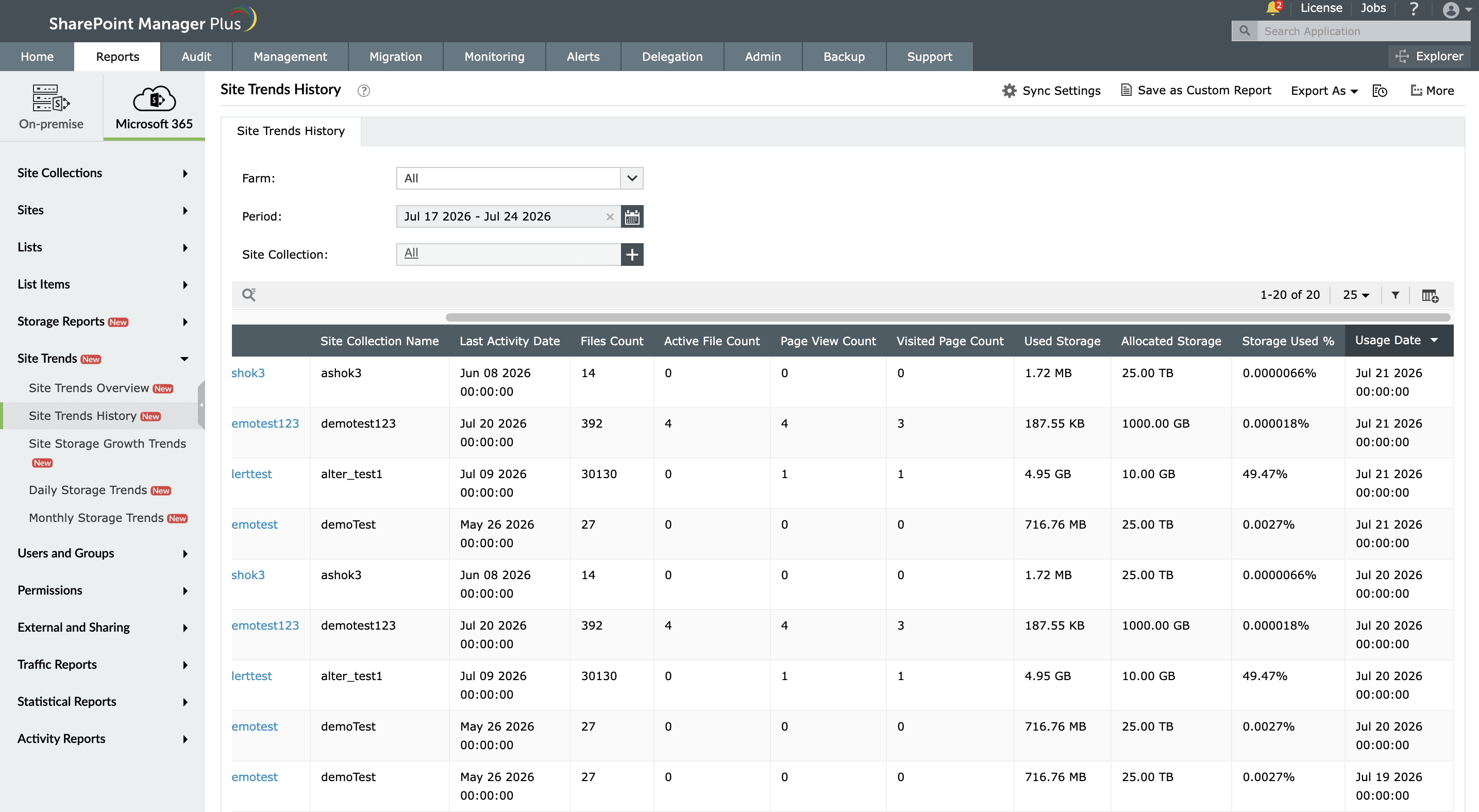
The Site Trends History report provides dated, point-in-time snapshots of storage consumption and activity for a selected SharePoint site collection across a user-adjustable historical period. It covers the same attributes as the Site Trends Overview, such as URL, site collection name, Last Activity Date, Files Count, and more, with the addition of a Usage Date for each row. That date stamp is what transforms the report from a current-state view into a time-series record. Every row is a documented observation of the site collection's storage and activity state on a specific date, retrievable on demand without the manual export scheduling that native tools require.
What does the Site Trends History report show?
Using SharePoint Manager Plus, you can filter the Site Trends History report with the following fields.
- Farm: Select the Microsoft 365 tenant from which you want to pull historical storage and activity data.
- Period: Set a custom date range to define the historical window for which dated snapshots are returned, such as from a specific week to a full year or more, depending on the investigation or compliance review in scope.
- Site Collection: Narrow the report to a specific site to retrieve its point-in-time storage and activity history across the selected period.
The Site Trends History report displays the following details for every dated snapshot in the selected period, as of Usage date.
| Attribute | Description |
|---|---|
| URL | The web address of the site associated with the snapshot. |
| Site Collection Name | The display name of the site collection recorded in the snapshot. |
| Last Activity Date | The latest recorded site activity date available in the snapshot. |
| Files Count | The total number of files recorded for the site on the Usage Date. |
| Active File Count | The number of files accessed or modified during the applicable reporting period. |
| Page View Count | The total number of page views recorded during the applicable reporting period. |
| Visited Page Count | The number of distinct pages viewed during the applicable reporting period. |
| Used Storage | The storage consumed by the site on the Usage Date. |
| Allocated Storage | The configured site storage limit on the Usage Date. |
| Storage Used % | The percentage of the configured site storage limit consumed on the Usage Date. |
| Usage Date | The date on which this snapshot of storage and activity data was recorded. |
Native SharePoint admin portals and PowerShell vs SharePoint Manager Plus
Microsoft's SharePoint usage reports, PowerShell, and Microsoft Graph reporting APIs provide historical storage and activity data for supported reporting periods. Extending this history or creating custom reporting windows typically requires scheduled retrieval, external storage, data normalization, report formatting, and ongoing automation maintenance.
SharePoint Manager Plus simplifies this with retained historical views, built-in filtering, scheduled reports, exports, and email delivery.
| Capability | SharePoint admin center | PowerShell | The SharePoint Manager Plus advantage |
|---|---|---|---|
| Report accessibility | ❌ Manual filtering is required every time | ❌ Script execution is required for every run | ✅ Utilize one-click access to categorized reports |
| Custom reports | ❌ | ❌ | ✅ Create custom reports by saving granular, attribute-based conditional filters |
| Report exports | ✅ Reports can be exported only in CSV or JSON formats | ✅ Requires additional scripting to format and export data | ✅ Reports can be exported in CSV, HTML, PDF, and XLSX formats |
| Emailing reports to admins | ❌ | ❌ | ✅ Send report emails to stakeholders and admins in preferred formats |
| Automated report generation | ❌ Requires technical scripting or separate complex add-ons | ❌ Requires Task Scheduler or Azure Automation | ✅ Schedule multiple reports that can be generated, filtered, emailed, and exported between defined periods automatically |
For a more detailed comparison, review our page on how to check the size of a SharePoint site.
Features that enhance the Site Trends History report
SharePoint Manager Plus provides several built-in tools to help you query, schedule, and distribute the historical storage data captured by the Site Trends History report.
- Automated report generation: Schedule the report to run at defined intervals such as daily, weekly, or monthly, so that historical snapshots accumulate automatically.
- Export reports: Download the Site Trends History report in CSV, PDF, HTML, or XLSX formats for compliance audit and storage trend analysis.
- Storage growth alerts: Configure alerts to notify administrators when storage exceeds a defined threshold.
- Clear version history: Use storage reports to identify bloated sites, then clear unnecessary version history directly from the SharePoint Manager Plus console.
- Custom filters: Save filters based on farm, period, site, storage consumption, utilization, or activity indicators for recurring reviews.
Reports that complement the Site Trends History report
If you are investigating storage patterns, verifying governance actions, or building compliance evidence for SharePoint storage management, these reports work alongside the Site Trends History report to give you a fuller picture.
- Site Trends Overview report: Provides the current-state view of storage consumption, quota utilization, and activity signals across every site collection. Use the Overview to identify which collections need investigation, then use the History report to understand how those collections' storage and activity profiles evolved to reach their current state.
- Site Storage Growth Trends report: Calculates storage change between two selected dates, helping administrators compare growth rates across sites.
- Monthly Storage Trends report: Displays storage and file count changes month by month.
- Storage by Version reports: Show storage consumed by retained file versions, helping administrators investigate whether version history data contributes to storage growth.
- SharePoint site activity reports: Provide additional activity context for interpreting historical storage changes and prioritizing owner reviews.
Other features of SharePoint Manager Plus
- SharePoint management: Grant, remove, or copy SharePoint permissions, and manage group members in bulk without relying on complex scripts, simplifying your SharePoint administration.
- SharePoint reporting: Access over 140 prebuilt and custom reports for SharePoint—including permissions, site usage, content inventory, and security insights—all from a centralized dashboard.
- SharePoint auditing: Maintain a comprehensive, searchable audit trail of activities across your SharePoint environment, including user actions, permission changes, and content modifications.
- SharePoint alerting: Receive real-time alerts on crucial events such as permission changes, suspicious user activities, site access anomalies, and policy violations.
- Delegated administration: Empower help desk technicians with granular, role-based access to perform specific SharePoint administrative tasks, without elevating native privileges.
- SharePoint migration: Simplify SharePoint migration by enabling seamless content and permission migration across sites and tenants, with minimal downtime and full visibility into migration progress.