# การตั้งค่า DHCP Server บนอุปกรณ์ Cisco
DHCP (Dynamic Host Configuration Protocol) ถูกนำมาใช้อย่างแพร่หลายในเครือข่าย LAN เพื่อแจกจ่ายหมายเลข IP ให้กับโฮสต์แบบอัตโนมัติจากเซิร์ฟเวอร์กลาง ช่วยลดภาระด้านการจัดการ IP ลงได้อย่างมาก ทั้งยังช่วยประหยัดพื้นที่ IP ที่มีจำกัด เนื่องจาก IP จะถูกจัดสรรเฉพาะเมื่ออุปกรณ์เชื่อมต่อกับเครือข่ายเท่านั้น DHCP Server จะทำหน้าที่แจกจ่ายและจัดการหมายเลข IP ให้กับอุปกรณ์ลูกข่ายจากช่วงหมายเลขที่กำหนดไว้บนเราเตอร์หรืออุปกรณ์ที่ทำหน้าที่เป็น DHCP Server
ในบทความนี้ คุณจะได้เรียนรู้วิธีตั้งค่าเราเตอร์ Cisco ให้ทำหน้าที่เป็น DHCP Server ผ่าน CLI และอัปเดตพร้อมกันในหลายอุปกรณ์ด้วย Network Configuration Manager (NCM) ผ่านการใช้ Configlet หากยังไม่มีโปรแกรม NCM กรุณา [คลิกที่นี่](https://www.manageengine.com/th/network-configuration-manager/download.html?configlets) เพื่อดาวน์โหลดและติดตั้ง
## ขั้นตอนการตั้งค่า DHCP Server บนอุปกรณ์ Cisco ผ่าน CLI
1. ล็อกอินเข้าอุปกรณ์ผ่าน SSH / TELNET และเข้าสู่โหมด enable
2. เข้าสู่โหมด Config
```
Router# configure terminal
Enter configuration commands, one per line. End with CNTL/Z.
Router(config)#
```
3. ยกเว้น IP address ไม่ให้ถูกแจกจ่ายโดย DHCP ด้วยการใช้คำสั่ง `ip dhcp excluded-address FIRST_IP LAST_IP`
```
Router(config)# ip dhcp excluded-address 192.168.0.1 192.168.0.50
Router(config)#
```
4. สร้าง DHCP Pool ใหม่ เพื่อกำหนดกลุ่ม IP ที่ DHCP จะนำไปแจก
```
Router(config)# ip dhcp pool Floor1DHCP
Router(dhcp-config)#
```
5. กำหนด Subnet ที่จะใช้แจก IP address ให้กับ Host ด้วยคำสั่ง `network SUBNET SUBNET_MASK`
```
Router(dhcp-config)# network 192.168.0.0 255.255.255.0
Router(dhcp-config)#
```
6. กำหนด Default Gateway โดยใช้คำสั่งใน DHCP Config Mode
```
Router(dhcp-config)# default-router 192.168.0.1
Router(dhcp-config)#
```
7. กำหนด DNS Server ด้วยคำสั่ง `dns-server IP_address`
```
Router(dhcp-config)# dns-server 192.168.0.1
Router(dhcp-config)#
```
8. กลับสู่โหมด Privilege Config
```
Router(dhcp-config)# exit
Router(config)#
```
9. เปิดใช้งาน DHCP Server บนอินเทอร์เฟซ ใช้คำสั่ง `service dhcp` ตามด้วยประเภทและหมายเลขของอินเทอร์เฟซ เช่น `vlan1` เพื่อเปิด DHCP บนอินเทอร์เฟซนั้น ๆ
```
Router(config)# service dhcp vlan1
Router(config)#
```
10. ออกจากโหมด Config
```
Router(config)# exit
Router#
```
11. ใช้คำสั่ง `show ip dhcp binding` เพื่อตรวจสอบรายการ IP ที่ถูกแจกให้กับลูกข่าย (DHCP Clients)
```
Router# show ip dhcp binding
IP address Client-ID/ Lease expiration Type
Hardware address
192.168.0.51 0060.5C2B.3DCC -- Automatic
```
จากผลลัพธ์ด้านบน จะเห็นว่ามี DHCP client เพียง 1 เครื่องที่ได้รับ IP address เป็น `192.168.0.51` เนื่องจากเราได้กันช่วง IP `192.168.0.1 — 192.168.0.50` ออกไว้แล้ว อุปกรณ์จึงได้รับ IP แรกที่ยังว่างอยู่ คือ `192.168.0.51`
12. หากต้องการแสดงข้อมูลเกี่ยวกับ DHCP pools ที่ตั้งค่าไว้ สามารถใช้คำสั่ง `show ip dhcp pool` ได้
```
Router# show ip dhcp pool
Pool Floor1DHCP :
Utilization mark (high/low) : 100 / 0
Subnet size (first/next) : 0 / 0
Total addresses : 254
Leased addresses : 1
Excluded addresses : 1
Pending event : none
1 subnet is currently in the pool
Current index IP address range Leased/Excluded/Total
192.168.0.1 192.168.0.1 - 192.168.0.254 1 / 1 / 254
```
คำสั่งนี้จะแสดงข้อมูลสำคัญเกี่ยวกับ DHCP Pool ที่ถูกกำหนดไว้บนอุปกรณ์ ได้แก่ ชื่อของ Pool, จำนวน IP Address ทั้งหมด, จำนวน IP ที่ถูกแจกจ่ายไปแล้ว, จำนวน IP ที่ถูกยกเว้นไม่ให้แจก และช่วงของ IP Address ที่อยู่ใน Subnet เป็นต้น
13. คัดลอกค่าการตั้งค่าที่กำลังทำงานอยู่ (Running Configuration) ไปบันทึกเป็นค่าการตั้งค่าเริ่มต้น (Startup Configuration) โดยใช้คำสั่งด้านล่างนี้
```
Router# write memory
Building configuration... [OK]
Router#
```
สามารถสร้าง Configlet ที่สอดคล้องกันได้ในแอปพลิเคชัน NCM ตามที่แสดงในภาพหน้าจอด้านล่าง
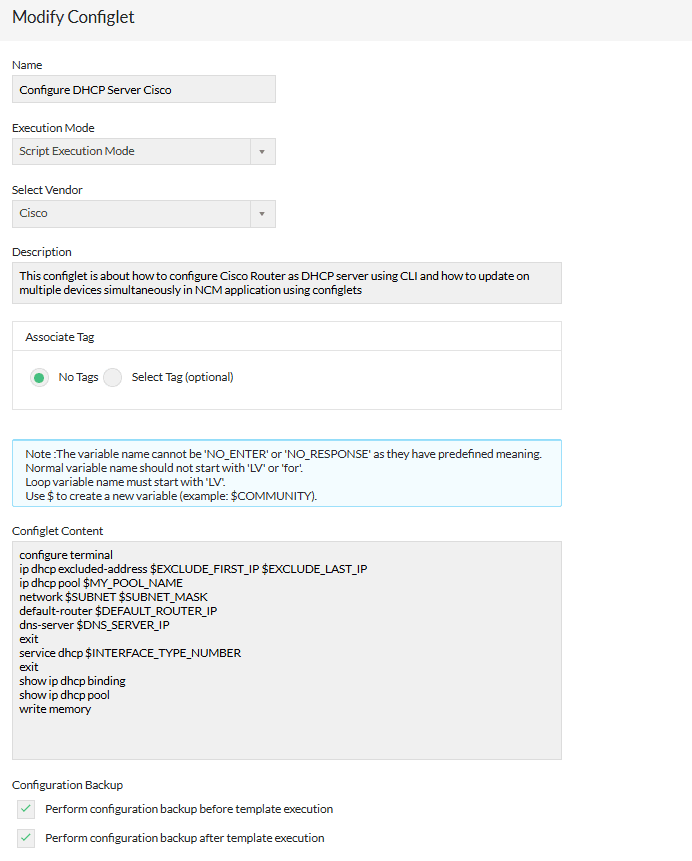
คุณสามารถคลิกเพื่อดาวน์โหลด Configlet ในรูปแบบไฟล์ XML และนำเข้าไปยังแอปพลิเคชัน NCM โดยใช้ตัวเลือกนำเข้าไฟล์ (File Import):
[ดาวน์โหลด Configlet XML](https://www.manageengine.com/network-configuration-manager/configlets/configure-dhcp-server-cisco.xml)
**SHA256 value**
```
e923c902c4f7e18c45414569a924605b4928b9fc8c6cd6e80b70425facab2088
```
## รายละเอียด Configlet
| ชื่อ Configlet | Configure DHCP Server Cisco |
|---|---|
| คำอธิบาย | บทความนี้แสดงวิธีตั้งค่า DHCP บนอุปกรณ์ Cisco ด้วย CLI พร้อมกับการนำไปใช้พร้อมกันหลายเครื่องผ่าน NCM โดยใช้ Configlet |
| โหมดการรัน | Script execution mode |
| คำสั่ง Configlet | configure terminal
ip dhcp excluded-address $EXCLUDE_FIRST_IP $EXCLUDE_LAST_IP
ip dhcp pool $MY_POOL_NAME
network $SUBNET $SUBNET_MASK
default-router $DEFAULT_ROUTER_IP
dns-server $DNS_SERVER_IP
exit
service dhcp $INTERFACE_TYPE_NUMBER
exit
show ip dhcp binding
show ip dhcp pool
write memory |