# Integration with ServiceDesk Plus Cloud
Analytics Plus seamlessly integrates with ServiceDesk Plus Cloud, enabling you to analyze your data and track help desk metrics easily. This allows help-desk managers to create intuitive reports and dashboards with drill-down capabilities for deeper insights.
**Note:**
This page describes the new ServiceDesk Plus Cloud integration model, which includes a revised set of modules and a different data model. We recommend setting up all new integrations using this model, as the previous integration model will eventually be phased out. To continue using or modify an existing integration configured with the previous model, refer to the [old integration model](https://www.manageengine.com/analytics-plus/cloud-help/service-desk-cloud-integration.html) documentation.
## General
1. [What is Analytics Plus?](https://www.manageengine.com/analytics-plus/cloud-help/service-desk-cloud-pull-integration.html#introduction)
2. [What are the highlights of this integration?](https://www.manageengine.com/analytics-plus/cloud-help/service-desk-cloud-pull-integration.html#highlights)
3. [Who can set up this integration?](https://www.manageengine.com/analytics-plus/cloud-help/service-desk-cloud-pull-integration.html#user-setup)
## Setup
1. [How do I integrate Analytics Plus with ServiceDesk Plus Cloud?](https://www.manageengine.com/analytics-plus/cloud-help/service-desk-cloud-pull-integration.html#integrate)
2. [How long should I wait for my ServiceDesk Plus Cloud data to initially appear in Analytics Plus?](https://www.manageengine.com/analytics-plus/cloud-help/service-desk-cloud-pull-integration.html#initial-sync)
3. [What should I do when the data synchronization fails?](https://www.manageengine.com/analytics-plus/cloud-help/service-desk-cloud-pull-integration.html#sync-failure)
4. [How frequently can I synchronize my ServiceDesk Plus Cloud data?](https://www.manageengine.com/analytics-plus/cloud-help/service-desk-cloud-pull-integration.html#sync-frequency)
5. [How much ServiceDesk Plus data can Analytics Plus sync and retain?](https://www.manageengine.com/analytics-plus/cloud-help/service-desk-cloud-pull-integration.html#sync-and-retain)
6. [Can I edit the synchronization settings?](https://www.manageengine.com/analytics-plus/cloud-help/service-desk-cloud-pull-integration.html#edit-sync-settings)
7. [Can I synchronize my ServiceDesk Plus Cloud data instantly?](https://www.manageengine.com/analytics-plus/cloud-help/service-desk-cloud-pull-integration.html#instant-sync)
8. [How do I create custom reports over my ServiceDesk Plus Cloud data?](https://www.manageengine.com/analytics-plus/cloud-help/service-desk-cloud-pull-integration.html#custom-reports)
9. [Can I set up the ServiceDesk Plus Cloud integration in existing workspaces of Analytics Plus?](https://www.manageengine.com/analytics-plus/cloud-help/service-desk-cloud-pull-integration.html#existing-workspace)
10. [Can I collect and report on data from several ServiceDesk Plus Cloud accounts in a single workspace?](https://www.manageengine.com/analytics-plus/cloud-help/service-desk-cloud-pull-integration.html#single-workspace)
11. [How do I remove the ServiceDesk Plus Cloud setup?](https://www.manageengine.com/analytics-plus/cloud-help/service-desk-cloud-pull-integration.html#remove-setup)
## Reporting Features
1. [What are the report types supported by Analytics Plus?](https://www.manageengine.com/analytics-plus/cloud-help/service-desk-cloud-pull-integration.html#report-types)
2. [How do I create reports using fields/columns across different ServiceDesk Plus Cloud modules?](https://www.manageengine.com/analytics-plus/cloud-help/service-desk-cloud-pull-integration.html#create-reports)
3. [What are formulas in reports?](https://www.manageengine.com/analytics-plus/cloud-help/service-desk-cloud-pull-integration.html#formulas)
4. [Is it possible to create custom formulas in Analytics Plus?](https://www.manageengine.com/analytics-plus/cloud-help/service-desk-cloud-pull-integration.html#custom-formulas)
5. [Can I modify the tables imported from ServiceDesk Plus Cloud?](https://www.manageengine.com/analytics-plus/cloud-help/service-desk-cloud-pull-integration.html#modify-tables)
6. [Can I add new columns to the tables imported from ServiceDesk Plus Cloud?](https://www.manageengine.com/analytics-plus/cloud-help/service-desk-cloud-pull-integration.html#add-new-columns)
7. [Can I import new tables into the ServiceDesk Plus Cloud workspace?](https://www.manageengine.com/analytics-plus/cloud-help/service-desk-cloud-pull-integration.html#import-new-tables)
8. [Can I combine data from other sources with the data from ServiceDesk Plus Cloud, and create reports and dashboards?](https://www.manageengine.com/analytics-plus/cloud-help/service-desk-cloud-pull-integration.html#combine-data)
9. [What are Query Tables?](https://www.manageengine.com/analytics-plus/cloud-help/service-desk-cloud-pull-integration.html#query-tables)
## Sharing & Collaboration
1. [How do I share reports, dashboards, and tables in Analytics Plus?](https://www.manageengine.com/analytics-plus/cloud-help/service-desk-cloud-pull-integration.html#share-reports)
2. [Why are my colleagues unable to access the reports I create?](https://www.manageengine.com/analytics-plus/cloud-help/service-desk-cloud-pull-integration.html#accessibility)
3. [Can other users create reports using the tables in the ServiceDesk Plus Cloud workspace?](https://www.manageengine.com/analytics-plus/cloud-help/service-desk-cloud-pull-integration.html#other-users)
4. [Is it possible to share the same report with multiple users such that they each see different data?](https://www.manageengine.com/analytics-plus/cloud-help/service-desk-cloud-pull-integration.html#multiple-users)
5. [Can I export a report or a dashboard?](https://www.manageengine.com/analytics-plus/cloud-help/service-desk-cloud-pull-integration.html#export)
6. [How do I print the reports and dashboards created in Analytics Plus?](https://www.manageengine.com/analytics-plus/cloud-help/service-desk-cloud-pull-integration.html#print)
7. [Can I email reports and dashboards at scheduled times?](https://www.manageengine.com/analytics-plus/cloud-help/service-desk-cloud-pull-integration.html#email)
8. [Can I embed reports?](https://www.manageengine.com/analytics-plus/cloud-help/service-desk-cloud-pull-integration.html#embed)
## Help & Support
1. [How do I get technical support on Analytics Plus?](https://www.manageengine.com/analytics-plus/cloud-help/service-desk-cloud-pull-integration.html#contact-support)
2. [Can I have a personalized demo of this integration?](https://www.manageengine.com/analytics-plus/cloud-help/service-desk-cloud-pull-integration.html#demo)
## General
### 1. What is Analytics Plus?
Analytics Plus is a self-service business intelligence and analytics software that empowers you to transform complex IT data into actionable insights without the data scientists. It allows you to create intuitive reports and dashboards and collaborate with the team for informed decision-making.
Analytics Plus offers the following important capabilities:
- Import data from [local files](https://www.manageengine.com/analytics-plus/cloud-help/import-upload-data-into-analytics-plus/files.html), [web feeds](https://www.manageengine.com/analytics-plus/cloud-help/import-upload-data-into-analytics-plus/feeds.html), [local and cloud databases](https://www.manageengine.com/analytics-plus/cloud-help/import-upload-data-into-analytics-plus/import-from-local-and-cloud-db-main.html), and [cloud storage/drive](https://www.manageengine.com/analytics-plus/cloud-help/import-upload-data-into-analytics-plus/cloud-drive.html).
- Displays data in an [easy-to-view excel format](https://www.manageengine.com/analytics-plus/cloud-help/table/working-with-tables.html).
- Build custom reports and dashboards easily with the drag-and-drop report builder.
- Visualize the reports in the form of [charts](https://www.manageengine.com/analytics-plus/cloud-help/chart/charts.html), [pivot tables](https://www.manageengine.com/analytics-plus/cloud-help/pivot-table/pivot-tables.html), [summary views](https://www.manageengine.com/analytics-plus/cloud-help/summary-views.html), and [tabular views](https://www.manageengine.com/analytics-plus/cloud-help/tabular-views.html).
- Organize and showcase the reports on [dashboards](https://www.manageengine.com/analytics-plus/cloud-help/dashboard/dashboard-index.html) along with [KPIs](https://www.manageengine.com/analytics-plus/cloud-help/dashboard/kpi-widgets.html).
- Bring out the hidden insights in your data in seconds with [Zia](https://www.manageengine.com/analytics-plus/cloud-help/zia.html), Analytics Plus' intelligent analytics assistant powered by Machine Learning and Artificial Intelligence.
- Create [custom formulas](https://www.manageengine.com/analytics-plus/cloud-help/table/add-formulas.html) using the built-in formula engine that contains a wide range of mathematical, statistical, and logical functions.
- [Share reports and dashboards](https://www.manageengine.com/analytics-plus/cloud-help/sharing/sharing-and-collaboration.html) with your colleagues easily through a wide range of collaboration features.
- [Export](https://www.manageengine.com/analytics-plus/cloud-help/export-and-email/export-index.html) and [publish](https://www.manageengine.com/analytics-plus/cloud-help/publishing/publishing-index.html) reports and dashboards in various formats, and configure permissions and filters for the views.
- Supports out-of-the-box [integrations](https://www.manageengine.com/analytics-plus/cloud-help/integrations.html) with a wide number of applications to give you pre-built reports and dashboards on your application's data within minutes.
### 2. What are the highlights of this integration?
Analytics Plus seamlessly integrates with ServiceDesk Plus Cloud, allowing you to create intuitive reports and live dashboards for a high level view of your help desk. The data from the following modules will be synchronized into Analytics Plus on setting up this integration.
| | |
|---|---|
| - Request
- Asset
- Change
- Projects
- Problem
- Software
- Release
- CMDB
- Tasks | - WorkLog
- Users
- Survey Results
- Approvals
- Workflow
- Purchase
- Contracts
- Downtime Details
- Services |
### 3. Who can set up this integration?
To set up the Analytics Plus and ServiceDesk Plus Cloud integration, the user should be an Administrator or owner of the ServiceDesk Plus Cloud portal, and an Account Administrator or Organization Administrator in Analytics Plus.
## Setup
### 1. How do I integrate Analytics Plus with ServiceDesk Plus Cloud?
To integrate Analytics Plus with ServiceDesk Plus Cloud, follow the steps detailed in the below presentation.
[View the integration presentation](https://show.zohopublic.in/publish/90ta9a23ea2571fac44d694b49a6680104e07)
### 2. How long should I wait for my data to initially appear in Analytics Plus?
After setting up the integration, you might have to wait sometime for the initial fetch to complete. Depending on the amount of data in your application, the reports and dashboards might take up to 5 minutes to display all the metrics. If you access the workspace before the initial fetch, it will not display any data.
### 3. What should I do when the data synchronization fails?
The import or synchronization process of your data can sometimes fail, due to a variety of reasons. Follow the below steps to resolve this:
1. Click the **Data Sources** button from the side panel. This opens the Data Sources summary page, which lists all the configured data sources in the workspace.
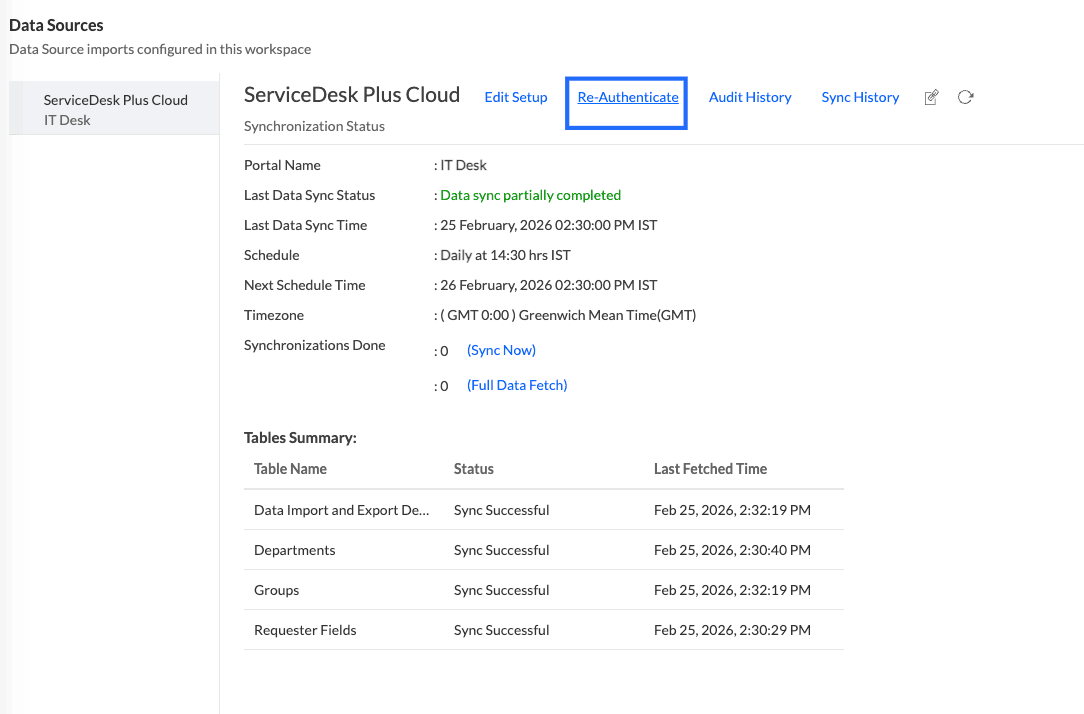
2. Navigate to the **Data source**, and click the **Re-Authenticate** link.
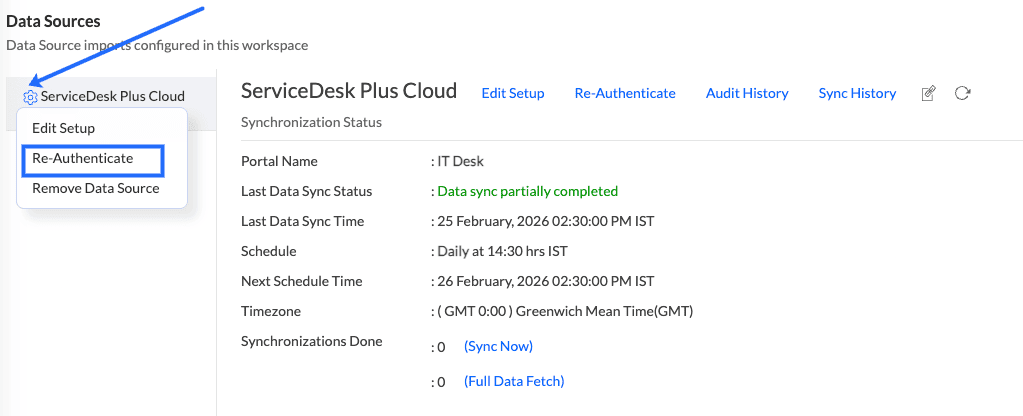
3. You can also access the re-authenticate link from the data sources summary page. Click the **Settings** icon that appears on mouse over the ServiceDesk Plus Cloud data source and click the **Re-Authenticate** option.
### 4. How frequently can I synchronize my data?
Analytics Plus allows you to schedule data synchronization at regular intervals. The shortest interval being 1 hour. However, the data it retrieves depends on how often ServiceDesk Plus Cloud updates its data for reporting.
ServiceDesk Plus Cloud updates the data available for Analytics Plus once every two hours. This means that even if Analytics Plus runs a sync more frequently, such as every hour, it can only fetch the most recently updated data from ServiceDesk Plus.
For example, if ServiceDesk Plus updates its data at 9:00 AM and the next update is at 11:00 AM, any sync triggered in Analytics Plus between 9:00 AM and 11:00 AM will only retrieve data as of 9:00 AM. Changes made after 9:00 AM will be reflected only after the 11:00 AM update.
### 5. How much ServiceDesk Plus data can Analytics Plus sync and retain?
By default, Analytics Plus syncs 5 quarters of data from ServiceDesk Plus during the initial sync. As new data is synced, it is added to the existing data, allowing the workspace to retain more than 5 quarters of historical data over time.
However, only data from the latest 5 quarters is kept up to date. Any changes made to records older than 5 quarters, such as a status update to an older ticket, will not be reflected in Analytics Plus.
If a full sync is initiated, all existing data in the workspace will be purged and only the latest 5 quarters of data will be synced again.
### 6. Can I edit the synchronization settings?
To edit the connection and synchronization settings, follow the steps below:
1. Click the **Data Sources** option from the side panel. This opens the Data Sources summary page, which lists the data sources configured in the workspace.
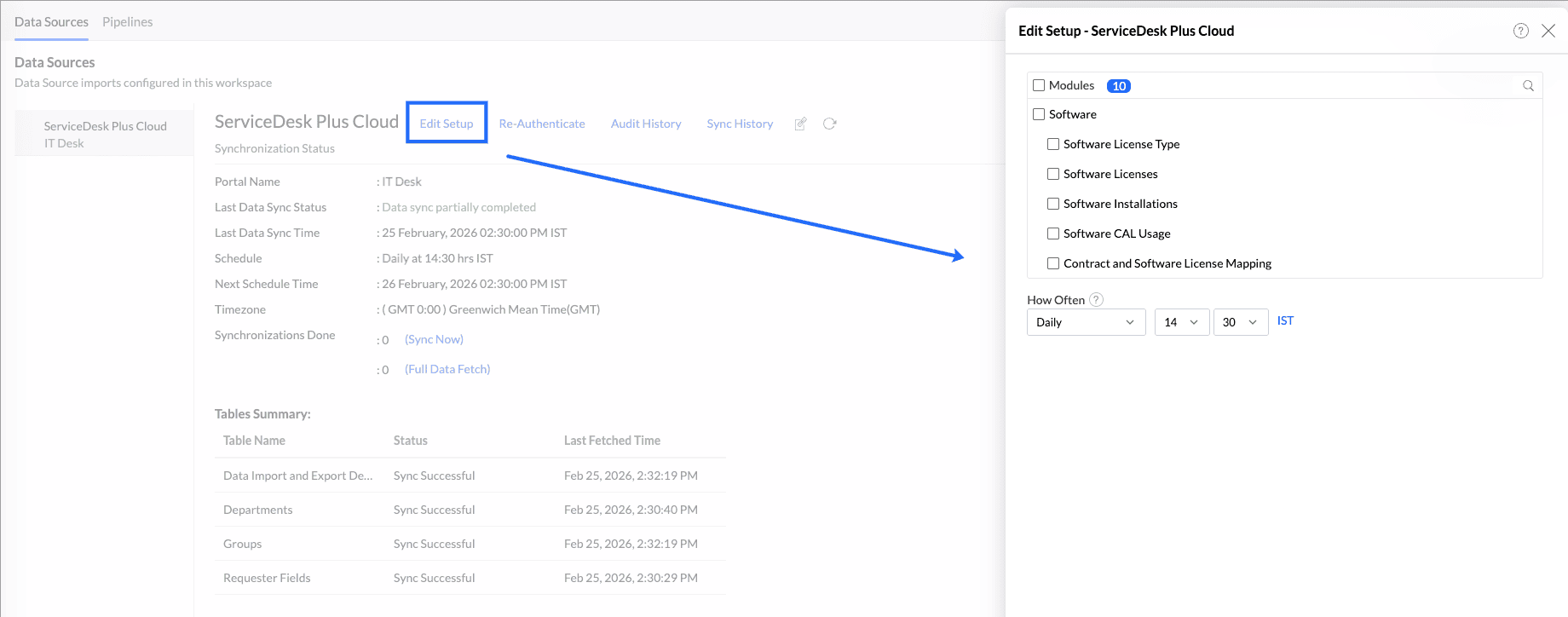
2. Navigate to the **Data source**, and click the **Edit Setup** link.
3. In the popup that appears, make the necessary changes and click **Save**.
4. You can also edit the setup from the Data Sources summary page. Click the **Settings** icon and click the **Edit Setup** option.
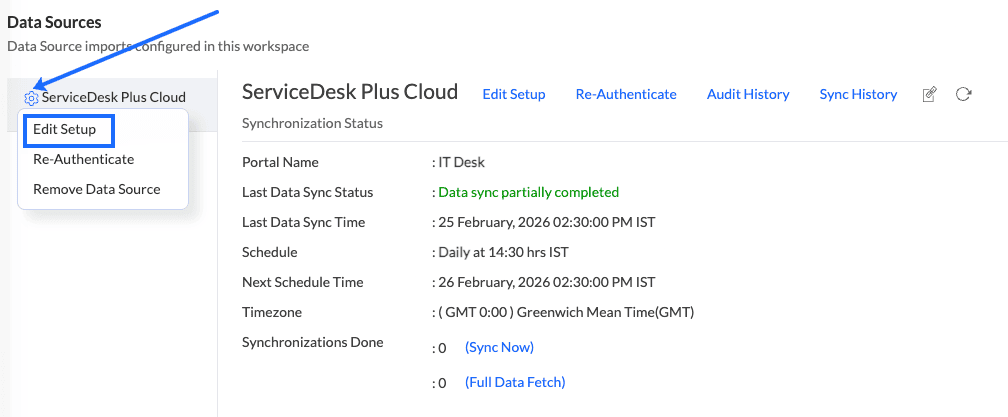
5. In the popup that appears, make the necessary changes and click **Save**.
### 7. Can I synchronize my data instantly?
Yes. To do this, click the **Data Sources** option from the side panel. In the page that appears and click the **Sync Now** button.
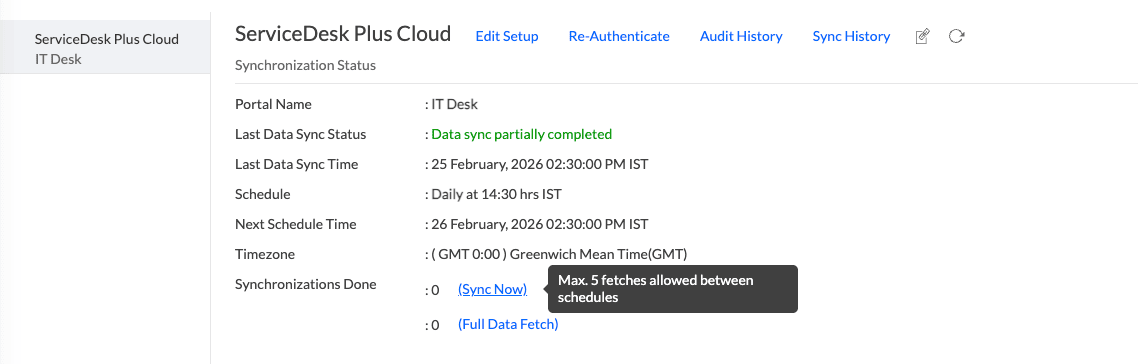
You can also perform a **Full Data Fetch** to fetch the data again. By default, the full data fetch retreives data from the **last five quarters**.
### 8. How do I create custom reports over my data?
You can easily create custom reports in the form of [charts](https://www.manageengine.com/analytics-plus/cloud-help/chart/charts.html), [pivot tables](https://www.manageengine.com/analytics-plus/cloud-help/pivot-table/pivot-tables.html), [summary](https://www.manageengine.com/analytics-plus/cloud-help/summary-views.html), and [tabular views](https://www.manageengine.com/analytics-plus/cloud-help/tabular-views.html) in Analytics Plus. Click the corresponding links to learn more about creating reports. These reports can also be organized together to form intuitive dashboards. Refer [this documentation](https://www.manageengine.com/analytics-plus/cloud-help/dashboard/dashboard-index.html) to learn more about creating dashboards.
### 9. Can I set up the integration in existing workspaces of Analytics Plus?
Yes. Follow the steps below to do this.
1. Open the required workspace, click the **Create** button from the side panel, and select the **New Table / Import Data** option.
2. Select the **ServiceDesk Plus Cloud** tile from the Import Your Data screen that appears, and follow the [setup procedure](https://www.manageengine.com/analytics-plus/cloud-help/service-desk-cloud-pull-integration.html#setup).
### 10. Can I collect and report on data from several accounts in a single workspace?
Yes. Analytics Plus allows you to import data from different ServiceDesk Plus Cloud accounts. To import additional account data, follow the steps below:
1. Open the required workspace, click the **Create** button from the side panel, and select the **New Table / Import Data** option.
2. Select the **ServiceDesk Plus Cloud** tile from the Import Your Data screen, and enter the details of the required account, and follow the [setup procedure](https://www.manageengine.com/analytics-plus/cloud-help/service-desk-cloud-pull-integration.html#setup).
### 11. How do I remove the setup?
1. Open the required workspace, and click the **Data Sources** option from the side panel.
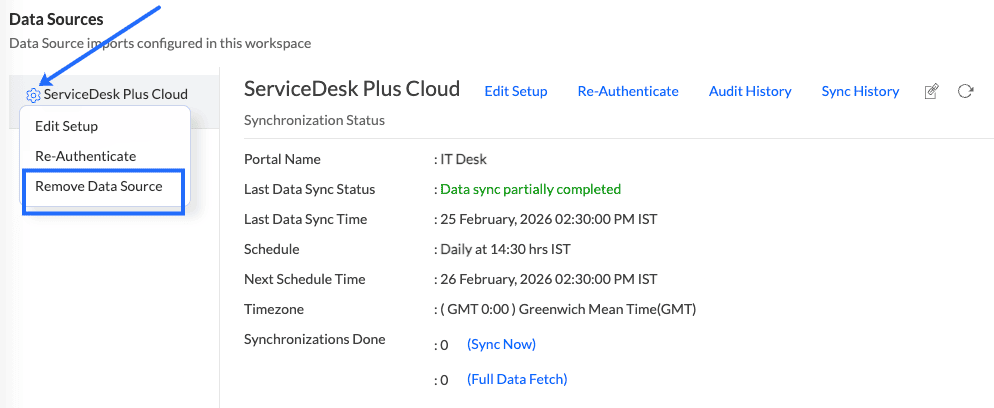
2. Click the **Settings** icon that appears on mouse over the data source's name, and select **Remove Data Source**.
## Reporting Features
### 1. What are the report types supported by Analytics Plus?
Analytics Plus supports a wide variety of reports, in the form of charts, pivot tables, summary views, and tabular views. To learn more about the various types of reports, [click here](https://www.manageengine.com/analytics-plus/cloud-help/chart/chart-types.html). To know more about dashboards and KPI widgets, [click here](https://www.manageengine.com/analytics-plus/cloud-help/dashboard/dashboard-index.html).
### 2. How do I create reports using fields/columns across different reports?
Columns from different modules are joined by default. Therefore, reports can be created over this data by simply dragging and dropping the respective columns in the report builder. [Click here](https://www.manageengine.com/analytics-plus/cloud-help/zoho-salesiq.html#custom-report) to learn more about creating reports.
### 3. What are formulas in reports?
Formulas are calculations that can be defined using the powerful formula engine to create required reports. Refer [to this documentation](https://www.manageengine.com/analytics-plus/cloud-help/table/add-formulas.html) to know more. There are also several default formulas created based on the ServiceDesk Plus Cloud modules. To view the default formulas, open the required table, click Add, and select the Edit Formulas option.
### 4. Is it possible to create custom formulas in Analytics Plus?
Yes. Refer [to this documentation](https://www.manageengine.com/analytics-plus/cloud-help/table/add-formulas.html#custom) to learn more.
### 5. Can I modify the tables imported from?
The data from ServiceDesk Plus Cloud is synchronized with Analytics Plus automatically, and stored in the form of various tables. Therefore, it is not possible to add data or modify the existing data present in these tables.
### 6. Can I add new columns to the tables imported from?
No. However, you can add Formula Columns and Aggregate Formulas to these tables to create custom reports. Refer [this documentation](https://www.manageengine.com/analytics-plus/cloud-help/table/add-formulas.html#custom) to know more.
### 7. Can I import new tables into the workspace?
Yes. To do this, open the ServiceDesk Plus Cloud workspace, click **Create** from the side panel and select the **New Table / Import Data** option. You can [integrate with other applications](https://www.manageengine.com/analytics-plus/cloud-help/integrations.html) or choose to import data stored in [local files](https://www.manageengine.com/analytics-plus/cloud-help/import-upload-data-into-analytics-plus/files.html), [web URLs](https://www.manageengine.com/analytics-plus/cloud-help/import-upload-data-into-analytics-plus/feeds.html), [local databases](https://www.manageengine.com/analytics-plus/cloud-help/import-upload-data-into-analytics-plus/import-data-from-local-databases.html), and [cloud databases](https://www.manageengine.com/analytics-plus/cloud-help/import-upload-data-into-analytics-plus/import-data-from-cloud-databases.html).
### 8. Can I combine data from other sources with the data from, and create reports and dashboards?
Yes. To do this, import or add a new table to the ServiceDesk Plus Cloud workspace and define a lookup relationship between the added data and the existing data in the workspace. To define a lookup relationship between two tables, it is essential that the tables have at least one column in common between them. Follow the below steps to establish a lookup relationship.
1. Open the corresponding table, right click the column header, and select the **Change to Lookup Column** option.
2. In the popup that appears, select the column from the second table to look up.
3. Click **Save & Close.**
[Click here](https://www.manageengine.com/analytics-plus/cloud-help/table/joining-tables.html#defining-lookup) to learn more about lookup columns.
### 9. What are Query Tables?
Using query tables, Analytics Plus allows you to import the required data by writing standard SQL queries. This feature also allows you to combine data from different tables and create reports from the combined data. Refer [to this documentation](https://www.manageengine.com/analytics-plus/cloud-help/table/query-tables.html) to know more.
## Sharing & Collaboration
### 1. How do I share reports, dashboards, and tables in Analytics Plus?
You can share the out-of-the-box reports, dashboards, and tables, and the ones you create, with other users easily. Refer [to this documentation](https://www.manageengine.com/analytics-plus/cloud-help/sharing/sharing-to-a-user.html) to know more.
### 2. Why are my colleagues unable to access the reports I create?
The workspace can be accessed only by the administrator who set up the integration. To allow other users to access the out-of-the-box reports and dashboards, you can share the reports and dashboards as needed. Refer [to this documentation](https://www.manageengine.com/analytics-plus/cloud-help/sharing/sharing-to-a-user.html) to know more. You can also share the entire workspace with a user. Refer [to this documentation](https://www.manageengine.com/analytics-plus/cloud-help/sharing/sharing-database-to-user.html) to know more.
### 3. Can other users create reports using the tables in the workspace?
Yes. To do this, share the required table with the users with the required permissions and filters.
### 4. Is it possible to share the same report to multiple users such that they each see different data?
Yes, you can do this by creating Variables. This allows you to share the report with several users, with associated filter criteria so that each user can access only the data specific to them. To learn more, refer [to this documentation](https://www.manageengine.com/analytics-plus/cloud-help/workspace/settings.html#variables).
### 5. Can I export a report or a dashboard?
Yes, you can export the report or dashboard in various formats such as CSV, EXCEL, PDF, HTML, and image. To learn more, refer [to this documentation](https://www.manageengine.com/analytics-plus/cloud-help/export-and-email/export-a-report.html).
### 6. How do I print the reports and dashboards created in Analytics Plus?
To do this, export the report or dashboard in the required format and print the exported file. To learn more about exporting a view in Analytics Plus, refer [this documentation](https://www.manageengine.com/analytics-plus/cloud-help/export-and-email/export-a-report.html).
**Note**: To export a shared report or dashboard, the Export permission has to be enabled.
### 7. Can I email reports and dashboards at scheduled times?
Yes, you can easily set up email schedules. Refer [to this documentation](https://www.manageengine.com/analytics-plus/cloud-help/export-and-email/emailing-reports-and-dashboards.html#scheduling-emails) to learn more.
### 8. Can I embed reports?
Yes. You can easily embed reports and dashboards into websites, applications, or blogs. Refer [to this documentation](https://www.manageengine.com/analytics-plus/cloud-help/publishing/publishing-index.html#Embed) to know more.
## Help & Support
### 1. How do I get technical support on Analytics Plus?
Technical support is free for all users, even during the trial period. You can contact the technical support team using the information below.
- Email: [analyticsplus-support@manageengine.com](mailto:analyticsplus-support@manageengine.com)
- Phone:
- United States: +1 4695016108
- United Kingdom: +44 2076602649
- Australia: +61 892100050
- India: +91-44-69656217
You can also get answers straight from our [community](https://pitstop.manageengine.com/portal/community/analytics-plus).
### 2. Can I have a personalized demo of this integration?
Yes, please register for a demo using the form on [this page](https://www.manageengine.com/analytics-plus/demo.html).