# Apple Device Management
Apple Device Management in MDM empowers IT admins to seamlessly configure, secure, and manage macOS, iOS, iPadOS, and tvOS devices across their organization. This document outlines the different Apple management types supported through MDM, including Automated Device Enrollment (via Apple Business Manager/Apple School Manager), User Enrollment, and manual enrollment methods. It also provides a comparison of features based on the management type, enabling admins to evaluate the right approach for their environment. With these options, admins can simplify large-scale deployments, enforce compliance, and deliver a consistent and secure experience for all Apple devices.
## Apple Enrollment Methods
| iOS Management Mode | Scenarios | Enrollment Methods |
|---|---|---|
| Personal device management (Device Enrolment or User Enrolment) (Unsupervised) | - Used for employee-owned devices or BYOD
- Work apps and data are protected separately from personal apps
- No control over personal apps and data | 1. Using a direct QR Code or Enrolment link
2. Self Enrollment
3. User invitations
4. Apple User Enrollment |
| Company-owned device management (Device enrolment or Automated device enrolment) (Supervised) | - Used for Company-owned devices
- Devices deployed in kiosk mode; dedicated devices locked down to run only work applications
- Company-owned devices used for both work and personal purposes | 1. Automated Device Enrolment (ABM/ASM)
2. Using Apple Configurator App in iPhone/Mac |
## Apple Device Management Types
1. **Company-Owned Device Management:** For devices purchased and owned by the organization, ensuring full control and security.
### Enrollment Methods
- **Automated Device Enrollment (ABM/ASM):**
**When to Use:**
- Apple Business Manager (ABM) or Apple School Manager (ASM) [Available in Your Country or Region](https://support.apple.com/en-in/102867).
- Devices purchased directly from Apple or an [authorized reseller](https://support.apple.com/en-us/118207). If there are company-owned devices purchased otherwise, it is possible to add them to Apple Business/School Manager's Automated Device Enrollment program via the Apple Configurator app in [iPhone](https://www.manageengine.com/mobile-device-management/how-to/add-macs-to-abm-with-ios-configurator.html) or [Mac](https://www.manageengine.com/mobile-device-management/how-to/mdm-enroll-any-ios-device-abm-via-apple-configurator.html).
Verify the above device eligibility and enroll devices in MDM through [Automated Device Enrollment (ABM/ASM)](https://www.manageengine.com/mobile-device-management/help/enrollment/automated_device_enrollment.html).
- **Manual Enrollment via Apple Configurator**
**When to Use:** If Apple Business Manager (ABM) or Apple School Manager (ASM) is not available in your Country or Region.
2. **Personal Device Management (BYOD - Bring Your Own Device):** For employee-owned personal devices accessing corporate resources.
**Management Mode:** Devices can be enrolled either **Account-Driven (using a Managed Apple ID) or Profile-Based (via an installation profile)**. If a user removes the enrollment profile, all associated configurations, policies, and managed apps are automatically revoked, ensuring corporate data remains protected when devices exit management. MDM supports multiple manual enrollment methods, including **Invite Enrollment, Self Enrollment, and Apple User Enrollment**, providing flexibility for different deployment scenarios.
### Enrollment Methods
- **Self-Enrollment:**
**When to Use:** Employees need to enroll their personal devices for work access.
**Enrollment Type:**
- **Self Enrollment using AD Credentials:** Users can self-enroll personal devices by scanning a QR code or visiting a self-enrollment URL, authenticated via Active Directory credentials. Visit the [Self Enrollment guide](https://www.manageengine.com/mobile-device-management/help/enrollment/mdm_byod.html) for detailed information.
- **Apple User Enrollment (Managed Apple IDs):** Users can self-enroll personal devices via Apple User Enrollment (iOS 13+/macOS 10.15+) using their Managed Apple ID. Refer to the [Apple User Enrollment Guide](https://www.manageengine.com/mobile-device-management/help/enrollment/mdm_apple_user_enrollment.html).
- **Invite Enrollment**
**When to Use:** IT Admins want to send a secure enrollment invitation (email) to employees. Useful for BYOD scenarios where users need a guided setup.
Invite enrollment can be sent to an individual user to enroll a single device and can also be sent in bulk to multiple users for enrolling their devices. For detailed instructions, refer to the [Invite Enrollment Guide](https://www.manageengine.com/mobile-device-management/help/enrollment/mdm_enrollment_by_email_invite.html).
## Comparison of Supported Functionality by Management Type
This section outlines the key functionality available for each Apple device management type, helping IT admins choose the right approach based on security and functionality requirements.
### iOS/iPadOS
#### Policy
| Functionality | Automated Device Enrollment iOS/iPadOS (Non-Shared) | Automated Device Enrollment Shared iPad | Invite Enrollment/Self Enrollment | Apple User Enrolment |
|---|---|---|---|---|
| [Passcode](https://www.manageengine.com/mobile-device-management/help/profile_management/ios/mdm_passcode.html) | ✅ | ❌ | ✅ | ✅ (Limited Capability) |
| [Restrictions](https://www.manageengine.com/mobile-device-management/help/profile_management/ios/mdm_restrictions.html) | ✅ | ✅ | ✅ | ✅ (Limited Restrictions) |
| [Wi-Fi](https://www.manageengine.com/mobile-device-management/help/profile_management/ios/mdm_wifi.html) | ✅ | ✅ | ✅ | ✅ |
| [Virtual Private Network (VPN)](https://www.manageengine.com/mobile-device-management/help/profile_management/ios/mdm_vpn.html) | ✅ | ✅ | ✅ | ❌ |
| [Per-App VPN](https://www.manageengine.com/in/mobile-device-management/help/profile_management/ios/mdm_per_app_vpn.html) | ✅ | ✅ | ✅ | ✅ |
| [E-Mail](https://www.manageengine.com/mobile-device-management/help/profile_management/ios/mdm_email.html) | ✅ | ❌ | ✅ | ✅ |
| [Exchange ActiveServer (EAS)](https://www.manageengine.com/mobile-device-management/help/profile_management/ios/mdm_exchange_active_sync.html) | ✅ | ❌ | ✅ | ✅ |
| [Kiosk](https://www.manageengine.com/mobile-device-management/help/profile_management/ios/mdm_app_lock.html) | ✅ | ✅ | ❌ | ❌ |
| [Web Shortcut](https://www.manageengine.com/mobile-device-management/help/profile_management/ios/mdm_webclips.html) | ✅ | ❌ | ✅ | ✅ |
| [Web Content Filter](https://www.manageengine.com/mobile-device-management/help/profile_management/ios/mdm_ios_web_content_filtering.html) | ✅ | ✅ | ❌ | ❌ |
| [App Notification](https://www.manageengine.com/in/mobile-device-management/help/profile_management/ios/mdm_app_notifications.html) | ✅ | ✅ | ❌ | ❌ |
| [Managed Web Domains](https://www.manageengine.com/mobile-device-management/help/profile_management/ios/mdm_browser_management.html) | ✅ | ✅ | ✅ | ❌ |
| [Wallpaper](https://www.manageengine.com/mobile-device-management/help/profile_management/ios/mdm_wallpaper.html) | ✅ | ✅ | ❌ | ❌ |
| [Asset Tag](https://www.manageengine.com/in/mobile-device-management/help/profile_management/ios/mdm_asset_tagging.html) | ✅ | ✅ | ❌ | ❌ |
| [AirPrint](https://www.manageengine.com/mobile-device-management/help/profile_management/ios/mdm_airprint.html) | ✅ | ✅ | ✅ | ✅ |
| [Global HTTP Proxy](https://www.manageengine.com/mobile-device-management/help/profile_management/ios/mdm_global_proxy_settings.html) | ✅ | ✅ | ❌ | ❌ |
| [Enterprise SSO](https://www.manageengine.com/in/mobile-device-management/help/profile_management/ios/mdm_single_sign_on.html) | ✅ | ❌ | ✅ | ✅ |
| [Extensible SSO](https://www.manageengine.com/in/mobile-device-management/help/profile_management/ios/mdm_extensible_SSO.html) | ✅ | ❌ | ✅ | ✅ |
| [Certificate](https://www.manageengine.com/mobile-device-management/help/profile_management/ios/mdm_certificate.html) | ✅ | ✅ | ✅ | ✅ |
| [SCEP](https://www.manageengine.com/mobile-device-management/help/profile_management/ios/mdm_scep.html) | ✅ | ✅ | ✅ | ✅ |
| [ACME](https://www.manageengine.com/mobile-device-management/help/certificate_management/mdm_integrating_ACME.html) | ✅ | ✅ | ✅ | ✅ |
| [Shared iPad Configuration](https://www.manageengine.com/in/mobile-device-management/help/profile_management/ios/shared_ipad.html) | ❌ | ✅ | ❌ | ❌ |
| [LDAP](https://www.manageengine.com/mobile-device-management/help/profile_management/ios/mdm_ldap.html) | ✅ | ❌ | ✅ | ✅ |
| [Contact Sync](https://www.manageengine.com/mobile-device-management/help/profile_management/ios/mdm_carddav.html) | ✅ | ❌ | ✅ | ✅ |
| [Calendar Sync](https://www.manageengine.com/mobile-device-management/help/profile_management/ios/mdm_caldav.html) | ✅ | ❌ | ✅ | ✅ |
| [Subscribed Calendars](https://www.manageengine.com/mobile-device-management/help/profile_management/ios/mdm_subscribed_calendars.html) | ✅ | ❌ | ✅ | ✅ |
| [Access Point Name](https://www.manageengine.com/mobile-device-management/help/profile_management/ios/mdm_apn.html) | ✅ | ✅ | ✅ | ❌ |
| [Fonts](https://www.manageengine.in/mobile-device-management/help/profile_management/ios/mdm_fonts.html?mdmod) | ✅ | ❌ | ✅ | ✅ |
| [Accessibility Settings](https://www.manageengine.com/in/mobile-device-management/help/profile_management/ios/mdm_accessibility_settings.html?mdmod) | ✅ | ✅ | ❌ | ❌ |
| [eSIM](https://www.manageengine.com/in/mobile-device-management/help/profile_management/ios/mdm_eSIM.html?mdmod) | ✅ | ✅ | ✅ | ❌ |
#### Apps & Update Management
| Functionality | Automated Device Enrollment (Non-Shared) | Automated Device Enrollment Shared iPad | Invite Enrollment/Self Enrollment | Apple User Enrolment |
|---|---|---|---|---|
| Silent Installation of Store Apps | ✅ | ✅ | ❌ (User prompted or install via App Catalog) | ❌ (User prompted or install via App Catalog) |
| Installation of apps without Apple ID | ✅ | ✅ | ✅ | ✅ |
| Silent Installation of in-house Apps | ✅ | ✅ | ❌ (User prompted or install via App Catalog) | ❌ (User prompted or install via App Catalog) |
| Restricting side-loaded Apps | ✅ | ✅ | ✅ | ✅ |
| Automate OS Updates | ✅ | ✅ | ❌ | ❌ |
| Schedule and Automate app updates | ✅ | ✅ | ✅ | ✅ |
| Blocklisting Apps | ✅ | ✅ | ❌ | ❌ |
| Multiple versions of in-house Apps | ✅ | ✅ | ✅ | ✅ |
#### Inventory
| Functionality | Automated Device Enrollment (Non-Shared) | Automated Device Enrollment Shared iPad | Invite Enrollment/Self Enrollment | Apple User Enrolment |
|---|---|---|---|---|
| Device details such as model name, manufacturer name, UDID, etc. | Required details will be fetched. | Required details will be fetched. | Required details will be fetched. | Required details will be fetched. |
| Tracking Device Battery Level | ✅ | ✅ | ✅ | ✅ |
| Locate Device | ✅ | ✅ | ✅ | ✅ |
| Restart Device | ✅ | ✅ | ❌ | ❌ |
| Shutdown Device | ✅ | ✅ | ❌ | ❌ |
| Remove Screen Time Passcode | ✅ | ❌ | ❌ | ❌ |
| Logout Users | ❌ | ✅ | ❌ | ❌ |
| Delete Users | ❌ | ✅ | ❌ | ❌ |
#### Tools
| Functionality | Automated Device Enrollment (Non-Shared) | Automated Device Enrollment Shared iPad | Invite Enrollment/Self Enrollment | Apple User Enrolment |
|---|---|---|---|---|
| [Announcements](https://www.manageengine.com/mobile-device-management/help/asset_management/mdm_announcements.html) | ✅ | ✅ | ✅ | ✅ |
| [Remote Troubleshooting (Only remote view is possible)](https://www.manageengine.com/mobile-device-management/help/asset_management/mdm_remote_troubleshoot_ios.html) | ✅ | ✅ | ✅ | ✅ |
#### Security Management
| Functionality | Automated Device Enrollment (Non-Shared) | Automated Device Enrollment Shared iPad | Invite Enrollment/Self Enrollment | Apple User Enrolment |
|---|---|---|---|---|
| Complete Wipe of the device | ✅ | ✅ | ✅ | ❌ |
| Corporate Wipe of the device | ✅ | ✅ | ✅ | ✅ |
| Remote Lock | ✅ | ✅ | ✅ | ✅ |
| Lost Mode | ✅ | ✅ | ❌ | ❌ |
| Clear/Reset Passcode | ✅ | ❌ | ✅ | ❌ |
### MacOS
#### Policy
| Functionality | Automated Device Enrollment | Invite Enrollment/Self Enrollment | Apple User Enrolment |
|---|---|---|---|
| [Passcode](https://www.manageengine.com/mobile-device-management/help/profile_management/mac/mdm_mac_passcode.html) | ✅ | ✅ | ❌ |
| [Restrictions](https://www.manageengine.com/mobile-device-management/help/profile_management/mac/mdm_mac_restrictions.html) | ✅ | ✅ | ✅ (Limited Restrictions) |
| [Wi-Fi](https://www.manageengine.com/mobile-device-management/help/profile_management/mac/mdm_mac_wifi.html) | ✅ | ✅ | ✅ |
| [Virtual Private Network (VPN)](https://www.manageengine.com/mobile-device-management/help/profile_management/mac/mdm_mac_vpn.html) | ✅ | ✅ | ❌ |
| [Per-App VPN](https://www.manageengine.com/mobile-device-management/help/profile_management/mac/mdm_per_app_vpn.html) | ✅ | ✅ | ✅ |
| [Web Content Filter](https://www.manageengine.com/mobile-device-management/help/profile_management/mac/mdm_mac_web_content_filtering.html) | ✅ | ✅ | ❌ |
| [App Notifications](https://www.manageengine.com/mobile-device-management/help/profile_management/mac/mdm_app_notifications.html) | ✅ | ✅ | ❌ |
| [FileVault Encryption](https://www.manageengine.com/mobile-device-management/help/profile_management/mac/mdm_filevault_encryption.html) | ✅ | ✅ | ❌ |
| [Firewall](https://www.manageengine.com/mobile-device-management/help/profile_management/mac/mdm-mac-firewall.html) | ✅ | ✅ | ❌ |
| [AirPrint](https://www.manageengine.com/mobile-device-management/help/profile_management/mac/mdm_mac_airprint.html) | ✅ | ✅ | ✅ |
| [Global HTTP Proxy](https://www.manageengine.com/mobile-device-management/help/profile_management/mac/mdm_mac_global_proxy.html) | ✅ | ✅ | ❌ |
| [Extensible SSO](https://www.manageengine.com/mobile-device-management/help/profile_management/mac/mdm_mac_extensible_SSO.html) | ✅ | ✅ | ✅ |
| [Certificate](https://www.manageengine.com/mobile-device-management/help/profile_management/mac/mdm_mac_certificate.html) | ✅ | ✅ | ✅ |
| [SCEP](https://www.manageengine.com/mobile-device-management/help/profile_management/mac/mdm_mac_scep.html) | ✅ | ✅ | ✅ |
| [AD Asset Binding](https://www.manageengine.com/mobile-device-management/help/profile_management/mac/mdm_mac_active_directory_binding.html) | ✅ | ✅ | ✅ |
| [AD Certificate Policy](https://www.manageengine.com/mobile-device-management/help/profile_management/mac/ad_certificate_policy.html) | ✅ | ✅ | ✅ |
| [Recovery lock / Firmware password](https://www.manageengine.com/mobile-device-management/help/profile_management/mac/mdm_mac_firmware_password.html) | ✅ | ✅ | ❌ |
| [System extensions](https://www.manageengine.com/mobile-device-management/help/profile_management/mac/mdm_mac_system_extensions.html) | ✅ | ✅ | ❌ |
| [Background service management](https://www.manageengine.com/mobile-device-management/help/profile_management/mac/mdm_mac_service_mgmt.html) | ✅ | ✅ | ❌ |
| [PPPC](https://www.manageengine.com/mobile-device-management/help/profile_management/mac/mdm_mac_pppc.html) | ✅ | ✅ | ❌ |
| [Fonts](https://www.manageengine.com/mobile-device-management/help/profile_management/mac/mdm_mac_fonts.html) | ✅ | ✅ | ✅ |
#### Apps & Update Management
| Functionality | Automated Device Enrollment | Invite Enrollment/Self Enrollment | Apple User Enrolment |
|---|---|---|---|
| Installation of apps without Apple ID | ✅ | ✅ | ✅ |
| Schedule and Automate app updates (VPP) | ✅ | ✅ | ✅ |
#### Inventory
| Functionality | Automated Device Enrollment | Invite Enrollment/Self Enrollment | Apple User Enrolment |
|---|---|---|---|
| Device details such as model name, manufacturer name, UDID, etc. | Required details will be fetched. | Required details will be fetched. | Required details will be fetched. |
| Locate Device | ✅ | ✅ | ✅ |
| Restart Device | ✅ | ✅ | ❌ |
| Shutdown Device | ✅ | ✅ | ❌ |
| Delete User | ✅ | ✅ | ❌ |
#### Security Management
| Functionality | Automated Device Enrollment | Invite Enrollment/Self Enrollment | Apple User Enrolment |
|---|---|---|---|
| Complete Wipe of the device | ✅ | ✅ | ❌ |
| Corporate Wipe of the device | ✅ | ✅ | ✅ |
| Remote Lock | ✅ | ✅ | ❌ |
## Access Management for Managed Apple Accounts
## What is Access Management?
Access Management gives you control over where your organization’s **Managed Apple IDs (MAIDs)** can be used. Instead of letting end-users sign in from any iPhone, iPad, or Mac, access can be restricted to only those devices that are enrolled or supervised by your organization. This helps keep company data secure and ensures Managed Apple Accounts stay within your IT boundaries.
## Key Benefits
- **Security** — Prevent users from signing in with a corporate Apple ID on unapproved devices.
- **Compliance** — Ensure organizational accounts are used only on devices you manage.
- **Control** — Decide whether to allow sign-in on any device, managed devices only, or supervised devices only.
## Prerequisites
- **Minimum OS versions required:**
- iOS/iPadOS 17 or later
- macOS 14 or later
**Note:** Devices running versions below iOS/iPadOS 17 or macOS 14 will not be able to sign in with Managed Apple IDs and will appear as unsupported OS. This limitation applies only when the **Managed** or **Supervised** option is selected under Access Management.
## Enable Access Management Capability
The **Access Management Capability** is enabled when **Apple Account Access Management** is activated in the MDM console. This capability allows administrators to control Managed Apple ID sign-ins by defining scope-based access such as allowing sign-in from any device, only managed devices, or only supervised devices as configured in Apple Business Manager (ABM).
## How to Enable the Capability
1. In the MDM web console, navigate to **Enrollment → Apple → Apple Enrollment (ABM/ASM) → Access Management**.
2. Click **Enable Now**.

3. The MDM server syncs with the configured ABM server and pushes a configuration profile to all eligible devices.
## What Happens After Enabling
- The configuration profile makes the device capable of Access Management.
- This capability enables devices to apply Managed Apple ID sign-in restrictions once defined in ABM.
- Only devices that have received and installed this configuration will support Managed Apple ID sign-ins.
Administrators can verify the status by navigating to **Inventory → Devices** and checking the **Access Management Capability** column:
- **Enabled:** The device has successfully received the configuration profile.
- **In Progress:** The profile is still being applied and will change to **Enabled** once complete.

After confirming that all devices show **Enabled**, sign in to **Apple Business Manager** to configure Managed Apple ID sign-in controls under **Organization name > Settings > Access Management > Apple Services**.
## Configuration Steps
1. Log in to the ABM portal with **Administrator** or **People Manager** rights.
2. Go to **Organization name > Settings > Access Management**.
3. Configure the following settings as required:
### Sign in with Apple (App scope)
- **All apps** — Users can sign in with their Managed Apple ID on any app that supports **Sign in with Apple**.
**Example:** Ideal for employees who use a mix of productivity and collaboration apps.
- **Specific apps** — Users can sign in only on apps explicitly allowed by the organization.
**Example:** Suitable for education or regulated environments.
### Apple Services (Service scope)
- Controls access to services such as **iCloud**, **Messages**, **FaceTime**, **Wallet**, **Developer**, and **AppleSeed for IT**.
- Each service can be toggled **On/Off**.
**Example:** Disable iCloud Drive and FaceTime but allow Developer access for testing.
### Allow Managed Apple Account on (Device scope)
- **Any device** — Users can sign in from any device (default).
**Example:** Suitable for hybrid work environments.
- **Managed devices only** — Sign-in allowed only from devices enrolled in MDM.
**Example:** Recommended for corporate-owned deployments.
- **Supervised devices only** — Sign-in allowed only from supervised corporate devices.
**Example:** Best for education or retail setups.
**Note:** Changes apply to all servers under the same organization account in ABM/ASM.
## Restrict Personal Apple IDs on Organization Devices
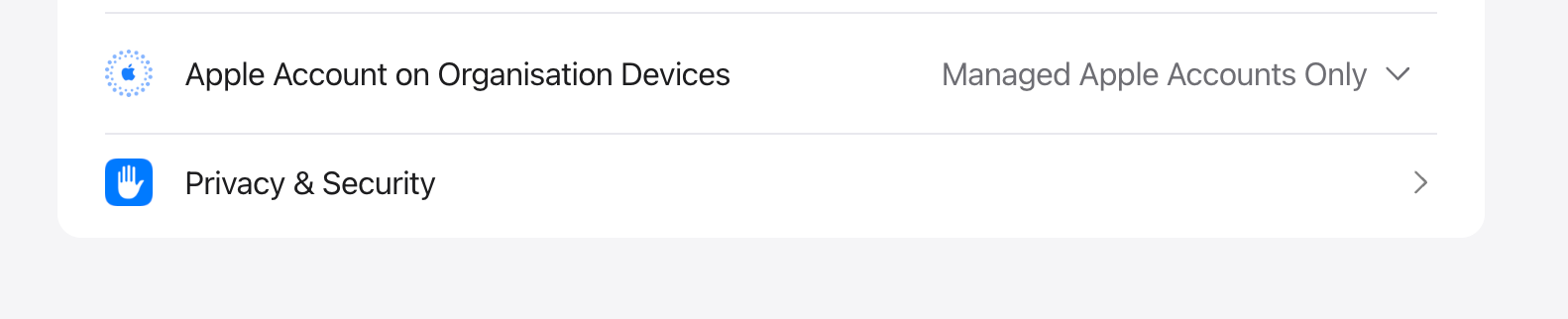
To prevent users from signing in with personal Apple IDs on ABM-enrolled devices:
Navigate to **Organization name > Settings > Access Management > Apple Services > Apple Account on Organization Devices** in **Apple Business Manager**, and set the option to **Managed Apple Account only**.
This ensures only corporate Managed Apple IDs can be used on enrolled devices.
### Revoke the Restriction
To revoke the restriction, return to the same **Access Management** page in ABM and reset:
- **All apps** for Sign in with Apple.
- **Any device** for Apple Services.
- **Any device** for Allow Managed Apple Account on.
Revoking restores the default ABM/ASM configuration.
**Note:** Revocation must be done in **Apple Business Manager** only. No changes are required in the MDM console.
## Things to Keep in Mind
- Restrictions can be relaxed later by selecting **Any device** in ABM/ASM.
- Users are automatically signed out if their device does not meet new access requirements.
- For devices using **Apple User Enrollment**, devices are automatically unenrolled if criteria are not met.
- **Shared iPads** do not support Managed Apple IDs.
- Accounts are affected only when sign-in is restricted to **Managed** or **Supervised** devices.
- Ensure the selected server remains synced to maintain status.
- Refer to the [Apple Access Management documentation](https://support.apple.com/en-in/guide/apple-business-manager/axm53xk34bq/web) for more details.