Last updated: August 18, 2026
Zebra Wipe Method
This page covers how to deprovision Zebra devices in Mobile Device Manager Plus, comparing available wipe methods such as Enterprise Reset and Factory Reset for removing device data.
When a Zebra device is no longer assigned to a user, is being repurposed, or requires data removal for security reasons, you can deprovision (wipe) the device to erase data and reset it to a usable state. Zebra devices provide multiple wipe options that allow you to control how much data is removed during the reset process.
Depending on your organization's requirements, you can choose to either remove only user-specific data while preserving enterprise configurations or perform a complete device reset that removes all data and settings.
When deprovisioning a Zebra device, you can choose between Enterprise Reset and Factory Reset based on the level of data removal required.
Zebra Wipe Methods
| Component | Enterprise Reset | Factory Reset |
|---|---|---|
| User data and settings | Removed | Removed |
| User-installed applications | Removed | Removed |
| Enterprise applications | Removed | Removed |
| Provisioning files | Retained if in the Enterprise directory | Removed |
| Certificates | Retained if in the Enterprise directory | Removed |
| Configuration profiles | Retained if in the Enterprise directory | Removed |
| DataWedge profiles | Retained | Removed |
| Enterprise folder contents | Retained | Removed |
| Resulting device state | Restored to enterprise default state | Restored to factory default state |
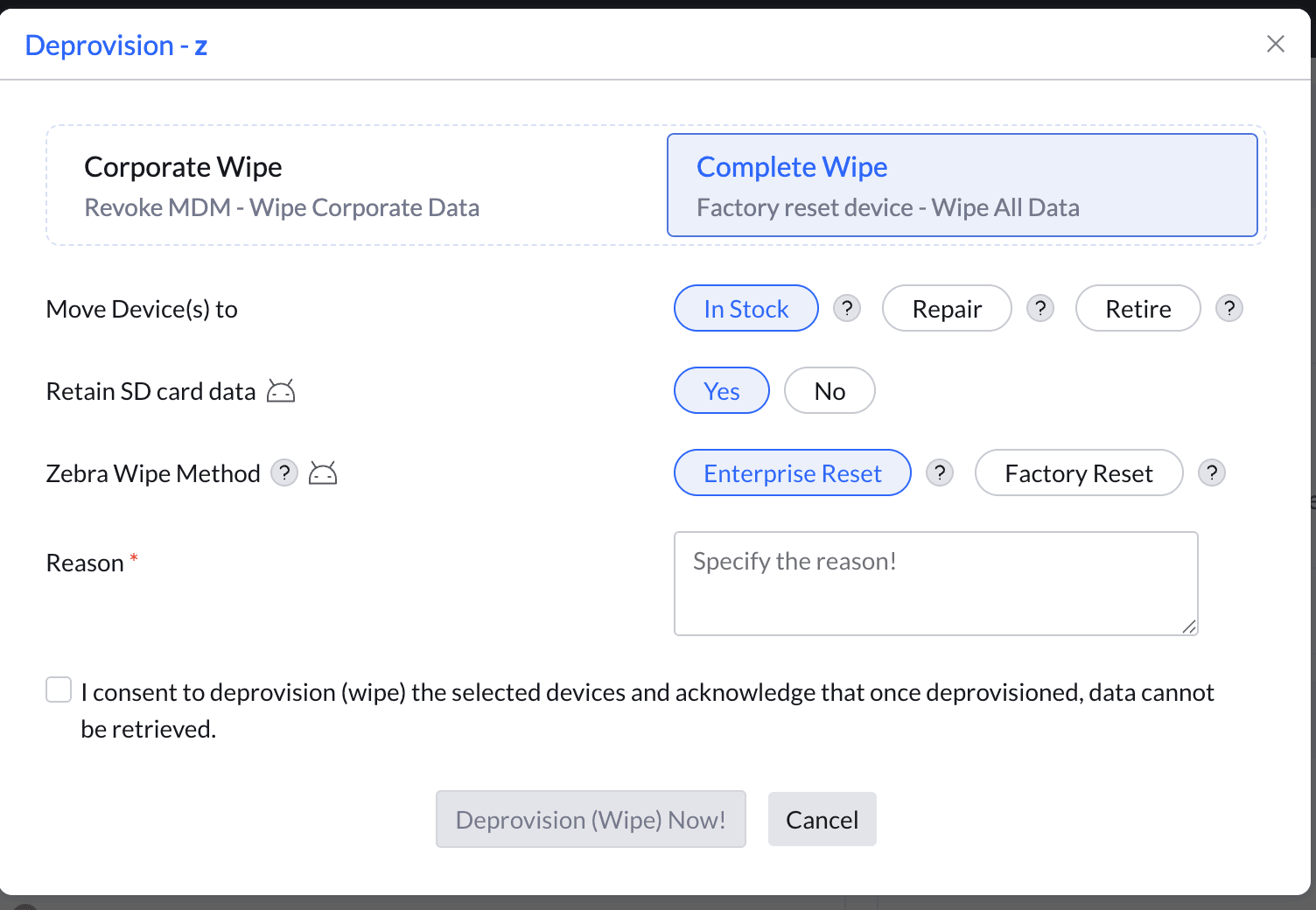
Enterpise Reset
Select Enterprise Reset when you want to remove user data from a Zebra device while keeping your organization's applications and configurations intact. This reset removes user-specific information, such as accounts, settings, and installed apps, and restores the device to its enterprise default state. However, content stored in the Enterprise folder is preserved.
To learn more about the Enterprise Folder and how it is used to preserve enterprise data across device resets, refer to the official Zebra documentation .
- The Enterprise Folder preserves critical enterprise data such as provisioning files, certificates, and configuration profiles during an Enterprise Reset.
- It retains DataWedge profiles and business applications, helping maintain device functionality after a reset.
- It helps preserve organizational settings and configurations, reducing the need for manual reconfiguration.
- It simplifies device re-enrollment and redeployment.
- It minimizes setup time when repurposing or reassigning Zebra devices.
Enterprise Reset is ideal when reassigning a device to another user, as it clears personal data while keeping enterprise applications, such as the MDM agent, available on the device.
Factory Reset
Important: To perform a Factory Reset through MDM, the Zebra OEMConfig application must be installed on the device. If OEMConfig is not available, the reset cannot be initiated remotely.
Select Factory Reset when you want to erase a Zebra device completely and restore it to its original factory state.
This reset removes all data from the device, including user accounts, settings, applications, and enterprise content. Unlike an Enterprise Reset, applications and files stored in the Enterprise Folder are also deleted.
Factory Reset is recommended when retiring a device, transferring ownership, troubleshooting persistent issues, or whenever a complete device wipe is required.
Note: Enterprise Reset preserves persistent enterprise content, whereas Factory Reset removes all content from the device, including enterprise data and applications.
Reference: For more information on the differences between Enterprise Reset and Factory Reset on Zebra Android devices, refer to Zebra's official documentation .
Frequently Asked Questions
1. What is the Zebra Wipe Method for deprovisioning?
The Zebra Wipe Method is a deprovisioning action specific to Zebra rugged devices managed in ManageEngine MDM. It performs a full enterprise reset of the device, removing all MDM profiles, corporate data, and configurations while restoring the device to its factory state.
2. When should I use Zebra deprovision instead of a standard MDM unenroll?
Use the Zebra deprovision when retiring, reassigning, or returning a Zebra device to inventory. The Zebra Wipe ensures that all corporate data and MDM configurations are completely removed, which is especially important for devices used in high-security environments.
3. Can the Zebra Wipe Method be triggered remotely from the MDM console?
Yes. The Zebra Wipe Method can be initiated remotely from the ManageEngine MDM console without requiring physical access to the device, provided the device is online and reachable by the MDM server.