Last updated: July 24, 2026
Wi-Fi/VPN Authentication fails due to certificate mapping error
Problem
You encounter an error message similar to the following in the Event Viewer on the Domain Controller:
"The Key Distribution Center (KDC) encountered a user certificate that was valid but could not be mapped to a user in a secure way..." (Event ID 39 under Kerberos-Key-Distribution-Center).
Cause
As detailed in Microsoft KB5014754, Windows domain controllers now enforce stronger validation for certificate-based authentication. This includes the requirement for strong certificate mappings using the onPremisesSecurityIdentifier attribute. If the certificate does not include this mapping, authentication fails with the above error.
Resolution
To fix this issue, update the SCEP certificate template to include the required SID information in the Subject Alternative Name (SAN) field.
Steps to Modify and Re-Deploy SCEP Certificate Templates:
- Access Certificate Templates:
- In the MDM console, go to Device Mgmt > Certificates > Templates.
- Select the relevant certificate template and click Modify.
- Update the SAN Field:
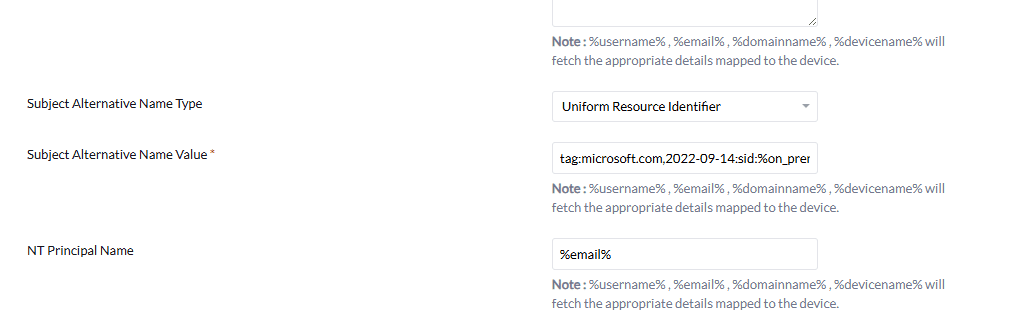
- Set the Subject Alternative Name Type to:
Uniform Resource Identifier - Set the Subject Alternative Name Value to:
tag:microsoft.com,2022-09-14:sid:%on_premises_security_identifier%
- Set the Subject Alternative Name Type to:
- Save the Template:
- Click Save to apply the changes.
- Re-Distribute the Profile:
- Re-deploy the updated SCEP certificate profiles to all affected devices.
- Ensure Proper User Association:
- Verify that each device is assigned to a valid user account. This ensures the
%on_premises_security_identifier%variable is correctly populated during certificate issuance.
- Verify that each device is assigned to a valid user account. This ensures the
Applies to: SCEP Certificate Configuration, Certificate-Based Authentication, Wi-Fi Profile Installation
Keywords: KDC certificate mapping error, Event ID 39, Microsoft KB5014754, SCEP SID URI, onPremisesSecurityIdentifier, Certificate authentication failure, MDM SCEP Wi-Fi profile