How network backup software works
Published on: Nov 03, 2025
4-6 mins read
Every network device stores configurations that determine how your IT infrastructure operates. These settings include access rules, routing paths, firewall policies, and many other critical parameters. Since networks are constantly evolving, these configurations are regularly updated or adjusted to meet changing operational and security needs.
The real challenge arises when a network suddenly goes down, leaving users stuck with no quick way to recover. Every minute of downtime is costly, disrupting operations and productivity. That's why a strong backup strategy is essential. Network backup software captures every version of your configurations, stores them securely, and enables fast, reliable recovery.
Let’s walk through the three main types of network backups and see how they work in practice.
The three core approaches to network backups
Network admins don’t rely on just one method of network backup. Depending on urgency, policy requirements, or risk level, they use different approaches. Broadly, these fall into three categories:
- Instant or bulk backups allow administrators to backup configurations immediately , either for a single device or across hundreds of devices at once.
- Scheduled backups are executed at fixed intervals , such as daily, weekly, or monthly, to ensure configurations are consistently backed up.
- Automated backups are event-driven and trigger automatically whenever a change is detected on a device.
Now let’s explore how each of these methods actually works in a network backup solution.
On-demand and bulk backups: control at your fingertips
Sometimes admins can’t afford to wait for the next scheduled job. Before a critical firmware update, or while preparing for an audit, they need to take a snapshot of current device configurations immediately.
This is where instant and bulk backups come in. With a single command, the backup software connects to devices via SSH or Telnet, retrieves both startup and running configurations, and encrypts them for secure storage.
Bulk mode takes it further, letting admins backup hundreds of devices simultaneously. This is particularly useful for:
- Major roll-outs (e.g., new policy updates across all firewalls).
- Change windows where several devices are modified at once.
- Urgent recovery prep before troubleshooting complex outages.
It saves hours of manual effort and ensures admins always have a clean restore point to fall back on.
Scheduled backups: consistency without effort
For many organizations, backups aren’t just about reacting; they’re about routine and predictability. Scheduled backups are configured to run daily, weekly, or monthly, depending on how often configurations typically change.
Once scheduled, the software automatically contacts each device, extracts configurations, and stores them securely. This helps network admins avoid the manual labour of backing up configurations and ensures they always have a reliable, up-to-date archive, saving time, reducing errors, and making recovery or auditing fast and stress-free.
Automated backups: zero missed changes
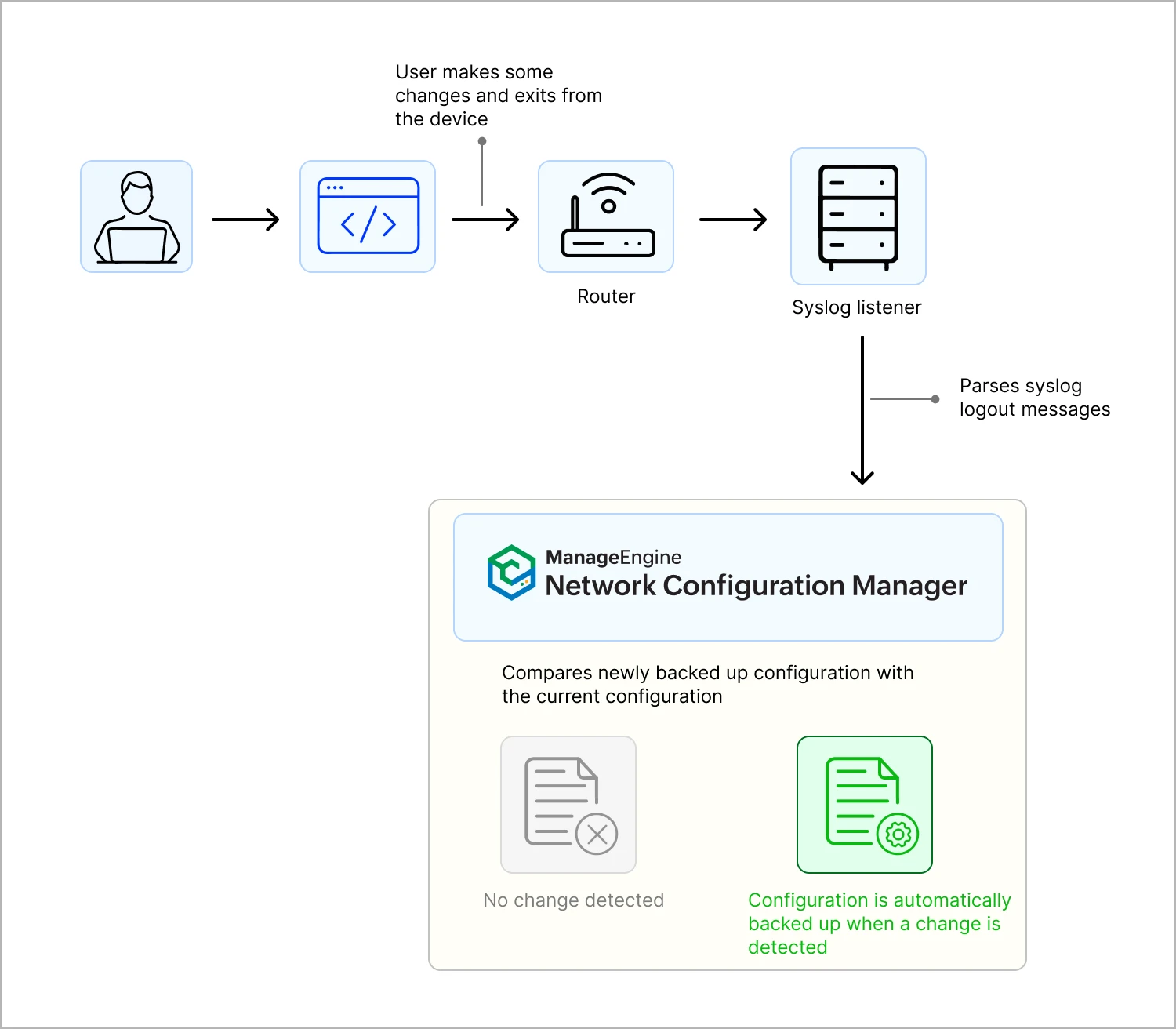
The most advanced, and often the most valuable form of backup is automated, event-driven backups . Instead of relying on manual intervention or fixed schedules, the software responds in real-time to device activity.
Here’s how it works:
- When a user logs in or logs out of a network device, the device generates a syslog message.
- The built-in syslog server inside the backup solution listens for these events.
- Upon detecting a logout event, the system immediately triggers a backup.
- The new configuration is compared with the last stored version.
- If changes are detected, the updated config is encrypted and stored.
- If nothing has changed, the backup is skipped.
This ensures that every single configuration change is backed up the moment it happens , without admins needing to lift a finger. It eliminates the blind spots that can occur between scheduled jobs, giving full visibility and accountability.
ManageEngine Network Configuration Manager delivers these network backup capabilities and more
ManageEngine Network Configuration Manager goes beyond simply capturing device configurations. It unifies all three types of backups: instant, scheduled, and automated, into a single platform, making sure admins never lose visibility or control.
Here’s what makes it stand out:
1. Comprehensive backup coverage for every scenario
Whether you need a quick, on-demand snapshot of a single device, a bulk backup across hundreds of devices, or automated backups triggered by configuration changes, Network Configuration Manager handles it all. Syslog-based triggers capture every modification in real-time, scheduled backups maintain a consistent version history, and bulk operations save time during large-scale network updates. This ensures a restorable configuration exists for every device, at all times, minimising risk during maintenance or troubleshooting.
2. Detailed and audit-ready backup reports
Network Configuration Manager generates rich, actionable reports that show which devices were backed up, when each backup occurred, and whether it succeeded or failed. These reports make it easy to identify gaps, demonstrate compliance with regulatory requirements, and provide a clear history for audits. With this level of transparency, admins can proactively manage backup reliability rather than reacting to failures.
3. Real-time backup status and mobile visibility
Through Network Configuration Manager’s centralised dashboard, admins gain a real-time overview of the health of all backup jobs. Failed backups are highlighted immediately, and historical data is searchable for easy review. For teams on the move, the Network Configuration Manager mobile app mirrors this functionality, allowing network administrators to monitor backup status, receive alerts, and stay in control even when away from their desks.
4. Integrated with broader configuration management
Network backups in Network Configuration Manager aren't just isolated snapshots; they are part of a complete configuration management system. Admins can check if backups are compliant with policies, compare different versions to see what has changed, and ensure that all configurations remain consistent and secure across the network. In this way, backups do more than protect, they help maintain governance, improve reliability, and reduce the risk of downtime.
Network configuration backups are the safety net that keep networks resilient. Whether it’s an on-demand snapshot before a risky change, a recurring schedule to maintain history, or an automated trigger to capture every event, network backup software ensures admins are never caught unprepared.
ManageEngine Network Configuration Manager delivers all these backup options and integrates them into a complete configuration change management solution.
Ready to strengthen your network's resilience? Download the 30-day free trial or request a personalized demo to see Network Configuration Manager in action.