Remote Collector
The Remote Collector is a lightweight, unified agent designed for deployment on low-spec machines. It functions both as a Poller and a packet analysis engine, providing end-to-end monitoring capabilities. Integrated with OpManager (Standalone or Probe), it can discover devices, and perform advanced network analysis.
Key Features of the Remote Collector
- Acts as a Poller, NetFlow Generator, DPI Engine, and NetSpeed Tracker.
- Captures, reads, and translates raw network packets for deep inspection.
- Differentiates between network latency and application response time.
- NetSpeed Tracker helps measure jitter and latency for performance optimization.
- Supports network troubleshooting by providing visibility into packet-level details.
Mini Poller
The Mini Poller, a functional mode of Remote Collector, is specifically designed to discover, monitor, and report device metrics from remote or distributed networks back to the OpManager server. It reduces probe/essential server load, ensures continuous polling, and enables monitoring at the edge.
- Ideal for geographically distributed environments where polling is inefficient.
- Reduces network overhead between the probe servers.
- Ensures polling continuity even during intermittent connectivity.
- Enables discovery and monitoring at the edge (e.g., remote branches).
NetFlow Generator
The NetFlow Generator captures raw network packets from devices that do not support native flow export and converts them into NetFlow packets recognized by NetFlow Analyzer. This allows deeper visibility into network traffic, including average flow rate, flow count, last flow received, and listener port details.
- Supports up to 5 configurable listener ports.
- Configure listener ports under
Settings > General Settings > Server Settings.
Deep Packet Inspection Engine
The Deep Packet Inspection (DPI) Engine helps identify whether poor performance is caused by the network or the application by monitoring response times at both levels. It generates detailed forensic reports that assist administrators in quickly diagnosing and resolving issues before end-users are affected.
Reports include:
- Application Response Time
- Network Response Time
- Network and application traffic insights
- Top conversations, source/destination details, and URL hits
Note: Install the Remote Collector to enable packet-level inspection and server traffic monitoring.
NetSpeed Tracker
The NetSpeed Tracker agent monitors ISP performance by analyzing internet speed and connection health. It tracks upload and download rates, data volume, jitter, and latency, providing comprehensive visibility into internet quality.
This feature enables administrators to ensure reliable internet connectivity and proactively address ISP-related performance issues.
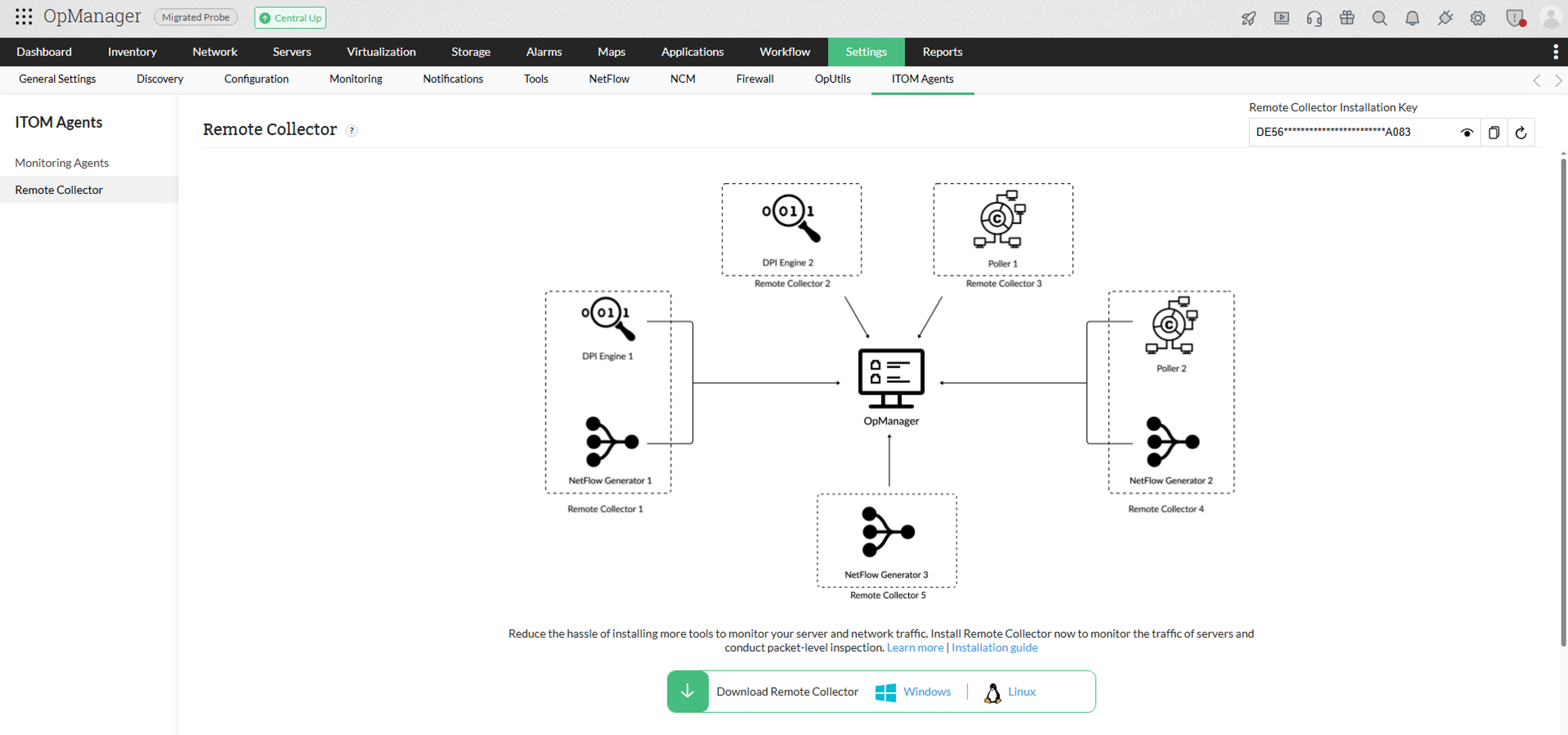
Installation & Configuration Steps
Choose Agent Type during installation
- Options available: Mini Poller, NetFlow Generator, NetSpeed Tracker, or DPI Engine.
- Select the mode based on monitoring requirements.
Post-installation configuration
- Navigate to
Settings > ITOM Agent > Remote Collector > Actionsin OpManager. - Enable/disable functional modes (Mini Poller, DPI Engine, NetSpeed Tracker, NetFlow Generator).
Ethernet Card Selection
- Choose the Ethernet card to capture and analyze raw packets.
- Supports Deep Packet Inspection and NetFlow translation.
NetFlow Generator setup
- Configure up to 5 listener ports under
Settings > General Settings > Server Settings.
Limitations
- Mini Poller is supported only in HTTPS-enabled OpManager setups.
- Requires correct Ethernet card configuration for DPI and NetFlow functionalities.
- For OpManager MSP, only the Mini Poller functionality will be enabled under Remote Collector.
This feature enhances OpManager’s distributed monitoring capabilities by enabling efficient polling at scale and advanced packet-level insights.