VoIP Monitor Reports
OpManager's VoIP monitoring feature provides comprehensive insights into the performance and quality of VoIP call paths across your network. By leveraging Cisco's IP SLA technology, OpManager simulates VoIP traffic between source and destination routers, enabling proactive monitoring of key metrics such as latency, jitter, packet loss, and Mean Opinion Score (MOS). These reports assist network administrators in identifying and resolving issues that affect VoIP call quality.
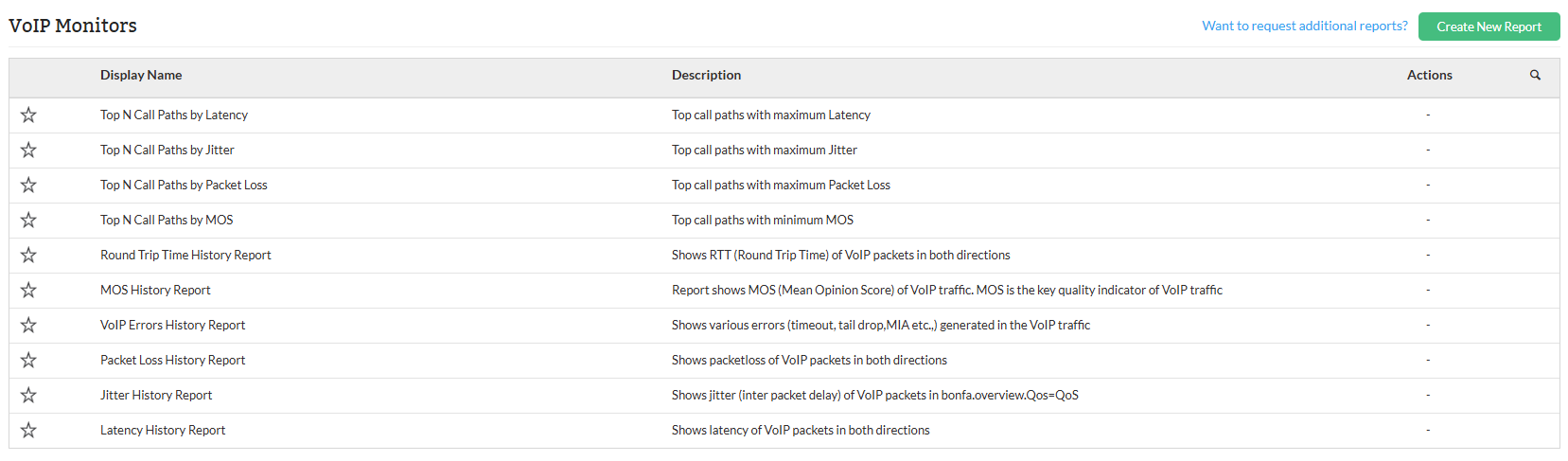
VoIP Monitor Reports in OpManager offer detailed information into a wide range of performance and quality metrics, including:
- Latency: Measures the delay in packet transmission, affecting the responsiveness of VoIP calls.
- Jitter: Indicates the variability in packet arrival times, leading to potential audio issues.
- Packet Loss: Represents the percentage of packets lost during transmission, impacting call clarity.
- Mean Opinion Score (MOS): A numerical indicator of call quality, with higher scores denoting better quality.
- VoIP Errors: Includes various error types such as timeouts, tail drops, MIA, and out-of-sequence packets, which can disrupt VoIP communication.
By analyzing these metrics, network administrators can proactively monitor VoIP performance, identify problem areas, and implement corrective measures to ensure high-quality voice communication across the network.
Types of VoIP monitor reports
The following are the default VoIP Monitor Reports available:
| Report Name | Description | Available Columns | Available Filters |
|---|---|---|---|
| Top N Call Paths by Latency | Lists the top call paths by latency, highlighting the minimum, maximum, and average round-trip times. Useful for identifying latency bottlenecks in high-priority paths like VoIP. | Source, Destination, Min, Max, Avg | Period |
| Top N Call Paths by Jitter | Tracks jitter across call paths, measuring variation in latency over time. Helps assess stability and quality of communication paths for sensitive applications like VoIP. | Source, Destination, Min, Max, Avg | |
| Top N Call Paths by Packet Loss | Highlights packet loss across call paths, showing data loss during transmission. Crucial for evaluating network reliability and communication quality. | Source, Destination, Min, Max, Avg | |
| Top N Call Paths by MOS | Displays the Mean Opinion Score (MOS), a measure of voice quality. Higher scores indicate better quality. | Source, Destination, Min, Max, Avg | |
| Round Trip Time History Report | Provides historical round-trip times (RTT) between source and destination. Useful for assessing network latency and detecting performance issues over time. | Date and Time, Source, Destination, Min. RTT, Max. RTT, Avg. RTT | |
| MOS History Report | Provides historical Mean Opinion Score (MOS) between source and destination. Helps track voice quality trends and identify performance-related issues. | Date and Time, Source, Destination, Min, Max, Avg | |
| VoIP Errors History Report | Tracks VoIP-related errors like packet loss, late arrivals, missing packets, and sequence issues. Useful for identifying and troubleshooting communication problems. | Date and Time, Source, Destination, Src-Dst Pack.Loss, Dst-Src Pack.Loss, Pack. Late Arrival, MIA, Out Of Sequence | |
| Packet Loss History Report | Monitors packet loss between source and destination over time. Helps detect issues impacting call quality and data transmission. | Date and Time, Source, Destination, Src-Dst Pack.Loss, Dst-Src Pack.Loss | |
| Jitter History Report | Tracks jitter over time by measuring positive, negative, and average variations in packet arrival times in both directions. Useful for diagnosing instability in real-time communication. | Date and Time, Source, Destination, Pos. Jitter(Src-Dst), Neg. Jitter(Src-Dst), Avg. Jitter(Src-Dst), Pos. Jitter(Dst-Src), Neg. Jitter(Dst-Src), Avg. Jitter(Dst-Src) | |
| Latency History Report | Tracks latency between source and destination over time, including min, max, and average delay in both directions. Useful for identifying communication delays in real-time applications. | Date and Time, Source, Destination, Min(Src-Dst), Max(Src-Dst), Avg(Src-Dst), Min(Dst-Src), Max(Dst-Src), Avg(Dst-Src) |
To know more about the Available Filters in various reports of OpManager, Click here.
Users can also export reports to PDF or Excel, schedule them for automated generation within defined business hours or time windows.
For more information on configuring VoIP monitors and templates, refer to the VoIP Monitoring Help page. Click here to know more about other report types in OpManager.