Integrating AWS-ACM Certificate Manager with PAM360
PAM360 facilitates integration with AWS Certificate Manager (ACM) — an SSL certificate manager and private certificate authority. This integration enables you to request and obtain certificates from AWS-ACM into PAM360. In addition, you can deploy certificates from PAM360 to the AWS-ACM repository.
It also allows you to renew certificate requests and automate the end-to-end lifecycle management of SSL/TLS certificates issued and managed by ACM, directly from the PAM360 web interface.
- How Does the PAM360 — AWS-ACM Integration Work?
- Discovering AWS-ACM Certificates into PAM360
- Deploying Certificates to AWS-ACM
- Requesting Certificates from AWS-ACM
- Domain Validation, Certificate Issue, and Deployment
- Managing Certificates Issued by AWS-ACM
1. How Does the PAM360 — AWS-ACM Integration Work?
Through PAM360's certificate discovery feature, import AWS-ACM certificates into the PAM360 repository. Once discovery is done, PAM360 displays all the AWS certificates deployed to all regions under the AWS tab. Click here to learn more about the supported regions in AWS.
There are two types of certificates in AWS-ACM: Public and Private Certificates. AWS-ACM allows you to use public certificates provided by ACM or certificates that are imported into ACM. If you use ACM Private CA to create a CA, ACM can issue certificates and automate certificate renewals from that private CA.
PAM360 allows you to create new certificates and manage them in the product. AWS-ACM does not support the creation of new certificates. However, you can create, request, and import certificates from PAM360 into AWS-ACM and manage them from the AWS Management Console. Click here to learn more about importing certificates into AWS-ACM.
Caution
- To perform the AWS-ACM integration, administrators require the following user role permissions in AWS-ACM: AWSCertificateManagerFullAccess. This policy provides full access to all ACM actions and resources. Click here to read more about the user role policies in AWS.
- This integration requires API AccessKey and SecretKey. These credentials are also required to perform AWS certificate discovery to import AWS-ACM certificates into PAM360.
2. Discovering AWS-ACM Certificates into PAM360
PAM360 enables you to discover, import, and configure expiry notifications for SSL certificates hosted in the following Amazon Web Services: AWS Certificate Manager (ACM) and AWS Identity and Access Management (IAM). Click here for detailed steps on how to discover AWS-ACM certificates.
Caution
When you perform any operation on the AWS certificates added before PAM360 build 6200, PAM360 automatically performs certificate rediscovery and re-populates the data in the table to get the Amazon Resource Name (ARN) ID. Please note that this automatic rediscovery happens only from PAM360 build 6200 onwards.
In the Certificates >> AWS tab,
- Public Certificates requested from Amazon are marked as Amazon Issued.
- Private Certificates are marked as Private.
- Certificates that are imported from PAM360 to AWS-ACM are marked as Imported.
3. Deploying Certificates to AWS-ACM
PAM360's integration with AWS-ACM facilitates you to deploy certificates to the AWS-ACM and manage them from their console. To deploy certificates to AWS-ACM, follow the below steps:
- Navigate to Certificates >> Certificates.
- Select the required AWS certificate and click Deploy >> AWS-ACM from the top menu.
- In the dialog box that appears, choose the following attributes:
- AWS Credential from the dropdown.
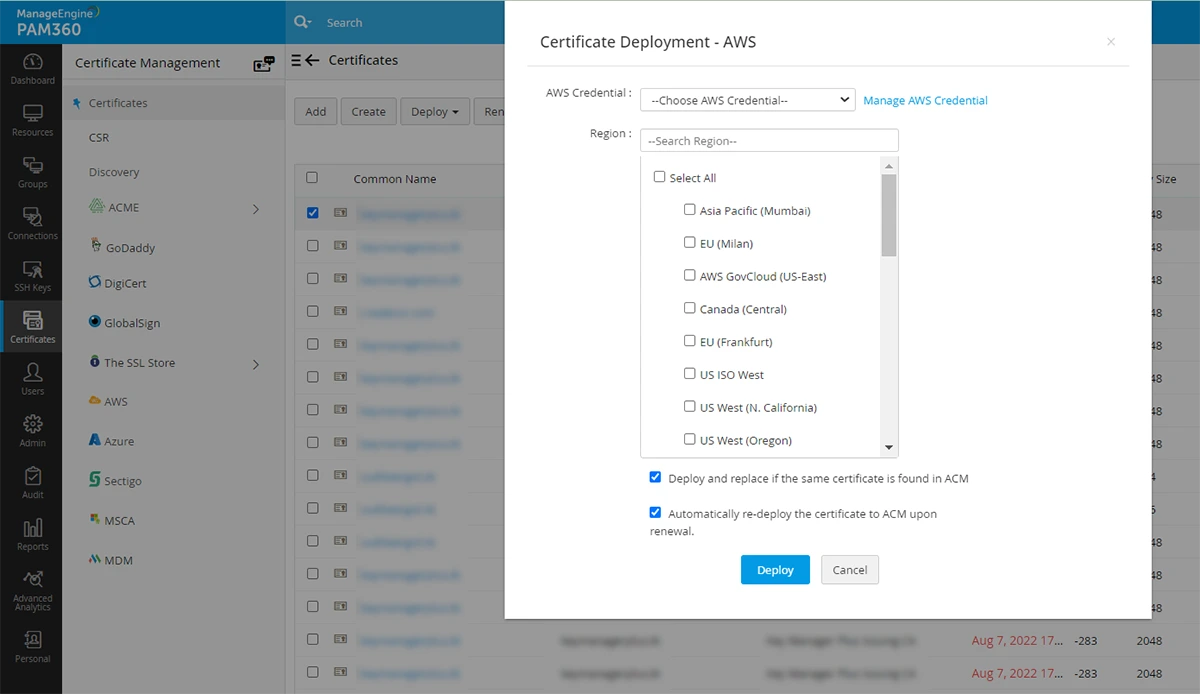
- Select one or more Regions using the checkboxes.
Caution
Certificates can be deployed to all the supported regions only if the private keys are available.
- Deploy and replace if the same certificate is found in ACM: If you wish to replace the certificate in ACM after deployment, in case it turns out to be a duplicate, select this option.
- Automatically re-deploy the certificate to ACM upon renewal: Select this option to automatically re-deploy the certificate to ACM every time it is renewed so that the certificate in PAM360 and AWS-ACM are always in sync.
Additional Detail
If there is a mismatch in the deployed certificates, they will be marked in red in the AWS tab within PAM360.
- AWS Credential from the dropdown.
4. Requesting Certificates from AWS-ACM
PAM360 allows you to request both Public and Private certificates from AWS-ACM and manage them from the PAM360 interface.
4.1 Requesting Public Certificates
- Navigate to Certificates >> AWS.
- Click the Request Certificate dropdown and click Public Certificate.

- In the page that appears, fill in the following attributes:
- Select your AWS Credential from the dropdown.
- Enter the Domain Name and SAN.
- Choose a Validation Type: Email or DNS.
- Click the Region from the dropdown.
- Now, click Request Certificate.
The certificate matching the credentials you have provided will be imported into PAM360. Please note that Public Certificates from AWS-ACM do not have a private key.
4.2 Requesting Private Certificates
- Navigate to Certificates >> AWS.
- Click the Request Certificate dropdown and click Private Certificate.
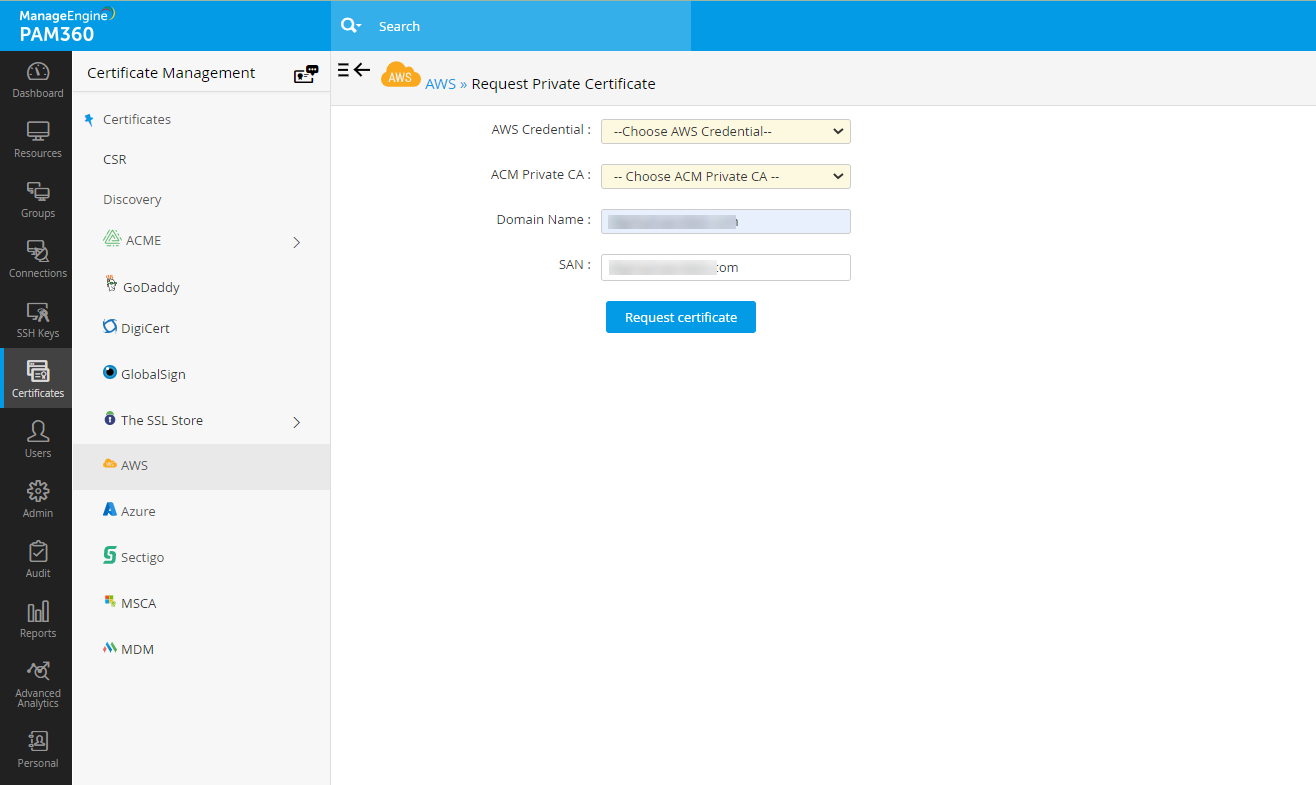
- In the page that appears, fill in the following attributes:
- Select your AWS Credential from the dropdown.
- Select an ACM Private CA from the dropdown.
- Enter the Domain Name and SAN.
- Now, click Request Certificate.
Upon validation, the requested certificates will be issued and added to the repository.
4.3 Requesting Certificate Status
Once you request certificates from AWS-ACM, click the Request Status option from the top menu to view and validate the status of the certificates.
On this page, you can view the request, renewal, and domain validation status of both private and public certificates. Once a certificate request is created, the status of the certificate will appear in this table as Pending Validation/Deploy Challenge/Sync Records.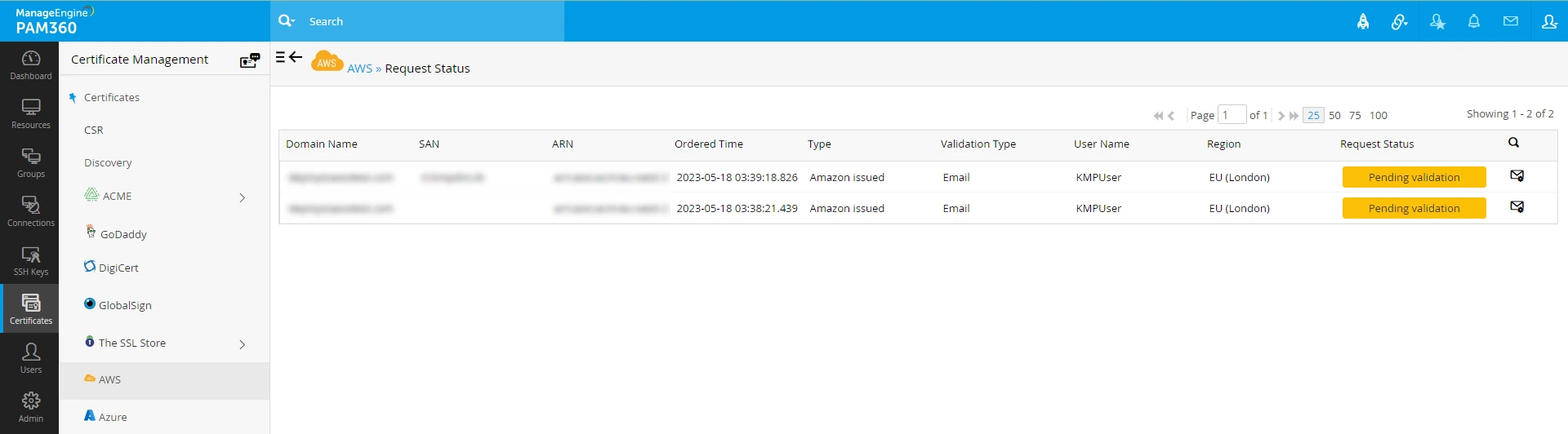
If you have configured DNS-based challenge verification, click the status to deploy the challenge. The status will change to Deploy Challenge, and the validation process will be initiated. Upon completion, the status will be changed to Issued.
5. Domain Validation, Certificate Issue, and Deployment
Once the certificate authority receives your order, you will have to go through a process called domain validation and prove your ownership over the domain upon the completion of which you will receive the certificate. PAM360 supports all the two validation methods:
- Email Validation
- DNS Validation
5.1 Email Validation
- In email validation, the certificate authority sends a verification email to the approver email ID specified when placing the certificate order.
- This email will guide you through the steps that need to be performed to complete the validation procedure. Go to verify option and verify via email. Go to request status and click pending validation to obtain the certificates.
- After completing the steps, navigate to the PAM360 server, and switch to the AWS tab.
- Upon successful verification, the certificate authority issues the certificate which is fetched and added to PAM360's secure repository. You can access the certificate from the Certificates >> Certificates tab. Click here for more details on certificate deployment.
5.2 DNS Validation
If you have opted for DNS validation when ordering a public certificate with a provided details of the DNS:
- Go to the Request Status page and click the Deploy Challenge option to create the DNS record.
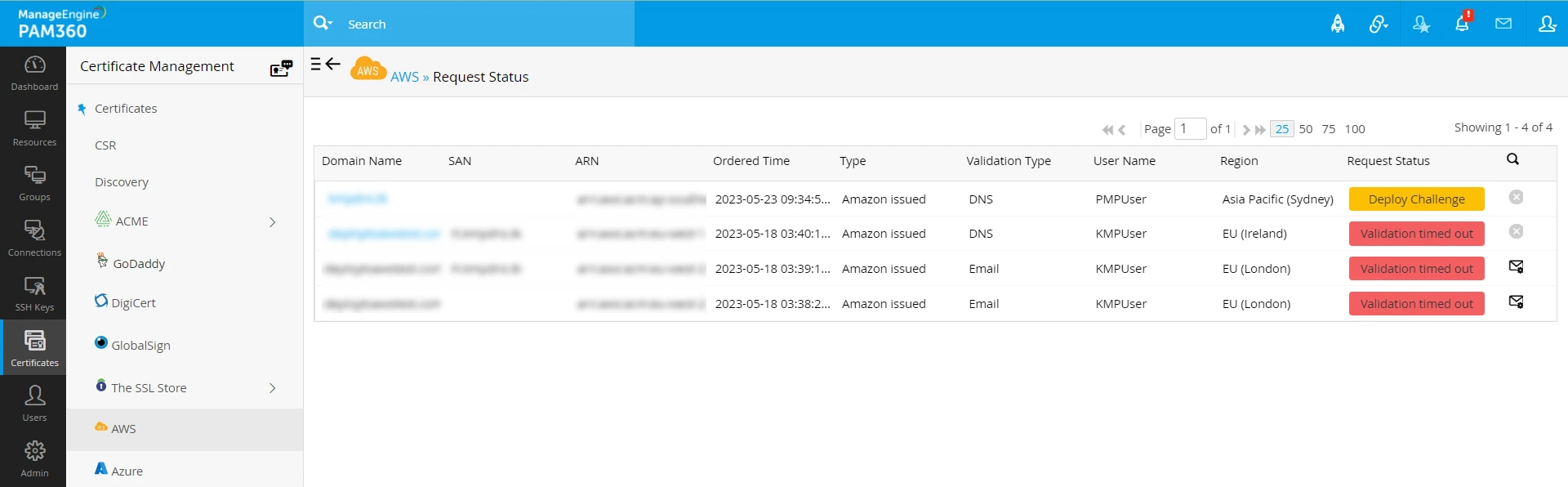
- The DNS challenge values and text records are automatically deployed in the corresponding DNS servers post the above action.
- Upon successful DNS validation, the certificate authority issues the certificate.
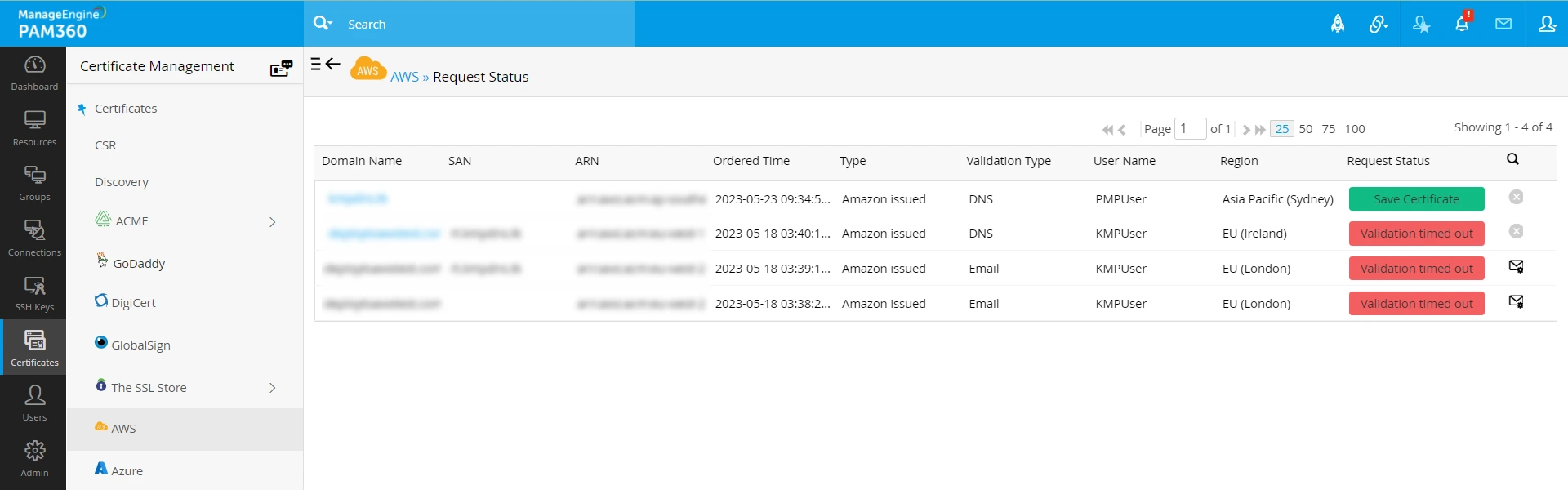
- Once the certificate is issued, the status will change accordingly, and you can access the certificate from the Certificates >> Certificates tab.
If you have opted for DNS validation when ordering a public certificate without the DNS details:
- Go to the Request Status page and click the Sync Records option to create the DNS record.
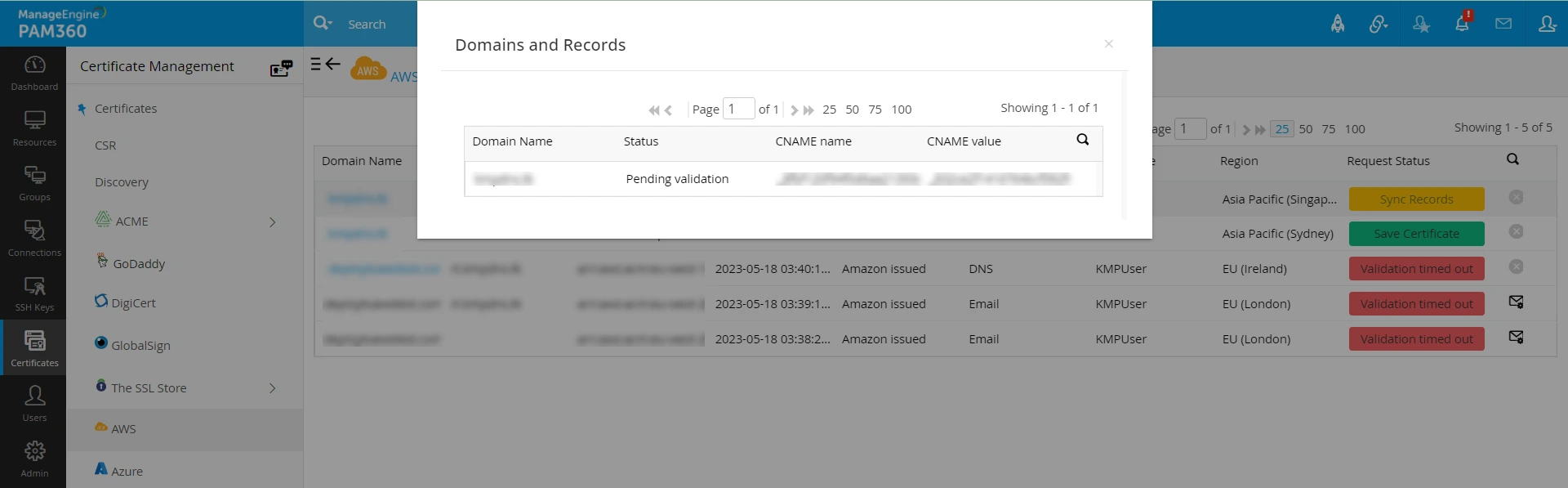
- The DNS challenge value and text record will be displayed in a pop-up. Copy and paste the text records manually into the domain server.

- You can sync the order's current status by clicking on the button under Request Status for that particular order.
- Upon successful DNS validation, the certificate authority issues the certificate and you can access the certificate from the Certificates >> Certificates tab.
6. Managing Certificates Issued by AWS-ACM
PAM360 allows you to renew private certificates. When a certificate renewal is requested from PAM360, the renewed certificate will be retrieved from AWS-ACM. However, if you renew a certificate in AWS-ACM, it is not automatically updated in PAM360. To fix the mismatch, rediscover the certificates in PAM360 and re-populate the data.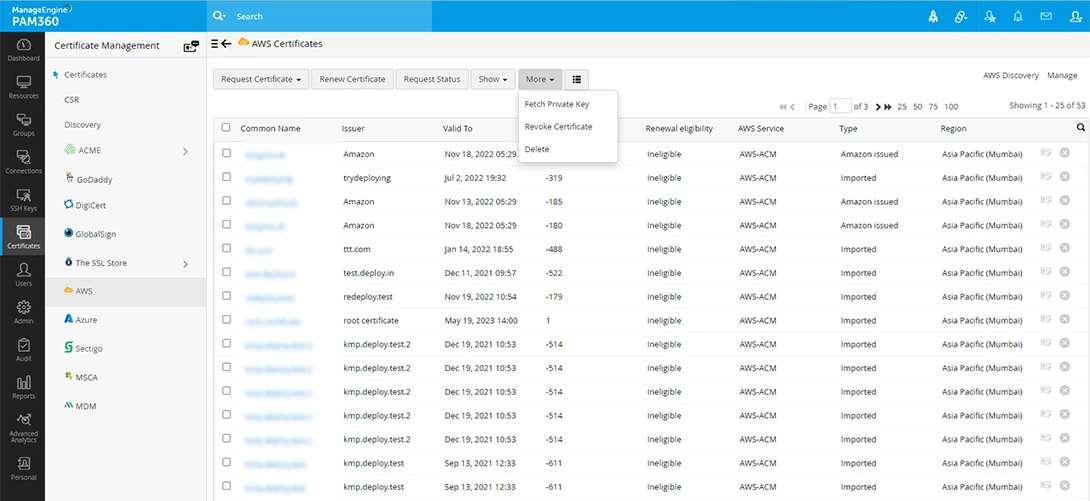
6.1 Renewing a Certificate
- Navigate to Certificates >> AWS.
- Select the required order and click Renew Certificate from the top menu.
- Complete the DNS validation procedure if necessary.
- On successful validation, the certificate will be issued and the new version will be automatically updated in the Certificates >> AWS tab.
Caution
Only the certificates that satisfy all criteria mentioned here will be renewed. Click here to read about AWS's eligibility criteria for certificate renewal.
6.2 Revoking a Certificate Request
- Navigate to Certificates >> AWS.
- Select the certificate that needs to be revoked and click More >> Revoke Certificate.
Caution
The revoke option applies only to private certificates in AWS-ACM. Revoking a certificate request removes the certificate entry from PAM360 only.
6.3 Fetching the Private Key
To fetch the private key of a private certificate, follow the below steps:
- Navigate to Certificates >> AWS.
- Select the required private certificate and click More >> Fetch Private Key from the top menu.
This operation fetches the private key of the selected private certificate from AWS-ACM.
Caution
This is a paid option and might incur costs as per your AWS-ACM license.
6.4 Deleting a Certificate
- Navigate to Certificates >> AWS.
- Select the required certificate and click More >> Delete from the top menu.
- The certificate request is deleted from the AWS tab.
Caution
Using the Delete option simply removes the certificate from the PAM360 interface. You can no longer manage it from the product. However, it does not delete the certificate from AWS-ACM. The certificate can still be viewed and managed from the AWS console.