Password Reset Listener
For builds 8310 and below, please refer to this help document.
Password reset is one of the critical functions performed by PAM360 to secure the sensitive data within an organization from unauthorized access. When passwords of critical systems are reset, they should be updated in the dependent services and systems that utilize this password to prevent service disruptions.
The Password Reset Listener in PAM360 is an event-based trigger that executes predefined actions during password reset operations. It supports both pre-reset and post-reset execution modes, enabling credentials to be updated or synchronized with external applications and services at the appropriate stage of the reset process. This ensures credential consistency across systems, applications, and databases, prevents authentication failures, reduces downtime, and simplifies credential management.
This help document covers the following topics in detail:
- Roles and Permissions
- Workflow
- Follow-Up Actions Supported by PAM360
- Adding a Password Reset Listener
- Approving a Password Reset Listener
- Frequently Asked Questions
1. Roles and Permissions
By default, users with the Privileged Administrator and Administrator roles can add, manage, and configure password reset listeners in PAM360. Additionally, PAM360 allows administrators to configure custom user roles with the Manage Password Reset Listener privilege within Admin >> Customization >> Roles >> Custom Settings to add, manage, and approve password reset listeners.
2. Workflow
Whenever the password of an account stored in the PAM360 repository is rotated, the configured Password Reset Listener in PAM360 invokes a script or executable to update the passwords on dependent services and systems. The listener scripts can be invoked when the local account passwords are rotated and when the passwords of resource types for which remote password reset is not natively supported by PAM360 are rotated. Administrators can configure password reset listener scripts individually for each resource type, including the custom (i.e., user-defined) resource types.
- The listener scripts are executed in the same way as they would be executed from the operating system’s command prompt.
- If the scripts require another program to run (for example, cscript c:\scripts\changepassword.vbs old_password new_password), it can be specified as a Pre-Command.
- By default, PAM360 passes parameters such as the resource name, DNS name, account name, old password, and new password as arguments to the script.
- Additional arguments can also be configured through the Additional Parameters field.
For security reasons, the password reset listener scripts run with the same privilege as the user account running the PAM360 server, and a dual control mechanism ensures that any add, edit, or delete operation on password reset listeners is approved by another administrator. PAM360 will not invoke the script until it has been reviewed and approved.
The password reset listeners are invoked from a separate thread, so it does not affect the password reset process itself. Listener scripts are stored securely in the PAM360 database, ensuring that they benefit from existing database security and backup configurations.
3. Follow-Up Actions Supported by PAM360
PAM360 enables administrators to execute a wide range of event-driven follow-up actions using listener scripts during password reset operations. These actions can be configured to run before or after a password reset, ensuring that dependent services, applications, and systems remain synchronized with credential changes while minimizing operational risk and disruption.
3.1 Sample Pre-Reset Actions
Pre-reset listener scripts help validate system readiness and reduce the risk of failed or unsafe password resets. Common pre-reset use cases include:
- Verifying that the target application or service account is active, unlocked, and not disabled before initiating the password reset.
- Exporting or securely backing up the existing password and temporarily logging account details to a protected location, a practice commonly used during high-risk or business-critical resets.
- Running custom validation logic to ensure all prerequisite conditions are met before proceeding.
3.2 Sample Post-Reset Actions
Post-reset listener scripts ensure that updated credentials are immediately applied and consumed across the environment. Supported actions include:
- Restarting dependent services immediately after password reset to ensure continuity without any service disruptions.
- Updating the credentials of Windows scheduled tasks and other associated processes to prevent authentication failures.
- For services that use accounts whose passwords are rotated in PAM360, listener scripts can automatically update the stored credentials in the service’s Logon property.
- If accounts of network devices are added as resources in PAM360, their passwords can first be reset locally in PAM360, and then a custom listener script can be triggered to connect to the devices and apply the updated passwords directly on them.
- Sending password reset events and related metadata to SIEM or monitoring platforms such as Splunk for audit, compliance, and security monitoring.
4. Adding a Password Reset Listener
To set up a new password reset listener, navigate to Admin >> Password Management >> Password Reset Listener and click Add Listener button in the top pane. In the pop-up window that appears, enter the following details:
- Listener Name - Enter a name for the password reset listener you are creating. Provide a distinctive and easily identifiable name to help with efficient management.
Caution
The name should include the listener script's file format as a suffix. For example: win-10-11F.bat
- Listener Script - Click the Browse button and upload the script that should run as part of the PAM360 password reset process. The allowed maximum file size is 5 MB.
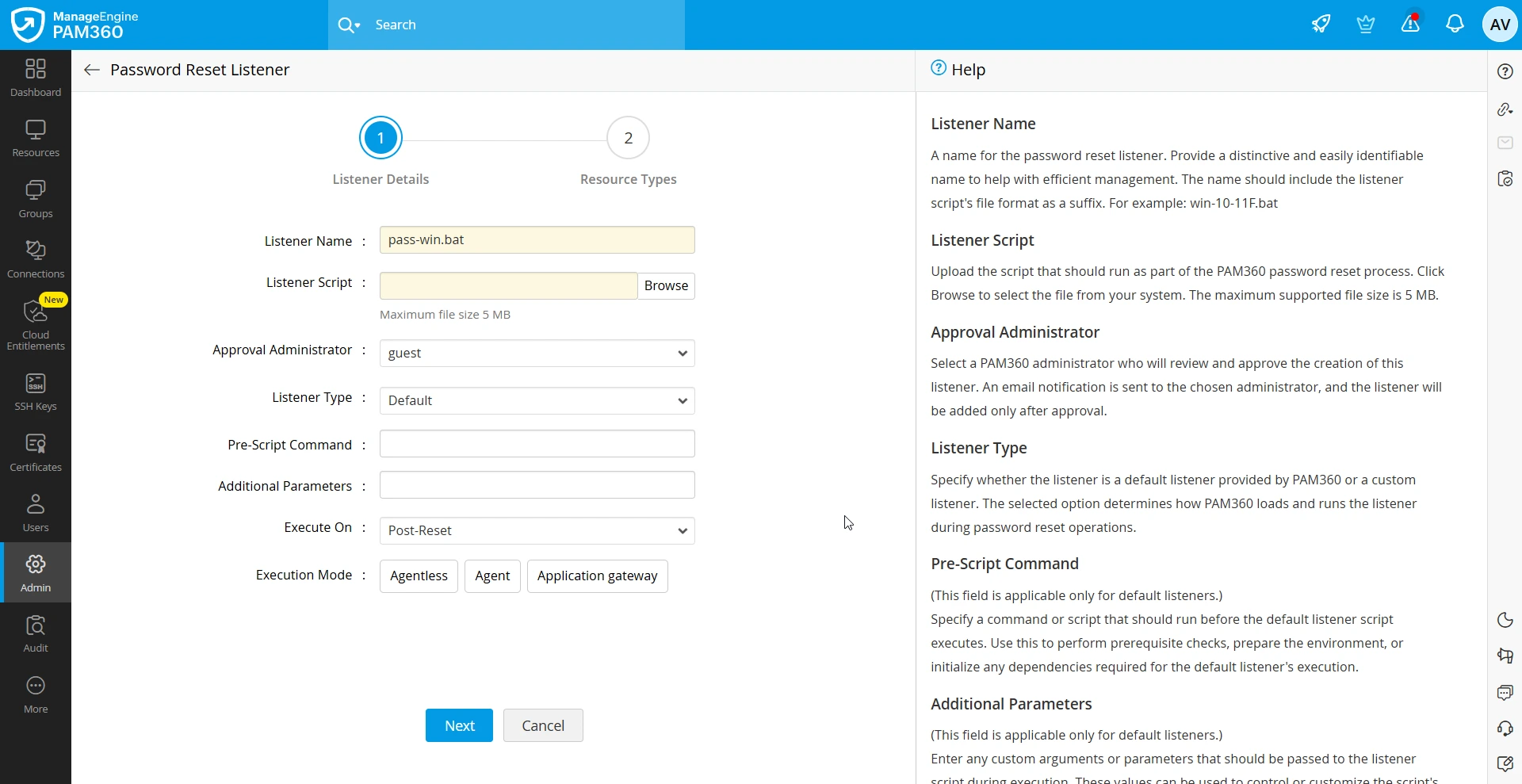
- Approval Administrator - Select a PAM360 administrator who will review and approve the creation of this listener. An email notification is sent to the chosen administrator, and the listener will be added only after approval.
- Listener Type - Specify whether the listener is a Default listener provided by PAM360 or a Custom listener. The selected option determines how PAM360 loads and runs the listener during password reset operations.
Additional Detail
PAM360 allows you to implement your own custom listeners. A custom listener provides the flexibility to only define and execute any post-password-reset follow-up action beyond the standard listener scripts. This can be achieved by writing your own implementation class that integrates with PAM360 through the provided interface.
- If you have selected the Listener Type as Default, follow these steps:
- Pre-Scipt Command - If the listener script you are adding requires another program to run (for example, cscript c:\scripts\changepassword.vbs old_password new_password), specify it in this field.
- Additional Parameters - If you want to pass additional parameters to the script, specify them in this field. These parameters will be passed as arguments to the script during execution in the specified order.
- If you have selected the Listener Type as Custom, follow these steps:
Additional Detail
By default, PAM360 provides a predefined listener interface and its corresponding implementation class to execute PowerShell-based custom listener scripts. In this case, simply uploading the respective listener script is sufficient. If you need to include additional password reset attributes or use a different scripting language, you should define a new listener interface class (Add New Class) along with its implementation class. In this scenario, uploading a listener script is not required.
- Class Name - Enter the Java class name of the listener interface.
- Implementation Class - Write your own implementation class that implements the PMPListenerInterface.java interface to define your custom listener. For example,Implement your class in such a way that resource or account properties are passed as arguments. You can pass various resource and account properties as arguments to your implementation class. For example, to access the Resource Name, you can use the resourceProps.get("RESOURCENAME") syntax. You can retrieve the value of any property using the keys listed below.
public interface PMPListenerInterface {
static final Logger LOG = Logger.getLogger(PMPListenerInterface.class.getName());
public String executeListener(Properties resourceProps, Properties accountProps, String listenerFilePath, String oldPassword) throws Exception;}Resource Properties (resourceProps) RESOURCENAME
Name of the resource added in PAM360.
IPADDRESS
DNS name or IP address of the resource.
RESOURCEURL
Resource URL configured for the resource.
DOMAINNAME
Domain name for Windows Domain resources.
SSHPORT
SSH port number if the device supports SSH connections.
RESOURCEDESC
Description of the resource.
LOCATION
Location of the resource.
DEPARTMENT
Department to which the resource belongs.
Custom Resource Columns
The label name of each custom column will serve as the key. Returns the respective account parameter details.
Account Properties (accountProps) DESCRIPTION
Description of the account.
LOGINNAME
Login name of the user account added in PAM360.
PASSWORD
Password of the user account.
DOMAINNAME
Domain name for Windows Domain resources.
COMPLIANTSTATUS
Whether the password complies with the password policy configured in PAM360.
COMPLIANTREASON
Provides the reason if the password does not comply with the policy.
EXPIRYSTATUS
Status of password expiry for the account.
PASSWRDSYNCSTATUS
Whether the password is in sync with the password set on the remote resource.
Custom Account Columns
Returns the respective account parameter details. The label name of each custom column will serve as the key.
Other Arguments listenerFilePath
Path to the script or file to be invoked as the listener. You can also specify this file while configuring the listener in PAM360.
oldPassword
Old password passed to the implementation class to facilitate the password reset operation.
Below is an example of a custom implementation class designed to execute a PowerShell script using the listener mechanism:public class PowerShellListener implements PAM360ListenerInterface {
public String executeListener(Properties resourceProps, Properties accountProps, String listenerFilePath, String oldPassword) throws Exception {
String message = "Executed Successfully";// used for audit reason
// got the properties
// call the powershell script}}Caution
If you are using a new custom implementation class, convert your implementation class into a .jar file and place the JAR file in the PAM360 installation directory for Agentless execution or place the JAR file in the corresponding Application Gateway deployed server for Application Gateway execution. Restart the respective service later for the JAR file to take effect.
- Description (New Custom Listener) - If you have opted for Add New Class, enter a brief description for the custom listener you are adding in this field.
- Execute On - Select the execution period of the script. Choose when the listener should be invoked within the PAM360 password reset workflow. You can configure it to run before the password reset (Pre-Reset) or after the reset is completed (Post-Reset).

- Execution Mode - Select how PAM360 should execute the listener script. The supported modes are:
- Agentless : Runs the script directly from PAM360 without requiring an agent on the target machine.
- Agent : Executes the script through the PAM360 Agent installed on the target system.
- Application Gateway : Executes the script through the Application Gateway, suitable for environments that require a secure intermediate channel.
Additional Details
- If all three execution modes are selected, PAM360 first checks whether the resource is associated to an agent or an Application Gateway. If an association is found, the script is executed through the corresponding mode. Otherwise, PAM360 defaults to executing the listener script directly.
- The resource types supported by the password reset listener depend on the selected execution mode:
- If Agentless is selected alone, the listener can be configured for all resource types.
- If any execution mode combination includes Agent (for example, Agent, Agentless and Agent, or Agentless, Agent, and Application Gateway), the listener is supported only for resource types - Windows, WindowsDomain, Linux, Mac, Solaris, HP UNIX and IBM AIX.
- If any execution mode combination includes Application Gateway (for example, Application Gateway or Agentless and Application Gateway), the listener is supported for all resource types except, Kubernetes, Cisco IOS, Cisco PIX, Cisco Cat OS and HP iLO.
- Now, click Next to navigate to the Resource Types association with the password reset listener.
- Resource Types - Select the resource types for which you want to configure this password reset listener. The supported resource types may vary depending on the chosen execution mode. The following list shows the resource types supported for execution via Agent, Agentless, and Application Gateway.
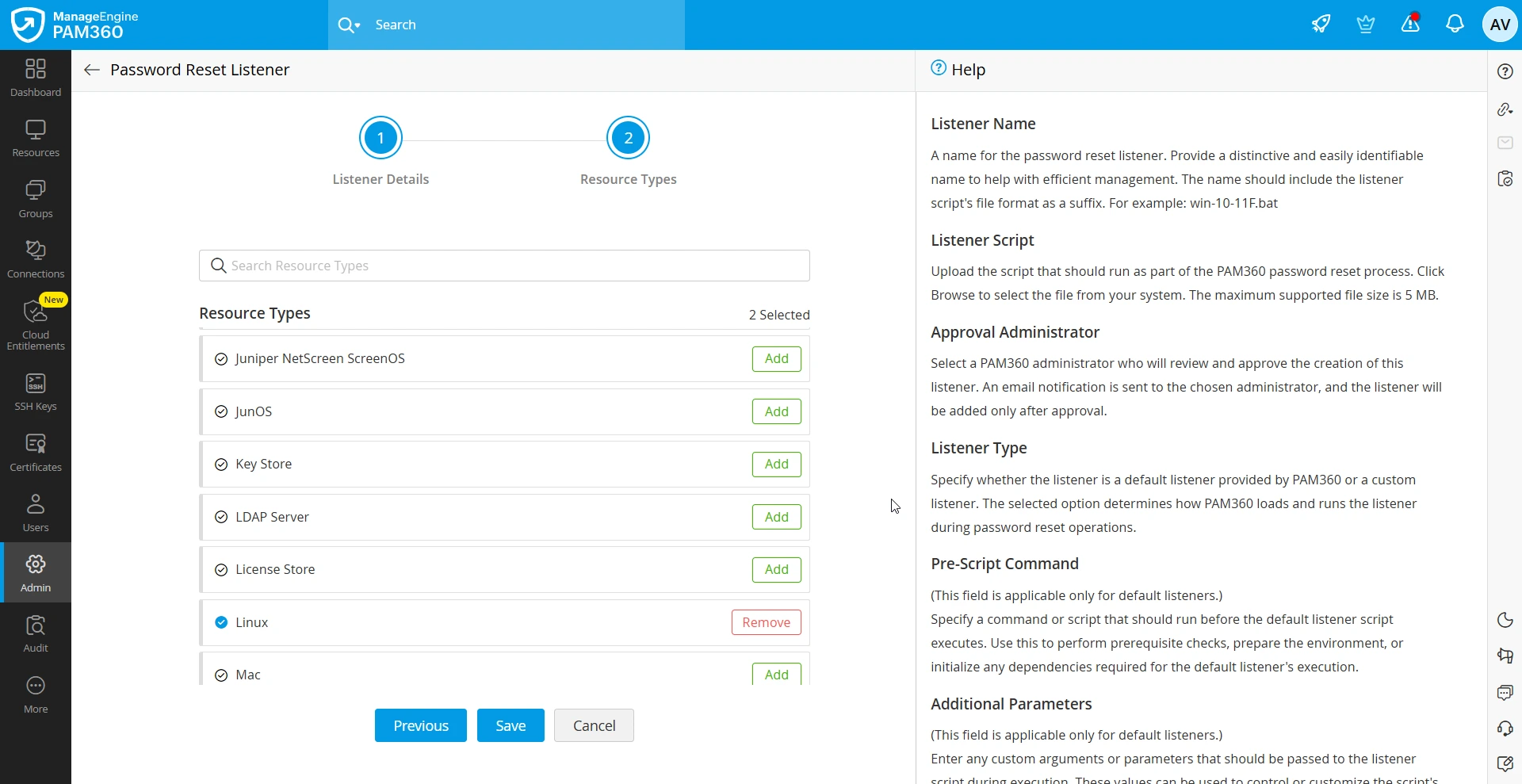
- Now, click Save to add the password reset listener.
The listener script will be added and associated with resource types successfully once it is approved by the selected administrator.
5. Approving a Password Reset Listener
By default, users with the administrator type user role can add the password reset listeners in PAM360. Additionally, all the password reset listeners added by an administrator should be approved by another administrator to ensure that only authorized and necessary scripts or programs are being invoked. Follow these steps to approve the addition of a password reset listener:
- Navigate to Admin >> Password Management >> Password Reset Listener.
- On the Password Reset Listener page, you will see the list of all the listeners added in your environment.
- Click the Approve button located under the Approval Status column beside the desired listener you want to approve.
All the events related to password reset listeners are audited in PAM360.
6. Frequently Asked Questions
1. What are the Execution Modes available in the Password Reset Listener?
Two execution modes are available: Pre (executes the script before the password reset) and Post (executes the script after the reset).
2. Are there any reports for resources configured with the Password Reset Listener?
Yes. Navigate to Reports >> Query Reports >> Resources and search for Password Reset Listener. The report lists resources configured with the listener.