Freshservice
Note: Only users with either of the following privilege levels in Freshservice can proceed with the configuration:
- Permissions to create, reply to, edit, and delete tickets
or
- The SD Agent, SD Supervisor, Admin, or Account Admin role
Before configuring Freshservice in ADAudit Plus, you need to get some details from your Freshservice ticketing tool. Refer to the official Freshservice help document to get the API token.
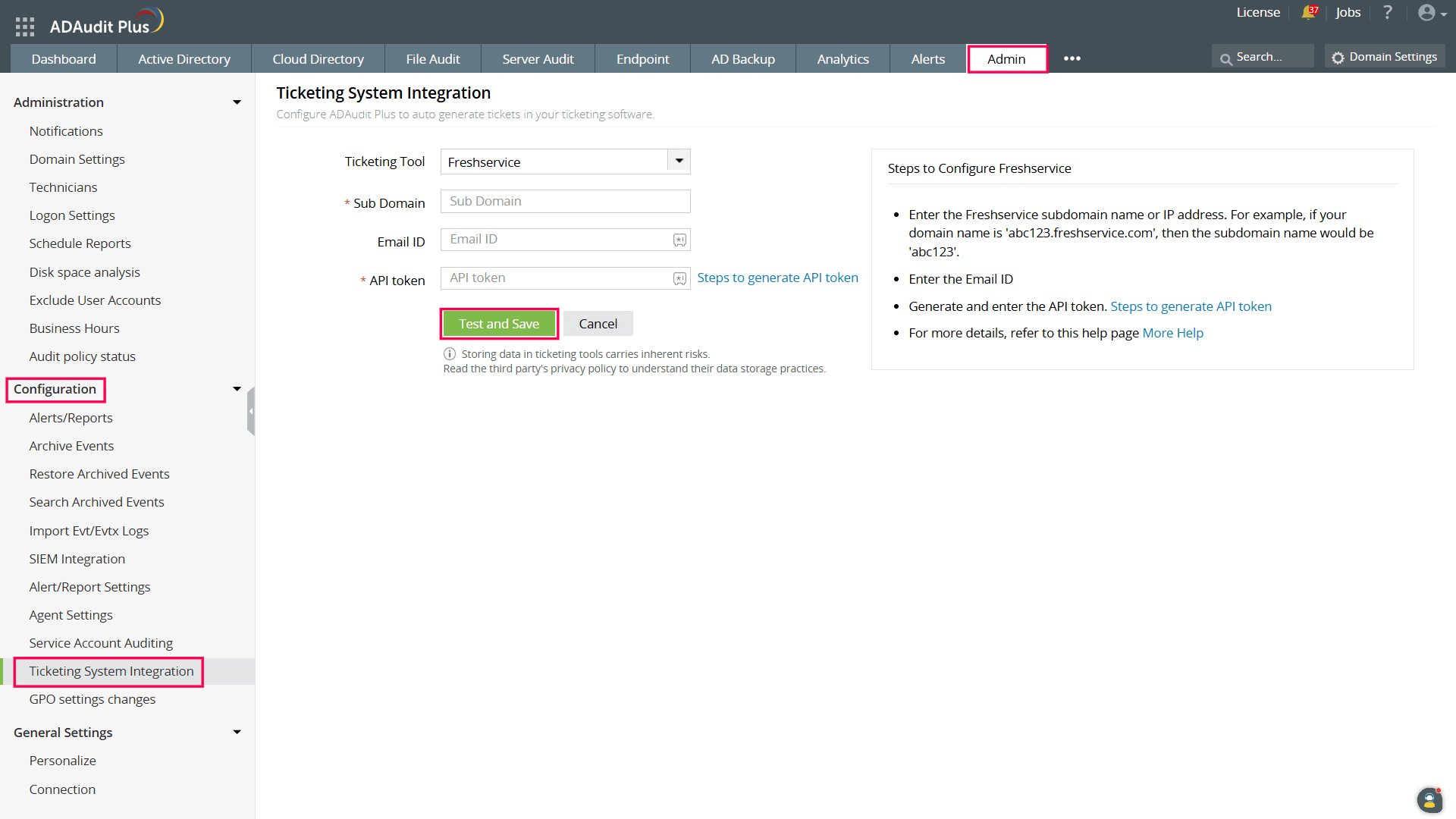
To configure Freshservice in ADAudit Plus:
- Log in to your ADAudit Plus web console.
- Navigate to Admin > Configuration > Ticketing System Integration.
- From the Ticketing Tool drop-down, select Freshservice.
- Enter the Freshservice Sub Domain.
- Enter the Freshservice account Email ID.
- Enter the API token retrieved by following the steps in the official Freshservice help document.
- Click the Test and Save button to establish communication and complete the configuration.
Don't see what you're looking for?
-
Visit our community
Post your questions in the forum.
-
Request additional resources
Send us your requirements.
-
Need implementation assistance?
Try OnboardPro