×
×
×
×
Focus Mode
Share
Theme Switcher
Share

Understanding User Roles in Endpoint Central

This document will explain the User Roles and permissions which can be mapped for users. Creating various users with only certain roles and permissions allow you to have a more robust control over who does what with the product. For a detailed understanding about the various user roles and the associated scope offered by the product, refer to the doc on Role differences

To create a new user, navigate to Admin -> General Settings -> User Administration -> Add User
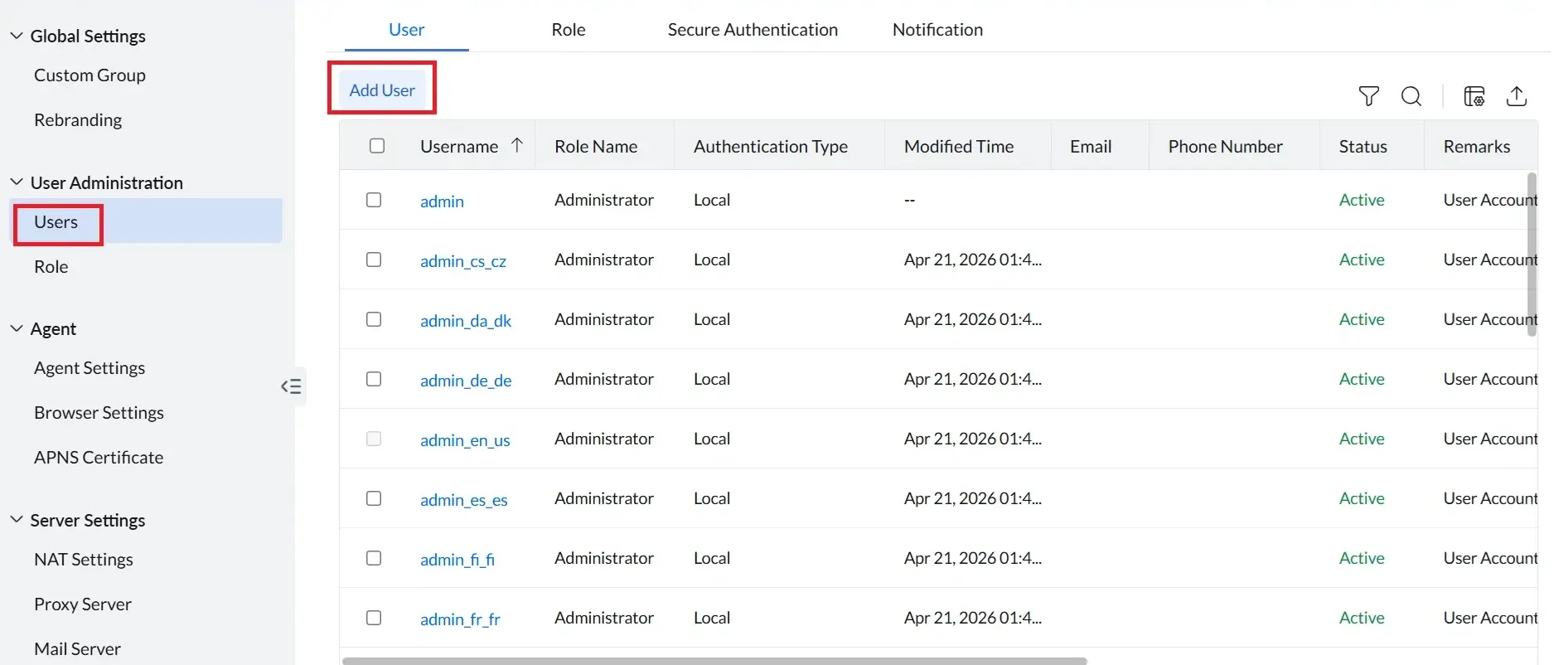
Understanding user roles

To create a new role, navigate to Admin -> General Settings -> User Administration -> Add Role
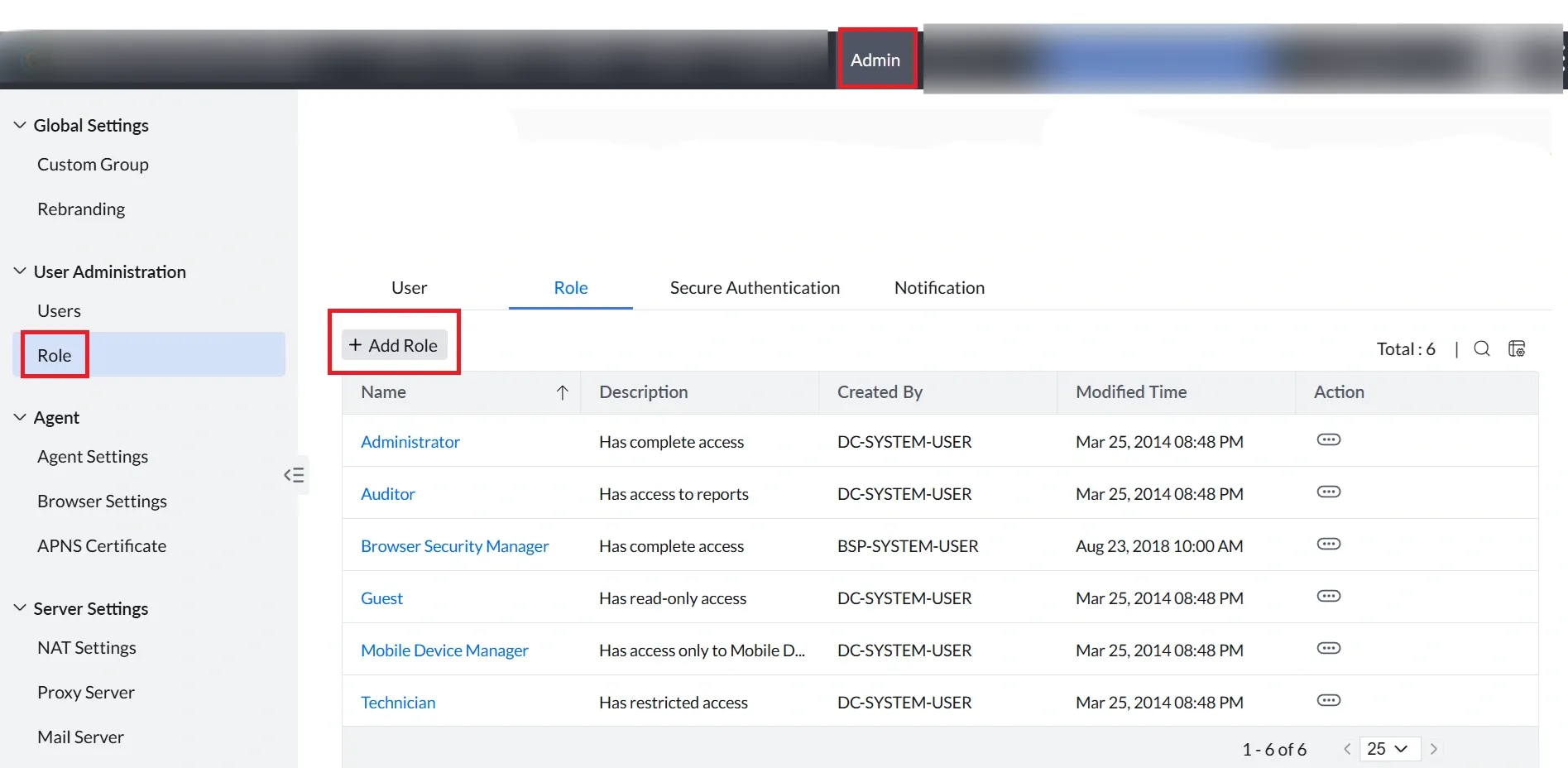
Understanding user roles

Pre-defined Roles

Pre-defined roles are built-in roles that represent common IT team profiles. They cannot be modified. The roles and modules shown depend on your product.

Administrator

Administrators have unrestricted access to all modules and settings in Endpoint Central. This is the highest-privilege pre-defined role and should be assigned only to personnel responsible for managing the full product.

ModuleAccess LevelDescription
ConfigurationsFull ControlCreate, edit, deploy, and delete all user and computer configurations and templates.
Patch ManagementFull ControlManage all patching features: approval settings, deployment policies, automated patch deployment, system health policies, and patch database settings.
Software DeploymentFull ControlCreate software packages, deploy and remove software, manage templates, and configure the Self Service Portal and its settings.
InventoryFull ControlView, edit, and manage all hardware and software inventory, license records, and scan configurations.
ToolsFull ControlAccess all Remote System Manager features: Task Manager, Services, Terminal, Wake on LAN, Remote Shutdown, Chat, and Announcements.
Remote Desktop SharingFull ControlInitiate and manage remote control sessions, view session history, and configure session confirmation requirements.
ReportsFull ControlView, create, schedule, and export all pre-defined, custom, and module-based reports.
MDM Control ModulesFull ControlManage all MDM capabilities: profile management, app management, inventory management, OS updates, and remote control.
OS ImagingFull ControlCreate and manage OS imaging configurations, boot media, and deployment templates.
OS DeploymentFull ControlConfigure and execute OS deployments, including tasks and post-deployment actions.
SensorsFull ControlCreate, configure, and manage sensor-based monitoring rules and alerts.
Endpoint AnalyticsFull ControlAccess and manage all endpoint analytics dashboards, reports, and configurations.
WorkflowFull ControlCreate, modify, and manage all workflow automations and approval processes.
Query ReportsFull ControlCreate, run, and manage custom query-based reports across all modules.
Scope of ManagementFull ControlAdd and remove computers, manage Remote Offices, install and uninstall agents, and configure settings.
Application ControlFull ControlCreate and manage application groups, policies, privilege groups, and exclusion policies.
Device ControlFull ControlCreate and manage Device Control policies, trusted device records, temporary access, and extension groupings.
BitLocker ManagementFull ControlCreate and manage BitLocker policies, deploy them to devices, and view recovery keys.
Browser SecurityFull ControlCreate and manage browser security policies, URL filtering rules, and browser configurations.
Endpoint DLPFull ControlManage all Endpoint DLP Plus features, including data loss prevention policies.
Vulnerability ManagementFull ControlView, assess, and remediate detected vulnerabilities. Configure misconfiguration rules and scan settings.

Auditor

Auditors have read-only access to reports and limited read access to MDM report data. They cannot view or interact with any operational module. This role is intended for compliance reviewers and internal audit teams who need report visibility without operational access.

ModuleAccess LevelDescription
ConfigurationsNo AccessCannot view or interact with configuration settings or deployed configurations.
Patch ManagementNo AccessCannot view patch status, deployment tasks, or any patch management data.
Software DeploymentNo AccessCannot view software packages, deployments, or the Self Service Portal.
InventoryNo AccessCannot access hardware or software inventory data.
ToolsNo AccessCannot access any Remote System Manager features.
Remote Desktop SharingNo AccessCannot initiate or view any remote control sessions.
ReportsRead AccessView all standard reports across the product. Cannot create, schedule, or export reports.
MDM Control ModulesRead AccessView MDM reports only. Cannot access MDM operational features such as profiles or enrollment.
OS ImagingNo AccessCannot access OS imaging features.
OS DeploymentNo AccessCannot access OS deployment features.
SensorsNo AccessCannot access sensor configurations or monitoring data.
Endpoint AnalyticsNo AccessCannot access endpoint analytics dashboards or data.
WorkflowNo AccessCannot view or interact with workflow configurations.
Query ReportsNo AccessCannot create or run query-based reports.
Scope of ManagementNo AccessCannot view or modify scope settings, Remote Offices, or computer management.
Application ControlNo AccessCannot access Application Control features or reports.
Device ControlNo AccessCannot access Device Control features or reports.
BitLocker ManagementNo AccessCannot access BitLocker Management features or reports.
Browser SecurityNo AccessCannot access Browser Security features.
Endpoint DLPNo AccessCannot access Endpoint DLP features or reports.
Vulnerability ManagementNo AccessCannot access Vulnerability Management features or reports.

Guest

Guests have read-only access to most operational modules. They cannot modify settings, perform actions, run query reports, or access scope management. This role is suited for stakeholders who need visibility into the environment without the ability to make changes.

ModuleAccess LevelDescription
ConfigurationsRead AccessView existing configurations and deployment status. Cannot create, edit, or delete configurations.
Patch ManagementRead AccessView patch status, deployment tasks, and policies. Cannot approve, deploy, or modify any patches.
Software DeploymentRead AccessView software packages and deployment status. Cannot deploy, remove, or create packages.
InventoryRead AccessView hardware and software inventory data. Cannot modify records, manage licenses, or configure scans.
ToolsRead AccessView Remote System Manager data such as session history and system information. Cannot perform actions.
Remote Desktop SharingRead AccessView remote session history. Cannot initiate remote control sessions or modify session settings.
ReportsRead AccessView all standard reports. Cannot create, schedule, or export reports.
MDM Control ModulesRead AccessView MDM module data across all control areas. Cannot modify any MDM settings or configurations.
OS ImagingRead AccessView OS imaging configurations and templates. Cannot create or modify imaging settings.
OS DeploymentRead AccessView OS deployment tasks and configurations. Cannot create or execute deployments.
SensorsRead AccessView sensor configurations and monitoring data. Cannot create or modify sensor rules.
Endpoint AnalyticsRead AccessView endpoint analytics dashboards and reports. Cannot modify analytics settings.
WorkflowRead AccessView workflow configurations and status. Cannot create or modify workflows.
Query ReportsNo AccessCannot create or run query-based reports.
Scope of ManagementNo AccessCannot view or modify scope settings, Remote Offices, or computer management.
Application ControlRead AccessView Application Control policies and groups. Cannot create, modify, or delete policies or groups.
Device ControlRead AccessView Device Control policies and trusted device records. Cannot create, modify, or publish policies.
BitLocker ManagementRead AccessView BitLocker policies and encryption status. Cannot create, modify, or deploy policies.
Browser SecurityRead AccessView Browser Security policies and configurations. Cannot create or modify policies.
Endpoint DLPRead AccessView Endpoint DLP policies and incidents. Cannot create, modify, or delete policies.
Vulnerability ManagementRead AccessView vulnerability scan results and remediation status. Cannot configure scan settings or initiate scans.

IT Asset Manager

IT Asset Managers have full control over Inventory and MDM Inventory, and read-only access to Sensors, Endpoint Analytics, and Workflow. All other modules are inaccessible. This role is designed for personnel responsible for tracking and managing the organization's hardware and software assets.

ModuleAccess LevelDescription
ConfigurationsNo AccessCannot view or interact with configuration settings or deployed configurations.
Patch ManagementNo AccessCannot view patch status, deployment tasks, or any patch management data.
Software DeploymentNo AccessCannot view software packages, deployments, or the Self Service Portal.
InventoryFull ControlView, edit, and manage all hardware and software inventory, license records, and scan configurations.
ToolsNo AccessCannot access any Remote System Manager features.
Remote Desktop SharingNo AccessCannot initiate or view any remote control sessions.
ReportsNo AccessCannot access standard or custom reports.
MDM Control ModulesFull ControlFull control over MDM Inventory. Cannot access other MDM areas such as profile management or remote control.
OS ImagingNo AccessCannot access OS imaging features.
OS DeploymentNo AccessCannot access OS deployment features.
SensorsRead AccessView sensor configurations and monitoring data. Cannot create or modify sensor rules.
Endpoint AnalyticsRead AccessView endpoint analytics dashboards and reports. Cannot modify analytics settings.
WorkflowRead AccessView workflow configurations and status. Cannot create or modify workflows.
Query ReportsNo AccessCannot create or run query-based reports.
Scope of ManagementNo AccessCannot view or modify scope settings, Remote Offices, or computer management.
Application ControlNo AccessCannot access Application Control features or reports.
Device ControlNo AccessCannot access Device Control features or reports.
BitLocker ManagementNo AccessCannot access BitLocker Management features or reports.
Browser SecurityNo AccessCannot access Browser Security features.
Endpoint DLPNo AccessCannot access Endpoint DLP features or reports.
Vulnerability ManagementNo AccessCannot access Vulnerability Management features or reports.

OS Deployer

OS Deployers have full control over OS Imaging and OS Deployment, together with Configurations and Patch Management. All other modules are inaccessible. This role is intended for technicians responsible for operating system provisioning and imaging workflows.

ModuleAccess LevelDescription
ConfigurationsFull ControlCreate, edit, deploy, and delete all user and computer configurations and templates.
Patch ManagementFull ControlManage all patching features: approval settings, deployment policies, automated patch deployment, system health policies, and patch database settings.
Software DeploymentNo AccessCannot view software packages, deployments, or the Self Service Portal.
InventoryNo AccessCannot access hardware or software inventory data.
ToolsNo AccessCannot access any Remote System Manager features.
Remote Desktop SharingNo AccessCannot initiate or view any remote control sessions.
ReportsNo AccessCannot access standard or custom reports.
MDM Control ModulesNo AccessCannot access MDM features.
OS ImagingFull ControlCreate and manage OS imaging configurations, boot media, and deployment templates.
OS DeploymentFull ControlConfigure and execute OS deployments, including tasks and post-deployment actions.
SensorsNo AccessCannot access sensor configurations or monitoring data.
Endpoint AnalyticsNo AccessCannot access endpoint analytics dashboards or data.
WorkflowNo AccessCannot view or interact with workflow configurations.
Query ReportsNo AccessCannot create or run query-based reports.
Scope of ManagementNo AccessCannot view or modify scope settings, Remote Offices, or computer management.
Application ControlNo AccessCannot access Application Control features or reports.
Device ControlNo AccessCannot access Device Control features or reports.
BitLocker ManagementNo AccessCannot access BitLocker Management features or reports.
Browser SecurityNo AccessCannot access Browser Security features.
Endpoint DLPNo AccessCannot access Endpoint DLP features or reports.
Vulnerability ManagementNo AccessCannot access Vulnerability Management features or reports.

Patch Manager

Patch Managers have full control over Patch Management and Software Deployment. All other modules are inaccessible. This role is designed for administrators whose responsibility is managing operating system and application patches across the environment.

ModuleAccess LevelDescription
ConfigurationsNo AccessCannot view or interact with configuration settings or deployed configurations.
Patch ManagementFull ControlManage all patching features: approval settings, deployment policies, automated patch deployment, system health policies, test groups, and patch database settings.
Software DeploymentFull ControlCreate software packages, deploy and remove software, manage templates, and configure the Self Service Portal and its settings.
InventoryNo AccessCannot access hardware or software inventory data.
ToolsNo AccessCannot access any Remote System Manager features.
Remote Desktop SharingNo AccessCannot initiate or view any remote control sessions.
ReportsNo AccessCannot access standard or custom reports.
MDM Control ModulesNo AccessCannot access MDM features.
OS ImagingNo AccessCannot access OS imaging features.
OS DeploymentNo AccessCannot access OS deployment features.
SensorsNo AccessCannot access sensor configurations or monitoring data.
Endpoint AnalyticsNo AccessCannot access endpoint analytics dashboards or data.
WorkflowNo AccessCannot view or interact with workflow configurations.
Query ReportsNo AccessCannot create or run query-based reports.
Scope of ManagementNo AccessCannot view or modify scope settings, Remote Offices, or computer management.
Application ControlNo AccessCannot access Application Control features or reports.
Device ControlNo AccessCannot access Device Control features or reports.
BitLocker ManagementNo AccessCannot access BitLocker Management features or reports.
Browser SecurityNo AccessCannot access Browser Security features.
Endpoint DLPNo AccessCannot access Endpoint DLP features or reports.
Vulnerability ManagementNo AccessCannot access Vulnerability Management features or reports.

Remote Desktop Viewer

Remote Desktop Viewers can start remote desktop connections and view details of users who have connected to a system. All other modules are inaccessible. This role is suited for IT support staff who need remote connectivity without access to policy or deployment features.

ModuleAccess LevelDescription
ConfigurationsNo AccessCannot view or interact with configuration settings or deployed configurations.
Patch ManagementNo AccessCannot view patch status, deployment tasks, or any patch management data.
Software DeploymentNo AccessCannot view software packages, deployments, or the Self Service Portal.
InventoryNo AccessCannot access hardware or software inventory data.
ToolsFull ControlAccess all Remote System Manager features: Task Manager, Services, Terminal, Wake on LAN, Remote Shutdown, Chat, and Announcements.
Remote Desktop SharingNo AccessCannot initiate or view any remote control sessions.
ReportsNo AccessCannot access standard or custom reports.
MDM Control ModulesNo AccessCannot access MDM features.
OS ImagingNo AccessCannot access OS imaging features.
OS DeploymentNo AccessCannot access OS deployment features.
SensorsNo AccessCannot access sensor configurations or monitoring data.
Endpoint AnalyticsNo AccessCannot access endpoint analytics dashboards or data.
WorkflowNo AccessCannot view or interact with workflow configurations.
Query ReportsNo AccessCannot create or run query-based reports.
Scope of ManagementNo AccessCannot view or modify scope settings, Remote Offices, or computer management.
Application ControlNo AccessCannot access Application Control features or reports.
Device ControlNo AccessCannot access Device Control features or reports.
BitLocker ManagementNo AccessCannot access BitLocker Management features or reports.
Browser SecurityNo AccessCannot access Browser Security features.
Endpoint DLPNo AccessCannot access Endpoint DLP features or reports.
Vulnerability ManagementNo AccessCannot access Vulnerability Management features or reports.

Technician

Technicians have a defined set of permissions for specific operations. They cannot perform the administrative operations on the Admin tab, such as defining the Scope of Management or changing mail server settings. Technicians can define and deploy configurations and collections, view all configurations (including those created by other users), suspend, modify, or redeploy the configurations that they defined, update the Vulnerability Database, and scan all modules.

ModuleAccess LevelDescription
ConfigurationsFull ControlCreate, edit, deploy, and delete all user and computer configurations and templates.
Patch ManagementRead AccessView patch status, deployment tasks, and policies. Cannot approve, deploy, or modify any patches.
Software DeploymentFull ControlCreate software packages, deploy and remove software, manage templates, and configure the Self Service Portal and its settings.
InventoryNo AccessCannot access hardware or software inventory data.
ToolsFull ControlAccess all Remote System Manager features: Task Manager, Services, Terminal, Wake on LAN, Remote Shutdown, Chat, and Announcements.
Remote Desktop SharingNo AccessCannot initiate or view any remote control sessions.
ReportsNo AccessCannot access standard or custom reports.
MDM Control ModulesNo AccessCannot access MDM features.
OS ImagingNo AccessCannot access OS imaging features.
OS DeploymentWrite AccessWrite access to OS Deployment.
SensorsWrite AccessWrite access to Sensors.
Endpoint AnalyticsWrite AccessWrite access to Endpoint Analytics.
WorkflowNo AccessCannot view or interact with workflow configurations.
Query ReportsNo AccessCannot create or run query-based reports.
Scope of ManagementNo AccessCannot view or modify scope settings, Remote Offices, or computer management.
Application ControlNo AccessCannot access Application Control features or reports.
Device ControlNo AccessCannot access Device Control features or reports.
BitLocker ManagementNo AccessCannot access BitLocker Management features or reports.
Browser SecurityNo AccessCannot access Browser Security features.
Endpoint DLPNo AccessCannot access Endpoint DLP features or reports.
Vulnerability ManagementNo AccessCannot access Vulnerability Management features or reports.

Mobile Device Manager

Mobile Device Managers have access only to Mobile Device Management features. All other modules are inaccessible. This role is designed for administrators managing the organization's mobile device fleet.

ModuleAccess LevelDescription
ConfigurationsNo AccessCannot view or interact with configuration settings or deployed configurations.
Patch ManagementNo AccessCannot view patch status, deployment tasks, or any patch management data.
Software DeploymentNo AccessCannot view software packages, deployments, or the Self Service Portal.
InventoryNo AccessCannot access hardware or software inventory data.
ToolsNo AccessCannot access any Remote System Manager features.
Remote Desktop SharingNo AccessCannot initiate or view any remote control sessions.
ReportsNo AccessCannot access standard or custom reports.
MDM: Profile ManagementFull ControlCreate, deploy, and manage device configuration profiles, including Wi-Fi and VPN.
MDM: App ManagementFull ControlDeploy, update, and remove applications on managed mobile devices.
MDM: InventoryFull ControlView and manage mobile device hardware and software inventory.
MDM: ReportsFull ControlView and export all MDM reports.
MDM: EnrollmentFull ControlEnroll and manage mobile devices. Configure enrollment settings and manage devices.
MDM: Content ManagementFull ControlManage and distribute content to enrolled mobile devices.
MDM: OS Update ManagementFull ControlConfigure and manage OS update policies for mobile devices.
MDM: Remote ControlFull ControlInitiate remote control sessions on managed mobile devices.
OS ImagingNo AccessCannot access OS imaging features.
OS DeploymentNo AccessCannot access OS deployment features.
SensorsNo AccessCannot access sensor configurations or monitoring data.
Endpoint AnalyticsNo AccessCannot access endpoint analytics dashboards or data.
WorkflowNo AccessCannot view or interact with workflow configurations.
Query ReportsNo AccessCannot create or run query-based reports.
Scope of ManagementNo AccessCannot view or modify scope settings, Remote Offices, or computer management.
Application ControlNo AccessCannot access Application Control features or reports.
Device ControlNo AccessCannot access Device Control features or reports.
BitLocker ManagementNo AccessCannot access BitLocker Management features or reports.
Browser SecurityNo AccessCannot access Browser Security features.
Endpoint DLPNo AccessCannot access Endpoint DLP features or reports.
Vulnerability ManagementNo AccessCannot access Vulnerability Management features or reports.

Vulnerability Manager

Vulnerability Managers have full control over the Vulnerability Management module only. All other modules are inaccessible. This role is designed for security administrators responsible for identifying, assessing, and remediating vulnerabilities across the managed endpoint estate.

ModuleAccess LevelDescription
ConfigurationsNo AccessCannot view or interact with configuration settings or deployed configurations.
Patch ManagementNo AccessCannot view patch status, deployment tasks, or any patch management data.
Software DeploymentNo AccessCannot view software packages, deployments, or the Self Service Portal.
InventoryNo AccessCannot access hardware or software inventory data.
ToolsNo AccessCannot access any Remote System Manager features.
Remote Desktop SharingNo AccessCannot initiate or view any remote control sessions.
ReportsNo AccessCannot access standard or custom reports.
MDM Control ModulesNo AccessCannot access MDM features.
OS ImagingNo AccessCannot access OS imaging features.
OS DeploymentNo AccessCannot access OS deployment features.
SensorsNo AccessCannot access sensor configurations or monitoring data.
Endpoint AnalyticsNo AccessCannot access endpoint analytics dashboards or data.
WorkflowNo AccessCannot view or interact with workflow configurations.
Query ReportsNo AccessCannot create or run query-based reports.
Scope of ManagementNo AccessCannot view or modify scope settings, Remote Offices, or computer management.
Application ControlNo AccessCannot access Application Control features or reports.
Device ControlNo AccessCannot access Device Control features or reports.
BitLocker ManagementNo AccessCannot access BitLocker Management features or reports.
Browser SecurityNo AccessCannot access Browser Security features.
Endpoint DLPNo AccessCannot access Endpoint DLP features or reports.
Vulnerability ManagementFull ControlView, assess, and remediate detected vulnerabilities. Configure misconfiguration rules and scan settings.

Endpoint Security Roles

The following roles apply to the Endpoint Security features of Endpoint Central. Each role grants full control over one or more security modules. All other product areas are inaccessible unless noted.

Application Control Manager

Application Control Managers have full control over the Application Control module and its reports. All other modules are inaccessible. This role is suited for security administrators responsible for defining and enforcing application allow and deny policies.

ModuleAccess LevelDescription
Application ControlFull ControlCreate, modify, publish, and delete application groups, policies, privilege groups, and access grants. Remove local admin rights from managed users.
Application Control ReportsFull ControlView, generate, and export all Application Control reports, including policy compliance reports.
All other modulesNo AccessNo access to Patch Management, Configurations, Software Deployment, Inventory, Device Control, BitLocker, Browser Security, Endpoint DLP, Vulnerability Management, or any other module.

BitLocker Manager

BitLocker Managers have full control over BitLocker Management features and its reports. All other modules are inaccessible. This role is intended for security administrators responsible for managing full-disk encryption across the endpoint estate.

ModuleAccess LevelDescription
BitLocker ManagementFull ControlCreate, modify, publish, and delete BitLocker policies. Deploy policies to computers and perform on-demand encryption actions.
BitLocker ReportsFull ControlView, generate, and export all BitLocker compliance and encryption status reports.
All other modulesNo AccessNo access to Patch Management, Configurations, Software Deployment, Inventory, Application Control, Device Control, Browser Security, Endpoint DLP, Vulnerability Management, MDM, or any other module.

Browser Security Manager

Browser Security Managers have full control over the Browser Security module. All other modules are inaccessible. This role is designed for administrators whose primary responsibility is browser security.

ModuleAccess LevelDescription
Browser SecurityFull ControlCreate and manage browser security policies, URL filtering rules, browser extensions, and baselines.
All other modulesNo AccessNo access to Patch Management, Configurations, Software Deployment, Inventory, Application Control, Device Control, BitLocker, Endpoint DLP, Vulnerability Management, or any other module.

Device Control Manager

Device Control Managers have full control over the Device Control module and its reports. All other modules are inaccessible. This role is intended for security administrators responsible for managing peripheral device access policies across endpoints.

ModuleAccess LevelDescription
Device ControlFull ControlCreate, modify, publish, and delete Device Control policies, trusted device grants, audit settings, and file extension groupings. Deploy policies to target computers.
Device Control ReportsFull ControlView, generate, and export all Device Control reports, including access audit and compliance reports.
All other modulesNo AccessNo access to Patch Management, Configurations, Software Deployment, Inventory, Application Control, BitLocker, Browser Security, Endpoint DLP, Vulnerability Management, or any other module.

Endpoint DLP Manager

Endpoint DLP Managers have full control over the Endpoint DLP Plus module. They also have access to Wake on LAN and the ability to schedule reports. All other modules are inaccessible. This role is designed for data security administrators responsible for preventing data loss across managed endpoints.

ModuleAccess LevelDescription
Endpoint DLPFull ControlCreate, manage, and enforce data loss prevention policies. View and manage DLP incidents and rules, and access all Endpoint DLP Plus features.
Wake on LAN (Tools)Full ControlSend Wake on LAN signals and manage scheduled Wake on LAN tasks on managed computers.
Schedule ReportsFull ControlCreate and manage scheduled reports for Endpoint DLP data. Cannot access standard reports.
All other modulesNo AccessNo access to Configurations, Patch Management, Software Deployment, Inventory, Application Control, Device Control, BitLocker, Browser Security, Vulnerability Management, Scope of Management, or any other module.

Security Manager

Security Managers have access to all Endpoint Security modules and Scope of Management. This is the senior security role, suited for administrators who oversee the full security posture of the endpoint estate across all security surfaces.

ModuleAccess LevelDescription
Application ControlFull ControlCreate and manage application groups, policies, privilege groups, and exclusion policies. Remove local admin rights.
BitLocker ManagementFull ControlCreate and manage BitLocker policies, deploy them to devices, view recovery keys, and manage encryption.
Browser SecurityFull ControlCreate and manage browser security policies, URL filtering rules, and browser configurations.
Device ControlFull ControlCreate and manage Device Control policies, trusted device records, temporary access, and extension groupings.
Endpoint DLPFull ControlCreate and manage data loss prevention policies, view and manage incidents, and access all Endpoint DLP features.
Vulnerability ManagementFull ControlView, assess, and remediate detected vulnerabilities. Configure scan settings and misconfiguration rules.
Patch ManagementFull ControlManage all patching features: approval settings, deployment policies, automated patch deployment, and system health policies.
Security ReportsFull ControlView, generate, and export reports across all Endpoint Security modules.
Scope of ManagementFull ControlAdd and remove computers, manage Remote Offices, install and uninstall agents, and configure settings.
All other modulesNo AccessNo access to Configurations, Software Deployment, Inventory, Tools, Remote Desktop Sharing, OS Imaging, OS Deployment, MDM, Sensors, Endpoint Analytics, Workflow, or Query Reports.
MDM ControlCreate Profile ManagementCreate App ManagementCreate InventoryCreate ReportEnrollmentContent ManagementOS Update ManagementRemote Control
Mobile Device ManagerFull ControlFull ControlFull ControlFull ControlFull ControlFull ControlFull ControlFull Control

The following are the roles within the Endpoint Security.

RoleDescription
Application Control ManagerThis role provides the user with full control over application control and application control reports.
Bitlocker ManagerThis role provides the user with full control of BitLocker management and reports.
Browser Security ManagerThis role provides the user with full control of Browser Security functions.
Device Control ManagerThis role provides the user with full control of Device Control functions and reports.
Security ManagerThis role provides the user with full control of Security Manager functions such as BitLocker Management, Patch Management, Application Control and Vulnerability Management amongst others.
Note
Apart from these predefined roles, you can create multiple custom roles based on your organization's access requirements. You are not limited to one role of each type, multiple roles can be created to suit different access needs within your organization.

Was this article helpful?
Yes
No