Zoho MCP Server Integration
Connecting ManageEngine Endpoint Central with your AI assistants enables real-time endpoint insights access, automated remediation, and smarter IT decision-making without manual intervention. By integrating your Zoho MCP server with Endpoint Central, you can trigger endpoint management actions, manage device groups and tags, monitor IT automations, and access endpoint telemetry directly through your MCP clients. This connection ensures seamless IT team operations, continuous compliance tracking, and centralized visibility across your entire endpoint infrastructure.
What is an MCP server?
An MCP server is a service that implements the Model Context Protocol to act as an integration layer between AI assistants and enterprise systems. It exposes tools, data sources, and operational capabilities that MCP clients can discover and invoke. Through these tools, AI assistants can retrieve information, run automations, execute scripts, and perform endpoint management actions using natural language commands.
Use cases
- An AI assistant can respond to queries like "Show me all Windows devices with pending critical patches" — prompting the MCP server to fetch real-time patch status from Endpoint Central and return results instantly.
- During troubleshooting of endpoint issues, AI can suggest next checks — missing patches, prohibited software, etc. — from live Endpoint Central data, helping reduce Mean Time to Resolution (MTTR).
- During user requests or regular IT operations, you can instruct the AI assistant to run deployments with simple commands like "Deploy following business app to user John."
Benefits of integrating Endpoint Central with a Zoho MCP server
Get Endpoint Central insights through natural language conversations without manual queries.
Resolve endpoint issues faster by triggering automations (policy deployment, group assignments) directly via AI prompts.
Centralize all endpoint management and actions through one connected interface (AI interface).
Integrate Endpoint Central data with enterprise applications — for example, check approved ITSM tickets and deploy applications for approved requests, then auto-update the ticket based on the response.
Why should you integrate Endpoint Central with Zoho MCP?
Endpoint Central is integrated as a configured service in the Zoho MCP console. Doing so allows your AI assistants to gain controlled access to the Endpoint Central APIs across all major modules. Instead of writing API queries or scripts, users can simply ask questions in plain language. Whether it's about device inventory, patch status, software deployment, mobile device actions, or policy deployments (remediation) — the MCP clients contact the MCP endpoints, which translate them into the correct Endpoint Central API request and return the response seamlessly in natural language.
Supported MCP clients
Any MCP client that supports HTTP/SSE protocols can connect to Endpoint Central using Zoho MCP. Examples include:
Claude
Visual Studio Code
Windsurf
Cursor
How to integrate Endpoint Central with a Zoho MCP server
To integrate your Zoho MCP with Endpoint Central, follow the steps below:
Create your Zoho MCP account.
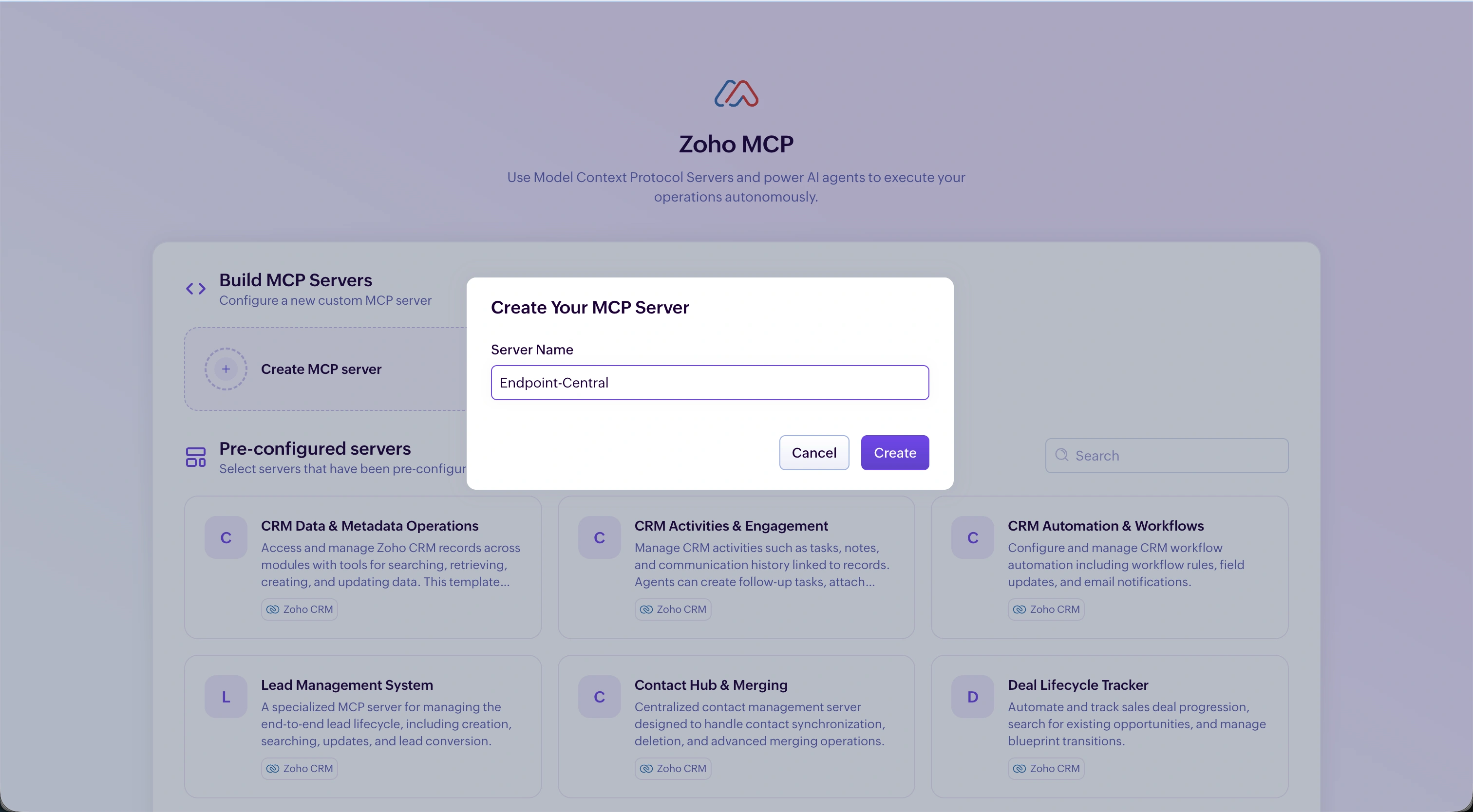
Provide a name for your MCP server and click Create. The MCP server will be created and you will be redirected to the MCP Tools view.
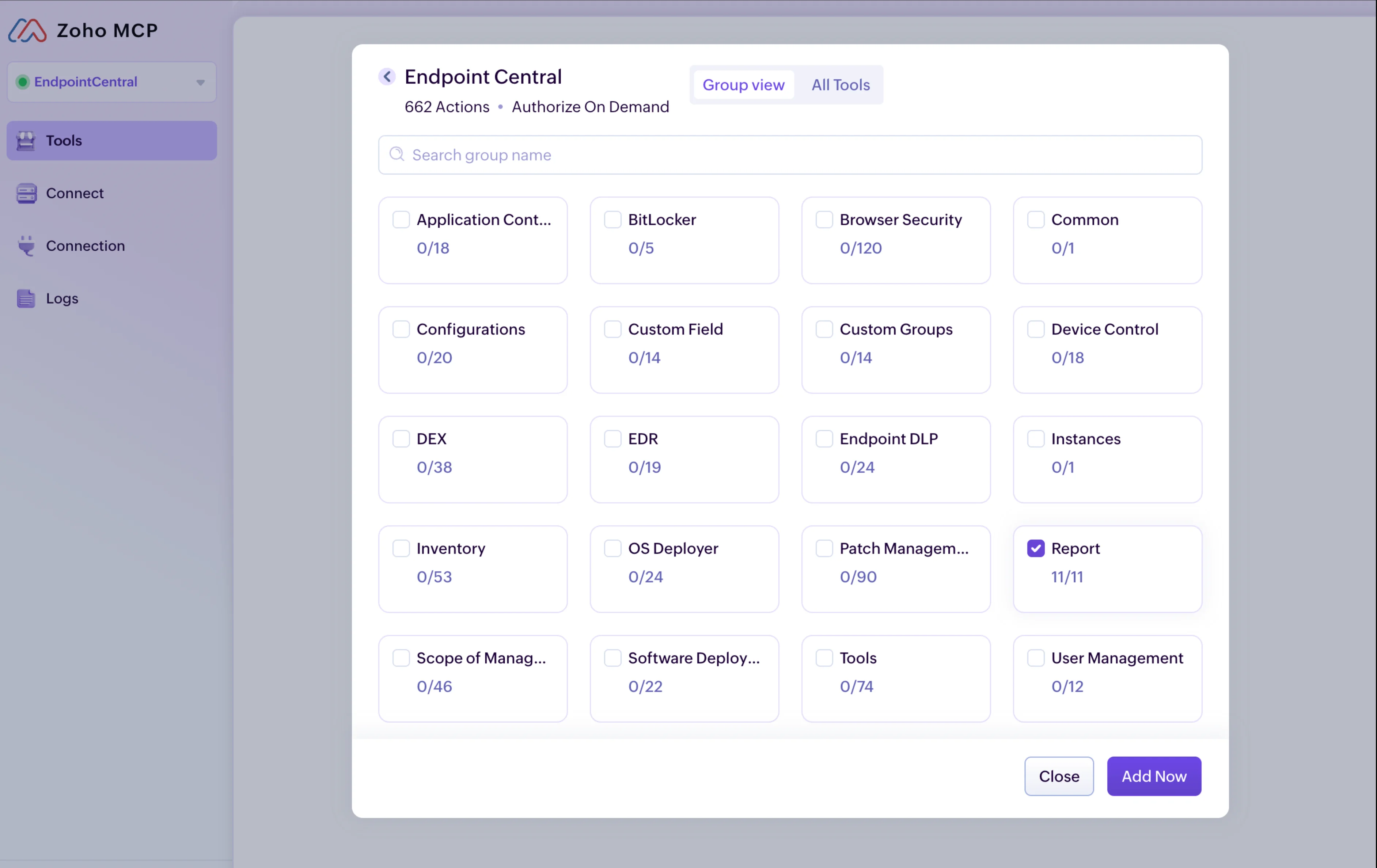
Go to the Tools section, search for Endpoint Central, and add the tools you want. Similarly, search for MDM and add the relevant tools.
Navigate to the Connection tab in the left navigation and select your authorization method. You can use Authorization on Demand or Authorization via Connection. For shared authentication between you and a collaborator, use Authorization via Connection. For individual authentication, select Authorization on Demand. Refer to the FAQ section for more details.
Open the Connect page and copy the MCP server URL.
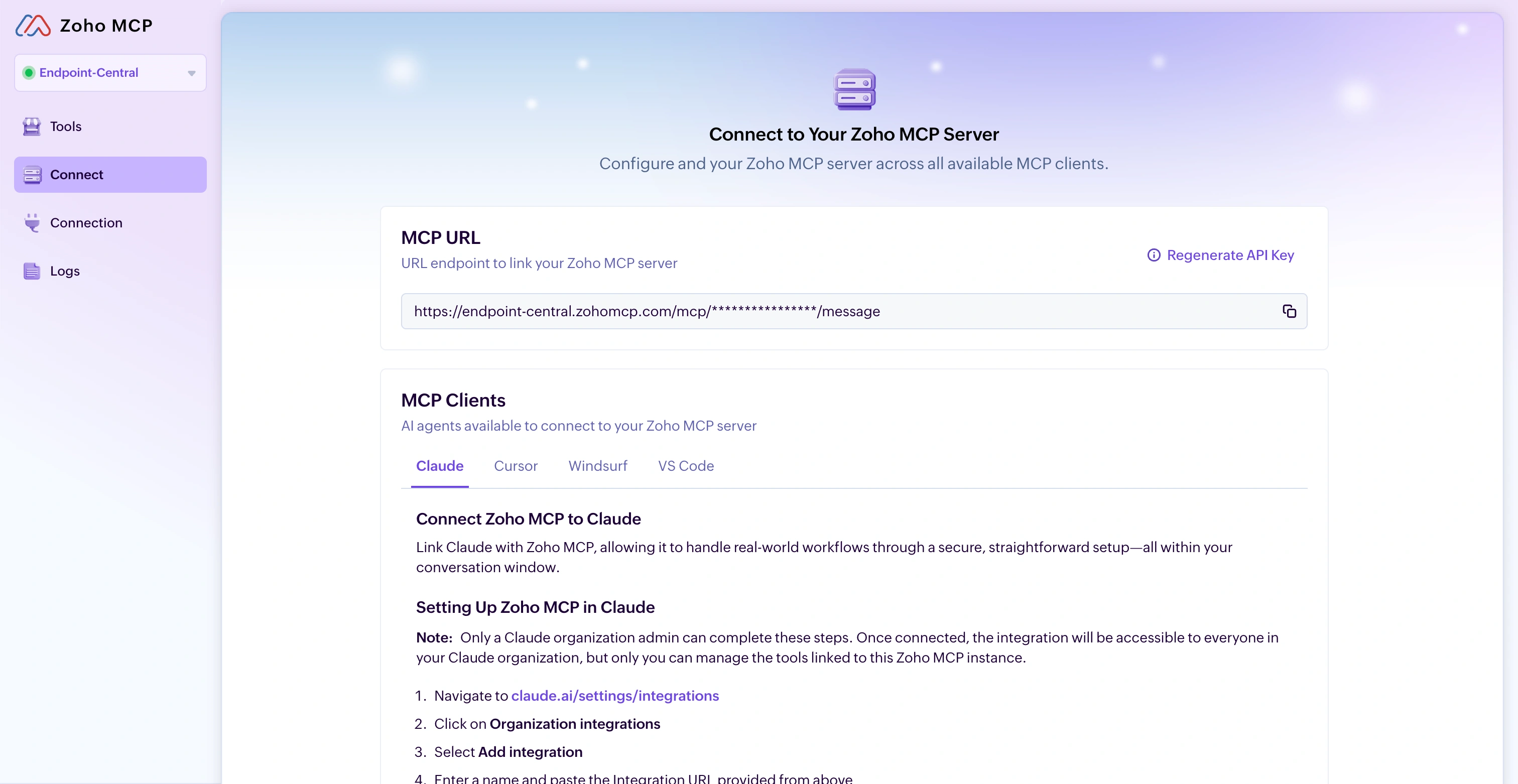
Add this URL to your MCP client — Claude, Cursor, Windsurf, or Visual Studio Code.
How to connect your Zoho MCP server with MCP clients
You can connect Zoho MCP with any supported MCP client.
Claude
Connect Claude with Zoho MCP to handle real-world endpoint management workflows through a secure and straightforward conversation.
Navigate to claude.ai > Settings > Integrations.
Select Connectors > Add Custom Connectors.
Enter Zoho MCP as the integration name and paste the integration URL.
Click Add.
How to access Zoho MCP tools in Claude
Open a new chat.
Go to Search and tools.
Choose the Zoho MCP connection.
Select the tools you want to use in the chat.
Ask Claude to carry out the endpoint management actions you need.
Refer to this article to know the steps to connect with other MCP clients.
FAQ
What type of MCP clients can connect with Endpoint Central?
Any MCP client that supports HTTP/SSE protocols (e.g., Claude, Cursor, Windsurf, VS Code) can connect to Endpoint Central using Zoho MCP.What is the difference between Authorization on Demand and Authorization via Connection?
When Endpoint Central is configured via Zoho MCP, it requires you to authenticate using the OAuth protocol. Zoho MCP supports two authorization methods:
- Authorization on Demand — The default method. Each user authenticates individually. If you and a collaborator share the same Zoho MCP server, you each authorize your own actions separately using your individual accounts.
- Authorization via Connection — Used for shared access. If you are the Super Admin of a group of trusted users all connecting to the same Zoho MCP server, you can allow them to authorize their actions using your OAuth access and refresh tokens, without each of them authenticating individually.
Can the AI assistant access all Endpoint Central data?
No. Only the configured set of APIs you add inside the MCP console are accessible. You have full control over which modules and operations are allowed.How do I limit the scope of my MCP server?
Every command passes through controlled Endpoint Central API permissions. You can further restrict actions by allowing only read-only APIs in Zoho MCP, or by using Authorization on Demand.What data centers are supported?
Zoho MCP is available in the following data centers:US (United States)
EU (Europe)
IN (India)
AU (Australia)
CA (Canada)
SA (Saudi Arabia)
JP (Japan)
UAE (United Arab Emirates)