Intune Patch Management: Automate Third-Party Updates
Automate third-party patch management in Microsoft Intune with ManageEngine Patch Connect Plus. Publish updates for 800+ applications, use deployment templates, attach pre/post scripts, and enforce compliance without manual Win32 packaging. Free 30-day trial with full Intune patching on the Enterprise edition.

What is Intune patch management?
Intune patch management is the process of deploying, tracking, and enforcing software updates on devices enrolled in Microsoft Intune. For Windows OS updates, Microsoft provides built-in tools: Windows Update for Business policies, update ring configurations, and Windows Autopatch handle quality and feature updates out of the box.
Third-party applications are a different story. Intune does not maintain a native catalog of third-party patches. Apps like Google Chrome, Adobe Reader, Zoom, Java, and Firefox need to be manually packaged as Win32 .intunewin files, uploaded individually, and re-uploaded every time a vendor ships a new version. That's the gap Patch Connect Plus fills.
Capabilities covered by native Intune:
- Windows OS updates
- Update ring policies
- Windows Autopatch
- Microsoft 365 app updates
- Driver updates
- Deployment reporting
Why native Intune patch management falls short for third-party apps
Intune is built around Microsoft's own update ecosystem. It handles Windows quality updates, driver updates, and Microsoft 365 app updates well. Once you move outside Microsoft's catalog, the experience drops off.
No third-party app catalog
Intune does not ship with a pre-built repository of third-party application updates. Every non-Microsoft app has to be sourced, packaged, and uploaded manually.Manual Win32 packaging for every release
Each vendor update means re-downloading the installer, wrapping it as an .intunewin file using the Win32 Content Prep Tool, configuring detection rules, and uploading it to Intune. Multiply that across 30, 50, or 100 apps and the overhead is significant.Limited cross-vendor compliance visibility
Intune's compliance reporting covers Microsoft updates. Telling whether Adobe Reader 24.005 is installed across 3,000 endpoints, or whether an old version of Java is still running on 200 machines, requires additional tooling.No automated supersedence for third-party apps
When a new version of Chrome ships, the old version doesn't automatically retire in Intune. Admins have to manage version conflicts and cleanup manually.Patch Connect Plus addresses each of these gaps.
It plugs into your Intune tenant and adds a curated catalog of 800+ third-party apps, automated publishing, supersedence management, and compliance reporting.
How Patch Connect Plus enables third-party patching in Intune
Patch Connect Plus has progressed from on-premises SCCM patch management to full cloud device management with Intune. All existing users with an Enterprise license can update to the latest build and find Intune added under the Third Party Updates tab, allowing a quick toggle between cloud and on-premises management.
The product supports the following capabilities to make Intune patch management practical at scale:
- Automated publishing of third-party patches
- Superseded update management
- Pre-defined deployment templates
- Custom pre/post deployment scripts
Automated publishing of third-party patches in Intune
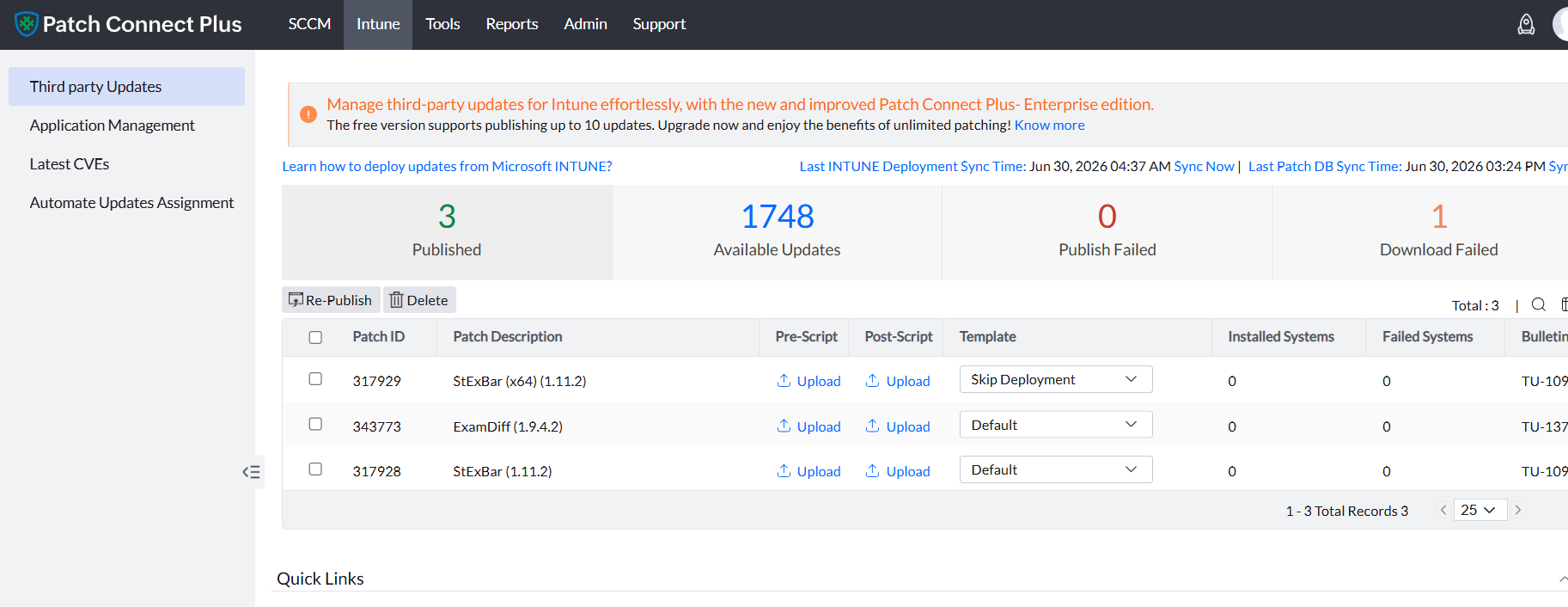
Patch Connect Plus identifies third-party applications that have been created within Intune and automatically publishes updates as they get released by vendors. New builds are typically available within 6 to 9 hours of vendor release. This takes the bulk of the workload away from IT admins: no manual download, no repackaging, no re-upload.
Superseded update management in Intune
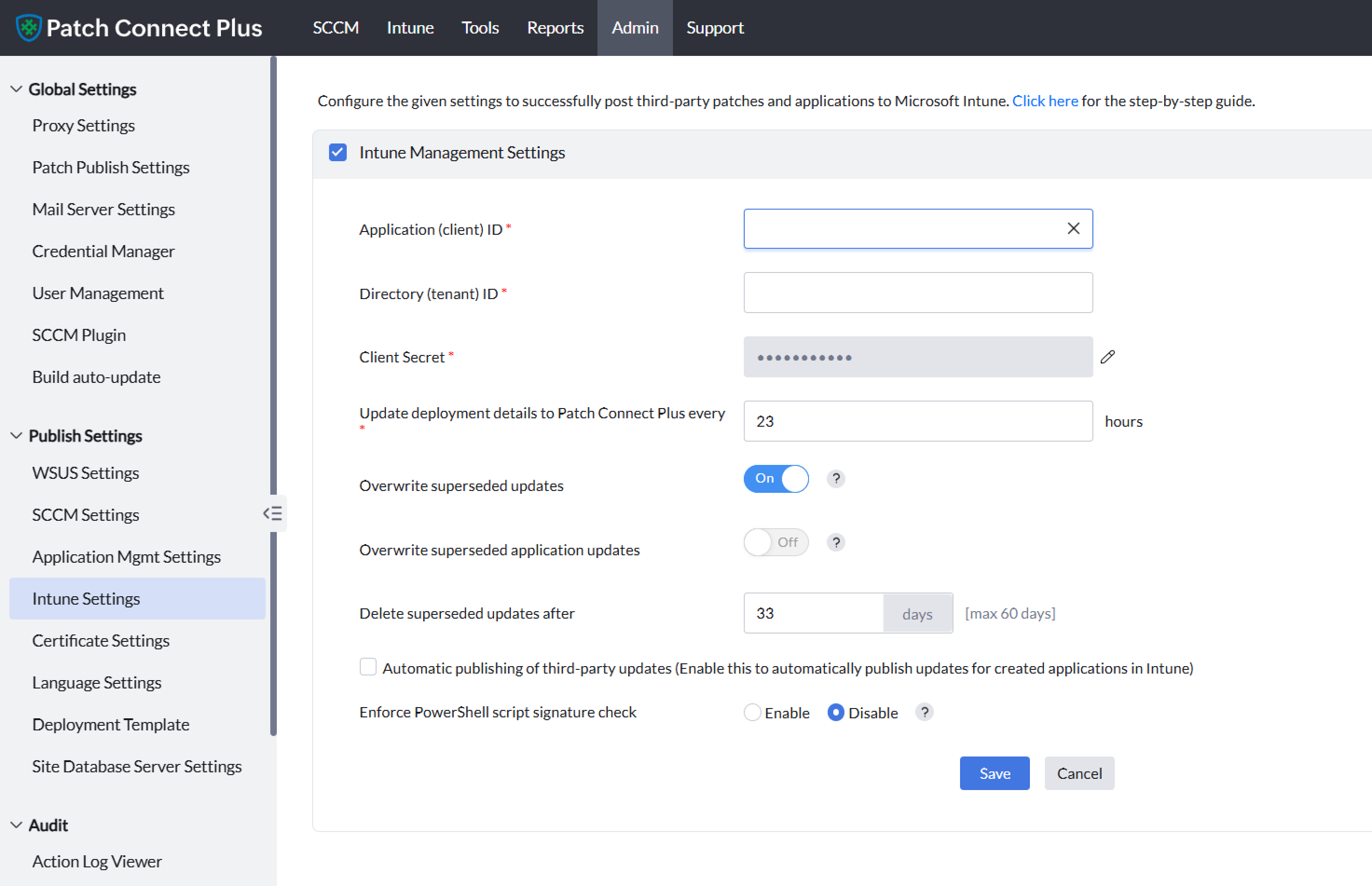
Patch Connect Plus gives you control over how superseded software updates are handled in the Intune console. You can choose to retain or remove older versions based on your environment's needs.
- Retain superseded updates: Keep the list of superseded updates visible under All apps in the Intune console. Disable this if you only need the most recent version displayed.
- Retain superseded application updates: Same control, scoped to application-level updates rather than individual patches.
- Delete superseded updates after a set period: Choose how many days superseded updates stay in the Intune console before automatic removal (maximum: 60 days).
Pre-defined deployment templates for Intune patching
Similar to the Intune Application Management feature, managing updates to Intune supports ready-to-use templates for controlling deployment behaviour on managed devices. These templates cover common use cases:
- Skip if app is running
- Uninstall older patches
- Suppress start menu icons
- Suppress taskbar icons
- Suppress desktop shortcuts
Custom pre/post scripts for Intune third-party patching
Patch Connect Plus allows granular control over Intune third-party patching according to enterprise-specific goals. Upload custom scripts for pre and post-deployment activities to manage client-side behaviour before and after each update. Common uses include:
- Applying follow-up configurations after the update completes.
- Changing registry settings required by your security or licensing policies.
- Creating or removing shortcuts that vendors add by default.
- Creating or appending environment paths for developer tools and runtimes.
Patch compliance and reporting in Intune
Audit readiness is one of the main reasons teams invest in patch management tooling. Native Intune reporting covers Microsoft updates, but third-party compliance data is harder to pull together without additional tools.
Patch Connect Plus provides compliance visibility for every third-party application under management in Intune:
Installation status by app
See which endpoints have the current version installed, which are missing the update, and which failed.Failed deployment details
Error codes, device names, last attempt timestamps, and last successful install dates.Pending updates
Applications where a newer vendor version exists but hasn't been published yet.Coverage gaps
Applications installed on endpoints but not currently under Patch Connect Plus management.
These reports are scoped to your Intune environment when you toggle to Intune in the console. Admins running co-management (SCCM + Intune) see both sets of data from the same interface.
Best practices for Intune third-party patch management
Patching third-party apps in Intune is simpler with the right process in place. These practices reflect what works in production environments, not theory.
Start with a baseline inventory
Before publishing updates, know what's installed. Use Patch Connect Plus' auto-detection to scan your Intune-enrolled devices and identify which third-party applications are present and which versions are running.Automate publishing, review exceptions
Set Patch Connect Plus to auto-publish new vendor releases for your standard app portfolio (browsers, runtimes, productivity tools). Reserve manual review for niche or internally modified applications where you need to validate compatibility before rollout.Use deployment templates for consistency
Standardise your deployment behaviour using templates. Decide once whether to suppress shortcuts, uninstall old versions, or skip running applications, then apply that template across all updates instead of configuring each one individually.Test with a pilot group first
Assign new updates to a small Entra ID pilot group before rolling out to the full organisation. Catch issues early without impacting production broadly.Monitor compliance weekly
Review the patch compliance reports in Patch Connect Plus at least once a week. Focus on failed deployments and coverage gaps first, since those represent the highest risk.Keep superseded updates on a cleanup schedule
Configure automatic deletion of superseded updates after a set number of days (30 to 60 days is typical). This prevents clutter in the Intune console and keeps your app list manageable.
Get started: set up third-party patching in Intune
Five steps from download to your first published update. The full step-by-step guide has screenshots.
Step 1 : Download and install Patch Connect Plus
Grab the installer from the free trial page. The Enterprise edition includes full Intune patching.Step 2 : Connect to your Intune tenant
In the Patch Connect Plus console, go to Admin > Intune Settings. Enter your Client ID, Tenant ID, and Client Secret from your Azure AD (Entra ID) app registration.Step 3 : Enable third-party updates
Open the Third Party Updates tab. Toggle to Intune. Patch Connect Plus syncs your managed devices and displays available third-party applications.Step 4 : Configure auto-publishing and templates
Select which applications to auto-publish. Apply a deployment template for default behaviour (suppress shortcuts, uninstall old versions, etc.). Attach pre/post scripts if needed.Step 5 : Publish and assign
Click Publish Now for your first batch. Assign the updates to an Entra ID group. The updates reach enrolled devices on the next sync cycle.
After the initial setup, new vendor releases are published automatically. The only ongoing manual step is reviewing the compliance reports and handling any failed deployments.
The bottom line If your team uses Microsoft Intune and needs to patch anything Microsoft didn't write, Patch Connect Plus is the most direct path from "we need this fixed" to "it's done."