Patch Upload Failed Checksum Mismatch
Problem
A manually uploaded third-party patch fails checksum validation.
Cause
A vendor can replace a download while the displayed application version remains similar.
The uploaded installer does not exactly match the package expected for the selected Patch ID, or the file is incomplete, corrupted, modified, or renamed.
Verify the installer package
Compare the exact Patch ID, package variant, original filename and expected checksum. Update the patch database and retry with the package required for that entry. If the current vendor file still differs, send Support the URL and expected and received checksums. Keep checksum validation enabled.
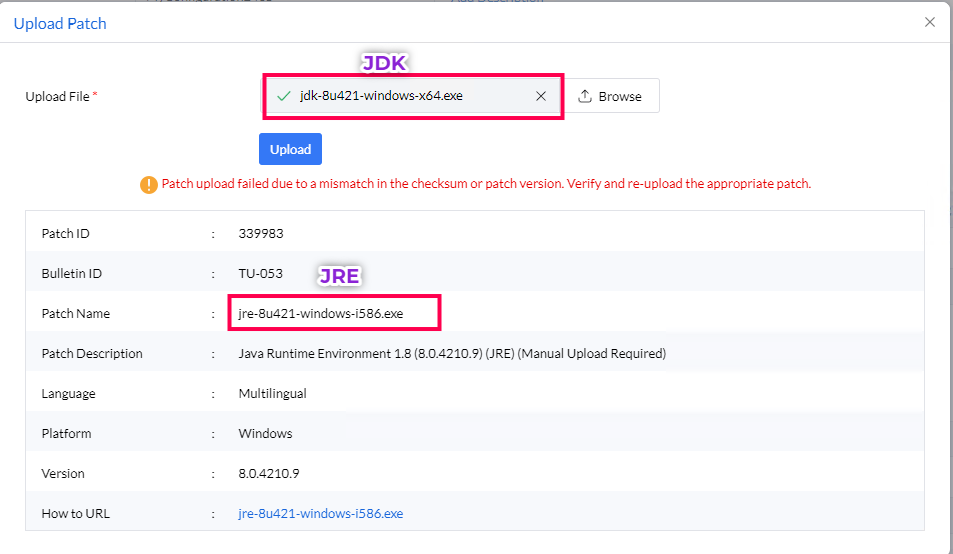
- In the upload patch view, compare the expected patch or application, exact version, architecture, installer or package variant, filename, and file size with the file that you downloaded. Vendor pages can provide multiple installers with the same displayed version; only the exact package expected by the Patch ID passes checksum validation.
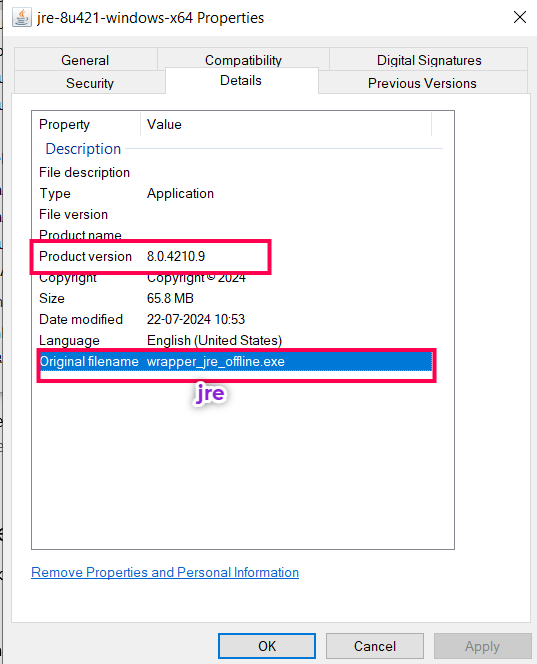
- Open the downloaded file's properties and verify its original filename and version information. Do not rename the file.
- If any value differs, download the expected package and upload it again.
Oracle Java packages
For Oracle Java packages, select the JRE or JDK package, version, and architecture required by the Patch ID. For Java 8 on Windows, use the Oracle Java SE downloads page. After signing in to the vendor site, retain the original installer filename.
- Click Upload next to the upload-failed message and upload the expected package.
- Alternatively, open Patches → Downloaded Patches → Upload Patches, search for the application Bulletin ID, and click Upload under Action.
Oracle application Bulletin IDs include JRE 6: TU-011, JRE 7: TU-030, JRE 8: TU-053, JDK 8: TU-160, JDK 11: TU-802, JDK 13: TU-1000, JDK 14: TU-1139, and JRE 8 for Mac: MAC-033.