Hard Reset Insight
The Hard Resets insight identifies devices that have experienced an abrupt, uncontrolled power interruption — where the device was forcibly powered off without going through a normal Windows shutdown process. This is distinct from a deliberate restart or a system crash (BSOD): the OS had no opportunity to save state, write logs, or generate a crash dump.
Hard resets are caused by events such as a user holding the power button to force power off, an unexpected power cut, a battery failure, a hardware lockup with no error code, or a thermal shutdown triggered by overheating. Because no crash dump is produced, hard resets leave fewer diagnostic traces than system crashes — making this insight the primary way to detect and track them.
Hard Resets: The device loses power or is forcibly interrupted with no warning — no crash dump, no stop error code.
Hard resets produce significantly less diagnostic data, which is why the device table in this insight contains fewer columns than the System Crashes insight.
This insight helps administrators:
- Identify devices that have experienced forced power interruptions that users may not have reported
- Detect patterns of recurring hard resets on specific devices — a signal of hardware instability, power issues, or thermal problems
- Investigate the Last Hard Reset timestamp to correlate with known events (power outages, user-reported lockups)
- Escalate devices with recurring hard resets for hardware investigation before a complete failure occurs
Trigger Conditions
The Hard Resets insight is generated when a system hard reset event is detected on a managed endpoint. All hard reset events are surfaced regardless of frequency.
Accessing the Insight
- In DEX Manager Plus, click DEX in the top navigation bar.
- Select Insights from the left sidebar.
- Locate the insight: Devices with hard resets may be experiencing hardware or power issues.
- Click the insight name to open the detail view.
Interpreting the Insight Metrics
The summary bar shows four cards — Total Impacted Devices, Top Impacted Model, Top Impacted Vendor, and Top Impacted Remote Office. All three non-count cards have View More drill-downs.
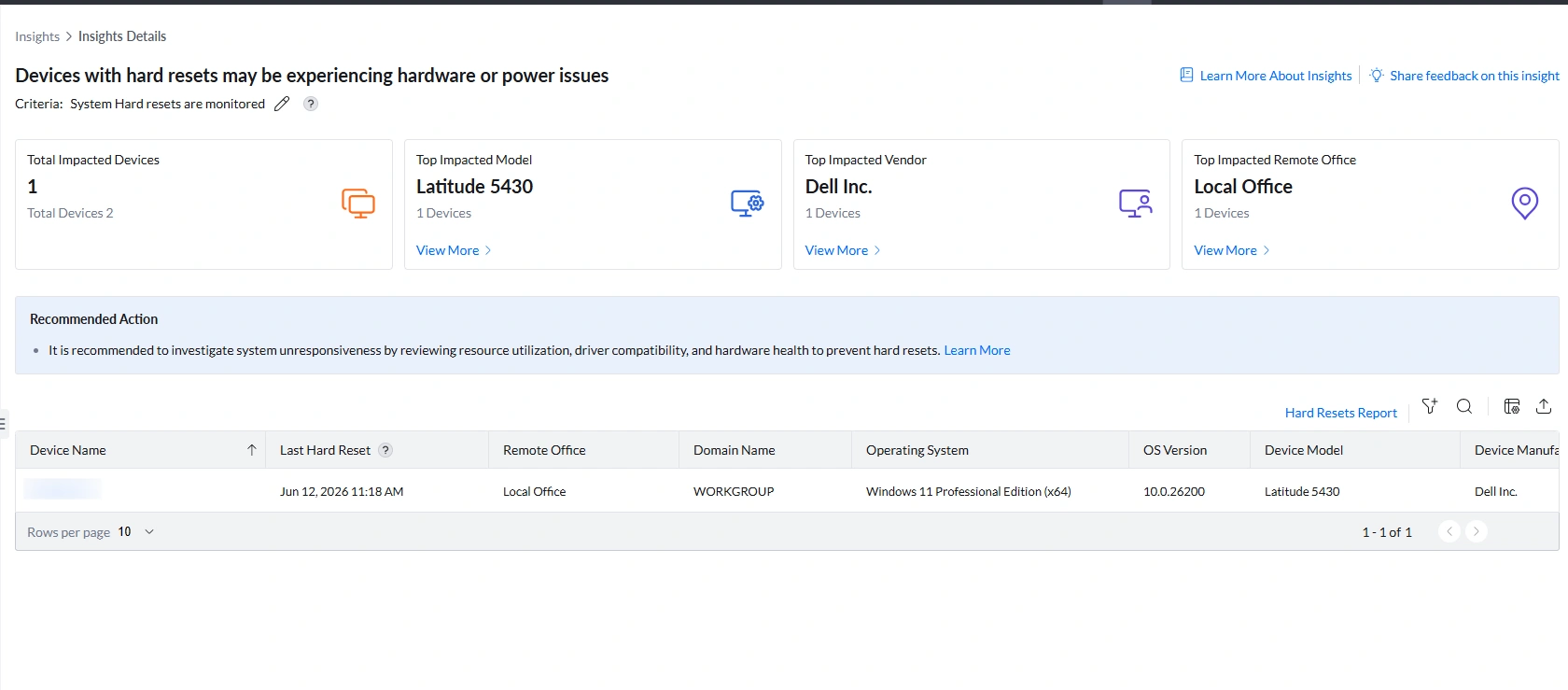
| Metric | What it shows | How to use it |
|---|---|---|
| Total Impacted Devices | Number of devices that have experienced at least one hard reset (e.g., 1 out of 2 total managed devices) | Assess scope. A single device is likely an isolated incident — investigate that device. Multiple devices affected simultaneously suggests a common cause: a power outage at a site, a network-wide thermal event, or a firmware issue affecting a specific model. |
| Top Impacted Model | The device model most commonly associated with hard resets (e.g., Latitude 5430 — 1 device) | Click View More to open the Impacted Models Summary. If one model accounts for 100% contribution, check whether that model has a known firmware issue or thermal management problem. Check the relevant vendor's support site for advisories on that specific model. |
| Top Impacted Vendor | The hardware manufacturer most frequently associated with hard resets (e.g., Dell Inc. — 1 device) | Click View More for vendor-level breakdown. Single-vendor dominance is expected when the fleet is largely one brand. Only meaningful when multiple vendors are in the fleet and one shows disproportionate hard reset frequency. |
| Top Impacted Remote Office | The office location with the most devices experiencing hard resets (e.g., Local Office — 1 device) | Click View More to open the Impacted Remote Offices Summary. If hard resets are concentrated in one office, check whether that site had a power event (outage, surge, UPS failure) around the time of the Last Hard Reset timestamp on affected devices. |
Analyzing Affected Devices
The device table is simpler than other reliability insights — hard resets produce no stop error codes or crash dumps, so the diagnostic data available is limited to device identity and the timestamp of the last reset.
Understanding the columns
| Column | What it shows | What it means for remediation |
|---|---|---|
| Last Hard Reset | The date and time of the most recent hard reset on that device (e.g., nithish-test: Jun 12, 2026 11:18 AM) | The primary diagnostic column. Use this timestamp to correlate the hard reset with known events: user-reported lockup, power outage, scheduled maintenance, or a software deployment that ran at that time. |
| Remote Office | The physical location of the device (e.g., Local Office) | Cross-reference with other devices in the same office around the same time. If multiple Local Office devices share a similar Last Hard Reset timestamp, a site-level power or infrastructure event is the likely cause. |
| Domain Name | The network domain the device belongs to (e.g., WORKGROUP) | A device in WORKGROUP rather than a corporate domain may be standalone or recently provisioned — factor this into the investigation context. |
| Operating System / OS Version | The Windows edition and build version (e.g., Windows 11 Professional Edition x64, 10.0.26200) | Check whether the OS version has known issues with unexpected shutdowns or power management. A recently upgraded OS version alongside a hard reset may indicate a compatibility issue. |
| Device Model / Device Manufacturer | The specific hardware (e.g., Latitude 5430, Dell Inc.) | Use to search the manufacturer's support site for known firmware issues, power management bugs, or thermal advisories for that model. A Latitude 5430 hard reset may have a known BIOS fix available. |
Navigation: DEX > Reports > Hard Resets Report
Root Cause Investigation
Because hard resets leave no crash dump or stop error code, investigation relies on correlating the Last Hard Reset timestamp with other data sources.
Step 1 — Determine whether it is isolated or concurrent
| Pattern | Likely cause | Investigation path |
|---|---|---|
| Single device, single hard reset event | User-initiated (held power button to unfreeze), or a one-time hardware event | Check with the user whether they reported a lockup. Review the Hard Resets Report for that device to confirm this is the first occurrence. |
| Single device, multiple hard reset events | Recurring hardware instability — thermal issue, RAM failure, power delivery problem, or failing storage causing repeated lockups | Escalate to hardware investigation: check thermal cooling, run memory diagnostic, check disk health, verify power supply. |
| Multiple devices in the same office with similar Last Hard Reset timestamps | Site-level power event — outage, surge, or UPS failure | Check with the facility team for any power events at that site. Inspect UPS battery health. Review power strip and PDU logs if available. |
| Multiple devices with same model, similar timestamps | Firmware or driver issue affecting that hardware model | Check the manufacturer's support site for BIOS/firmware updates addressing unexpected shutdowns or power management bugs for that model. |
Step 2 — Correlate with other DEX insights
Hard resets rarely occur in isolation. Check whether the same device appears in:
- System Crashes insight — if the device has both hard resets and BSOD events, it has multiple types of stability failures. The crash data provides additional diagnostic signals even when the hard reset itself leaves none.
- High CPU Utilization or High Memory Utilization insight — sustained resource overload can cause a device to become completely unresponsive, prompting a user to force a hard reset. Resolving the resource pressure may prevent future resets.
- Disk Contention insight — severe disk queue can cause the OS to freeze, again prompting a forced power off. Cross-reference the Last Hard Reset timestamp with disk contention data collected around the same time.
- Input Response Delay insight — a device that regularly experiences input freeze events may lead users to force hard resets as a workaround. High Input Response Delay on the same device confirms this pattern.
Step 3 — Check the Hard Resets Report for frequency
Open DEX > Reports > Hard Resets Report and filter by the affected device. Key questions to answer:
- Is this the first hard reset on this device, or is it recurring?
- If recurring, are hard resets clustered at specific times (suggesting a scheduled task or workload trigger) or random (suggesting hardware instability)?
- Has the frequency been increasing over time (suggesting progressive hardware degradation)?
Remediation
| If you see this... | Do this |
|---|---|
| Single hard reset on one device, user reported a lockup | Connect via Remote Actions > Remote Desktop during the user's next working session and observe whether the device freezes under normal workload. Check Event Viewer > Windows Logs > System for critical errors around the time of the Last Hard Reset. If no errors are found and no recurrence, monitor and document. |
| Recurring hard resets on the same device | Escalate to hardware investigation. Run Windows Memory Diagnostic (mdsched.exe) via Remote Actions to check for RAM errors. Check disk health via Remote Actions > Command Prompt: wmic diskdrive get status. Check Event Viewer for thermal events. If hardware faults are confirmed, escalate for replacement. |
| Hard resets concentrated in one office at similar timestamps | A power event likely triggered simultaneous forced shutdowns. Check with the facility team for power outage or surge records. Inspect UPS battery health — a failing UPS can cause devices to lose power unexpectedly. Ensure devices are connected through surge-protected power strips. |
| Latitude 5430 or other specific model showing recurring hard resets | Check the vendor's support site (e.g., Dell) for BIOS updates, firmware advisories, or known power management issues for that model. BIOS updates frequently address unexpected shutdown and power delivery bugs. Deploy available updates via Software Deployment. |
| Device also appears in the System Crashes insight | The device has multiple reliability failures. Treat as high priority. The combination of BSOD events and hard resets indicates severe hardware instability. Escalate for hardware replacement if issues persist after driver and firmware updates. |
| Device also appears in High CPU or Input Response Delay insight | Resource overload may be causing system freezes that lead users to force hard resets. Address the resource issue first — reduce CPU load, add RAM, upgrade to SSD. If the device stops freezing under normal workload, hard resets should stop without hardware repair. |
Post-Remediation Monitoring
- Return to DEX > Insights. A device will remain in the Hard Resets insight until the monitoring window passes with no new hard reset events. A device that exits the insight has had no further hard resets detected.
- Open DEX > Reports > Hard Resets Report and filter by the previously impacted device. Confirm no new hard reset events have been recorded after the remediation date.
- If a BIOS or firmware update was deployed, verify via the report that no hard resets have occurred since the update was applied.
- Set up an Alert (DEX > Alerts) targeting the affected device for hard reset notifications so you are immediately informed if resets recur.
Frequently Asked Questions
What is a hard reset?
A hard reset (also called a hard power off or forced reset) occurs when a device's power is interrupted abruptly — without going through a normal Windows shutdown sequence. This happens when a user holds the power button for several seconds to unfreeze a locked device, when a power outage cuts power to the device, when a battery completely fails, or when a thermal protection circuit shuts down the hardware to prevent overheating. The OS has no opportunity to save state, close applications gracefully, or generate a crash dump.
How is this different from the System Crashes insight?
System Crashes (BSODs) occur when Windows itself detects a critical failure — it saves a crash dump file and records a stop error code before restarting, providing rich diagnostic data. Hard Resets occur when power is lost or interrupted at the hardware level — Windows has no opportunity to record anything. No stop error, no crash dump. This is why the Hard Resets device table has fewer diagnostic columns than System Crashes — there is simply less data available to surface.
Why would a device hard reset if the user didn't press the power button?
Several hardware conditions can cause an automatic hard reset without user action: thermal protection triggering when a device overheats (fan failure, blocked vents, thermal paste degradation), a battery failing to supply stable power, a RAM failure causing a complete freeze with no BSOD, a storage failure causing the OS to become completely unresponsive, or a power supply delivering unstable voltage. These are all hardware-level failures that Windows cannot detect and respond to before power is lost.
Should one hard reset be treated as an emergency?
A single hard reset on a device that has never had one before is not necessarily an emergency — the user may have intentionally force-powered off after a one-time freeze. Check with the user and review the Hard Resets Report to confirm it is the first occurrence. The concern level rises significantly with recurrence: two or more hard resets within a short period, or an increasing frequency over time, indicates a developing hardware problem that should be investigated before the device fails completely.
Should I review this insight alongside other insights?
Yes. Hard Resets is most diagnostic when cross-referenced with System Crashes, High CPU Utilization, High Memory Utilization, and Input Response Delay. A device appearing in both Hard Resets and System Crashes has multiple types of reliability failures and should be treated as high priority. A device appearing in both Hard Resets and Input Response Delay may be freezing under resource pressure, prompting users to force power off — resolving the resource issue may stop the hard resets without any hardware repair.