DDI Central + Endpoint Central
Device profile and health
See exactly what kind of device is consuming a lease—down to OS version, hardware specs, and MAC address.
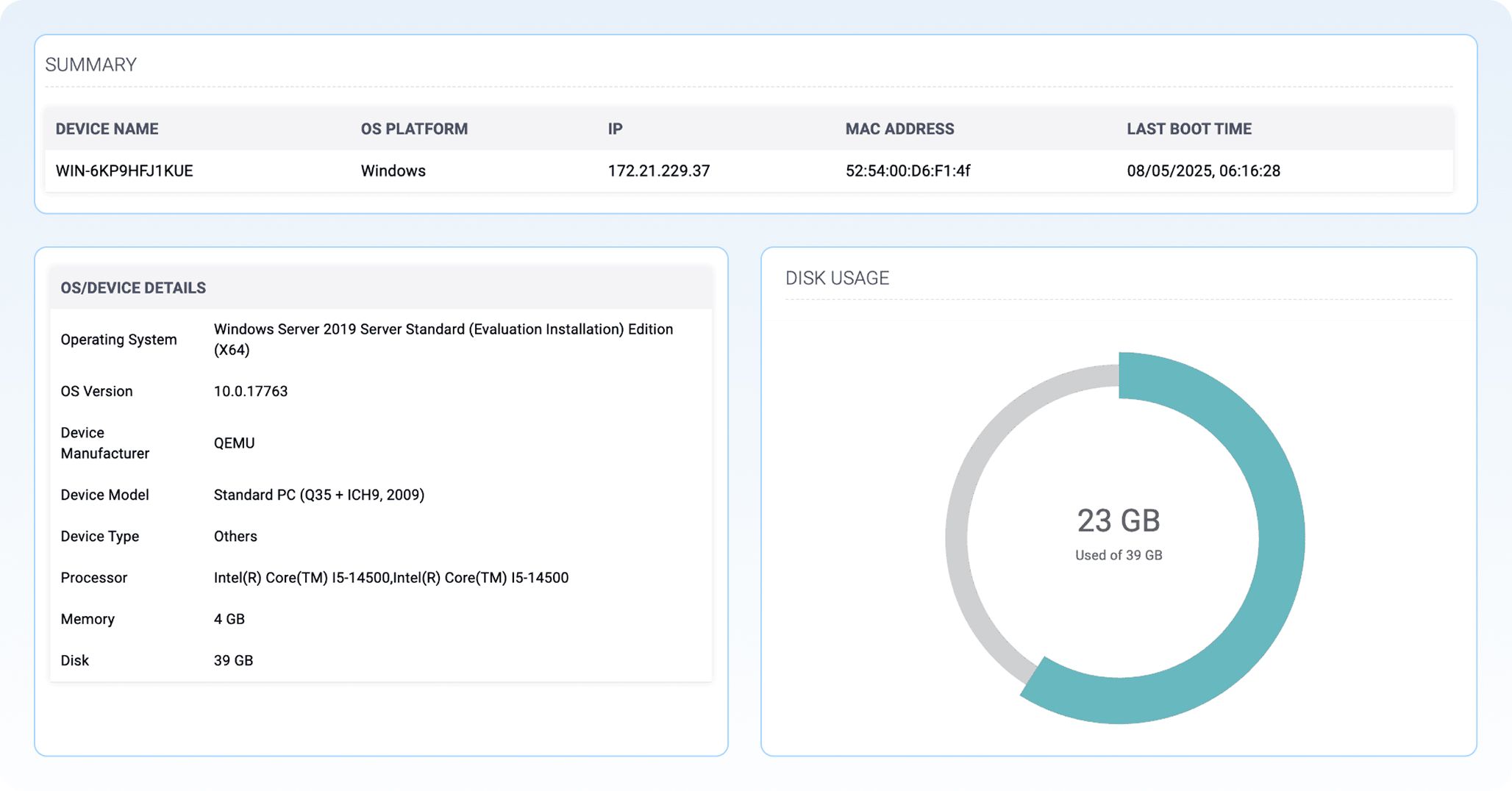
- Operational awareness at a glance
From disk usage spikes to OS misconfigurations, map everything to an IP. It’s not just about knowing what’s broken—it’s about knowing where to look and what to fix first. - IP-to-device mapping
Instantly map IP addresses to real device names, OS versions, and hardware specs. - Spot non-compliant and outdated systems
Identify evaluation builds, unsupported hardware, and EOL systems lurking within your IP ranges before they become a risk.
- Live system metrics
View live memory, disk, and processor stats for every endpoint consuming a DHCP lease. - Boot status insights
Track the last boot time and device status for faster troubleshooting.
Patch status
Analyze your entire patch landscape—spotting what’s missing, what’s critical, and where action is needed—without switching tools.
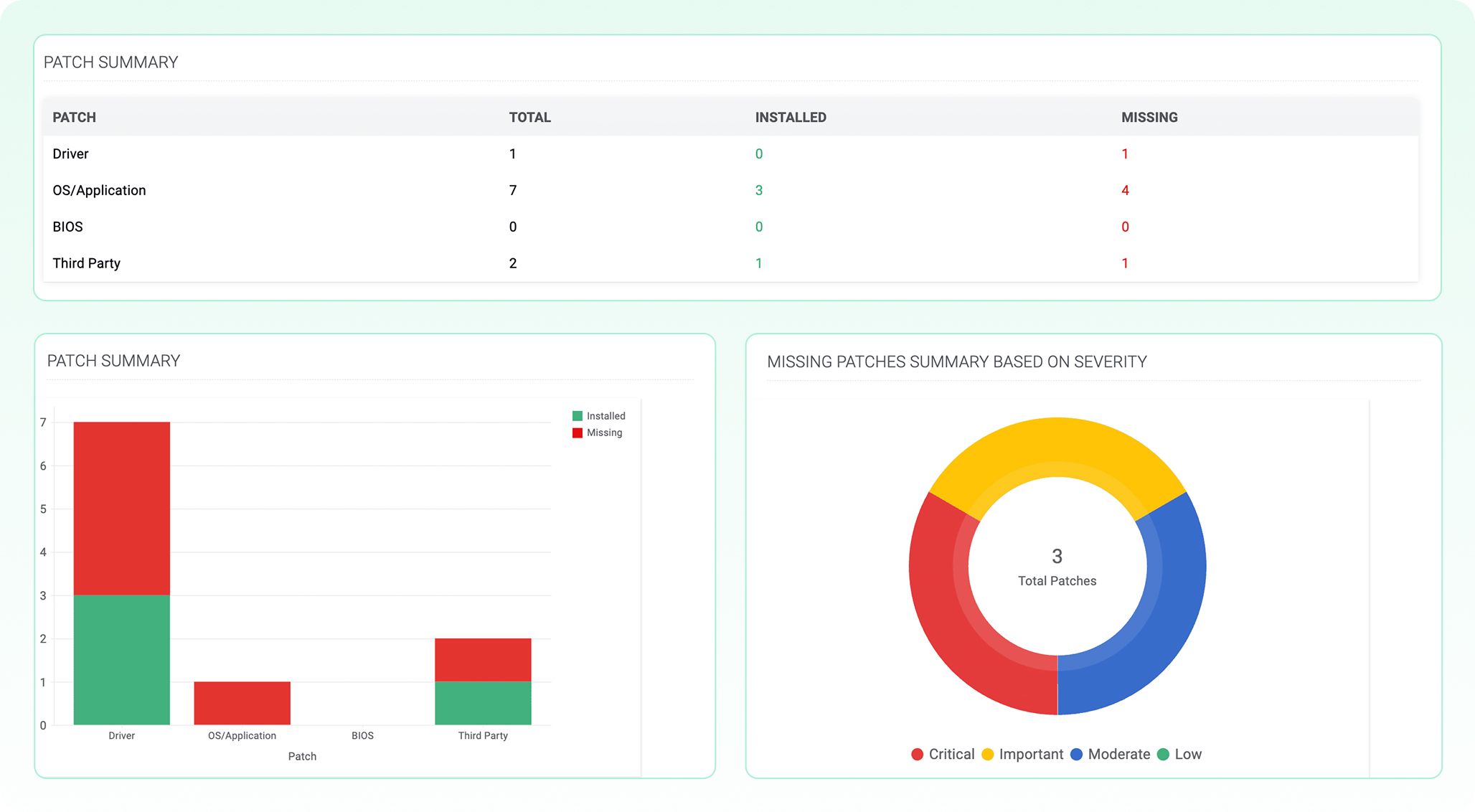
- Instant patch visibility by IP or device
Visualize patch compliance instantly for any device or IP directly from the DDI Central console. - Quickly spot critical gaps
Zero in on missing and critical patches with color-coded charts.
- Sort and patch by risk level
Prioritize fixes and see what needs action, not just what’s outdated. - Insight to action, all in one console
Take action fast. Move from insight to remediation without leaving your DDI console.
Vulnerability view
From DHCP lease to CVSS, get visual cues that bring vulnerabilities to light.
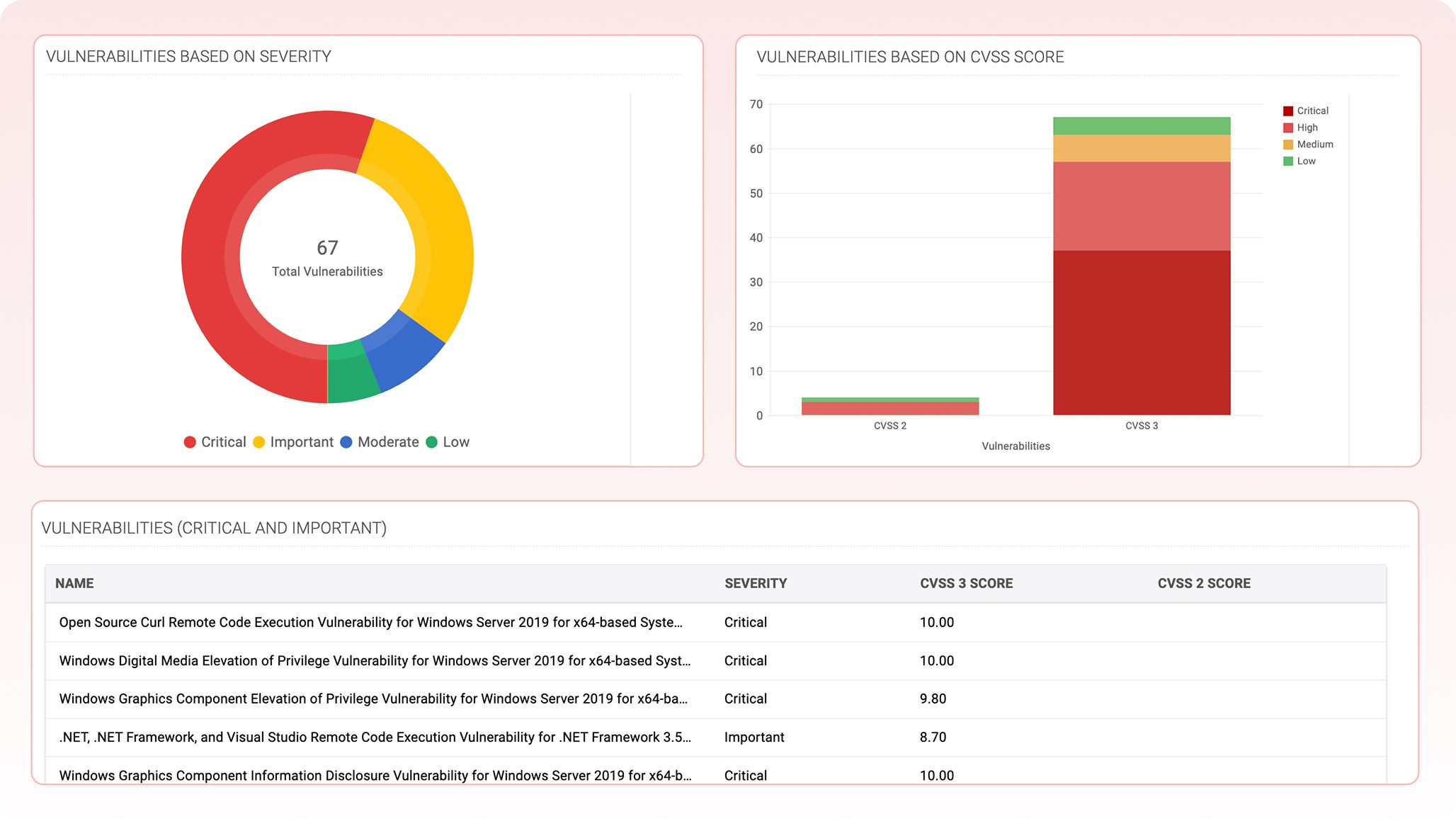
- Instant device-level risk breakdown
Instantly visualize all vulnerabilities by severity and CVSS score for each device. - Spot the urgency; minimize patch fatigue
Rapidly pinpoint and prioritize critical and important threats to remediate high-risk endpoints.
- Risk-aware IPAM
Correlate vulnerability data with IP address, DHCP lease, and DNS query activity to deliver actionable, forensic-level context for targeted incident response. - Always audit-ready
Make compliance tracking and security reporting effortless with unified vulnerability intelligence.
AWS cloud observability
Interactive dashboard
An all-in-one dashboard that brings your AWS landscape into focus. Use filters and charts to pinpoint issues, uncover resource gaps, and detect overprovisioned regions, so you can plan smarter, spend wiser, and stay in control of your cloud.
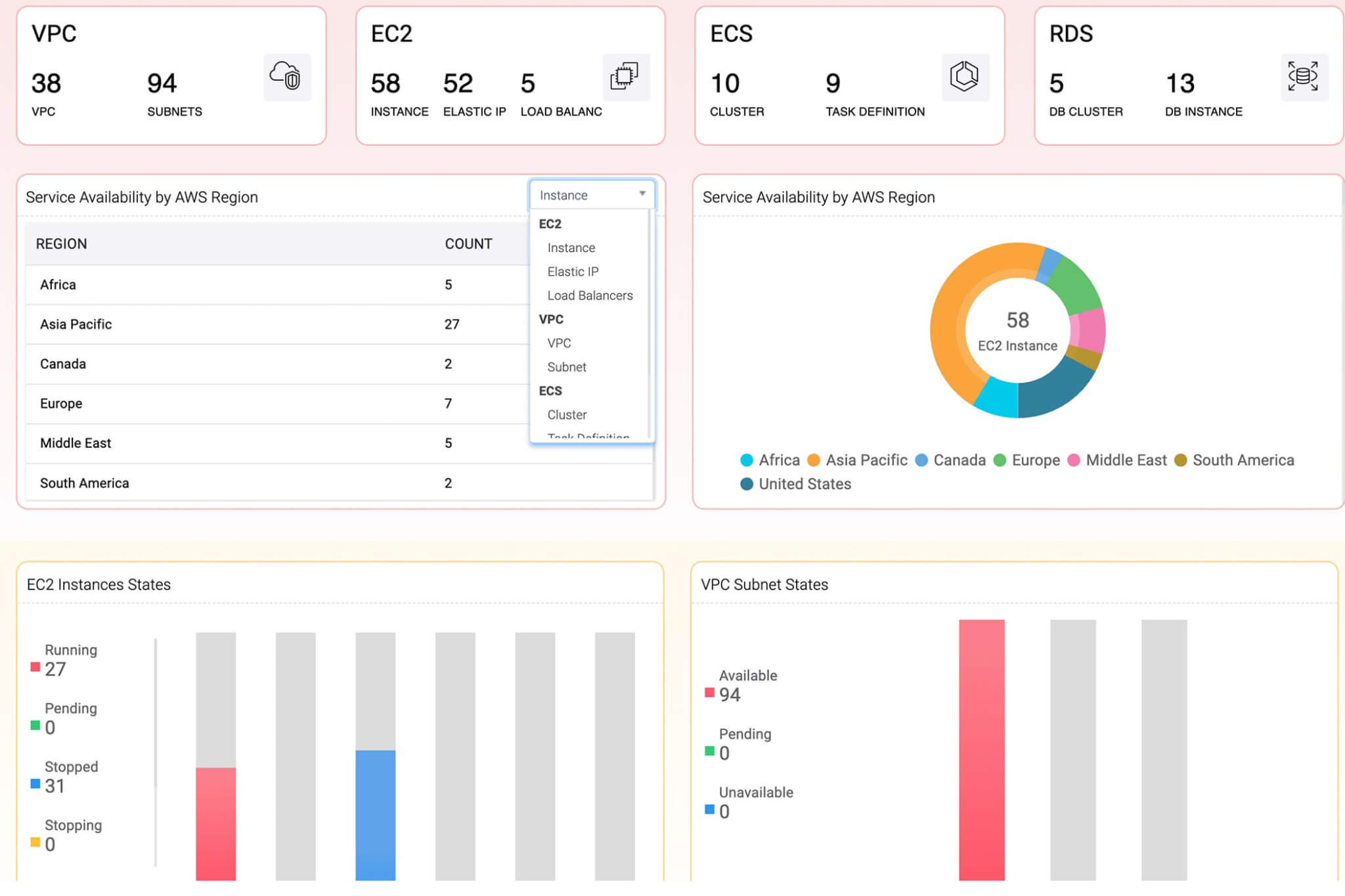
- Get instant context by region
Know how your AWS resources—like EC2 instances, Elastic IPs, load balancers, and virtual private clouds (VPCs)—are distributed across global regions at a glance. - Optimize your cloud footprint
Identify over- or under-utilized regions to make better scaling, load balancing, or cost-saving decisions. - Plan with precision
Region-level visibility helps admins align infrastructure with user demand, latency goals, or compliance needs like data residency.
- Detect subnet imbalance in real time
Identify underutilized or overprovisioned subnets across regions to optimize IP allocation and forecast capacity needs. Instantly verify subnet readiness to reduce provisioning errors and eliminate configuration blind spots. - Correlate EC2 states with resource efficiency
Track instance states like running, stopped, and pending to align actual usage with planned resource distribution.
Global resource map
Visualize your assets. Compare across regions. Command your cloud from one map.
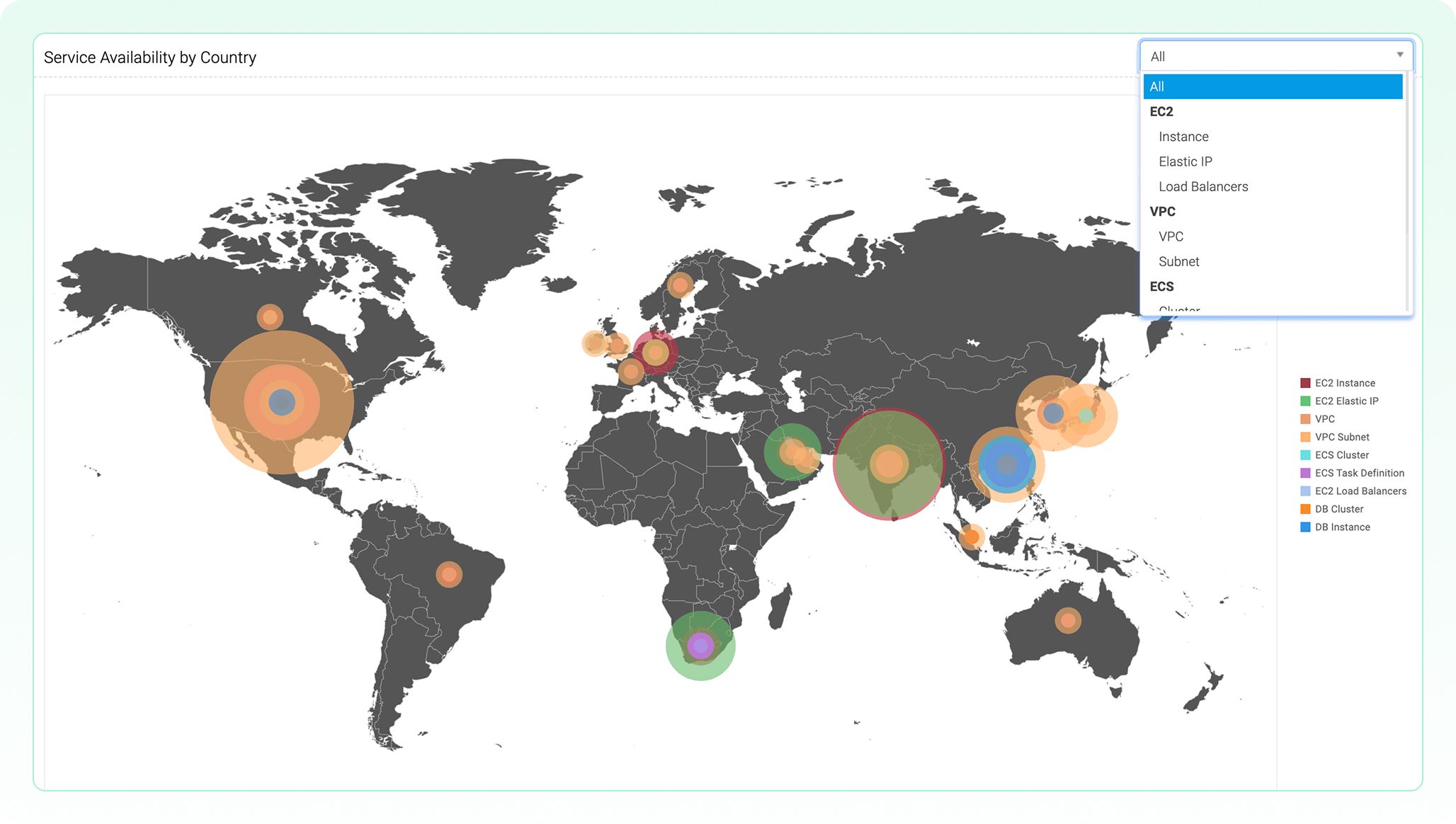
- Unified visibility across borders
Instantly see where your cloud assets are concentrated—from EC2 instances to VPC subnets—on a single global map. No need to log into AWS separately or switch tools. - Compliance and data residency awareness
Easily validate whether assets are deployed within geo-restricted regions for regulatory or compliance needs—critical for industries like healthcare and finance.
- Optimize cloud distribution
Visualizing asset sprawl helps teams balance workloads across global zones and avoid over-concentration in a single country, minimizing latency and risk. - Asset-type filtering on the fly
Use the dropdown to filter the visualization by asset type, like ECS clusters or Elastic IPs, for focused planning, audits, and cost attribution.
VPCs and subnets
Your VPCs broken down for availability, allocation, and actionable insights.
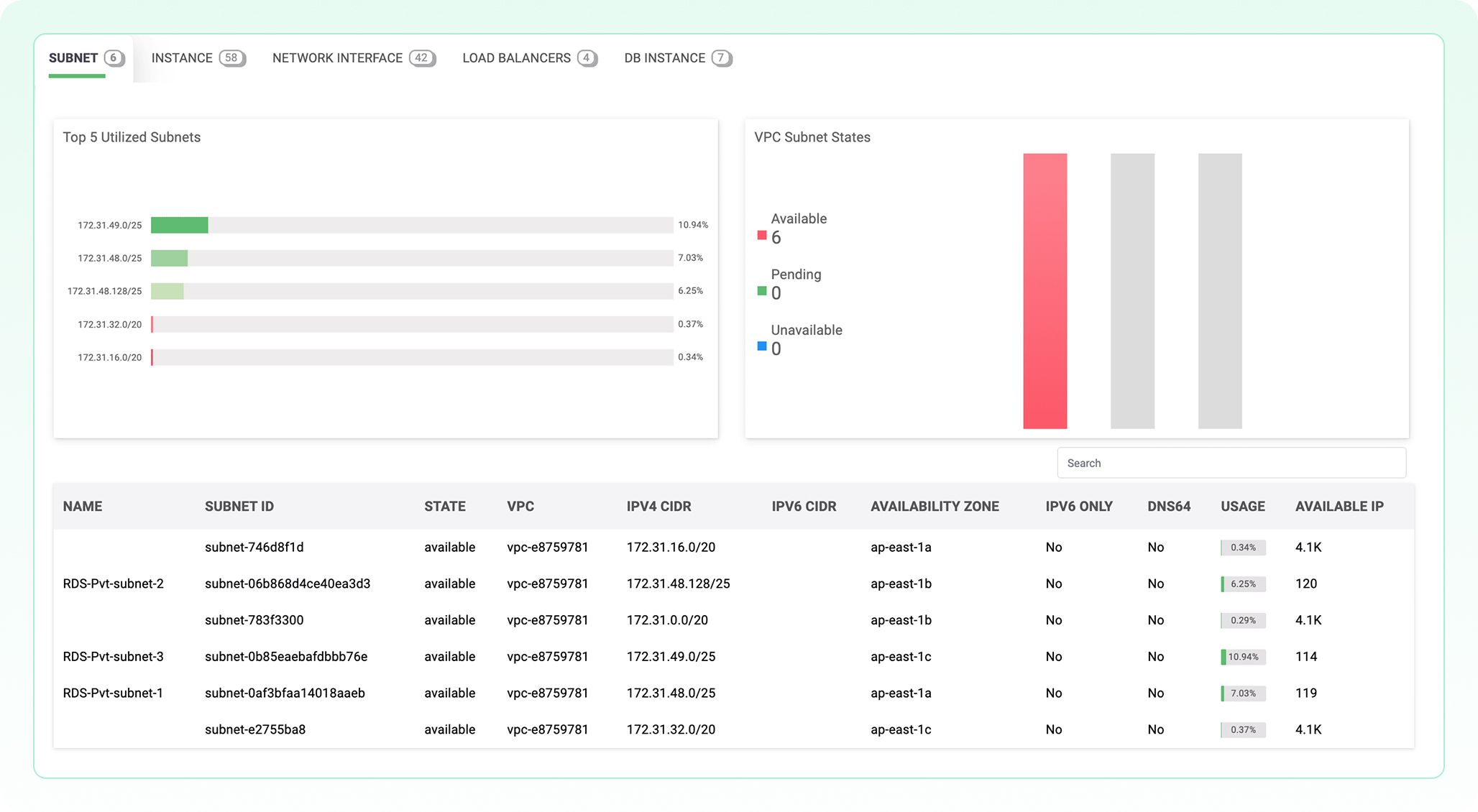
- Subnet usage at a glance
Slice your VPC by subnet to identify its utilization hotspots. Instantly see which subnets within the VPC are nearing IP exhaustion—prioritize reallocation or expansion where usage is peaking. - Instance allocation within the VPC
Track EC2 instance distribution by subnet and AZ. Understand where your compute resources reside in the VPC and optimize placement for performance and resilience. - Network interface visibility
Correlate Elastic Network Interfaces (ENIs) to their VPC-level footprint. Drill down into every ENI tied to the VPC and monitor traffic paths, attached resources, and security group exposure for precise control.
- Load balancer mapping
Surface load balancer endpoints in the VPC’s topology. Identify all load balancers linked to the VPC and their associated subnets to validate front-end coverage and back-end reachability. - DB instance placement
Map DB resources managed by AWS Relational Database Service (RDS) to the VPC's layout. Track where DB instances live within your VPC, including AZ placement and subnet associations for better high availability (HA) planning. Quickly detect failed or missing RDS components in your service chain. - Unified VPC resource inventory
Rely on one console to monitor everything within a VPC. From subnets and instances to interfaces and DBs, get a consolidated view of your VPC's entire network stack, enabling deep diagnostics and life cycle control.
EC2
A bird’s-eye view of each instance’s position in your AWS topology.
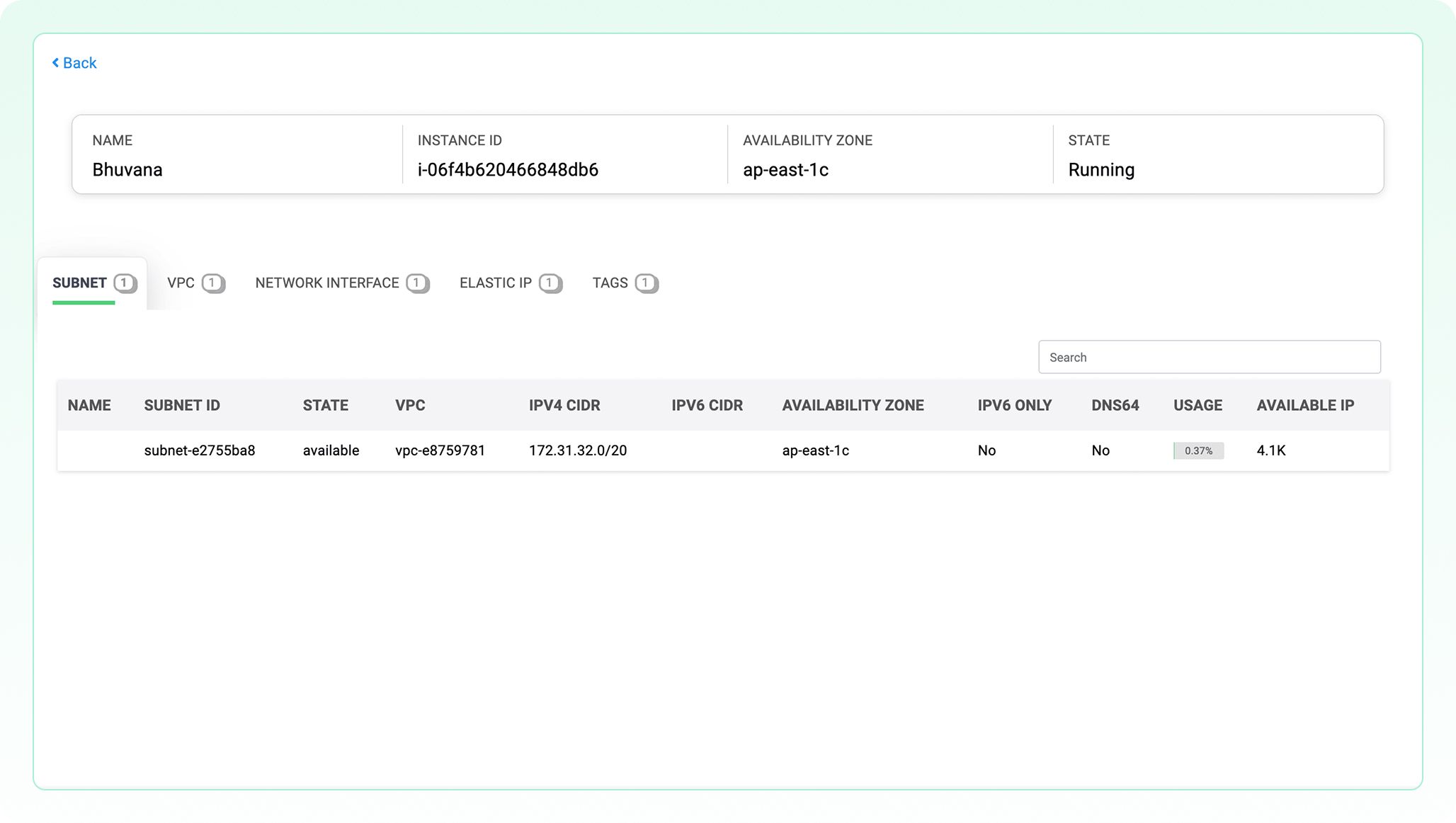
- Immediate subnet-instance association
View which subnet the instance is running in, along with its CIDR and AZ. This helps ensure proper segmentation, compliance, and zoning of workloads. - IP utilization awareness at the instance level
By exposing subnet usage and available IPs, admins can monitor IP exhaustion risks per instance context—enabling proactive scaling or reallocation.
- Cross-layer context on the spot
Gain direct visibility into the VPC, ENI, and Elastic IP tied to the EC2 with no need to navigate multiple AWS console layers to troubleshoot instance connectivity. - Track DNS and IPv6 configurations for each instance
Quickly validate if IPv6 and DNS64 are enabled, allowing for streamlined decisions in dual-stack planning or IPv6 transitions.
Elastic IPs
End-to-end ECS visibility, including task load, container health, and cluster spread, all within DDI Central.
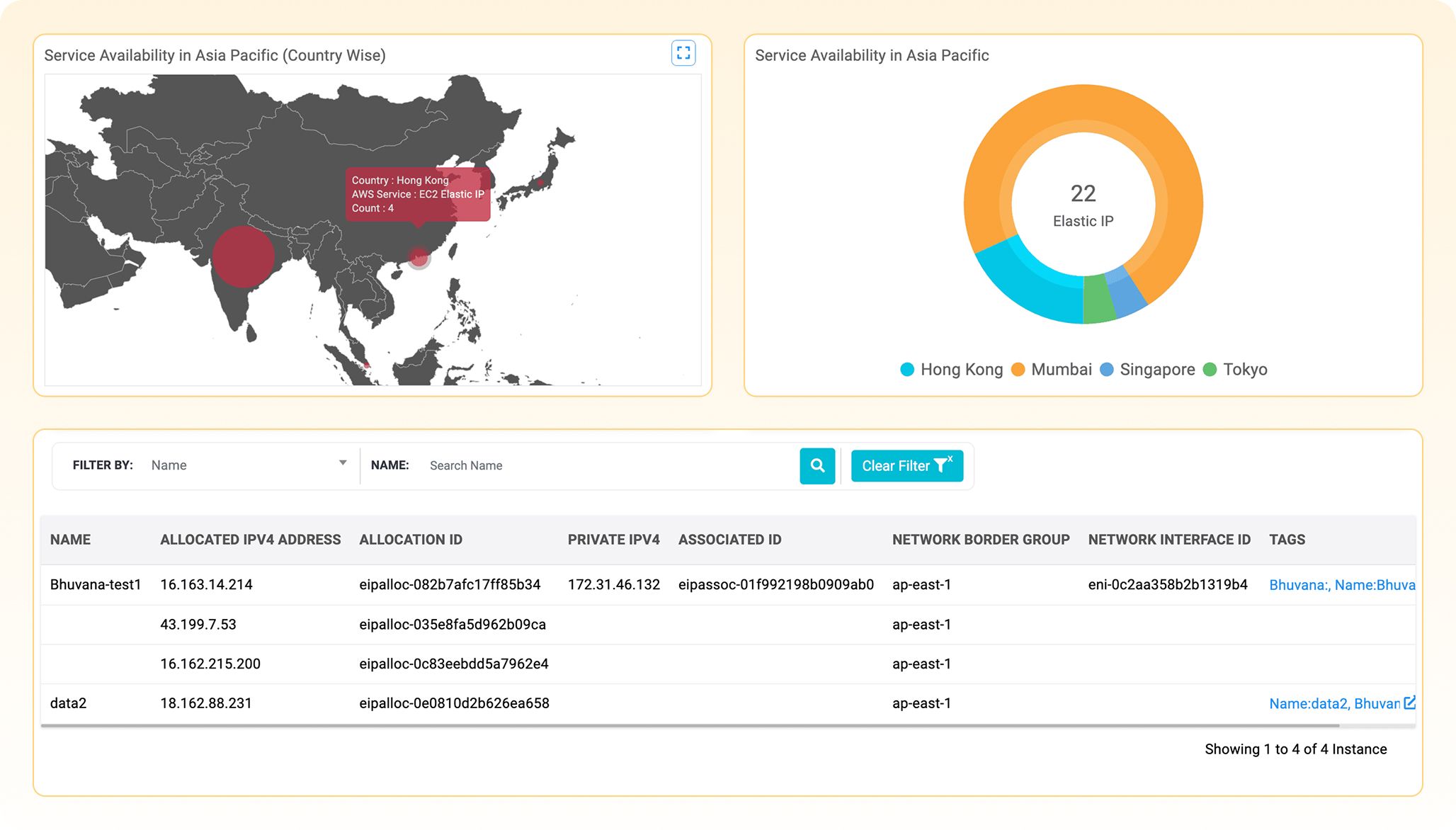
- Instant visibility across regions
Get a geographic and regional breakdown of Elastic IP usage across AWS regions, eliminating the need to navigate by region in the AWS console. - End-to-end IP mapping
Directly correlate each Elastic IP with its associated instance, private IP, network interface, and tags, offering full traceability of address assignments. Quickly spot and deallocate idle or orphaned EIPs that incur cost but aren't attached to any resource.
- Capacity and inventory management
Monitor how many Elastic IPs are allocated vs. used, helping prevent wastage, cost overruns, or public IP exhaustion. - Security and exposure audits
Identify publicly exposed resources instantly by checking which Elastic IPs are bound to instances and which are floating unassociated.
Load balancers
From DNS to zones, decode the full anatomy of your AWS load balancers.
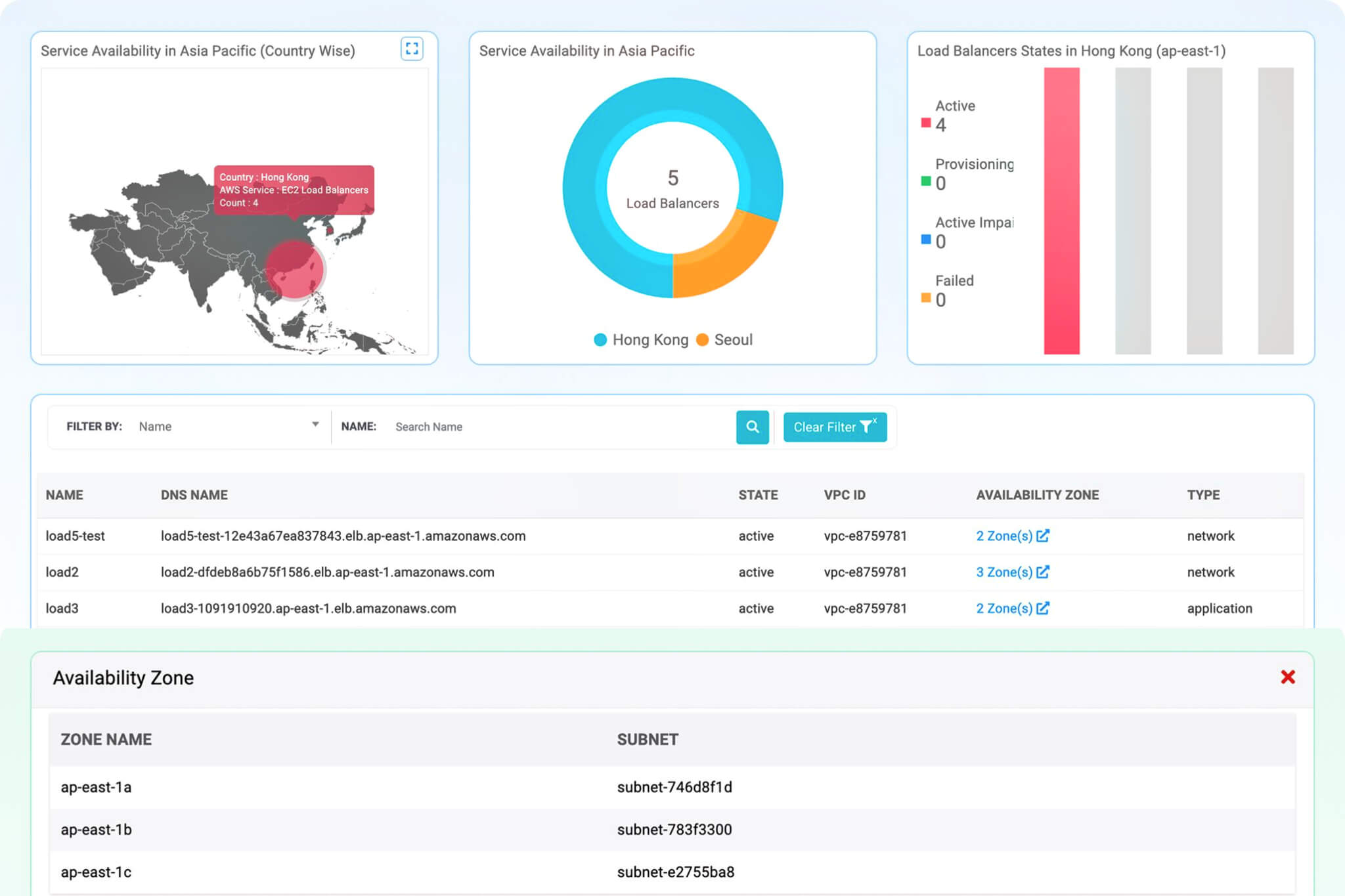
- Geo-mapped load balancer distribution
View the density of active load balancers across individual AZs (e.g., Hong Kong) and the entire region (e.g., Asia Pacific). This helps instantly assess geographic redundancy and plan failover or resiliency strategies. - Real-time load balancer health overview
Get instant visibility into active, failed, or impaired states, enabling quick identification of provisioning or performance issues across zones. - Cross-zone availability monitoring
Track the exact zones each load balancer spans. This ensures adherence to the HA design, enabling zone-aware capacity planning.
- DNS mapping for fast troubleshooting
Access full DNS names mapped to each load balancer directly from the console. This accelerates resolution workflows by providing precise endpoints for diagnostics or validation. - Eliminate misconfigurations
Quickly verify that each load balancer is correctly mapped to distinct subnets across AZs, avoiding single-point failures due to subnet overlap or missing zones. - Simplify network troubleshooting
Correlate zonal subnet mapping with health metrics and logs to trace latency spikes, routing failures, or zone-specific outages without switching consoles.
ECS
End-to-end ECS visibility, including task load, container health, and cluster spread, all within DDI Central.
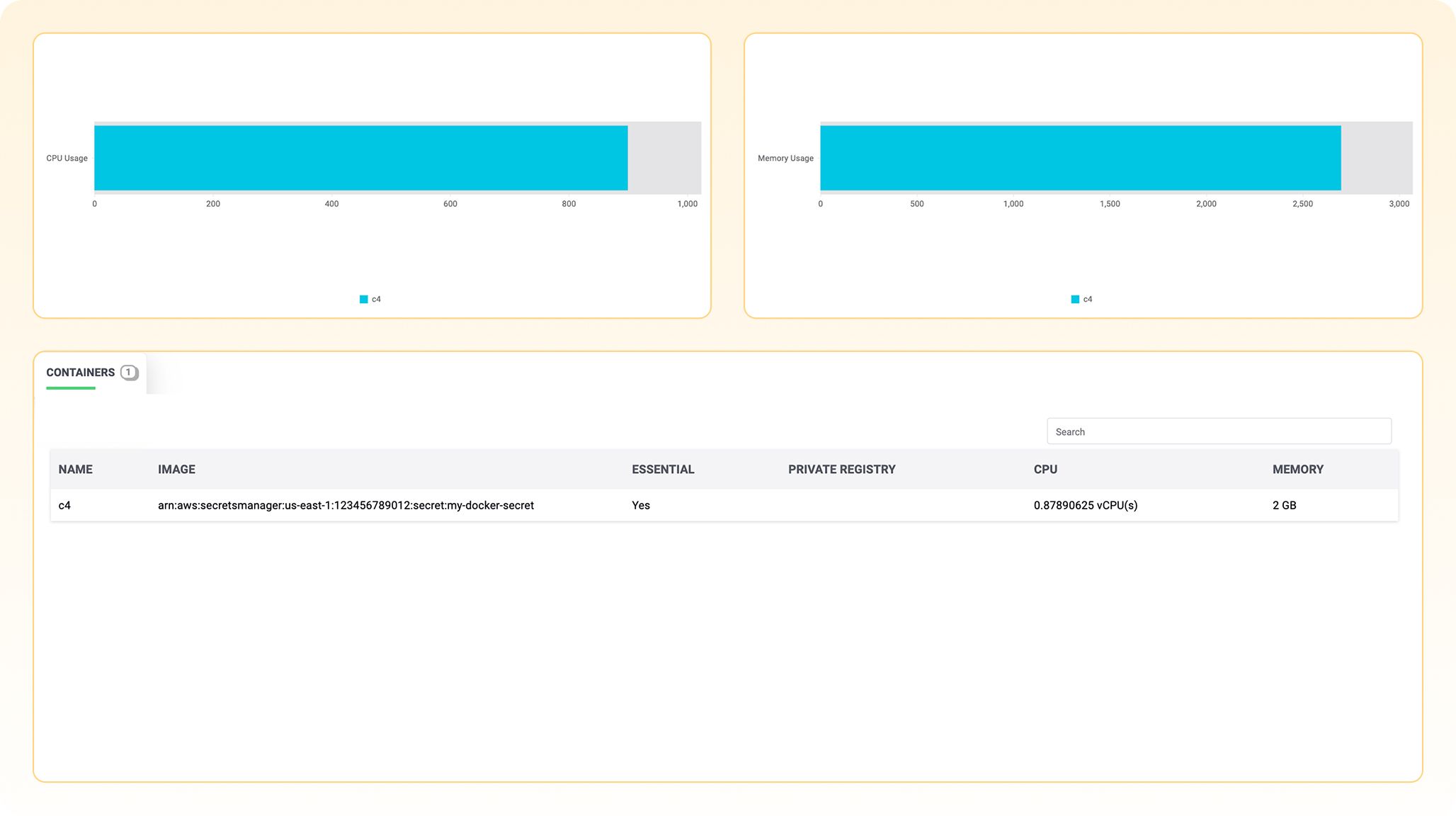
- Understand container-level resource usage at a glance
Instantly view CPU and memory utilization charts for every running container, enabling quick assessment of workload efficiency and saturation risks. - Trace image provenance and deployment origin
Get visibility into container image sources, including secret-based registries, helping ensure you’re pulling trusted builds and avoiding configuration drift. - Spot essential containers in multi-task deployments
Identify which containers are flagged as essential for service uptime—critical for fault-tolerant design and availability planning.
- Validate registry source and access control
See if the container image is pulled from a private registry and confirm security policies tied to registry usage, tightening control on image provenance. - Gain runtime context for performance tuning
Drill into specific containers, correlate task definitions to service logic, and pinpoint root causes across runtime failures or scaling inefficiencies. - Isolate and inspect containers for microservice debugging
Drill into specific containers, correlate task definitions to service logic, and pinpoint root causes across runtime failures or scaling inefficiencies.
RDS
See the whole stack—from IP to SQL. Track your cloud DBs not just as services, but as IP-bound resources with VPC, subnet, and DNS context—all in one pane.
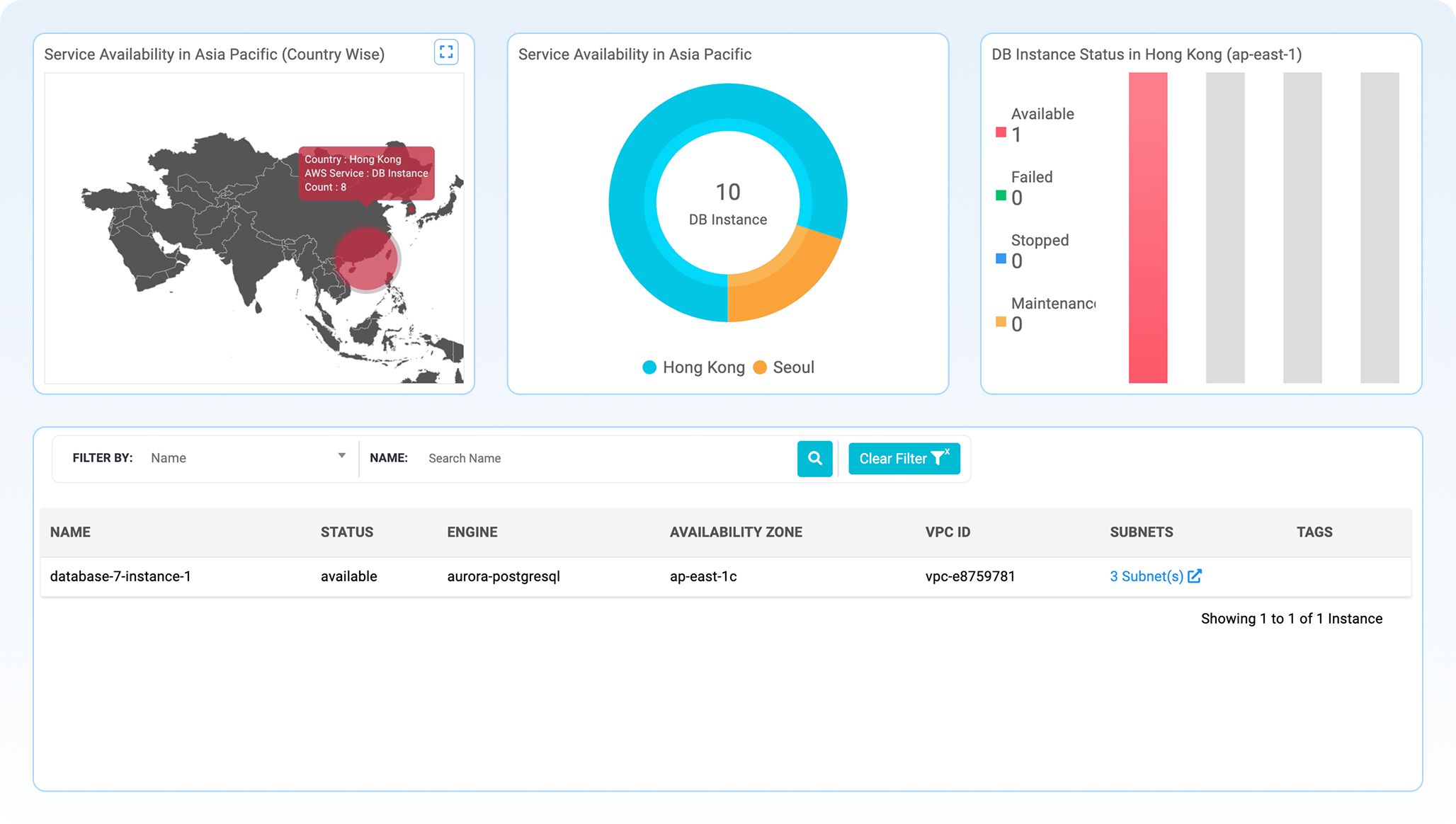
- Pinpoint geographic DB distribution
View where your DB instances are running across countries to align with latency goals, compliance zones, and disaster recovery plans. - Segment by region, strategize HA
Donut chart view helps validate how DB instances are spread across critical regions—ensuring your HA strategy has true depth. - Instant health checks by state
A bar chart shows DB instance availability, helping you spot failing, stopped, or under-maintained DBs before they impact users.
- Get full metadata in one place
Dive into DB engine types, current state, AZ placement, and linked VPC and subnets without switching consoles. - Connected context for network mapping
DB instances aren’t islands. See their full IP lineage—VPCs, subnets, zones— within DDI Central for seamless network-DB correlation.
HA for DNS and DHCP servers
Always-on infrastructure
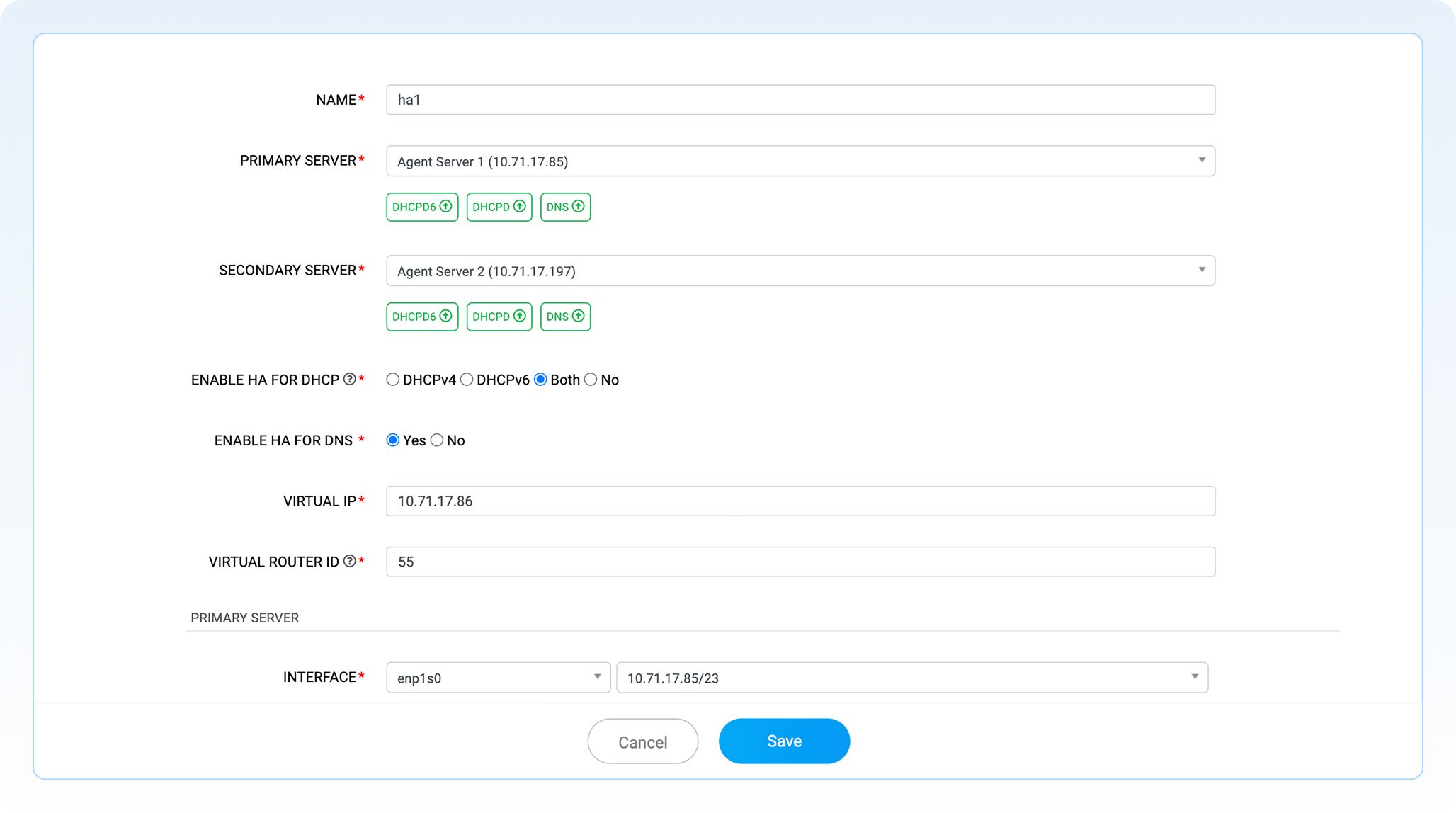
- Pair your servers, protect your uptime
Configure server pairs that actively monitor each other for seamless failover. The active server owns the shared virtual IP (VIP); the standby waits in sync. - Same IP, no disruption
If the active server fails, the standby instantly takes over the VIP, ensuring clients always reach the service through the same IP—even if the underlying server changes.
- No load balancers, no hardware dependency
Achieve HA without external load balancers, hardware appliances, or DNS/DHCP-level redirects—no reconfiguration required. - Zero IP conflicts, zero chaos
HA architecture keeps IP leases and DNS records consistent and uninterrupted, even during server reboots or unexpected failures.
Automatic PTR record creation
Quick dual record setup
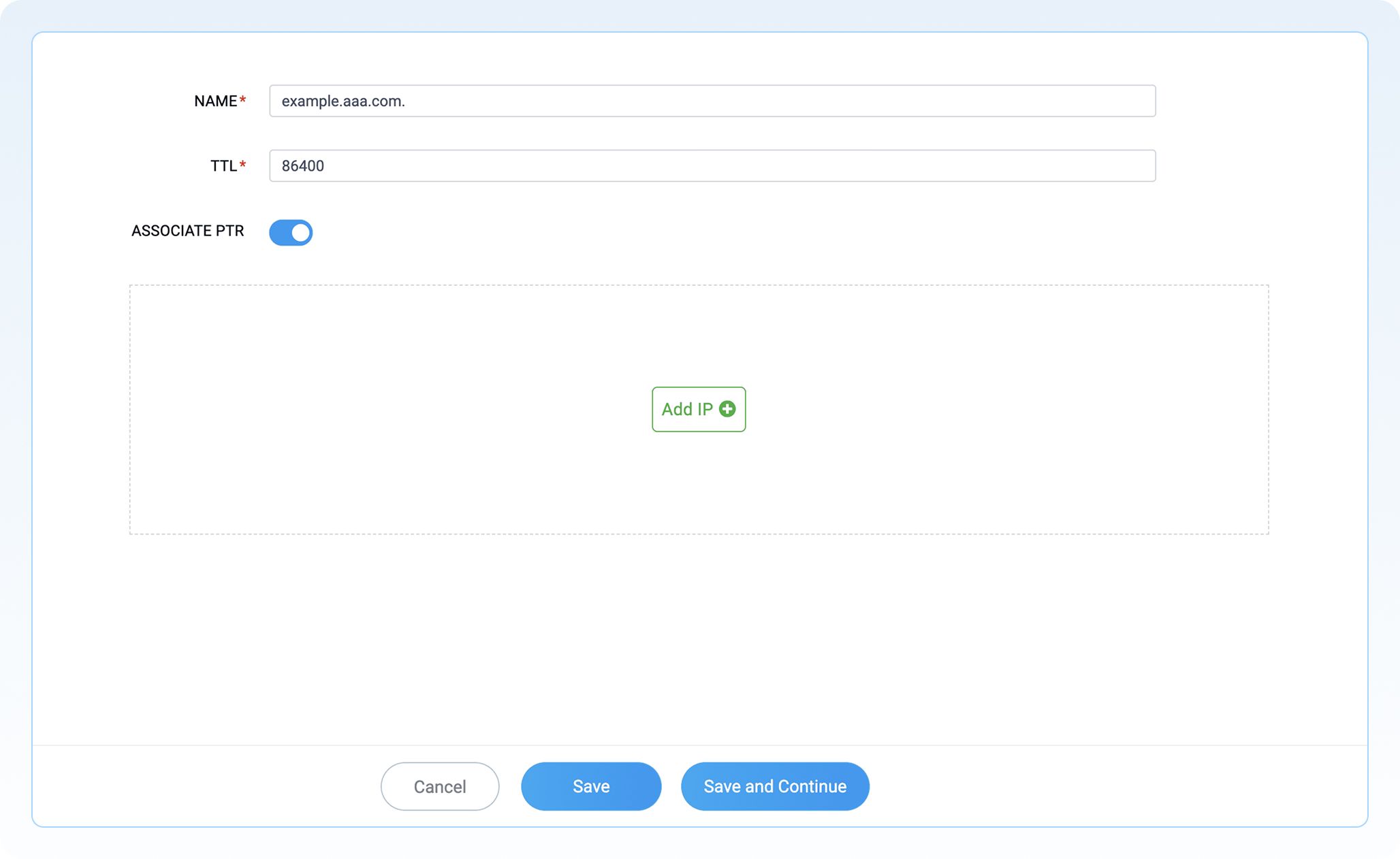
- Eliminate manual errors
Avoid misconfigurations that cause DNS mismatches, ensuring reliable record accuracy. - Maintain DNS hygiene
Automatically synchronize forward (A/AAAA) and reverse (PTR) records, enhancing overall DNS quality.
- Accelerate provisioning
Significantly reduce the time spent creating and updating reverse zones, boosting operational efficiency. - Enhance auditing and monitoring
Ensure accurate PTR records for improved network traceability, compliance, and effective monitoring.