RESTful APIs
Key Manager Plus APIs allow other applications to connect, interact and integrate with Key Manager Plus directly. These APIs belong to the REpresentational State Transfer category and allow applications to create, fetch, associate digital keys and add, retrieve or manage users programmatically.
1. Prerequisites
Generating an API Key
The first step to configure and use KMP APIs is generating the API key from the KMP user interface. Only administrator users can generate the API keys. The API keys serve as the auth token for your access purposes. The API keys are tied to the host in which they are created.
- Navigate to Settings >> General Settings >> API Key tab and click Generate.
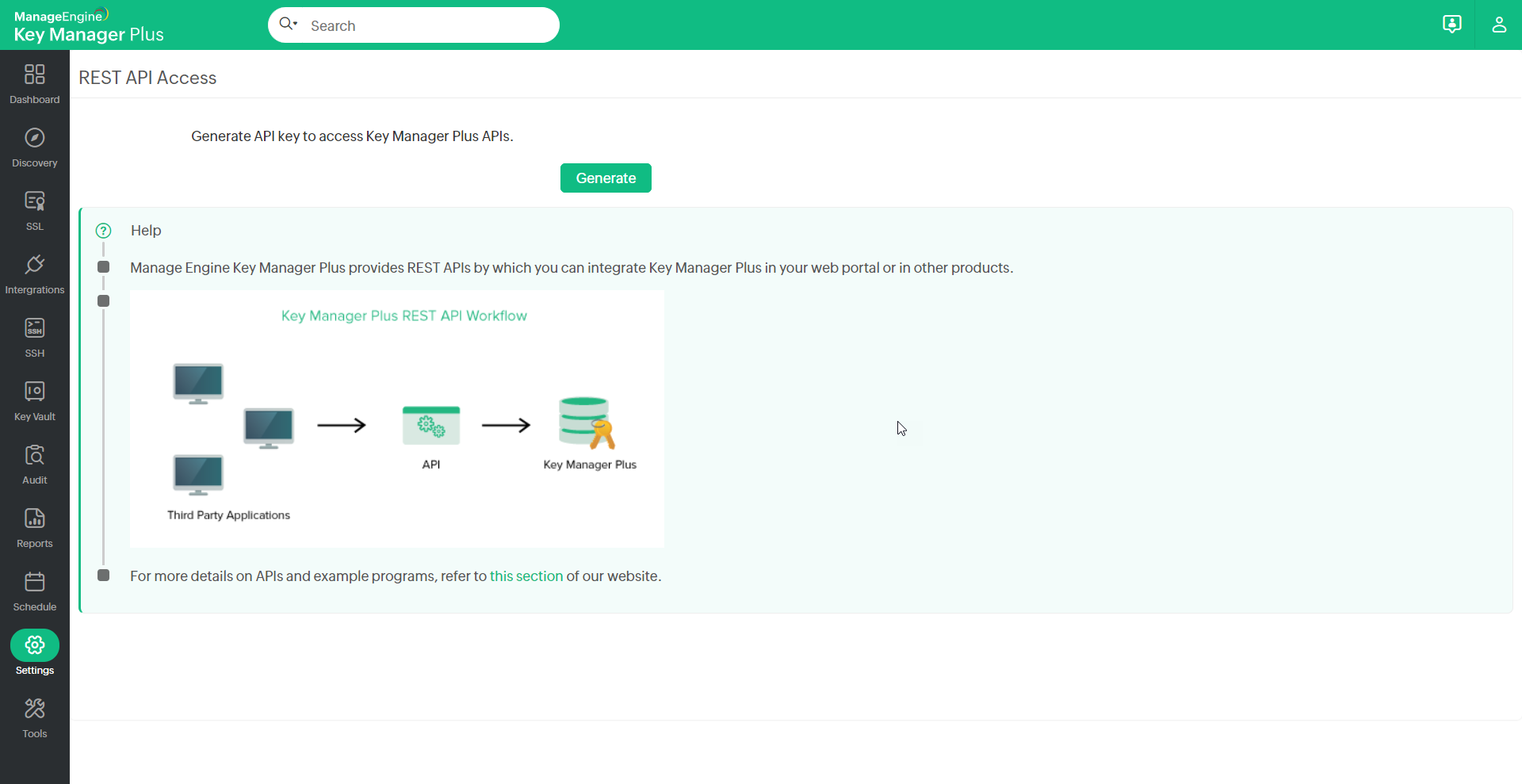
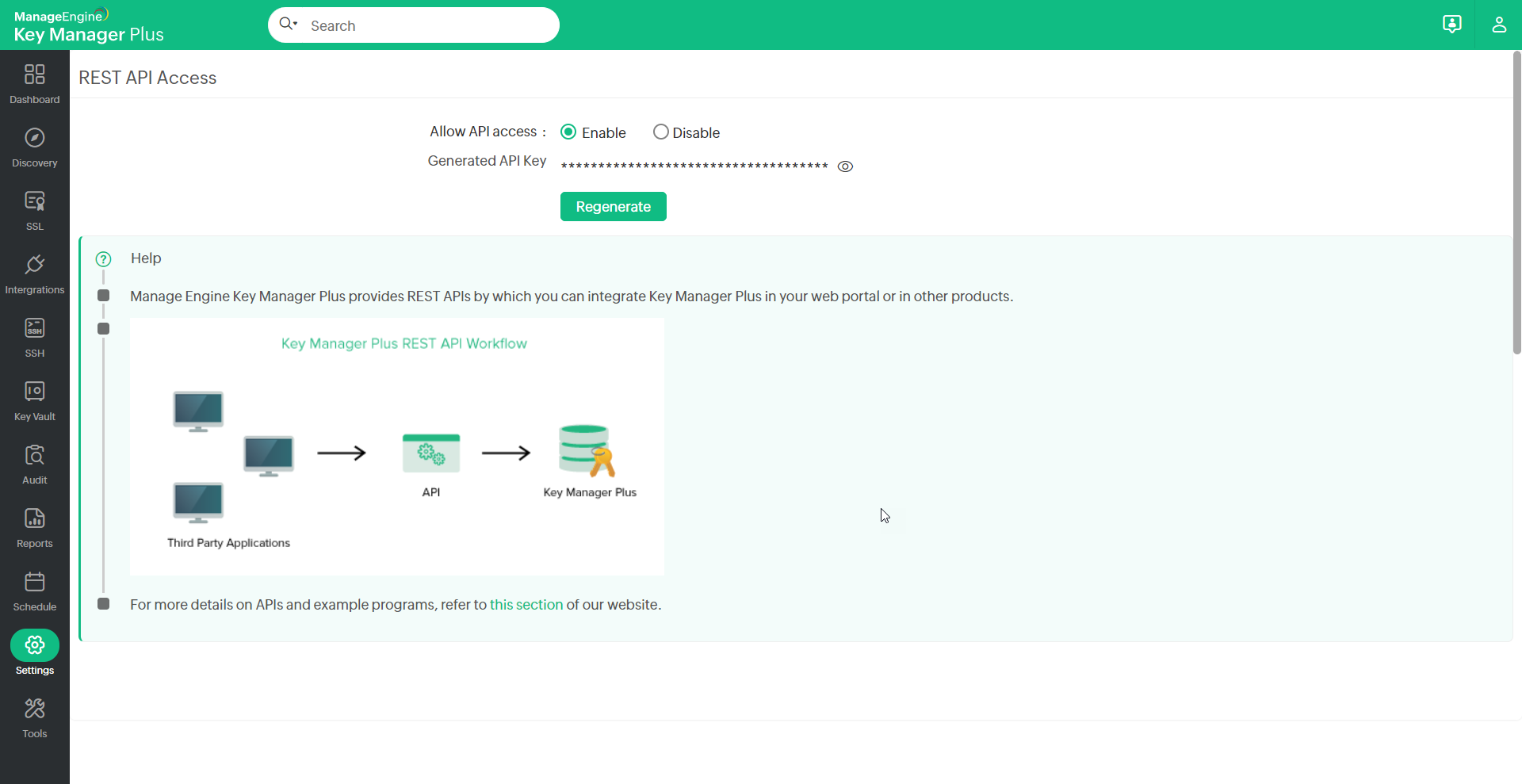
- The API key is generated and this key serves as the authentication token for your access purposes and you need to provide this key every time you try to access KMP API.
- Key Manager Plus provides an option to regenerate the API key in case if the API key in use has been compromised. Log in to your account, navigate to Settings >> General Settings >> API Key and click Regenerate and the new API Key is generated.
2. HTTPS Methods Used
GET
To fetch resources, user accounts, keys, account/resource details
DELETE
To delete an existing key or a certificate
POST
To create new keys, certificates or to discover resources
3. How to Make Use of the APIs?
Invoking the APIs
The APIs can be via HTTP POST, GET and PUT requests. All parameters in the request should be form-url encoded. For all the APIs you need to pass AUTH token, which is mandatory.
Supported Format
The URL structure for the KMP API would be as below:
https://<Host-Name-of-KMP-Server OR IP address>:6565/api/pki/restapi/ <api_name> /AUTHTOKEN=A3164150-4C15-4AA4-918E-F258F38149F8
APIs Summary
KMP provides the following APIs:
- To create a new SSH key
- To update credentials
- To fetch all SSH resources
- To fetch all the SSH keys
- To fetch a particular SSH key
- To export a SSH key
- To get SSH key passphrase
- To export a SSH Key as a specific Key Type
- To get SSH keys for a user
- To enumerate all users
- To get all SSH users
- To fetch all associated users
- To get all the key vault keys
- To export a key vault key
- To delete a key vault key
- To add a key vault key
- To update a key vault key
- To get a certificate
- Fetch Intermediate Certificate
- To get a certificate in different file formats
- To get all certificates
- To get all certificate expiry
- To get certificate details
- To get certificate keystore
- To update a certificate
- To delete a certificate
- To perform resource discovery
- To perform resource discovery (for a range of IP addresses)
- To discover SSL in bulk from files
- To create CSR
- To get CSR list
- To import CSR
- To sign CSR
- To export a CSR
- To create certificate
- To import a SSH key
- To associate a SSH key
- To dissociate a SSH Key
- To add a Certificate
- To deploy a Certificate
- To delete a SSH Key
- To get Certificate Private Key Passphrase
- To fetch PGP Keys
- To fetch all audit details
- To get SSL vulnerabilities count
- To Revoke MSCA Certificates
- To Fetch Unmanaged Certificates from a Load Balancer or Shared Path
- To Import the Unmanaged Certificates Fetched from a Load Balancer or Shared Path
- To Update the Additional Fields Associated with an SSL Certificate
1. To Create a New SSH Key
Description
To create a new SSH key
HTTPS method
POST
Header
AUTHTOKEN=99AE42A9-02E0-4638-888A-D4D19225C3FE
Input Data
The following data to be passed as input
{"operation":{"Details":{"keyName":"keytest",
"passPhrase":"passPhrase",
"comment":"comment",
"length":"2048",
"keyType":"ssh-rsa"}}}
Sample Request
https://<Host-Name-of-KMP-Server OR IP address>:6565/api/pki/restapi/createsshkey?INPUT_DATA={"operation":{"Details":{"keyName":"keytest","passPhrase":"passPhrase","comment":"comment","length":"2048","keyType":"ssh-rsa"}}}
Sample Response
{ "name": "CreateSSHKey",
"result": {
"status": "Success",
"message": "New SSH key created successfully" }
}
Note: Following are the key types that can be used to create new SSH keys:
- ssh-rsa (key length: 1024/2048/4096)
- rsa-sha2-256 (key length: 1024/2048/4096)
- rsa-sha2-512 (key length: 1024/2048/4096)
- ssh-dss (key length: 1024)
- ed25519 (no specific key length)
- ecdsa (key length: 256/384/521)
2. To Update Credentials
Description
To update credentials for the discovered resources.
HTTPS method
POST
Header
AUTHTOKEN=99AE42A9-02E0-4638-888A-D4D19225C3FE
Input Data
The following data to be passed as input
{"operation":{"Details":{"userName":"test3",
"password":"test3",
"resourceName":"172.21.147.80",
"isAdmin":"false"}}}
Sample Request
https://<Host-Name-of-KMP-Server OR IP address>:6565/api/pki/restapi/applycredentials?INPUT_DATA={"operation":{"Details":{"userName":"test3","password":"test3","resourceName":"172.21.147.80","isAdmin":"false"}}}
Sample Response
{
"name": "ApplyCredentials",
"result": {
"status": "Success",
"message": "Credentials updated successfully"
}
}
3. To Fetch all SSH Resources
Description
To fetch all the SSH resources.
HTTPS method
GET
Header
AUTHTOKEN=1604F2E1-2E31-4886-AA4E-DDBC9D3D189B
Input Data
None
Sample Request
https://<Host-Name-of-KMP-Server OR IP address>:6565/api/pki/restapi/getAllSSHResourceDetails
Sample Response
{
"result": {
"message": "All SSH Resources fetched successfully.",
"status": "Success"
},
"name": "GetAllSSHResources",
"details": [
{
"Path": "/home",
"Description": "NA",
"ResourceId": 1,
"ResourceName": "pmp-linux.keymanagerplus.com",
"Port": 22,
"CreationTime": "Apr 13, 2023 16:55",
"IPADDRESS": "172.XX.145.XXX",
"LandingServerName": "-"
},
{
"Path": "/home",
"Description": "NA",
"ResourceId": 2,
"ResourceName": "pmp-centos6.keymanagerplus.com",
"Port": 22,
"CreationTime": "Apr 18, 2023 12:13",
"IPADDRESS": "172.YY.YYY.2",
"LandingServerName": "testServer"
}
],
"totalRows": 2
}
4. To Fetch all the SSH Keys
Description
To fetch all the discovered SSH keys
HTTPS method
GET
Header
AUTHTOKEN=99AE42A9-02E0-4638-888A-D4D19225C3FE
Input Data
None
Sample Request
https://<Host-Name-of-KMP-Server OR IP address>:6565/api/pki/restapi/getAllSSHKeys
Sample Response
{"name": "GetAllSSHKeys",
"result": {"status": "Success","message": "All SSH Keys fetched successfully"
},"totalRows": 1,"details": [{"KeyName": "testkey","KeyType": "ssh-rsa",
"KeyLength": "2048","FingerPrint": "SHA256:v28/AlRYrpBKjAp4JoTRphLOkFdVb1ummVcyFHSfC5I",
"isPassphraseAvailable": false,"CreatedBy": "mm","CreationTime": "Today"}]}
5. To Fetch a Particular SSH Key
Description
To fetch a particular SSH keys from the discovered keys
HTTPS method
POST
Header
AUTHTOKEN=99AE42A9-02E0-4638-888A-D4D19225C3FE
Input Data
The name of the operation and key to be passed as input
{"operation":{"Details":{"keyName":"key"}}}
Sample Request
https://<Host-Name-of-KMP-Server OR IP address>:6565/api/pki/restapi/getSSHKey?INPUT_DATA={"operation":{"Details":{"keyName":"key"}}}
Sample Response
{"name": "GetSSHKey",
"result": {"status": "Success","message": "SSH Key testkey fetched successfully"
}, "details": [{"KeyName": "testkey","KeyType": "ssh-rsa","KeyLength": "2048",
"FingerPrint": "SHA256:v28/AlRYrpBKjAp4JoTRphLOkFdVb1ummVcyFHSfC5I",
"isPassphraseAvailable": false,"CreatedBy": "mm","CreationTime": "Today"}]}
6. To Export a SSH Key
Description
To export a particular SSH key
HTTPS METHOD
POST
Header
AUTHTOKEN=99AE42A9-02E0-4638-888A-D4D19225C3FE
Input Data
The name of the operation and key to be passed as input
{"operation":{"Details":{"keyName":"key"}}}
Sample Request
https://<Host-Name-of-KMP-Server OR IP address>:6565/api/pki/restapi/exportSSHKey?INPUT_DATA={"operation":{"Details":{"keyName":"key"}}}
Sample Response
Key file
7. To Get SSH Key Passphrase
Description
To get a passphrase of an SSH key
HTTPS METHOD
GET
Header
AUTHTOKEN=99AE42A9-02E0-4638-888A-D4D19225C3FE
Input Data
The name of the operation and key to be passed as input
{"operation":{"Details":{"keyName":"testKey"}}}
Sample Request
https://<Host-Name-of-KMP-Server OR IP address>:6565/api/pki/restapi/getSSHKeyPassphrase?INPUT_DATA={"operation":{"Details":{"keyName":"testKey"}}}
Sample Response
{
"result": {
"message": "Passphrase fetched successfully"
"status": "Success"
},
"name": "GetSSHKeyPassphrase",
"details": {
"passphrase": "passphrase@321"
}
}
8. To Export a SSH Key as a Specific Key Type
Description
To export a particular SSH key as a specific Key Export Type(Public or Private).
HTTPS METHOD
POST
Header
AUTHTOKEN=99AE42A9-02E0-4638-888A-D4D19225C3FE
Input Data
- {"operation":{"Details":{"keyName":"Key","keyExportType":"public"}}}
- {"operation":{"Details":{"keyName":"Key","keyExportType":"private"}}}
Note: Specify 'public or 'private' in 'keyExportType' to indicate to fetch public or private key.
Sample Request
- https://<Host-Name-of-KMP-Server OR IP address>:6565/api/pki/restapi/exportSSHKey?INPUT_DATA={"operation":{"Details":{"keyName":"Key","keyExportType":"public"}}}
- https://<Host-Name-of-KMP-Server OR IP address>:6565/api/pki/restapi/exportSSHKey?INPUT_DATA={"operation":{"Details":{"keyName":"Key","keyExportType":"private"}}}
Sample Response
Key file
9. To Get SSH Keys for a User
Description
To get all the SSH keys associated with a particular user
HTTPS Method
GET
Header
AUTHTOKEN=99AE42A9-02E0-4638-888A-D4D19225C3FE
Input data:
The user name and resource name to be passed as input
{"operation":{"Details":{"userName":"test","resourceName":"172.21.147.80"}}}
Sample Request
https://<Host-Name-of-KMP-Server OR IP address>:6565/api/pki/restapi/getSSHkeysforuser?INPUT_DATA={"operation":{"Details":{"userName":"test","resourceName":"172.21.147.80"}}}
Sample Response
{ "name": "GetSSHKeysForUser",
"result": {
"status": "Success","message": "SSH keys for user test of resource pmp-centos6 fetched successfully"
}, "details": "testkey,testkey1"}
10. To Enumerate all Users
Description
To enumerate all users in a particular resource
HTTPS Method
POST
Header
AUTHTOKEN=99AE42A9-02E0-4638-888A-D4D19225C3FE
Input data:
The user name and resource name to be passed as input
{"operation":{"Details":{"userName":"test","resourceName":"172.21.147.80"}}}
Sample Request
https://<Host-Name-of-KMP-Server OR IP address>:6565/api/pki/restapi/enumerateusers?INPUT_DATA={"operation":{"Details":{"userName":"test","resourceName":"172.21.147.80"}}}
Sample Response
{
"name": "EnumerateUsers",
"result": {
"status": "Success",
"message": "User enumeration started"
}
}
11. To Get all SSH Users
Description
To get all the discovered SSH users
HTTPS Method
GET
Header
AUTHTOKEN=99AE42A9-02E0-4638-888A-D4D19225C3FE
Input Data
None
Sample Request
https://<Host-Name-of-KMP-Server OR IP address>:6565/api/pki/restapi/getAllSSHUsers
Sample Response
{
"name": "GetAllSSHUsers",
"result": {
"status": "Success",
"message": "All SSH Users fetched successfully"
},
"totalRows": 2,
"details": [
{
"UserName": "test",
"ResourceName": "172.21.147.80"
},{
"UserName": test1,
"ResourceName": "172.21.147.80"
}]}
12. To Fetch all Associated Users
Description
To fetch all the users associated with SSH keys
HTTPS Method
GET
Header
AUTHTOKEN=99AE42A9-02E0-4638-888A-D4D19225C3FE
Input Data
None
Sample Request
https://<Host-Name-of-KMP-Server OR IP address>:6565/api/pki/restapi/getAllAssociatedUsers
Sample Response
"result": { "status": "Success","message": "All associated users fetched successfully"
}, "totalRows": 1,"details": [{ "UserName": "test","ResourceName": "pmp-centos6"}]}
13. To Get all the Key Vault Keys
Description
Key Vault: Key Manager Plus provides a repository called Key Vault to securely store your digital keys. To fetch all the keys from the key vault
HTTPS Method
GET
Header
AUTHTOKEN=99AE42A9-02E0-4638-888A-D4D19225C3FE
Input Data
None
Sample Request
https://<Host-Name-of-KMP-Server OR IP address>:6565/api/pki/restapi/getAllKeyStoreKeys
Sample Response
{
"name": "getAllKeyStoreKeys",
"result": {
"status": "Success",
"message": "All KeyStore Keys fetched successfully"
},
"totalRows": 1,
"details": [
{
"Description": "test",
"Key Name": "cert.cer",
"Created Time": "Sep 27, 2016 12:27",
"Datacenter": "Central US",
"Instance Name": "test",
"Key Type": "test",
"Created By": "admin",
"Key Store ID": 1,
}]}
14. To Export a Key Vault Key
Description
To export a particular key from the key vault
HTTPS Method
POST
Header
AUTHTOKEN=99AE42A9-02E0-4638-888A-D4D19225C3FE
Input Data
The key name to be passed as input.
{"operation":{"Details":{"keyName":"cert.cer"}}}
Sample Request
https://<Host-Name-of-KMP-Server OR IP address>:6565/api/pki/restapi/exportKeyStoreKey?INPUT_DATA={"operation":{"Details":{"keyName":"cert.cer"}}}
Sample Response
Key file
15. To Delete a Key Vault Key
Description
To delete a key from the key vault
HTTPS method
DELETE
Header
AUTHTOKEN=99AE42A9-02E0-4638-888A-D4D19225C3FE
Input Data
The key name to be passed as input.
{"operation":{"Details":{"keyName":"cert.cer"}}}
Sample Request
https://<Host-Name-of-KMP-Server OR IP address>:6565/api/pki/restapi/deleteKeyStoreKey?INPUT_DATA={"operation":{"Details":{"keyName":"cert.cer"}}}
Sample Response
{
"name": "DeleteKeyStoreKey",
"result": {
"status": "Success",
"message": "Key Store keys deleted successfully"
}
}
16. To Add a Key Vault Key
Description
To add a new key to the key vault
HTTPS method
POST
Header
AUTHTOKEN=99AE42A9-02E0-4638-888A-D4D19225C3FE
Input data
The following data to be passed as input.
{"operation":{"Details":{"keyName":"brin.cer",
"description":"test",
"datacenter":"test",
"passphrase":"test",
"keyType":"test",
"instanceName":"test"}}} -F File=@E:/certs/cert.cer
Sample Request
curl -X POST -k -H "AUTHTOKEN=99AE42A9-02E0-4638-888A-D4D19225C3FE" -H 'Content-Type: multipart/form-data' -F INPUT_DATA={"operation":{"Details":{"keyName":"brin.cer","description":"test","datacenter":"test","passphrase":"test","keyType":"test","instanceName":"test"}}} -F File=@E:/certs/cert.cer https://<Host-Name-of-KMP-Server OR IP address>:6565/api/pki/restapi/addKeyStoreKey
Sample Response
{"Status":"Success","Message":"Key added to key store successfully"}
17. To Update a Key Vault Key
Description
To update a particular key vault key
HTTPS Method
POST
Header
AUTHTOKEN=99AE42A9-02E0-4638-888A-D4D19225C3FE
Input Data
The following data to be passed as input.
{"operation":{"Details":{"keyName":"brin.cer",
"description":"test",
"datacenter":"test",
"passphrase":"test",
"keyType":"test",
"instanceName":"test"}}} -F File=@E:/certs/cert.cer
Sample Request
curl -X POST -k -H "AUTHTOKEN=99AE42A9-02E0-4638-888A-D4D19225C3FE" -H 'Content-Type: multipart/form-data' -F INPUT_DATA={"operation":{"Details":{"keyName":"brin.cer","description":"test","datacenter":"test","passphrase":"test","keyType":"test","instanceName":"test"}}} -F File=@E:/certs/cert3.cer https://<Host-Name-of-KMP-Server OR IP address>:6565/api/pki/restapi/updateKeyStoreKey
Sample Response
{"Status":"Success","Message":"Key Store key updated successfully"}
18. To Get a Certificate
Description
To obtain a certificate from KMP's certificate repository
HTTPS Method
GET
Header
AUTHTOKEN=3E014D78-E603-413A-AC24-6392F0001283
Input Data
The operation details and the name of the certificate fetched to be passed as input
{"operation":{"Details":{"common_name":"*.google.com","serial_number":"XXXXXXXXXXXXXX" }}}
Sample Request
https://<Host-Name-of-KMP-Server OR IP address>:6565/api/pki/restapi/getCertificate?INPUT_DATA={"operation":{"Details":{"common_name":"*.google.com","serial_number":"XXXXXXXXXXXXXX"}}}
Sample Response
Certificate object
19. Fetch Intermediate Certificate
Description
To fetch an intermediate certificate from KMP's certificate repository.
HTTPS Method
GET
Header
AUTHTOKEN=3E014D78-E603-413A-AC24-6392F0001283
Input Data
The operation details and the intermediate certificate detailed should be passed as input.
"INPUT_DATA={"operation":{"Details":{"common_name":"r5","serial_number":"ab279417","intermediate_issuer_dn":"r2","intermediate_serial_number":"d7fddd02"}}}"
Sample Request
https://<Host-Name-of-KMP-Server OR IP address>:6565/api/pki/restapi/getIntermediateCertificate?INPUT_DATA={"operation":{"Details":{"common_name":"r5","serial_number":"ab279417","intermediate_issuer_dn":"r2","intermediate_serial_number":"d7fddd02"}}}"
Sample Response
Certificate object
20. To Get a Certificate in Different File Formats
Description
To obtain a certificate from KMP's certificate repository in different file formats.
HTTPS Method
GET
Header
AUTHTOKEN=3E014D78-E603-413A-AC24-6392F0001283
Input Data
The operation details and the name of the certificate fetched to be passed as input
{"operation":{"Details":{"common_name":"certificate_common_name","serial_number":"certificate_serial_number,"fileType":"File format"}}}
Notes:
- The certificates can be exported in the following file formats: CER, CRT, DER, P7B, PKCS, JKS, PEM, KEY.
- Specify the required file format in 'fileType' to export the certificate in that format.
Sample Request
https://<Host-Name-of-KMP-Server OR IP address>:6565/api/pki/restapi/getCertificate?INPUT_DATA={"operation":{"Details":{"common_name":"examplecert","serial_number":"182e967a976","fileType":"PEM"}}}
Sample Response
Certificate object
21. To Get all Certificates
Description
To obtain all certificates from KMP's certificate repository
HTTPS Method
GET
Header
AUTHTOKEN=3E014D78-E603-413A-AC24-6392F0001283
Input Data
{"operation":{"Details":{"withExpiryDaysLessThan":"500","withKeyLength":"1024","withSignatureAlgorithm":"SHA1","withPrivateKey":"true" }}}
Sample Request
https://<Host-Name-of-KMP-Server OR IP address>:6565/api/pki/restapi/getAllSSLCertificates?INPUT_DATA={"operation":{"Details":{"withExpiryDaysLessThan":"500"}}}
(or)
https://Host-Name-of-KMP-Server OR IP address>:6565/api/pki/restapi/getAllSSLCertificates?INPUT_DATA={"operation":{"Details":{"NotInCertificateGroup":"cg,wordpress","withExpiryDaysLessThan":"45","InCertificateGroup":"appleGp"}}}
Note: Including the Input Data in the API request is optional. In case input data is provided, you can add any one or all of the available filters: withExpiryDaysLessThan, withKeyLength, withSignatureAlgorithm, withPrivateKey, InCertificateGroup, NotInCertificateGroup. The InCertificateGroup and NotInCertificateGroup parameters are applicable from 7030 and multiple group names can be given in comma separated form.
Sample Response
{ "name": "GetAllSSLCertificates","result": { "status": "Success", "message": "All SSL Certificates fetched successfully"}, "totalRows": 2,"details": [{ "CertID": 1, "DNS Name/FQDN": "paytm.com", "Port": 443, "Common Name": "*.paytm.com", "Issuer": "GeoTrust Inc.", "FromDate": "Oct 13, 2015", "ExpiryDate": "Aug 27, 2017", "KeyStrength": "2048","SignatureAlgorithm": "SHA256withRSA","Created By": "admin","Expiry Notification Email": "","Description": "test"},{ "CertID": 302,"DNS Name/FQDN": "204.141.32.155","Port": 443, "Common Name": "*.zoho.com", "Issuer": "Sectigo Limited", "FromDate": "Jul 2, 2019", "ExpiryDate": "Apr 30, 2021", "KeyStrength": "2048","SignatureAlgorithm": "SHA256withRSA","Created By": "admin","Expiry Notification Email": "","Description": "test"}]}
22. To Get all Certificate Expiry
Description
To get the expiry dates of all the certificates
HTTPS Method
GET
Header
AUTHTOKEN=1B2BF6FA-8511-47A8-867D-CE7FFE4BFBD0
Input Data
INPUT_DATA:{"operation":{"Details":{"customExpiryDateFormat":"yyyy-MM-dd"}}}
Note: Applicable for builds 7040 and above
Providing a date format as input is optional. If specified, any valid date format can be used, and the output will display the expiry date in the same format alongside the dafault date format.
Sample Request
Sample Response
{
"result": {
"message": "Certificates expiry date fetched successfully",
"status": "Success"
},
"name": "GetAllSSLCertificatesExpiryDate",
"details": [
{
"ExpiryDate": "Oct 2, 2025",
"serialNumber": "9cf7a987ccd33ea4d27e0bab31c7c247",
"Common Name": "*.zoho.com",
"formattedExpiryDate": "2025-10-02"
},
{
"ExpiryDate": "Oct 18, 2025",
"serialNumber": "c745dcae53f59103beda2477ccce73a",
"Common Name": "*.wikipedia.org",
"formattedExpiryDate": "2025-10-18"
},
{
"ExpiryDate": "Aug 4, 2025",
"serialNumber": "65d68ea40d3bb74d128839b49c787f90",
"Common Name": "*.google.com",
"formattedExpiryDate": "2025-08-04"
}
],
"totalRows": 3
}
23. To Get Certificate Details
Description
To get the details of a particular certificate
HTTPS Method
GET
Header
AUTHTOKEN=3E014D78-E603-413A-AC24-6392F0001283
Input Data
The operation details and the name of the certificate to passed as input
{"operation":{"Details":{"common_name":"*.google.com","serial_number":"xxxxxxxxxxxx"}}}
Note: It is optional to provide the serial number to fetch certificate details.
Sample Request
https://<Host-Name-of-KMP-Server OR IP address>:6565/api/pki/restapi/getCertificateDetails?INPUT_DATA={"operation": {"Details":{"common_name":"*.google.com","serial_number":"xxxxxxxxxxxx"}}}
Sample Response
{ "name": "GetCertificateDetails", "result": { "status": "Success", "message": "Details of certificate *.zoho.com fetched successfully"
}, "details": [{ "certtype": "Domain", "certificateTemplate": "N/A", "endpoint": { "hostName": "*.zoho.com", "port": "443",
"expiry_date": "2021-04-30 05:29:59.0", "from_date": "2019-07-02 05:30:00.0", "certSignAlg": "SHA256withRSA",
"Sans": "*.zoho.com,zoho.com", "serial": "8c0b04e91a1796d86d1de5e89c8b3c5c",
"fingerPrint": "aeecb6227dc8adef18a8fb99465739996e2782a8", "keyalg": "RSA", "PublicKeyLength": 2048,
"PrivateKey": false, "isAWS": false}, "isCertInstalledMulipleServers": false, "issuer": {
"cname": "Sectigo RSA Domain Validation Secure Server CA", "org": "Sectigo Limited", "orgunit": "-"},
"issuedto": { "cname": "*.zoho.com", "org": "-", "orgunit": "Domain Control Validated"}, "intermediate": {},
"ipaddress": "204.141.32.155", "CertificateId": "302"}]}
24. To Get Certificate Keystore
Description
To get the key store file of a particular certificate
HTTPS Method
GET
Header
AUTHTOKEN=3E014D78-E603-413A-AC24-6392F0001283
Input Data
The name of the operation and the common name of the keystore file to be passed as input
{"operation":{"Details":{"common_name":"apitest","serial_number":"XXXXXXXXXXXXXX" }}}
Sample Request
https://<Host-Name-of-KMP-Server OR IP address>:6565/api/pki/restapi/getCertificateKeyStore?INPUT_DATA={"operation":{"Details":{"common_name":"apitest","serial_number":"XXXXXXXXXXXXXX"}}}
Sample Response
KeyStore File Object
25. To Update a Certificate
Description
To update an SSL certificate in the KMP repository.
HTTPS Method
POST
Header
AUTHTOKEN=99AE42A9-02E0-4638-888A-D4D19225C3FE
Input Data
The operation name and the common name of the certificate to be passed as input
{"operation":{"Details":{"common_name":"apitest","serial_number":"XXXXXXe433d" ,"description":"testdescription","dns_name":"dnsname","email_address":"hooby@gmail.com","isAutoDeploy":"true","sslAdditionalFieldData":[{"ADDITIONALFIELDNAME":"Owner Name","ADDITIONALFIELDVALUE":"John"},{"ADDITIONALFIELDNAME":"dropdown","ADDITIONALFIELDVALUE":"option2"},{"ADDITIONALFIELDNAME":"Numeric","ADDITIONALFIELDVALUE":"678"},{"ADDITIONALFIELDNAME":"email","ADDITIONALFIELDVALUE":"mail@gmail.com"},{"ADDITIONALFIELDNAME":"date","ADDITIONALFIELDVALUE":"06/12/2022"}]}}}
Sample Request
https://<Hostname-of-the-KMP-server-OR-IP-Address>:<Port>/api/pki/restapi/updateSSLCertificateDetails?INPUT_DATA={"operation":{"Details":{"common_name":"apitest","serial_number":"XXXXXXe433d" ,"description":"testdescription","dns_name":"dnsname","email_address":"hooby@gmail.com","isAutoDeploy":"true","sslAdditionalFieldData":[{"ADDITIONALFIELDNAME":"Owner Name","ADDITIONALFIELDVALUE":"John"},{"ADDITIONALFIELDNAME":"dropdown","ADDITIONALFIELDVALUE":"option2"},{"ADDITIONALFIELDNAME":"Numeric","ADDITIONALFIELDVALUE":"678"},{"ADDITIONALFIELDNAME":"email","ADDITIONALFIELDVALUE":"mail@gmail.com"},{"ADDITIONALFIELDNAME":"date","ADDITIONALFIELDVALUE":"06/12/2022"}]}}}
Sample Response
{
"result": {
"message": "SSL Certificate apitest details updated successfully.",
"status": "Success"
},
"name": "updateSslDetails"
}
26. To Delete a Certificate
Description
To delete an SSL certificate from the KMP repository.
HTTPS Method
DELETE
Header
AUTHTOKEN=3E014D78-E603-413A-AC24-6392F0001283
Input Data
The operation name and the common name of the certificate to be passed as input
{"operation": {"Details":{"common_name":"apitest","serial_number":"XXXXXXXXXXXXXX"}}}
Input Data
(Applicable from build 7000 & above only)
The operation name and the common name of the certificate to be passed as input
{"operation": {"Details":{"common_name":"apitest","serial_number":"XXXXXXXccda","exclude_certificate":"true","reason":"Test"}}}
Sample Request
https://<Host-Name-of-KMP-Server OR IP address>:6565/api/pki/restapi/deleteCertificate?INPUT_DATA={"operation": {"Details":{"common_name":"apitest"}}}
Sample Request
(Applicable from build 7000 & above only)
https://<Hostname-of-KMP-Server-OR-IP-Address>:<Port>/api/pki/restapi/deleteCertificate?INPUT_DATA={"operation": {"Details":{"common_name":"apitest","serial_number":"XXXXXXXccda","exclude_certificate":"true","reason":"Test"}}}
Sample Response
{
"result": {
"message": "Certificate apitest deleted successfully.",
"status": "Success"
},
"name": "DeleteCertificate"
}
27. To Perform Resource Discovery
Description
To discover a particular resource for SSL certificates
HTTPS Method
POST
Header
AUTHTOKEN=3E014D78-E603-413A-AC24-6392F0001283
Input Data
The name/IP address of the host and port number to be passed as input
{"operation":{"Details":{"HOST":"de-ubuntu10-1","TIMEOUT":"300","PORT":"6565"}}}
Sample Request
https://<Host-Name-of-KMP-Server OR IP address>:6565/api/pki/restapi/sslCertSingleDiscovery?INPUT_DATA={"operation":{"Details":{"HOST":"de-ubuntu10-1","TIMEOUT":"300","PORT":"6565"}}}
Sample Response
{"name": "Get SSL Discovery", "totalRows": 1,"details": {"zoho.com": ["SUCCESS", "SSL Certificate already available, *.zoho.com certificate found at port 443"]}}
28. To Perform Resource Discovery (for a range of IP addresses)
Description
To discover a set of resources for SSL certificates
HTTPS Method
POST
Header
AUTHTOKEN=7EDC4ED5-E684-4413-9848-F0016C114874
Input Data
The start and end IP addresses, port number and time-out to be passed as input
{"operation":{"Details":{"StartIpAddress":"192.168.216.0",
"EndIpAddress":"192.168.216.3",
"TIMEOUT":"3",
"PORT":"443"}}}
Sample Request
https://<Host-Name-of-KMP-Server OR IP address>:6565/api/pki/restapi/sslCertRangeDiscovery?INPUT_DATA={"operation":{"Details":{"StartIpAddress":"192.168.216.0","EndIpAddress":"192.168.216.3","TIMEOUT":"3","PORT":"443"}}}
Sample Response
{ "name": "Get SSL Discovery","totalRows": 4,"details": {
"192.168.216.1": ["FAILURE","Connection failed,no certificate found at port 443"],
"192.168.216.0": [ "FAILURE","Connection timed out,no certificate found at port 443"],
"192.168.216.2": ["FAILURE", "Connection timed out,no certificate found at port 443"],
"192.168.216.3": ["FAILURE","Connection timed out,no certificate found at port 443"]}}
29. To Discover SSL in Bulk from Files
Description
To perform SSL discovery in bulk from files.
HTTPS Method
POST
Header
AUTHTOKEN=A36ECFEF-7374-4DE2-B1A0-3EE719E3D2C7
Input Data
INPUT_DATA:{"operation":{"Details":{"FileName":"sslDiscInputFile.txt","TIMEOUT":"3","PORT":443}}} File=@C:/path/to/file/sslDiscovery
File Content Format - IP address/Hostname<space>Port (By default the port will be in 443 and is an optional one)
For example:
0.0.0.0 6565
test-username-10 443
192.168.20.20 7272
example.com
Sample Request
curl -X POST -k -H "AUTHTOKEN:A36ECFEF-7374-4DE2-B1A0-3EE719E3D2C7" -H 'Content-Type: multipart/form-data' -F INPUT_DATA={"operation":{"Details":{"FileName":"sslDiscoveryInputFile.txt","TIMEOUT":"3","PORT":443}}} -F File=@C:/path/to/file/sslDiscoveryInputFile.txt https://<Host-Name-of-KMP-Server OR IP address>:6565/api/pki/restapi/sslCertFileBasedDiscovery
Sample Response
{
"result": {
"message": "SSL discovery completed successfully",
"status": "Success"
},
"name": "Get SSL Discovery",
"details": {
"10.53.0.209": [
"FAILURE",
"Connection timed out,no certificate found at port 443"
],
"10.53.0.208": [
"FAILURE",
"Connection timed out,no certificate found at port 443"
],
"10.53.0.212": [
"FAILURE",
"Connection timed out,no certificate found at port 443"
]
},
"totalRows": 3
}
30. To Create CSR
Description
To create a certificate signing request
HTTPS Method
POST
Header
AUTHTOKEN=C6506112-6113-42C9-AD3F-4A3AEF9476C9
Input Data
The following data need to be passed as input.
{
"operation": {
"Details": {
"CNAME": "kmptestcert",
"ALT_NAMES": "testcert",
"ORGUNIT": "ManageEngine",
"ORG": "Zoho",
"LOCATION": "Krisp",
"STATE": "TamilNadu",
"COUNTRY": "IN",
"PASSWORD": "##########",
"VALIDITY_TYPE": "days",
"VALIDITY": "90,
"ALG": "RSA",
"LEN": "4096",
"SIGALG": "SHA256",
"StoreType": "PKCS12",
"CSR_EMAIL":"kmpadmin@adventnet.com"
}
}
}
Notes: Validity type can be days, hours or minutes. CSR_EMAIL field is optional.
Sample Request
https://<Host-Name-of-KMP-Server OR IP address>:6565/api/pki/restapi/createCSR?INPUT_DATA={"operation":{"Details":{"CNAME":"mytestcert","ALT_NAMES":"test","ORGUNIT":
"hhh","ORG":"h","LOCATION":"hh","STATE":"h","COUNTRY":"hh","PASSWORD":"bbbbbbbb",
"VALIDITY_TYPE":"88","VALIDITY":"888","ALG":"RSA","LEN":"4096","SIGALG":"SHA256",
"StoreType":"PKCS12"}}}
Sample Response
{"name":"CreateCertificate","result":{"status":"Success","message":"CSR saved successfully"}}
31. To Get CSR List
Description
To get CSR list
HTTPS Method
GET
Header
AUTHTOKEN=7930AD60-B2F6-4CAA-90E5-779EDF229615
Input Data
None
Sample Request
https://<Host-Name-of-KMP-Server OR IP address>:6565/api/pki/restapi/getCSRList
Sample Response
{"name": "GetCSRList",
"result": {
"status": "Success",
"message": "Fetched all CSRs successfully"
},
"totalRows": 1,
"GeneratedList": [
{"CREATED_BY": "admin",
"KEYALGORITHM": "RSA",
"KEYSTORE_TYPE": "JKS",
"isPassword": true,
"CSR_ID": 1,
"CREATED_DATE": "May 15, 2020 19:51",
"KEY_STRENGTH": 2048,
"DOMAIN_NAME": "testcsr",
"VALIDITY": "30",
"SIGNATURE_ALGORITHM": "SHA256withRSA"
}]}
32. To Import CSR
Description
To import the list of CSRs available in the request list.
URL
https://<<KMPaddress>>:<PORT>/api/pki/restapi/importCSR
HTTPS Method
POST
Header
AUTHTOKEN=A3164150-4C15-4AA4-918E-F258F38149F8
Input Data
INPUT_DATA={"operation":{"Details":{"password":"Test@123","Email":"test@mail.com"}}}
Note: It is optional to provide the Key File. If the Key File is provided, the Password field is mandatory.
Sample Request
curl -X POST -k -H 'AUTHTOKEN:A3164150-4C15-4AA4-918E-F258F38149F8' 'https://Host-Name-of-the-KMP-Server:Port/api/pki/restapi/importCSR' -F 'CSR=@"/home/downloads/test.csr"' -F 'Key=@"/home/downloads/test.keystore"' -F 'INPUT_DATA={"operation":{"Details":{"password":"Test@123","Email":"kmp-server@manageengine.com"}}}'
Sample Response
{
"result": {
"message": "CSR demo.test.com imported successfully.",
"status": "Success"
},
"name": "importCSR"
}
33. To Sign CSR
Description
To sign CSR
HTTPS Method
POST
Header
AUTHTOKEN=7930AD60-B2F6-4CAA-90E5-779EDF229615
Input Data
INPUT_DATA={"operation":{"Details":{"serverName":"kmp-w12r2-1","caName":"kmp-w12r2-1-ca","templateName":"DomainController","CSR_ID":"1"}}}
(or)
INPUT_DATA={"operation":{"Details":{"signType":"signWithRoot","rootCertificateCommonName":"testroot","rootCertificateSerialNumber":"1879376424c","Validity":100,"isIntermediate":"true","CSR_ID":"301"}}}
(or)
INPUT_DATA={"operation":{"Details":{"signType":"MSCAusingAgent","serverName":"test-w16-1","caName":"test-W16-1-CA","templateName":"WebServer","agentName":"test-w16-1","agentResponseTimeout":90,"CSR_ID":"1"}}}
Note: The 'signType' can be 'MSCA', 'MSCAusingAgent' or 'signWithRoot'. The sign type 'MSCAusingAgent' is applicable from 7030 and by default, the 'signType' will be taken as 'MSCA'.
Sample Request
https://<Host-Name-of-KMP-Server OR IP address>:6565/api/pki/restapi/signCSR
Sample Response
{
"result": {
"message": "Certificate csr successfully signed with test.",
"status": "Success"
},
"name": "SignCSR",
"details": [
{
"commonName": "test",
"Certificate_ID": 3301,
"serialNumber": "bd865c93"
}
]
}
34. To Export a CSR
Description
To export a CSR from the Key Manager Plus repository.
HTTPS Method
GET
Header
AUTHTOKEN=1604F2E1-2E31-4886-AA4E-DDBC9D3D189B
Input Data
{"operation":{"Details":{"CSR_ID":"304","fileType":"CSR"}}}
Note: The file type can be CSR, PrivateKey or KeyStore.
Sample Request
https://<Host-Name-of-KMP-Server OR IP address>:6565/api/pki/restapi/exportCSR?INPUT_DATA={"operation":{"Details":{"CSR_ID":"304","fileType":"CSR"}}}
Sample Response
File Content
35. To Create a Certificate
Description
To create an SSL certificate
HTTPS Method
POST
Header
AUTHTOKEN=C6506112-6113-42C9-AD3F-4A3AEF9476C9
Input Data
The following data to be passed as input.
{
"operation": {
"Details": {
"CNAME": "kmptestcert",
"ALT_NAMES": "testcert",
"ORGUNIT": "ManageEngine",
"ORG": "Zoho",
"LOCATION": "Krisp",
"STATE": "TamilNadu",
"COUNTRY": "IN",
"PASSWORD": "##########",
"VALIDITY_TYPE": "days",
"VALIDITY": "90,
"ALG": "RSA",
"LEN": "4096",
"SIGALG": "SHA256",
"StoreType": "PKCS12",
"CSR_EMAIL":"kmpadmin@adventnet.com"
}
}
}
Note: Validity type can be days, hours or minutes. CSR_EMAIL field is optional.
Sample Request
https://<Host-Name-of-KMP-Server OR IP address>:6565/api/pki/restapi/createCertificate?INPUT_DATA={"operation":{"Details":{"CNAME":"mytestcert","ALT_NAMES":"test","ORGUNIT":
"hhh","ORG":"h","LOCATION":"hh","STATE":"h",
"COUNTRY":"hh",
"PASSWORD":"bbbbbbbb","VALIDITY_TYPE":"88",
"VALIDITY":"888","ALG":"RSA","LEN":"4096","SIGALG":"SHA256","StoreType":"PKCS12"}}}
Sample Response
{
"result": {"message": "Certificate saved successfully","status": "Success"},
"name": "CreateCertificate",
"details": [
{
"SSL_RESOURCEID": 3
}
],
"totalRows": 1
}
36. To Import a SSH Key
Description
To import a SSH key
HTTPS Method
POST
Header
AUTHTOKEN=A3164150-4C15-4AA4-918E-F258F38149F8
Input Data
The following data to be passed as input.
{"operation":{"Details":{"keyName":"testkey","passphrase":"passtrix"}}}
Sample Request
curl -X POST -k -H "AUTHTOKEN=A3164150-4C15-4AA4-918E-F258F38149F8" -H 'Content-Type: multipart/form-data' -F INPUT_DATA={"operation":{"Details":{"keyName":"testkey","passphrase":"passtrix" }}} -F File=@D:/certs/keys/test1-passtrix/test1_Jul-21-2017-15_56.key
https://<Host-Name-of-KMP-Server OR IP address>:6565/api/pki/restapi/addSSHKey
Sample Response
{"name":"addSSHKey","result":{"status":"SUCCESS","message":"Key imported successfully"}}
37. To Associate a SSH Key
Description
To associate a SSH key
HTTPS Method
POST
Header
AUTHTOKEN=A3164150-4C15-4AA4-918E-F258F38149F8
Input Data
The following data to be passed as input.
{"operation":{"Details":{"keyName":"testkey","resourceName":"test.csez.zohocorpi
n.com","userName":"test"}}}
Sample Request
https://<Host-Name-of-KMP-Server OR IP address>:6565/api/pki/restapi/associateKey?INPUT_DATA={"operation":{"Details":{"keyName":"te
stkey","resourceName":"test.csez.zohocorpin.com","userName":"test"}}}
Sample Response
{"name": "associateKey",
"result": {
"status": "Success",
"message": "Key associated successfully "}}
38. To Dissociate a SSH Key
Description
To dissociate a SSH key
HTTPS Method
POST
Header
AUTHTOKEN=A3164150-4C15-4AA4-918E-F258F38149F8
Input Data
The following data to be passed as input.
{"operation":{"Details":{"keyName":"testkey","resourceName":"test.csez.zohocorpi
n.com","userName":"test"}}}
Sample Request
https://<Host-Name-of-KMP-Server OR IP address>:6565/api/pki/restapi/dissociateKey?INPUT_DATA={"operation":{"Details":{"keyName":"te
stkey","resourceName":"test.csez.zohocorpin.com","userName":"test"}}}
Sample Reponse
{"name": "dissociateKey",
"result": {
"status": "SUCCESS",
"message": "Key dissociated successfully."}}
39. To Add a Certificate
Description
To add an SSL certificate to Key Manager Plus certificate repository.
URL
https://<Host-Name-of-KMP-Server OR IP
address>:6565/api/pki/restapi/addCertificate
HTTPS Method
POST
Header
AUTHTOKEN=A3164150-4C15-4AA4-918E-F258F38149F8
Input Data
The following data to be passed as input.
input data: {"operation":{"Details":{"fileType":"KEYSTORE","PASSWORD":"PASSWORD"}}}
Note: The fileType specified in the input data can be either CERTFILE or KEYSTORE. For CERTFILE fileType, the PASSWORD field need not be specified.
Sample Request
curl -X POST -k -H "AUTHTOKEN=A3164150-4C15-4AA4-918E-F258F38149F8" -H 'Content-Type: multipart/form-data' -F INPUT_DATA={"operation":{"Details":{"fileType":"KEYSTORE","PASSWORD":"PASSWORD"}}} -F File=@D:/certs/newcert.keystore https://<Host-Name-of-KMP-Server OR IP address>:6565/api/pki/restapi/addCertificate
Sample Response
{"name": "AddCertificate",
"result":
{{"Status":"Success",
"Message": "Certificate newcert.com added successfully"}}}
40. To Deploy a Certificate
Description
To Deploy SSL Certificate.
HTTPS Method
POST
Header
AUTHTOKEN:75408B31-EC01-4494-BCBC-48DC5F39920F
Input Data
INPUT_DATA={"operation":{"Details":{"common_name":"testcert","serial_number":"xxxxxxxx","serverName":"testmachine"}}}
Note: It is optional to provide the server name. The server name allows you to deploy certificates to that particular server. Without the server name, the certificates are deployed to all the saved servers from the client.
Sample Request
https://127.0.0.1:6565/api/pki/restapi/deployCertificate
Sample Response
{"result": {
"message": "Certificate deployment is successful.",
"status": "Success"
},
"name": "DeployCertificate",
"totalRows": 1,
"deployStatus": [
{
"server": "testmachine",
"message": "Certificate testcert of format CER and PFX deployed in testmachine successfully.",
"status": "Success"
}]}
41. To Delete a SSH Key
Description
To delete a particular SSH key.
URL
https://< Host-Name-of-KMP-Server OR IP address>:6565/api/pki/restapi/deleteSSHKey
HTTPS Method
DELETE
Header
AUTHTOKEN=A3164150-4C15-4AA4-918E-F258F38149F8
Input Data
The following data to be passed as input.
{"operation":{"Details":{"key_name":"newkey1","withoutDisassociation":"true"}}}
Sample Request
https://< Host-Name-of-KMP-Server OR IP address
>:6565/api/pki/restapi/deleteSSHKey?INPUT_DATA={"operation":{"Details":{"key_name":"newkey1","withoutDisassociation":"true"}}}
Sample Response
{ "name": "DeleteSSHKey",
"result": { "status": "Success",
"message": "SSH keys newkey1 deleted successfully"}}
42. To Get Certificate Private Key Passphrase
Description
To get the passphrase of a certificate private key
URL
https://<Host-Name-of-KMP-Server OR IP address>:6565/api/pki/restapi/getCertificatePassphrase
HTTPS Method
GET
Header
AUTHTOKEN=894241B8-C361-4E30-B467-0AF9AAA00011
Input Data
The following data is to be passed as input:
{"operation":{"Details":{"common_name":"mycert","serial_number":"XXXXXXXXXXXXXX"}}}
Sample Request
https://<Host-Name-of-KMP-Server OR IP address>:6565/api/pki/restapi/getCertificatePassphrase?INPUT_DATA={"operation":{"Details":{"common_name":"mycert","serial_number":"XXXXXXXXXXXXXX"}}}
Sample Response
{
"result": {
"message": "Private key passphrase of certificate mycert is fetched",
"status": "Success"
},
"name": "GetCertificatePassphrase",
"details": {
"Passphrase": "SamplePassphrase"
}
}
43. To Fetch PGP Keys
Description
To fetch PGP Keys
HTTPS Method
GET
Header
AUTHTOKEN=99AE42A9-02E0-4638-888A-D4D19225C3FE
Input Data
The following data is to be passed as input:
- {"operation":{"Details":{"User":"test (test) <tes@test.com>","keyExportType":"public"}}}
- {"operation":{"Details":{"User":"test (test) <tes@test.com>","keyExportType":"private"}}}
Notes:
Specify 'public or 'private' in 'keyExportType' to indicate to fetch public or private key.
If you are using special characters in the key "User", kindly escape them using the backslash.
Sample Request
- https://<Host-Name-of-KMP-Server OR IP address>:6565/api/pki/restapi/getPGPKey?INPUT_DATA={"operation":{"Details":{"User":"test (test) <tes@test.com>","keyExportType":"public"}}}
- https://<Host-Name-of-KMP-Server OR IP address>:6565/api/pki/restapi/getPGPKey?INPUT_DATA={"operation":{"Details":{"User":"test (test) <tes@test.com>","keyExportType":"private"}}}
Sample Response
Key file
44. To Fetch all Audit Details
Description
To get all the audit details.
HTTPS Method
GET
Header
AUTHTOKEN=068E1EC1-9587-4CA5-A284-02A6200F0032
Input Data
None
Sample Request
https://<Host-Name-of-KMP-Server OR IP address>:6565/api/pki/restapi/getAuditDetails
Sample Response
{
"result": {
"message": "All Audit data fetched successfully.",
"status": "Success"
},
"name": "GetAllAudits",
"details": [
{
"OPERATION": "REST API",
"DESCRIPTION": "All Audit data fetched successfully.",
"AUDITID": 902,
"USERNAME": "admin",
"TIME": "Apr 18, 2023 13:25"
}
],
"totalRows": 1
}
45. To Get SSL Vulnerabilities Count
Description
To get the total number of SSL vulnerabilities.
HTTPS Method
GET
Header
AUTHTOKEN=A36ECFEF-7374-4DE2-B1A0-3EE719E3D2C7
Input Data
None
Sample Request
https://<Host-Name-of-KMP-Server OR IP address>:6565/api/pki/restapi/getSSLVulnerabilityCount
Sample Response
{
"result": {
"message": "SSL vulnerability data fetched successfully.",
"status": "Success"
},
"name": "GetSSLVulnerabilityCount",
"details": {
"SSLVulnerabilityCount": {
"Weak Cipher Suites": 0,
"Poodle SSL": 0,
"Revoked": 0,
"SSLv3 Enabled": 0,
"No TLS1.2": 1,
"Heartbleed": 0
}
}
}
46. To Revoke MSCA Certificate
Description
To revoke a MSCA certificate.
HTTPS Method
POST
Header
AUTHTOKEN=1604F2E1-2E31-4886-AA4E-DDBC9D3D189B
Input Data
None
Sample Request
https:<//Host-Name-of-KMP-Server OR IP address>:6565/api/pki/restapi/revokeMSCACertificate?INPUT_DATA={"operation":{"Details":{"common_name":"test3","serial_number":"12345","revoke_reason":1}}}
Note: Provide the revoke_ reason attribute accordingly as specified below.
0 - Unspecified, 1 - Key compromise, 2 - Certificate Authority compromise, 3 - Affiliation changed, 4 - Superseded, 5 - Cessation of operation, 6 - Certificate hold, 7 - Remove from CRL
Sample Response
Certificate manageengine.com revoked successfully with reason Certificate hold.
47. Fetch Unmanaged Certificates from a Load Balancer or Shared Path
Description
To fetch the discovered and unmanaged certificates of format JKS/PKCS from a load balancer or shared path.
HTTPS Method
GET
Header
AUTHTOKEN=1604F2E1-2E31-4886-AA4E-DDBC9D3D189B
Input Data
{"operation":{"Details":{"type":"loadbalancer"}}}
Note: 'type' can be 'loadbalancer' or 'sharedpath' as required.
Sample Request
https://<Host-Name-of-KMP-Server OR IP address>:6565/api/pki/restapi/getUnmanagedCertList?INPUT_DATA={"operation":{"Details":{"type":"loadbalancer"}}}
Note: 'type' can be 'loadbalancer' or 'sharedpath'.
Sample Response
{
"result": {
"message": "Data fetched from the repository",
"status": "Success"
},
"name": "getUnmanagedCertList",
"details": [
{
"Certificate.keystore::2": "ENTER_THE_PASSWORD",
"www.managengine.com.keystore::8": "ENTER_THE_PASSWORD",
"Certificate.jks::1": "ENTER_THE_PASSWORD",
"www.chrometest.com_04_13_9_57_06.pfx::7": "ENTER_THE_PASSWORD",
"success.pfx::5": "ENTER_THE_PASSWORD",
"zs.com_May-17-2021-11_14.pfx::9": "ENTER_THE_PASSWORD",
"secret.keystore::4": "ENTER_THE_PASSWORD",
"test.pfx::6": "ENTER_THE_PASSWORD",
"des.EcSN9OIoOFuCQa8Tg.com.keystore::3": "ENTER_THE_PASSWORD"
}
],
"totalRows": 9
}
Note: Enter the respective certificate's password and save the response as a .txt file in the below format.
{
"Certificate.keystore::2": "Qx@7rF2uPv",
"www.managengine.com.keystore::8": "Y9g#kL4sZ",
"Certificate.jks::1": "H3&bN8wXp",
"www.chrometest.com_04_13_9_57_06.pfx::7": "A1z%vD6fR",
"success.pfx::5": "P7m*C2oLq",
"zs.com_May-17-2021-11_14.pfx::9": "W5@hU9sKt",
"secret.keystore::4": "F4g%B6nYl",
"test.pfx::6": "X8d#jM6oZ",
"des.EcSN9OIoOFuCQa8Tg.com.keystore::3": "V2p!tR7sH"
}
48. To Import the Unmanaged Certificates Fetched from a Load Balancer or Shared Path
Description
To import the unmanaged certificates of format JKS/PKCS fetched from a load balancer or shared path into the Key Manager Plus.
HTTPS Method
GET
Header
AUTHTOKEN=1604F2E1-2E31-4886-AA4E-DDBC9D3D189B
Input Data
The .txt file saved with the fetched data from the API - Fetch Unmanaged Certificates (.keystore/.pfx) from a Load Balancer or Shared Path is to be uploaded here as input data.
Sample Request
https://<Host-Name-of-KMP-Server OR IP address>:6565/api/pki/restapi/discoverUnmanagedCert
Sample Response
{
"Status": "Success",
"Message": "All certificates were imported successfully.",
"ImportedCertificate": [
"Certificate.keystore",
"www.manageengine.com.keystore",
"Certificate.jks",
"www.chrometest.com_04_13_9_57_06.pfx",
"success.pfx",
"zs.com_May-17-2021-11_14.pfx",
"secret.keystore",
"teste.pfx",
"demo.EcSN9OIoOFuCQa8Tg.com.keystore"
]
}
49. To Update the Additional Fields Associated with an SSL Certificate
Description
To update the existing additional fields associated with an SSL certificate stored in the Key Manager Plus repository.
URL
https://<Host-Name-Of-KMP-Server OR IP-Address>:6565/api/pki/restapi/updateSSLAdditionalFields
HTTPS Method
POST
Header
AUTHTOKEN=99AE42A9-02E0-4638-888A-D4D19225C3FE
Input Data
{"operation":{"Details":{"common_name":"mycert","serial_number":"fe1d1392618ae70c1065902a55d041ad" ,"sslAdditionalFieldData":[{"ADDITIONALFIELDNAME":"Owner Name","ADDITIONALFIELDVALUE":"John"},{"ADDITIONALFIELDNAME":"dropdown","ADDITIONALFIELDVALUE":"option2"},{"ADDITIONALFIELDNAME":"Numeric","ADDITIONALFIELDVALUE":"678"},{"ADDITIONALFIELDNAME":"email","ADDITIONALFIELDVALUE":"mail@gmail.com"},{"ADDITIONALFIELDNAME":"date","ADDITIONALFIELDVALUE":"06/12/2022"}]}}}
Sample Request
https://<Host-Name-Of-KMP-Server OR IP-Address>:6565/api/pki/restapi/updateSSLAdditionalFields?INPUT_DATA={"operation":{"Details":{"common_name":"mycert","serial_number":"fe1d1392618ae70c1065902a55d041ad" ,"sslAdditionalFieldData":[{"ADDITIONALFIELDNAME":"Owner Name","ADDITIONALFIELDVALUE":"John"},{"ADDITIONALFIELDNAME":"dropdown","ADDITIONALFIELDVALUE":"option2"},{"ADDITIONALFIELDNAME":"Numeric","ADDITIONALFIELDVALUE":"678"},{"ADDITIONALFIELDNAME":"email","ADDITIONALFIELDVALUE":"mail@gmail.com"},{"ADDITIONALFIELDNAME":"date","ADDITIONALFIELDVALUE":"06/12/2022"}]}}}
Sample Response
{
"result": {
"message": "Additional field details updated successfully for mycert",
"status": "Success"
},
"name": "updateSSLAdditionalFields"
}