Reduce mean time to respond (MTTR) by connecting SIEM detection directly to ITSM resolution. Log360 seamlessly integrates with ServiceDesk Plus to create a closed-loop security incident management ecosystem. This integration enriches ITSM tickets with deep threat context, enables SOAR actions directly from the help desk console, and ensures comprehensive compliance by archiving ServiceDesk Plus ITSM audit data.
How the Log360-ServiceDesk Plus integration works
- Log Retention and compliance: Log360 ingests logs from the entire IT infrastructure, including ServiceDesk Plus audit data—tracking technician logins, and server events to ensure long-term retention and satisfying strict compliance reporting requirements.
- Continuous threat monitoring: As a SIEM, Log360 actively analyzes system logs, security events, and network activity in real time to detect anomalies, unauthorized access attempts, and potential cyber threats.
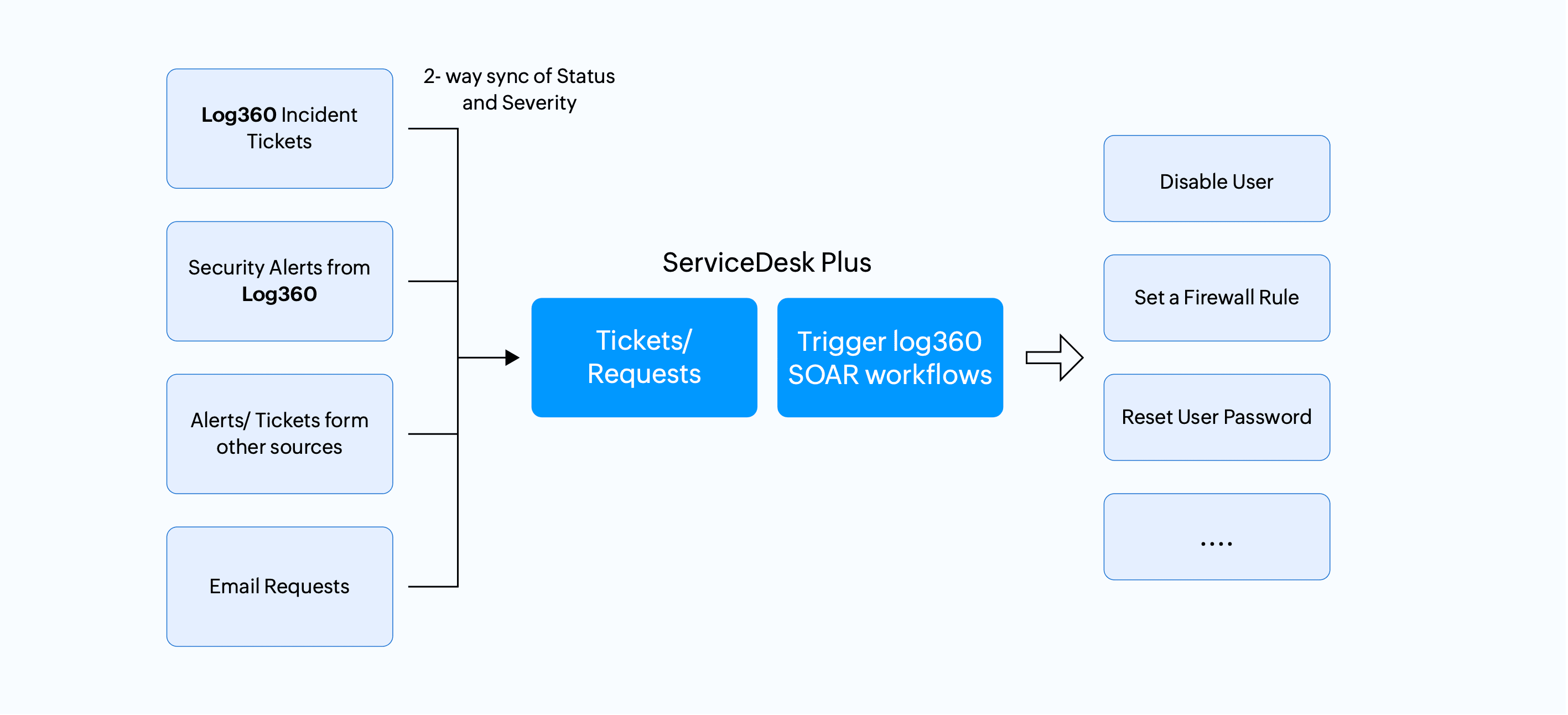
- Automated ticket creation in ServiceDesk Plus: When a security event is detected—such as repeated failed logins, a firewall DoS attack, or any predefined threat—Log360 automatically generates a ticket in ServiceDesk Plus. These tickets are enriched with critical threat indicators, including IP risk scores, involved users, endpoints, and source hosts, eliminating the need for technicians to toggle between tools.
- Efficient incident management: IT teams can execute Log360 SOAR playbooks directly from the ServiceDesk Plus console. This allows technicians to trigger immediate corrective actions—such as disabling a compromised user or shutting down an endpoint, drastically minimizing response times.
How to enable ServiceDesk Plus integration with Log360
- ServiceDesk Plus audit data configuration: Enables the continuous collection and ingestion of ServiceDesk Plus audit and debug logs into Log360 for monitoring and compliance. Configuration steps.
- Log360 alert forwarding: Facilitates the automated routing of Log360 security alerts to generate context-rich tickets within ServiceDesk Plus. Configuration steps.
- SOAR playbooks and bi-directional sync: Achieved via the dedicated Log360 extension, this enables SOAR playbook execution and ticket state synchronization.
The Log360 and Log360 Cloud extensions for ServiceDesk Plus are available in the ManageEngine Marketplace.
Benefits of SIEM-ITSM integration for security teams
- Automated security incident generation: Converts Log360 security alerts into actionable ServiceDesk Plus tickets automatically, eliminating manual effort and accelerating the initial response pipeline.
- Contextual data enrichment: Appends critical SIEM telemetry such as risk scores, host and user details—directly into ServiceDesk Plus tickets to equip technicians for immediate triage.
- SOAR playbook execution: Enables the triggering of Log360 Security Orchestration, Automation, and Response (SOAR) workflows in ServiceDesk Plus interface for rapid threat containment without switching platforms.
- Bi-directional state synchronization: Continuously maps and updates ticket severity, and resolution states between the SIEM and ITSM platforms to ensure operational consistency.
- ITSM audit log collection: Forwards ServiceDesk Plus application events, user activity, and technician login data to Log360 for centralized log management, long-term retention, and compliance reporting.