

- Home
- Play books
- Windows - Detection and response to RDP session hijack via tscon.exe
Windows - Detection and response to RDP session hijack via tscon.exe
In this page
Playbook Description
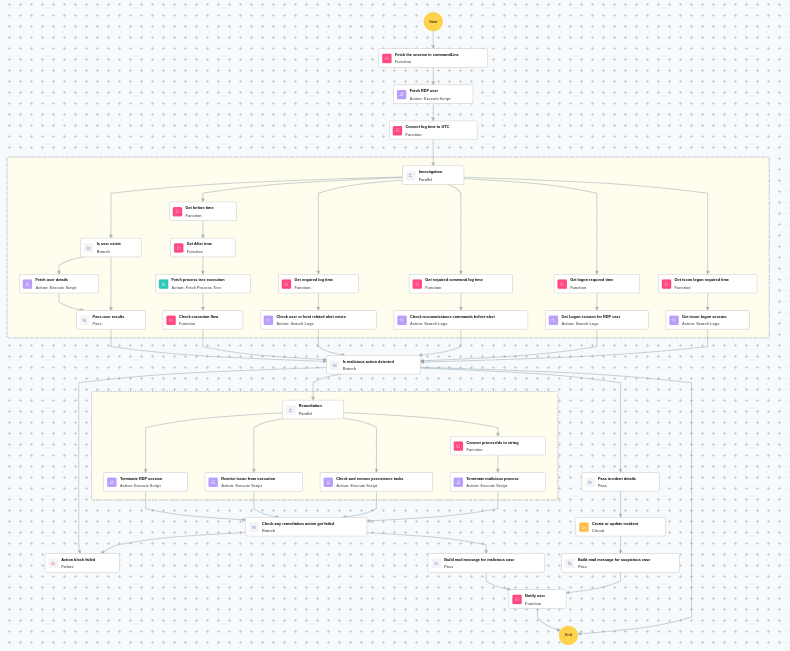
This playbook investigates RDP session hijacking via tscon by extracting the session ID, identifying the hijacked RDP user, and running parallel checks — including process execution chain analysis, reconnaissance command detection (whoami, qwinsta, query user), related alert lookups, and logon session verification — then automatically remediates confirmed hijacks by terminating the RDP session, restricting tscon execution, removing persistence tasks, and killing malicious processes, while creating an incident and sending a manual-review notification for suspicious but unconfirmed cases.
MITRE ATT&CK mapping
| Tactics | Techniques | Sub-techniques |
|---|---|---|
| Lateral Movement(TA0008) | Remote Service Session Hijacking(T1563) | RDP Hijacking(T1563.002) |
MITRE D3FEND mapping
| Tactics | Techniques | Sub-techniques |
|---|---|---|
| Harden(D3-Harden) | Access Mediation(D3-AMED) | Network Access Mediation(D3-NAM) |
Playbook input type
Alert
Prerequisites
- Log360 Cloud - Connection to execute PowerShell scripts on the target Windows host for investigation and remediation actions.
- Privileges - Admin privileges on the target host are required.
Dependencies
Utility functions:
- utility_convertTimeToUTC
- utility_getRequiredTime
- utility_convertToString
- windows_detectMaliciousProcessChain
- windows_fetchSessionID
- utility_sendMail
Scripts
| Script Name | Description | Arguments |
|---|---|---|
| StopProcess.ps1 | Stops processes by PID or file path. Supports hex PIDs and comma-separated inputs. Skips protected PowerShell executables. | ProcessIdentifiers |
| FetchUserDetails.ps1 | Fetches detailed user information (password expiry, group memberships, admin status) for both domain (AD) and local users | Name |
| AddSoftwareRestrictionPolicy.ps1 | Creates Software Restriction Policy (SRP) rules in the Windows registry to block execution of programs from specified paths. For each path, it checks if an SRP rule already exists — if so and it's not set to "Disallowed", it updates the existing rule; otherwise it creates a new GUID-keyed rule under HKLM:\SOFTWARE\Policies\Microsoft\Windows\Safer\CodeIdentifiers\0\Paths. Enables SRP enforcement (TransparentEnabled=1, PolicyScope=0) on each run. | RestrictedPath |
| FetchPersistenceEntries.ps1 | Scans for persistence mechanisms including scheduled tasks, registry Run/RunOnce keys, startup folder entries, and services to identify potential malicious persistence. | - |
| FetchRDPUser.ps1 | Retrieves RDP session details for a given session ID using query user. | SessionId |
| TerminateSession.ps1 | Logs off one or more user sessions using logoff , with optional RDP-only filtering by remote IP. | UserNames |
Sub playbooks
- Log360 Cloud - Create or update incident
Execution workflow
Investigation:
- Fetches the session ID from the command line.
- Fetches the RDP user.
- Checks whether the user exists.
- Fetches the user details.
- Passes user results.
- Fetches the process tree execution.
- Checks the execution flow.
- Checks if user or host related alert exists.
- Checks the reconnaissance commands before alert.
- Retrieves the logon session for RDP user.
- Retrieves the tscon logon session.
Decision logic:
- Proceeds to remediation based on the following conditions:
- A malicious execution flow was detected in the process tree.
- Related investigation findings are present.
- If no malicious indicators are confirmed, the playbook ends with no further actions.
Remediation:
- Terminates the RDP session.
- Restrict tscon from execution.
- Checks and removes persistence tasks.
- Terminates the malicious process.
- Checks if any remediation action got failed.
- Builds the notification email with remediation details and findings.
- Sends a notification email regarding the actions taken and required next steps.
Post execution procedure
- Review the restricted tscon execution policy to ensure no legitimate administrative use is affected.
- Investigate whether the attacker performed any lateral movement after hijacking the RDP session.
- Audit RDP access logs across the organization for similar session hijacking patterns.
- Review user account for any unauthorized access or privilege escalation.
- Consider implementing additional RDP security measures such as Network Level Authentication (NLA).