

- Home
- Play books
- Log360 Cloud - Create or update incident
Log360 Cloud - Create or update incident
In this page
Playbook Description
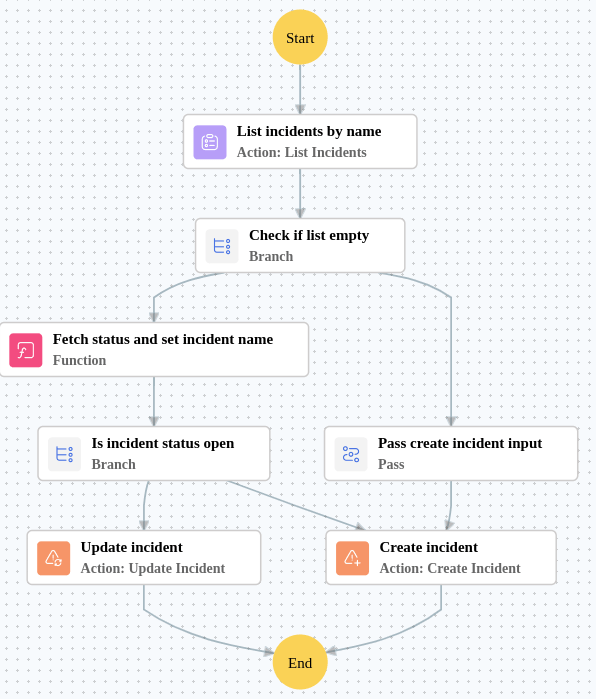
Lists incidents by name, fetches status details, and checks if an open incident exists. If open, updates it with new evidence. Otherwise, creates a new critical incident with alert evidence and notes.
MITRE D3FEND mapping
| Tactics | Techniques | Sub-techniques |
|---|---|---|
| (Detect) D3-Detect | (Network Traffic Analysis) D3-NTA | (Connection Attempt Analysis) D3-CAA |
Dependencies
Utility:
- utility_getIncidentStatusDetails
Execution workflow
- Lists the incidents by name.
- Checks if list empty.
- Pass create incident input.
- Creates the incident.
Post Execution Procedure
- Review the created or updated incident in Log360 Cloud for completeness and accuracy.
- Verify that all relevant alert evidence and notes are attached to the incident.
- Assign the incident to the appropriate analyst for further investigation.
- Ensure incident severity and priority levels are correctly set.
- Monitor the incident for any subsequent related alerts or escalations.