
- Home
- Play books
- Windows - File enrichment
Windows - File enrichment
In this page
Playbook Description
Retrieves file hashes, checks their reputation via VirusTotal, validates authenticode signatures, and detects files in suspicious locations. It also classifies file risk as high, medium, or low.
MITRE ATT&CK mapping
| Tactics | Techniques | Sub-techniques |
|---|---|---|
| Defense Evasion(TA0005) | Masquerading(T1036) | - |
| Defense Evasion(TA0005) | Subvert Trust Controls(T1553) | Code Signing(T1553.002) |
| Execution(TA0002) | User Execution(T1204) | Malicious File(T1204.002) |
MITRE D3FEND mapping
| Tactics | Techniques | Sub-techniques |
|---|---|---|
| (Detect) D3-Detect | (File Analysis) D3-FA | D3-FHA |
| (Detect) D3-Detect | (File Analysis) D3-FA | (File Content Analysis) D3-FCR |
| (Detect) D3-Detect | (Process Analysis) D3-PA | (Process Spawn Analysis) D3-PSA |
Playbook input type
Log
Prerequisites
Windows device configuration - Please provide Windows Administrator credentials in Windows device configuration page. Username: DOMAIN\Administrator or .\Administrator (for local accounts). Password: .
Playbook creation input
- connectionName - Provide the VirusTotal connection name for executing the VirusTotal APIs.
Dependencies
Extensions:
- virustotal_fileReputation
- virustotal_calculateRiskScore
Utility:
- utility_extractMaliciousEntitiesByRiskScore
- utility_validateResponses
- utility_filterByStartsWith
- utility_filterByCriteria
- utility_convertToString
- utility_normalizeValue
Scripts
| Script Name | Description | Arguments |
|---|---|---|
| GetFileHash.ps1 | This script retrieves the hash of a specified file using the given algorithm. | FilePaths, Algorithm |
| GetAuthenticodeSignature.ps1 | Checks the Authenticode digital signature of one or more files. Returns whether each file is signable, whether its signature is valid, and signer certificate details (subject, issuer, thumbprint, validity dates) for validly signed files. | JsonPathList |
Connections
VirusTotal connection - Need to connect to VirusTotal API and fetch access key to check the malware IP/URL/file details.
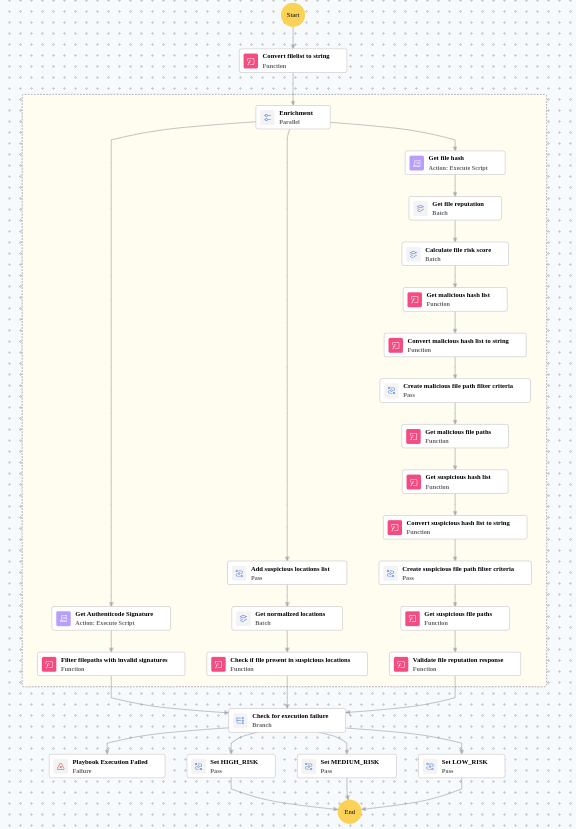
Execution workflow
- Retrieves the file hash.
- Retrieves the file reputation in batch.
- Calculates the file risk score in batch.
- Identifies malicious entities based on their risk scores.
- Creates the malicious file path filter criteria.
- Retrieves the malicious file paths.
- Identifies malicious entities based on their risk scores.
- Creates the suspicious file path filter criteria.
- Retrieves the suspicious file paths.
- Validates the file reputation response.
- Adds the suspicious locations list.
- Retrieves the normalized locations in batch.
- Checks if file present in suspicious locations.
- Retrieves the Authenticode Signature.
- Filters the filepaths with invalid signatures.
- Checks for execution failure.
- Sets the LOW_RISK.
Post execution procedure
- Review the file risk classification (high, medium, or low) and take appropriate action.
- Investigate files flagged as high-risk for indicators of compromise.
- Verify Authenticode signature results — unsigned or invalidly signed files warrant further analysis.
- Check if any files were found in suspicious locations and investigate their origin.
- Use the enrichment results to update threat intelligence feeds and blocklists.