
Domain Data Collection Account
What is the Domain Data Collection Account?
The Domain Data Collection Account is the AD domain user (or gMSA) that ADAudit Plus uses to authenticate to domain-joined machines for agentless audit data collection. It is configured per domain in ADAudit Plus and is the primary method for providing authentication credentials.
| Field | Details |
|---|---|
| What it is | The account ADAudit Plus uses to authenticate to remote domain-joined machines |
| Where to configure | ADAudit Plus web console → Admin → Domain Settings → select a domain → Data Collection Account |
| Account type | AD domain user or Group Managed Service Account (gMSA) |
| Recommended privilege | Domain Admin |
| Minimum privilege | Least-privilege account with specific rights per data source |
| Minimum privilege | Least-privilege account with specific rights per data source |
Which modules use this account?
This account is shared by all four Windows domain-based auditing modules within the same domain:
| Module | What it audits | Privilege guide |
|---|---|---|
| Active Directory & GPO | Domain Controllers — AD changes, GPO changes, authentication | AD & GPO Privileges |
| File Server | Windows File Servers — file access, modification, deletion | File Server Privileges |
| Windows Server | Member servers — logons, process tracking, service changes | Windows Server Privileges |
| Windows Endpoint | Workstations — logon/logoff, USB, endpoint security | Windows Endpoint Privileges |
The account needs the combined privileges for all data source types you are auditing.
How it works
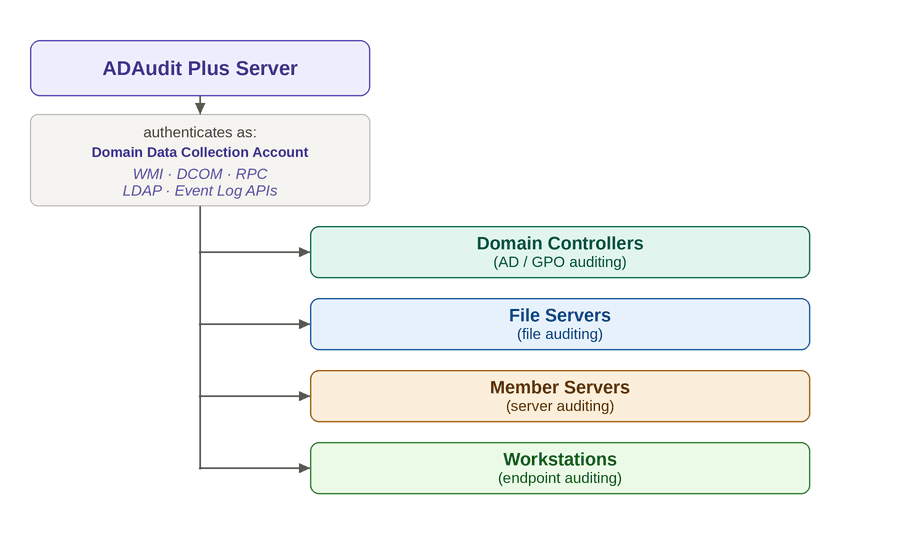
ADAudit Plus uses standard Windows remote management interfaces — WMI, DCOM, RPC, LDAP, and Event Log APIs — all of which require the Data Collection Account to have proper privileges on the target machines.
Domain admin vs. least-privilege
| Approach | Pros | Cons |
|---|---|---|
| Domain Admin | Works immediately, no per-machine configuration needed | Broad privileges — may not meet organizational security policies |
| Least-privilege | Follows principle of least privilege, passes security audits | Requires explicit configuration of each privilege per data source type |
ADAudit Plus works seamlessly when this account has Domain Admin privileges. If Domain Admin rights cannot be granted, assign the specific privileges documented in each module's privilege guide.
Privilege summary matrix
If using a least-privilege account, the following privileges are required per data source type:
| # | Privilege | Domain Controllers | File Servers | Windows Servers | Windows Endpoints |
|---|---|---|---|---|---|
| 1 | Remote WMI/DCOM/RPC Access | ✓(Optional) | ✓(Optional) | ✓(Optional) | ✓(Optional) |
| 2 | Read Access to AD Objects & Naming Contexts | ✓ | ✓ | — | — |
| 3 | Membership in Event Log Readers Group | ✓ | ✓ | ✓ | ✓ |
| 4 | Manage Auditing and Security Log | ✓ | ✓ | ✓ | ✓ |
| 5 | Read Access to SYSVOL | ✓ | — | — | — |
| 6 | GPO Permissions (optional — auto audit policy only) | ✓ Edit | ✓ Create | ✓ Create | ✓ Create |
| 7 | AD Group Management in CN=Users (optional) | — | ✓ Create/Write | ✓ Create/Write | ✓ Create/Write |
| 8 | Membership in Power Users Group | — | ✓ | — | — |
| 9 | Read Permission on Audited Shares | — | ✓ | — | — |
Note For Domain Admin accounts, all the above privileges are already granted by default.
For detailed explanations of each privilege, see the individual module guides:
Multi-domain environments
In ADAudit Plus, each domain is added separately under Admin → Domain Settings. Each domain entry has its own Domain Data Collection Account field.
| Scenario | Guidance |
|---|---|
| Single domain | One Data Collection Account is sufficient for all four modules (AD, File, Server, Endpoint) within that domain. |
| Multiple trusted domains | Configure a Data Collection Account per domain. While cross-domain authentication is technically possible via trust, using an account from each domain simplifies privilege management (group memberships, GPO delegation, etc.) |
| Non-trusted domains | Each domain must have its own account. No cross-domain authentication is possible without a trust relationship. |
Why per-domain accounts are recommended even with trusts:
- Group memberships (Event Log Readers, Power Users) are easier to manage with a same-domain account
- Avoids dependency on trust relationship health for auditing
- Clearer accountability and audit trail per domain
Alternative: Using the Service Account as the Data Collection identity
Note This is an alternative approach. Most deployments use the Data Collection Account configured in Domain Settings (described above). This section is for customers who prefer to change the Service Account instead.
If the ADAudit Plus service is configured to run as a domain user or gMSA (instead of the default Local System), the process identity can implicitly authenticate to remote machines. In this case, you do not need to configure a separate Data Collection Account in Domain Settings for the service account's own domain.
How it works: When no Data Collection Account is configured in Domain Settings, ADAudit Plus uses the service process identity for outbound connections to remote machines.
When to consider this approach:
- You already need a custom Service Account for other reasons (remote MSSQL, remote archive)
- You want to use a gMSA for automatic password rotation with no credentials stored in the console
- Single-domain environment where you prefer managing one account in services.msc rather than in the web console
Limitations:
Only works for the Service Account's own domain — additional domains still require a Data Collection Account in Domain Settings.
For full details on the Service Account, see ADAudit Plus Service Account.
Troubleshooting
Access denied when collecting event logs
Symptom: ADAudit Plus shows "Access Denied" or "Error 5" when attempting to read event logs from a target machine.
Resolution:
- Verify the Data Collection Account is a member of the Event Log Readers group on the target machine.
- Verify the account has the Manage auditing and security log user right on the target machine.
- Verify WMI and DCOM permissions are correctly configured.
WMI connection failure
Symptom: ADAudit Plus reports WMI connection timeout or "RPC server is unavailable."
Resolution:
- Run Test-NetConnection -ComputerName {target} -Port 135 to verify RPC connectivity.
- Ensure Windows Management Instrumentation (WMI) firewall rules are enabled on the target.
- Verify DCOM Remote Launch and Remote Activation rights.
Account locked out
Symptom: The Data Collection Account is getting locked out.
Resolution:
- Verify the password configured in Domain Settings matches the current password in AD.
- Check if the account is configured in multiple places with an old password.
FAQ
Do I always need to configure a Data Collection Account in Domain Settings?
In most cases, yes. The default Service Account is Local System, which cannot authenticate to remote machines. You must configure a Data Collection Account in Domain Settings.
The only exception: if you change the Service Account to a domain user or gMSA with the required privileges (single-domain only), the process identity acts as the data collection identity and you can skip configuring a separate account in Domain Settings. See Alternative: Using the Service Account.
When should I use a gMSA?
gMSA (Group Managed Service Account) is ideal when:
- You want automatic password rotation
- Your environment supports gMSA (Windows Server 2012+ domain functional level)
A gMSA can be configured as:
- The Data Collection Account (in Domain Settings)
- The Service Account (in services.msc) — which then also acts as the data collection identity
- Or both
Do I need Domain Admin?
Recommended for seamless operation. If not possible, configure least-privilege using the per-module guides.
Do agents need this account?
No. Agents collect data locally and do not use the Domain Data Collection Account.