With employees working from anyplace and on any device, the organizational boundary has moved from the traditional corporate network perimeter to every endpoint network. Employees wish to readily access their work apps and resources from a device of their choice while IT teams struggle to balance between ensuring availability and ensuring security..
At the same time, enterprises are striving to cut down on IT costs and meet their environmental, social, and governance goals while keeping their employees delighted at the same time. While these might look like disparate objectives, they are interconnected goals that can be achieved with a combination of unified endpoint management and security (UEMS) and digital employee experience (DEX) management tools.
Digital Employee Experience (DEX) tools, also referred to as End User Experience Management (EUEM) tools, monitors the performance of applications, operating systems, devices, and all other resources in the network, and the way the end user interacts with them. With DEX, IT admins obtain a holistic, real-time overview of the end user's experience in addition to automated troubleshooting and remediation capabilities.
Endpoint Central can deliver DEX and UEMS from the same console. This page provides you with an overview of how Endpoint Central contributes to improving the digital employee experience (DEX) and caters to the IT team’s need to provide a secure, anywhere workplace.
How to improve the End User Experience in workplace?
Enhanced visibility through interactive dashboards
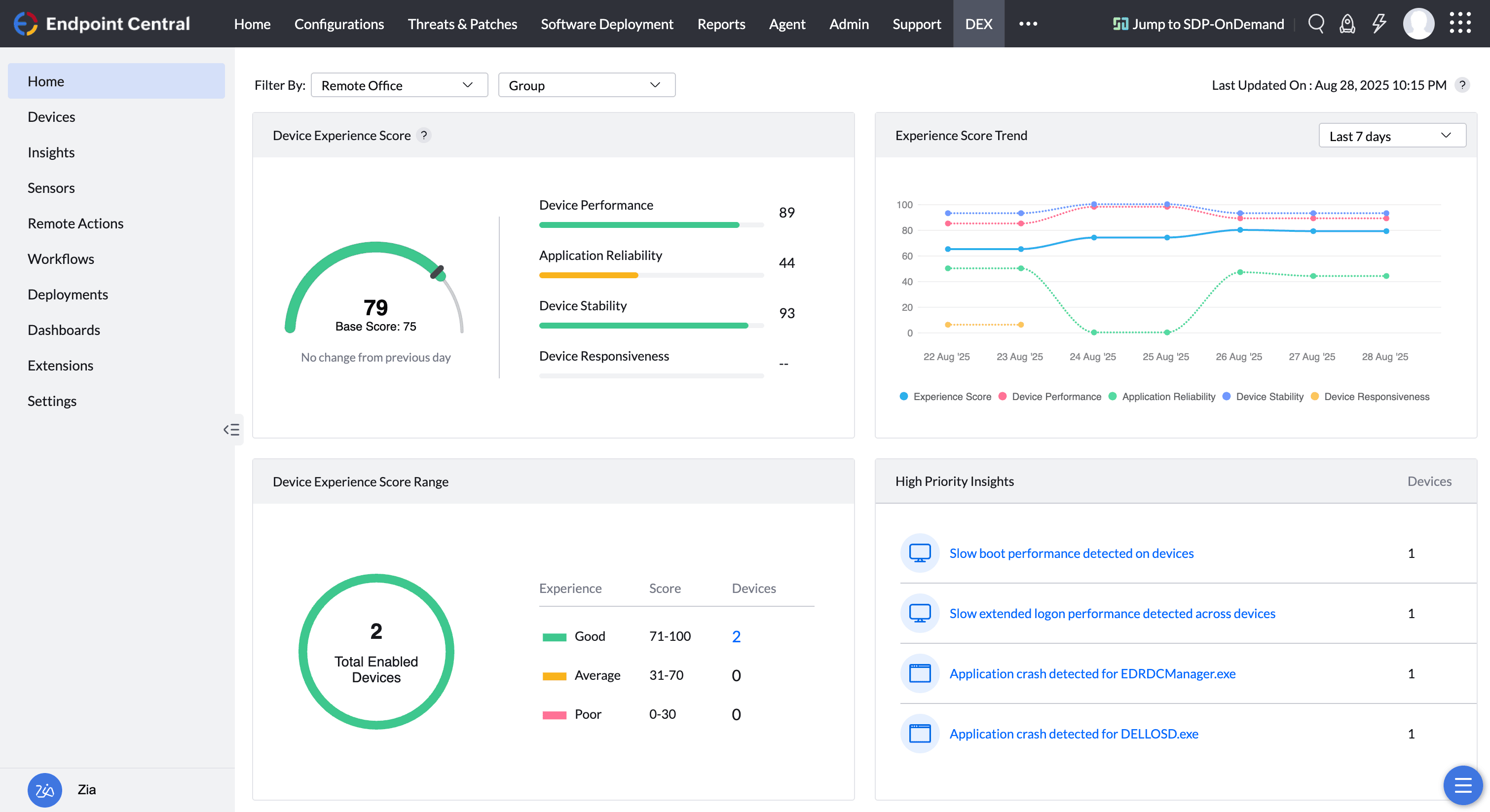
Endpoint Central has over 1,000 telemetry collection points on managed endpoints. We have built an insights engine using this extensively relayed telemetry as a base layer. Contextually placed dashboards deliver these insights in the relevant sections within the product. For example, application deployment statuses are relayed in near-real time so you can get instant updates on failures and why they have occurred. Additionally, this relayed telemetry helps execute pre- and post-deployment workflows set up by the IT and DevOps teams.
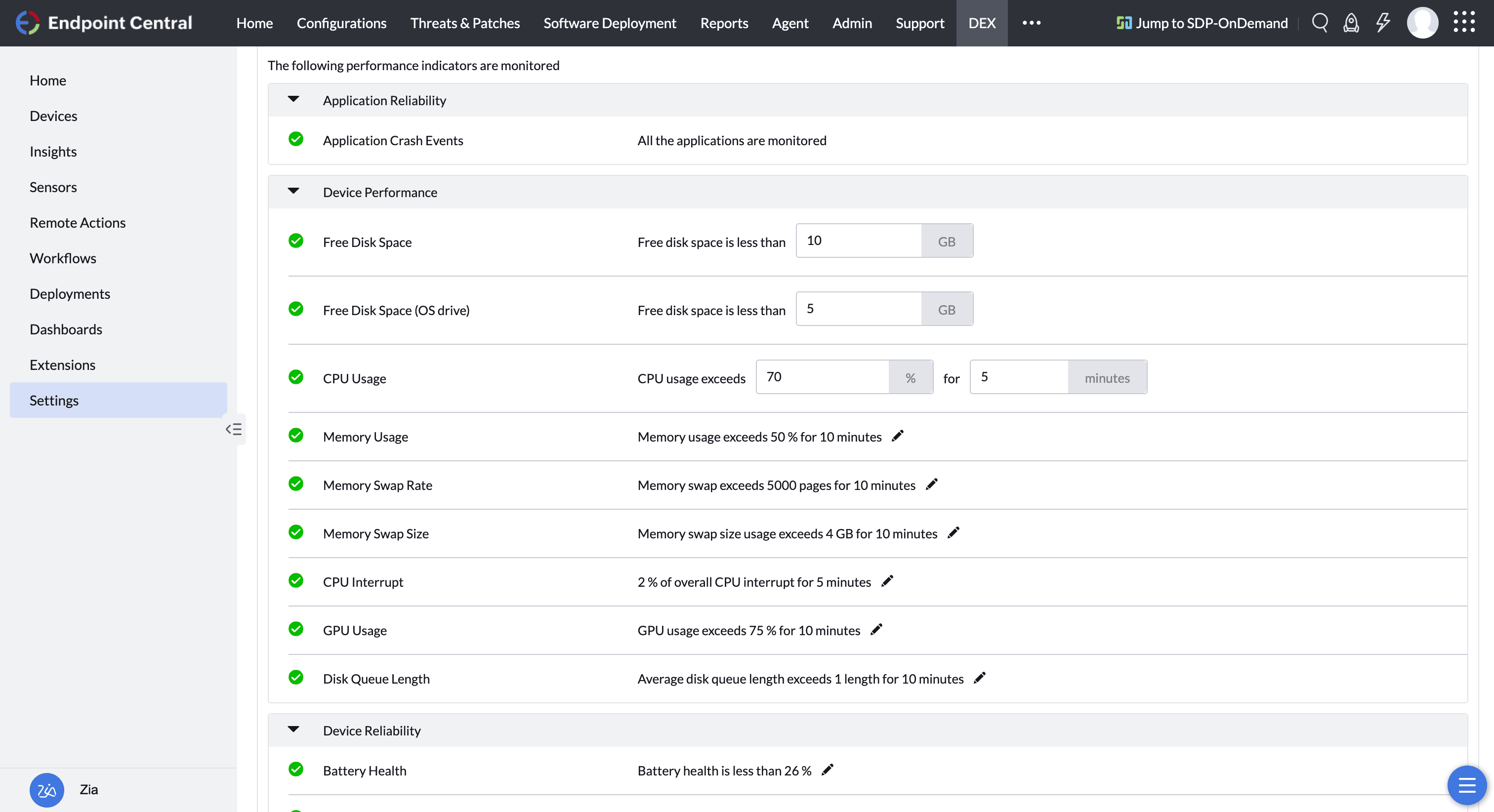
With Endpoint Central's DEX capabilities, you can additionally, regularly monitor 20+ pre-defined experience metrics. Set up thresholds for these metrics based on which alerts are generated for experience-hampering issues. DEX capabilities enhance the existing telemetry collection of Endpoint Central, with focus on proactively identifying device-centric components that could contribute to issues such as slow PCs, crashing apps etc.
Real-time user experience alerts for issue identification
Endpoint Central has built-in alerting mechanisms to notify admins about issues in real time through emails, mobile and console notifications, and SMS messages. This is functionally achieved through our telemetry engine that relays information to the server in real time. Furthermore, tickets can be automatically created in ITSM tools to ensure that these alerts do not go unnoticed or undocumented. Endpoint Central alerts admins about expiring licenses or certificates, driver or BIOS issues, newly detected or faulty hardware, removed or added software, missing updates, and more.
Additionally, admins can set up thresholds for the metrics monitored under DEX and get real-time alerts for the same. Alerts are smartly grouped so that they dont contribute to alert fatigue. For example: If an app crashes in 100 machines, admins will not get 100 alerts for the same, they are smartly grouped into a single alert.
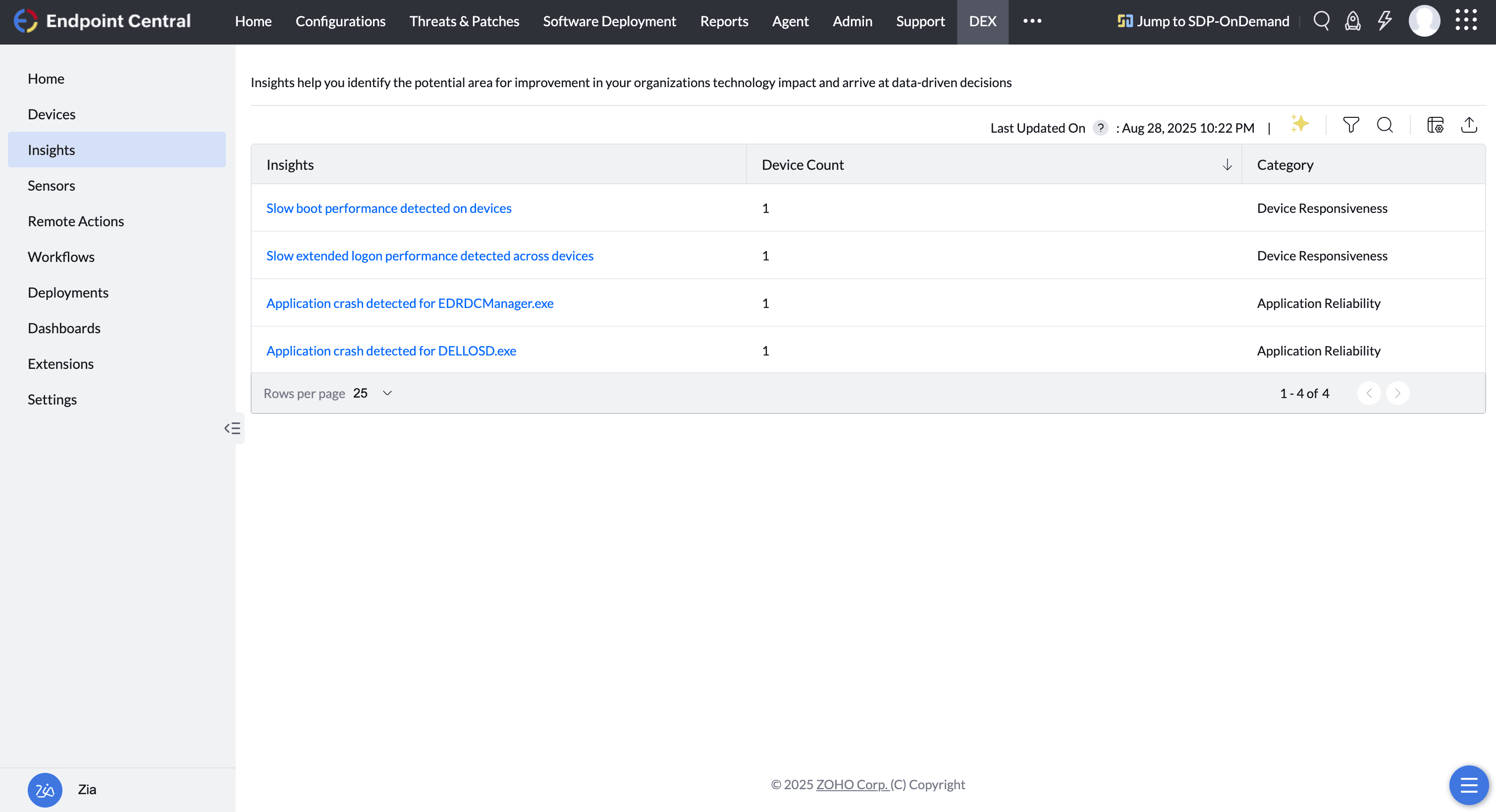
Additionally, admins can set up thresholds for the metrics monitored under DEX and get real-time alerts for the same. Alerts are smartly grouped so that they dont contribute to alert fatigue. For example: If an app crashes in 100 machines, admins will not get 100 alerts for the same, they are smartly grouped into a single alert.
In-depth diagnostics and root cause analysis for faster troubleshooting
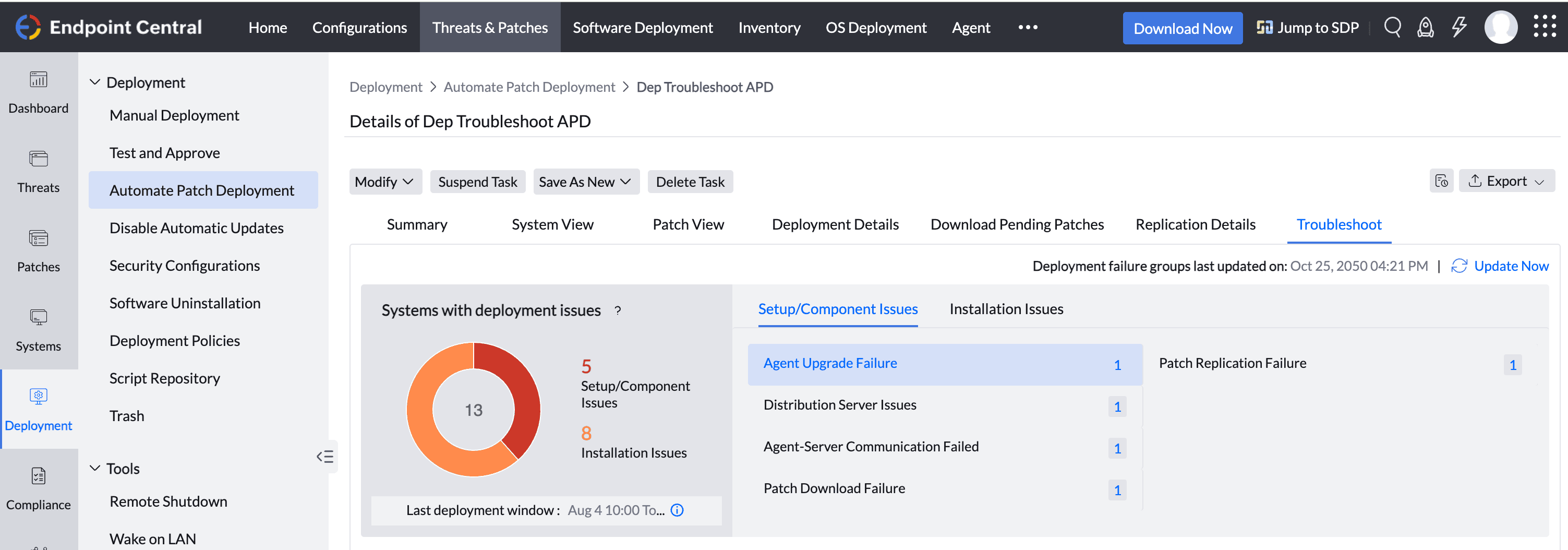
Endpoint Central pulls detailed insights on what went wrong for the IT team to diagnose issues faster. For example: Incase of patch deployment failures, admins can get a detailed breakdown of what went wrong, if it was a component failure or installation failure, etc.
Endpoint Central pulls detailed insights on what went wrong for the IT team to diagnose issues faster. For example: Incase of patch deployment failures, admins can get a detailed breakdown of what went wrong, if it was a component failure or installation failure, etc.
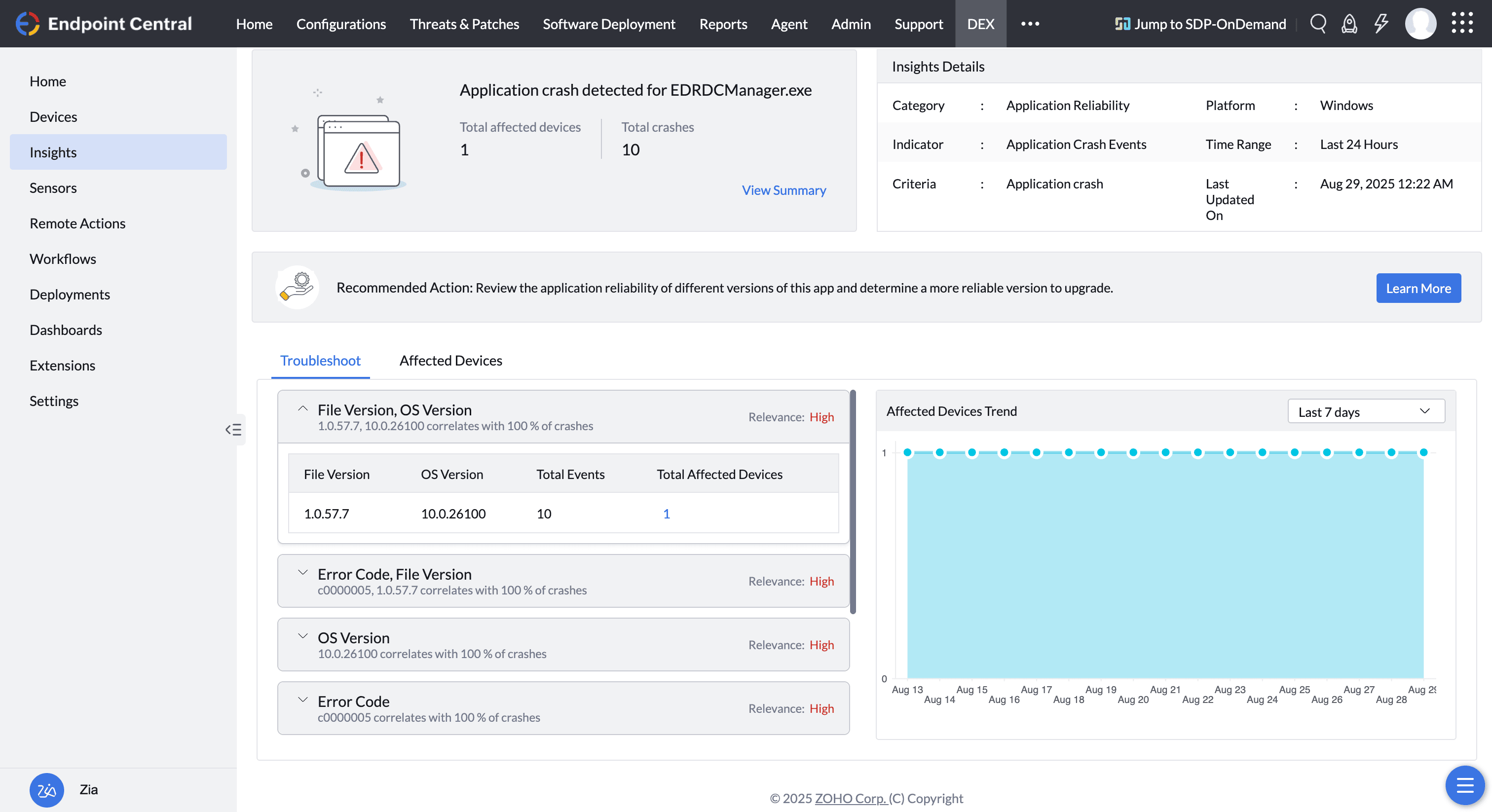
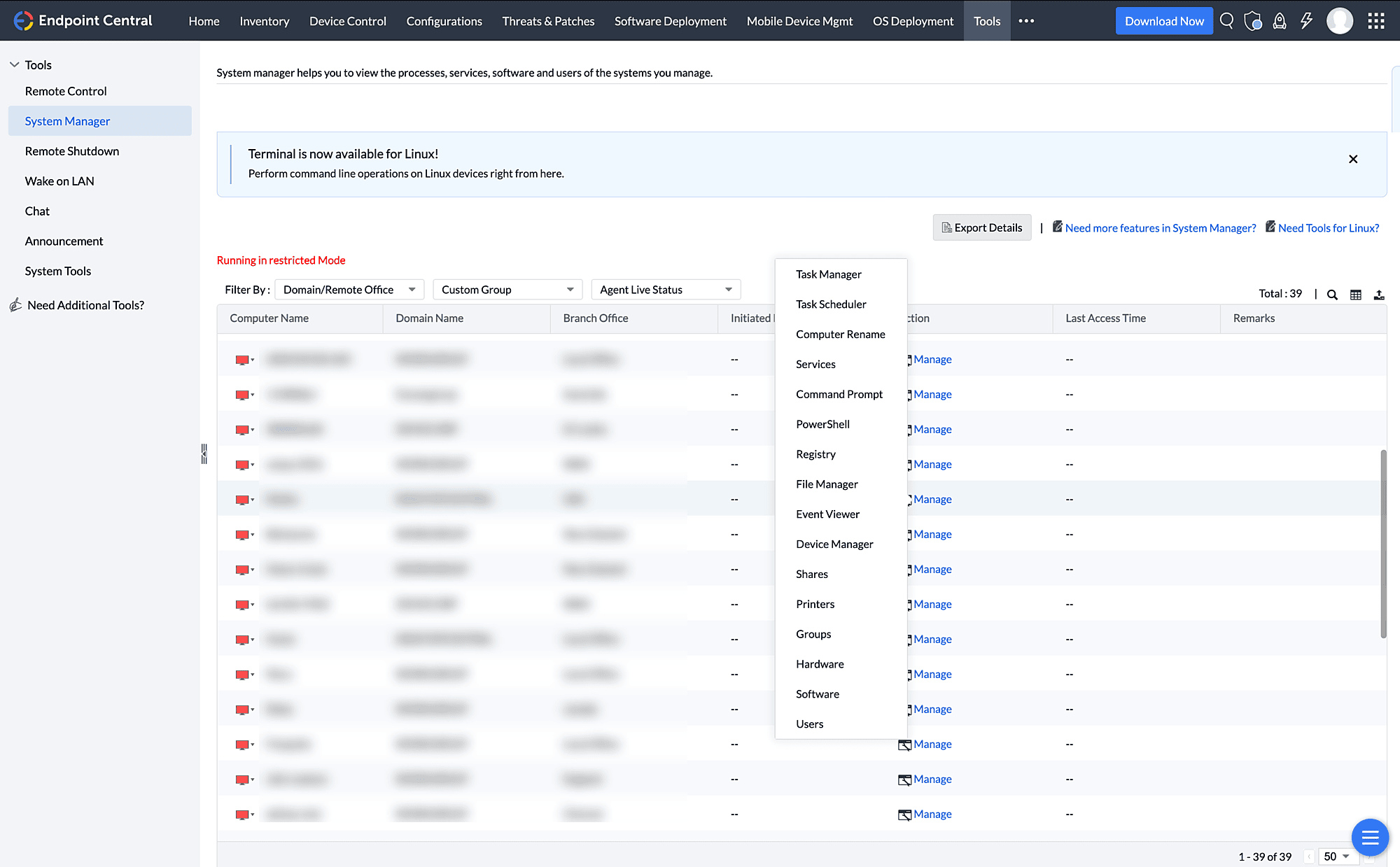
For advanced troubleshooting, Endpoint Central provides admins with remote access to critical troubleshooting tools, like Windows Task Manager, Command Prompt, Windows PowerShell, Windows Registry, Event Viewer, and Windows Services. Using these tools, admins can narrow down and pinpoint the root cause. To aid with issue resolution, admins can then remotely take control of the endpoints with our built-in HIPAA-compliant remote troubleshooting tool that works on Windows, macOS, Linux, Android, iOS, and iPadOS devices.
Proactive resolution and maintenance for self-healing
Endpoint Central comes with a host of built-in automations to course-correct endpoint deviations and ensure that problems are identified and rectified at scale before they actually affect the experiences of end users. For fixes requiring multiple steps and navigation, we provide a dedicated script library that organizations can expand by adding custom scripts.
Some of Endpoint Central's Digital Employee Experience Management capabilities include checking for the presence of software and patches, automatically reapplying device baseline policies to correct deviations, provisioning applications with the necessary credentials and configurations for zero-touch app setup, automating restarts of devices and servers, clearing application caches, and cleaning up hard disk drives.
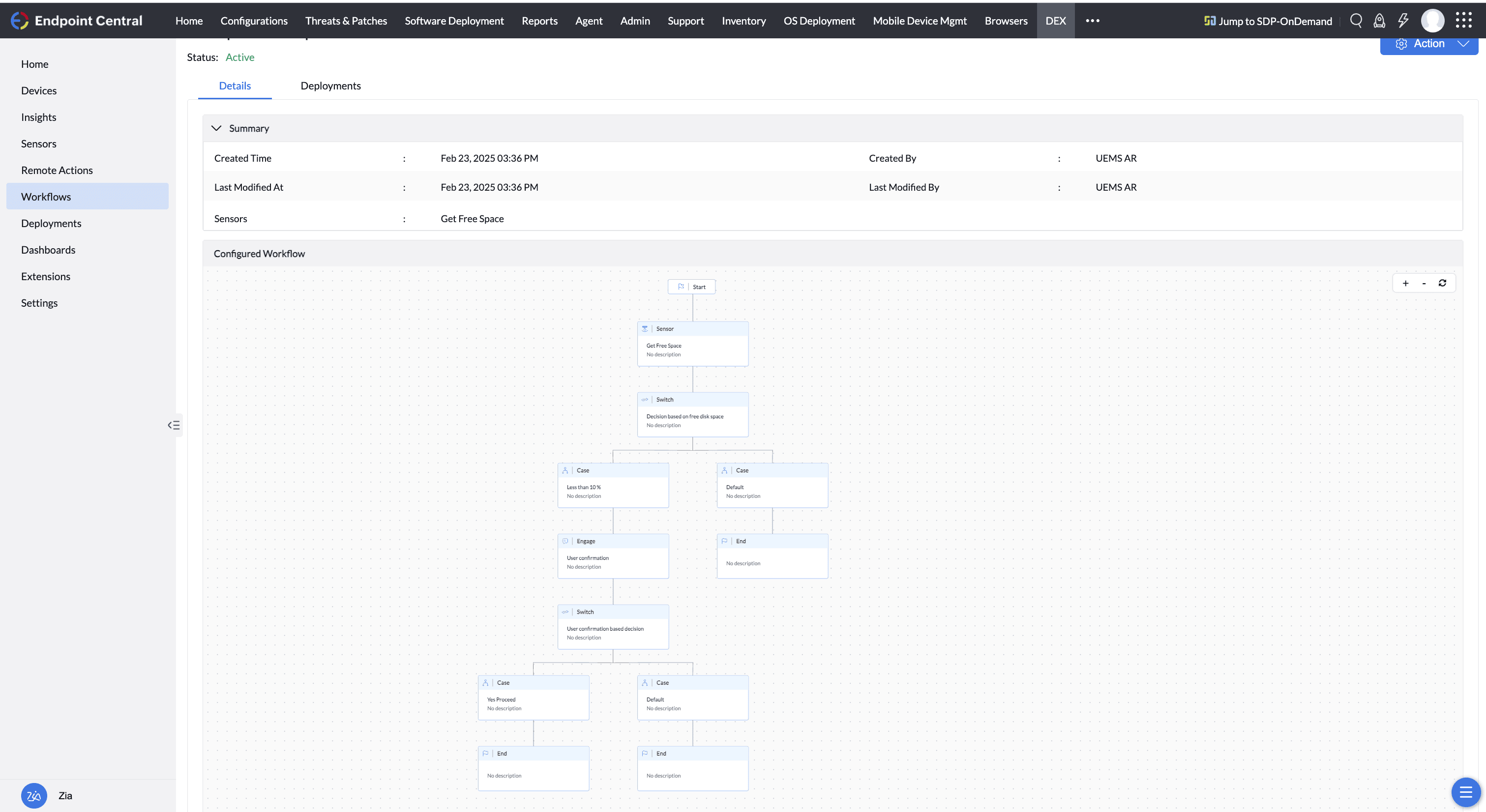
DEX capabilities also include a no-code workflow builder that can be leveraged by admins to build out a detection-to-remediation workflow
By integrating with ITSM and ESM offerings, such as ManageEngine ServiceDesk Plus or ServiceNow, enterprises can create workflows that improve the employee experience. For example, devices can be provisioned with all the necessary access and resources for new employees based on their role and department as indicated in the HRMS or ESM portals. Also, user profiles can be migrated individually or in bulk to new endpoints when faulty devices are replaced or when digital transformation projects are undertaken.
Furthermore, Endpoint Central is listed in the Zoho Flow marketplace along with 850 other enterprise applications. Leveraging this listing, IT teams can orchestrate complex use cases with little to no code.
Extensible Action Library
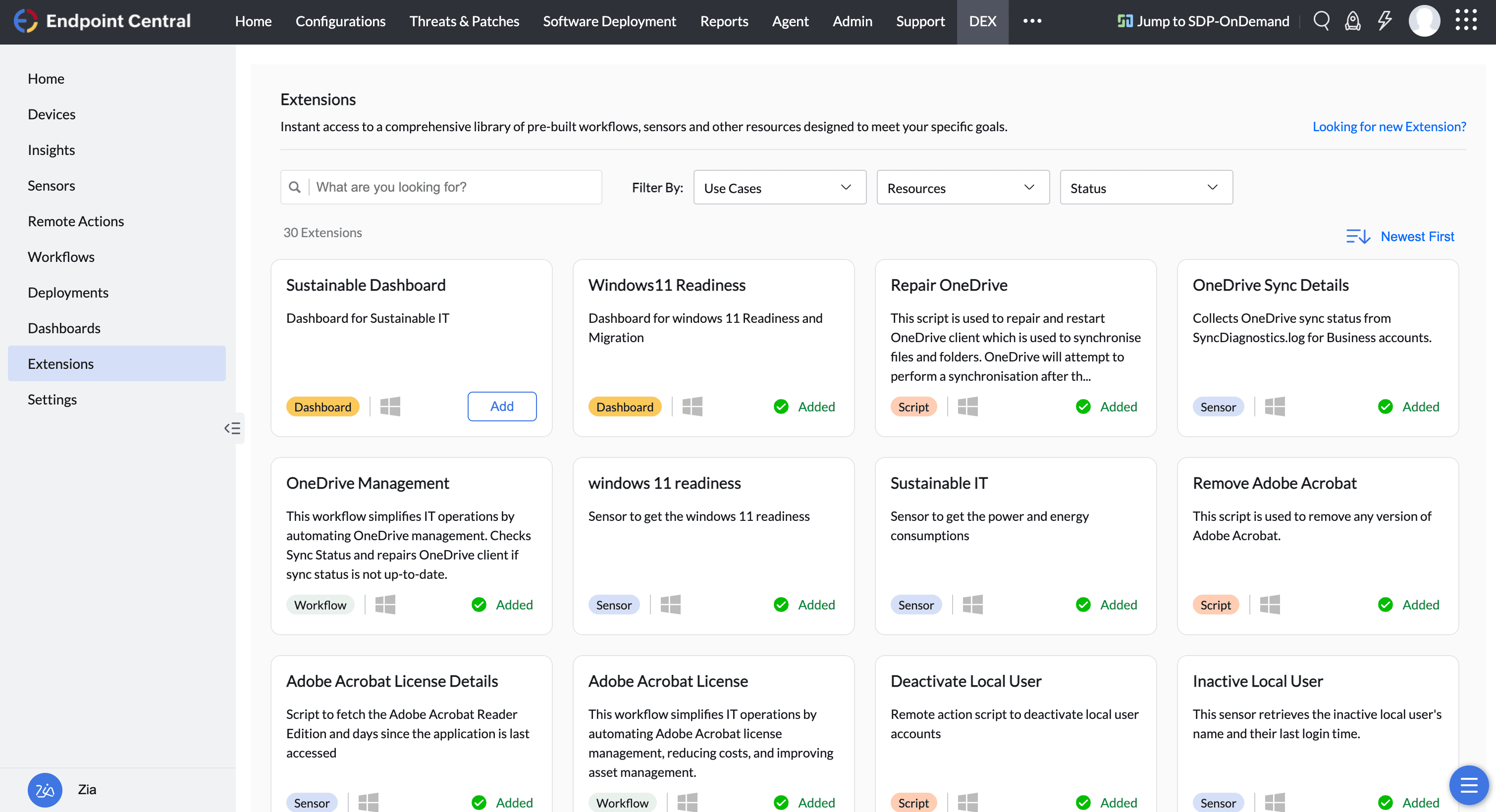
We also have an extensible Action Library that gives IT teams a powerful catalog of prebuilt scripts, workflows, dashboards, and sensors to automate common endpoint issues and the flexibility to build their own. From disk cleanup and system restarts to license management and OneDrive troubleshooting, IT can deploy fixes instantly or extend them with custom logic. With support for multiple script formats and reusable templates, the library scales automation across thousands of devices, ensuring faster resolution, consistent remediation, and adaptability for unique business needs.
Features that empower and engage end users
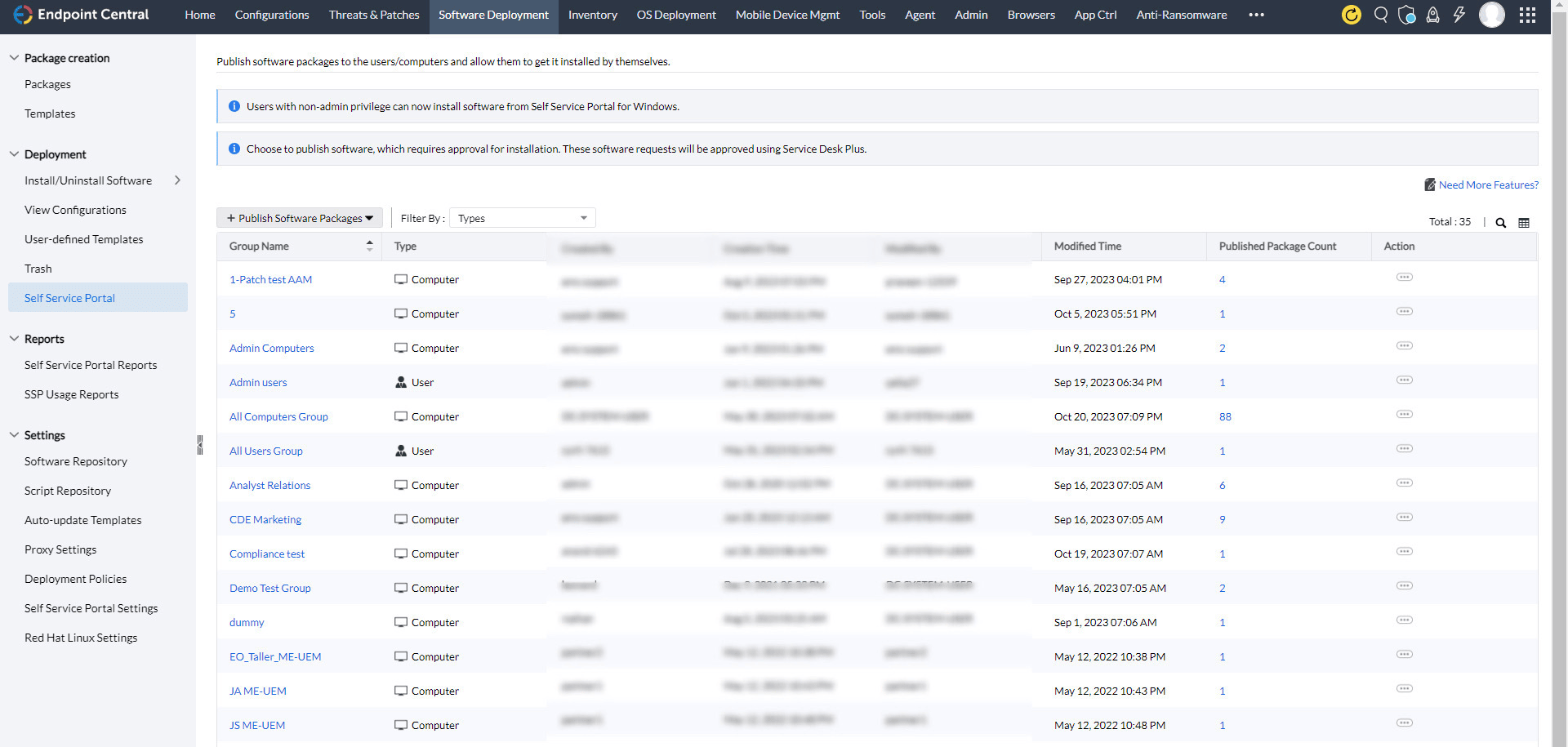
Empowering employees and engaging with them are critical to maintaining an excellent employee experience. Endpoint Central caters to such needs with a unified self-service portal that gives users the power to install necessary apps or updates, access critical resources, and view company notifications and announcements. This ensures that employees do not have to wait for admins to address their requests and issues.
You can engage employees through emails, notifications, voice calls, video calls, and text messages—all from within Endpoint Central—to keep them informed of any issues; the statuses of their requests; and critical, company-wide events or maintenance. Furthermore, you can publish micro-surveys and employee sentiment analysis surveys on the self-service portal to gauge employees’ emotions after every IT touchpoint by leveraging our integration with ServiceDesk Plus.
Why choose Endpoint Central for DEX?
- A single agent and console: We have built all of our capabilities in house without acquisitions, so we can deliver all of these features from a single console and a single agent.
- Built-in control with UEMS: We have expanded our offerings and use cases over time to build capabilities related to the DEX on top of our existing UEMS platform. This means that we are good not just at identifying problems but at fixing them as well, so you will not require additional integrations or products. We also have endpoint security covered within this portfolio through vulnerability management, device and application controls, browser management, DLP, and ransomware protection. This results in cost savings for customers looking to manage their DEX.
- The Zoho-ManageEngine ecosystem—better together With the easy flow of data between Endpoint Central and other ManageEngine and Zoho offerings, we are able to provide contextual, rich insights; dashboards; and actions that can be performed through this interoperable design. Any complex business use cases that organizations have can be solved easily with our combined ecosystem of over 200 applications. Better context leads to better workflows, which in turn lead to a better DEX.
FAQs
1. What is Digital Employee Experience Management?
Digital Employee Experience Management (DEX) is a combination of tools and strategies that focus on monitoring and optimizing the performance and usability of systems and applications in an organization's network, from the end user's perspective..
DEX provides IT admins with data-backed insights via telemetry on how users interact with the network resources. This further helps admins identify and address issues hindering productivity or satisfaction. As a result, this proactive management ensures that the end-users, i.e. employees or customers have a seamless and efficient experience, which ultimately boosts productivity.
2. What is User Experience Management?
User Experience Management (UXM) is the process of managing and refining user interactions with a product or service. It comprises several factors such as understanding the user's needs, choices, and behaviors to create intuitive designs and seamless experiences.
The goal of user experience management is to optimize all the aspects of the user's interaction with the network resources to ensure a smooth and satisfying experience. Effective user experience management leads to increased engagement, and improved user experience, which in turn boosts productivity in an organization.
3. What is End User Management?
End User Management is the process of managing, monitoring, and securing digital assets, such as laptops, mobile devices, IOTs, KIOSKS, and other installed applications.
It involves managing application permissions, user access to certain applications and functionalities, configurations, and securing the managed devices from vulnerabilities and malware to ensure a consistent and secure computing environment.
4. 4. Why is Digital Employee Experience Important?
Digital employee experience is important because it directly impacts the end user's productivity, satisfaction, and trust in the IT team, which in turn dictates the business's success.
Positive user experience in an enterprise via faster systems, and reduced turn-around times for software installation or asset requests, lead to higher satisfaction and productivity and reduced support costs. On the flip side, a negative experience can result in end user or employee frustration and decreased efficiency.
5. What is the meaning of Digital Employee Experience?
Digital Employee Experience (DEX) is the holistic quality of experience, perception, and interaction employees have with the digital endpoints, systems, and processes in an organization.
It encompasses the employee's overall journey, right from onboarding to daily usage and task execution, which significantly impacts productivity, engagement, and job satisfaction. A positive DEX ensures that employees can efficiently and effectively perform their tasks using the allocated systems and tools, which further leads to enhanced performance and morale.
6. How do you measure Digital Employee Experience?
Digital Employee Experience or DEX can be measured using a combination of quantitative and qualitative methods to gain a comprehensive understanding of how the digital endpoints impact employee performance and productivity:
- Digital Employee Experience or DEX can be measured using a combination of quantitative and qualitative methods to gain a comprehensive understanding of how the digital endpoints impact employee performance and productivity:
- Employee feedback via regular surveys to gather feedback and assess employee experience and satisfaction with the digital tools to identify new areas for improvement
- Monitoring performance metrics through telemetry data collection about performance indicators such as application responsiveness, system downtime, and process execution rates to evaluate the efficiency of the digital tools.
- Tracking usage analytics to analyze how employees utilize the digital tools thereby gaining visibility over adoption rates, learning curves, usage patterns, and potential training needs.
- Support ticket analysis to review the IT support tickets to identify recurring issues with the digital tools.