Vulnerability Remediation
Remediating vulnerabilities by deploying patches is a crucial part of maintaining a secure infrastructure. Using the patch management feature of Endpoint Central, you can remediate vulnerabilities manually or through automated patch deployment.
Overview
Patches are released by vendors to fix security flaws, bugs, or performance issues in software and systems. Neglecting to address vulnerabilities can expose an organization to significant risks. When vulnerabilities are left unpatched, attackers can exploit them to gain unauthorized access to critical systems, leading to data breaches, theft, or corruption. Hence, vulnerability remediation is essential for ensuring a secure and resilient infrastructure.
Remediating Vulnerabilities without a Deployable Patch
When a vulnerability does not have a patch that can be deployed directly from the console:
- Navigate to Threats & Patches → Threats → Vulnerabilities and select the vulnerability.
- Review its Patch Availability and the instructions under Remediation.
- If Patch Availability is Manual Fix Required, follow the displayed remediation instructions. If they identify an applicable vendor update, such as a Windows cumulative update, deploy that update to the affected systems.
- If Patch Availability is Not Available and the remediation information states that a fix is expected in an upcoming update, wait until the vendor releases the official fix.
- If the latest available software version is still affected and the vendor has not released a fixed version, installing that latest version will not clear the vulnerability. Follow any vendor-provided workaround shown under Remediation. If no workaround is available, contact the software vendor or the relevant product support team.
- After applying the specified fix, run a vulnerability scan on the affected systems. The vulnerability is cleared when the scan confirms that the installed version is no longer affected.
Vulnerability Remediation through Manual Deployment of Patches
To find the patches associated with a specific CVE, navigate to Threats & Patches → Patches → Supported Patches and apply the CVE ID filter. If the filter returns no results, no supported patch is currently mapped to that CVE. Open the vulnerability and review its Remediation information for the available resolution.
If the CVE filter returns a superseded patch that cannot be selected, follow Cannot select a superseded patch before choosing a deployment target. Older-version availability depends on N-1 applicability and retention settings.
To identify the updates for a specific CVE that are currently pending on your managed endpoints, navigate to Threats & Patches → Patches → Missing Patches and apply the CVE ID filter. The filtered view lists the CVE-related updates that are missing from your managed systems.
A CVE can be mapped to the patch version that first introduced the fix rather than every later application update. To deploy a newer application version, synchronize the patch database and search for the version or Patch ID under Supported Patches.
If the patch associated with a CVE has been superseded, it will not appear as missing and cannot be deployed through the standard missing-patch workflow. Open the associated patch under Supported Patches, check the Superseded By value, and follow the replacement chain until you reach the latest applicable patch. Deploy the superseding patch to remediate the vulnerability.
To remediate vulnerabilities through manual deployment of patches:
A custom role needs Write permission for Vulnerability Management to use Fix, Install/Publish Patches, and Fix CVEs. Read permission does not show those actions.
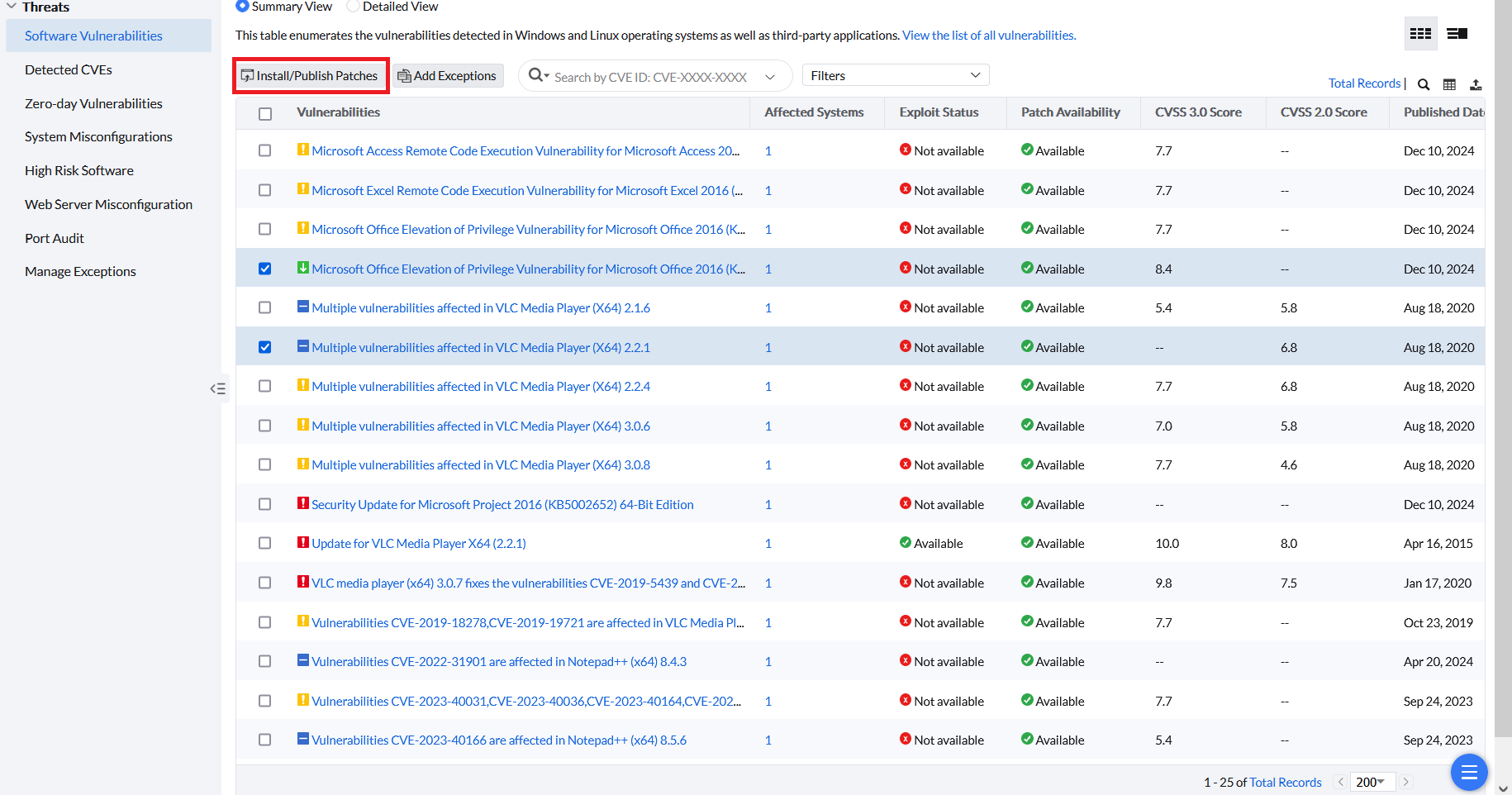
- From the Software Vulnerabilities or Zero-day Vulnerabilities section, select the required vulnerabilities for which a patch is available and click Install/Publish Patches.
- From the Detected CVEs section, select the required vulnerabilities and click Fix CVEs.
Deploy patches separately for each platform. A Windows-only computer view does not by itself confirm that the selected vulnerability deployment is limited to Windows.
- Open Software Vulnerabilities and select the required vulnerability.
- Click the affected system count.
- Apply the Windows platform filter, select the applicable entries, and click Install Patch.
- Repeat the platform filtering and deployment separately for macOS and Linux, where applicable.
- Verify that every selected patch installs successfully.
After validation succeeds, the Install/Uninstall Patch window lists the required missing patches for the selected vulnerabilities. Configure the manual deployment settings to install these patches. To learn more about configuring manual deployment settings, refer to this page.
If the alert Fixing multi platform threats using a single deployment policy is not supported remains, review the applicable patches and target platform in Manual Deployment. Collect the selected vulnerability IDs, applied filter, server logs and HAR for Support.
Troubleshoot vulnerabilities that remain after an update
- Verify that the endpoint is online and that its latest vulnerability scan completed successfully.
- Confirm that the old application version is no longer installed.
- On Windows endpoints, check whether residual registry data for the old application version remains after the application is upgraded or uninstalled.
- Remove only the registry entries confirmed to belong to the obsolete application version.
- Restart the endpoint and run a fresh vulnerability scan.
- If the vulnerability remains, collect the agent logs and contact support for further investigation.
Automated Vulnerability Remediation
As enterprises grow and their IT environments become more complex, manually applying patches across many servers, workstations, and devices becomes increasingly difficult. Automated patch deployment allows you to scale patching efforts, applying updates to thousands of devices simultaneously.
Once you configure automated patch deployment, if the required patch is available and is approved, vulnerability remediation automatically occurs without requiring additional manual intervention — these approved patches will be deployed to the chosen targets automatically. After the approved patch is installed, the vulnerability is removed from the dashboard when the next vulnerability scan completes successfully.
To learn more about configuring automated patch deployment tasks, refer to this page.