- Free Edition
- Quick Links
- MFA
- Microsoft Entra ID Security
- Self-Service Password Management
- Single Sign-On
- Password Synchronizer
- Password Policy Enforcer
- Employee Self-Service
- Reporting and auditing
- Integrations
- Related Products
- ADManager Plus Active Directory Management & Reporting
- ADAudit Plus Real-time Active Directory Auditing and UBA
- Exchange Reporter Plus Exchange Server Auditing & Reporting
- EventLog Analyzer Real-time Log Analysis & Reporting
- M365 Manager Plus Microsoft 365 Management & Reporting Tool
- DataSecurity Plus File server auditing & data discovery
- RecoveryManager Plus Enterprise backup and recovery tool
- SharePoint Manager Plus SharePoint Reporting and Auditing
- AD360 Integrated Identity & Access Management
- Log360 (On-Premise | Cloud) Comprehensive SIEM and UEBA
- AD Free Tools Active Directory FREE Tools
ADSelfService Plus supports Active Directory (AD)-based single sign-on (SSO) for HackerRank logins and many other SAML-enabled applications. When HackerRank SAML SSO is enabled, users only have to log in to ADSelfService Plus, the identity provider, once. After logging in, users can securely access their HackerRank accounts without having to enter their usernames and passwords again.
ADSelfService Plus supports service provider (SP)-initiated SSO for HackerRank logins.
SP-initiated HackerRank SSO: Users can access their HackerRank domain via a URL or bookmark. They will automatically be redirected to the ADSelfService Plus portal for login. Once they've signed on, they'll be automatically redirected and logged in to the Circonu portal.
Follow this step-by-step guide to enable SSO for HackerRank
Configure your Active Directory domain in ADSelfService Plus
For more details, click here.
Getting the HackerRank SAML SSO details from ADSelfService Plus
- Log in to ADSelfService Plus with admin credentials.
- Go to the Applications tab → Add Application, and select HackerRank from the applications displayed.
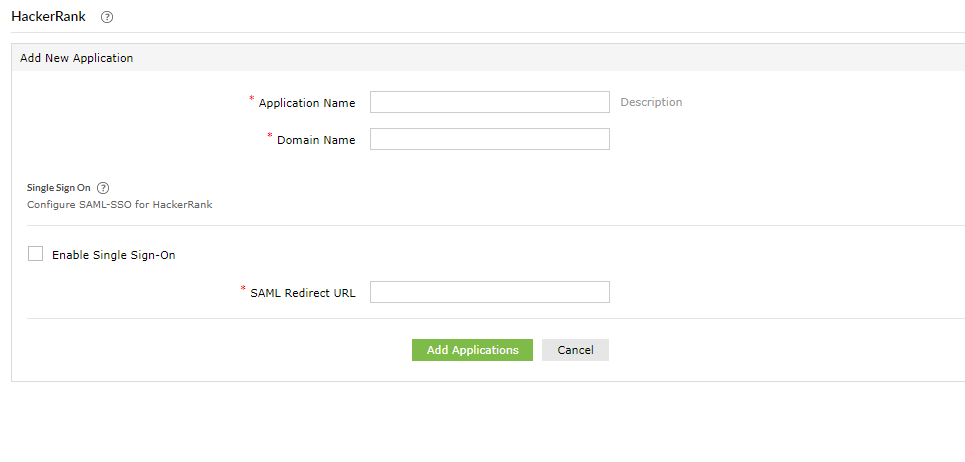
- Enter the Application Name and the Description.
- Enter the Domain Name of your HackerRank account. For example, if you use johndoe@HackerRank.com to log in to HackerRank, then HackerRank.com is the domain name.
- Select Enable Single Sign-On.
- Enter the SAML Redirect URL from step 13.
- Enter the Display Name and Description.
- Click Save.
- In the pop-up that appears, download the Metadata file
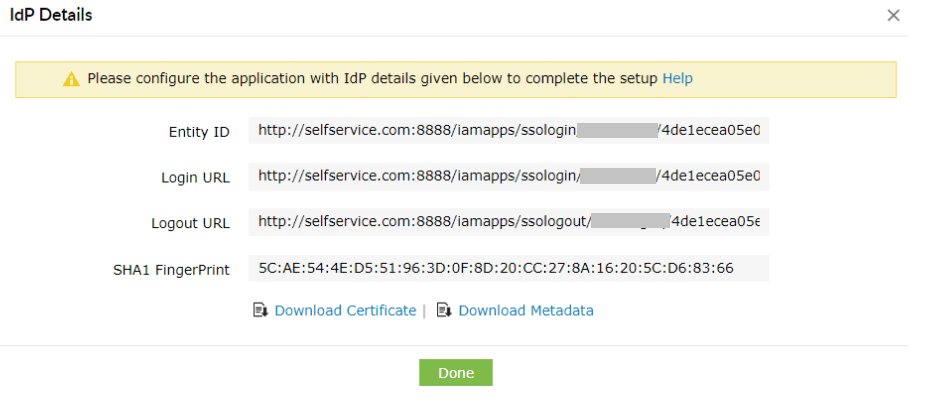
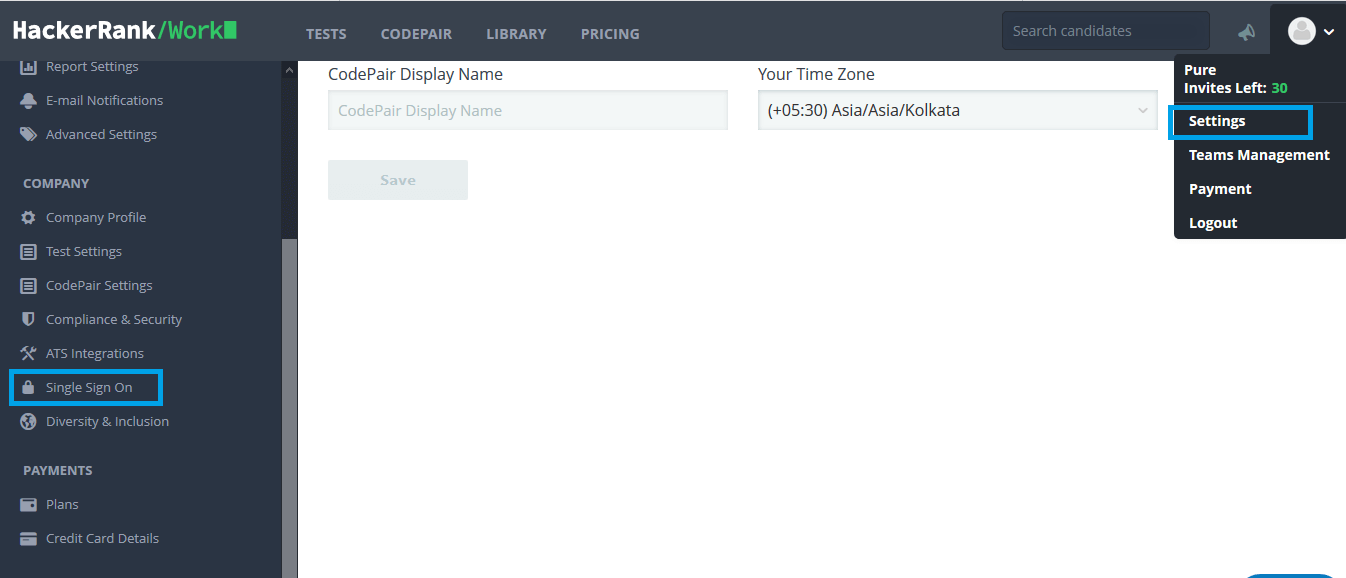
- Log in to your HackerRank account with admin credentials.
- Navigate to Settings → Single Sign On.
- Click Upload Metadata, and upload the downloaded metadata. Refer step 9.
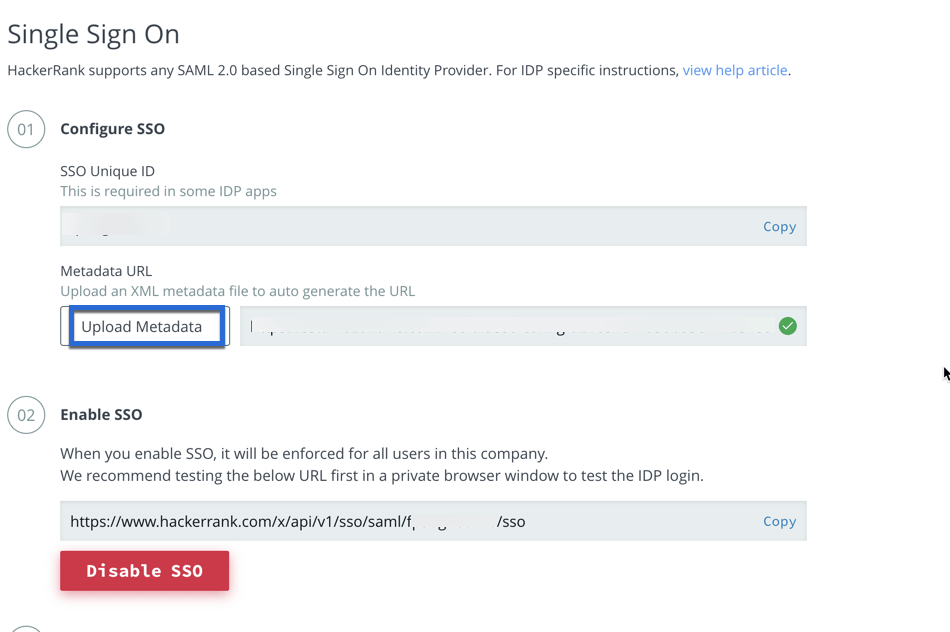
- Once the XML metadata is uploaded, the Single Sign-On metadata URL is automatically generated. Use it in step 6.


Configuring SAML SSO settings in HackerRank


Your users can now log in to their HackerRank account automatically using single sign-on.
Highlights of ADSelfService Plus
Password self-service
Free Active Directory users from attending lengthy help desk calls by allowing them to self-service their password resets/ account unlock tasks. Hassle-free password change for Active Directory users with ADSelfService Plus ‘Change Password’ console.
One identity with single sign-on
Get seamless one-click access to 100+ cloud applications. With enterprise single sign-on, users can access all their cloud applications with their Active Directory credentials. Thanks to ADSelfService Plus!
Password/Account Expiry Notification
Intimate Active Directory users of their impending password/account expiry by mailing them these password/account expiry notifications.
Password Synchronizer
Synchronize Windows Active Directory user password/account changes across multiple systems, automatically, including Office 365, G Suite, IBM iSeries and more.
Password Policy Enforcer
Ensure strong user passwords that resist various hacking threats with ADSelfService Plus by enforcing Active Directory users to adhere to compliant passwords via displaying password complexity requirements.
Directory Self-Update & Corporate Search
Portal that lets Active Directory users update their latest information and a quick search facility to scout for information about peers by using search keys, like contact number, of the personality being searched.