Firewall Analyzer Reports
Firewall Analyzer offers a rich set of pre-defined reports that help in analyzing bandwidth usage and understanding network behavior. On a broad level, reports in Firewall Analyzer are classified into the following types: All the above reports can be accessed from the Reports tab. Except the Live Report, all other reports include links to several sections of the report which can be seen when the  icon, or the report bar itself is clicked. Click on each section to go to the corresponding section of the report directly, or click the View Report link to view the entire report with all the sections. icon, or the report bar itself is clicked. Click on each section to go to the corresponding section of the report directly, or click the View Report link to view the entire report with all the sections. DNS Resolution in Reports Firewall Analyzer provides an option to configure DNS resolution for all the reports. For more details refer Configuring DNS Resolution page under the System Settings section. In each of the individual reports a ResolveDNS link has been provided at the top. Clicking this link enables DNS Resolution for all the IP Addresses of the unresolved hosts present in the current report. The status of DNS Resolution depends on the default DNS lookup time, within which Firewall Analyzer will try to resolve the IP Address. If DNS Resolution is in progress for any other Firewall Analyzer user, then the subsequent user will see the message "Please wait, DNS Resolution in progress for another user" when clicking ResolveDNS link. Once the DNS Resolution is complete for the first user, then the DNS Resolution for the subsequent user begins automatically. Using Calendar You can use the calendar to select a single date or range of days to view various details of the reports, alerts, and logs of the Firewalls. There are two icons provided on top left corner of the calendar to select a single day or range of days. Refer the screen shot given below: 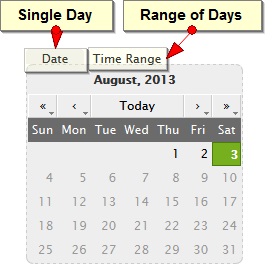
|


