The must-haves of a network monitoring software
The definition of Network monitoring no longer confines to just setting up a solution that is capable of garnering information from the network. With the corporate world looking at IT as that critical function having a say on day–to-day business, the choice of a network monitoring solution must factor–in the business aspects such as increased employee productivity and saving on infrastructure costs, besides the obvious need of the solution having to aide the business with all the ‘must-have’ functionality either built-in or by way of facilitating useful plug-ins.
When we talk about IT directly impacting the business, it could be anything from a seemingly simple problem like a web page taking eternity to load or a poor LAN connectivity, to more serious ones like an important email from a prospect not making it to your inbox, a CRM database crash, or even dealing with a mischief–maker within. While these issues can be addressed by a vareity of vertical solutions in the market, there is nothing like the convenience of a single–point access to visualize the entire network to manage the fault, performance, configuration, and security or the other resources within. With a wide range of IT functionality, it is important to look for the ‘must–haves’ to help align your IT with the business goals. It serves to keep in mind that to an administrator, network performance, security, fault management, and reliability are not mutually exclusive. A solution that serves all of these on one platter, keeps the administrator and his network happy! Anything more is a welcome bonus!
Vital features to look for in a network monitoring solution
Let us take a closer look at the main concerns of an administrator and what data he will mine for in the minutiae of information gathered by the solution for an efficient management of his network:
- Automatic discovery
- Smart classification & mapping
- Indepth performance monitoring
- Security management
- Intelligent alerting
- Solution’s scalability
Automatic discovery
With the corporate networks getting more complex due to huge and distributed infrastructure, automatic discovery leaves little room for manual errors. Constant upgrades and additions to the network is nothing new and this calls for a provision to initiate a discovery on demand too. So, a solution must be capable of automating the discovery and it must also accommodate a forced discovery.
Smart classification & mapping
The infrastructure to be managed include network devices, servers, applications, and other resources on the network. Different parameters determine the health of performance of these resources on the network. Classification of the infrastructure based on the type, and provision to map or logically group devices like clustered environments or geographically distributed resources, empowers the administrator and helps him visualize his network and manage.
In-depth performance monitoring
Performance degradation is an administrator’s nightmare. Any network resource can pull down the performance of a network, and the factors affecting the performance could be internal or external. Faults such as a hardware resource outage, a WAN link failure, a database application crash etc., have a cascading effect and the impact is larger than we perceive. The key areas an administrator must keep an eye on to assure a network that is 100% available include, availability & uptime monitoring, system resources monitoring and bandwidth monitoring.
Security management
A secured network is a good, healthy network. The challenges here are huge as the administrator cannot make the slightest compromise. Like any other aspect of network monitoring, ‘prevention is better than cure’ is the motto here too. While intrusion detection, intrusion prevention etc may not usually be a part of the solution, support for plugging–in even a third–party utility augurs well with the network security administrators. The areas an administrator focuses on to secure his network starts at keeping a close tab on the system log messages including Windows Event Logs, Syslogs on Unix–based devices, Firewall logs etc.
Intelligent alerting
An intelligent alerting mechanism using which the IT team can productively collaborate and work efficiently, is another important necessity. As we discussed earlier, any component or a resource in a network can play truant and pull down the network. A delay in preventing a fault from occurring, or repairing a damage in a lesser turn–around time requires a fool–proof alerting mechanism where the concerned engineer gets to know the source of the problem by way of a meaningful alert.
Scalability of the solution
Your choice of network solution must not take a beating and crash or it must do so with a warning at the least! A server on which you host the monitoring solution, or the monitoring application itself is as susceptible as the other resources on the network. Having a redundant server take over and provide un–interrupted monitoring service is an administrator’s dream.
How ManageEngine OpManager fits in
ManageEngine OpManager has a single big advantage of either loosely or tightly integrating with the other applications in the ManageEngine Suite. Built on a robust platform, OpManager addresses all the key requirements an administrator or an IT Manager looks for in a network monitoring solution. Let us quickly look at how each of the above functionality is addressed in OpManager:
Easier device onboarding
OpManager provides various options as part of its automatic discovery feature. Further, the devices are automatically classified based on the category into Routers, Switches, Servers etc. OpManager relies on the standard SNMP ⁄ ICMP pings to perform deep discovery. The discovery options include the following:
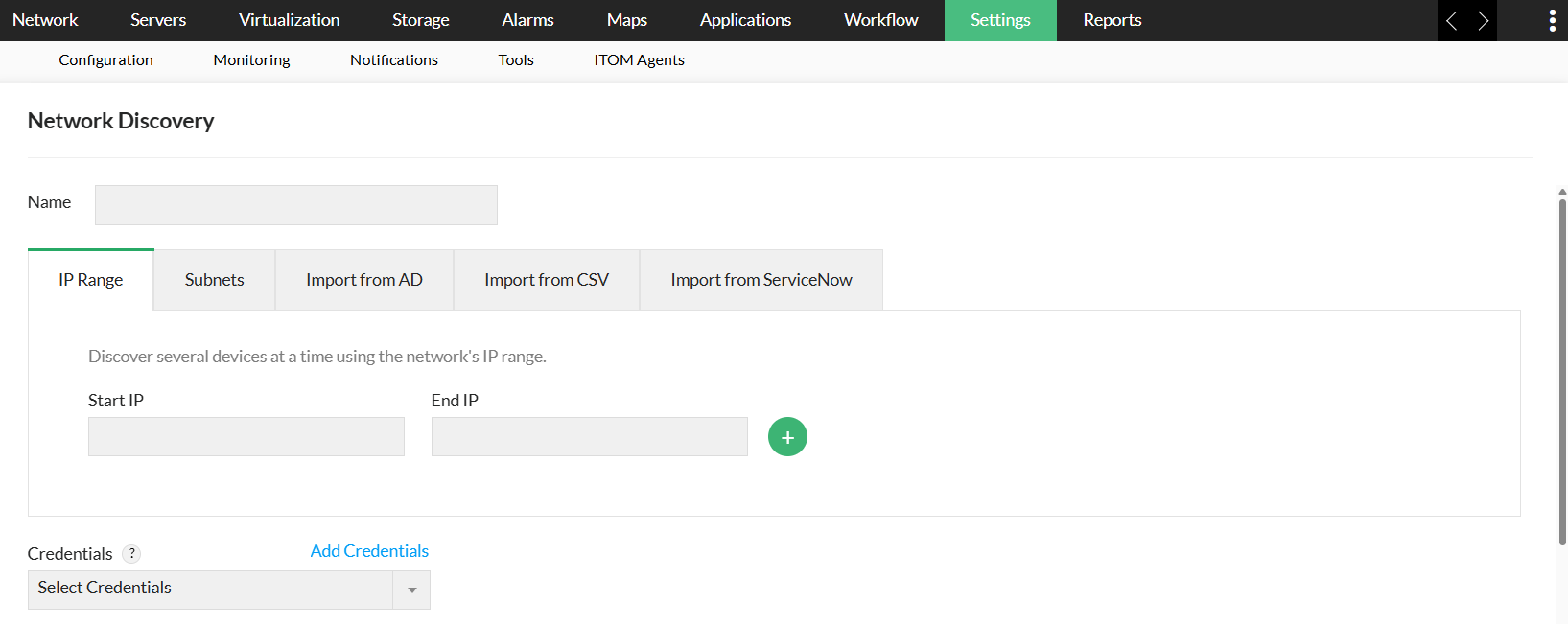
- IP range–based discovery: The option to discover by specifying a range is useful when there is a need to manage devices just within that range and proves less costly as opposed to scanning a complete network. When a new device is plugged-into the network, the monitoring application must be able to scan only that specific device.
- CIDR discovery: CIDR is Class–less Inter-Domain Routing, an IP addressing scheme that replaces the system based on classes A,B, and C.
- File–based discovery: This option is useful when an administrator has to discover a random set of devices across networks. Discovery must be initiated for a list containing the host–names or the IP addresses of the devices to be managed.
- On–demand discovery: When a new device is plugged–into the network, the application must be able discover only that specific device.
Custom views for in-depth visibility
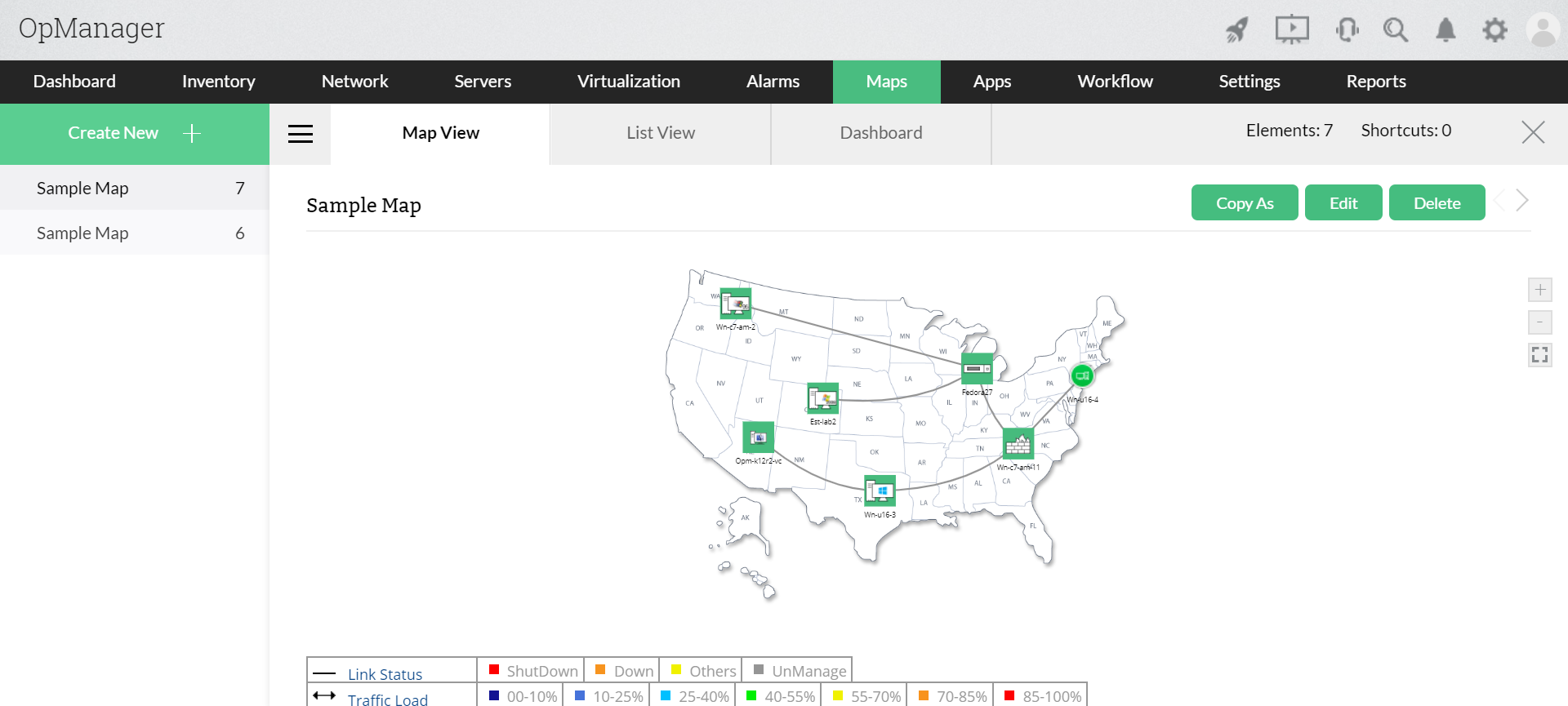
Discovered devices are categorized to simplify monitoring in OpManager. Additionally, the software enables users to create customized views for logical device grouping and provides centralized management capabilities. This facilitates segregation of devices by geographic location and further, allows assignment of authorized access within business views.
Round the clock monitoring features
OpManager supports industry–standard monitoring protocols that include SNMP, WMI, Telnet, and SSH, besides allowing custom scripting. It monitors almost every network resource and reports the performance. Some of the monitoring capabilities include,
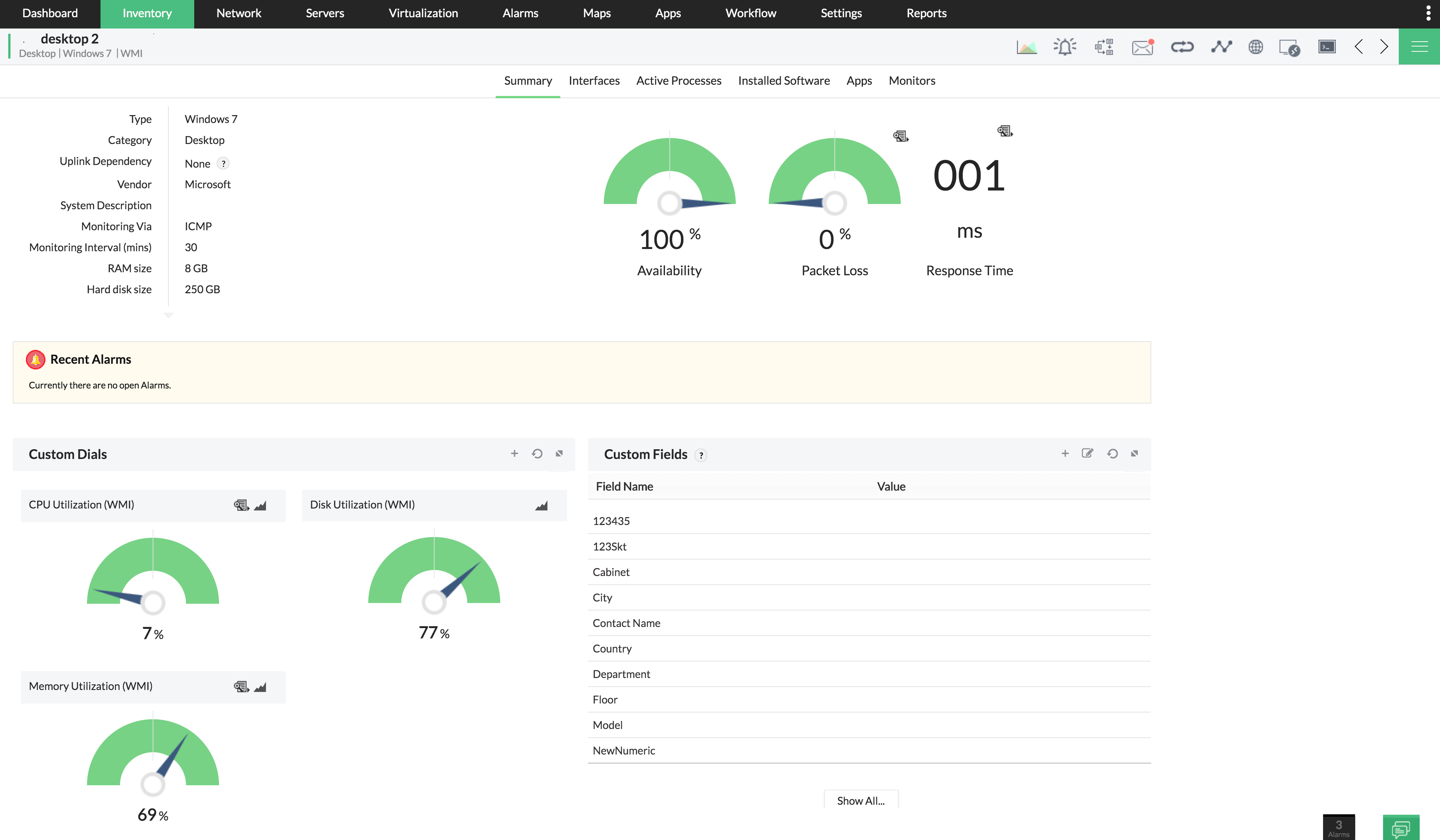
- Availability & Uptime monitoring:A quick, safe option to determine the performance of a network and its resources is to simply check its availability. Something as simple as a ping determines if a device is up or down. Checking for availability is often the start point from where an administrator can drill down to the root cause. Proactive monitoring for availability and uptime ensures that you have a plan B in place if the server or link cannot be made functional in a given time.
- System Resources monitoring:Any device is rendered unavailable if the hardware shows poor performance. An overloaded server may have its CPU and Memory eaten up by the applications hosted on it and make the server useless. By watching the performance of the resources, the system administrators can effect capacity planning, distribute the resources, or upgrade the resources much before a problem is encountered.
- Bandwidth monitoring: Any business relies heavily on the WAN, which is an indispensable and costly side of an enterprise network. A network administrator must be wary of the impending outages and equip accordingly so that the business is not affected. Keeping a tab on the WAN link latency, bandwidth utilization, the round–trip–time (RTT), etc enables the administrator to avoid serious outages, and also aids in capacity planning.
Enhanced network security
With OpManager, you will be the first to know of any security threat to your network. Be it an unauthorized user activity, or an outside intrusion, OpManager catches it all.
The network security administrators are left to face many threats to the network security from the external world and also from within. The Firewall security events such as intrusion detection, virus attacks, denial of service attack, etc., anomalous behaviors, employee web activities etc, provide a wealth of information on potential threats. Even a small compromise can prove costly to the business. Ability to visualize enterprise security and detect security compromises is another essential component.
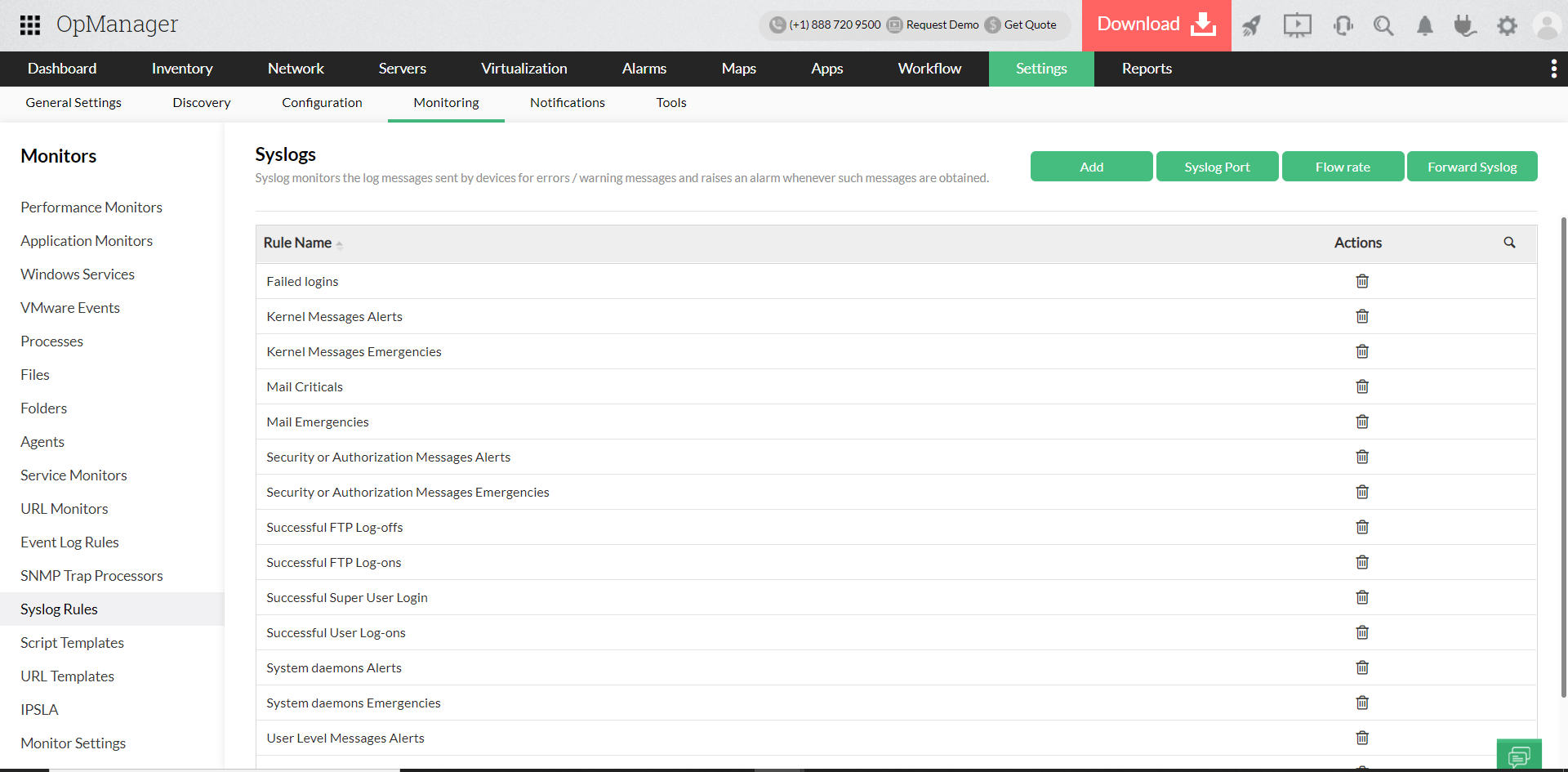
- Syslogs monitoiring: Log monitoring as a means of ensuring security, is incomplete without monitoring the syslog, the events of Unix-based systems such as Linux, Solaris, HP–UX, IBM AIX, and other devices supporting syslog like routers, switches etc. Seasoned administrators monitor Syslogs to keep a tab on unauthorized authentications, user activity, network connections, critical system or application failures, et all.
- Firewall log monitoring: The network security administrators are left to face many threats to the network security from the external world and also from within. The Firewall security events such as intrusion detection, virus attacks, denial of service attack, etc., anomalous behaviors, employee web activities etc, provide a wealth of information on potential threats. Even a small compromise can prove costly to the business. Ability to visualize enterprise security and detect security compromises is another essential component.
- Anomaly detection: While it is ideal to take the required measures to prevent an attack, a means to get the acts together even when a damage is done is needed to ensure there are no further attacks. It is no secret that perpetrators of malicious attacks find new means to gain entry into corporate networks, making them the biggest targets. Irrespective of the size of an enterprise, such attacks are unaffordable in terms of financial implications and data compromises. Detecting the onslaught of any virus attack or worm attack and getting to the root of the problem becomes necessary. The network administrator must be able to ‘watch’ for the spikes and predict the trend. This paves way to get to the source from which an attack originates and nail down the problem.
- Configuration and complaince management: With OpManager's network configuration management add-on, keep a tab on 'who', 'what' and 'when' of a configuration change in order to prevent misconfiguration and unauthorized configuration changes. Enhance security by staying complaint to latest industry policies. Further, OpManager helps you scan the network periodically to spot firmware vulnerabilities and mend them with suggested patches.
Alerting Mechanism
OpManager’s alerting is characterized by its real–time alerting capabilities in addition to maintaining a alert history. OpManager pro–actively checks for faults in a network by querying the devices periodically, listens for traps from devices, and also processes the system logs to generate corresponding OpManager alerts. Threshold–based alerting aids in quicker resolution time.
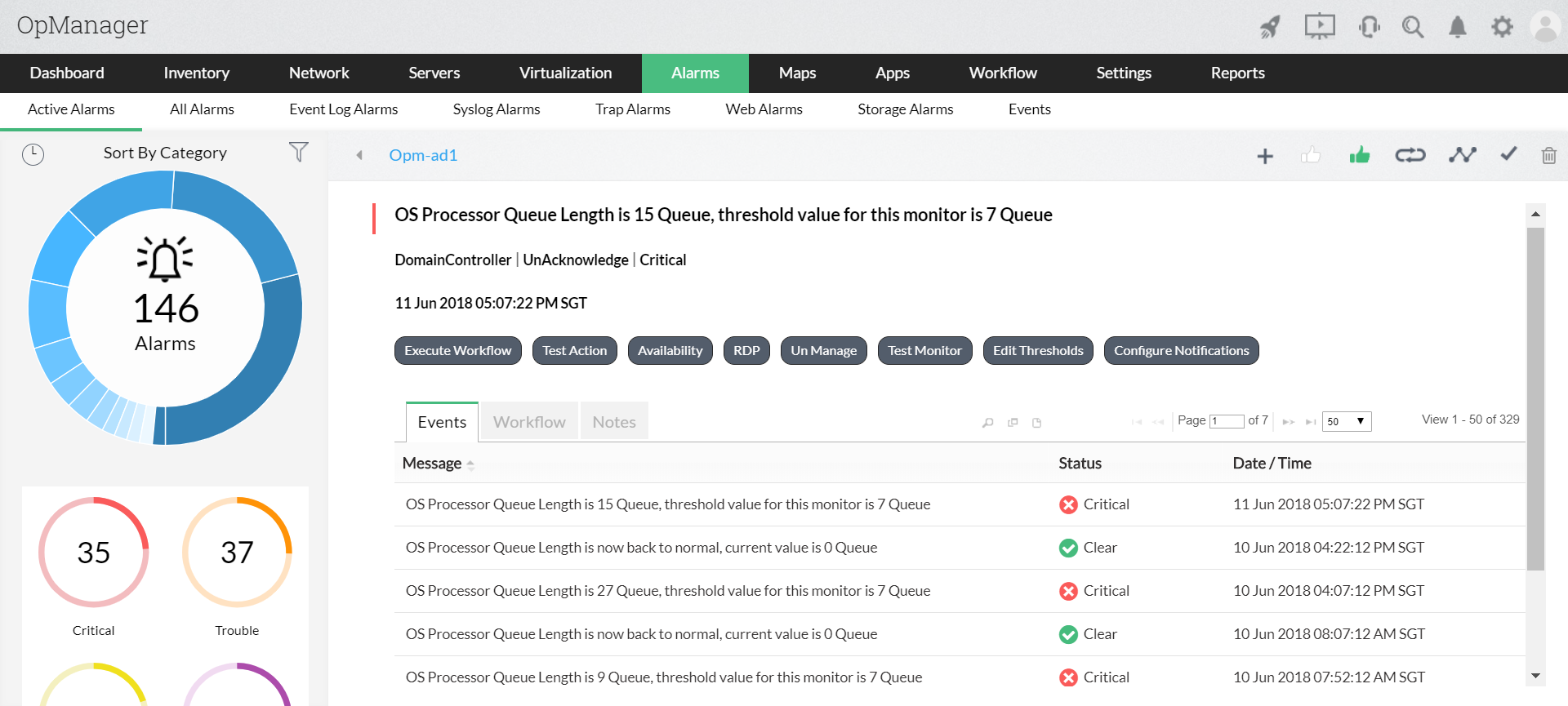
- Pull and push modes: A network monitoring system must be able to proactively seek out faults by talking to the network resources (the pull mode) and must also be capable of receiving or listening to fault messages from the resources (the push mode). Receiving and processing SNMP traps, converting the log messages on various monitoring systems into application alerts etc, facilitates fault management from a single console.
- AI based adaptive thresholds: Setting thresholds for the various monitored resources enables proactive alerting. The important parameters where thresholds help are, response time (very useful when you have customer SLAs), resource utilization, transfer rate, connection counts etc. A provision to re–arm an alert makes the threshold functionality complete. With OpManager's AI based adaptive threshold, the threshold value will be cutomatically adjusted based on real-time performance trends minimizing human intervention.
- Multi-channel network alerts: The purpose of alerting is to get the administrator or the IT staff attend to the problem as early as possible and prevent huge downtimes. So the alerts need to make it to the concerned engineer’s inbox or mobile besides other mechanisms like a pop–up on his screen etc. Some of the quick alerting mechanisms the administrators or other network engineers prefer include Email alerts, SMS alerts, a provision to plug–in some self–healing scripts, or even log a trouble–ticket with a helpdesk system based on the criticality or priority of the alert.
Scalable, Robust Application Architecture
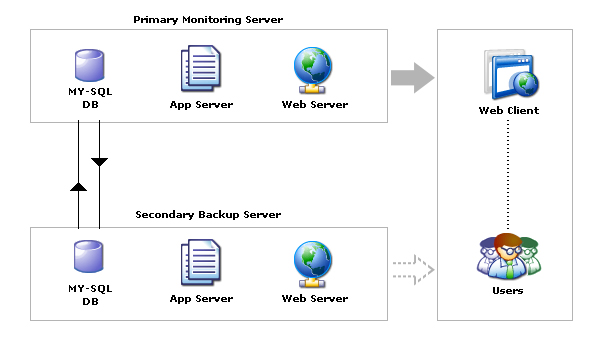
Failover or redundancy support is necessary to achieve uninterrupted service. Implementing a redundancy system helps you to overcome failures such as a database crash or a loss in network connectivity. OpManager is highly available with complete support for redundancy. You can set up MySQL or MSSQL replication which ensures that the monitoring task is un-interrupted. The failover to a secondary server in the event of the primary server failing, is seamless, and the users do not experience any downtime.
Why should you try OpManager right away
ManageEngine OpManager is a feature–rich network monitoring solution which is further powered by its capability to seamlessly integrate with the other offerings in the ManageEngine Suite as add-ons or plug–ins. It integrates with ServiceDesk Plus for trouble ticketing, with NetFlow Analyzer for detailed traffic analysis, with Network Configuration Manager for hassle–free configuration management, with Firewall Analyzer for tight security management, with Applications manager for effortless application performance monitoring and further integrates with OpUtils for seamless switch port and IP address management . A single point, intuitive console to manage and troubleshoot the network problems, reduces the hassles of having to deal with mutliple vendors and several standard and proprietory protocols. In short, just one–neck–to–hang when in trouble. Give it a try now if you have not already.