Computer Telephony Integration (CTI) plays a vital role in supporting your customers. It is identified as the technology of linking of computers and telecom instrument to respond calls, to pull out details from the database based on the phone numbers and even route calls to different people in some cases.
"A study by AT&T says that 27% of the customers, who don’t get an answer from the toll free number buy elsewhere or drop the idea of buying the service."
It—s better to have computer telephony in such cases. Computer Telephony gives a profound positive effect on the customers and also gives a ‘wow’ experience to the customers. In the modern day business, you are not required to satisfy your customers, but you are required to ‘wow’ them every time.
The major applications that a CTI can provide you is:
- 1. Call Answering
- 2. Call Routing
- 3. Pulling out customer data from the Data Base
- 4. Interactive Voice Response (IVR)
Think about this scenario, you are in customer support and you have an annoyed customer, who has mailed you 5 or 6 times that day. He is now calling you on the phone; you pick up and answer him with utmost sincerity, giving out his latest problems and possible solutions. I assure you, you are going to win him forever.
ManageEngine SupportCenter Plus is emerging as a full-fledged customer support and helpdesk software in facilitating Computer Telephony Integration (CTI) in organizations. SupportCenter Plus currently supports Asterisk and the Avaya PBX.
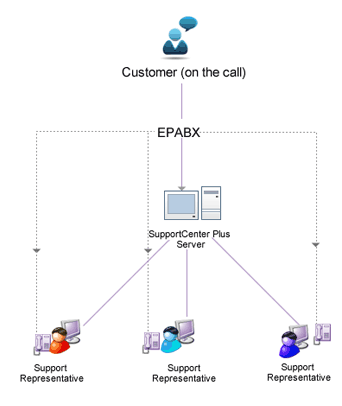
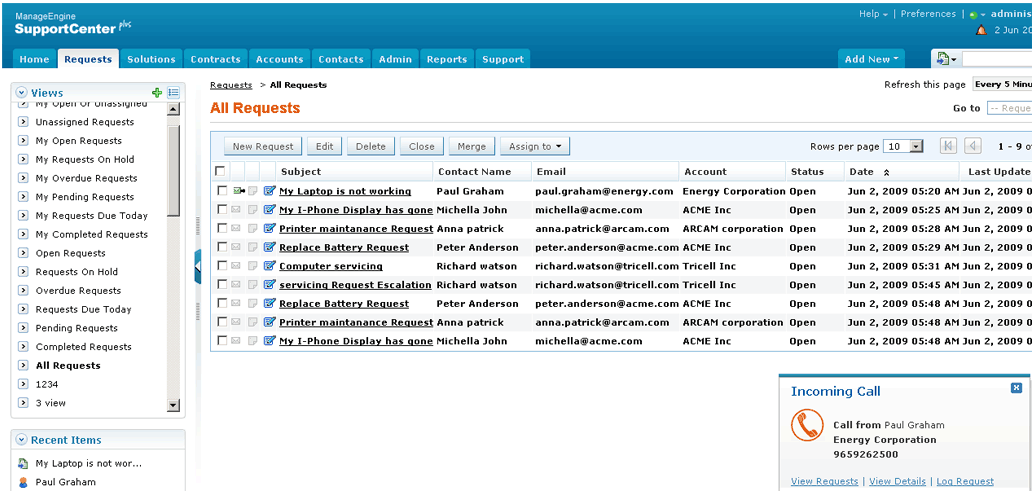
Features of CTI in SupportCenter Plus
- Screen pop up displaying the caller information, saving time and effort in database lookup.
- Click to dial option to call customers instantly.
Getting Started
On purchasing the CTI license, the following needs to be configured to get started with SupportCenter Plus CTI,
- Telephony Server Settings.
- Call Alert option under Support Reps.
It will tightly integrate with the Accounts and Contact management module in order to give you data about the customer.
Benefits of CTI in SupportCenter Plus
- With CTI SupportCenter Plus improves service quality by routing calls to expert queues based on phone prompts.
- Thus your helpdesk centres can become instantly efficient and productive, saving time and effort to reply to mails.
- SupportCenter Plus also mechanically identifies support contract privilege.
- In addition, screen pop-ups and one-click call (Click to Dial) competence from the customer record rationalize all support efforts.
Note: Please note that a separate license should be purchased to enable CTI in SupportCenter Plus.