Simplify Oracle E-Business Suite access with ADSelfService Plus
Productivity platform
Oracle E-Business Suite is an integrated suite of enterprise applications that helps companies streamline key business processes. Integrating ADSelfService Plus with Oracle E-Business Suite enables Active Directory (AD) password synchronization, providing users with consistent, seamless login credentials and reducing the need for multiple passwords.
Unified password synchronization across platforms
Ensure consistent credentials across Oracle E-Business Suite, AD, and other applications, streamlining user access and reducing login difficulties.
Enhanced security with centralized password policies
Secure Oracle E-Business Suite and AD access by enforcing unified password policies—including breach detection—which aligns with compliance standards.
Reduced help desk requests for password resets
Provide users with easier access by syncing AD and Oracle E-Business Suite passwords, significantly reducing password reset inquiries and enhancing satisfaction.
Password Synchronization with Oracle E-business Suite
Steps to configure Oracle E-business Suite accounts with ADSelfService Plus
Important: Install the Password Sync Agent to synchronize native password changes and resets.
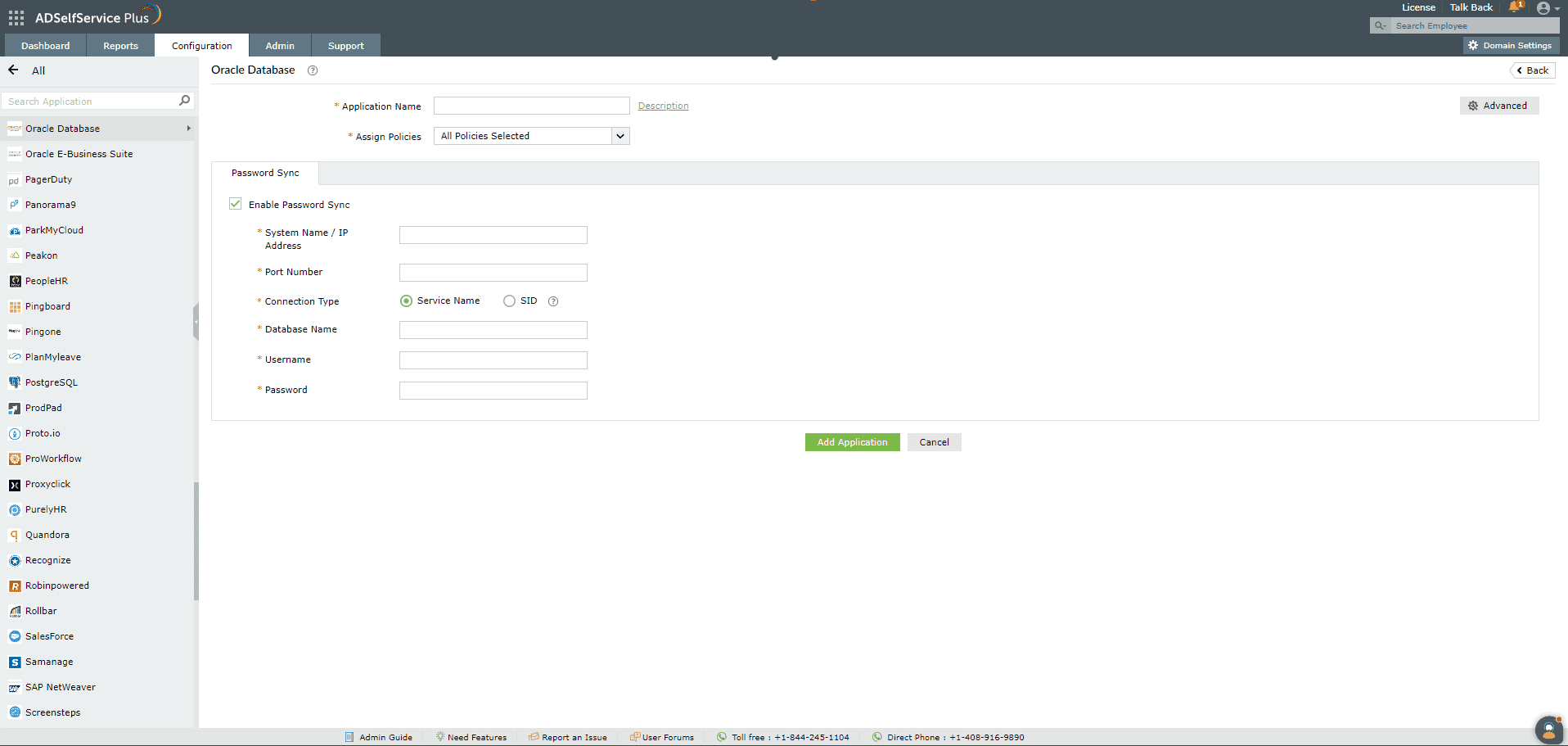
Log in to the ADSelfService Plus admin console with admin credentials.
Navigate to Configuration > Self-Service > Password Sync/ Single Sign On.
Select the Oracle E-business Suite application. Note: You can also find Oracle E-business Suite application that you need from the search bar located in the left pane or the alphabet wise navigation option in the right pane.
Enter the Application Name and Description.
In the Assign Policies field, select the policies for which the password sync needs to be enabled. Note: ADSelfService Plus allows you to create OU and group-based policies for your AD domains. To create a policy, go to Configuration > Self-Service > Policy Configuration > Add New Policy.
Select Enable Password Sync.
Enter the System Name / IP Address and the Port Number of the Oracle E-Business Suite.
Select the Connection Type. It can be either the Service Name or the system identifier ( SID ). Note: The Connection Type is determined by how the Oracle E-Business Suite is configured in your organization. Please contact your Oracle E-Business Suite administrator for this information.
Enter the name of the Oracle E-Business Suite in the Database Name field.
Enter the Username and Password of a user account with execute permissions on the FND_USER_PKG package. This package has the permissions necessary to change the user password and unlock the Oracle E-business Suite user account.
Click Add Application.
Chat now
Hello!
How can we help you?
I have a sales question
I need a personalized demo
I have a product query
E-mail our sales team
Book a meeting
Chat with sales now
Back
Book your personalized demo
Thanks for registering, we will get back at you shortly!
Back
E-mail our sales representative
Thanks for registering, we will get back at you shortly!
Back
Book a meeting
Thanks for registering, we will get back at you shortly!