Exchange mailbox backup tool
Exchange Server 2010 (SP1, SP2, SP3) , 2013, 2016, 2019
Exchange Online
9 out of every 10 Fortune 100 companies trusts ManageEngine

Why invest in an
Exchange backup solution?
Exchange Server and Exchange Online native backup options are primarily designed for full or bare-metal restores and offer no efficient way to perform granular mailbox recovery. As a result, restoring a single email or mailbox folder becomes a time-consuming and inefficient process.
RecoveryManager Plus helps you overcome these limitations. With RecoveryManager Plus, you can back up all mailbox items in Exchange mailboxes, including users’ emails, attachments, contacts, tasks, group mailboxes, archive mailboxes, and calendars. Additionally, you can recover the data of an entire mailbox, a single mailbox folder, or even a single mailbox item, such as an email or a contact.
Exchange Backup &
Recovery is now simple
Back up all items in your Exchange mailboxes, including all emails, calendar entries, contacts, journals, notes, posts, and tasks.
Comprehensive mailbox backup
Back up all items in your Exchange mailboxes, including all emails, calendar entries, contacts, journals, notes, posts, and tasks.
Item-level restoration
Restore entire mailboxes to a backed-up state or restore individual items like a single email or calendar event.
Incremental backups
Accelerate the backup process by backing up only the changes that occurred since the last backup cycle.
Multiple organization support
Add multiple Exchange organizations to RecoveryManager Plus, and perform backup and restoration of Exchange data in all organizations from a single console.
Cross-platform restoration
Restore backups of on-premises Exchange mailboxes to a mailbox in your Exchange Online tenant and vice-versa.
Cross-user restoration
Restore backups of on-premises Exchange mailboxes to a mailbox in your Exchange Online tenant and vice-versa.
Immutable backups
Insure against ransomware by storing backups in immutable cloud repositories like Azure Blob Storage, AWS S3, or Wasabi.
Multiple backup storage options
Store your Exchange backups within premises in local repositories, NAS, or cloud repositories like Azure Blob Storage, Azure Files, AWS S3, and Wasabi.
Backup retention
Define a retention period for your Exchange backups, and discard backups that have exceeded the retention period.
Advanced search
Browse through backup copies and find particular mailbox items with advanced search filters such as date, subject, from, and to.
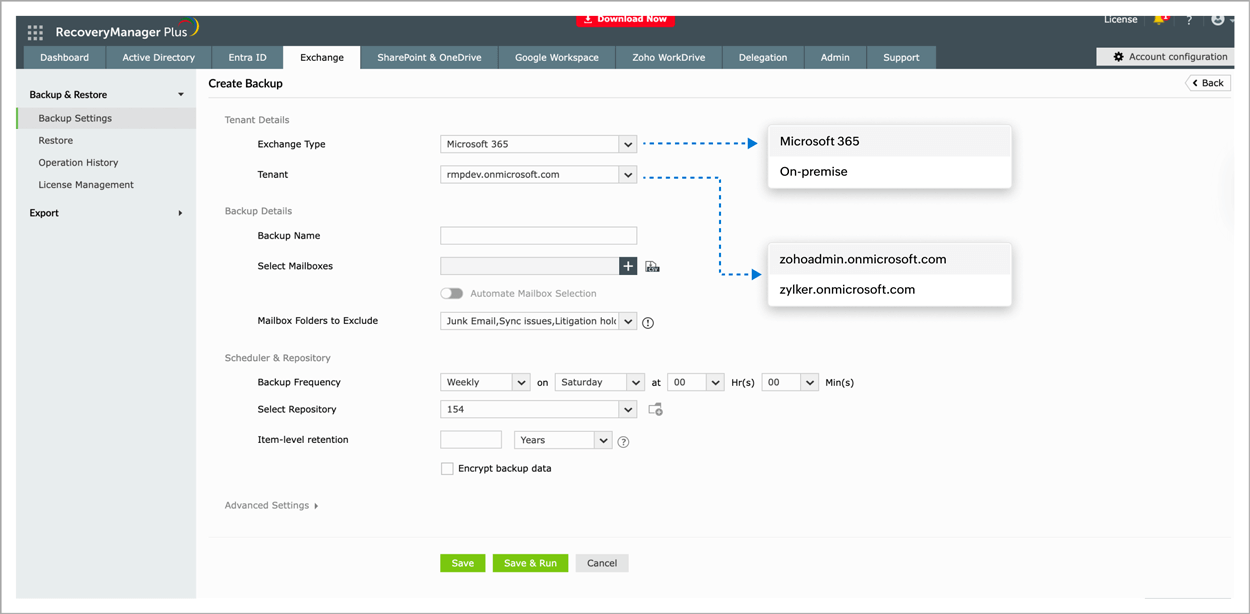
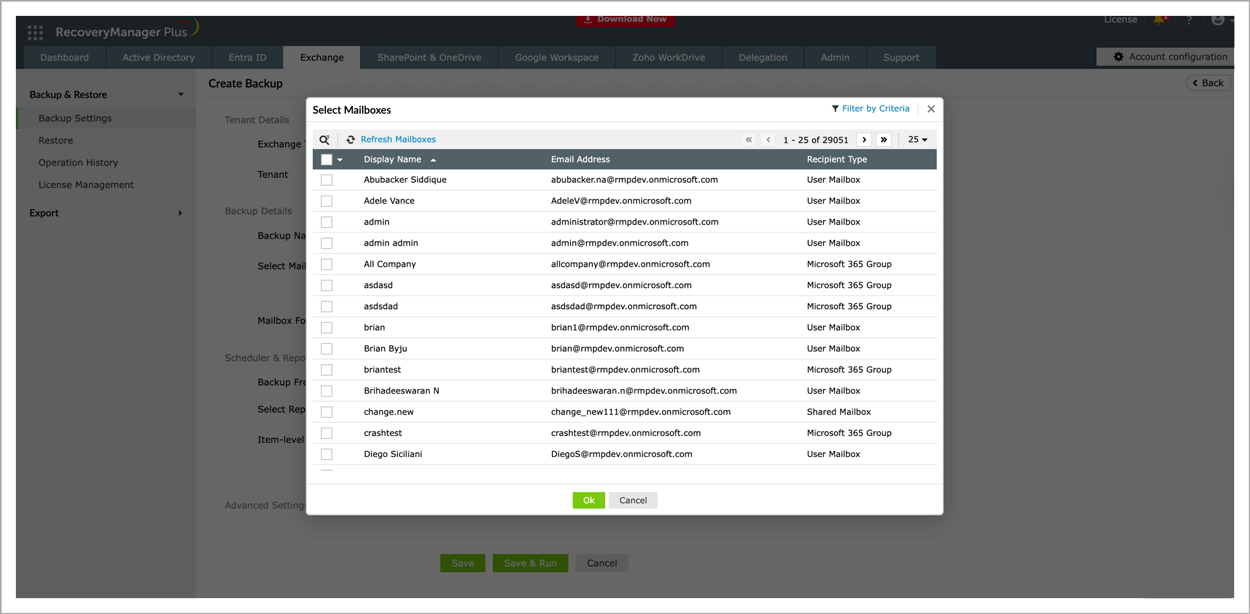
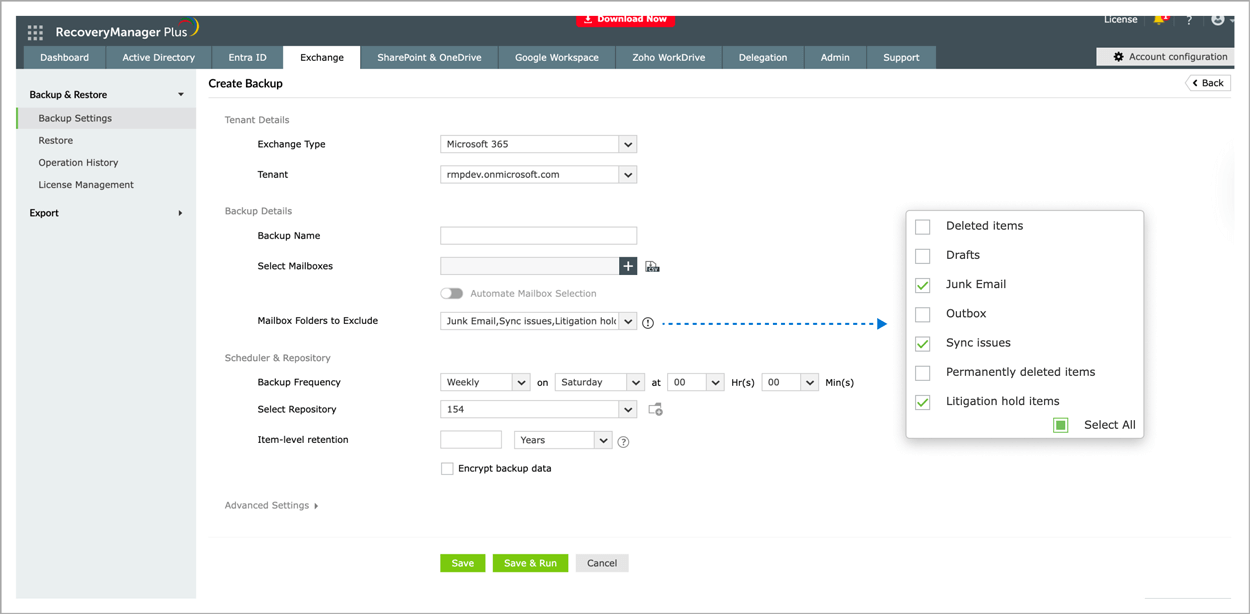
How to export an Exchange mailboxes to PST using RecoveryManager Plus
your Exchange type.
the mailbox that you wish to archive.
additional export settings.
Why Choose
RecoveryManager Plus?
-
Multiple backup storage options
Store backups within your premises in local repositories, NAS, or cloud repositories like Azure Blob Storage, Azure Files, AWS S3, and Wasabi.
-
Ransomware mitigation with backup immutability
Prevent ransomware by enabling immutability for backups stored in cloud repositories like Azure Blob Storage, AWS S3, or Wasabi.
-
Custom notifications
Curate your notification profile, and choose the actions you want to receive notifications for via email.
-
Unified backup solution
Configure multiple AD domains, Microsoft Entra ID and Microsoft 365 tenants, Exchange organizations, Google Workspace domains, and Zoho WorkDrive Teams for backup, and manage them from a single dashboard.
-
Automated backups
Schedule backups at fixed intervals to ensure you've backed up the most recent version of your AD, Microsoft Entra ID, Microsoft 365, Exchange, Google Workspace, and Zoho WorkDrive environments.
-
Backup delegation
Assign predefined technician roles such as admin, operator, or auditor to users, or create your own roles based on your specific needs, and give users the rights to perform specific functions in the product.
-
Technician auditing
Audit each action performed by technicians to make sure no unwanted or unexpected changes are applied to your environment.
Thank you
Thank you for your interest in ManageEngine RecoveryManager Plus. We have received your request for a personalized demo and will contact you shortly.