

- Overview
- Configuration
Syslog servers
Simplify log management with Syslog servers and ADSelfService Plus
A syslog server is a centralized system that collects, stores, and manages log messages from various devices and applications across a network. Integrating ADSelfService Plus with a syslog server allows organizations to forward logs to the server for centralized monitoring, analysis, and correlation with other network logs, enhancing visibility into user activities and security incidents.
Forward ADSelfService Plus logs to a syslog server
Automatically forward ADSelfService Plus logs to a syslog server, enabling centralized storage and analysis.
Correlate logs across the network
Integrate ADSelfService Plus logs with other network logs to gain broader insights into user activities and detect anomalies effectively.
Generate reports and trigger alerts
Use forwarded logs to generate detailed reports and set up alerts for critical security events, improving proactive monitoring.
Configuration
Integrating ADSelfService Plus with a Syslog Server
Follow these steps:
- Log in to ADSelfService Plus as default Admin.
- Navigate to Admin → Product Settings → Integration Settings.
- Click the Syslog Server tile.
- Click Enable forwarding of logs to syslog
- Enter the details including Syslog Server Name, Port number and Protocol. Choose the Syslog Standard and specify the Data Format needed for your SIEM parser.
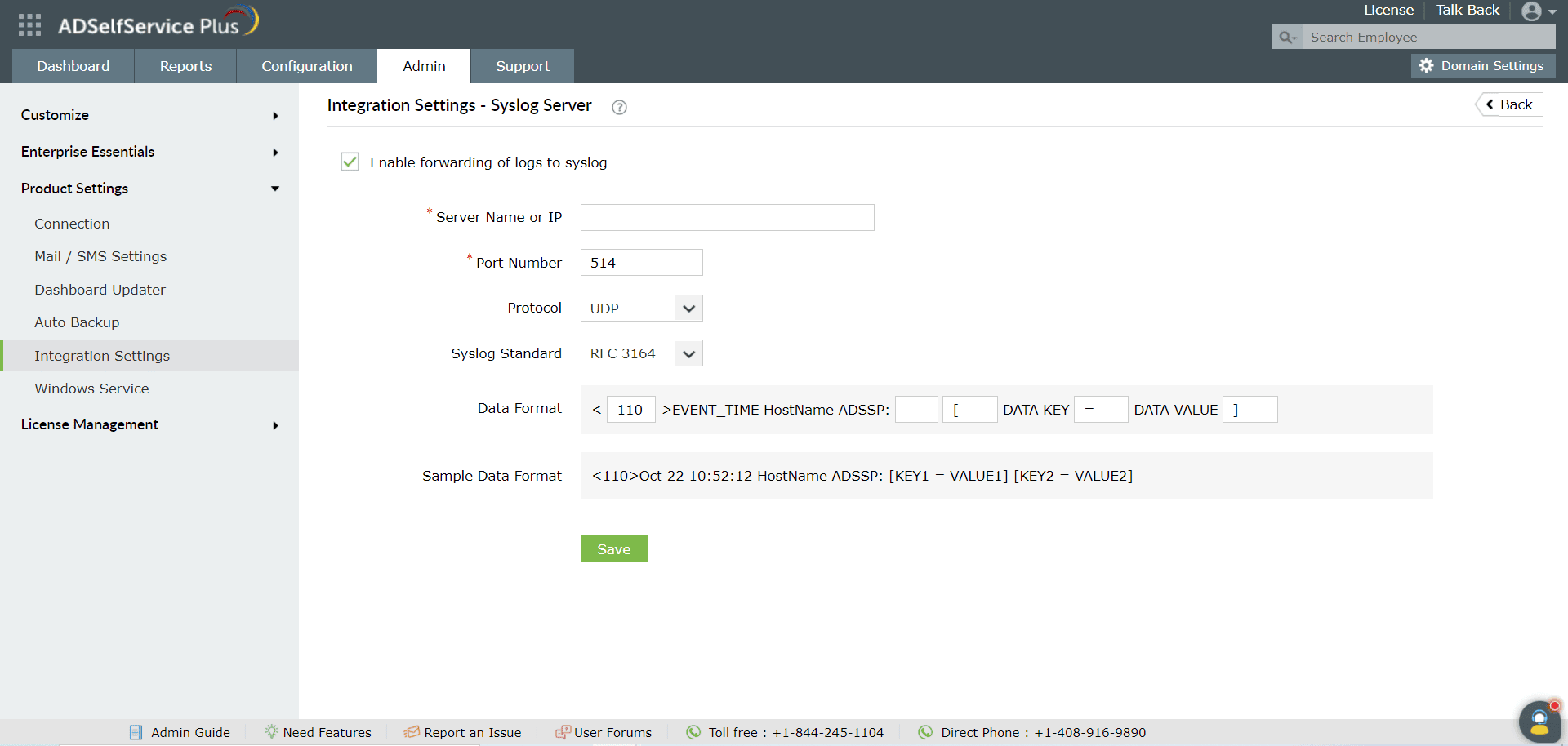
- Click Save.