Direct Inward Dialing: +1 408 916 9890
On May 21, 2026, the FBI released a public service announcement warning the public about Kali365, a phishing-as-a-service (PhaaS) platform that hijacks Microsoft 365 access tokens. Security firms have already documented hundreds of attacks across manufacturing, education, government, financial services, and healthcare in North America and Europe. By exploiting legitimate authentication processes, this threat bypasses even robust security layers of MFA.
This blog breaks down how the Kali365 attack works, why traditional security hardening falls short, what you can do to protect your tenant, and how M365 Manager Plus can help you detect Kali365 activity early.
Phishing-as-a-service (PhaaS) is a criminal subscription model in which developers sell ready-made attack infrastructure—phishing templates, token capture tools, tracking dashboards, and campaign management systems—to other criminals for a recurring fee. It operates like a SaaS product, complete with tiered pricing and customer support.
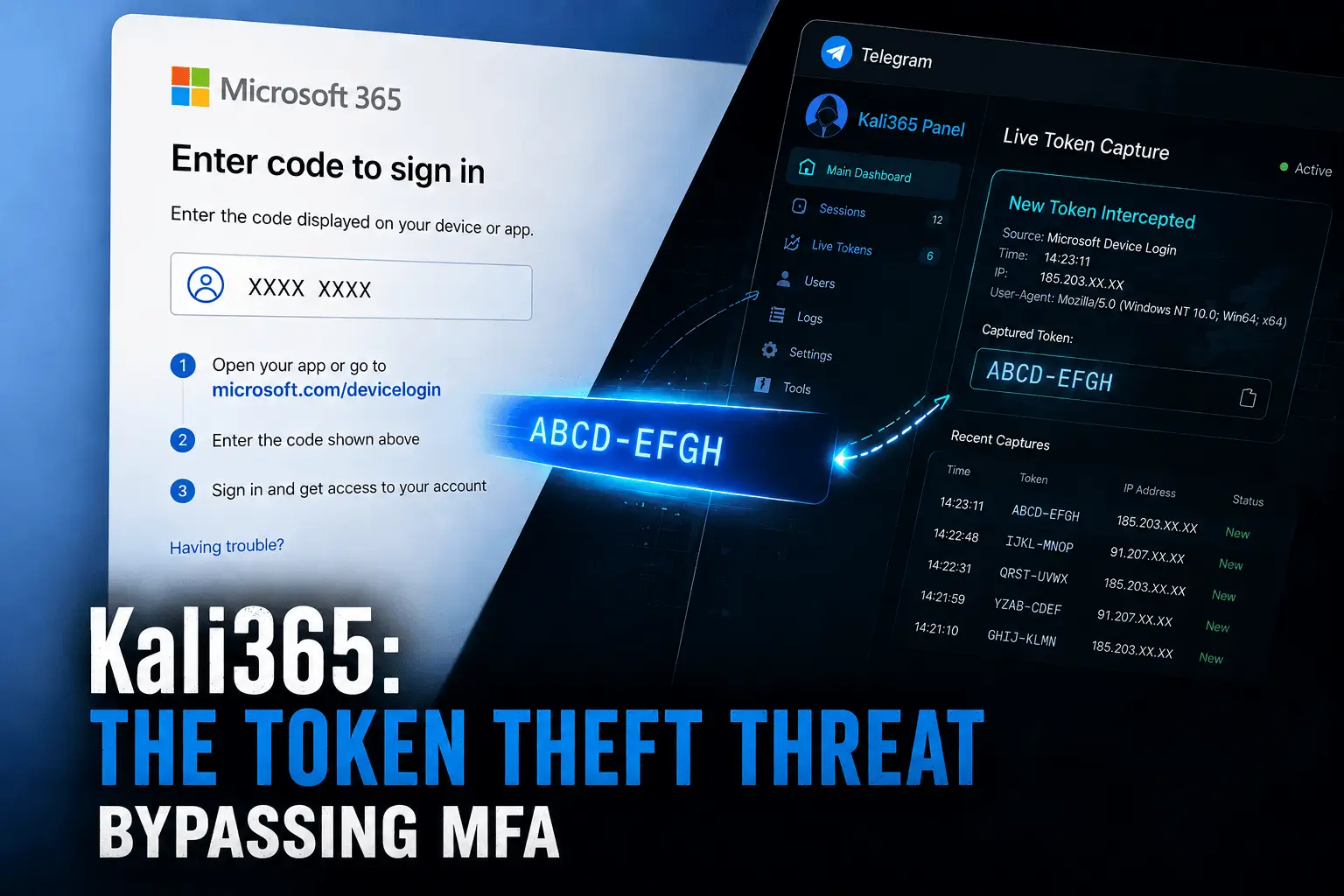
Kali365 is a PhaaS platform first observed by authorities in April 2026. It's sold through Telegram for as little as $250 for a 30-day subscription. Kali365 exploits a legitimate Microsoft authentication mechanism called the OAuth device code flow to capture access tokens without ever touching a user’s password or MFA credentials.
The FBI’s advisory, designated alert I-052126-PSA, describes Kali365 as an emerging threat that "lowers the barrier to entry, providing less-technical attackers access to AI-generated phishing lures, automated campaign templates, real-time targeted individual/entity tracking dashboards, and OAuth token capture capabilities."
Technical analysis by Arctic Wolf Lab found a three-tier commercial structure: an admin tier for the phishing kit’s authors, an agent tier for resellers, and a client tier for paying affiliates. Pricing ranges from $250 for 30 days to $2,000 for a full year, payable through cryptocurrency. Each affiliate can brand the panel with custom colors and names. Tokens captured by one affiliate can be shared with others on the platform, meaning a criminal who never sent a single phishing email can purchase access to already-compromised accounts, allowing anyone with a Telegram account and $250 to become a threat actor for a fraction of your IT security spend.
The Kali365 phishing attack on Microsoft 365 accounts follows a four-step sequence, each designed to exploit trust rather than crack credentials.
An attacker sends a phishing email impersonating a trusted cloud service like DocuSign, SharePoint, OneDrive, or Adobe Acrobat Sign. The email contains a short numeric code and a link to a legitimate Microsoft page: microsoft.com/devicelogin.
This is what makes Kali365 uniquely dangerous. The link is real. The Microsoft page is real. There is no spoofed URL for a cautious user to catch.
The device code flow was built for devices that lack keyboards—smart TVs, conference room displays, and industrial terminals. It works by generating a short device code on one device that a user enters on a companion screen to authenticate.
Kali365 hijacks this flow. The attacker’s device generates the code. The victim, following the instructions in the phishing email, enters it at the genuine Microsoft verification page. Once the victim enters the code and completes the authentication process, they unknowingly authorize an application controlled by the threat actor.
Once the victim completes authentication, Microsoft issues OAuth access and refresh tokens to the attacker’s device. These tokens prove to Microsoft’s servers that a user has authenticated successfully. They do not contain a password and they do not trigger an MFA challenge. Kali365 captures them, stores them on its platform, and makes them available via the attacker’s dashboard. This is called device-code phishing.
Kali365 uses a refined approach of device code phishing, but these attacks existed way before Kali365. Proofpoint documented a sharp increase in these attacks beginning in September 2025 by threat actors who focused on governmental targets. By October 2025, financially motivated criminal actors followed. By February 2026, PhaaS tools like EvilTokens had commoditized the technique, and Huntress tracked over 340 compromised organizations across five countries from a related campaign alone.
The attacker now has persistent access to the victim’s Outlook, Teams, and OneDrive for as long as the tokens remain valid and requires no further interaction from the victim. In incidents documented by Arctic Wolf Labs, attackers went further, creating inbox rules to bury security notifications, registering secondary devices against the victim’s account, and extending access beyond the initial token’s expiration window.

For years, organizations have heavily relied on MFA as the primary bulwark against unauthorized access. However, in the face of a Kali365 attack, this traditional hardening approach falls short. The reason is simple.
Device code phishing does not steal passwords, and it does not trigger anomalous login attempts that MFA is designed to block. Instead, the victim satisfies the MFA requirement during the legitimate authentication flow. Once the session is approved by the user, the attacker intercepts the resulting OAuth access token. Because the token represents a fully authenticated and MFA-cleared session, the attacker can use it to maintain access without ever prompting a secondary authentication check.
The FBI and Arctic Wolf both prescribe the same primary mitigation: block device code flow everywhere if it is not a genuine operational requirement. Here are the specific steps to take action now.
Create a conditional access policy targeting all users and all cloud applications that explicitly blocks device code flow authentication. Allow narrow exceptions only for verified processes that genuinely require it, such as meeting room devices or shared kiosk terminals.
Before deploying the policy, audit existing device code flow usage in your tenant to identify any legitimate dependencies. Blocking this flow without an audit can inadvertently lock out systems that rely on it.
Prevent users from transferring authentication sessions between devices. Authentication transfer policies allow a session initiated on one device (like a computer) to be migrated to another (like a mobile device). Kali365 exploits exactly this kind of session mobility. Blocking these policies removes one more vector the attacker can use to extend or maintain access.
When implementing blanket restrictions on device code flow, it would seem safe to exclude your emergency access accounts from the policy. However, they are as vulnerable to these attacks as a normal user account or can be laterally hijacked. Therefore, only exclude your emergency access accounts from tenant restrictions if you know they will not come in contact with any other account or cannot be exploited in any other way.
If you or your organization has been impacted by Kali365, the FBI urges you to file a complaint with the Internet Crime Complaint Center (IC3). Include the following in your report:
Even with preventative guidelines in place, detection remains a massive hurdle for IT administrators. Tracking suspicious IP addresses, correlating phishing email headers, and identifying unusual login timestamps across multiple Microsoft admin centers is an incredibly labor-intensive process. When relying on native auditing tools, admins often find themselves manually piecing together fragmented logs to determine if a device code flow was legitimately initiated by a conference room TV or maliciously triggered by an attacker halfway across the world. Time is of the essence during a token hijacking event, and manual tracking simply cannot keep up.
To stay ahead of PhaaS threats like Kali365, organizations need centralized visibility and proactive alerting. M365 Manager Plus provides a comprehensive solution to identify these attacks at their earliest stages.
M365 Manager Plus provides prebuilt audit reports on user sign-in activity, including login timestamps, source IP addresses, geolocations, client applications, and authentication methods. When a Kali365 attacker uses stolen OAuth tokens to access a mailbox from an unfamiliar IP or region, these reports surface that activity without requiring you to query logs from multiple portals.
Even if a Kali365 compromise is detected at a later stage, M365 Manager Plus makes the response process faster. The login audit data—timestamps, IPs, geolocations, device details, and session information—is exactly what the FBI’s IC3 asks you to include in a Kali365 complaint. Instead of pulling this data from three different admin centers, you export it from a single report.

When a Kali365 compromise is confirmed or even strongly suspected, the window between detection and containment determines how much damage the attacker can do. Every minute of delay is another minute for lateral movement, inbox rule manipulation, or data exfiltration from OneDrive and SharePoint.
M365 Manager Plus lets you execute the full containment sequence without switching between admin centers. From the same console where you identified the compromise, you can:

Don't wait for your access tokens to be hijacked. Get a free, 30-day trial of M365 Manager Plus with full access to its reporting, auditing, alerting, and management capabilities. Set up alert profiles, run the login audit reports against your tenant, and see for yourself whether Kali365 indicators are already present in your environment. Or contact us for a personalized demo on how to safeguard your tenant with M365 Manager Plus.