Last updated: August 14, 2026
Restrictions
This page provides a comprehensive reference for configuring Android Restrictions profiles in Mobile Device Manager Plus. Administrators can allow or restrict device features across categories including Device Functionality, Security, Sync and Storage, Applications, Browser, Network and Roaming, Device Connectivity, Tethering, Location, Phone, Display, and Miscellaneous settings. The profile description table details feature support across deployment modes — Fully Managed, Work Profile on Personally Owned, Fully Managed with Work Profile, and Legacy — helping admins identify the right restrictions for their Android fleet.
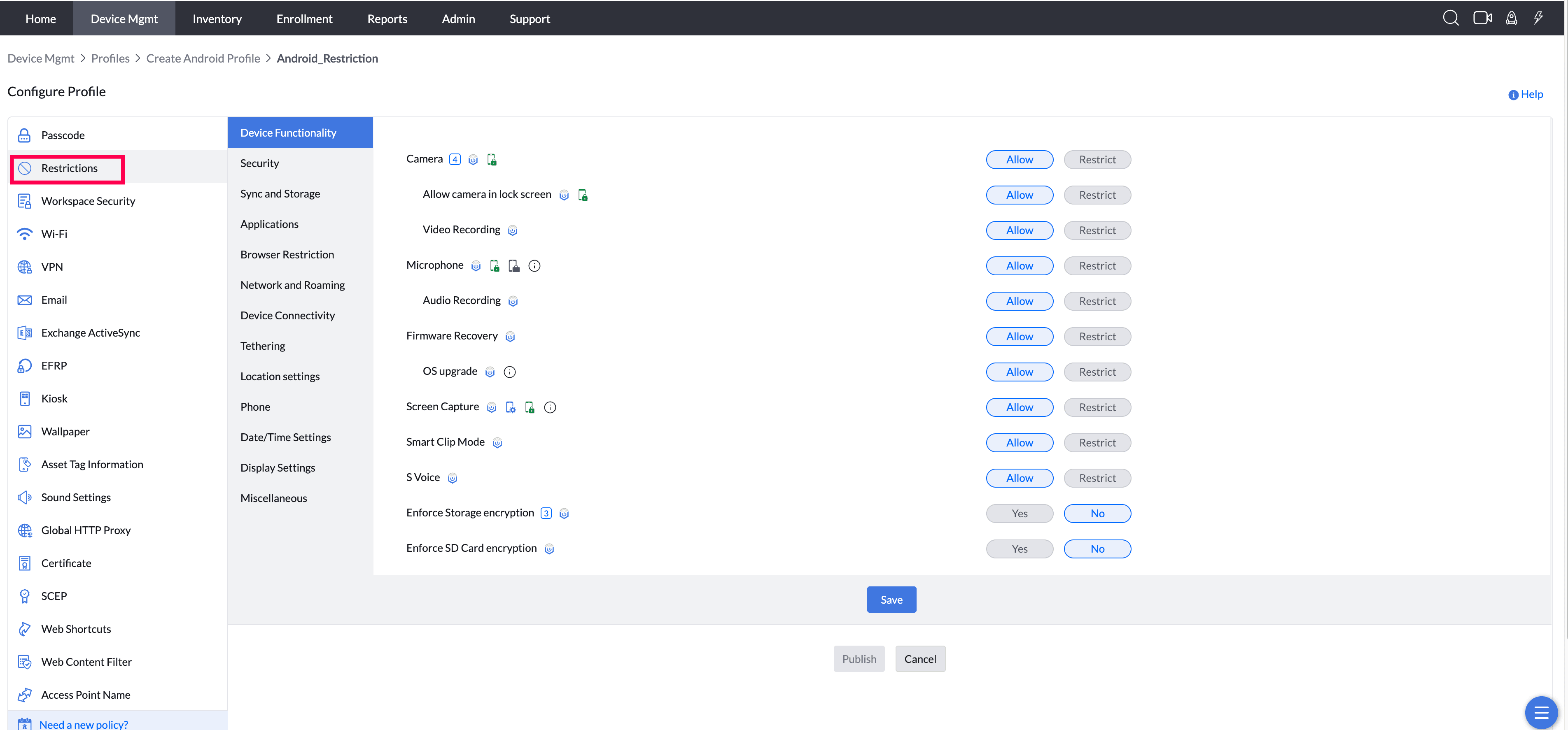
Mobile Device Manager Plus allows administrators to create an Android Restriction profile to manage various aspects of device functionality effectively. The profile encompasses several key sections, including Device Functionality, Security, Sync and Storage, Applications, Browser Restrictions, Network and Roaming, Device Connectivity, Tethering, Location Settings, Phone, Date/Time Settings, Display Settings, and Miscellaneous. Within each of these sections, administrators can specify features to either allow or restrict during the profile creation process. For detailed information on each section, please refer to the Profile Description section below.
Only devices running Android 5.0 or above can be provisioned as Personally-Owned Work Profile (BYOD, or previously Profile Owner) or Fully Managed (COSU and COBO, or previously Device Owner).
Note:To view a detailed comparison of various policies supported with respect to specific OS version, click here.
Note For enhanced security, the admin can configure a kiosk profile to lockdown the device with specific apps and settings or blocklist unwanted apps in the Inventory. The admin can further ensure corporate security by ensuring only safe apps are installed by users on devices by configuring application settings for Corporate Owned devices and Workspace Security for BYOD devices.
Profile Creation
To create a Restriction Profile follow the given steps:
- On the Mobile Device Manager Plus console, navigate to Device Management->Profiles->+create Profile->Choose Android

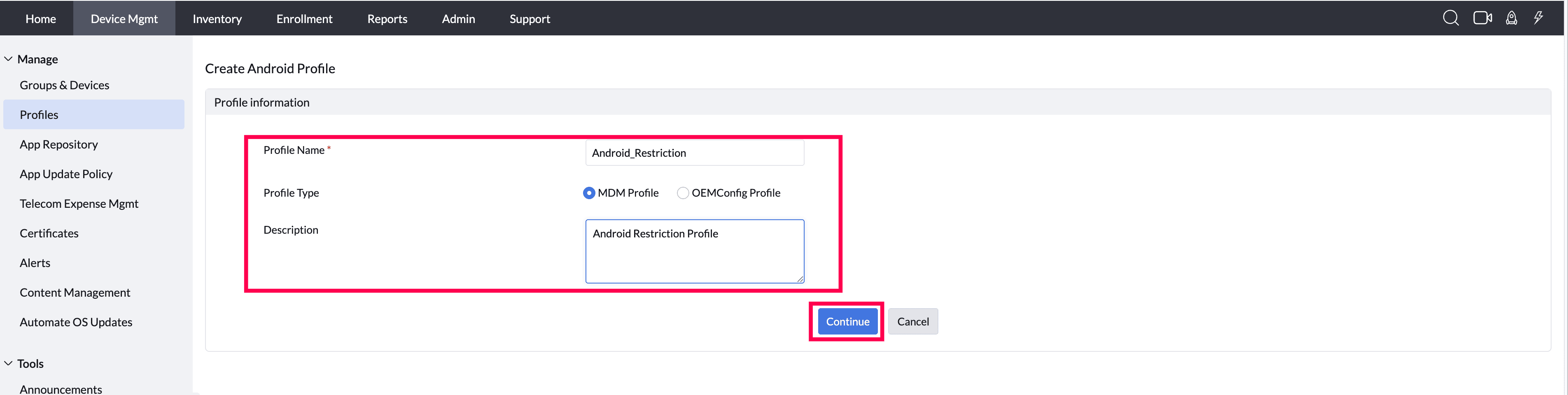
- Provide the Profile Name, Choose the Profile type and provide a description and continue.
- Select the Restrictions Tab and configure the restrictions as required. Save and Publish the Restriction. Associate the restriction profile to the desired groups or devices.
Profile Description
Note:
1. Since images are from Samsung devices, every OEM doesn't follow the same text or screens. Images or info texts shown may vary based on OEM's.
2. When a restriction is applied through MDM, the corresponding setting on the user's device is disabled (grayed out) and cannot be modified by the user until the restriction is removed.
Device Functionality
- Camera: By disabling this, users will not be allowed to use the Camera on their devices. On restricting this, the Camera will remain restricted within the Knox container also.
Supported Management Type: Fully Managed, Work Profile on a Company owned device, Legacy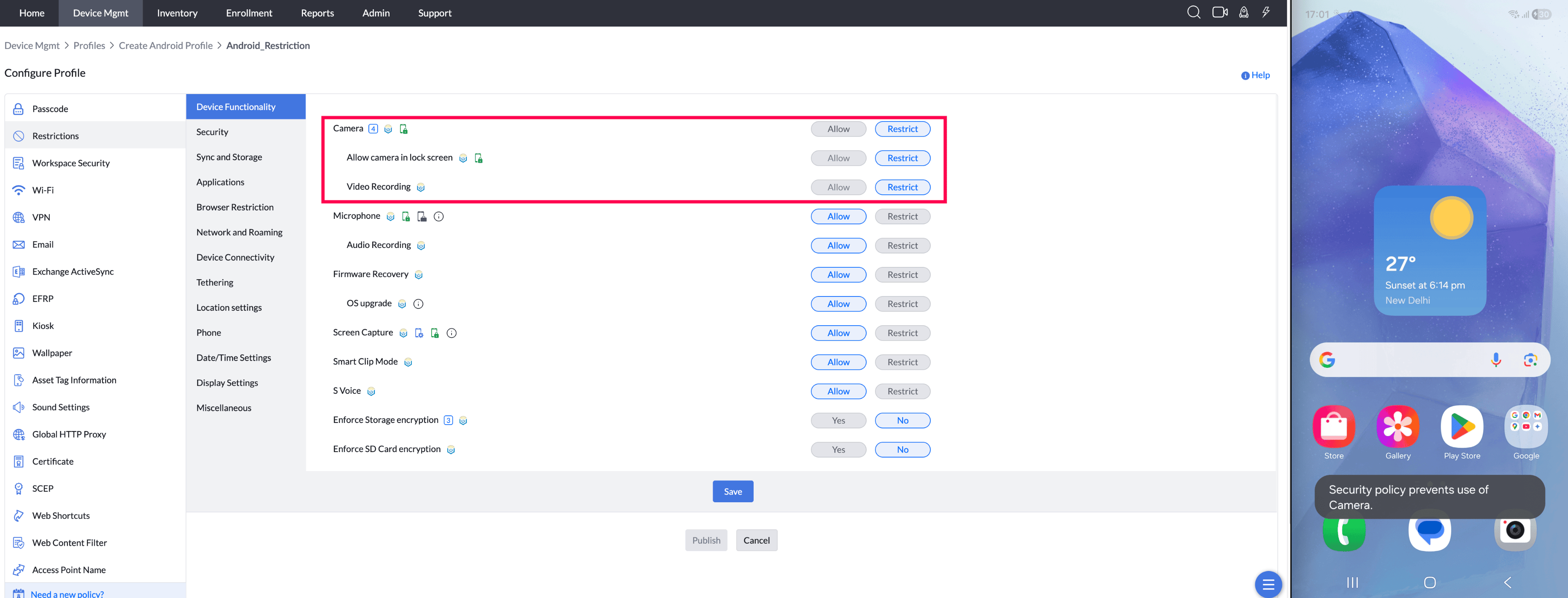
- Access Camera from Lock Screen (Supported from Android 5.0):By disabling this, the users are restricted from accessing the Camera from the lock screen of the device. This can be configured only when Camera is allowed on the device.
Note: For KNOX-enabled Samsung and legacy devices, this applies to devices running Android 5.0 or later versions.
Supported Management Type: Fully Managed, Work Profile on a Company owned device, Legacy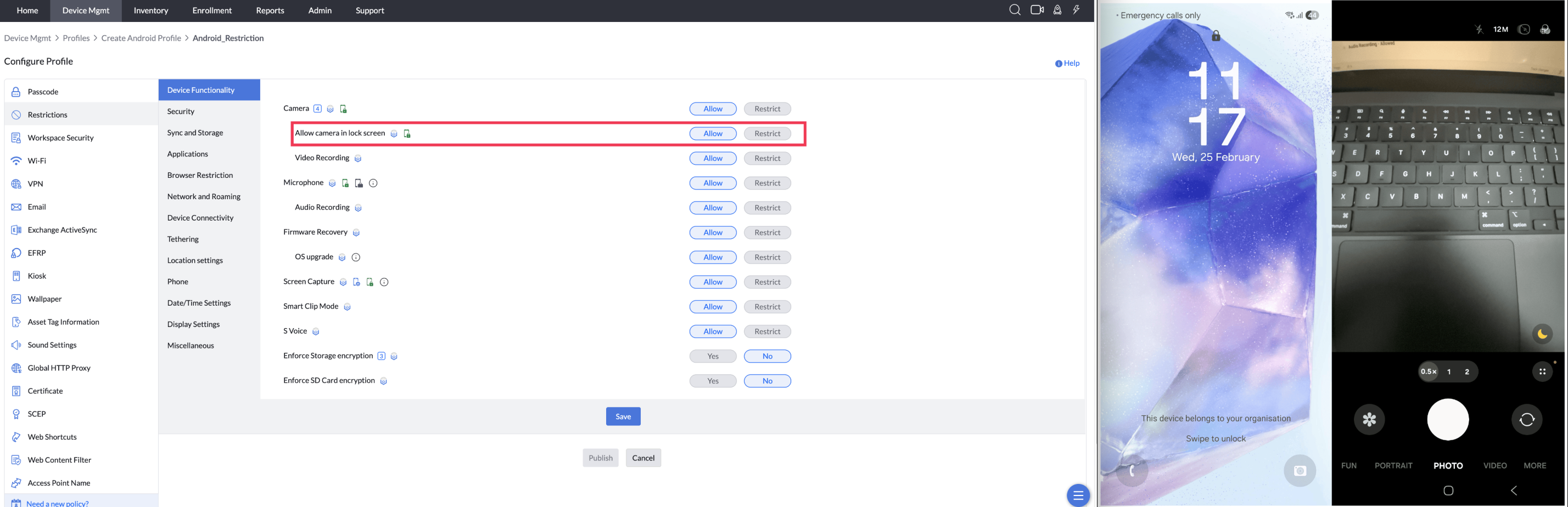
- Access Camera in Personal Space (Supported from Android 5.0):By disabling this, the users are restricted from accessing the Camera from the lock screen of the device. This can be configured only when Camera is allowed on the device.
Note: For KNOX-enabled Samsung and legacy devices, this applies to devices running Android 5.0 or later versions.
Supported Management Type: Fully Managed, Work Profile on a Company owned device, Legacy - Video Recording (Supported from Android 5.0):By disabling this, users will not be able to record videos on their devices.
Note:* Video Recording can be allowed only when Camera is allowed on the device.
Supported Management Type: Fully Managed, Knox enabled Legacy devices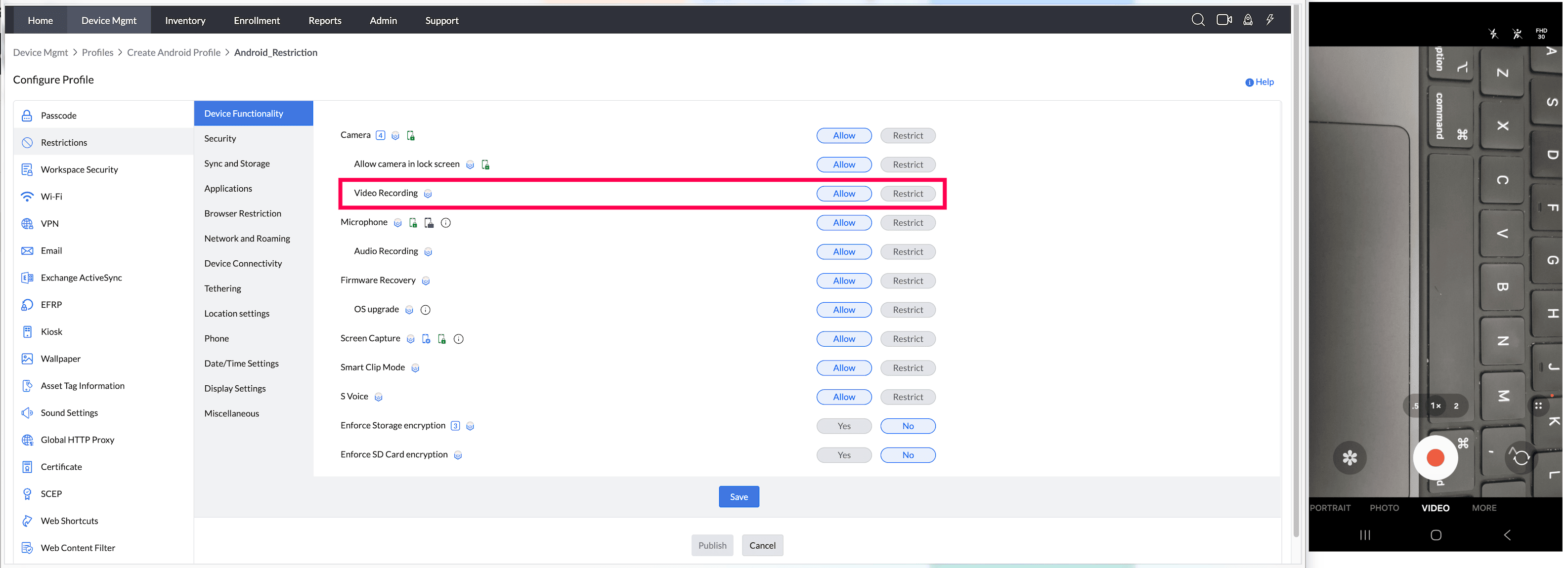
- Microphone: By enabling this, users will be allowed to use the Microphone. If this is disabled, users can use the Microphone only for receiving and making calls. All other voice applications which require Microphone usage will be restricted. On restricting this on the device, the Microphone will remain restricted within the Knox container also.
Supported Management Type: Fully Managed, Work Profile on a Company owned device, Knox enabled Legacy devices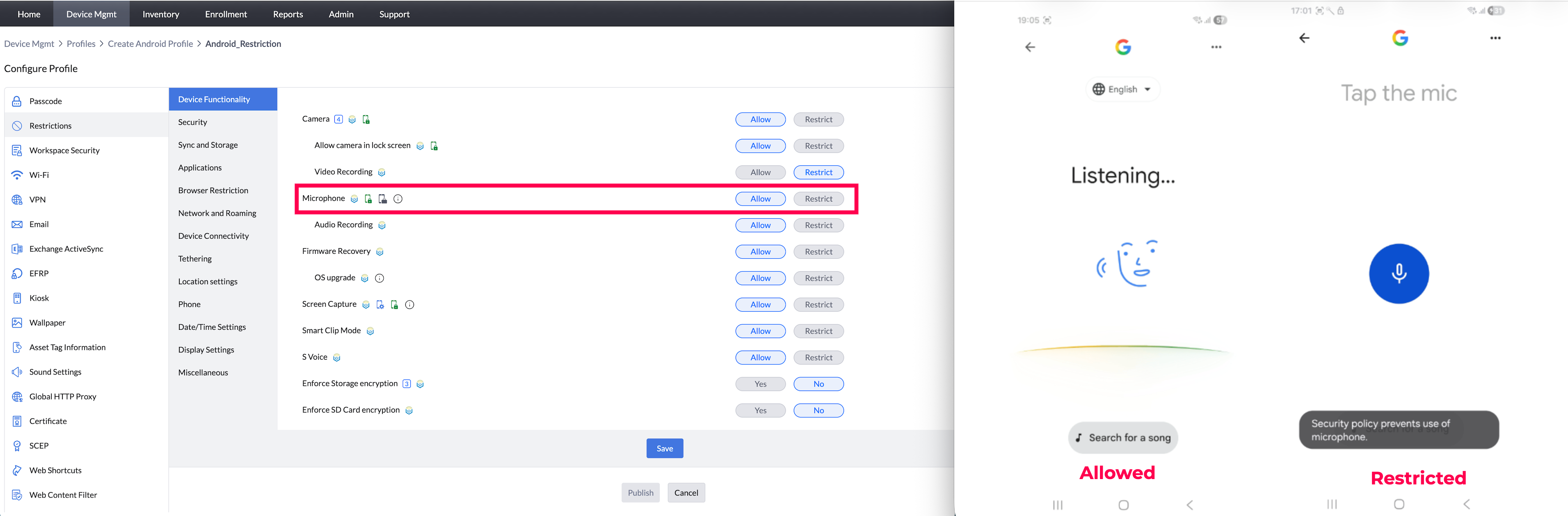
- Audio Recording (Supported from Android 5.0):By disabling this, users will not be able to record audios on their devices.
Note: 1. *Audio recording can be enabled only when the Microphone is enabled on the device.
2. For Fully Managed (COSU and COBO, or previously Device Owner) mode, there is no separate restriction available; restrictions apply when the Microphone is restricted.
Supported Management Type: Fully Managed, Knox enabled Legacy devices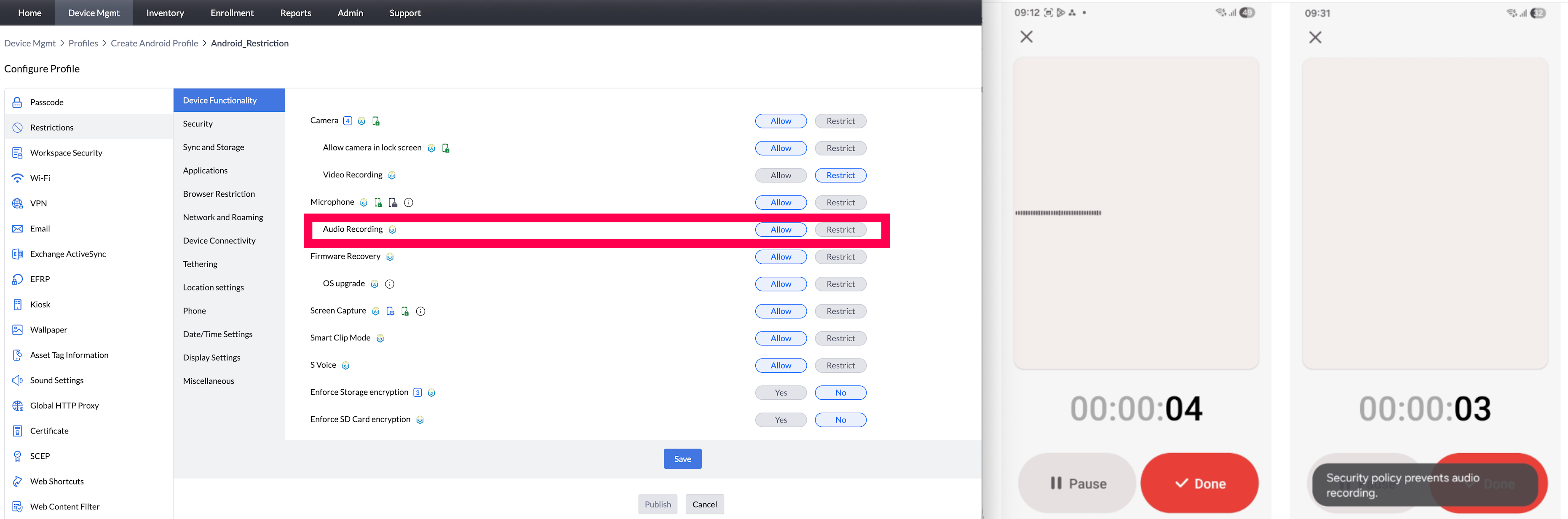
- Firmware Recovery (Samsung-only feature):By disabling this, users cannot perform firmware recovery on the device.
Supported Management Type: Knox enabled Fully Managed devices, Knox enabled Legacy devices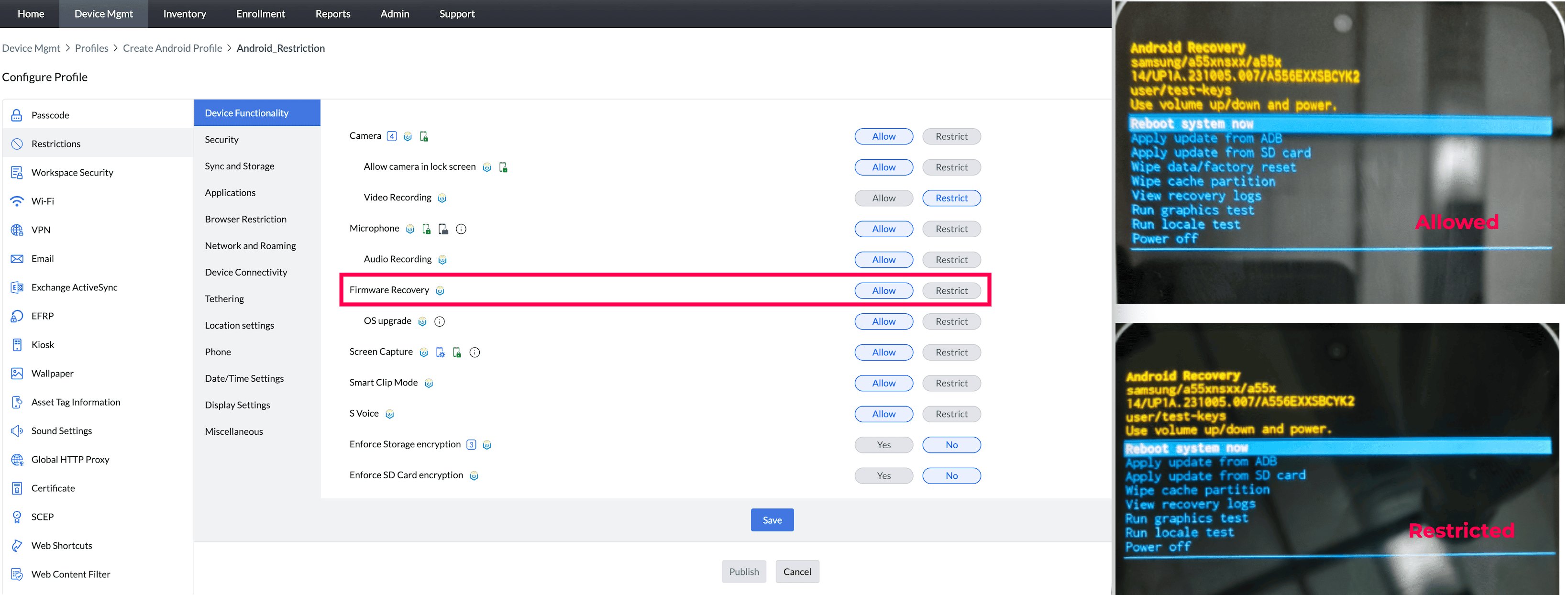
- OS Upgrade (Samsung-only feature, supported from Android 5.0):By enabling this, users will be able to perform OS upgrades on their devices.
Supported Management Type: Knox enabled Fully Managed devices, Knox enabled Legacy devices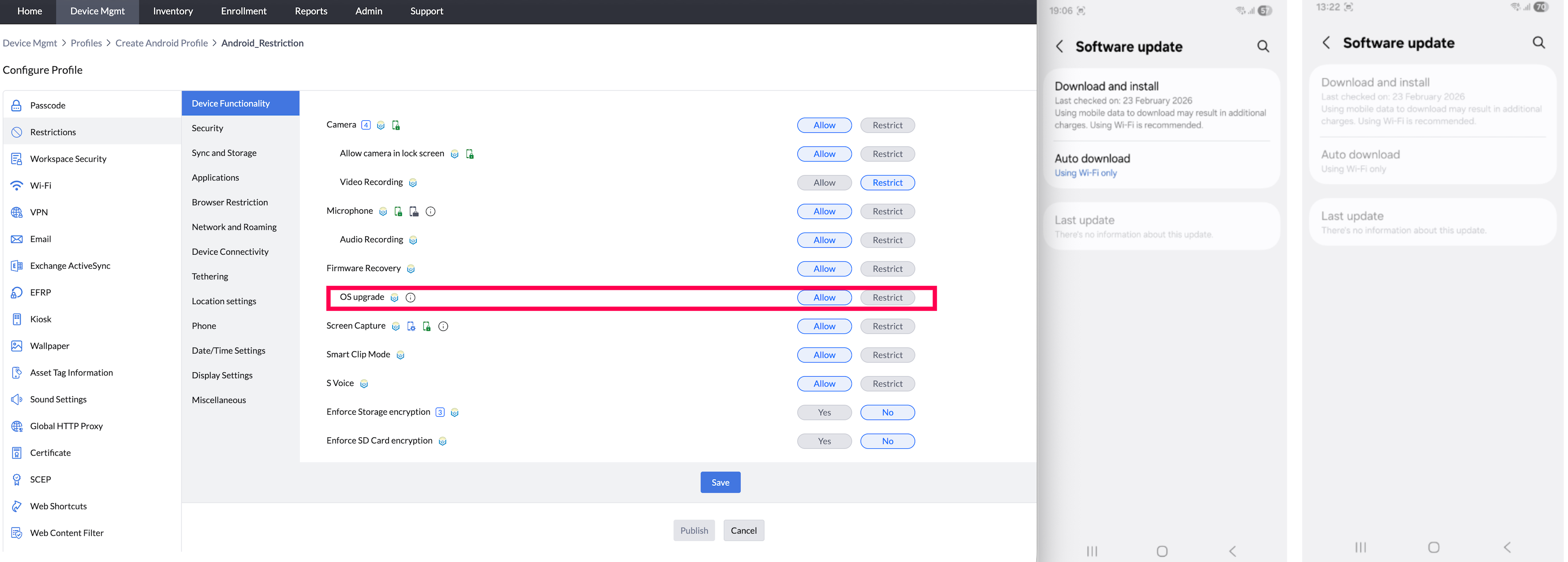
- Screen Capture: By disabling this, users will not be allowed to capture the screen on the devices.
Note: Since we are using Samsung API to apply the screen capture restriction, the API behavior changes from knox 3.8 and Samsung default apps like Launcher, SystemUI, Settings, Reminder, Calendar and Clock may not be disallowed to capture even if the restriction is applied.
Supported Management Type: Fully Managed, Work Profile on Company Owned Device, Knox enabled Legacy devices,Personally-Owned Work Profile (BYOD, or previously Profile Owner) Devices.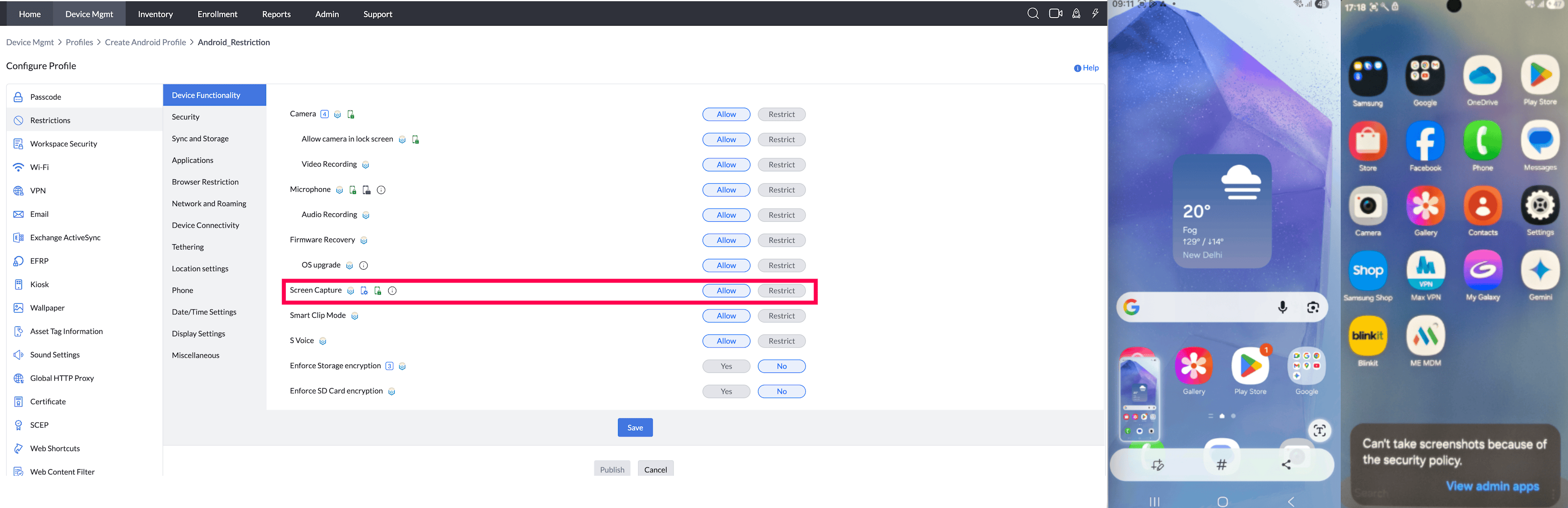
- Smart Clip Mode (Samsung-only feature, supported from Android 5.0):By enabling this, users will be allowed to access smart clip mode on their devices.
Supported Management Type: Knox enabled Fully Managed devices, Knox enabled Legacy devices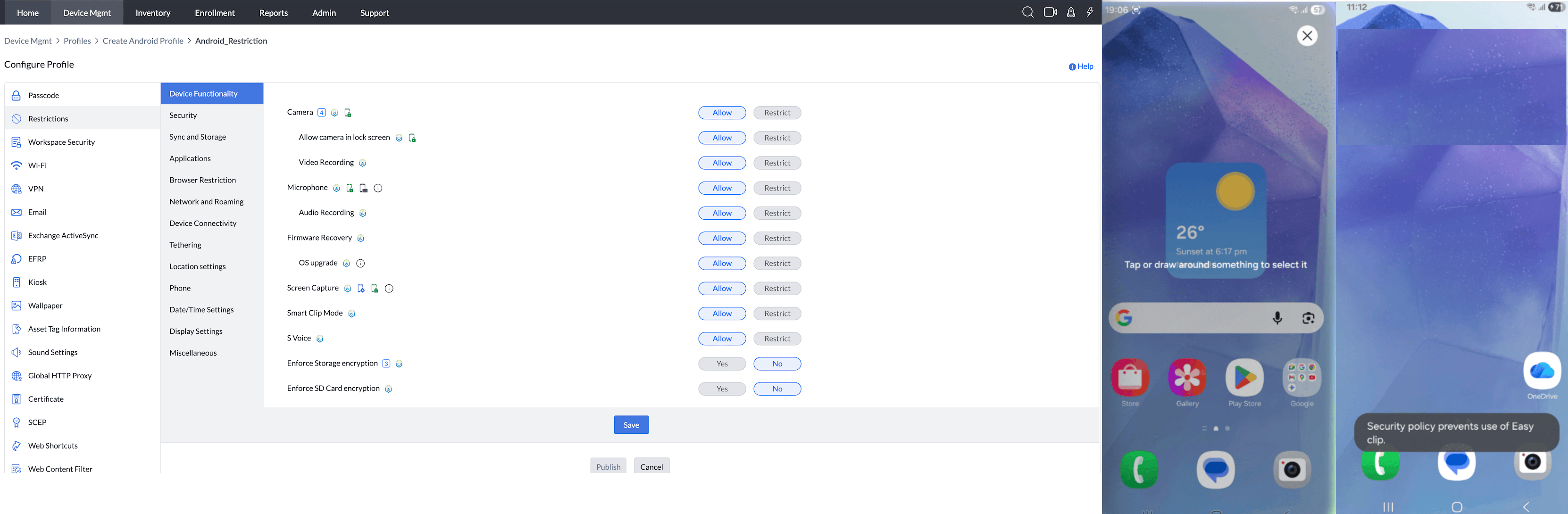
- S-Voice (Samsung-only feature, supported from Android 5.0 ):By disabling this, users will be unable to use the S-Voice feature on their devices.
Note: *S-Voice can be enabled only when the Microphone is enabled on the device.
Supported Management Type: Knox enabled Fully Managed devices, Knox enabled Legacy devices - Add Accounts (Supported from 5.0):Enabling this will allow users to add email, exchange, LDAP, and Google accounts on managed devices.
Disabling this prevents users from adding any of these accounts. The account addition is prevented only after the restriction is applied to the devices and the accounts that were already present, are not affected.
Note: For Work Profile on Company-Owned Devices, restrictions apply only to the Work Container.
Supported Management Type: Fully Managed, Work Profile on a Company owned device, Personal Devices and Knox enabled Legacy devices - Enforce Storage Encryption (Supported from Android 5.0):All data stored in the internal memory of the device must be encrypted. Ensure your devices are charges up to 80% to begin the encryption process. This restriction is applied only if the device is secured through a passcode. If there is no passcode on the device, you can associate a Passcode policyfirst and then distribute the restrictions policy.
Note: For Personally-Owned Work Profile (BYOD, or previously Profile Owner) and Fully Managed (COSU and COBO, or previously Device Owner) modes, encryption is enabled by default.
Supported Management Type: Fully Managed, Personal Device and Knox enabled Legacy devices - Enforce SD Card Encryption (Samsung-only feature, supported from Android 5.0):Encryption is forced on the SD Card. This restriction is applied only if the device is secured by a passcode. If there is no passcode on the device, you can associate a Passcode policy first and then distribute the restrictions policy.
Supported Management Type: Knox enabled Fully Managed devices, Knox enabled Legacy devices
SECURITY
- Allow Adding or Removing Accounts on the Device : This restriction applies only to Device-wide accounts managed by the Android Account Manager. It does not prevent users from using app-specific accounts or web-based logins from the browser.
Supported Management Type: Fully Managed, Work Profile on a Company owned device, Personal Devices and Knox enabled Legacy devices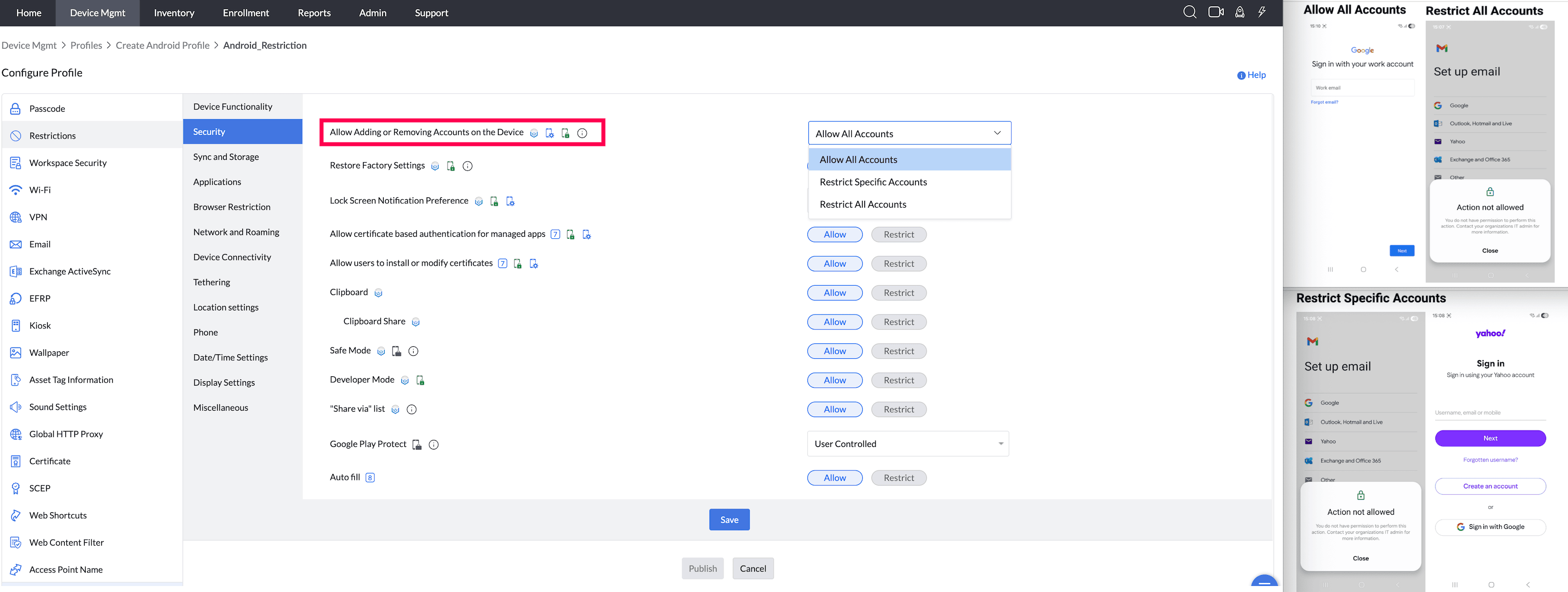
- Restore Factory Settings: By restricting this, admins can prevent users from resetting devices to their factory settings. Admins can also prevent users from removing devices from management by performing a hard reset by restricting this and also configuring EFRP on the devices.
Supported Management Type: Fully Managed, Knox enabled Legacy devices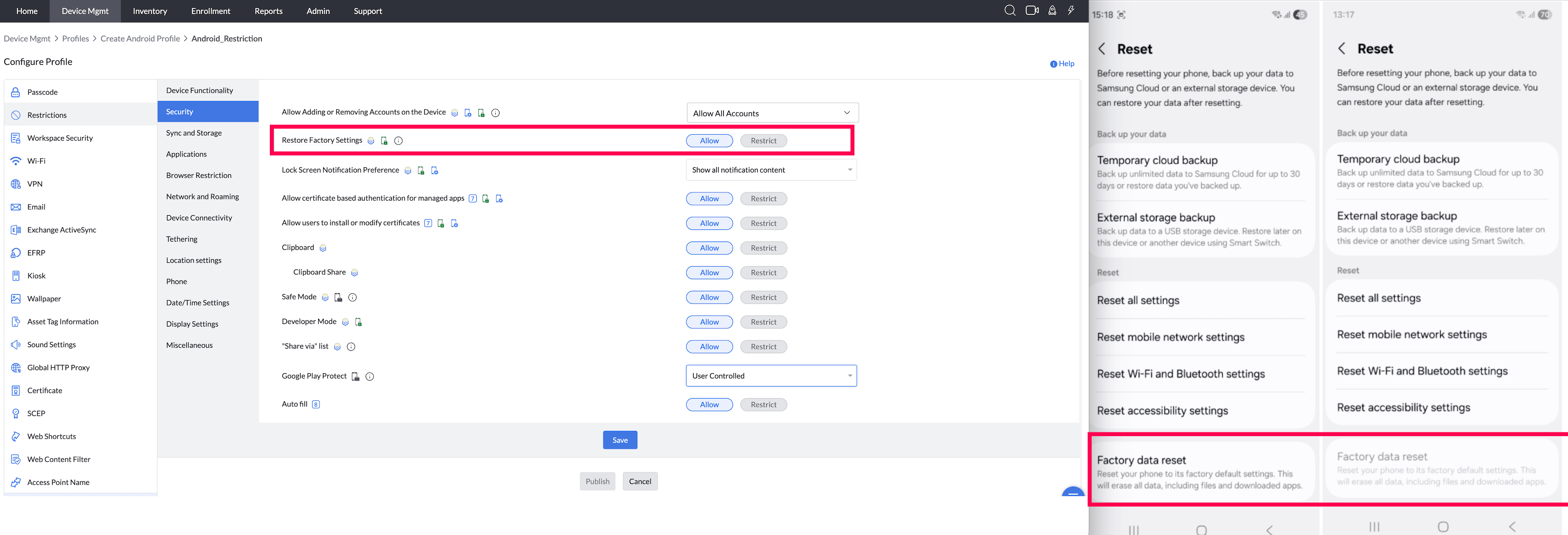
- Lock Screen Notification Preference: Configure how the notifications appear on the lock screen of the device. Either choose to show all content, hide sensitive content, or completely hide notifications.
Note: For Work Profile on Company-Owned Devices, restrictions apply only to the Work Container and For KNOX-enabled Samsung, this applies to devices running Android 5.0 or later versions.
Supported Management Type: Fully Managed, Work Profile on a Company owned device, Personal Devices and Knox enabled Legacy devices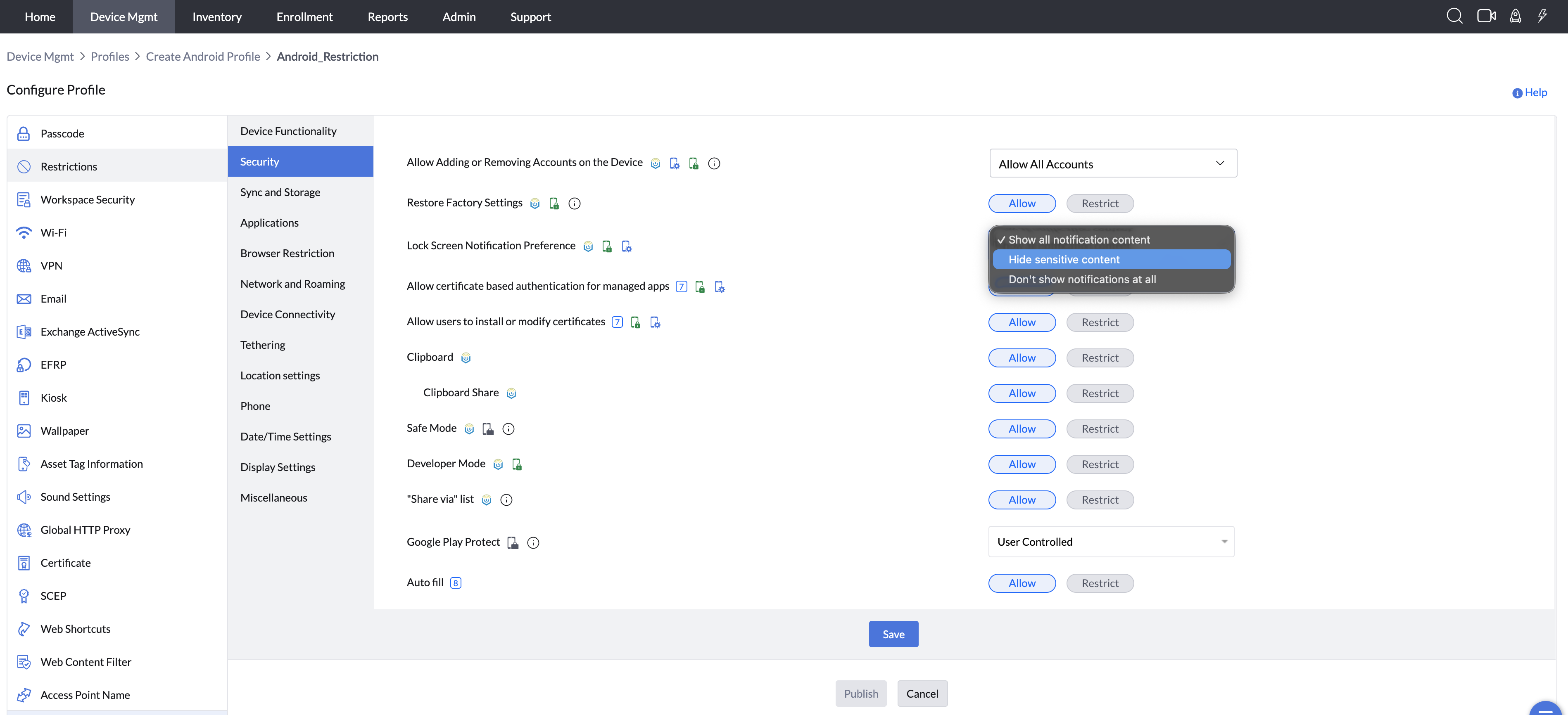
- Installing Non-Market apps:Allow/Restrict to install apps not listed on the Play Store. Restricting this disables Install apps from unknown sources settings, for app installation.
Note: For Profile Owner mode, restrictions are applied by default.
Supported Management Type: Fully Managed, Work Profile on a Company owned device, Personal Devices and Knox enabled Legacy devices - Allow Certificate Installation: Allow/Restrict certificate based authentication for managed apps. When enabled, the certificate is automatically used for authentication (for example, with VPNs) and the user will not be prompted to choose a certificate manually.
Note: For Work Profile on Company-Owned Devices, restrictions apply only to the Work Container.
Supported Management Type: Fully Managed, Work Profile on a Company owned device, Personal Devices - Allow users to install or modify certificates : Allow/Restrict users to install/modify certificates.If disabled, any certificates already added by the user will also be removed.
Note: For Work Profile on Company-Owned Devices, restrictions apply only to the Work Container.
Supported Management Type: Fully Managed, Work Profile on a Company owned device, Personal Devices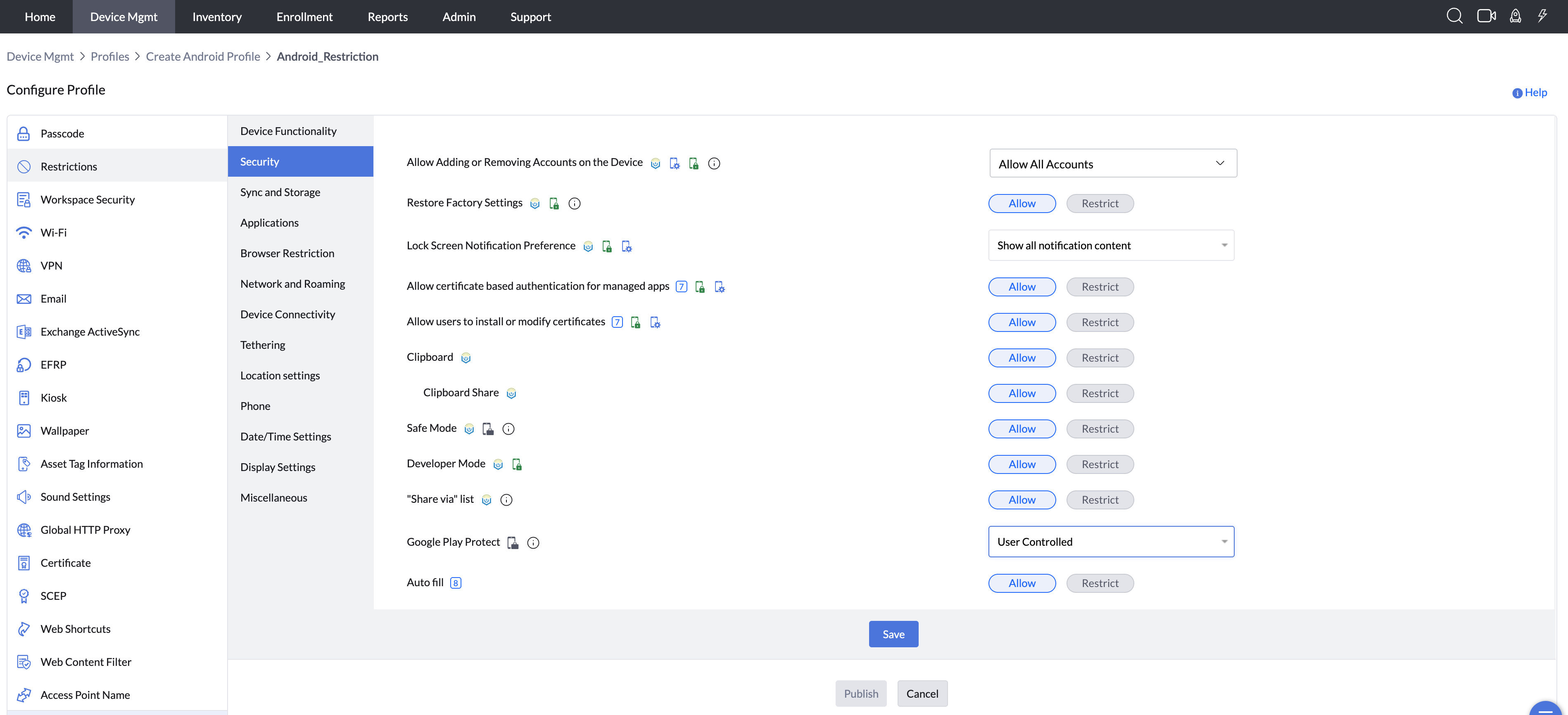
- Password Manager Apps: This setting allows admins to control which password manager applications users are permitted to use on their devices.
Select one of the following options to control access:
Allow Any App: Allows users to use any password manager apps installed on the device, without restrictions.
Allow Only System App: Allows only the device’s built-in or system-default password manager. All third-party password manager apps are blocked.
Allow Only Specific Apps: Allows only the password manager apps explicitly selected by the admin. Any other password manager apps will be blocked.
Block Specific Apps Blocks: only the selected password manager apps while allowing all others.
Block all Apps: Blocks all the password manager apps installed on the device.

- Clipboard: By enabling this, users will be allowed to use the Clipboard memory.
Note: For Work Profile on Company-Owned Devices, restrictions apply only to the Work Container.
Supported Management Type: Knox enabled Fully Managed, Knox enabled Legacy devices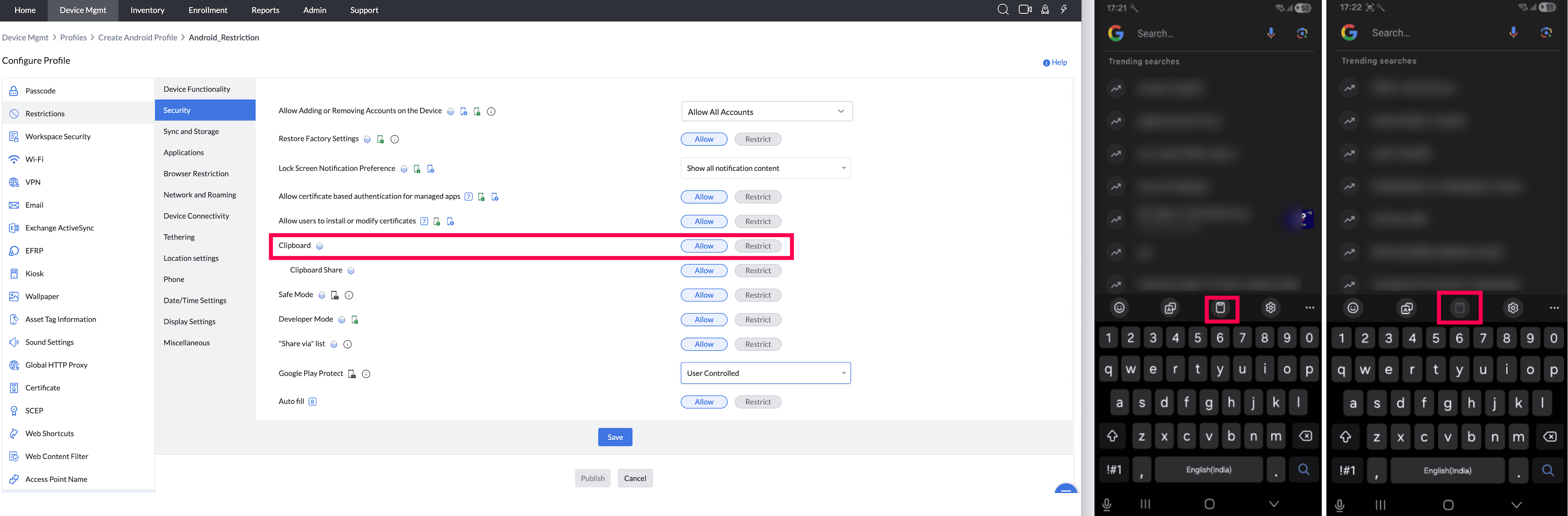
- Clipboard Share (Supported from Android 5.0): By enabling this, users can share the Clipboard content between different applications.
Note: 1. *This can be enabled only when Clipboard feature is enabled on the device.
2. For Profile Owner mode, there is no separate restriction; restrictions apply when the Clipboard is restricted.
Supported Management Type: Knox enabled Fully Managed, Personal and Knox enabled Legacy devices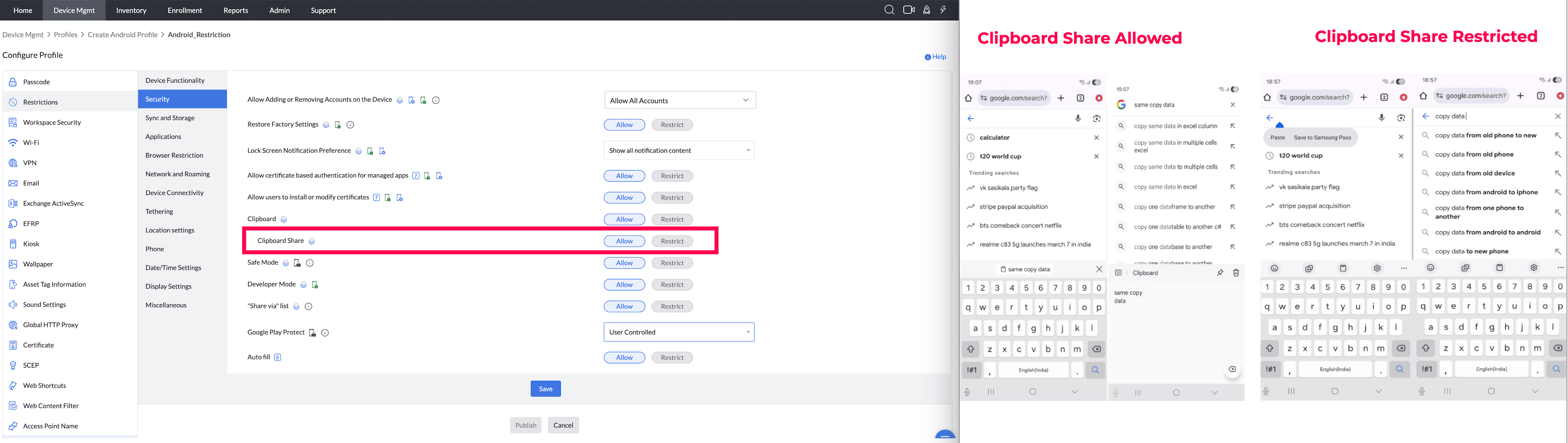
- Safe Mode (It is supported by Samsung, Personally-Owned Work Profile (BYOD, or previously Profile Owner) and Fully Managed (COSU and COBO, or previously Device Owner) devices from Android 6.0) : By enabling this, users can boot device in Safe mode.
Supported Management Type: Fully Managed, Work Profile on a Company owned device and Knox enabled Legacy devices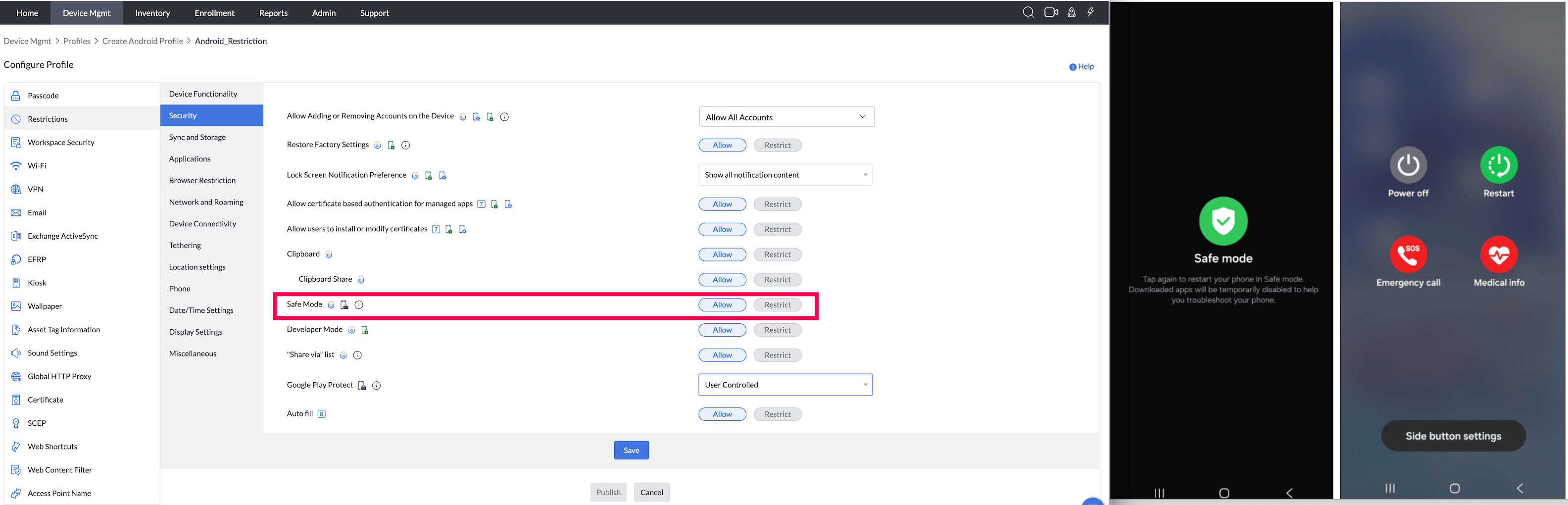
- Developer Mode: By enabling this, users can use developer options on the device.
Supported Management Type: Fully Managed, Work Profile on a Company owned device and Knox enabled Legacy devices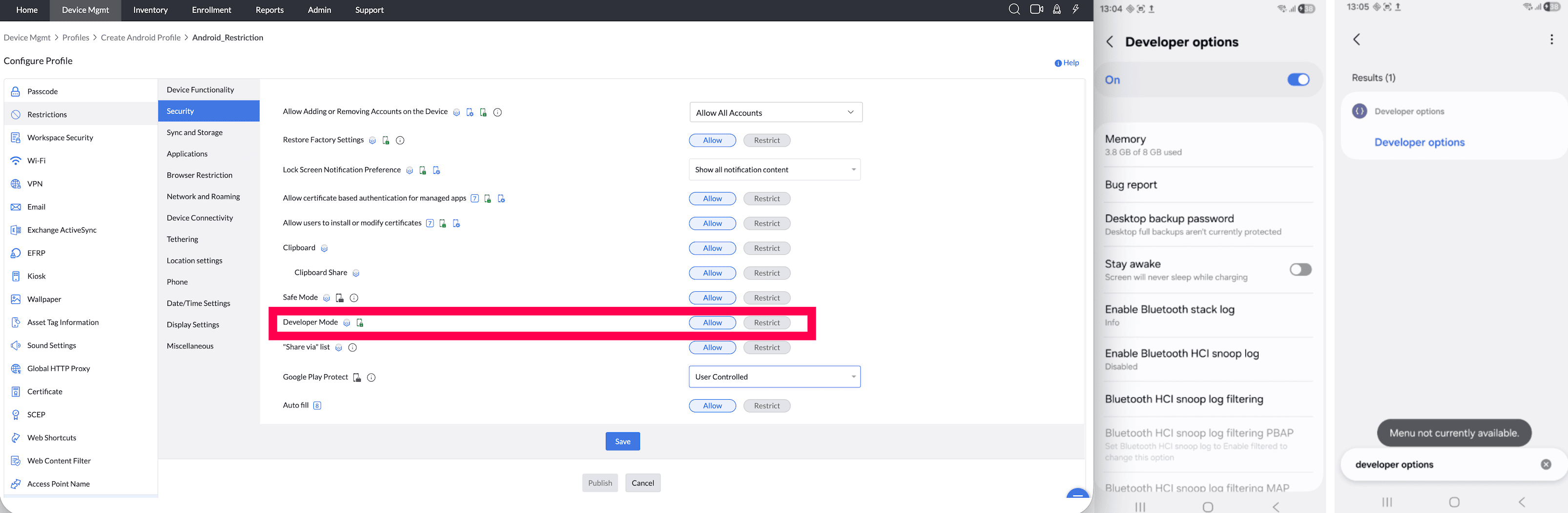
- Share via List (Samsung-only feature, supported from Android 5.0) By enabling this, users will be allowed to use the share list on their devices.
Supported Management Type: Knox enabled Fully Managed, Personal and Knox enabled Legacy devices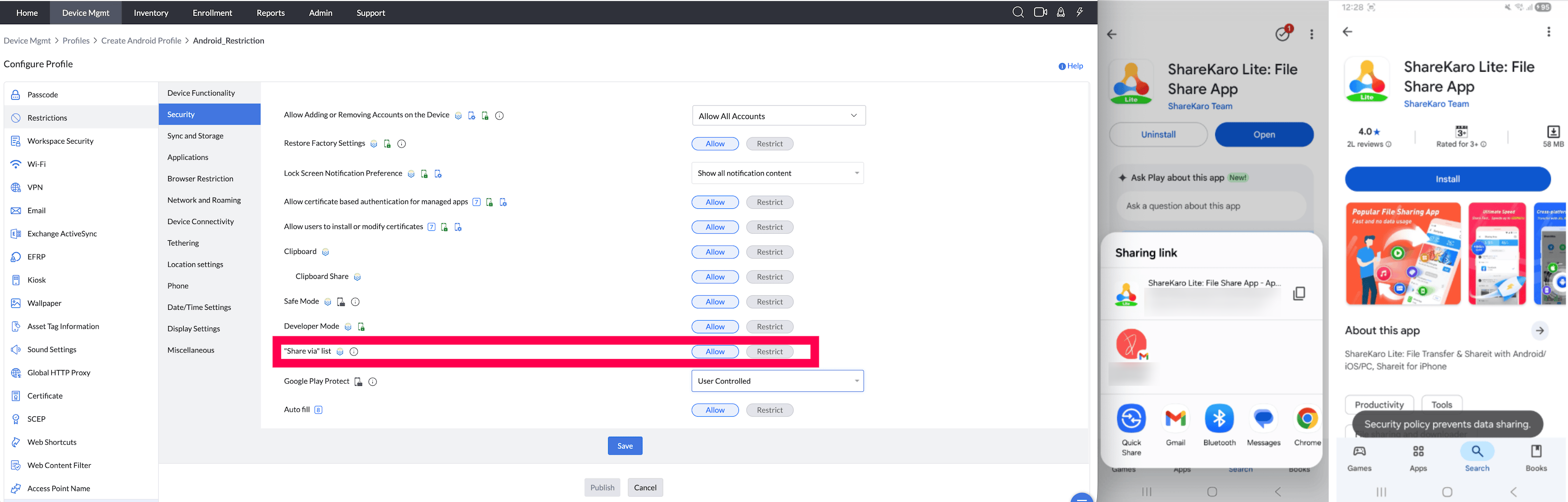
- Google Play Protect: Google Play Protect regularly checks apps and the devices for any harmful behaviour.
Supported Management Type: Fully Managed, Work Profile on a Company owned device, personal devices and Legacy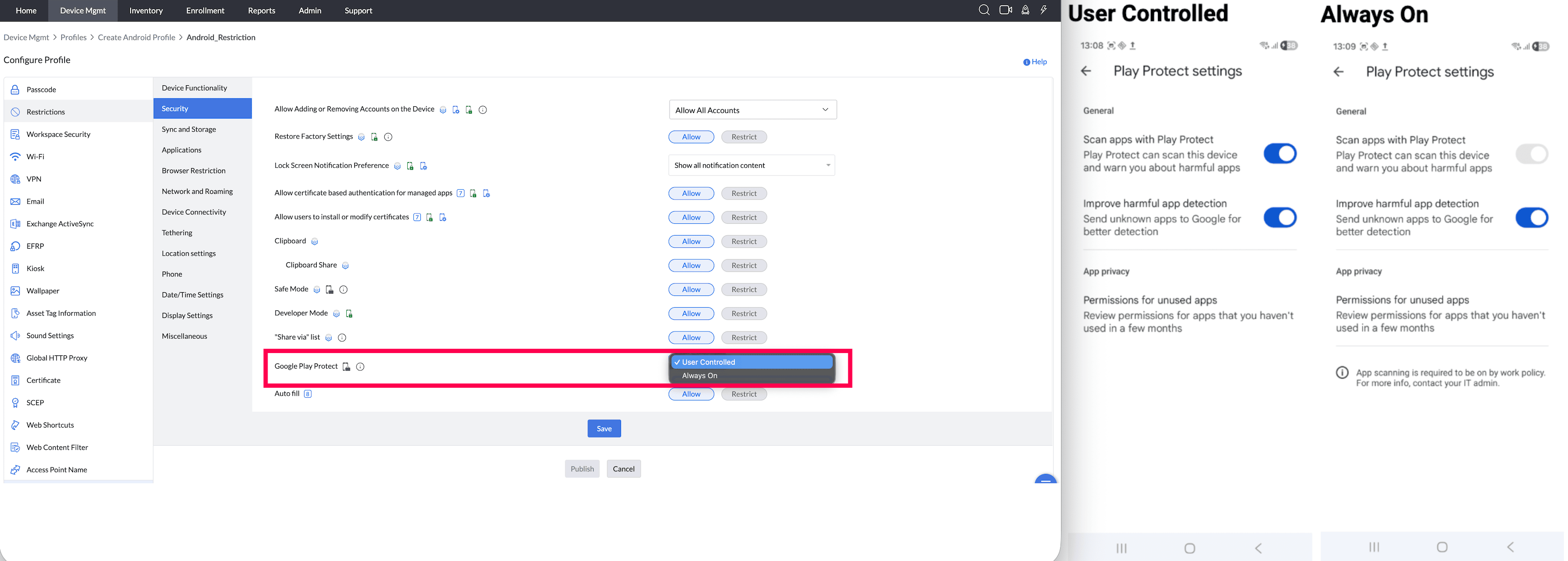
- Auto fill: By enabling this option, users will be allowed to use Auto-Fill Settings.
Supported Management Type: Fully Managed, personal devices and knox enabled Legacy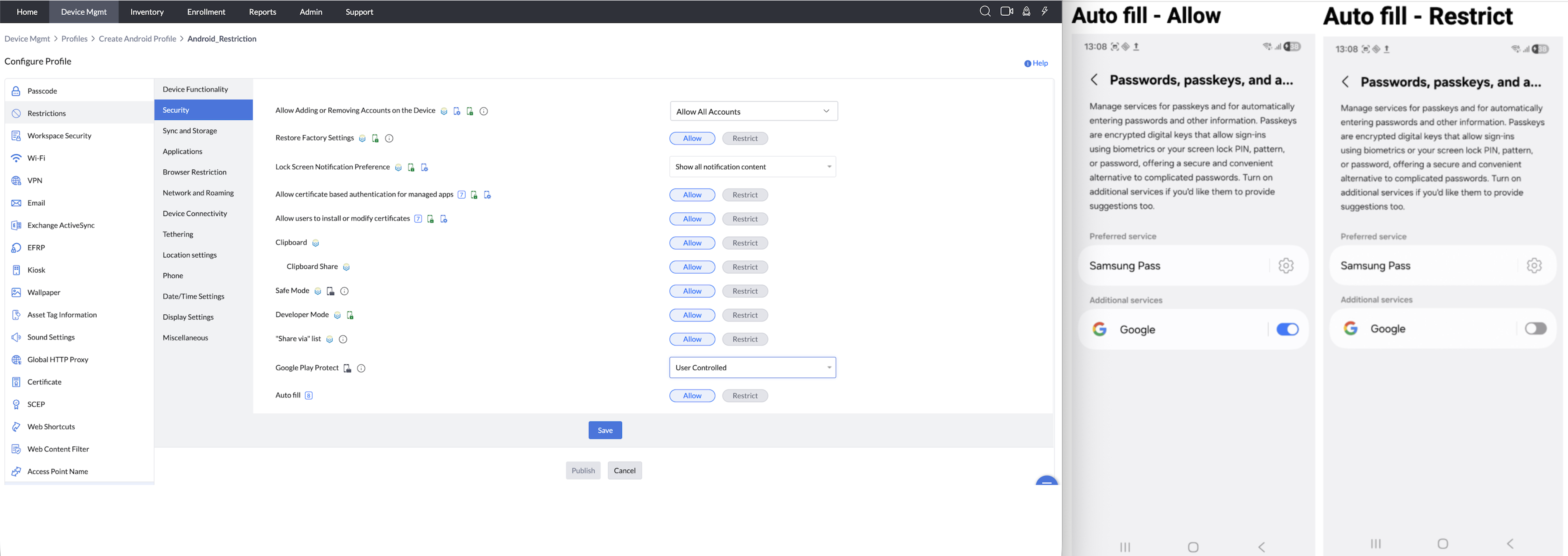
SYNC AND STORAGE
- Auto-Sync Google Accounts (Samsung-only feature, supported from Android 5.0) : By enabling this option, users will be allowed to sync their Google Accounts on their devices.
Supported Management Type: Knox enabled Fully Managed and Knox enabled Legacy devices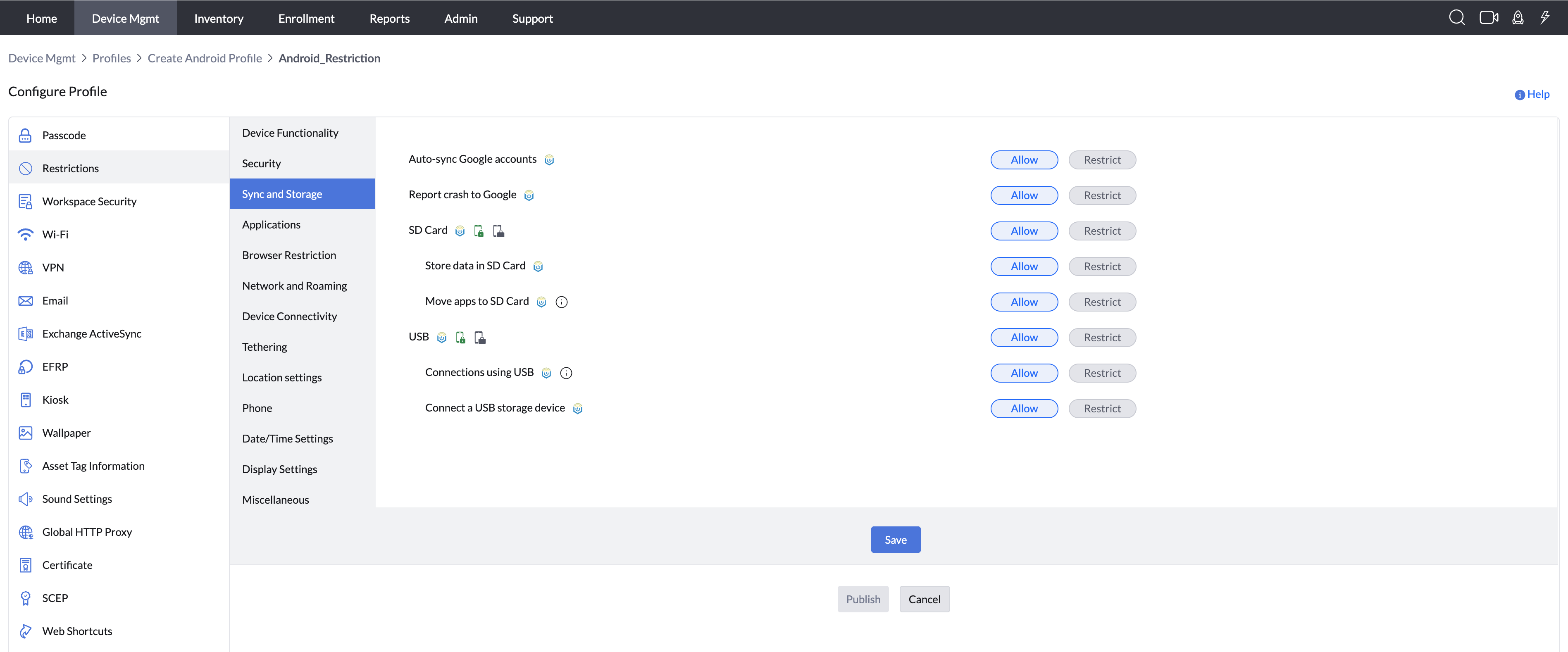
- Report Crash to Google (Samsung-only feature, supported from Android 5.0): By enabling this, crash reports will be sent to Google.
Supported Management Type: Knox enabled Fully Managed and Knox enabled Legacy devices - SD Card: By enabling this, users will be allowed to use an SD Card on their devices. For non-Samsung devices: This restriction only blocks new SD card mounts; existing mounts are unaffected. For Samsung devices: This restriction applies to both newly inserted and already mounted SD cards.
Supported Management Type: Fully Managed, Work Profile on a Company owned device and Knox enabled Legacy devices - Store data on SD Card: (Supported from Android 5.0) : By enabling this, users will be allowed to store data on SD Cards of the devices.
Note:For Device Owner mode, there is no separate restriction; restrictions apply when the SD Card is restricted.
Supported Management Type: Knox enabled Fully Managed and Knox enabled Legacy devices - Move apps to SD Card (Samsung-only feature, supported from Android 5.0) : By enabling this, users will be able to move applications installed in device memory to the SD card.
Supported Management Type:Knox enabled Fully Managed and Knox enabled Legacy devices - USB: By enabling this, users will be allowed to use USB on their devices.
Supported Management Type:Fully Managed, Work Profile on a Company owned device, Personal Device and Knox enabled Legacy devices - Connections using USB: By enabling this, users will be allowed to use USB to establish connections for debugging.
Note: For Device Owner mode, there is no separate restriction; restrictions apply when USB is restricted.
Supported Management Type:Knox enabled Fully Managed and Knox enabled Legacy devices - Connect a USB storage device: By enabling this, users will be allowed to connect USB Storage devices.
Note: For Device Owner mode, there is no separate restriction; restrictions apply when USB is restricted. On Android 15 and above, when this restriction is applied, all USB host functionalities will be restricted on the device. For example, connecting USB peripherals such as keyboards, mouse, and USB flash drives will be blocked.
Supported Management Type:Knox enabled Fully Managed and Knox enabled Legacy devices
APPLICATIONS
- Users can install only approved apps:This restriction lets the admin grant access to install all the applications or restricts to install apps only distributed from the MDM app repository. If this restriction is configured as Yes, then the user will be able to install only admin approved apps. All apps previously installed by users gets disabled, and in the case of subsequent installations of unapproved apps, although the apps get downloaded and installed, the apps are automatically uninstalled. Once this restriction is removed, apps previously disabled gets enabled automatically If No is chosen, then a sub-condition will be shown where the admin can choose whether the user can access all apps under Managed Google Play or only admin approved apps.
Note: Restricting the option Users can install unapproved apps for an Android device will also prevent the update and installation of Non-Market apps, even if the profiles settings in the MDM console allowed for "Non-Market apps." Pre-loaded non-system apps will also be disabled due to this restriction. For Work Profile on Company-Owned Devices, restrictions apply only to the Work Container.
Supported Management Type: Fully Managed, Work Profile on a Company owned device, Personal Device and Knox enabled Legacy devices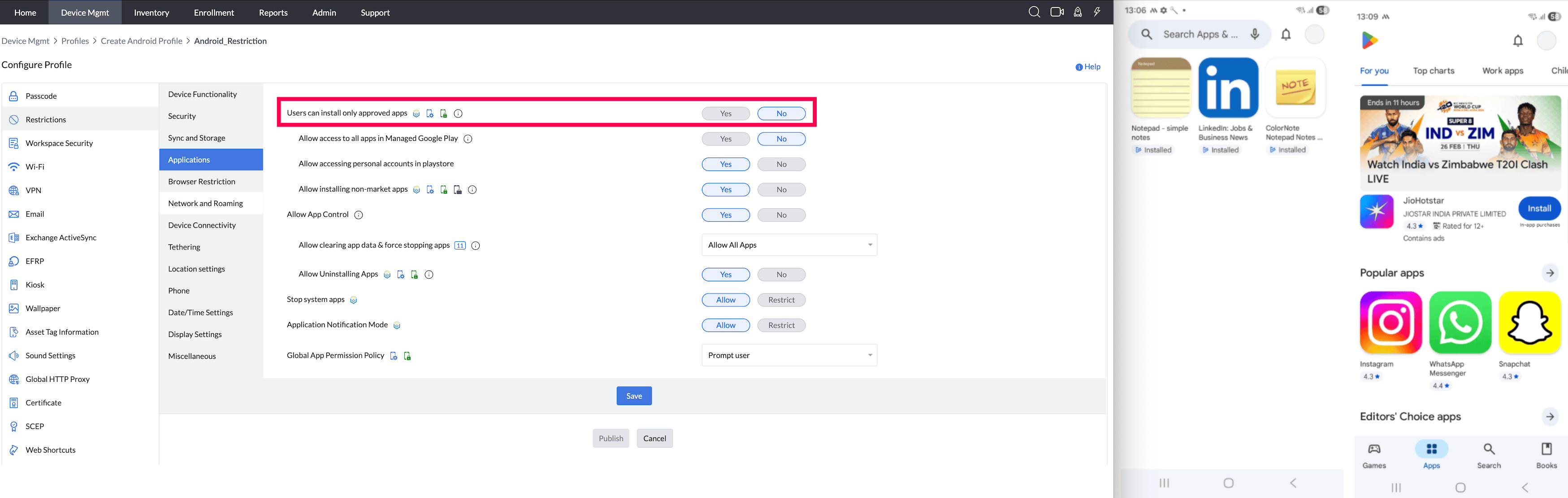
- Allow access to all apps under Managed Google Play:In case Managed Google Play is configured in the server, the admin can still restrict the access to either all apps under Managed Google Play or only admin approved apps.
1. In case access is given to all apps, Admin distributed apps will be listed under the Work Apps tab in Play Store
2. The apps available under the Work Apps tab can be arranged catering to the needs of the organization by customizing the Play Store
Note: For Work Profile on Company-Owned Devices, restrictions apply only to the Work Container.
Supported Management Type: Fully Managed, Work Profile on a Company owned device, Personal Device and Knox enabled Legacy devices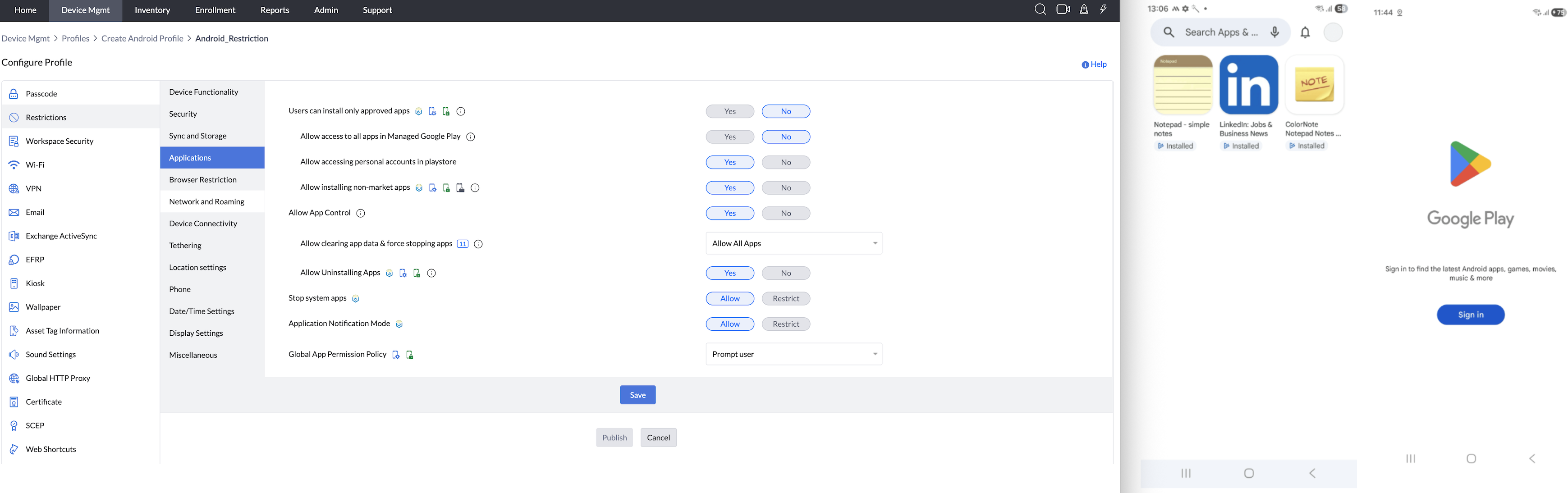
- Allow accessing personal accounts in playstore: By enabling this, user will be able to login to the personal accounts in playstore and switch among accounts as required.
Supported Management Type: Fully Managed, Work Profile on a Company owned device, Personal Device and Knox enabled Legacy devices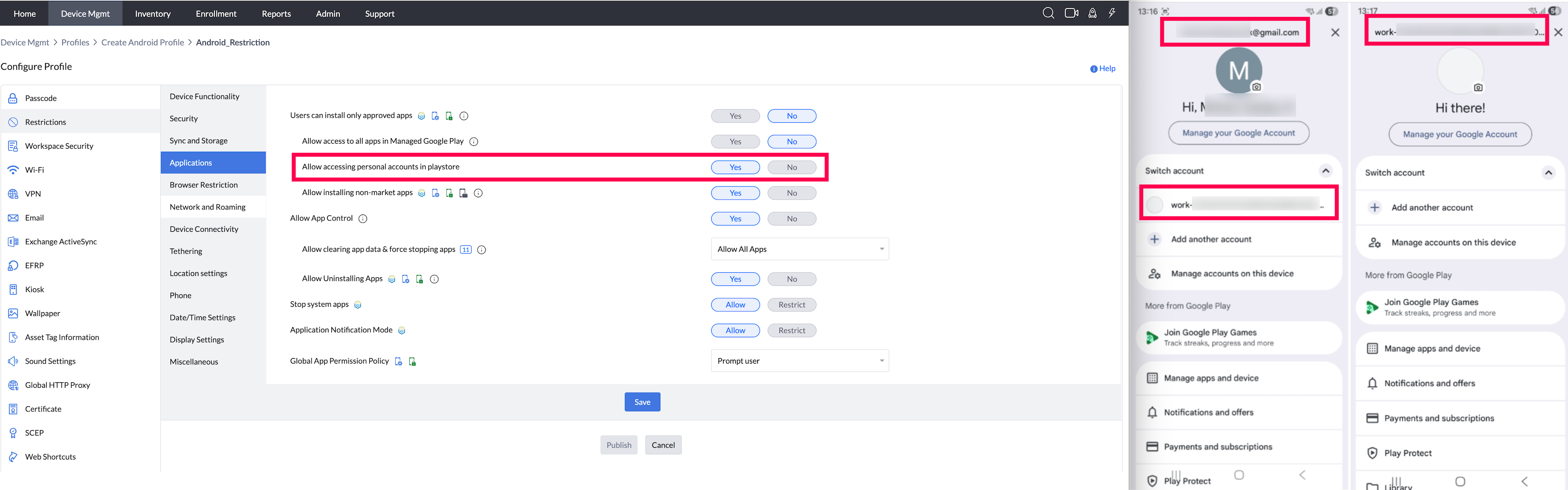
- Allow installing non-market apps: Non-market apps are apps that are not available on the Google Play Store. This setting applies to devices provisioned as Fully Managed (COSU and COBO, or previously Device Owner), Work Profile-enabled corporate devices, or Profile Owner.
Supported Management Type: Fully Managed, Work Profile on a Company owned device, Personal Device and Knox enabled Legacy devices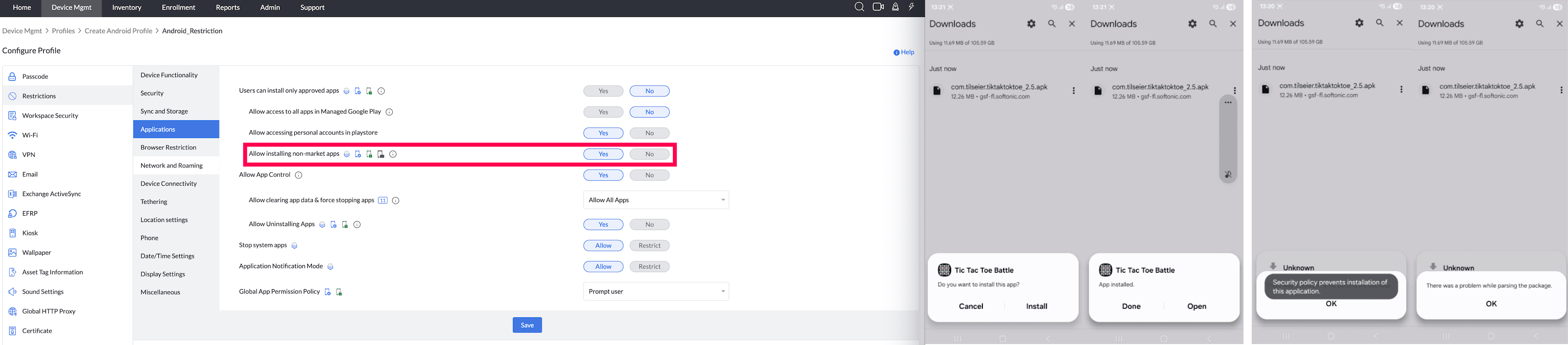
- Allow App Control:If restricted, the user cannot uninstall apps, disable apps, clear app caches, clear app data, force stop apps, and clear app defaults.
Supported Management Type: Fully Managed, Work Profile on a Company owned device, Personal Device and Knox enabled Legacy devices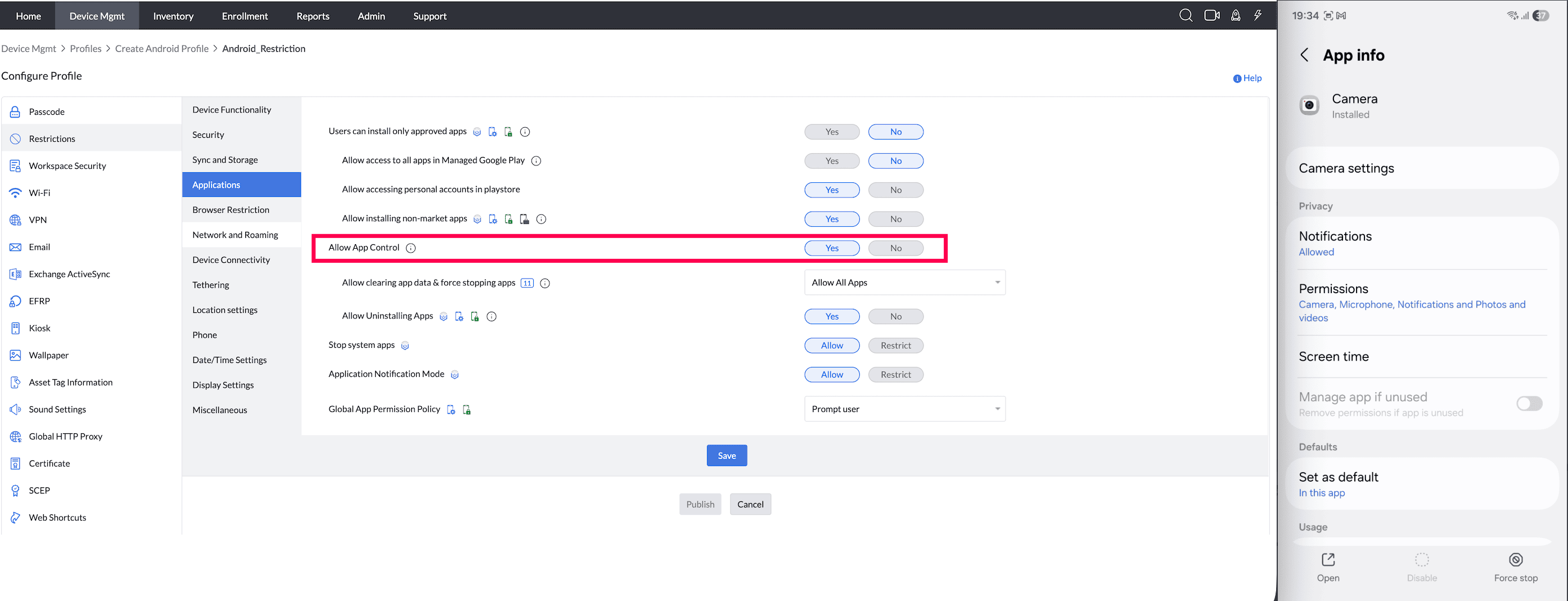
- Allow clearing app data & force stopping apps: If clear app data & force stop is restricted for an app, uninstallation will also be restricted.
Supported Management Type: Fully Managed, Work Profile on a Company owned device, Personal Device and Knox enabled Legacy devices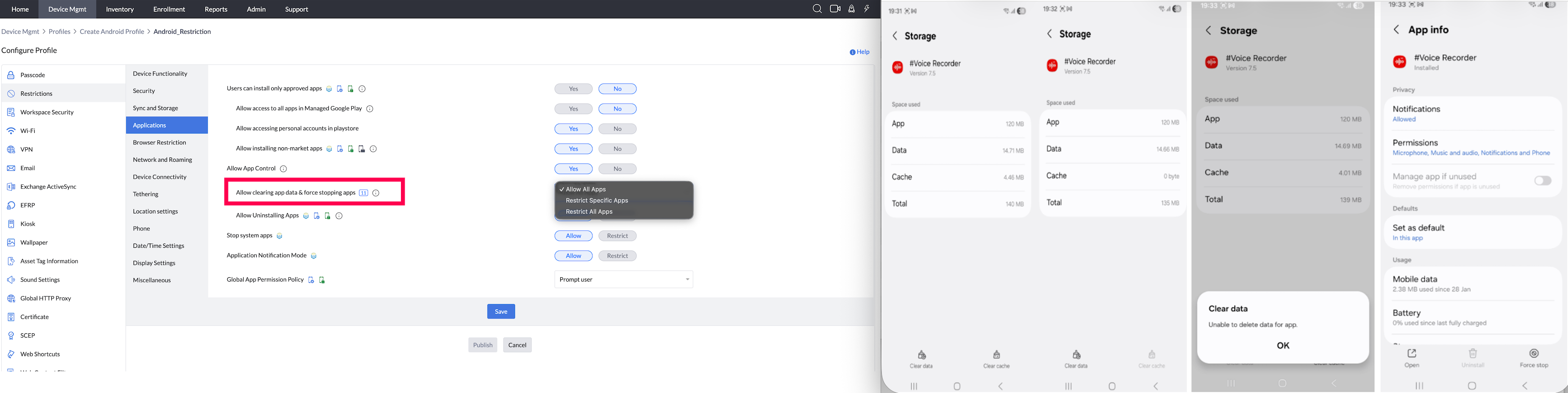
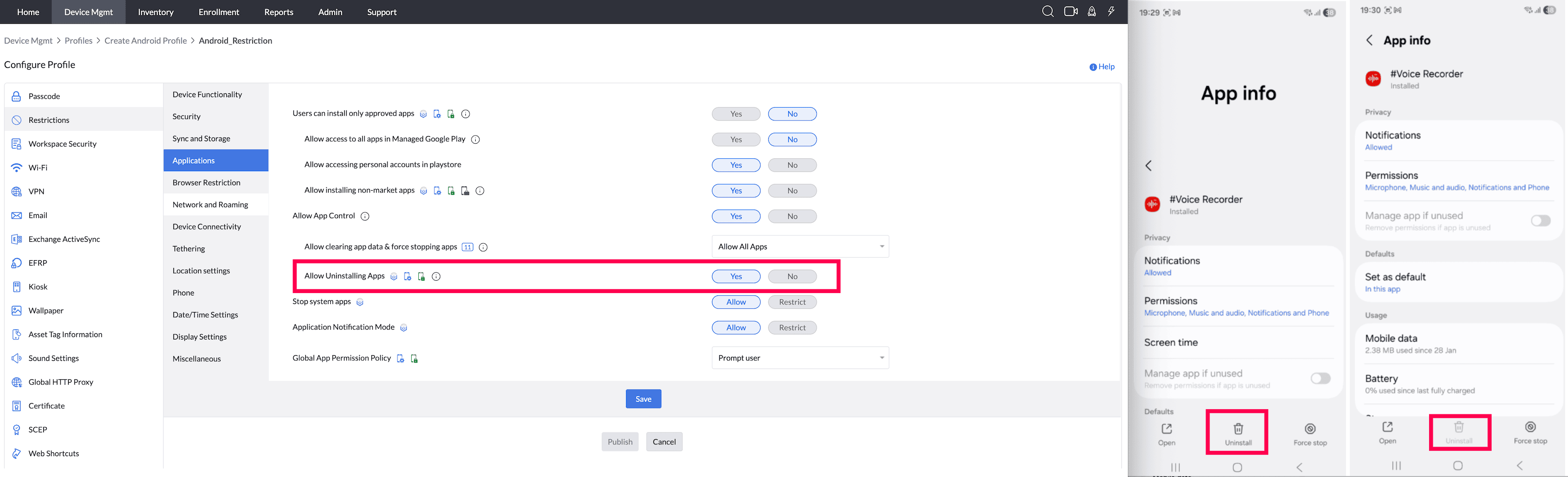
Allow Uninstalling Apps (Supported from Android 5.0) : By enabling this, users will be allowed to uninstall applications from the device.
Note:- Despite this setting, apps silently installed on devices cannot be uninstalled by users.
- In Fully managed devices, enabling this setting prevents uninstalling user-installed apps.
- For Work Profile on Company-Owned Devices, restrictions apply only to the Work Container.
- If you notice that some apps can still be uninstalled even after restricting it, or some apps cannot be uninstalled even after allowing it, this is because the App Distribution settings configured during app distribution take precedence over this restriction. To know more, see FAQ.
Supported Management Type: Fully Managed, Work Profile on a Company owned device, Personal Device and Knox enabled Legacy devices
- Stop system apps (Samsung-only feature, supported from Android 5.0) : By enabling this, users can stop the system apps present in their devices.
Supported Management Type: Knox enabled Fully Managed and Knox enabled Legacy devices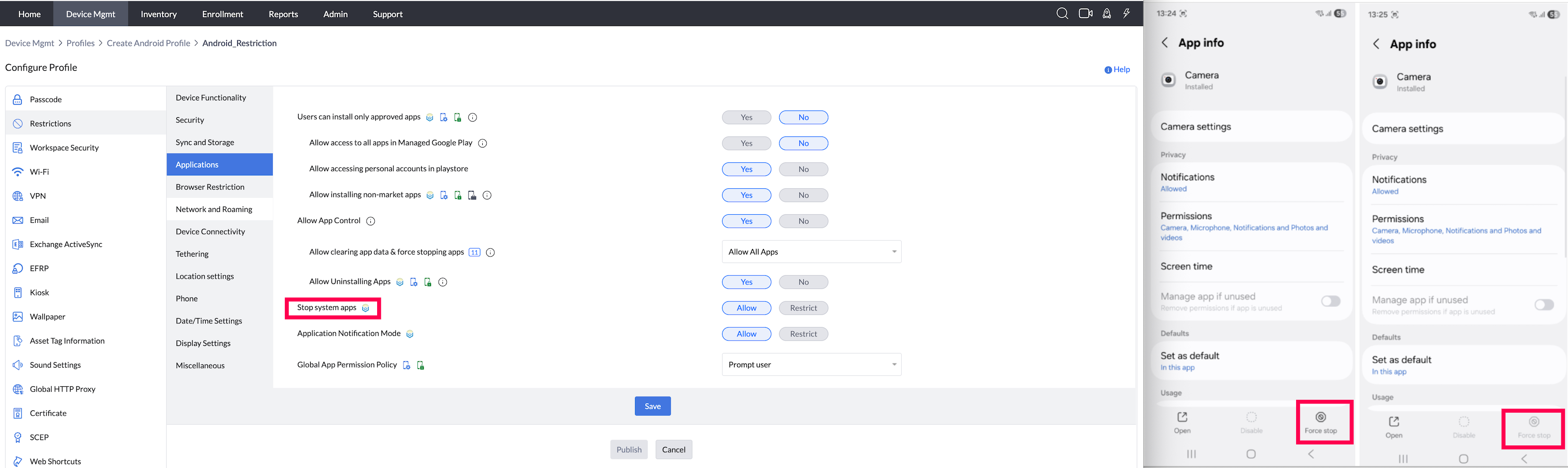
- Restrict force stop and clear storage settings for the specified app(s): Blocks users from force-stopping or clearing app storage.
Supported Management Type: Fully Managed, Work Profile on a Company owned device, Personal Device and Knox enabled Legacy devices - Application notification modeSamsung-only feature, supported from Android 5.0) : By enabling this, the user can choose to allow or restrict app notification If restricted the app notifications would be disabled.
Supported Management Type: Knox enabled Fully Managed and Knox enabled Legacy devices - Global App Permission policy : Configuring this ensures you can choose to automatically deny/allow permissions for apps present on the device. In case if Auto-deny is chosen, for some apps such as Camera, the app will be disabled and the user will not be prompted to accept the permission. While in other apps such as Phone, a display message will be shown notifying the user of the denied access. Optionally, you can also leave it to the user.
Note: For Work Profile on Company-Owned Devices, restrictions apply only to the Work Container.
Supported Management Type: Fully Managed, Work Profile on a Company owned device, Personal Device and Knox enabled Legacy devices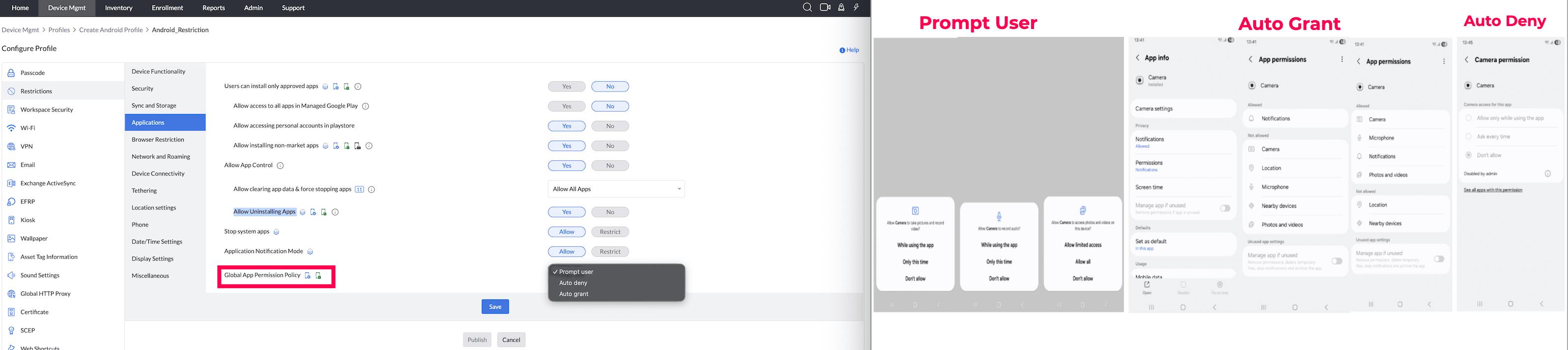
BROWSER (Applicable only for Google Chrome in legacy)
- Android browser: By enabling this option, the users will not be able to use any web browsers on the device.
Note: For Work Profile on Company-Owned Devices, restrictions apply only to the Work Container.
Supported Management Type: Fully Managed, Work Profile on a Company owned device, Personal Device and Knox enabled Legacy devices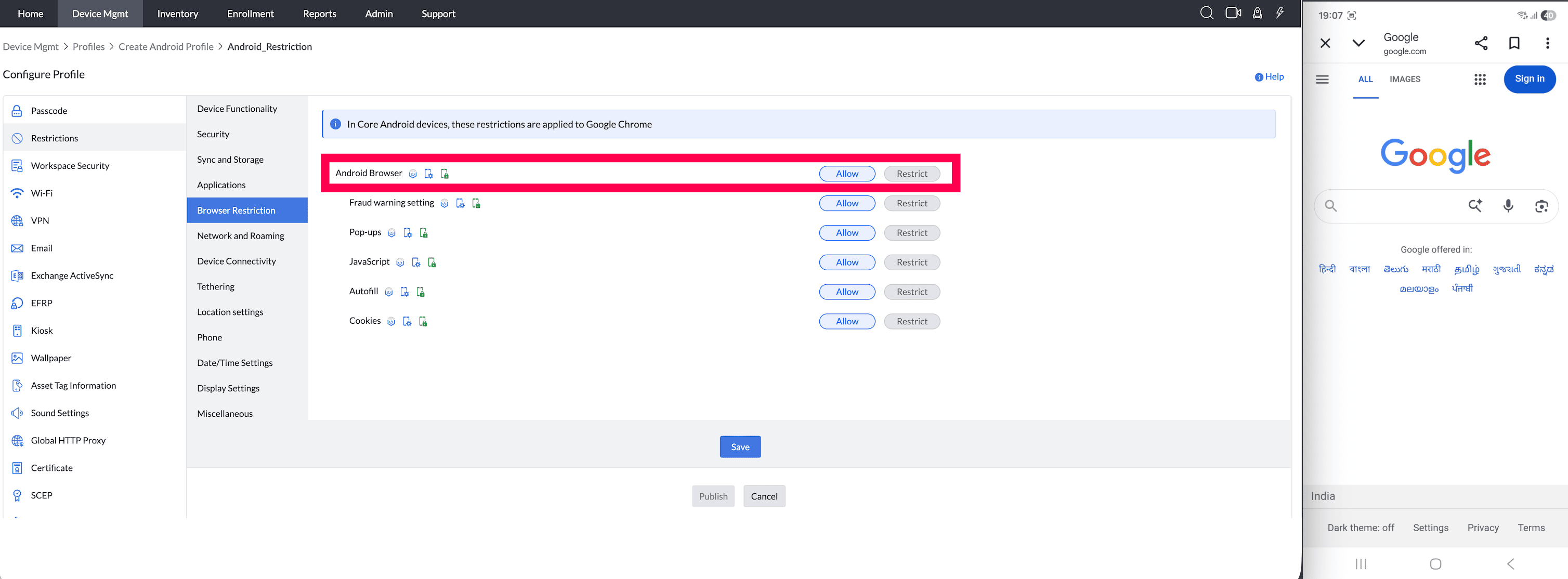
- Fraud warning settings : By enabling this, users will be allowed to use Fraud Warning Settings on the device.Supported Management Type: Knox enabled Fully Managed and Knox enabled Legacy devices
Note: For Work Profile on Company-Owned Devices, restrictions apply only to the Work Container.
Supported Management Type: Fully Managed, Work Profile on a Company owned device, Personal Device and Knox enabled Legacy devices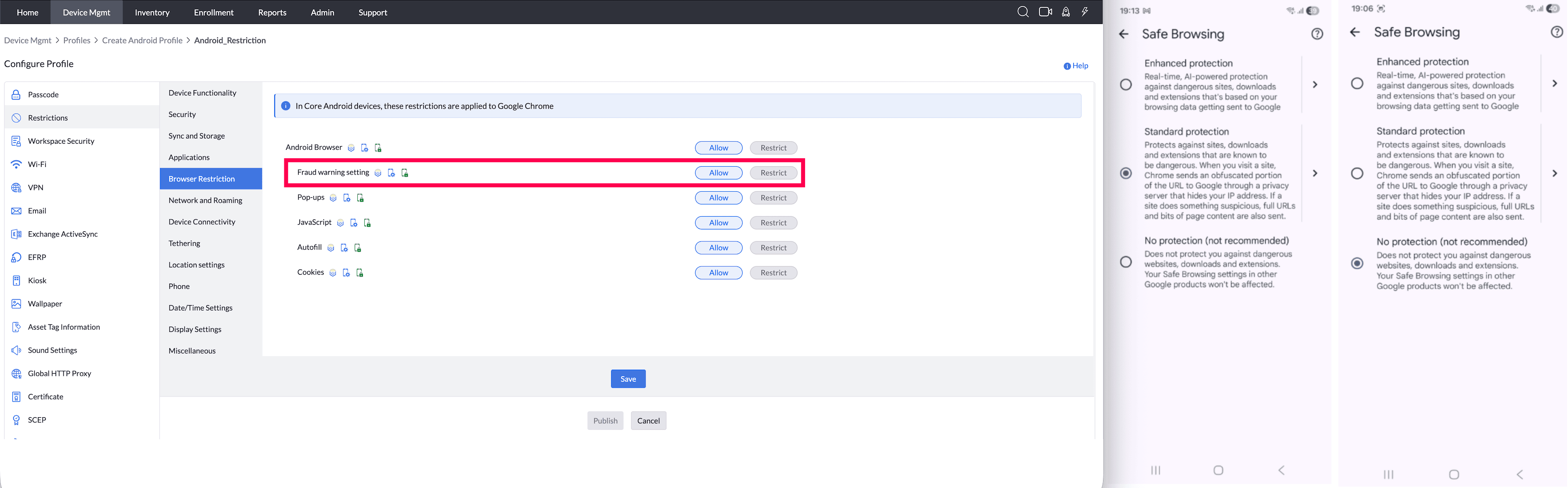
- Pop-ups: By enabling this, user Pop-Ups will be enabled on the device.
Note: For Work Profile on Company-Owned Devices, restrictions apply only to the Work Container.
Supported Management Type: Fully Managed, Work Profile on a Company owned device, Personal Device and Knox enabled Legacy devices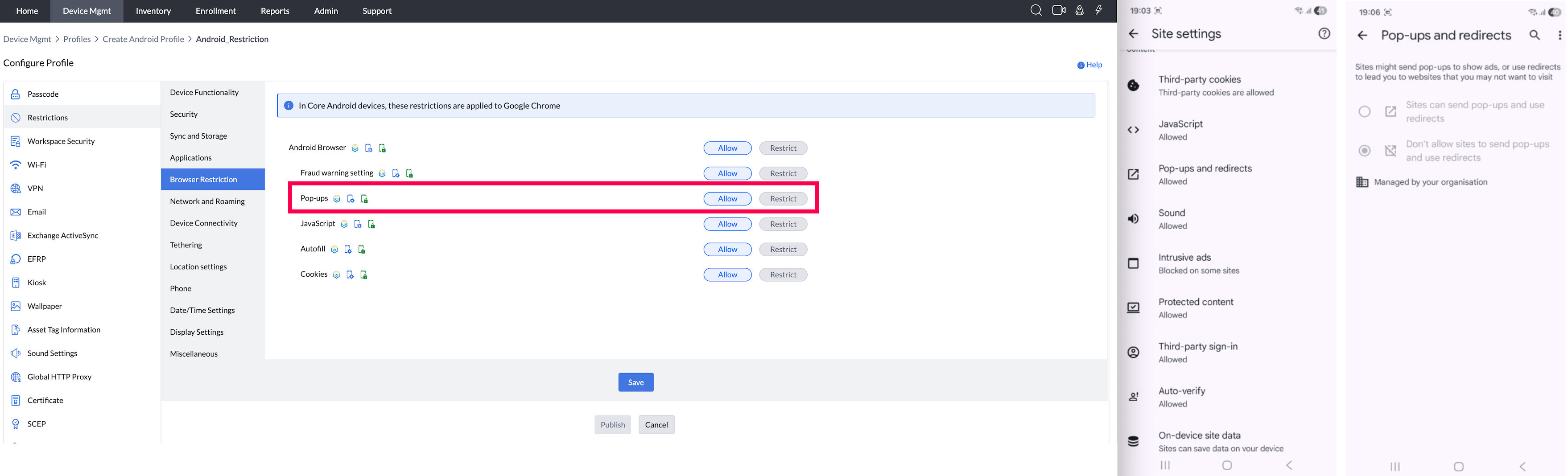
- JavaScript: By enabling this, users will be allowed to use applications running on Java scripts.
Note: For Work Profile on Company-Owned Devices, restrictions apply only to the Work Container.
Supported Management Type: Fully Managed, Work Profile on a Company owned device, Personal Device and Knox enabled Legacy devices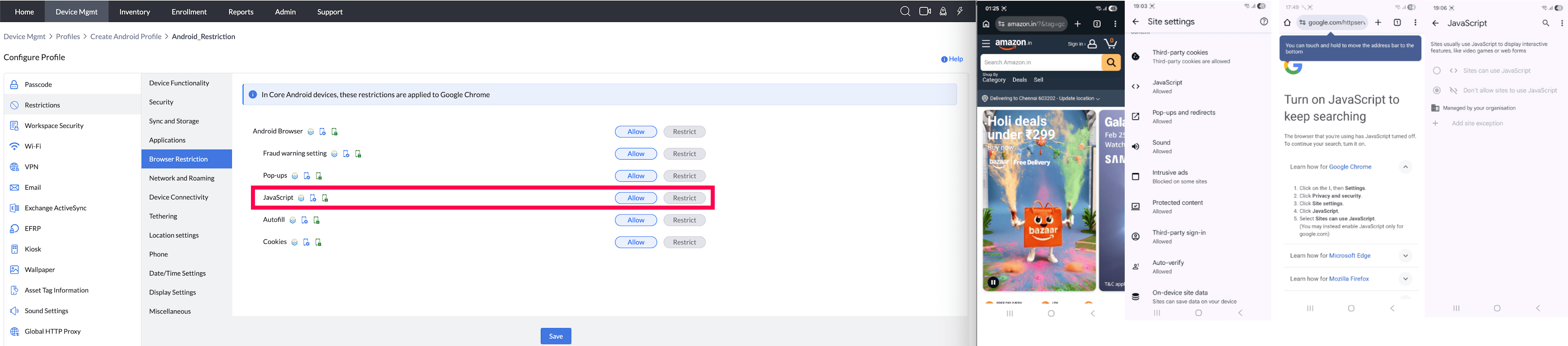
- Auto-fill: By enabling this, users will be allowed to use Auto-fill settings on the device.
Note: For Work Profile on Company-Owned Devices, restrictions apply only to the Work Container.
Supported Management Type: Fully Managed, Work Profile on a Company owned device, Personal Device and Knox enabled Legacy devices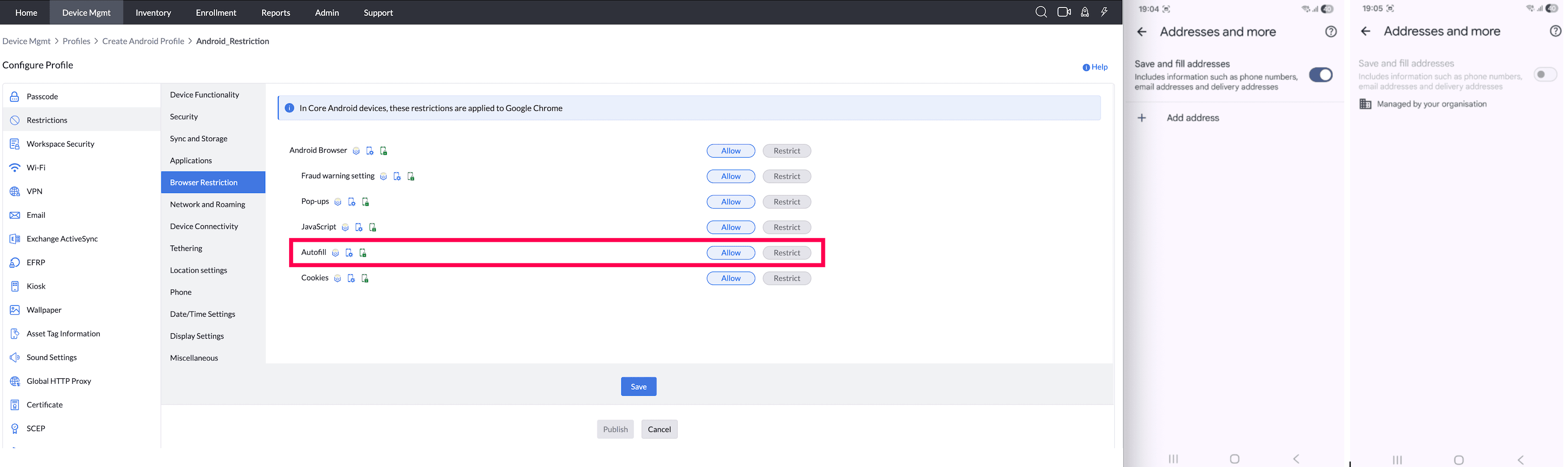
Cookies: By enabling this option, users will be allowed to use Cookies Settings on the device.
Note: For Work Profile on Company-Owned Devices, restrictions apply only to the Work Container.
Supported Management Type: Fully Managed, Work Profile on a Company owned device, Personal Device and Knox enabled Legacy devices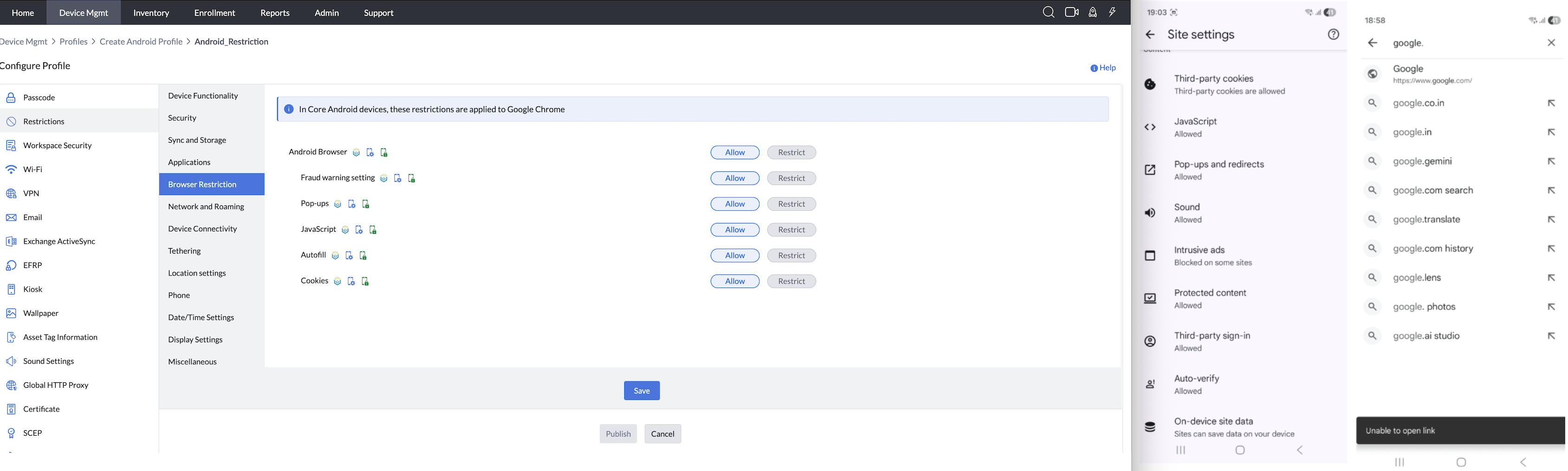
NETWORK AND ROAMING
- Airplane Mode: (supported for Samsung and devices running Android 9.0 and above) : If this is restricted, users will be unable to use airplane mode on their devices.
Supported Management Type: Fully Managed, Work Profile on a Company owned device, Personal Device and Knox enabled Legacy devices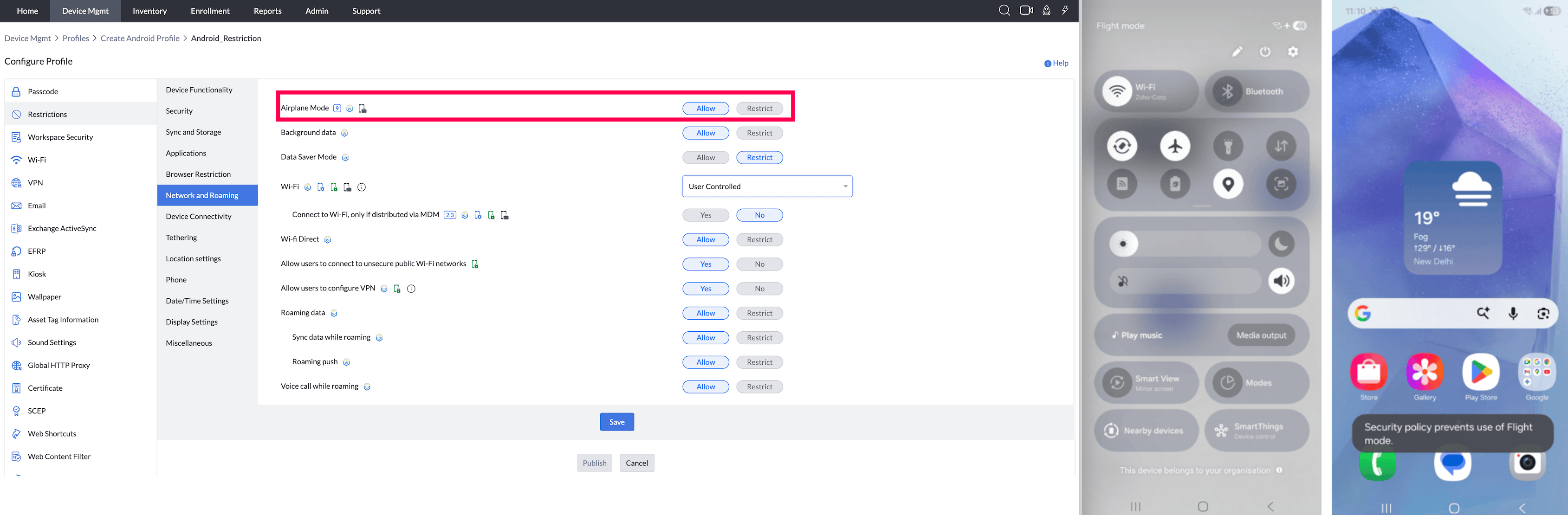
- Background data: (Samsung-only feature) : If Allow is chosen, users will be able to disable the background data whereas background data will be enabled by default. (This profile does not get applied automatically and the user has to accept this profile)
Supported Management Type: Knox enabled Fully Managed, and Knox enabled Legacy devices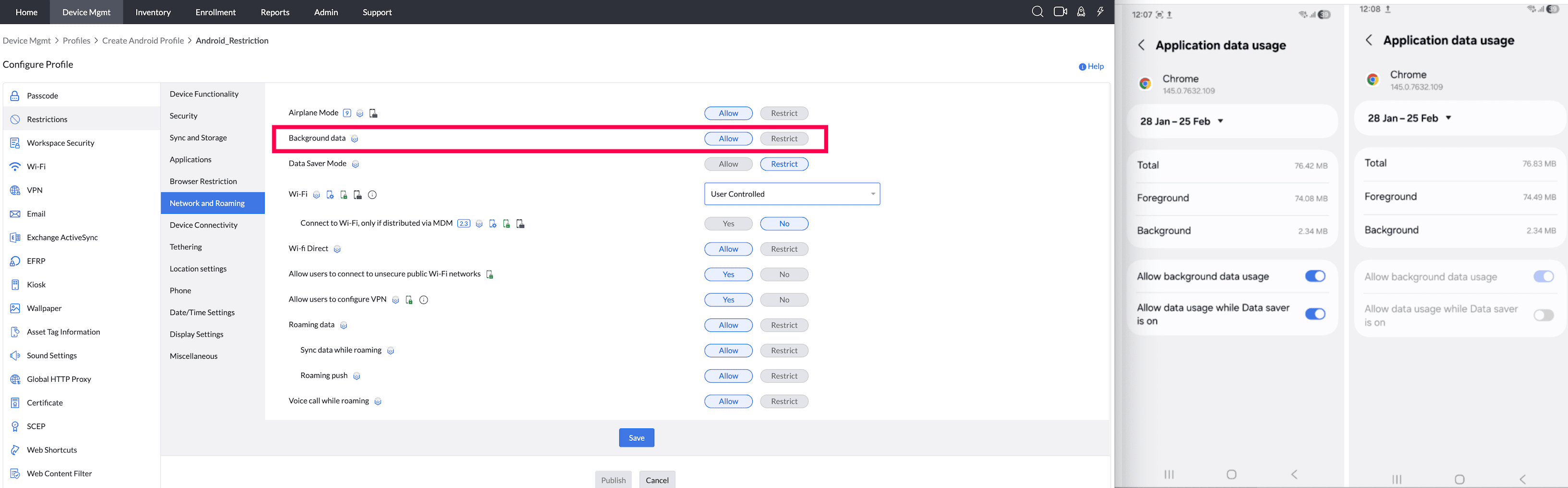
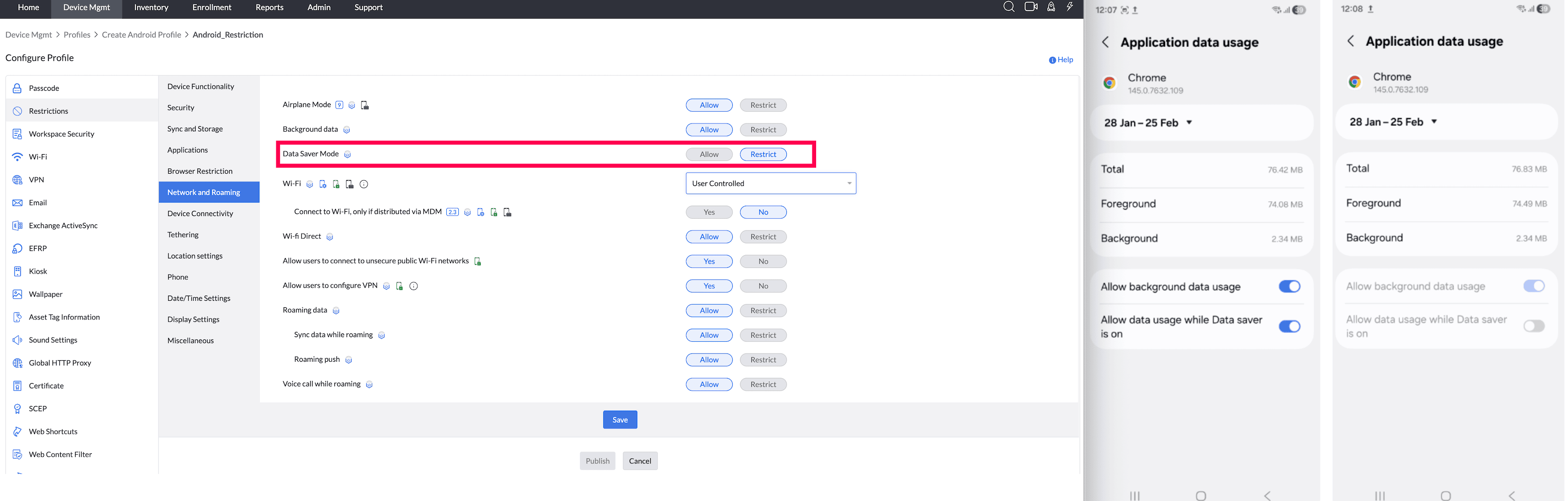
Data Saver Mode (Samsung-only feature) : Enable this option to reduce data usage by preventing apps from sending or receiving data in the background.
- When Admin configures Background data Restricted, Data Saver is not allowed to be configured by User even if data saver mode is allowed by admin.
- When Admin configures Data Saver Restricted, data saver is restricted and can not be modified by User and Background data is enabled for the apps.
Enabling Data saver mode will restrict mobile hotspot in most of the devices.
Supported Management Type: Knox enabled Fully Managed, and Knox enabled Legacy devices
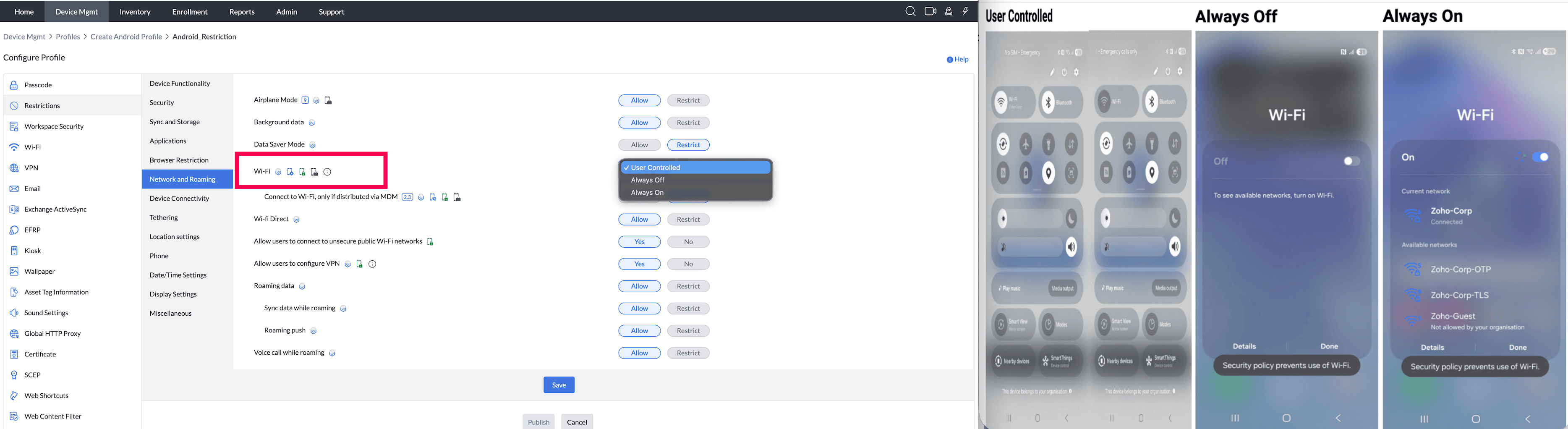
Wi-Fi:If 'User Controlled' is chosen, users will be allowed to disable or enable Wi-Fi on the device. If Wi-Fi is Always On on the device, users will not have permission to disable it.
Note:- This is not supported for corporate Samsung devices running Android 10.0 or above enrolled via invites.
- If Wi-Fi is Always Off on the device, users will not have permission to enable it.
- The managed devices will be out of network connectivity and even the MDM server cannot reach the device until cellular data is enabled on the device.
Supported Management Type: Fully Managed, Personal (Whole) device, Work Profile on a Company owned device, and Knox enabled Legacy devices
- Connecting to Wi-Fi, only if distributed via MDM (Supported from Android 5.0 and above) : Restrict/Allow users to connect to Wi-Fi networks only if Wi-Fi configurations have been distributed as a profile via MDM. If no Wi-Fi profile has been configured via MDM, the device can connect to other Wi-Fi networks. Also, if the Wi-Fi SSID has been changed, then the profile must be modified to include the new SSID and then re-distributed to the device, for continued management.
Note: Location access must be enabled on the device for this restriction to function as expected. This restriction works only when the Wi-Fi network distributed via MDM can reach the MDM server. If the MDM server is not reachable through that Wi-Fi network, the restriction will not work as expected and devices can lose MDM connectivity.
Supported Management Type: Fully Managed, Personal (Whole) device, Work Profile on a Company owned device, and Knox enabled Legacy devices - Wi-Fi Direct (Samsung-only feature - Supported from Android 5.0) : By enabling this, users will be allowed to access Wi-Fi Direct on their devices.
Supported Management Type: Knox enabled Fully Managed, and Knox enabled Legacy devices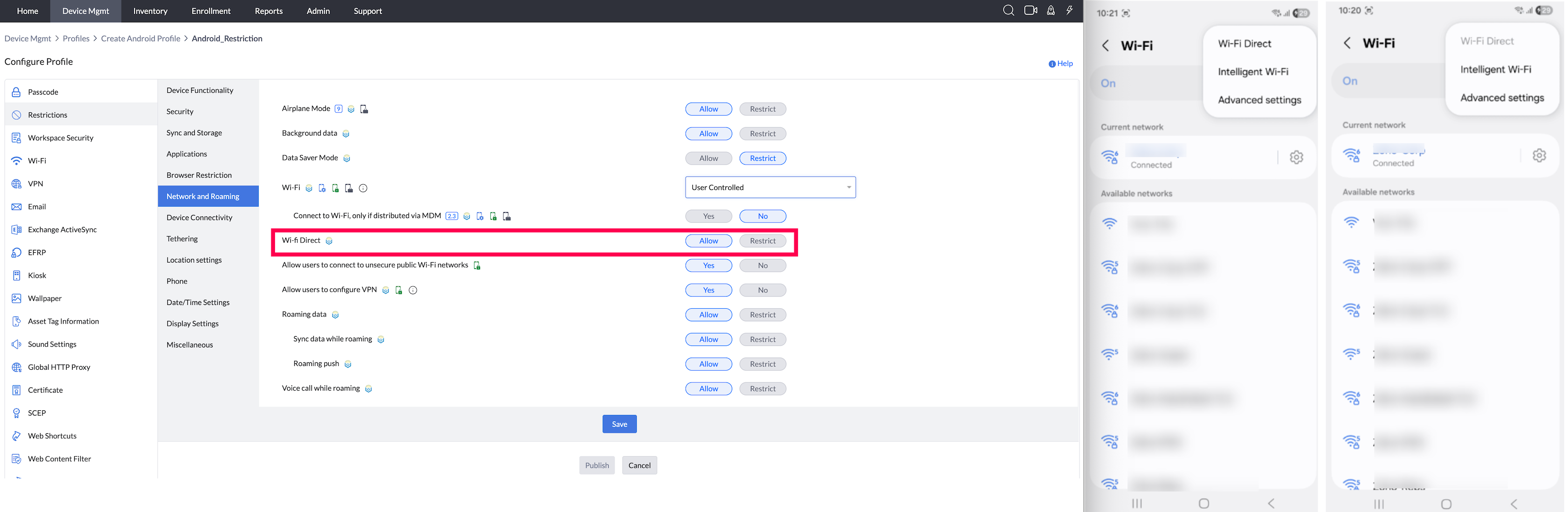
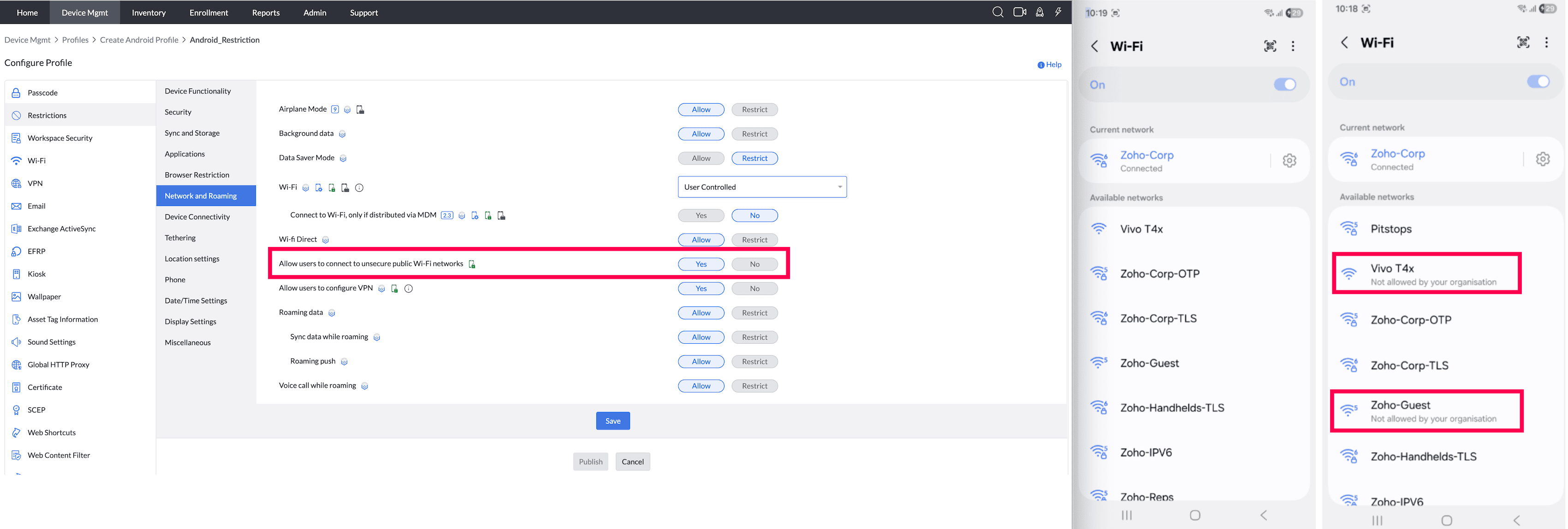
- Allow users to connect to unsecure public Wi-Fi networks: By restricting this, users will not be able to connect their devices with public or unsecure Wi-Fi network connections which are not protected with a password. Supported Management Type: Fully Managed, Work Profile on a Company owned device and Legacy devices
- Allow users to configure VPN (Supported from Android 5.0): Users are restricted from configuring VPN on devices, apart from any VPN configurations distributed through the MDM server. If this restriction is enabled on Samsung devices (running on OS 5.0 and above), any VPN configured by the user gets deleted.
Supported Management Type: Fully Managed, and Knox enabled Legacy devices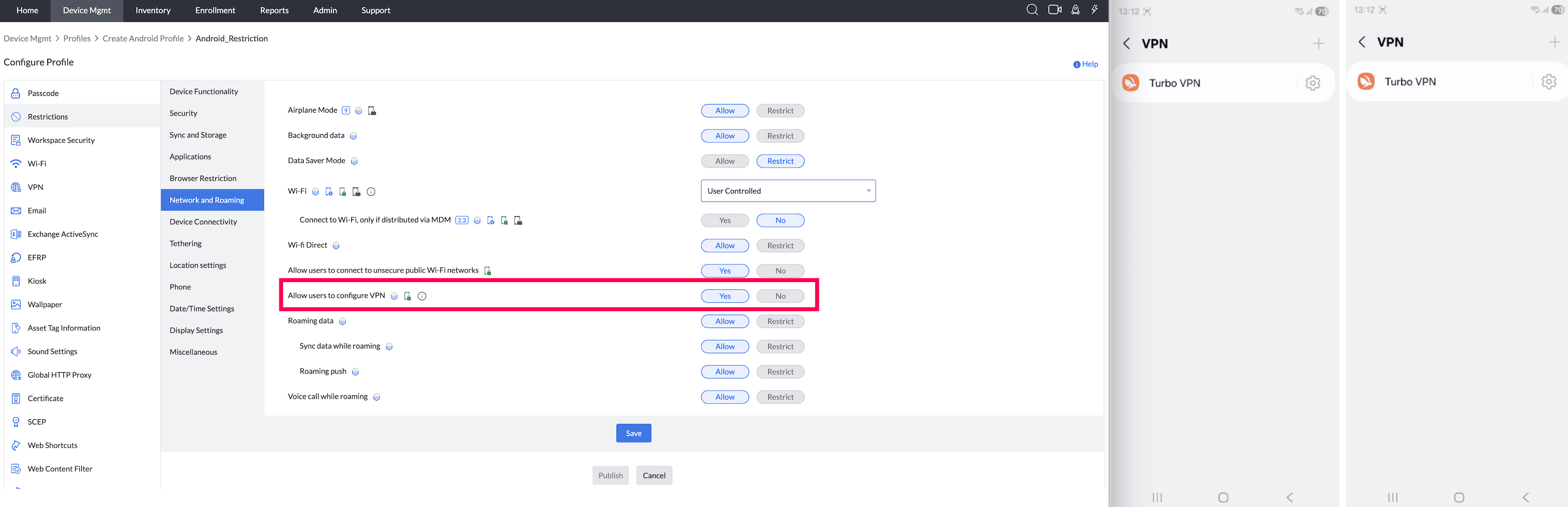
- Roaming data (Samsung-only feature) : If you have allowed this, users can choose to allow or disallow roaming data on the device. Else, this setting will be disabled and greyed out in the device.
Supported Management Type: Knox enabled Fully Managed, and Knox enabled Legacy devices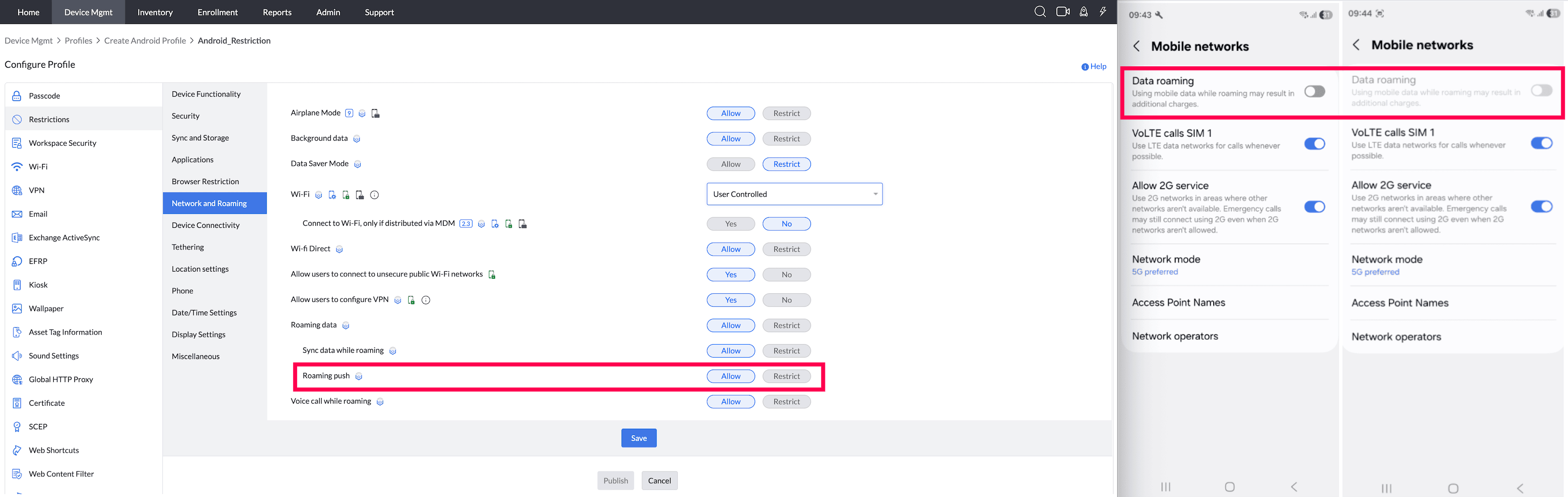
- Sync data while Roaming (Samsung-only feature) ": By enabling this, users will be allowed to use Sync feature while roaming.
Supported Management Type: Knox enabled Fully Managed, and Knox enabled Legacy devices - Roaming Push (Samsung-only feature) : By enabling this, data will be pushed to devices even if they are in roaming.
Supported Management Type: Knox enabled Fully Managed, and Knox enabled Legacy devices - Voice Call while Roaming (Samsung-only feature, supported from Android 5.0) : By enabling this, users will be allowed to receive/make voice calls during roaming.
Supported Management Type: Knox enabled Fully Managed, and Knox enabled Legacy devices
DEVICE CONNECTIONS
- NFC: By enabling this, users can utilize Near Field Communication (NFC).
Note: For DEVICE OWNER, the device will display a policy violation message, prompting the user to enable/disable the NFC setting as specified in the profile.
Supported Management Type: Fully Managed, and Legacy devices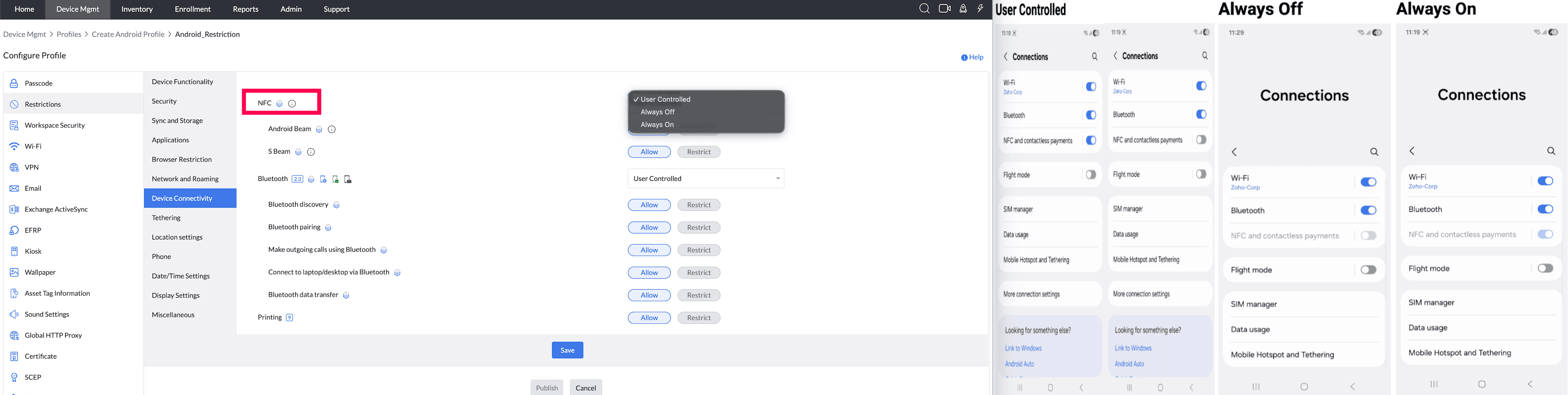
- Android Beam (Supported from Android 5.0) : By enabling this, users can utilize Android Beam to transfer data to other supported devices.
Note: For Profile Owner mode, restrictions are applied by default and For Work Profile on company-owned devices, restrictions are applied only to the Work Profile.
Supported Management Type: Knox enabled Fully Managed, Personal device, Work Profile on a Company owned device, and Knox enabled Legacy devices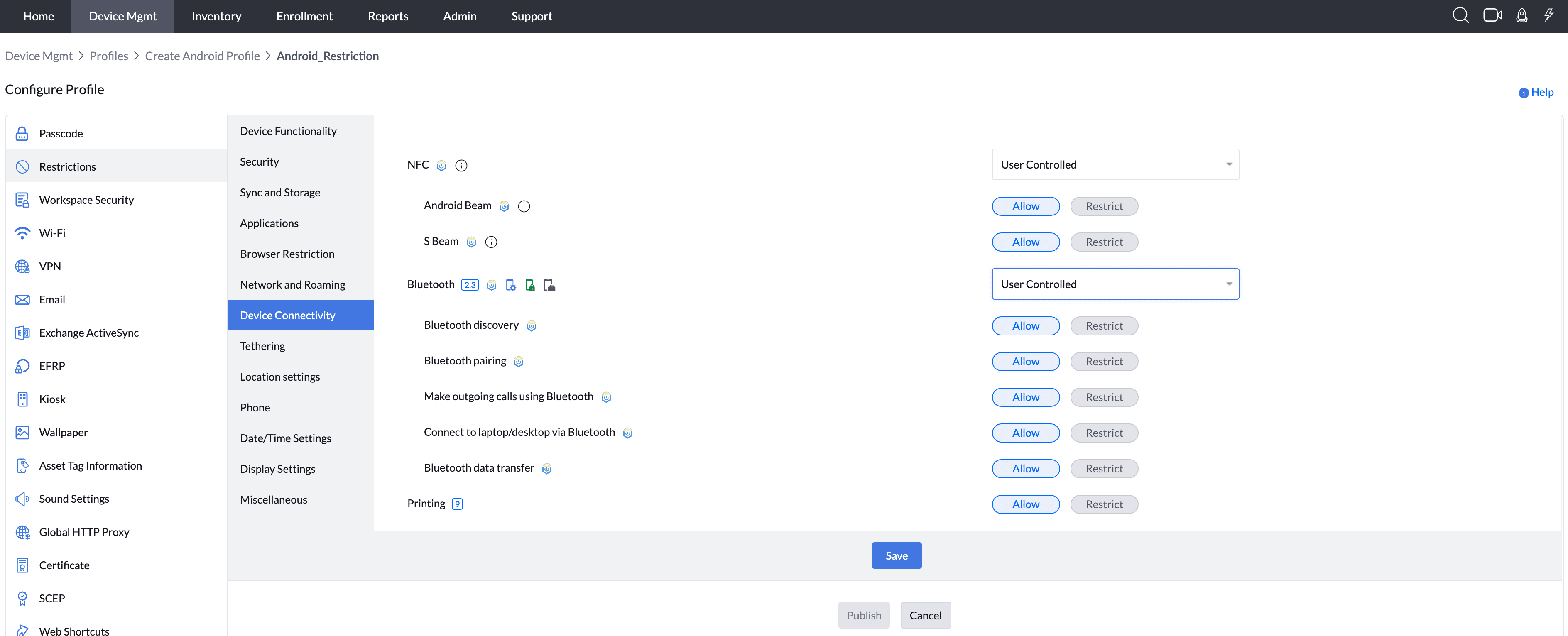
- S Beam (Samsung-only feature, supported up to Android 5.0) : By enabling this, users can utilize S Beam to share files with other supported devices.
Supported Management Type:Knox enabled Fully Managed, and Knox enabled Legacy devices - Bluetooth: By enabling this, users will be allowed to use Bluetooth in their devices.
Supported Management Type: Fully Managed, Personal (Whole) device, Work Profile on a Company owned device, and Knox enabled Legacy devices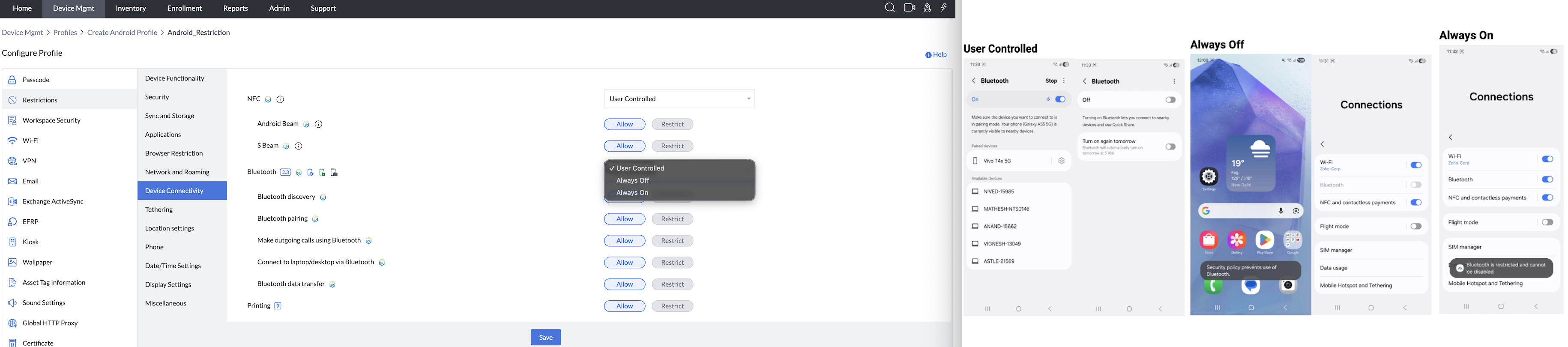
- Bluetooth Discovery (Samsung-only feature) : By enabling this, users can allow other devices to detect and connect to their devices.
Supported Management Type: Knox enabled Fully Managed, and Knox enabled Legacy devices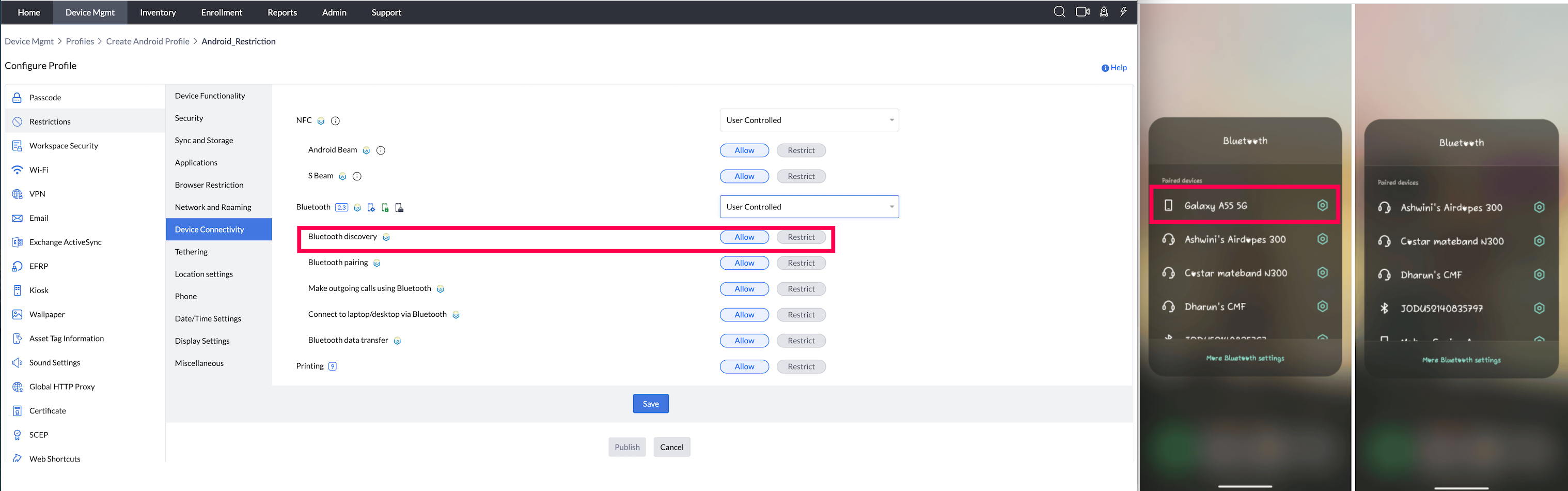
- Bluetooth Pairing (Samsung-only feature) : By enabling this, users will be allowed to pair their devices with other devices to enable data transfer.
Supported Management Type: Knox enabled Fully Managed, and Knox enabled Legacy devices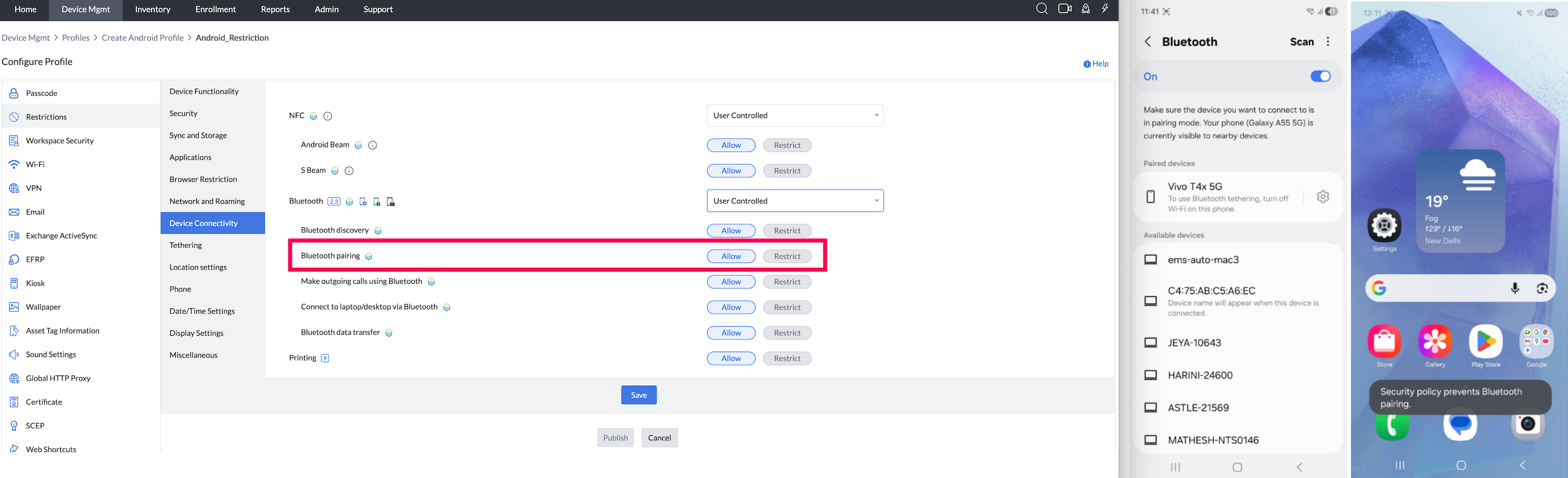
- Make outgoing calls using Bluetooth (Samsung-only feature) : By enabling this, users will be allowed to place outgoing calls using Bluetooth.
Supported Management Type: Knox enabled Fully Managed, and Knox enabled Legacy devices - Connect to Laptop/Desktop via Bluetooth (Samsung-only feature) : By enabling this, users can connect their devices to desktops/laptops using Bluetooth.
Supported Management Type: Knox enabled Fully Managed, and Knox enabled Legacy devices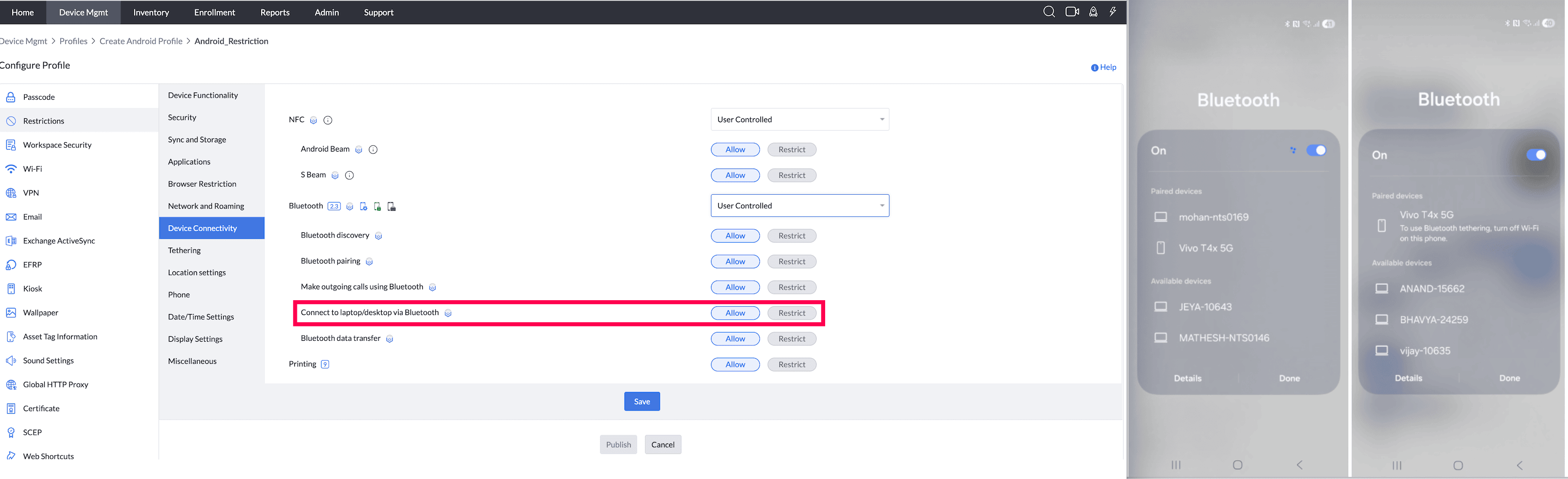
- Bluetooth Data transfer (Samsung-only feature) : By enabling this, users will be allowed to transfer data from their devices to other devices using Bluetooth.
Supported Management Type: Knox enabled Fully Managed, and Knox enabled Legacy devices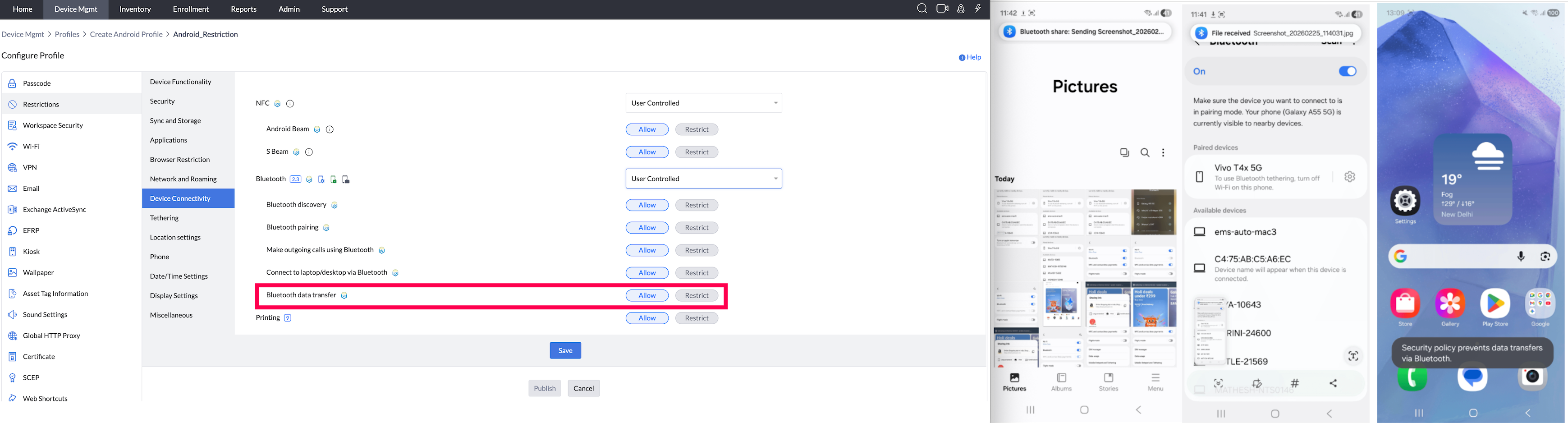
- Printing (Supported from Android 9.0) : By enabling this, users will be allowed to use bluetooth printers through their devices.
Supported Management Type: Fully Managed, and Knox enabled Legacy devices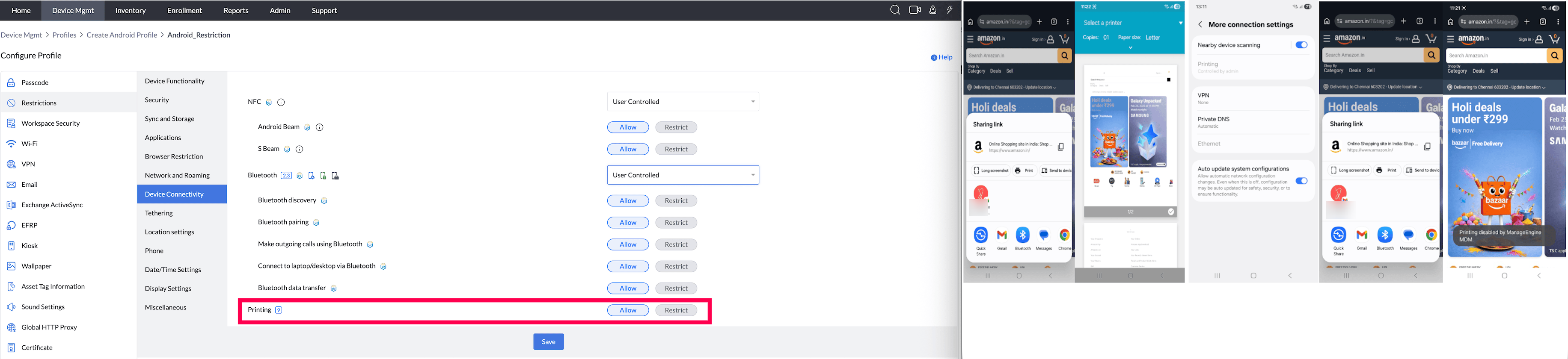
TETHERING
- Tethering: Disabling this, restricts managed devices from tethering with other devices, for sharing the cellular network.
Supported Management Type: Fully Managed, Work Profile on a Company owned device, and Knox enabled Legacy devices - Bluetooth Tethering: By enabling this, users will be allowed to share Internet connection via Bluetooth with other devices.
Note:1. This can be enabled only when Bluetooth is enabled on a device.
2. For Device-Owner, there are no separate restrictions. Tethering is restricted only when Tethering is specifically restricted.
Supported Management Type: Fully Managed, and Knox enabled Legacy devices - Wi-Fi Tethering: By enabling this, users will be allowed to share Internet connection via Wi-Fi with other devices.
Note:1. This can be enabled only when Wi-Fi and Wi-fi Direct are enabled on the device.
2. For Device-Owner, there are no separate restrictions. Tethering is restricted only when Tethering is specifically restricted.
Supported Management Type:Fully Managed, and Knox enabled Legacy devices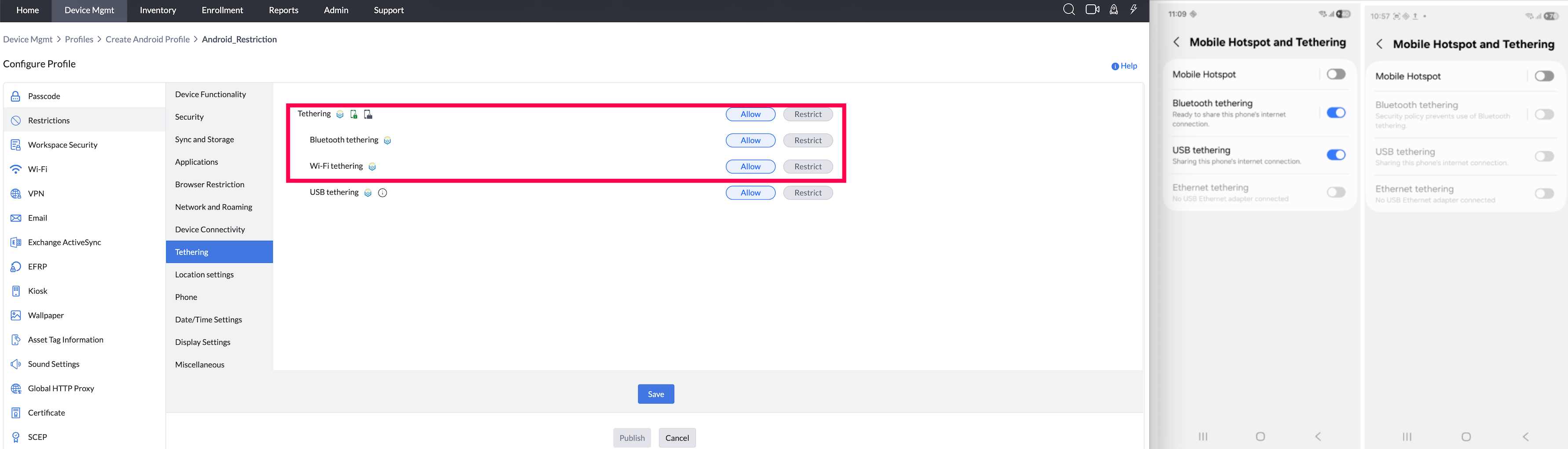
- USB Tethering: By enabling this, users will be allowed to share Internet connection via USB with other devices.
Note:1. This can be enabled only when USB is enabled on the device.
2. For Device-Owner, there are no separate restrictions. Tethering is restricted only when Tethering is specifically restricted.
Supported Management Type: Fully Managed, and Knox enabled Legacy devices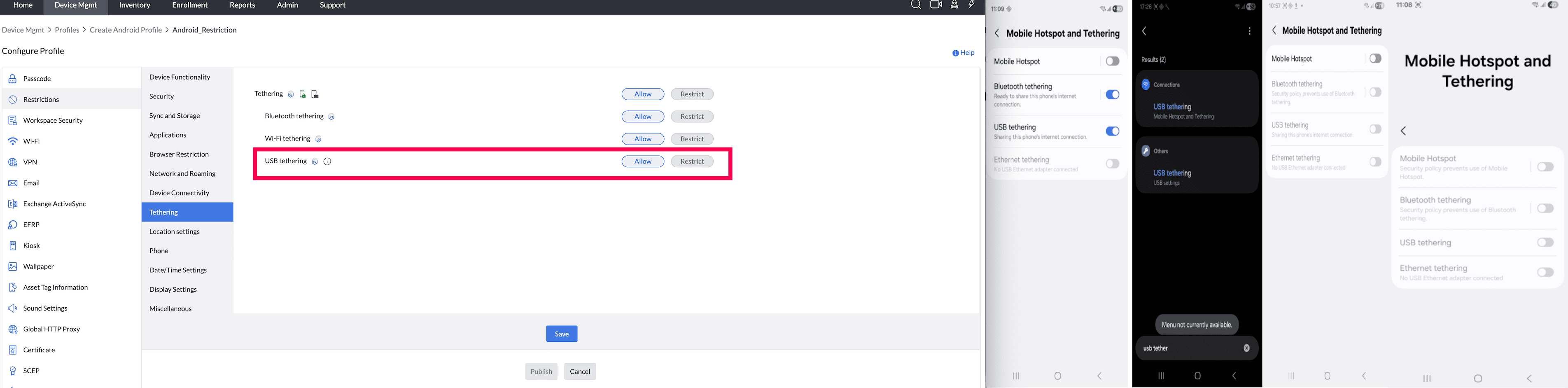
LOCATION Settings
- Location Services (Supported in legacy from OS 5.0) : When set as Always On, Location Services is forcefully enabled (Location Tracking can be highly accurate when Location Services are set to Always On only for devices running OS below 9). Even if users turn it Off, it automatically reverts to On state. This is applicable for Always Off option as well. In case, you configure it as User Controlled, device users can enable/disable it as per their needs.
Supported Management Type: Fully Managed, Work Profile on a Company owned device, and Legacy devices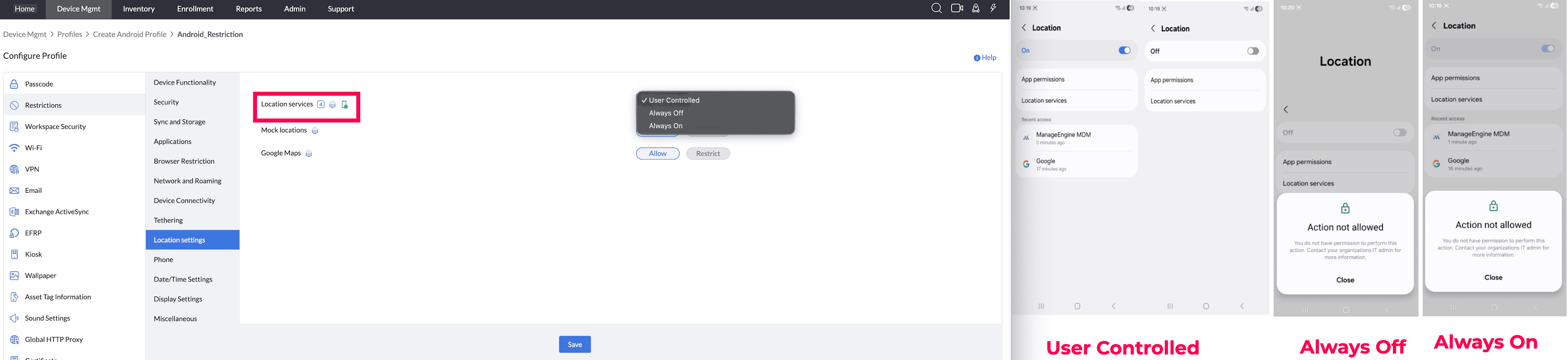
- Mock Location (Samsung-only feature) : Allow/Restrict users from showing falsifying location data.
Supported Management Type: Knox enabled Fully Managed, Knox enabled Legacy devices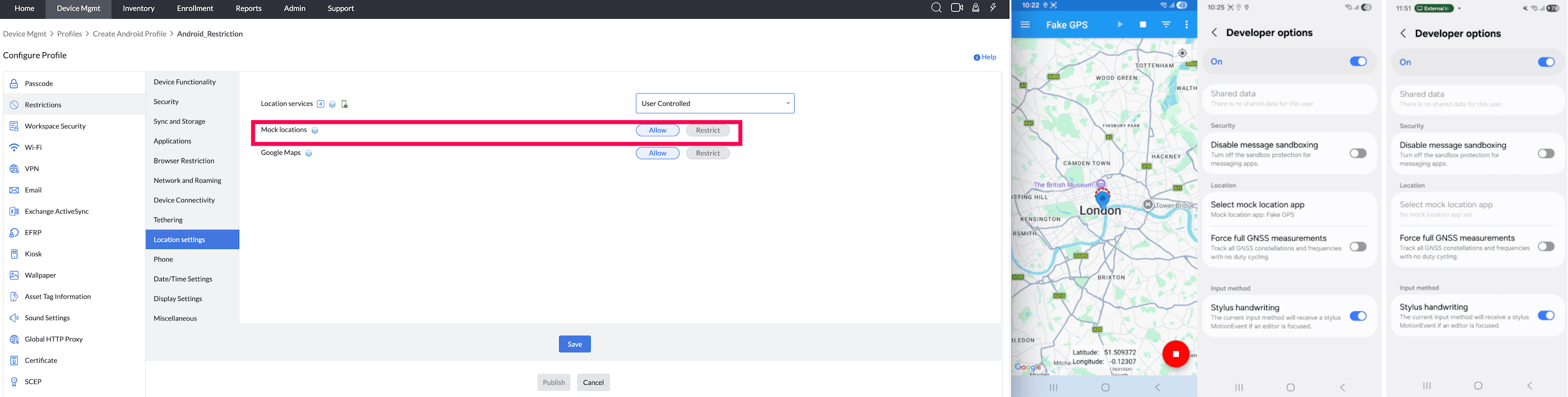
- Google Maps: By enabling this, users can utilize Google Maps.
Supported Management Type: Fully Managed, Knox enabled Legacy devices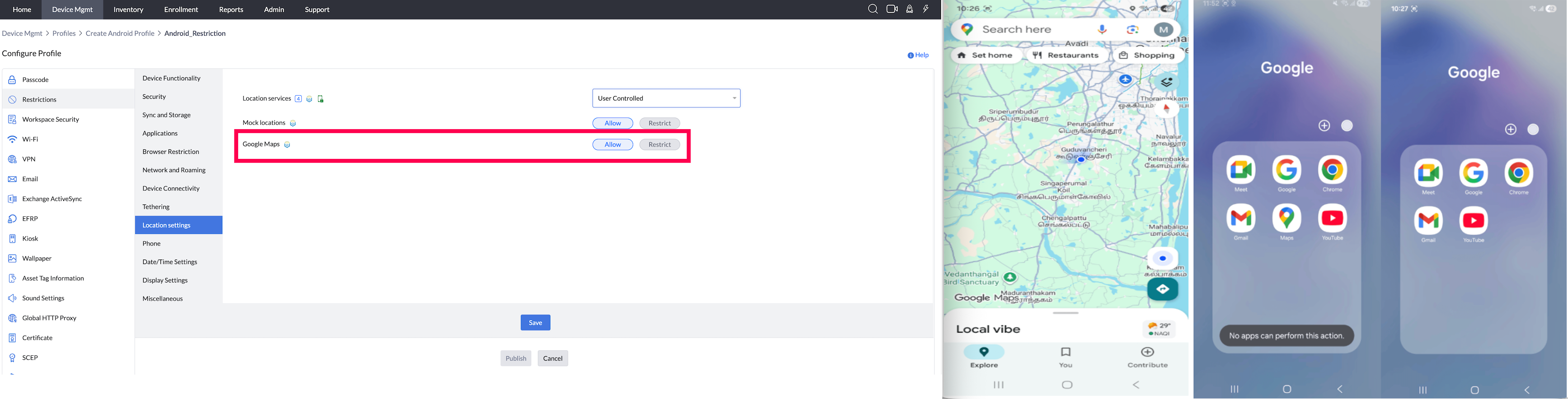
PHONE
- SMS(Supported from Android 5.0 in Samsung devices) : By disabling this, users will not be able to use Short Messaging Service(SMS) in the managed devices.
Supported Management Type: Fully Managed, Work Profile on a Company owned device, and Knox enabled Legacy devices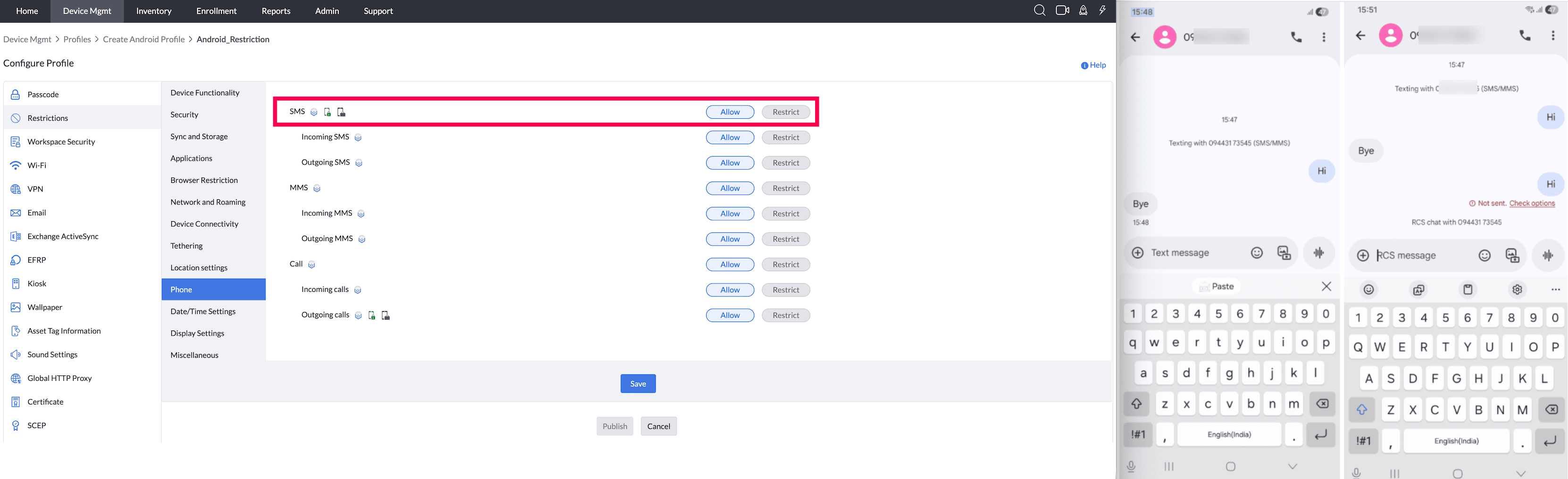
- Incoming SMS (Supported up to Android 5.0 in Samsung devices) : By disabling this, users will not be able to receive any incoming message on their devices.
Note: For Device-Owner, there are no separate restrictions. The device is restricted when SMS functionality is restricted.
Supported Management Type: Fully Managed, and Knox enabled Legacy devices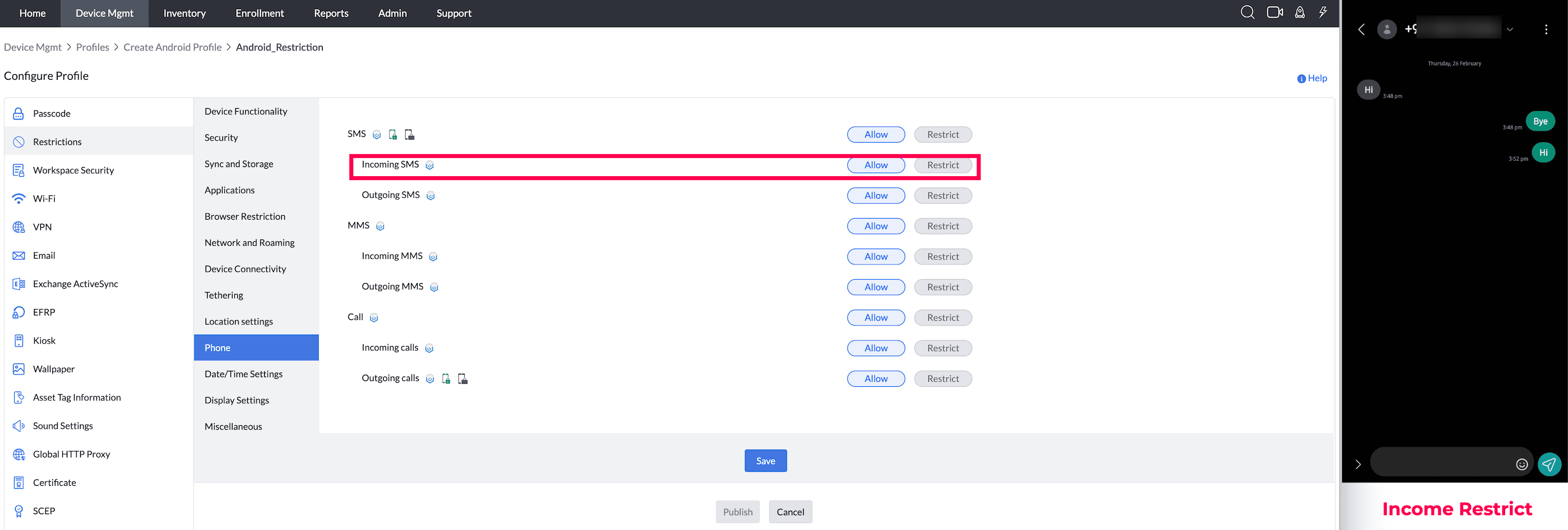
- Outgoing SMS (Supported up to Android 5.0 in Samsung devices) : By disabling this, users will not be able to send any outgoing message from their devices.
Note: For Device-Owner, there are no separate restrictions. The device is restricted when SMS functionality is restricted.
Supported Management Type: Fully Managed, and Knox enabled Legacy devices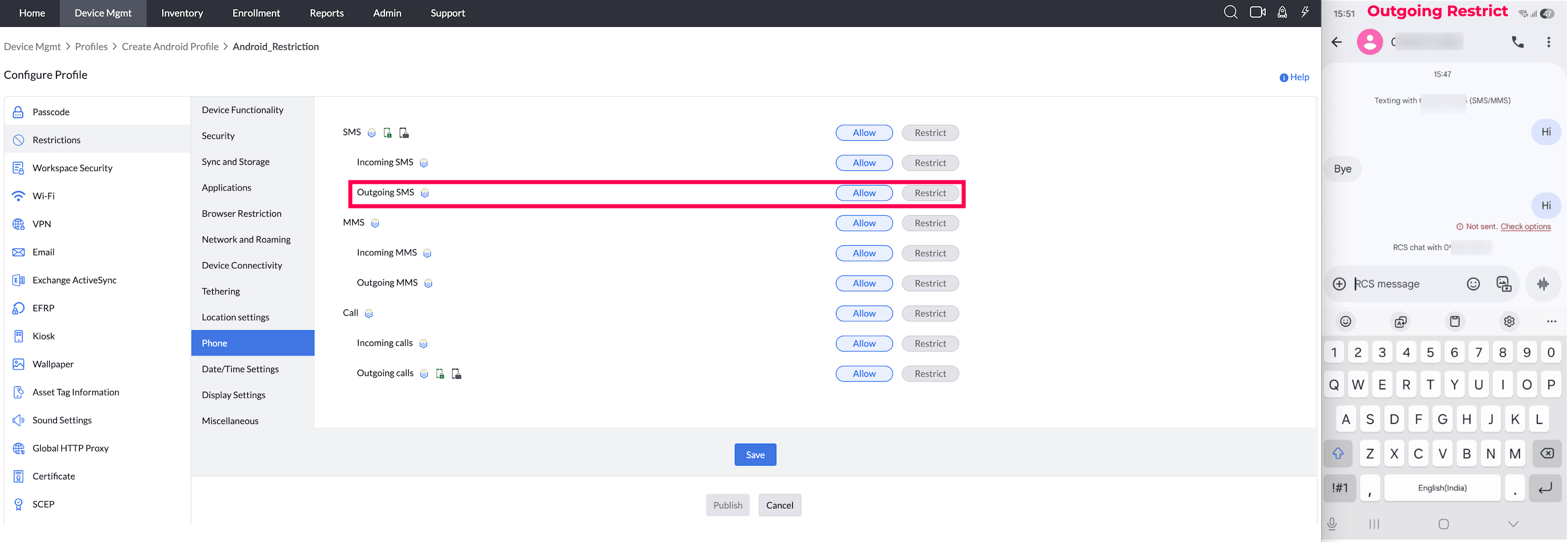
- MMS (Supported from Android 5.0 in Samsung devices) : By disabling this, users will not be able to use Multimedia Messaging Service(MMS) in the managed devices.
Note: For Device-Owner, there are no separate restrictions. The device is restricted when SMS functionality is restricted.
Supported Management Type: Fully Managed, Knox enabled Legacy devices - Incoming MMS (Supported up to Android 5.0 in Samsung devices) : By disabling this, users will not be able to receive any incoming MMS to their devices. Note: For Device-Owner, there are no separate restrictions. The device is restricted when SMS functionality is restricted.
Supported Management Type: Fully Managed, and Knox enabled Legacy devices - Outgoing MMS (Supported up to Android 5.0 in Samsung devices) : By disabling this, users will not be able to send any outgoing MMS from their devices.
Note: For Device-Owner, there are no separate restrictions. The device is restricted when SMS functionality is restricted.
Supported Management Type: Fully Managed, and Knox enabled Legacy devices - CallIf disabled, users cannot make/receive calls.
Supported Management Type: Knox enabled Fully Managed, and Knox enabled Legacy devices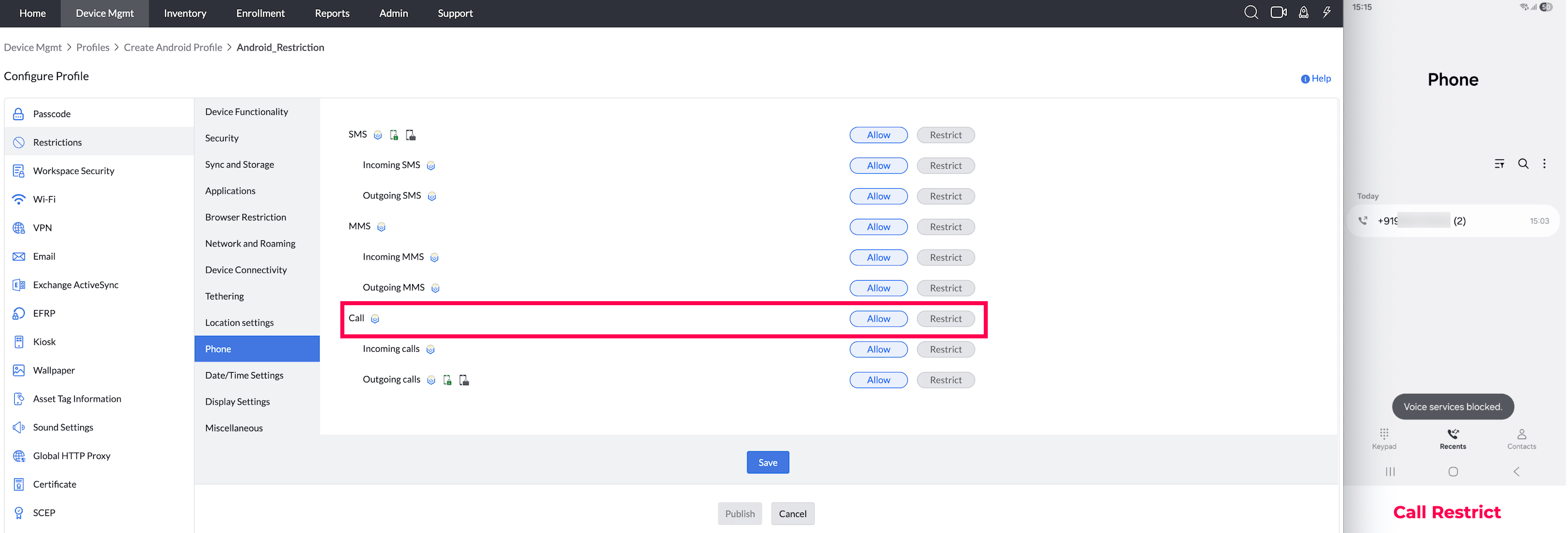
- Incoming Call(Samsung-only feature) : By disabling this, users will not be able to receive any incoming calls on their devices. Even when it is allowed, incoming calls will work only when the Microphone is enabled on the device.
Supported Management Type: Knox enabled Fully Managed, and Knox enabled Legacy devices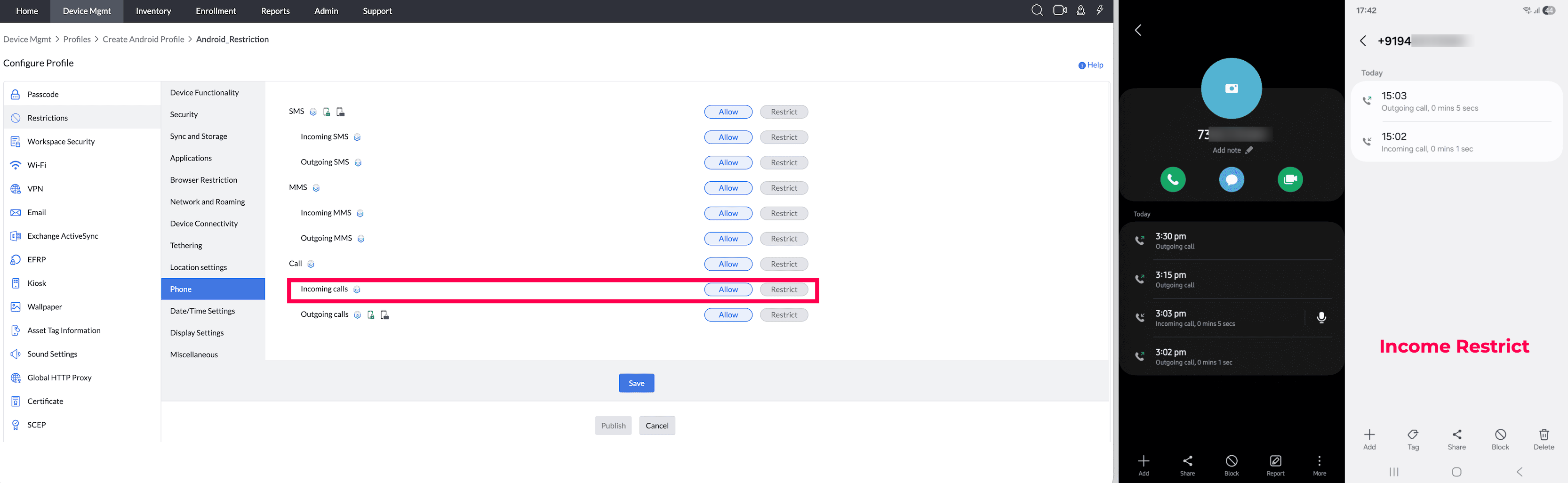
- Outgoing CallBy disabling this, users will not be able to place any outgoing calls on their devices. Even when it is allowed, outgoing calls will work only when the Microphone is on the device.
Supported Management Type: Fully Managed, Work Profile on a Company owned device, and Knox enabled Legacy devices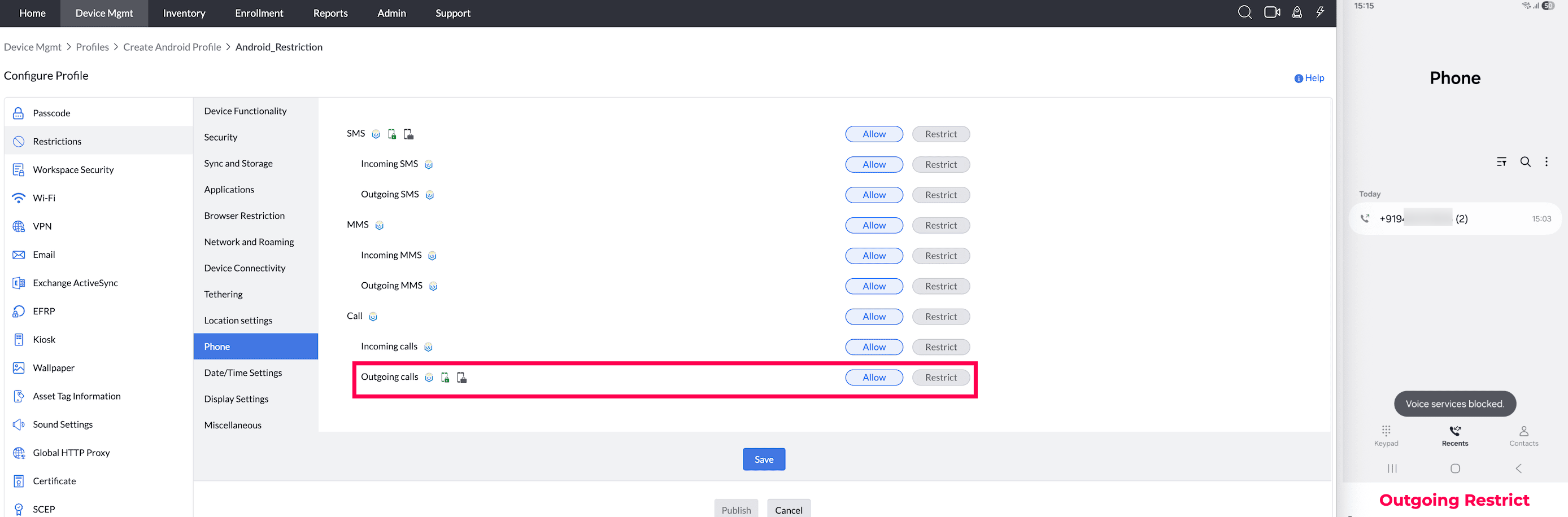
DATE/TIME SETTINGS
- Set device time (Supported from Android 9.0 and above) : You can set the device time either based on network provider's time or set up manually. Note: If the incorrect time is displayed, then try connecting to a different network and check the Wifi router.
Supported Management Type: Fully Managed, Work Profile on a Company owned device, and Knox enabled Legacy devices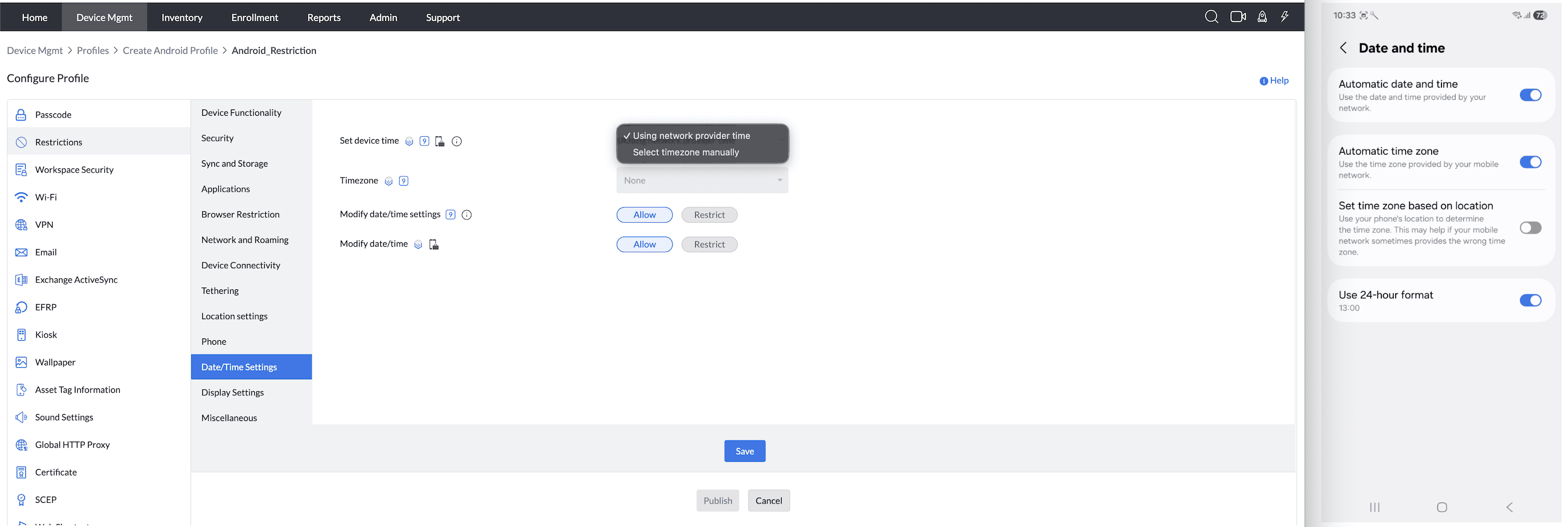
- Timezone (Supported from Android 9.0 and above) : If you have enabled the device time to be set manually, then you can choose the desired timezone from the dropdown.
Note: When you set the timezone, the device time will be fetched based on the connected network.
Supported Management Type: Fully Managed, Work Profile on a Company owned device, and Knox enabled Legacy devices.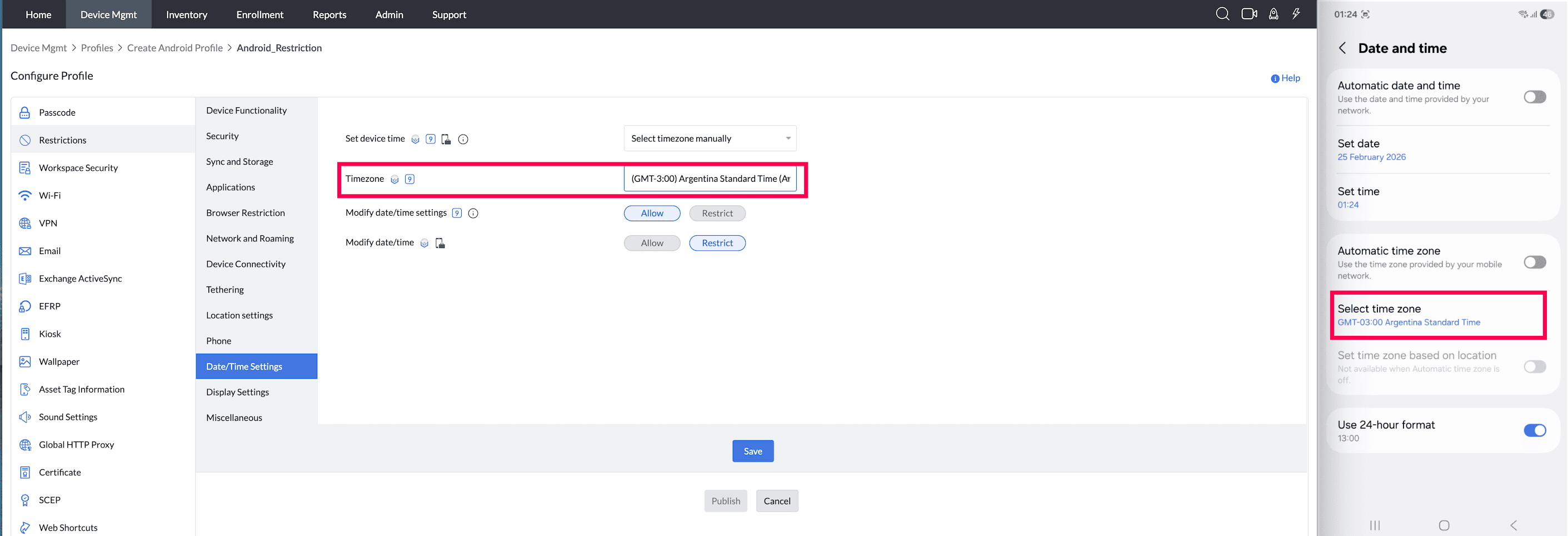
- Modify date/time settings (Supported from Android 9.0 and above) : Restricting this prevents the users from modifying date/time settings such as time format, date format, etc.
Supported Management Type: Fully Managed and Work Profile on a Company owned device.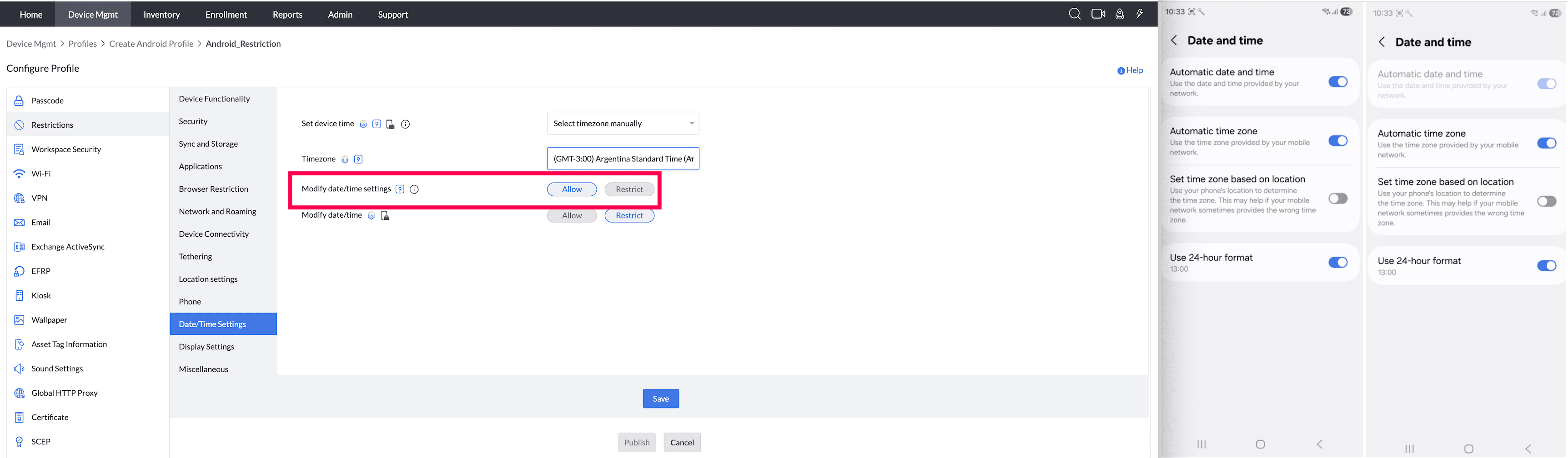
- Modify date/time (Supported from Android 5.0 in Samsung devices) : Restricting this prevents the users from modifying the date/time already set on the device.
Supported Management Type: Fully Managed and Work Profile on a Company owned device.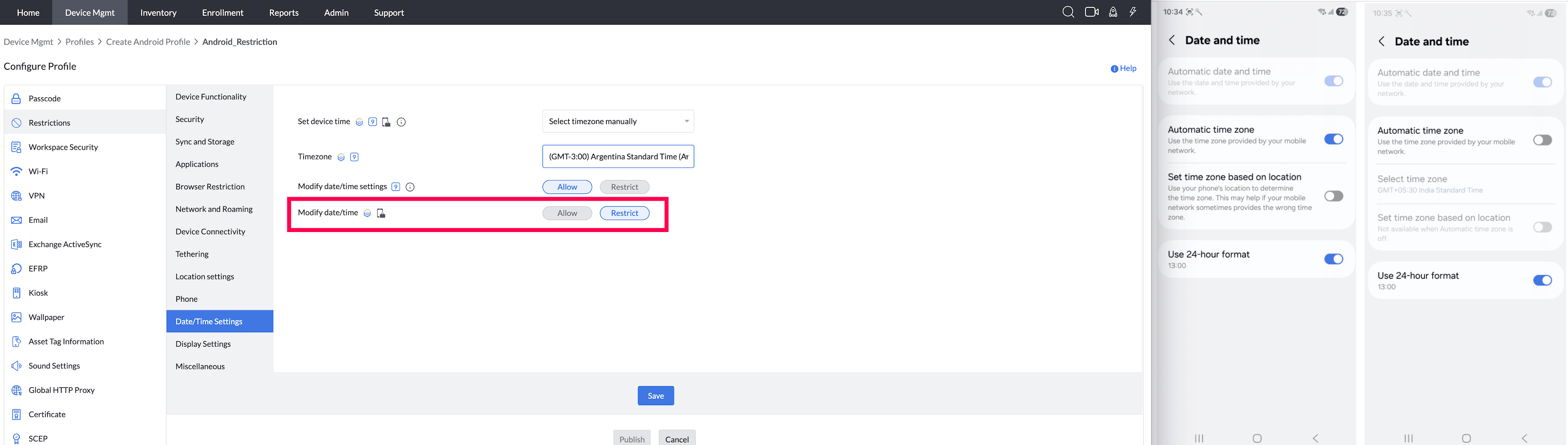
DISPLAY SETTINGS (Supported from Android 9.0)
- Screen Timeout: The duration(between 5 and 1800 seconds) of inactivity, after which the device goes to sleep.
Note: Screen Timeout duration cannot be higher than Maximum idle time allowed before auto-lock configured in Passcode profile.
Supported Management Type: Fully Managed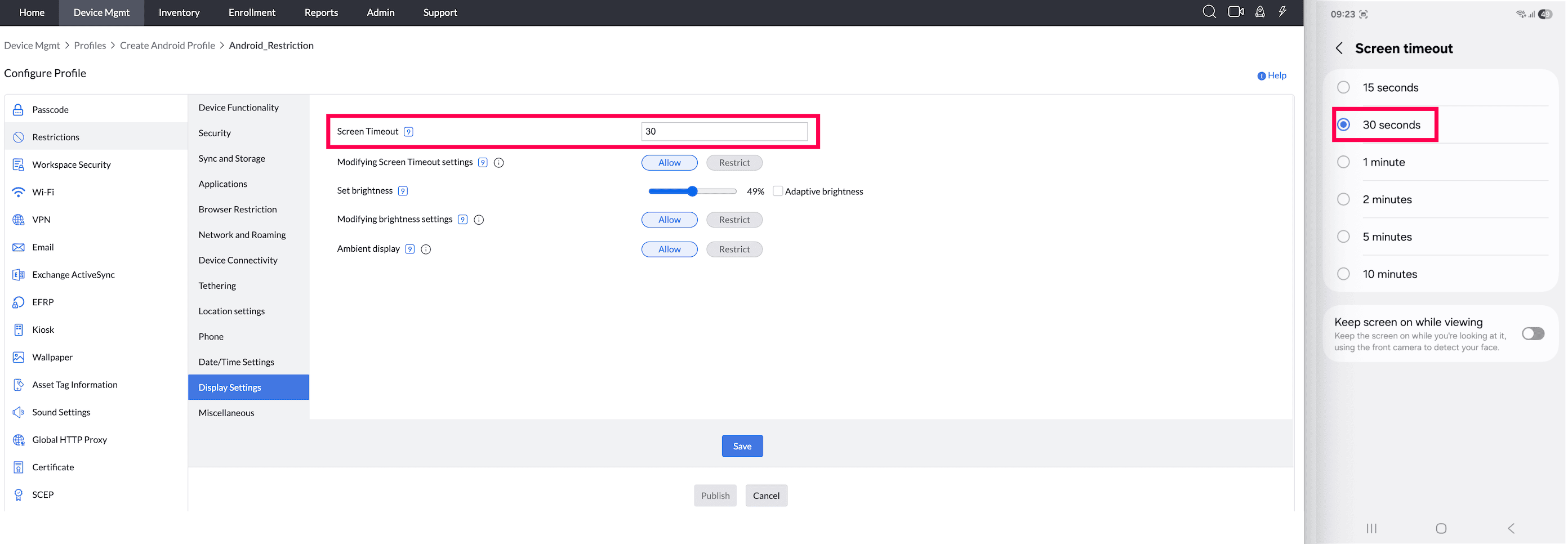
- Modify Screen Timeout Settings: Disabling this, ensures the screen timeout configured above or on the device cannot be modified.
Supported Management Type: Fully Managed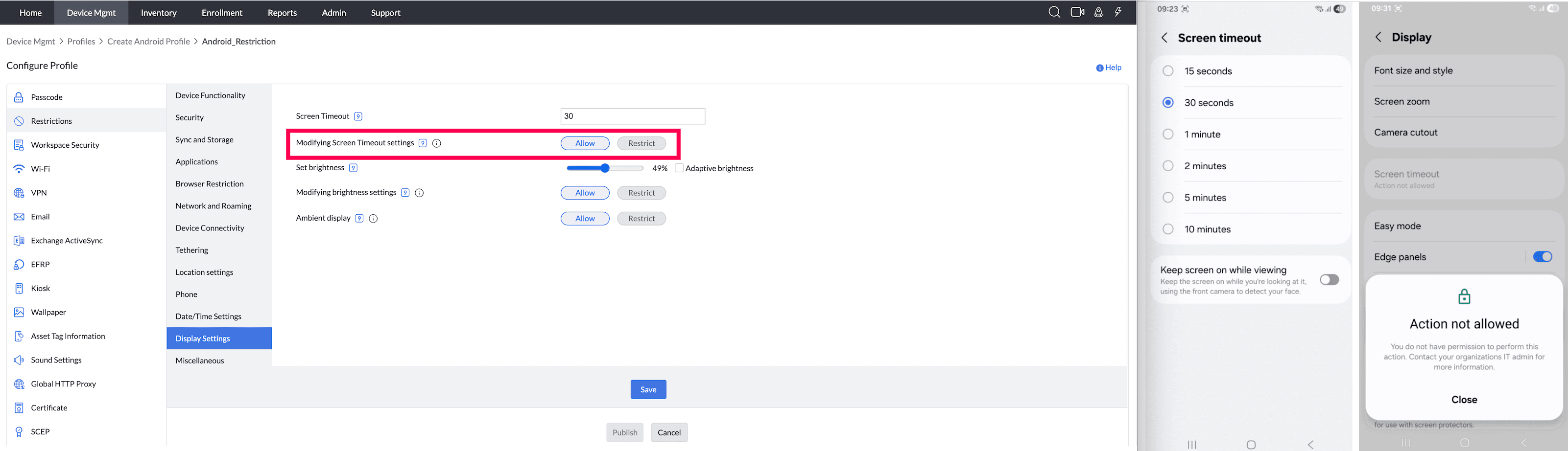
- Brightness: Provide the level of brightness to be configured on the device. Supported Management Type: Fully Managed
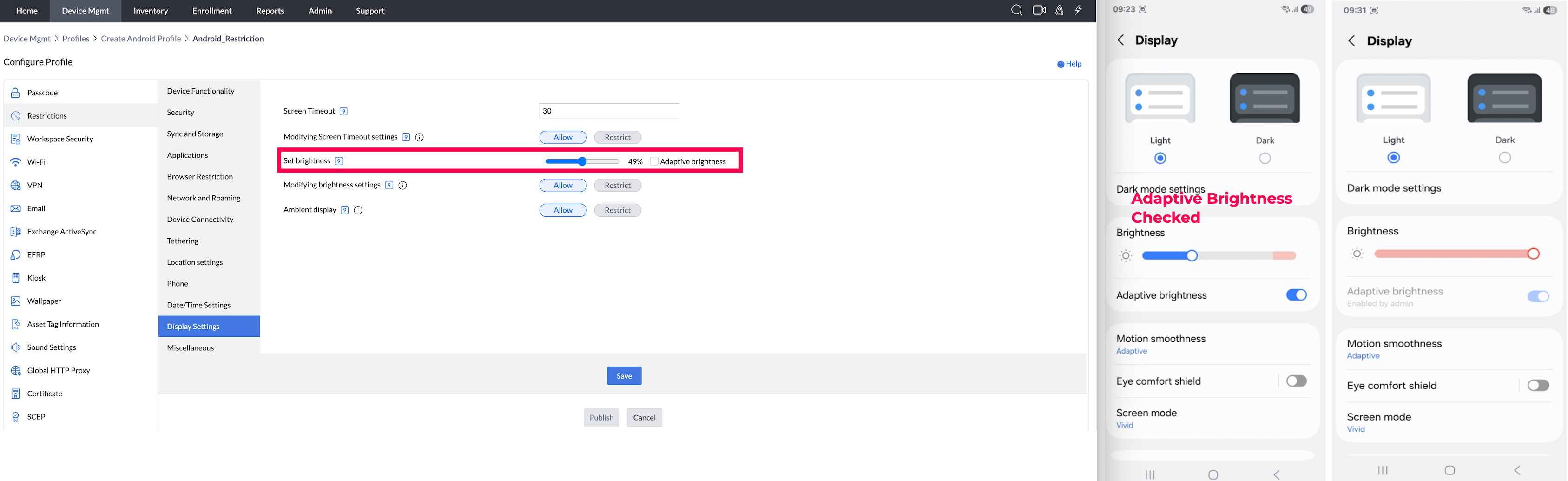
- Modify Brightness Settings: Disabling this, ensures the brightness configured above or on the device cannot be modified.
Supported Management Type: Fully Managed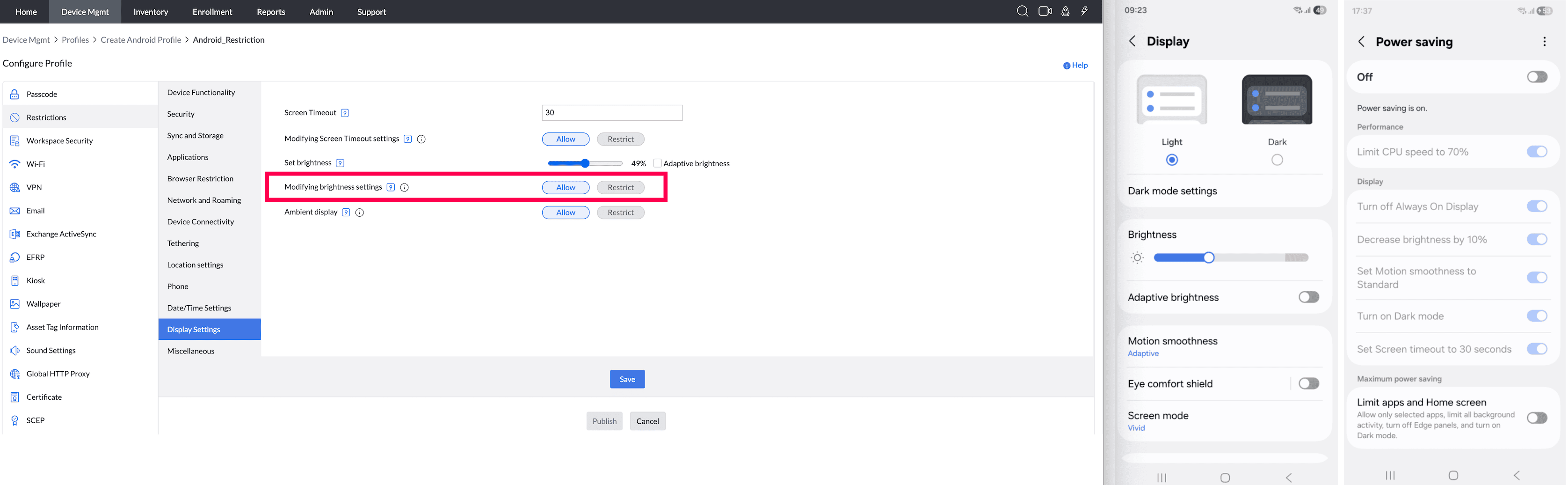
- Ambient Display : Enable/Disable displaying details such as the time, date, etc, on the device lock screen, when it is in sleep.
Supported Management Type: Fully Managed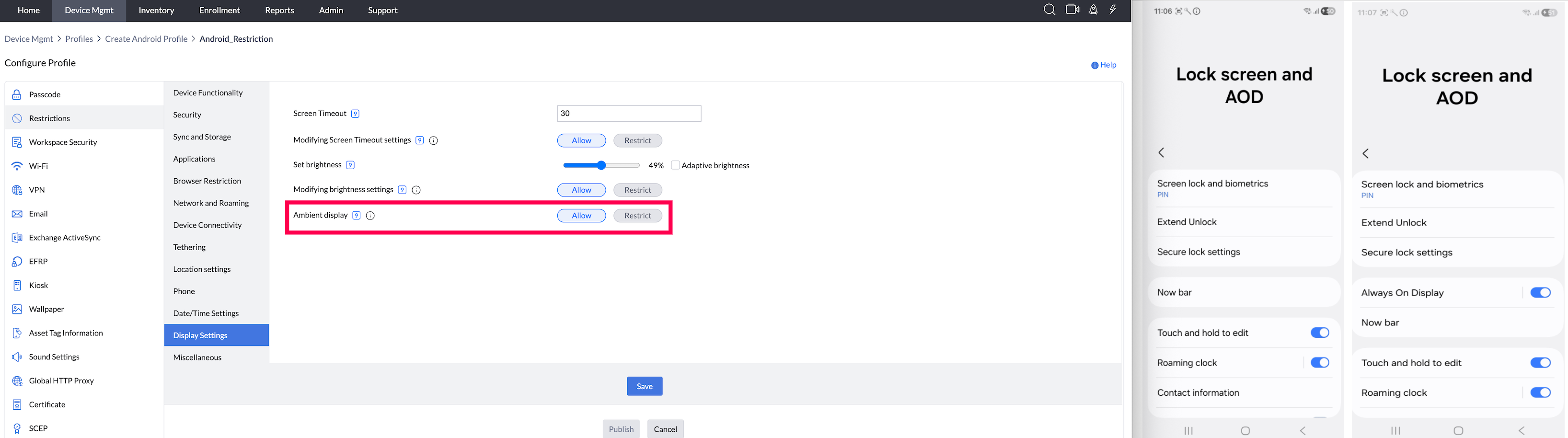
MISCELLANEOUS
- Turn the device off, using Power button (Samsung-only feature, supported from Android 5.0) : By disabling this, users will not be able to turn off their devices using the Power Button.
Supported Management Type: Knox enabled Fully Managed, Knox enabled Legacy devices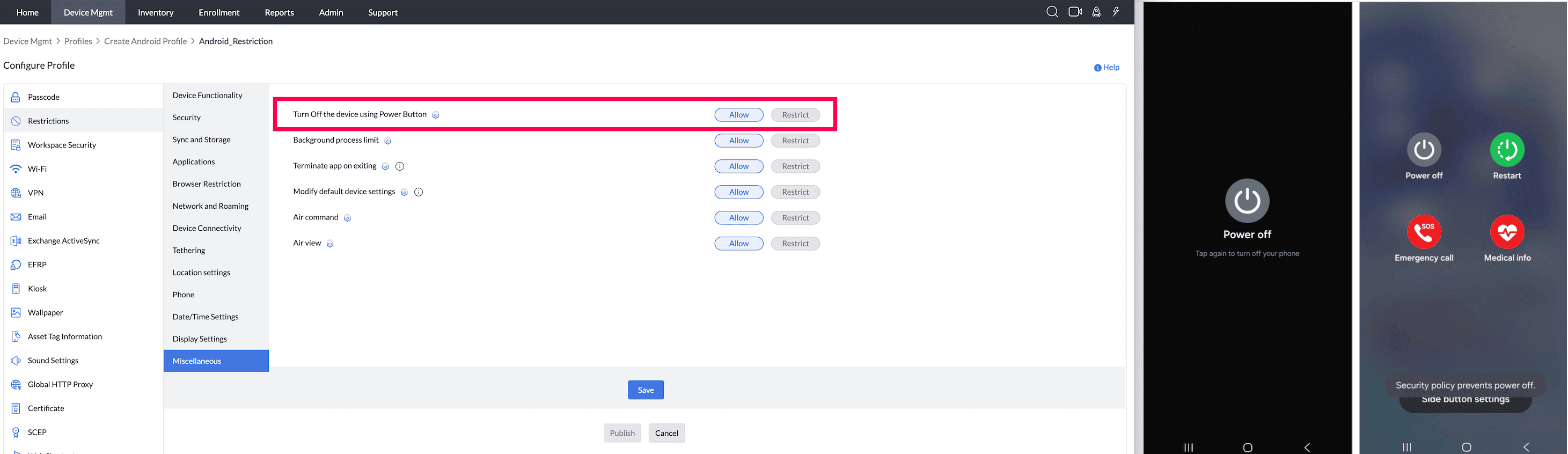
- Background process limit (Samsung-only feature, supported up to Android 5.0) : By enabling this, the background processes running on the device can be enabled/disabled by the user. If disabled, then the background process limit is set to maximum.
Supported Management Type: Knox enabled Fully Managed, and Knox enabled Legacy devices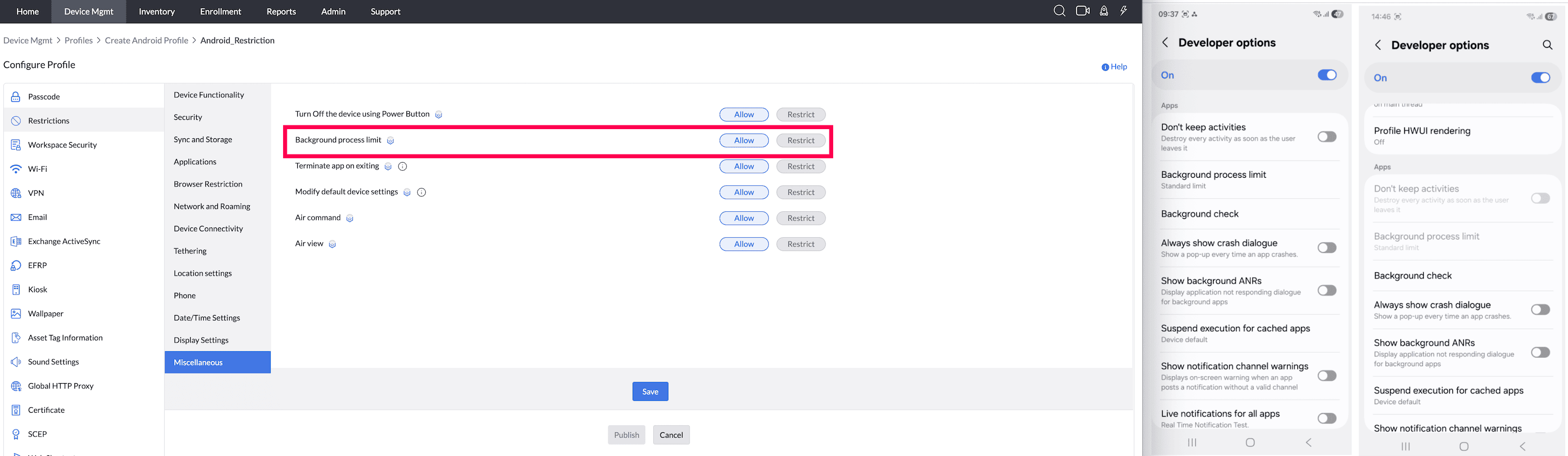
- Terminating app on exiting(Samsung-only feature, supported from Android 5.0) : This setting(Dont keep activities) is restricted in the device by default. If you choose to allow this, users can prefer to enable or disable them.
Supported Management Type: Knox enabled Fully Managed, and Knox enabled Legacy devices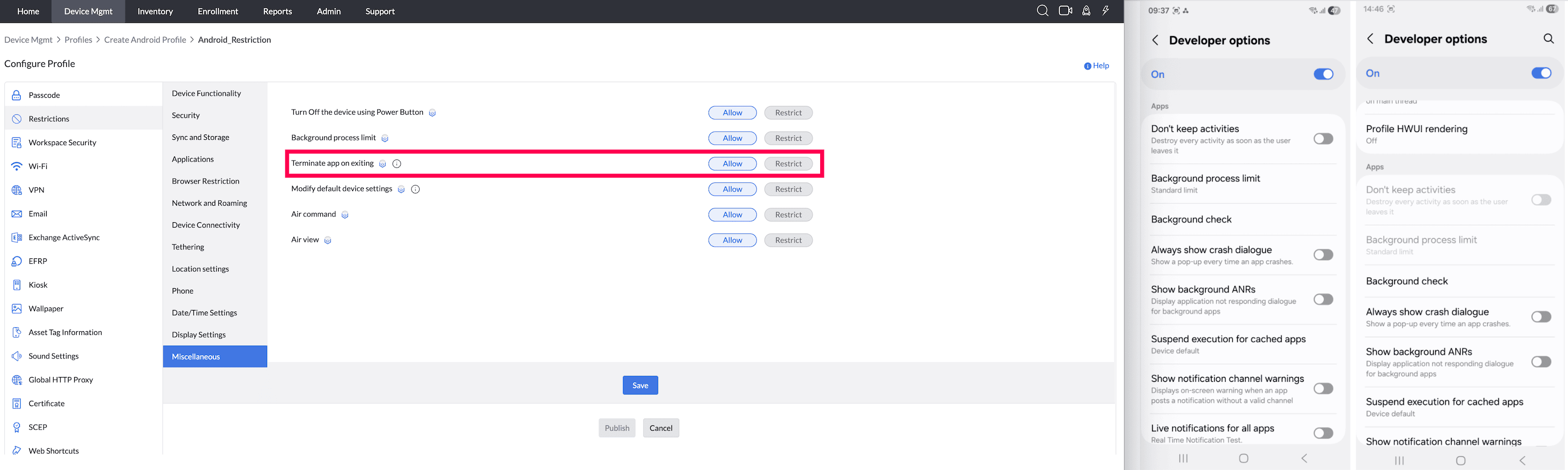
- Modify default device settings (Samsung-only feature) : Restricts access to the Settings app and Quick Settings panel modifications.
Supported Management Type: Knox enabled Fully Managed, and Knox enabled Legacy devices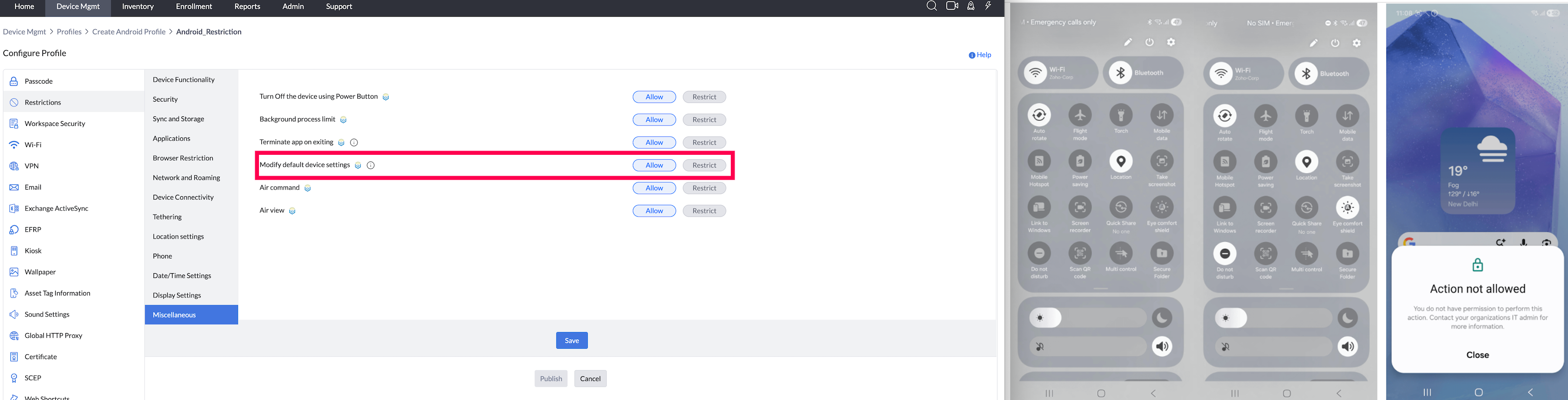
- Air Command (Samsung-only feature, supported from Android 5.0) : Enabling this will allow users to the access features related to S Pen, such as Notepad, virtual keyboard, Memo, etc. This is applicable only for Samsung Knox devices.
Supported Management Type: Knox enabled Fully Managed, and Knox enabled Legacy devices - Smart View (Samsung-only feature, supported from Android 5.0) : Enabling this allows users to view multimedia content present on the device, on a Samsung smart TV.
Supported Management Type: Knox enabled Fully Managed, and Knox enabled Legacy devices
Profile Description Table
Additional details on each section can be found in the Profile Description table below. A tick symbol indicates that a feature is applicable, a cross symbol means it is not supported, and the Knox symbol denotes applicability only for Knox-enrolled devices. Export Profile Description in Tab-Separated Values (.tsv) Format.
Note:For this restriction to work, the certificate must be pushed by the administrator.
- Restricting the option Users can install unapproved apps for an Android device will also prevent the update and installation of Non-Market apps, even if the profiles settings in the MDM console allowed for "Non-Market apps".
- Pre-loaded non-system apps will also be disabled due to this restriction.
- For Work Profile on Company-Owned Devices, restrictions apply only to the Work Container.
Details
| FEATURE | Fully Managed | WORK PROFILE ON PERSONALLY OWNED | FULLY MANAGED WITH WORK PROFILE | LEGACY | |
|---|---|---|---|---|---|
| DEVICE FUNCTIONALITY | |||||
| Camera (Supported from Android 5.0) |  |  | | | |
| Access Camera from Lock Screen (Supported from Android 5.0) | | | | | |
| Access Camera in Personal Space (Supported from Android 5.0) | | | | | |
| Video Recording (Supported from Android 5.0) | * | | |  | |
| Microphone | | | | | |
| Audio Recording (Supported from Android 5.0) | * | | | | |
| Firmware Recovery (Samsung-only feature) | | | | | |
| OS Upgrade (Samsung-only feature, supported from Android 5.0) | | | | | |
| Screen Capture | | | | | |
| Smart Clip Mode (Samsung-only feature, supported from Android 5.0) | | | | | |
| S-Voice (Samsung-only feature, supported from Android 5.0 ) | * | | | * | |
| Add Accounts (Supported from 5.0) | | | | | |
| Enforce Storage Encryption (Supported from Android 5.0) | | | | | |
| Enforce SD Card Encryption (Samsung-only feature, supported from Android 5.0) | | | | | |
| SECURITY | |||||
| Restore Factory Settings | | | | | |
| Lock Screen Notification Preference | | | | | |
| Installing Non-Market apps | | | | | |
| Allow certificate based authentication for managed apps. | | | | | |
| Allow users to install or modify certificates | | | | | |
| Clipboard (Supported from Android 5.0) | | | | | |
| Clipboard Share (Supported from Android 5.0) | * | * | | * | |
| Safe mode (It is supported by Samsung, Personally-Owned Work Profile (BYOD, or previously Profile Owner) and Fully Managed (COSU and COBO, or previously Device Owner) devices from Android 6.0) | | | | | |
| Developer Mode | | | | | |
| 'Share via' list (Samsung-only feature, supported from Android 5.0) | | | | | |
| Google Play Protect | | | | | |
| Auto fill | | | | | |
| SYNC AND STORAGE | |||||
| Google Account Auto-Sync (Samsung-only feature, supported from Android 5.0) | | | | | |
| Report Crash to Google (Samsung-only feature, supported from Android 5.0) | | | | | |
| SD Card | | | | | |
| Storing data in SD Card (Supported from Android 5.0) | | | | | |
| Move apps to SD Card (Samsung-only feature, supported from Android 5.0) | | | | | |
| USB | | | | | |
| Connections using USB | * | | | | |
| Connect a USB storage device | * | | | * | |
| APPLICATIONS | |||||
| Users can install only approved apps | | | | | |
| Allow access to all apps under Managed Google Play | | | | | |
| Uninstalling apps (Supported from Android 5.0) | | | | | |
| Stop system apps (Samsung-only feature, supported from Android 5.0) | | | | | |
| Application notification mode (Samsung-only feature, supported from Android 5.0) | | | | | |
| Restrict force stop and clear storage settings for the specified app(s) | | | | | |
| Global App Permission policy | | | | | |
| BROWSER (Applicable only for Google Chrome in legacy) | |||||
| Android browser | | | | | |
| Fraud warning settings | | | | | |
| Pop-ups | | | | | |
| JavaScript | | | | | |
| Auto-fill | | | | | |
| Cookies | | | | | |
| NETWORK AND ROAMING | |||||
| Airplane Mode (supported for Samsung and devices running Android 9.0 and above) | | | | | |
| Background data (Samsung-only feature) | | | | | |
| Data Saver Mode (Samsung-only feature) | | | | | |
| Wi-Fi | | Whole Device | | | |
| Wi-Fi Direct (Samsung-only feature - Supported from Android 5.0) | | | | | |
| Connecting to Wi-Fi, only if distributed via MDM (Supported from Android 5.0 and above) | | Whole Device | | | |
| Restrict users from connecting to unsecure public Wi-Fi networks: | | | | | |
| Allow users to configure VPN (Supported from Android 5.0) | | | | | |
| Roaming data (Samsung-only feature) | | | | | |
| Sync data while Roaming (Samsung-only feature) | | | | | |
| Roaming Push (Samsung-only feature) | | | | | |
| Voice Call while Roaming (Samsung-only feature, supported from Android 5.0) | | | | | |
| DEVICE CONNECTIONS | |||||
| NFC | | | | | |
| Android Beam (Supported from Android 5.0) | | | | | |
| S Beam (Samsung-only feature, supported up to Android 5.0) | | | | | |
| Bluetooth | | Whole Device | | | |
| Bluetooth discovery (Samsung-only feature) | | | | | |
| Bluetooth pairing (Samsung-only feature) | | | | | |
| Make outgoing calls using Bluetooth (Samsung-only feature) | | | | | |
| Connect to Laptop/Desktop via Bluetooth (Samsung-only feature) | | | | | |
| Data transfer via Bluetooth (Samsung-only feature) | | | | | |
| Printing (Supported from Android 9.0) | | | | | |
| TETHERING | |||||
| Tethering | | | | | |
| Bluetooth Tethering | * | | | * | |
| Wi-Fi Tethering | * | | | * | |
| USB Tethering | * | | | * | |
| LOCATION SERVICES | |||||
| Location Services (Supported in legacy from OS 5.0) | | | | | |
| Mock location (Samsung-only feature) | | | | | |
| Google Maps | | | | | |
| PHONE | |||||
| SMS (Supported from Android 5.0 in Samsung devices) | | | | | |
| Incoming SMS (Supported up to Android 5.0 in Samsung devices) | | | | | |
| Outgoing SMS (Supported from Android 5.0 in Samsung devices) | | | | | |
| MMS (Supported from Android 5.0 in Samsung devices) | | | | | |
| Incoming MMS (Supported from Android 5.0 in Samsung devices) | | | | | |
| Outgoing MMS (Supported from Android 5.0 in Samsung devices) | | | | | |
| Call (Samsung-only feature) | | | | | |
| Incoming Call (Samsung-only feature) | | | | | |
| Outgoing Call | | | | | |
| DATE/TIME SETTINGS | |||||
| Set device time (Supported from Android 9.0 and above) | | | | | |
| Timezone (Supported from Android 9.0 and above) | | | | | |
| Modify date/time settings (Supported from Android 9.0 and above) | | | | | |
| Modify date/time (Supported from Android 5.0 in Samsung devices) | | | | | |
| DISPLAY SETTINGS (Supported from Android 9.0) | |||||
| Screen Timeout | | | | | |
| Modify Screen Timeout Settings | | | | | |
| Brightness | | | | | |
| Modify Brightness Settings | | | | | |
| Ambient Display | | | | | |
| MISCELLANEOUS | |||||
| Turn the device off, using Power button (Samsung-only feature, supported from Android 5.0) | | | | | |
| Background process limit (Samsung-only feature, supported up to Android 5.0) | | | | | |
| Terminating app on exiting (Samsung-only feature, supported from Android 5.0) | | | | | |
| Modify default device settings (Samsung-only feature) | | | | | |
| Air Command (Samsung-only feature, supported from Android 5.0) | | | | | |
| Smart View (Samsung-only feature, supported from Android 5.0) | | | | | |
Frequently Asked Questions
- How to prevent Gmail app from bypassing MDM content sharing restrictions?
For BYOD devices enrolled as Personally-Owned Work Profile (BYOD, or previously Profile Owner), sharing managed data between the Work Profile and unmanaged apps is restricted by default. To tighten this further, configure a Workspace Security profile and restrict sharing between work and personal space, disable clipboard sharing, and restrict app connectivity.
On managed Android devices, you can also use Restrict Specific Accounts under Profiles → Android → Restrictions to block personal Google or Gmail accounts from being added to the device.
- Can the device time be set remotely using MDM?
Yes, administrators can remotely configure the device time and timezone using a Restrictions profile in MDM.
Steps:
- Navigate to Profiles → Restrictions → Date/Time Settings.
- Under Set device time, select "Select timezone manually" from the dropdown.
- Choose the appropriate Timezone from the list (e.g., UTC+02:00 — CAT).
- Set Modify date/time to Restrict to prevent end users from manually changing the time on the device. Note: The Modify date/time restriction is supported only on Knox enabled Fully Managed devices and Knox enabled Legacy devices.
- Save and distribute the profile to the target devices or groups.
Once the profile is applied, the device time will automatically reflect the configured timezone. This is especially useful for managing devices deployed across different regions or ensuring consistent time settings for compliance purposes.
- Why does app uninstall behavior differ even after configuring the "Allow Uninstalling Apps" restriction?
Some apps can be uninstalled even when uninstalling is restricted, while others cannot be uninstalled even when it's allowed. This is because app distribution settings always take priority over the restriction profile.
- When set to Allow, users can uninstall apps from the device.
- On Fully Managed Devices, enabling this prevents users from uninstalling apps they installed themselves.
- On Company-Owned Work Profile Devices, this restriction applies only to apps inside the Work Profile.
- If you chose Silent Installation with "Restrict users from uninstalling the app" enabled, the app cannot be uninstalled regardless of the restriction profile.
- If you chose Silent Installation without restricting uninstall, users can uninstall the app even if the restriction profile says otherwise.
Frequently Asked Questions
- How to prevent Gmail app from bypassing MDM content sharing restrictions?
For BYOD devices enrolled as Personally-Owned Work Profile (BYOD, or previously Profile Owner), sharing managed data between the Work Profile and unmanaged apps is restricted by default. To tighten this further, configure a Workspace Security profile and restrict sharing between work and personal space, disable clipboard sharing, and restrict app connectivity.
On managed Android devices, you can also use Restrict Specific Accounts under Profiles → Android → Restrictions to block personal Google or Gmail accounts from being added to the device.
- Can the device time be set remotely using MDM?
Yes, administrators can remotely configure the device time and timezone using a Restrictions profile in MDM.
Steps:
- Navigate to Profiles → Restrictions → Date/Time Settings.
- Under Set device time, select "Select timezone manually" from the dropdown.
- Choose the appropriate Timezone from the list (e.g., UTC+02:00 — CAT).
- Set Modify date/time to Restrict to prevent end users from manually changing the time on the device.
- Save and distribute the profile to the target devices or groups.
Once the profile is applied, the device time will automatically reflect the configured timezone. This is especially useful for managing devices deployed across different regions or ensuring consistent time settings for compliance purposes.
- Why does app uninstall behavior differ even after configuring the "Allow Uninstalling Apps" restriction?
Some apps can be uninstalled even when uninstalling is restricted, while others cannot be uninstalled even when it's allowed. This is because app distribution settings always take priority over the restriction profile.
- When set to Allow, users can uninstall apps from the device.
- On Fully Managed Devices, enabling this prevents users from uninstalling apps they installed themselves.
- On Company-Owned Work Profile Devices, this restriction applies only to apps inside the Work Profile.
- If you chose Silent Installation with "Restrict users from uninstalling the app" enabled, the app cannot be uninstalled regardless of the restriction profile.
- If you chose Silent Installation without restricting uninstall, users can uninstall the app even if the restriction profile says otherwise.