IPMI-based monitoring with OpManager

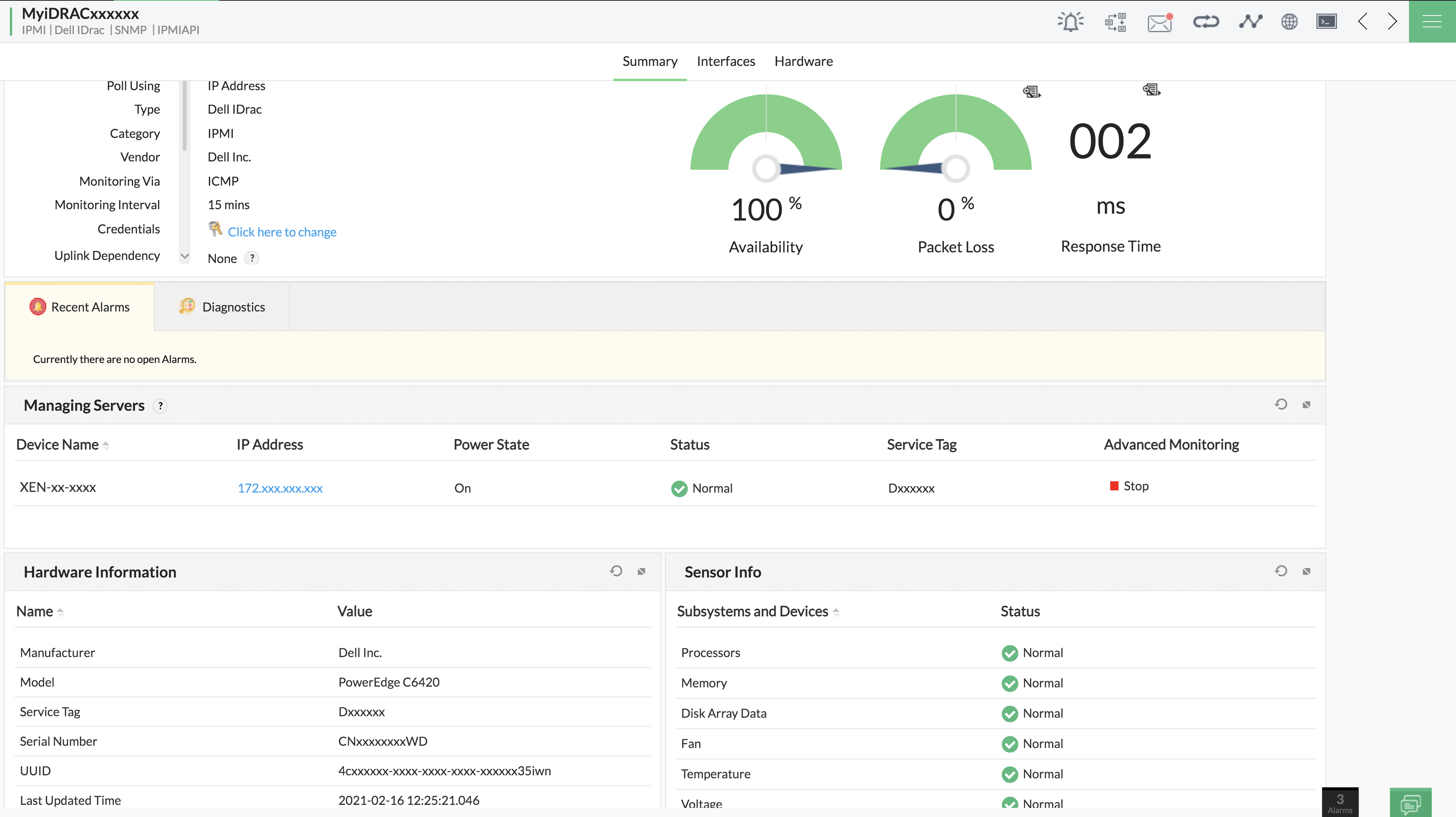
IPMI (Intelligent Platform Management Interface) monitoring enables users to seamlessly observe and manage server well-being, independent of the status of the device (the host system's CPU/firmware/operating system). Using IPMI, you can comprehensively monitor your devices' hardware health constantly. With IPMI, administrators gain the ability to receive alerts and notifications, enabling a prompt response to potential issues.
This help document includes a comprehensive list of vendors and protocols supported by OpManager for IPMI monitoring.
Supported vendors and protocols
Currently, OpManager supports the following vendor-protocol combinations for IPMI monitoring:
- Dell iDrac:
- SNMP: using MIB IDRAC-MIB-SMIv2.mib
- API: using version 8 or above
- HP iLO: Using API
- IBM IMM: Using SNMP MIB IMM.mib
- Supermicro: Using API
- Huawei:
- SNMP: using MIB HUAWEI-SERVER-IBMC-MIB.mib
- Using API
- H3C: Using SNMP MIB HH3C-SERVER-AGENT-MIB
- Lenovo : Using SNMP lenovo-XCC-MIB
OIDs/APIs used for data collection:
Dell iDrac:
- SNMP:
These are the OIDs from the IDRAC-MIB-SMIv2.mib that are used for hardware data collection:
- Manufacturer - .1.3.6.1.4.1.674.10892.5.1.1.4
- Model - .1.3.6.1.4.1.674.10892.5.1.3.12
- ServiceTag - .1.3.6.1.4.1.674.10892.5.1.3.2
- OS - .1.3.6.1.4.1.674.10892.5.1.3.6
- OS Version - .1.3.6.1.4.1.674.10892.5.1.3.14
Category Units Sensor Name Sensor Status Sensor Value Fan RPM .1.3.6.1.4.1.674.10892.5.4.700.12.1.8 .1.3.6.1.4.1.674.10892.5.4.700.12.1.5 .1.3.6.1.4.1.674.10892.5.4.700.12.1.6 Temperature degree C .1.3.6.1.4.1.674.10892.5.4.700.20.1.8 .1.3.6.1.4.1.674.10892.5.4.700.20.1.5 .1.3.6.1.4.1.674.10892.5.4.700.20.1.6 Power Watts .1.3.6.1.4.1.674.10892.5.4.600.12.1.8 .1.3.6.1.4.1.674.10892.5.4.600.12.1.5 .1.3.6.1.4.1.674.10892.5.4.600.12.1.6 Voltage Volts .1.3.6.1.4.1.674.10892.5.4.600.20.1.8 .1.3.6.1.4.1.674.10892.5.4.600.20.1.5 NIL Processors MHz .1.3.6.1.4.1.674.10892.5.4.1100.30.1.8 .1.3.6.1.4.1.674.10892.5.4.1100.30.1.5 .1.3.6.1.4.1.674.10892.5.4.1100.30.1.12 Memory MB .1.3.6.1.4.1.674.10892.5.4.1100.50.1.8 .1.3.6.1.4.1.674.10892.5.4.1100.50.1.5 .1.3.6.1.4.1.674.10892.5.4.1100.50.1.14 Battery -NA- .1.3.6.1.4.1.674.10892.5.4.600.50.1.7 .1.3.6.1.4.1.674.10892.5.4.600.50.1.5 .1.3.6.1.4.1.674.10892.5.4.600.50.1.6 Disk array data MB .1.3.6.1.4.1.674.10892.5.5.1.20.130.4.1.55 .1.3.6.1.4.1.674.10892.5.5.1.20.130.4.1.4 .1.3.6.1.4.1.674.10892.5.5.1.20.130.4.1.17 - API:
The base API call used for monitoring iDrac devices is:
/redfish/v1/systems/system.embedded.1/Based on the set of sensors that need to be monitored, the last part of the API is modified.
Category Units API to get sensor details Fan, Temperature RPM (fan), degree C (temperature) /redfish/v1/Chassis/System.Embedded.1/Thermal/ Power, Voltage Watts (power), Volts (Voltage) /redfish/v1/Chassis/System.Embedded.1/Power/ Processors MHz /redfish/v1/Systems/System.Embedded.1/Processors/ Memory MB /redfish/v1/Systems/System.Embedded.1/Memory/ Disk array data MB /redfish/v1/Systems/System.Embedded.1/Storage/
HP iLO (using API):
IPMI Hardware monitoring in HP iLO devices is performed using the base API call:
/redfish/v1/systems/1/
The different APIs used for hardware systems in the HP device is as listed below:
| Category | Units | APIs to get Sensor Details |
| Fan, Temperature | Percentage (fan), degree C (temperature) | /redfish/v1/Chassis/1/Thermal/ |
| Power | Watts | /redfish/v1/Chassis/1/Power/ |
| Processors | MHz | /redfish/v1/Systems/1/Processors/ |
| Memory | MB | /redfish/v1/Systems/1/Memory/ |
| Disk array data | MB | /redfish/v1/Systems/1/Storage/ - To get SSD details /redfish/v1/Systems/1/SmartStorage/ArrayControllers/ - To get HDD details |
IBM IMM (using SNMP):
The OIDs used for IPMI-based hardware monitoring under the IMM.mib are as follows:
- Model - .1.3.6.1.4.1.2.3.51.3.1.5.2.1.2
- Serialnumber - .1.3.6.1.4.1.2.3.51.3.1.5.2.1.3
- UUID - .1.3.6.1.4.1.2.3.51.3.1.5.2.1.4
| Category | Units | Sensor Name | Sensor Status | Sensor Value |
| Fan | Percentage | .1.3.6.1.4.1.2.3.51.3.1.3.2.1.2 | .1.3.6.1.4.1.2.3.51.3.1.3.2.1.10 | .1.3.6.1.4.1.2.3.51.3.1.3.2.1.3 |
| Temperature | degree C | .1.3.6.1.4.1.2.3.51.3.1.1.2.1.2 | .1.3.6.1.4.1.2.3.51.3.1.1.2.1.11 | .1.3.6.1.4.1.2.3.51.3.1.1.2.1.3 |
| Power | Watts | .1.3.6.1.4.1.2.3.51.3.1.11.2.1.2 | .1.3.6.1.4.1.2.3.51.3.1.11.2.1.6 | NIL |
| Voltage | Volts | .1.3.6.1.4.1.2.3.51.3.1.2.2.1.2 | .1.3.6.1.4.1.2.3.51.3.1.2.2.1.11 | .1.3.6.1.4.1.2.3.51.3.1.2.2.1.3 |
| Processors | Mhz | .1.3.6.1.4.1.2.3.51.3.1.5.20.1.2 | .1.3.6.1.4.1.2.3.51.3.1.5.20.1.11 | .1.3.6.1.4.1.2.3.51.3.1.5.20.1.3 |
| Memory | MB | .1.3.6.1.4.1.2.3.51.3.1.5.21.1.2 | .1.3.6.1.4.1.2.3.51.3.1.5.21.1.8 | .1.3.6.1.4.1.2.3.51.3.1.5.21.1.7 |
| Disk array data | MB | .1.3.6.1.4.1.2.3.51.3.1.12.2.1.2 | .1.3.6.1.4.1.2.3.51.3.1.12.2.1.3 | NIL |
SuperMicro (Using API):
SuperMicro devices are monitored by using the base call API: /redfish/v1/Systems/1
Based on the set of sensors that need to be monitored, the last part of the API is modified as follows:
| Category | Units | APIs to get sensor details |
| Fan, Temperature | rpm(fan), degree C(temperature) | /redfish/v1/Chassis/1/Thermal |
| Power, Voltage | Watts(power), Volts(Voltage) | /redfish/v1/Chassis/1/Power |
| Processors | Watts | /redfish/v1/Systems/1/Processors |
| Memory | MB | /redfish/v1/Systems/1/Memory (For higher versions) /redfish/v1/Systems/1 (For lower versions) |
| Disk array data | MB | /redfish/v1/Systems/1/SimpleStorage |
Huawei:
- SNMP:
These are the OIDs from the HUAWEI-SERVER-IBMC-MIB.mib that are used for hardware data collection:
- Serial Number - .1.3.6.1.4.1.2011.2.235.1.1.1.7
- UUID - .1.3.6.1.4.1.2011.2.235.1.1.1.22
Category Units Sensor Name Sensor Status Sensor Value Fan RPM .1.3.6.1.4.1.2011.2.235.1.1.8.50.1.7 .1.3.6.1.4.1.2011.2.235.1.1.8.50.1.4 .1.3.6.1.4.1.2011.2.235.1.1.8.50.1.2 Temperature degree C .1.3.6.1.4.1.2011.2.235.1.1.26.50.1.2 Nil .1.3.6.1.4.1.2011.2.235.1.1.26.50.1.3 Power Watts .1.3.6.1.4.1.2011.2.235.1.1.6.50.1.13 .1.3.6.1.4.1.2011.2.235.1.1.6.50.1.7 .1.3.6.1.4.1.2011.2.235.1.1.6.50.1.8 Processors MHz .1.3.6.1.4.1.2011.2.235.1.1.15.50.1.10 .1.3.6.1.4.1.2011.2.235.1.1.15.50.1.6 .1.3.6.1.4.1.2011.2.235.1.1.15.50.1.5 Memory MB .1.3.6.1.4.1.2011.2.235.1.1.16.50.1.10 .1.3.6.1.4.1.2011.2.235.1.1.16.50.1.6 .1.3.6.1.4.1.2011.2.235.1.1.16.50.1.4 Disk array data MB .1.3.6.1.4.1.2011.2.235.1.1.18.50.1.6 .1.3.6.1.4.1.2011.2.235.1.1.18.50.1.3 .1.3.6.1.4.1.2011.2.235.1.1.18.50.1.12 - API:
The base API call used for monitoring Huawei devices is:
/redfish/v1/Systems/1Based on the set of sensors that need to be monitored, the last part of the API is modified.
Category Units API to get sensor details Fan, Temperature RPM (fan), degree C (temperature) /redfish/v1/Chassis/1/Thermal Power, Voltage Watts (power), Volts (Voltage) /redfish/v1/Chassis/1/Power Processors MHz /redfish/v1/Systems/1/Processors Memory MB /redfish/v1/Systems/1/Memory
H3C:
The OIDs used for IPMI-based hardware monitoring under the HH3C-SERVER-AGENT-MIB are as follows:
- Manufacturer - .1.3.6.1.4.1.25506.13.1.2.2.8.2
- UUID - .1.3.6.1.4.1.25506.13.1.2.2.8.3
| Category | Units | Sensor Name | Sensor Status | Sensor Value |
| Fan | rpm | .1.3.6.1.4.1.25506.13.1.2.1.1.10.1.1.2 | .1.3.6.1.4.1.25506.13.1.2.1.1.10.1.1.8 | .1.3.6.1.4.1.25506.13.1.2.1.1.10.1.1.5 |
| Temperature | degree C | .1.3.6.1.4.1.25506.13.1.2.1.1.11.3.1.3 | .1.3.6.1.4.1.25506.13.1.2.1.1.11.3.1.6 | .1.3.6.1.4.1.25506.13.1.2.1.1.11.3.1.4 |
| Power | Watts | .1.3.6.1.4.1.25506.13.1.2.1.1.7.1.1.1.14 | .1.3.6.1.4.1.25506.13.1.2.1.1.7.1.1.1.13 | .1.3.6.1.4.1.25506.13.1.2.1.1.7.1.1.1.10 |
| Processors | Mhz | .1.3.6.1.4.1.25506.13.1.2.1.1.1.1.1.15 | .1.3.6.1.4.1.25506.13.1.2.1.1.1.1.1.14 | .1.3.6.1.4.1.25506.13.1.2.1.1.1.1.1.3 |
| Memory | MB | .1.3.6.1.4.1.25506.13.1.2.1.1.2.2.1.4 | .1.3.6.1.4.1.25506.13.1.2.1.1.2.2.1.16 | .1.3.6.1.4.1.25506.13.1.2.1.1.2.2.1.6 |
| Disk array data | MB | .1.3.6.1.4.1.25506.13.1.2.1.1.9.3.1.12 | .1.3.6.1.4.1.25506.13.1.2.1.1.9.3.1.11 | .1.3.6.1.4.1.25506.13.1.2.1.1.9.3.1.9 |
Lenovo:
These are the OIDs from Lenovo XCC MIB that are used for hardware data collection:
- Manufacturer - .1.3.6.1.4.1.19046.11.1.1.5.2.1.5
- Model - .1.3.6.1.4.1.19046.11.1.1.5.2.1.2
- UUID - .1.3.6.1.4.1.19046.11.1.1.5.2.1.4
- Serial number - .1.3.6.1.4.1.19046.11.1.1.5.2.1.3
| Category | Units | Sensor Name | Sensor Status | Sensor Value |
|---|---|---|---|---|
| Fan | Percentage | .1.3.6.1.4.1.19046.11.1.1.3.2.1.2 | .1.3.6.1.4.1.19046.11.1.1.3.2.1.10 | .1.3.6.1.4.1.19046.11.1.1.3.2.1.3 |
| Temperature | degrees C | .1.3.6.1.4.1.19046.11.1.1.1.2.1.2 | .1.3.6.1.4.1.19046.11.1.1.1.2.1.11 | .1.3.6.1.4.1.19046.11.1.1.1.2.1.3 |
| Power | Watts | .1.3.6.1.4.1.19046.11.1.1.11.2.1.2 | .1.3.6.1.4.1.19046.11.1.1.11.2.1.6 | .1.3.6.1.4.1.19046.11.1.1.11.2.1.6 |
| Processors | MHz | .1.3.6.1.4.1.19046.11.1.1.5.20.1.2 | .1.3.6.1.4.1.19046.11.1.1.5.20.1.11 | .1.3.6.1.4.1.19046.11.1.1.5.20.1.3 |
| Memory | MB | .1.3.6.1.4.1.19046.11.1.1.5.21.1.2 | .1.3.6.1.4.1.19046.11.1.1.5.21.1.8 | .1.3.6.1.4.1.19046.11.1.1.5.21.1.7 |
| Disk array data | MB | .1.3.6.1.4.1.19046.11.1.1.12.2.1.2 | .1.3.6.1.4.1.19046.11.1.1.12.2.1.3 | .1.3.6.1.4.1.19046.11.1.1.12.2.1.3 |
Alerts based on hardware status codes
The following list covers the status codes corresponding to each vendor-protocol combination and specifies the criticality of alerts triggered based on these codes.
- Dell iDrac (SNMP)
Disk array data:
- Unknown - 1, 4, 8
- Clear - 2, 3, 10
- Attention - 5, 9
- Trouble - 6
- Critical - 7
Other sensors:
- Unknown - 1, 2
- Clear - 3, 4
- Critical - 5
- Trouble - 6
- Dell iDrac (API)
- Unknown - if the status string contains "null"
- Clear - if the status string contains "OK"
- Critical - if the status string contains "Critical"
- Attention - if the status string contains "Warning"
- IBM IMM (SNMP)
Since status messages are passed as strings in IMM, only the following criticalities can be raised in the related alerts:
- Unknown - if the status string contains "Unknown"
- Clear - if the status string contains "Normal"
- Attention -if the status string contains "Warning"
- Critical -if the status string contains "Error" or "Critical"
- HP iLO (API)
- Unknown - if the status string contains "null"
- Clear - if the status string contains "OK"
- Critical - if the status string contains "Critical"
- Attention - if the status string contains "Warning"
HP iLO4 is the fourth generation in the iLO series and, below are the status strings that correspond to its respective memory status.
- Unknown - if the status string contains any of the following.
- "Other"
- "NotPresent"
- "NotSupported"
- "DoesNotMatch"
- Clear - if the status string contains any of the following:
- "GoodInUse"
- "AddedButUnused"
- "GoodPartiallyInUse"
- "PresentSpare"
- "PresentUnused"
- "UpgradedButUnused"
- Attention - if the status string contains any of the following:
- "ConfigurationError"
- "Degraded"
- "ExpectedButMissing"
- SuperMicro
- Unknown - if the status string contains "null"
- Clear - if the status string contains "OK"
- Critical - if the status string contains "Critical"
- Attention - if the status string contains "Warning"
- SuperMicro
- Unknown - if the status string contains "null"
- Clear - if the status string contains "OK"
- Critical - if the status string contains "Critical"
- Attention - if the status string contains "Warning"
- Huawei (SNMP)
- Unknown - 5, 6
- Clear - 1
- Critical - 4
- Attention - 2
- Trouble - 3
- Huawei (API)
- Unknown - if the status string contains "null" or "Unknown"
- Clear - if the status string contains "OK"
- Critical - if the status string contains "Critical"
- Attention - if the status string contains "Warning"
- H3C
- Unknown - 0, 1
- Clear - 2
- Critical - 5
- Attention - 3
- Trouble - 4
- Lenovo
- Clear - if the status string contains "Normal"
- Critical - if the status string contains "Critical"
- Attention - if the status string contains "Warning"