1 Million+ users worldwide

Why switch monitoring matters in modern networks?

Switch monitoring is the practice of continuously tracking the health, performance, and connectivity of network switches: the backbone of every modern IT environment. As businesses scale, embrace hybrid work, and add more connected devices, switches quietly handle an ever-growing load.

For today’s IT admins and business owners, effective switch monitoring means staying ahead of issues, diagnosing faults quickly, and ensuring the network runs smoothly without interruptions. OpManager brings all of this together into a single, intelligent platform.

Supercharge network reliability with smarter switch monitoring

01

Get instant switch health insights from the snapshot page

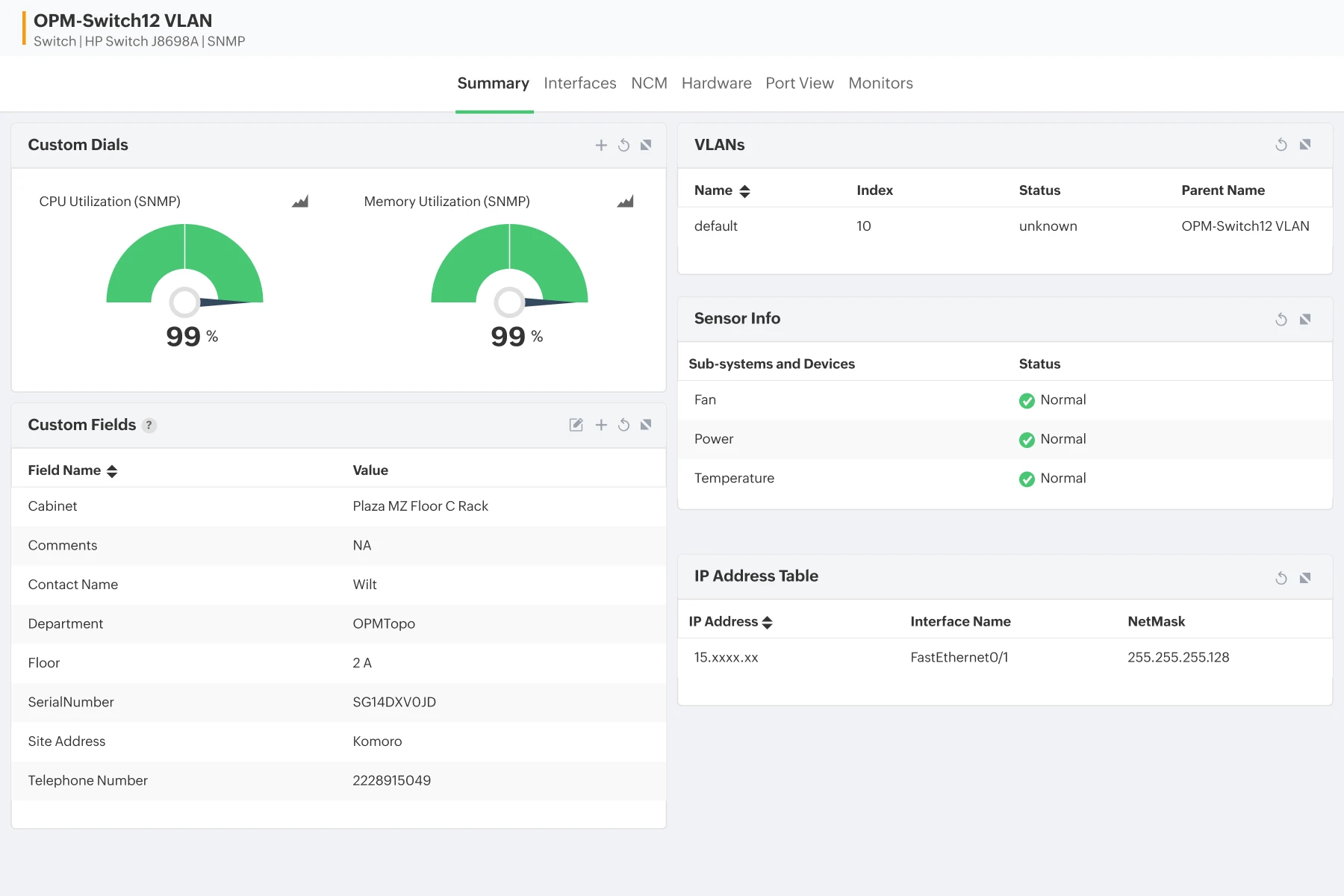
  • Real-Time Metrics: Spot availability drops and performance degradations early with real-time views of response time, latency, and packet loss. The snapshot page helps admins isolate switch-level issues especially when CRC errors or duplex-related symptoms start surfacing.
  • Load Monitoring: Track critical switch load at a glance using customizable dials for CPU and memory. This helps IT teams quickly correlate performance dips with interface congestion, unexpected traffic bursts, or speed-negotiation issues.
  • Custom Views: Build a personalized view of switch health by adding VLAN widgets, sensor metrics, environmental indicators, and more helping teams respond faster during bandwidth surges or sudden topology changes.
Get instant switch health insights from the snapshot page
Unlock accurate traffic insights with end-to-end interface monitoring
02

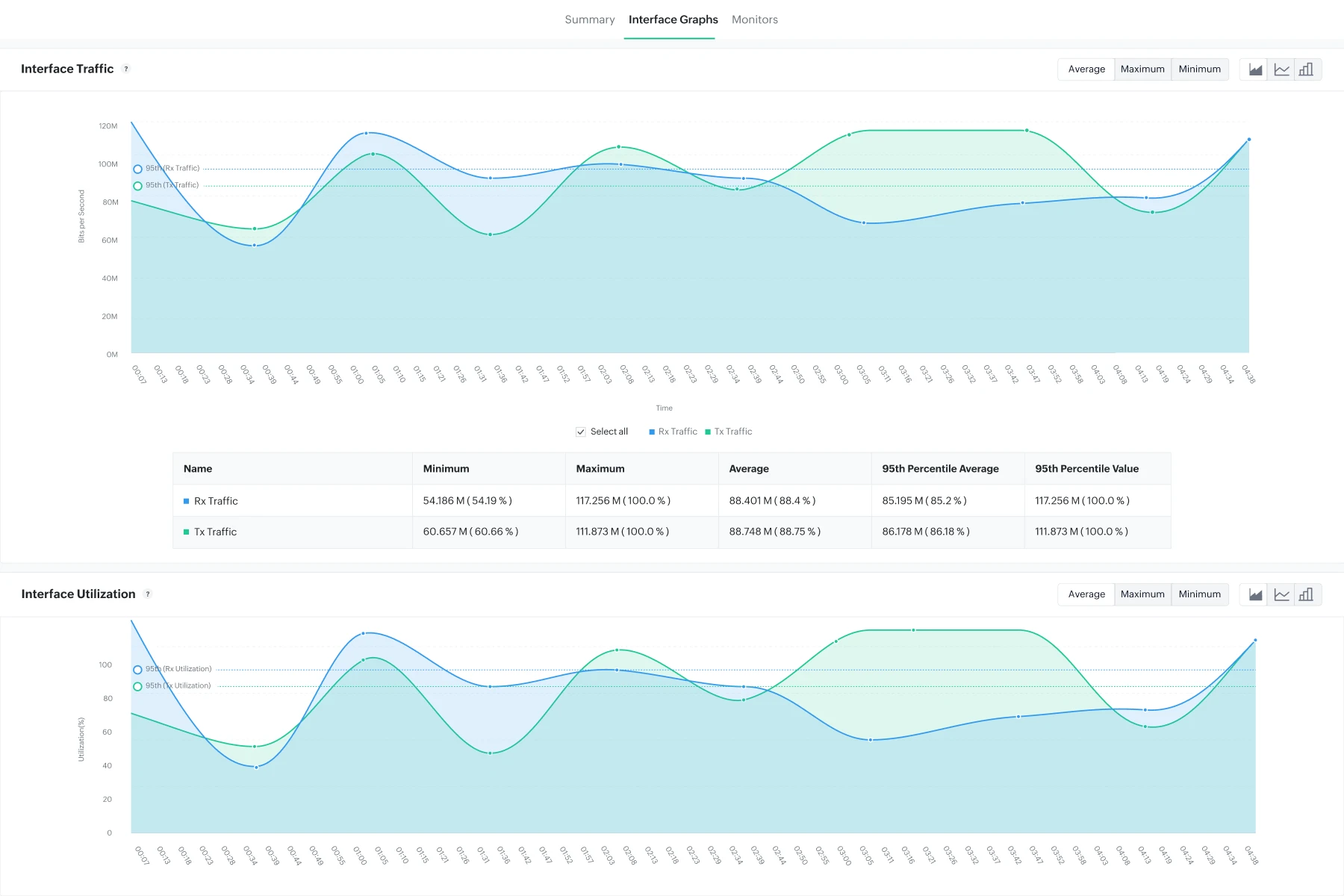
Unlock accurate traffic insights with end-to-end interface monitoring

  • Traffic Trends: Visualize Rx/Tx traffic trends across all interfaces, instantly exposing congestion, chatty devices, or bandwidth saturation. OpManager helps admins catch interface overutilization before it affects business-critical applications.
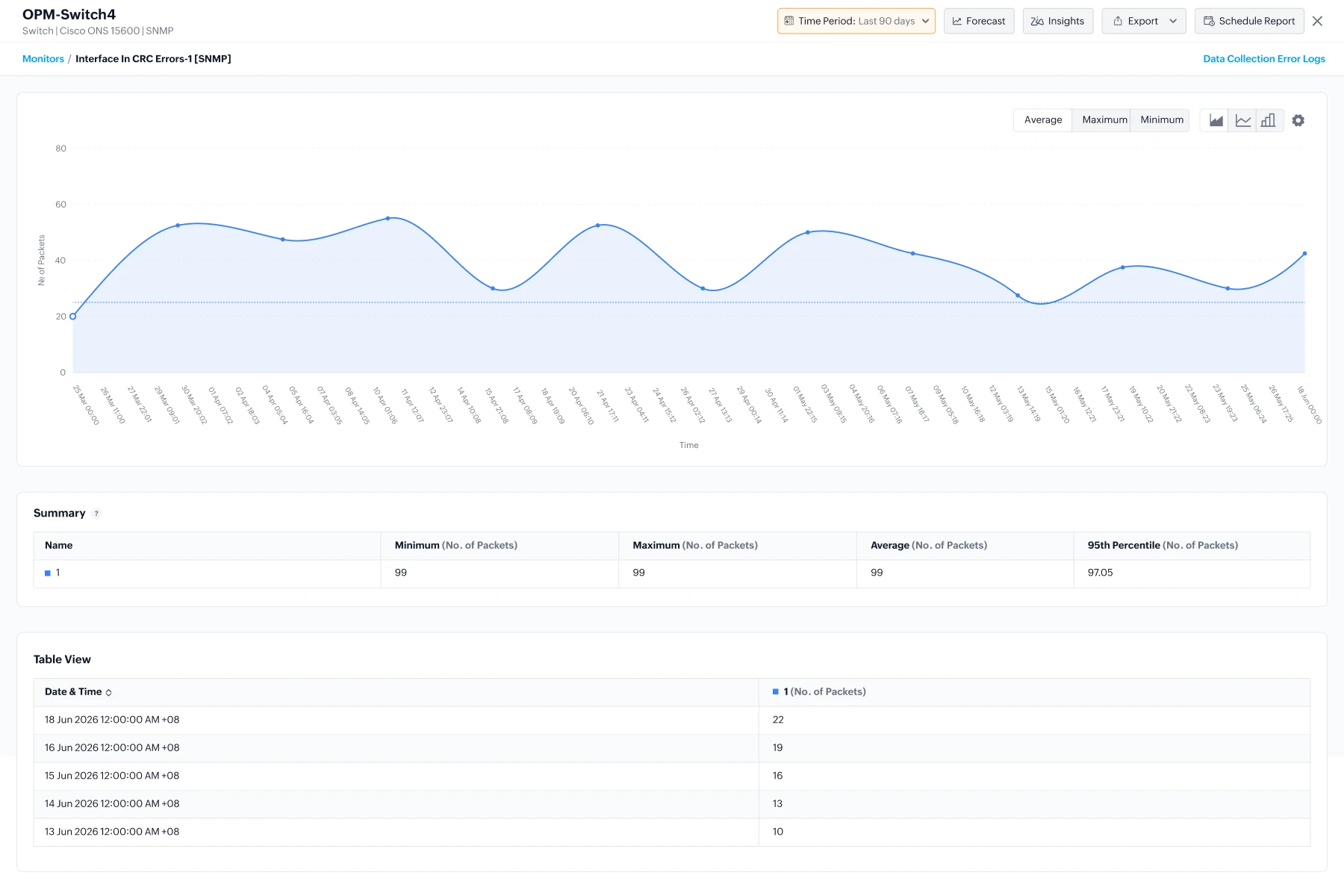
  • Error Detection: Drill into each interface to uncover deeper anomalies from rising CRC errors and discards to speed mismatches and duplex mismatch patterns that slow down endpoints. These intuitive graphs help teams troubleshoot proactively.
  • Capacity Planning: Plan upgrades with confidence. ML driven utilization forecasts help teams anticipate bandwidth growth, justify capacity expansions, and balance traffic across interfaces.
03

Monitor hardware sensors to prevent switch outages

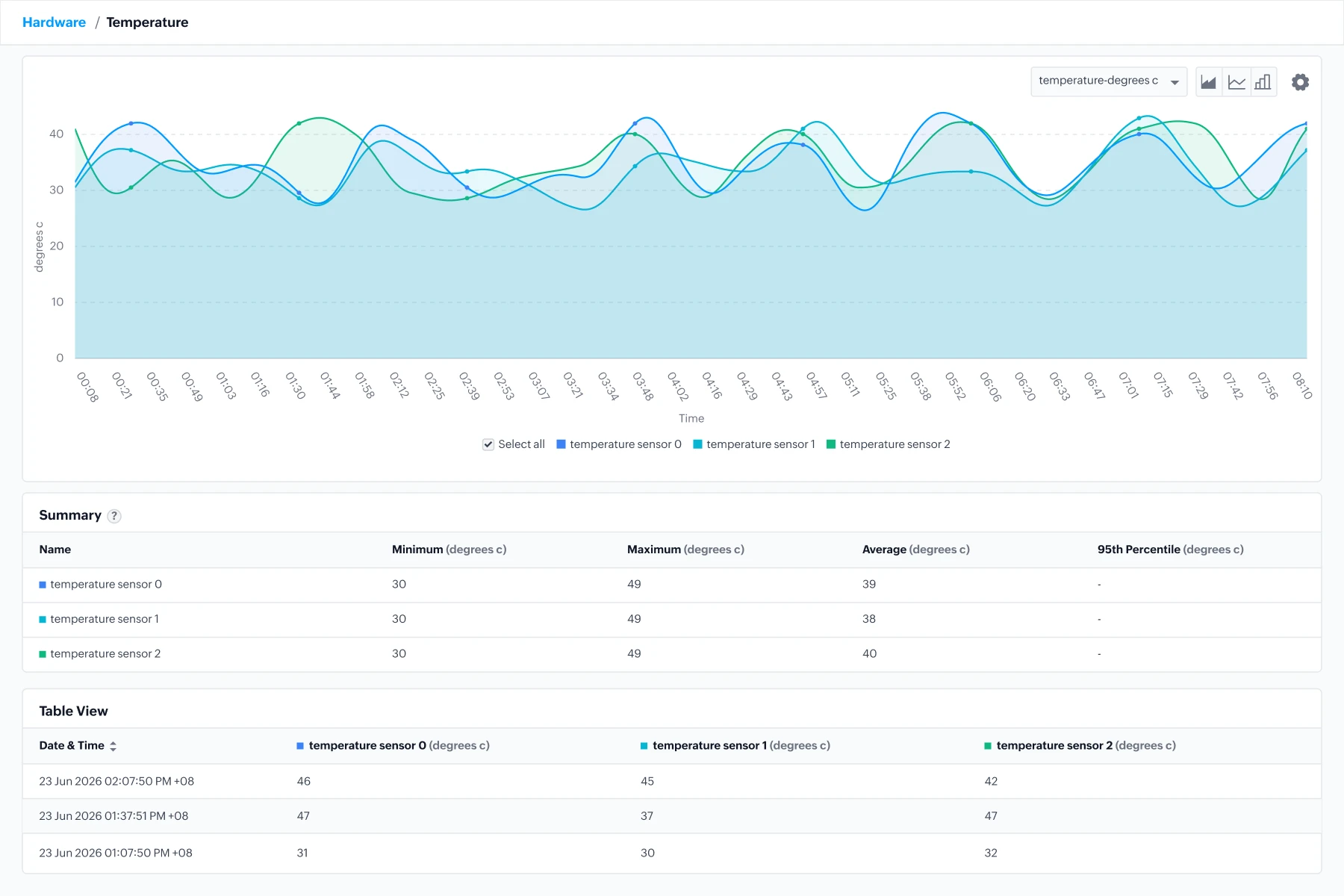
  • Environmental health: Track fan speed, temperature, and PSU health to prevent thermal shutdowns and power failures, which are still leading causes of switch downtime in distributed offices.
  • Proactive Alerts: Receive instant alerts when environmental thresholds spike, helping admins intervene before a failing fan or rising temperature cascades into port failures.
  • View trends for hardware sensors to plan replacements and prevent unexpected outages especially valuable in wiring closets and remote branches with limited on-site staff.
Monitor hardware sensors to prevent switch outages
Pinpoint port-level issues faster with the Switch Port Mapping
04

Pinpoint port-level issues faster with Switch Port Mapping

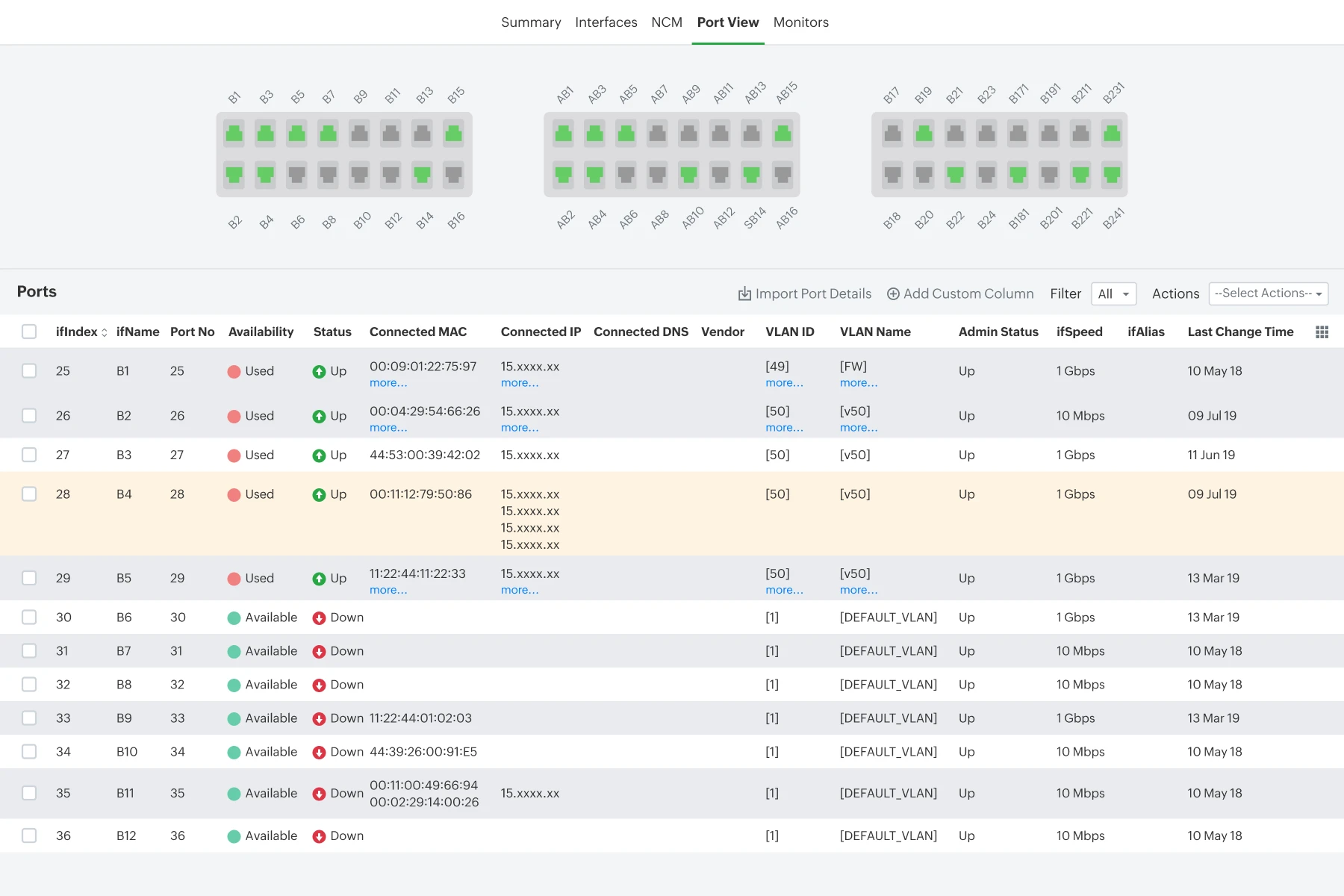
  • Monitor each port’s live status, speed, last-change, and admin state to quickly identify link failures, flapping ports, or ports negotiating at incorrect speeds. This is especially helpful when unstable endpoints or mismatched cables cause repeated disruptions.
  • Identify and trace devices instantly with automatic mapping of MAC, IP, DNS, vendor, and VLAN details helping you detect unauthorized devices, isolate slow endpoints, or fix poor cabling without guesswork.
  • Use the visual port-panel layout to see your switch as it physically exists, making it easy to spot unused ports, overloaded ports, or error-prone ports boosting both capacity planning and network hygiene.

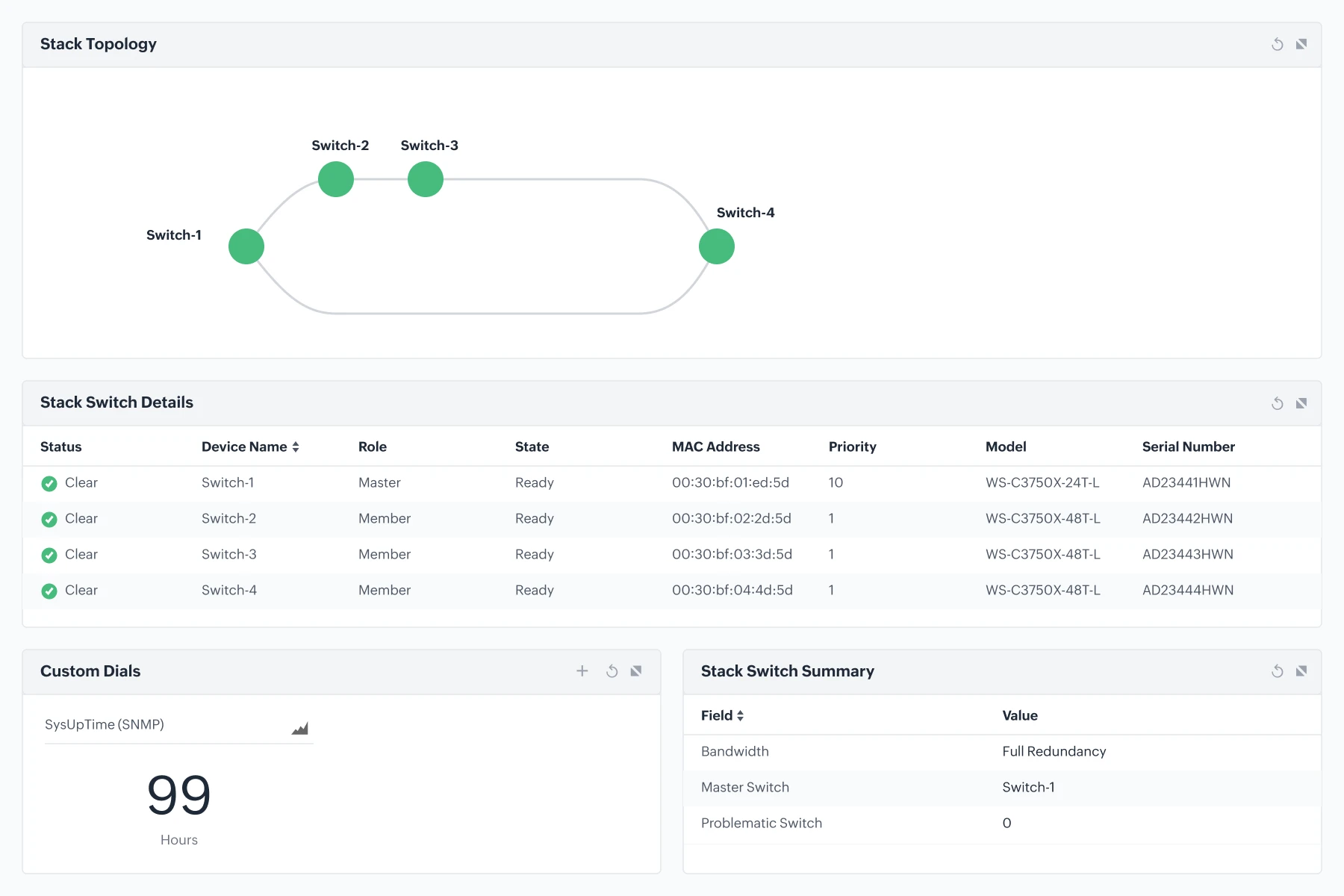
Monitor switch stacks, neighbor devices, and VLANs

Switch stack monitoring

  • Track stack member roles, health, and link integrity, helping you prevent disruptions caused by failing stack members or unstable stack links in high-availability setups.
  • Get real-time alerts on stack issues so teams can act before users feel the impact; valuable in campuses, hospitals, and retail floors where switch stacks are core connectivity hubs.

Neighbor device visibility (CDP/LLDP)

  • Automatically build topology maps showing every neighbor device connected to the switch, helping you trace mismatched cables, detect unexpected adjacency, or troubleshoot slow paths.
  • Accelerate root-cause analysis by knowing exactly which device sits behind each port; crucial during incidents involving speed mismatches or devices that frequently flap.

VLAN discovery & monitoring

  • Identify VLAN assignments across all ports effortlessly, helping you fix VLAN misconfigurations that often cause unreachable devices or cross-segment communication issues.
  • Keep segmentation clean and compliant by spotting ports mapped to wrong VLANs or unused VLANs tied to active ports.
Monitor switch stacks, neighbor devices, and VLANs

Uncover more powerful switch monitoring capabilities

Intelligent alerting

Get alerts based on thresholds, anomalies, or event patterns; helpful for catching early signs of link flaps, CRC bursts, or interface spikes.

Third-party integrations

Integrate with ITSM tools like ServiceNow, Jira, and ServiceDesk Plus for seamless ticketing and faster incident handling.

Interactive maps

Use L2 topology maps, business views, and dashboards for a complete picture of switch connectivity and health.

Data Collection Manager

Get instant alerts when any monitor or interface stops collecting data, ensuring you never miss critical switch insights due to polling failures.

Key metrics to monitor switch health and performance

Device Health

  • CPU
  • Memory
  • Temperature
  • Hardware Sensors (Fan/PSU)

Interface Stats

  • Utilization (Rx/Tx)
  • CRC Errors
  • Discards
  • Duplex Status

Port Metrics

  • Port Speed
  • Availability
  • Admin Status
  • Connected Device Count

Traffic Data

  • Bandwidth Usage
  • Top Talkers
  • Peak/Avg Trends

Benefits of using OpManager as switch monitoring tool

Downtime prevention

Predicts failures early with anomaly alerts on errors, overheating, and rising latency.

Rapid isolation

Pinpoints the exact switch, port, or path causing slowdowns; no multi-hop guessing.

Clean, controlled traffic

Spot bandwidth spikes, rogue endpoints, and noisy neighbors before they choke the network.

Confident scaling

Forecasts port usage, capacity, and traffic patterns so expansions happen without surprises.

Zero vendor lock

Monitor Cisco, Juniper, HPE, Aruba, and 100+ others under the same unified UI.

Stronger user experience

Reduces packet drops and interface congestion directly improving app and Wi-Fi performance.

Frequently asked questions (FAQs)

What is switch monitoring?


Switch monitoring is the continuous tracking of network switch health, performance, and traffic to ensure reliable network connectivity. It enables administrators to detect issues early, monitor ports and bandwidth, and troubleshoot problems quickly, helping maintain uptime and optimal network performance.

Does OpManager support Switch Stacking?


Can I see what devices are connected to specific ports?


Does it support non-Cisco switches?


Monitor switch, ports, and stacks proactively with OpManager.

Loved by customers all over the world


“Easy Implementation, Excellent support & Lower Cost Tool - Team Lead, IT Services Industry”

Reviewer Role: Infrastructure and Operations

Company size: 500M - 1B USD

We have been using OpManager since 2011 and our overall experience has been excellent. The tool plays a vital role in providing the value to our organization and to the customers we are supporting. The support is excellent and staff takes full responsibilities in resolving the issues. Innovation is never stopping and clearly visible with newer versions.

“OpManager - 10 steps ahead of the competition, one step away from being unequaled - Network Services Manager, Government Organization”

Reviewer Role: Infrastructure and Operations

Company size: 5,000 - 50,000 Employees

I have a long standing relationship with ManageEngine. OpManager has always missed one or two features that would make it truly the best tool on the market, but over it is the most comprehensive and easy to use the product on the market.

“Easy Implementation with a feature rich catalogue, support has some room for improvement - NOC Manager, IT Services Industry”

Reviewer Role: Program and Portfolio Management

Company size: 500M - 1B USD

The vendor has been supportive during the implementation & POC phases providing trial licenses. Feature requests and feedbacks is usually acted upon swiftly. There was sufficient vendor support during the implementation phase. After deployment, the support is more than adequate, where the vendor could make some improvements.

“Great Monitoring tool - CIO in Finance Industry”

Reviewer Role: CIO

Company size: 1B - 3B USD

ManageEngine provides a suite of tools that have made improvements to the availability of our internal applications. From monitoring, management and alerting, we have been able to peak performance within our data center.

“Simple Implementation, Easy To Use. Very Intuitive. - Principle Engineer in IT Services”

Reviewer Role: Enterprise Architecture and Technology Innovation

Company size: 250M - 500M USD


ManageEngine support was responsive to all our queries.

Capterra
Getapp
Software Advice
G2
Altaleb Alshenqiti

“OpManager helps me monitor all aspects of the data-center and equipment like servers, switches and routers. It is fast, intuitive and centralized and you do not need to be an expert to deal with OpManager.”

Altaleb Alshenqiti

NGHA

Donald Stewart

“Donald Stewart, IT Manager of Crest Industries is happy with ManageEngine OpManager for its end-to-end network monitoring software. It is easy-to-use and offers fault and performance management for router.”

Donald Stewart

IT Manager, Crest Industries

John Rosser

“John Rosser, MIS Manager of Yale Chase talks about the proactive nature of ManageEngine OpManager & how his organisation gained value from it.”

John Rosser

MIS Manager


 Pricing  Get Quote