Home » Features » » Case studies » <a href="https://www.manageengine.com/products/desktop-central/customers-home.html">customers</a> <a href="https://www.manageengine.com/products/desktop-central/customers-stories.html">Case studies</a> <span class="title">WD-40 Case study</span>
Digital employee experience software for enterprise IT
Poor digital employee experience kills productivity silently. Endpoint Central monitors, scores, and elevates the employee experience across your entire enterprise estate. Its self-healing capabilities trigger automated responses to device and application bottlenecks even before users report them, resulting in up to 15% fewer helpdesk tickets.
Book a demoJoin the early-access in Endpoint Central cloud
ManageEngine is recognised as a Challenger in the 2026 Gartner® Magic Quadrant™ for Endpoint Management Tools.
Zoho Corp. (ManageEngine) has been positioned as a Leader in the IDC MarketScape: Worldwide Unified Endpoint Management Software 2025—2026 Vendor Assessment
ManageEngine has been named a Strong Performer in The Forrester Wave ™ : Unified Endpoint Management, Q2 2026
9 of every 10 Fortune 100 companies trust ManageEngine
DEX barriers
IT lacks visibility
EUC and digital workplace leaders lack the tools to monitor systemic issues. Problems persist, or only a subset get reported.
Reduced productivity
Employees waste time dealing with issues ineffectively or waiting for resolution via slow, costly help desk channels.
Overwhelmed help desks
IT help desks are overwhelmed by a barrage of tickets asking them to resolve chronic issues.
Key Capabilities
Improve your DEX with our intelligence-driven automation capabilities
Telemetry
Intelligence
Automation
Extensibility
Quantitative data
Our UEM platform gathers quantitative data to measure the impact of device and app deployments on the employee experience. Aggregate telemetry from over 1,000 data points that converge on endpoints, including device and app performance, software and hardware inventory, usage, network connectivity, power management, and device readiness.
Custom telemetry
You can extend our agent's telemetry scope using custom scripts to build monitors for events unique to your business operations. These events are recorded at a defined frequency.
Employee sentiment
Analysis of employee sentiment about technology changes and usage helps you plan for improvements and employee enablement. Our UEM platform integrates with our in-house, low-code app builder to build surveys, and these surveys can be shared via our UEM platform's self-service portal to gather feedback from employees.
Analytics
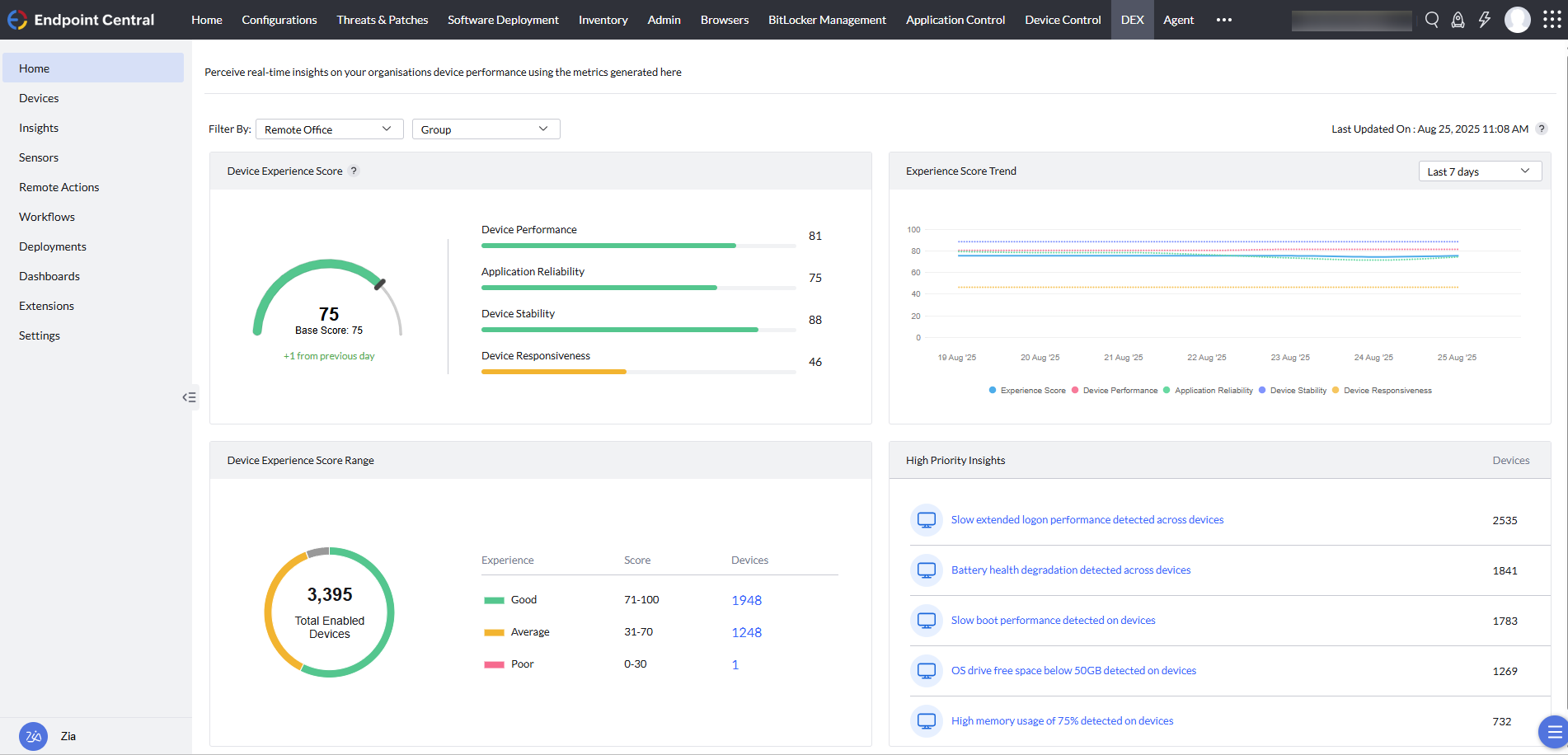
Our comprehensive telemetry forms the basis for intelligent scoring of the DEX, dedicated experience insights and dashboards, over 200 reports, and over 50 dashboard widgets. These deliver actionable insights about the inventory, ITOps, security, and the workplace experience via all touchpoints that converge on endpoints.
Insights, baselines, and scores
You can define performance thresholds across a multitude of hardware and software attributes to detect early signs of experience issues before they impact end users. Each parameter has a weighted average, according to how it impacts the experience score, which can be baselined and compared across LOBs, functions, or departments.
Root cause analysis
Drilling down on issues to their downstream data helps you understand event causation and root cause analysis. Having the asset inventory built into the same platform enriches your understanding and correlation of experience issues further. Use built-in remote control to analyze event logs, registries, services, and CLIs in order to identify the root cause of any issue.
Single-click healing
For every experience issue, we contextually provide a fix.
Self-healing
Our platform features over 200 guided automation workflows, over 10,000 prepackaged apps, over 100 ready-to-use configuration templates, over 400 ready-made scripts, and custom scripts. You can layer scripts sequentially and store them as playbooks for repetitive workflows. Based on preset triggers, our platform dynamically defines device groups and maps automation workflows to self-heal devices back to the desired state.
Self-service
Our UEM platform's built-in self-service portal hosts apps; updates; content; notifications; privacy policies; and a mechanism to raise requests for software, peripherals, and JIT admin privileges. The requests from the portal can be logged to service desks or viewed by admins in Endpoint Central.
Assisted healing
When the IT team must get involved, we offer built-in remote control for all major OSs and over 30 rugged handhelds. Access and monitor endpoints nonintrusively with the end users' consent to analyze event logs, registries, services, and CLIs in order to identify the root cause of any issue. Record sessions and perform actions such as remotely commanding or managing power, including Wake-on-LAN and shutdowns. Remediate noncompliant devices.
Augmented help desks
Our platform integrates with widely adopted help desk solutions so you can remotely troubleshoot issues directly from the ITSM console without switching contexts. To speed up responses to recurring issues, we've published a library of automations, which we've made available in the ticket and request windows of ITSM solutions through our integrations. For systemic issues, repeatable playbooks can be built using ManageEngine ServiceDesk Plus' workflow orchestration and our platform's extensive APIs.
Business intelligence
We integrate with our in-house business intelligence (BI) solution, ManageEngine Analytics Plus, to consolidate the quantitative and qualitative data gathered via our UEM agent, including custom telemetry pulled from endpoints. Beyond the endpoint analytics, Analytics Plus correlates telemetry from other first-party and third-party solutions to provide a holistic employee experience score.
Overcome challenges across your enterprise EUC
Proactive IT
Sustainable IT
Cost-efficient IT
Improved first call resolution
Employee Enablement
Digital Transformation
Proactive IT
Our UEM platform uncovers unreported or early signs of technology issues that may be slowing down users. Build self-healing automations to prevent systemic issues at scale. Reduce IT overhead and improve the number of issues avoided.
Sustainable IT
Pairing our deep IT asset inventory and experience analytics allows EUC and procurement teams to adopt intelligent, performance-driven device life cycle management. Lessen your carbon footprint by maximizing the asset life cycle and minimizing shipping. Utilize user login data to plan power management schedules and remotely hibernate inactive desktops to meet your ESG goals.
Cost-efficient IT
Analysis of software usage helps you identify license gaps, reconcile unused licenses, and track contract renewals efficiently. Software requests via our self-service portal are logged, helping you make informed decisions about self-service portal enablement. Our ROI dashboards showcase self-service success by quantifying reduced incidents and cost savings.
Improved first call resolution
You can improve incident management by gaining more insights and downstream data about issues to determine the root cause. With deep integrations with our in-house and third-party ESM solutions, first-line analysts can get the context of the issues listed on our platform from the comfort of their help desk, improving first call resolution.
Employee Enablement
You can discover digital personas through our UEM platform with identity provider integrations. Measure app usage patterns across lines of business (LOBs) and diverse functions to establish persona-based app bundles in order to accelerate employee onboarding. EUC teams can work with LOB leaders to improve employee awareness and adoption of these new applications. Along with app rollouts, teams can make announcements via the employee communication portal and can share educational materials with employees via the self-service portal.
Digital Transformation
Newer OS versions provide a better user experience. Drive efficiency and speed up transformation projects by automating readiness for new OSs. Plan organization-wide OS rollouts confidently.
Hear from the leaders
-%
reduction in cost
-%
reduction in downtime
"From getting ahead of system failures to enhancing the speed of resolution, we've seen downtime reduce by as much as 40% with Endpoint Central. Endpoint Central helps LTIMindtree achieve a 30% cost reduction while improving the user experience for its customers."
Siddarth Oruganti, Global practice head - digital workplace, LTIMindtree
Talk to us
Together, let's build a brave new world, where our people can work safely from anywhere, on any device, with a rich experience across all their workplace services.
Frequently asked questions on digital employee experience management
01. What is digital employee experience (DEX) and why does it matter for enterprises?
+-
Digital employee experience (DEX) is the sum of every interaction an employee has with the technology they use to do their job, including devices, applications, and networks. For enterprises, DEX matters because poor digital experience silently drains productivity, increases helpdesk volume, and drives attrition at scale. Endpoint Central measures DEX across every enterprise endpoint by combining quantitative telemetry from over 1,000 data points with qualitative employee sentiment, giving IT teams a unified score to track and improve.
02. How is digital employee experience management different from traditional endpoint monitoring?
+-
Traditional endpoint monitoring tells you when a device is up or down. DEX management tells you whether the device is actually usable, whether apps perform well, and whether employees can work without friction. It shifts IT from reactive (waiting for tickets) to proactive (fixing issues before they're noticed). Endpoint Central layers experience intelligence on top of its UEM platform, correlating device health, app reliability, network performance, and employee sentiment in a single view.
03. How does DEX management help reduce IT helpdesk tickets in an enterprise?
+-
Most enterprise helpdesk tickets stem from recurring, systemic issues that affect many employees but only some report. DEX management surfaces these patterns before they escalate, identifies root causes through device timeline analysis, and triggers self-healing automation to remediate them at scale. Endpoint Central customers have reported ticket volume and downtime reductions of 25 to 40 percent by combining proactive monitoring with automated workflows.
04. How does DEX support hybrid and remote enterprise workforces?
+-
Hybrid work has made DEX harder to measure and easier to lose. Employees work from home networks IT doesn't control, on devices IT can't physically access, and expect consumer-grade reliability. Endpoint Central monitors on-network and off-network devices through a single lightweight agent, surfaces localized issues by branch or region, and enables self-healing workflows that operate without VPN dependencies.
05. What role does AI and automation play in enterprise DEX management?
+-
AI transforms DEX from a monitoring discipline into a self-correcting one, detecting anomalies human analysts would miss and predicting hardware failures before they impact users. Automation closes the loop by remediating issues without manual intervention. Endpoint Central includes over 200 guided automation workflows, 400+ ready-made scripts, and a no-code workflow builder, letting IT teams build self-healing playbooks that trigger automatically when experience thresholds are breached.
Enterprise DEX is measured through a combination of quantitative telemetry (device performance, app crash rates, boot times, network quality, battery health) and qualitative signals (employee sentiment, adoption rates). These are weighted into an experience score that IT teams can baseline, benchmark, and track over time. Endpoint Central generates DEX scores using 1,000+ telemetry points and lets enterprises segment scores by line of business, function, or geography to see where experience is degrading and why.
07. How should enterprises evaluate a digital employee experience management platform?
+-
Enterprises should evaluate DEX platforms across five dimensions: breadth of telemetry collected, depth of root cause analysis, extent of self-healing automation, integration with existing UEM and ITSM tools, and whether DEX is standalone or built into the endpoint management platform (which affects cost, agent overhead, and data correlation). Endpoint Central delivers DEX as an add-on to its UEM platform, so enterprises get experience intelligence without additional agents or duplicated asset data.