

- Home
- Play books
- Windows - DSRM account compromise detection and remediation
Windows - DSRM account compromise detection and remediation
In this page
Playbook Description
Detects DSRM compromise by checking registry values, logon events, and user behavior. If malicious, the playbook disables scheduled tasks, blocks malicious IPs, resets the DSRM registry, and terminates the session.
MITRE ATT&CK mapping
| Tactics | Techniques | Sub-techniques |
|---|---|---|
| Defense Evasion(TA0005) | Valid Accounts(T1078) | Local Accounts(T1078.003) |
MITRE D3FEND mapping
| Tactics | Techniques | Sub-techniques |
|---|---|---|
| Restore(D3-Restore) | Restore Object(D3-RO) | Restore Database(D3-RD) |
Playbook input type
Alert
Prerequisites
- VirusTotal connection - Need to connect with VirusTotal API to check IPreputation and calculate risk scores.
- Keep your API key secure and do not share it.
- Log360 Cloud connection to execute PowerShell scripts on the target Windows host for investigation and remediation actions.
- Privileges - Admin privileges on the target host are required.
Playbook creation input
- connectionName - Provide the VirusTotal connection name for executing the VirusTotal APIs
Dependencies
Extensions - VirusTotal
- virustotal_ipReputation
- virustotal_calculateRiskScore
Utility functions:
- utility_getRequiredTime windows_detectMaliciousUser
- utility_convertTimeToUTC
- utility_extractFieldFromList
- utility_extractMaliciousEntitiesByRiskScore
- utility_validateResponses
- utility_convertToString
- utility_sendMail
Scripts
| Script Name | Description | Arguments |
|---|---|---|
| BlockIP.ps1 | Creates or updates Windows Firewall rules to block network traffic to/from one or more IPaddresses. Uses consolidated rules (SOAR_AutoBlock_IP_Inbound / SOAR_AutoBlock_IP_Outbound) — new IPs are merged into an existing rule rather than creating a rule per IP. Validates IPformat, checks firewall profile status, and reports per-IPresults. | IpString, Direction |
| FetchUserDetails.ps1 | Fetches detailed user information (password expiry, group memberships, admin status) for both domain (AD) and local users | Name |
| TerminateSession.ps1 | Logs off one or more user sessions using logoff , with optional RDP-only filtering by remote IP | UserNames |
| GetRegistryValue.ps1 | Reads a specific registry value on a domain controller, validating machine role and admin privileges | RegPath, RegName |
| UpdateRegistryValue.ps1 | Creates or updates a registry value at the specified path | RegistryPath, Name, Value, Type |
| FetchPersistenceEntries.ps1 | Scans for persistence mechanisms including scheduled tasks, registry Run/RunOnce keys, startup folder entries, and services to identify potential malicious persistence | - |
Connections
VirusTotal connection - Need to connect with VirusTotal API and fetch access key to check the malware IP/URL/File details.
Sub playbooks
- Log360 Cloud - Create or update incident
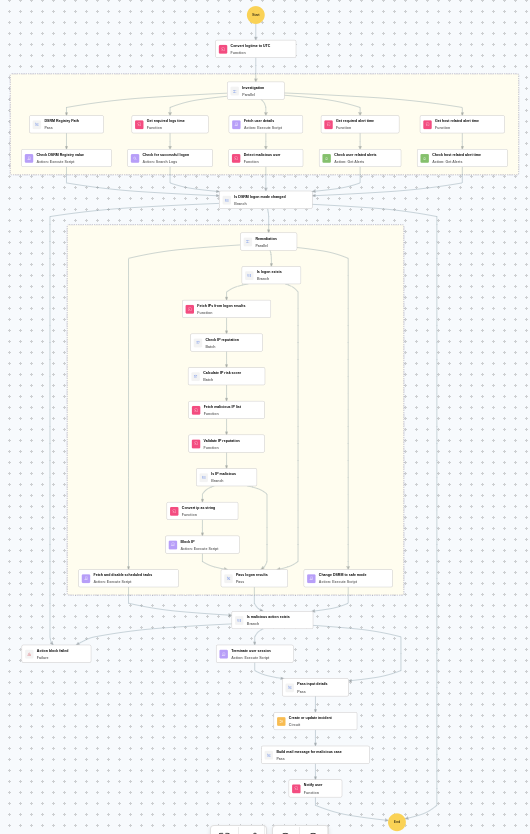
Execution workflow
Investigation:
- Check DSRM registry path.
- Checks the DSRM registry value.
- Checks for successful logons.
- Fetches the user details.
- Detects the malicious user.
- Checks the user related alerts.
- Checks the host related alert time.
Decision logic:
- Proceeds to remediation based on the following conditions:
- Related investigation findings are present.
- The user is flagged as malicious based on behavior analysis.
- Suspicious registry modifications were detected.
- If no malicious indicators are confirmed, the playbook ends with no further actions.
Remediation:
- Fetches and disables scheduled tasks.
- Checks whether logon exists.
- Fetches the IPs from logon results.
- Checks the IP reputation in batch.
- Calculates the IP risk score in batch.
- Identifies malicious entities based on their risk scores.
- Validates the IP reputation.
- Checks whether IP is malicious.
- Blocks the IP.
- Passes logon results.
- Changes DSRM to safe mode.
- Checks whether malicious action exists.
- Terminates the user session.
- Passes input details.
- Executes the "Log360 Cloud - Create or update incident" sub-playbook.
- Builds the notification email with remediation details and findings.
- Sends a notification email regarding the actions taken and required next steps.
Post execution procedure
- Confirm that the DSRM registry key has been reset to safe mode.
- Investigate whether the attacker gained access to Active Directory through the DSRM account.
- Review all domain controller logon events for signs of lateral movement.
- Audit scheduled tasks across domain controllers for persistence mechanisms.
- Consider resetting the DSRM password and all potentially compromised domain credentials.

