
- Home
- Play books
- Windows - File injection exploit remediation
Windows - File injection exploit remediation
In this page
Playbook Description
This playbook investigates file injection exploits by analyzing process behavior, checking file reputation, and evaluating user activity. If a threat is confirmed, it initiates remediation steps including terminating malicious processes, quarantining files, removing persistence mechanisms, and notifying the security team.
Playbook input type
Alert
Prerequisites
- PowerShell 3.0+
- Script Execution Policy
- Windows Credentials - Go to Settings -> Devices -> Windows Devices. Provide/update the credentials of the respective Windows device with admin privileges.
Playbook creation input
- connectionName - Provide the VirusTotal connection name for executing the VirusTotal APIs.
Dependencies
Extensions - VirusTotal
- virustotal_ipReputation
- virustotal_calculateRiskScore
Utility functions:
- utility_convertToString
- windows_commandLineAnalysisRegasmRegsvr32
- utility_sendMail
Scripts
| Script Name | Description | Arguments |
|---|---|---|
| BlockIp.ps1 | Blocks an IP address by adding an iptables INPUT DROP rule. | IpString, Direction, Protocol |
| BlockURLTraffic.ps1 | Blocks traffic to a given URL by resolving its domain to IP addresses, creating inbound and outbound Windows Firewall block rules (via New-NetFirewallRule) for each resolved IP, and flushing the DNS cache. | Url |
| QuarantineFiles.ps1 | Moves one or more files to a quarantine directory (%USERPROFILE%\Forensic_Quarantine), strips inherited permissions via .NET ACL API, and grants read-only access to Administrators. Skips protected PowerShell executables. | filePaths |
| StopAndQuarantineProcess.ps1 | Terminates processes by PID (decimal/hex) or by executable file path, then quarantines the executable to a forensic directory. Protects critical OS processes and the SOAR agent from termination. | ProcessIdentifiers |
| FetchAndRemovePersistenceTasks.ps1 | Scans and removes persistence mechanisms — scheduled tasks, registry Run keys, startup folder entries, and suspicious services — whose executable paths match known suspicious locations (Temp, Public, etc.). | AdditionalSuspiciousPaths |
| StopProcess.ps1 | Stops processes by PID or file path. Supports hex PIDs and comma-separated inputs. Skips protected PowerShell executables. | ProcessIdentifiers |
| UnregisterDLL.ps1 | Unregisters a DLL that was previously registered via RegAsm/RegSvcs (for .NET assemblies) or Regsvr32 (for native COM DLLs), auto-detecting the correct method from the original command line. For .NET assemblies, uses the in-process .NET RegistrationServices API (no child process spawned). For native COM DLLs, performs direct registry cleanup of CLSID, ProgID, and TypeLib entries (does not spawn regsvr32.exe). | DllFilePath, CommandLine |
| TerminateSession.ps1 | Logs off one or more user sessions using logoff, with optional RDP-only filtering by remote IP. | user |
Connections
VirusTotal connection - Need to connect with VirusTotal API and fetch access key to check the malware IP/URL/File details.
Sub playbooks
- Windows - File enrichment
- VirusTotal - URL reputation check
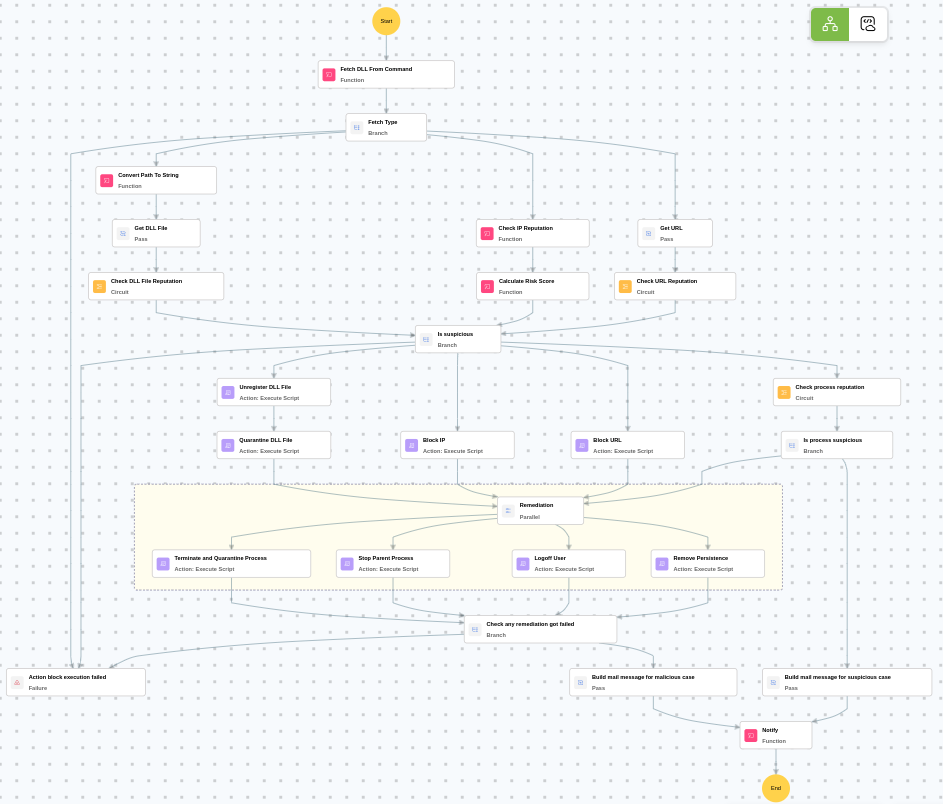
Execution workflow
Investigation:
- Analyzes the command line for suspicious patterns, URLs, or file paths.
- Fetches the type.
- Retrieves the URL.
- Executes the "VirusTotal - URL reputation check" sub-playbook.
Decision logic:
- Proceeds to remediation based on the following conditions:
- A malicious or suspicious URL was identified.
- If suspicious but not confirmed malicious, sends a notification for manual review and stops further actions.
- If no malicious indicators are confirmed, the playbook ends with no further actions.
Remediation:
- Unregisters the DLL File.
- Quarantines the DLL File.
- Terminates and quarantines the process.
- Stops the parent process.
- Logs off the user.
- Removes the persistence.
- Checks if any remediation got failed.
- Builds the notification email with remediation details and findings.
- Sends a notification email regarding the actions taken and required next steps.
Post execution procedure
- Review the quarantined process artifacts for forensic analysis on host.
- Investigate the command line [value] for additional indicators of compromise.
- Verify that all persistence mechanisms have been fully removed.
- Check for lateral movement from the affected host.
- Review user [user] account for unauthorized activity.
- Monitor the host for recurring DLL injection or process injection alerts.

