

- Home
- Play books
- Linux - Multiple failed sudo attempts investigation
Linux - Multiple failed sudo attempts investigation
In this page
Playbook Description
This playbook investigates multiple failed sudo attempts by validating whether the user is authorized, checking for malicious command activity and sudo failure causes, and assessing host risk score, then automatically remediates confirmed threats by removing sudo privileges, terminating user sessions, and enforcing sudo password-attempt limits, while sending a manual-review notification for lower-risk suspicious cases.
MITRE ATT&CK mapping
| Tactics | Techniques | Sub-techniques |
|---|---|---|
| Credential Access(TA0006) | Brute Force(T1110) | Password Guessing(T1110.001) |
MITRE D3FEND mapping
| Tactics | Techniques | Sub-techniques |
|---|---|---|
| Restore(D3-Restore) | Restore Access(D3-RA) | Restore User Account Access(D3-RUAA) |
Playbook input type
Alert
Dependencies
Utility functions:
- linux_detectMaliciousUser
- utility_sendMail
Scripts
| Script Name | Description | Arguments |
|---|---|---|
| fetchUserDetails.sh | Fetches user identity details including UID/GID, group memberships, and sudo privileges by inspecting /etc/sudoers and /etc/sudoers.d/ — without invoking sudo . | $.detection_details.action1.log_details[0].username |
| killProcess.sh | Terminates a running process by name using pkill -9 | $.detection_details.action1.log_details[0].username |
| fetchSudoFailureCause.sh | Finds a running process matching a given path pattern, extracts its executable path, and computes the SHA-256 hash of the binary for forensic analysis. | $.detection_details.action1.log_details[0].commandexecuted |
| limitSudoPasswordAttempts.sh | Applies a custom sudoers policy for a user that resets the sudo ticket immediately ( timestamp_timeout=0 ) and limits password retries to 3 ( passwd_tries=3 ) by creating a file in /etc/sudoers.d/ . | $.detection_details.action1.log_details[0].username |
| checkMaliciousCommand.sh | Scans system journal logs from a given timestamp for potentially malicious command activity (e.g., reverse shells, credential access, file-transfer utilities) and returns matched log lines as structured JSON. | $.detection_details.action1.log_details[0].username |
| removeSudoPrevileges.sh | Removes a user from a specified group, deletes the user account, and removes any custom sudoers file for that user under /etc/sudoers.d/ | $.detection_details.action1.log_details[0].username |
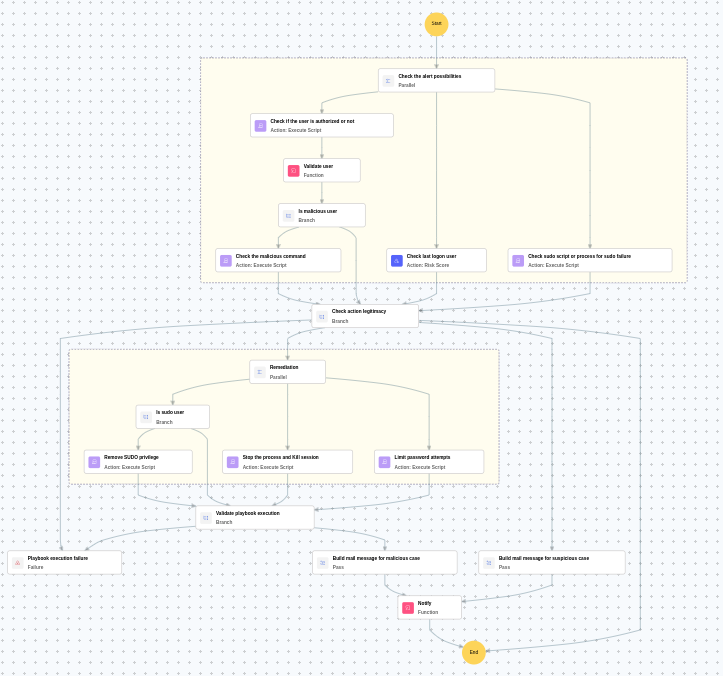
Execution workflow
Investigation:
- Checks if the user is authorized or not.
- Validates the user.
- Checks if it is a malicious user.
- Checks the malicious command.
- Checks the last logon user.
- Checks the sudo script or process for sudo failure.
Decision logic:
- Proceeds to remediation based on the following conditions:
- A monitored threshold was exceeded.
- If suspicious but not confirmed malicious, sends a notification for manual review and stops further actions.
- If no malicious indicators are confirmed, the playbook ends with no further actions.
Remediation:
- Checks if it is a sudo user.
- Removes the sudo privilege.
- Stops the process and kills the session.
- Limits password attempts.
- Validates that all remediation actions are completed successfully.
- Builds the notification email with remediation details and findings.
- Sends a notification email regarding the actions taken and required next steps.
Post execution procedure
- Review the revoked sudo privileges and ensure they are not restored without authorization.
- Investigate whether the attacker gained any elevated access before remediation.
- Review audit logs for any commands executed with elevated privileges by user.
- Check for any unauthorized SSH keys or cron jobs added by the attacker.
- Consider resetting the password for user.

