

- Home
- Play books
- Bitdefender - Obfuscated PS VSS deletion response
Bitdefender - Obfuscated PS VSS deletion response
In this page
Playbook Description
This playbook counters the deletion of Volume Shadow Copies by decoding obfuscated commands and evaluating file, URL, and IP reputations to pinpoint threats, automatically blocking malicious connections. Once threats are validated, the response triggers process termination, file quarantine, and host isolation to halt encryption attempts. It concludes by initiating full antivirus scans, updating file blocklists, and alerting stakeholders.
MITRE ATT&CK mapping
| Tactics | Techniques | Sub-techniques |
|---|---|---|
| Impact(TA0040) | Data Manipulation (T1565) | Stored Data Manipulation(T1565.001) |
MITRE D3FEND mapping
| Tactics | Techniques | Sub-techniques |
|---|---|---|
| Isolate(D3-Isolate) | D3-NI | - |
| Evict(D3-Evict) | D3-PE | - |
| Detect(D3-Detect) | D3-PA | D3-SEA |
Playbook input type
Alert
Prerequisites
Need license with plan - Business Security Enterprise.
Playbook creation input
connectionName - Connection name of Bitdefender.
Dependencies
Extensions - Bitdefender
- bitdefender_addFileToQuarantineTask
- bitdefender_createScanTask
- bitdefender_getTaskStatus
- bitdefender_killProcess
- bitdefender_createIsolateEndpoint
- bitdefender_addToBlocklist
Extensions - VirusTotal
- virustotal_ipReputation
- virustotal_fileReputation
- virustotal_calculateRiskScore
Utility functions
- windows_commandLineAnalysis
- bitdefender_buildBlockRule
- utility_resolveDomainToIP
- utility_extractMaliciousEntitiesByRiskScore
- utility_getRequiredTime
- utility_convertToString
- windows_decodeCommand
- utility_validateResponses
Scripts
| Script Name | Description | Arguments |
|---|---|---|
| GetFileHash.ps1 | This script retrieves the hash of a specified file using the given algorithm. | FilePaths, Algorithm |
Connections
- VirusTotal connection: Need to connect with VirusTotal API and fetch access key to check the malware IP/URL/File details.
- Bitdefender connection: Need to connect Bitdefender using API Key.
Sub playbooks
- Bitdefender - Scan task execution
- VirusTotal - URL reputation check
- Windows - File Enrichment
- Windows - Shadow Copy Deletion Remediation
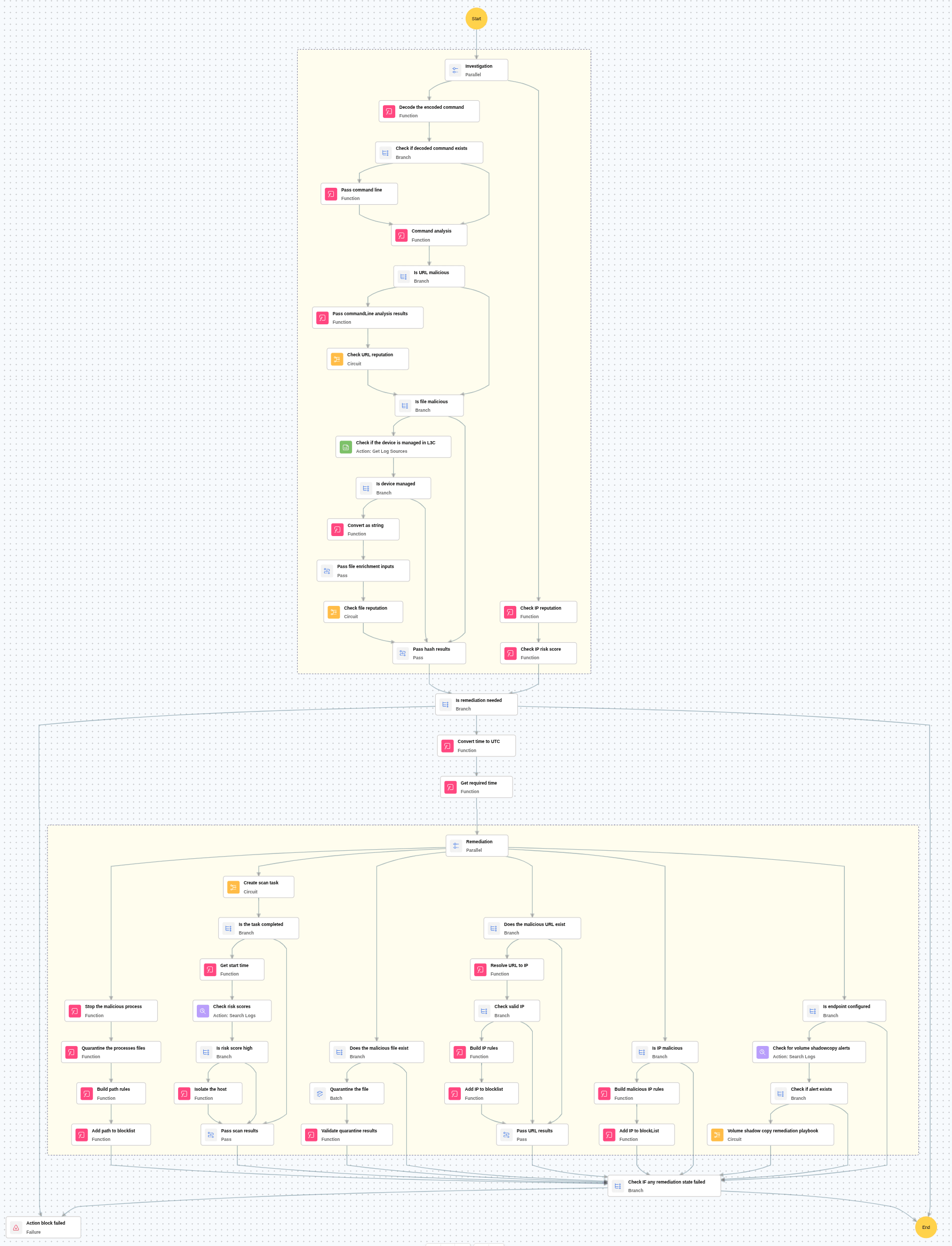
Execution Workflow
Investigation:
- Decodes the encoded command used in the attack.
- Analyzes the command and fetches file path or URL present.
- Checks the file hash or URL reputation.
- Checks IP reputation in VirusTotal, if remote IP is involved.
Decision logic:
- If IP and file path or URL risk score is high, it might be malicious and so proceeds with remediation.
Remediation:
- Blocks the IP, if malicious.
- Kills the process and quarantines the process.
- Adds the malicious process to the blocklist.
- Blocks the malicious file hashes & URLs fetched from the command line.
- Runs full antivirus scan and checks the risk score.
- Isolates the host if risk score is high.
- Notifies the users.
Post execution procedure
Steps to revert false positives:
- Remove file from blocklist.
- Remove the host from isolation.
- Remove the file from quarantine.

