

- Home
- Play books
- Okta - Suspicious activity remediation
Okta - Suspicious activity remediation
In this page
Playbook Description
This playbook is triggered when a user reports unauthorized activity in Okta. It immediately responds by terminating active sessions, blocking the attacker's IP, and requiring a mandatory password reset. The playbook further secures the account by deleting any MFA factors added by the intruder, ensuring the security team receives instant notification for further investigation.
MITRE ATT&CK mapping
| Tactics | Techniques | Sub-techniques |
|---|---|---|
| Persistence (TA0003) | Modify Authentication Process (T1556) | Multi-Factor Authentication (T1556.006) |
MITRE D3FEND mapping
| Tactics | Techniques | Sub-techniques |
|---|---|---|
| Eviction (D3-Evict) | D3-PE | Session Termination (D3-ST) |
Playbook input type
Alert
Prerequisites
API access with below scopes:
- okta.users.manage
- okta.networkZones.read,
- okta.networkZones.manage
- okta.policies.manage
- okta.users.read
Dependencies
Extensions - Okta
- okta_endUserSession
- okta_resetPassword
- okta_listFactor
- okta_unenrollFactor
Utility functions
- okta_getFactorsByEnrolledTime
- utility_validateResponses
Connections
- Okta configuration - Okta connection – Need to connect Okta using API Key.
Sub playbooks
Okta - Block IP or ASN
Execution workflow
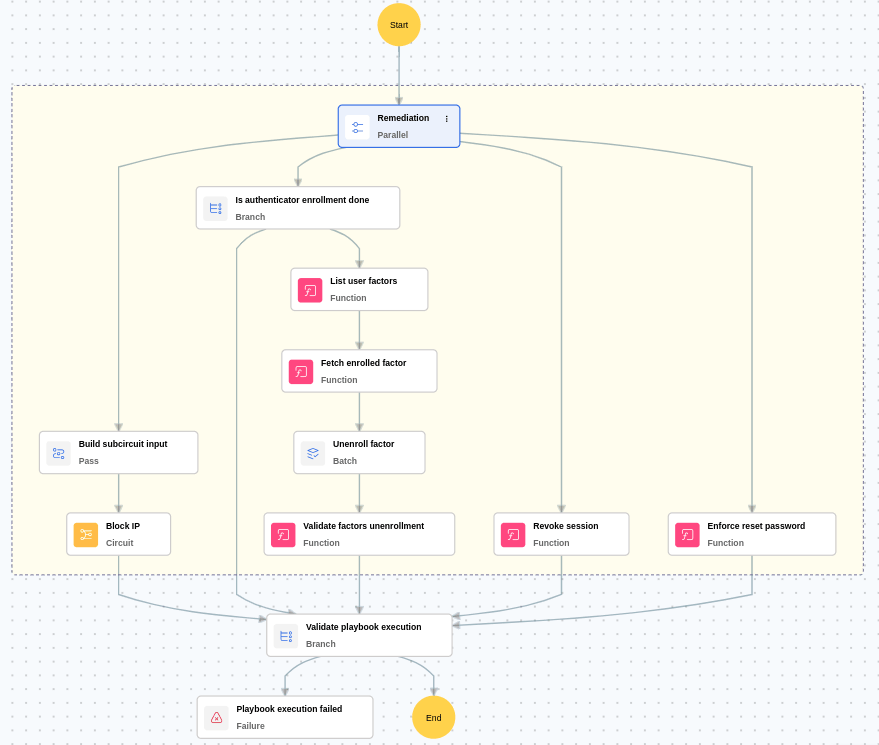
- Revokes the session to immediately terminate any active unauthorized access.
- Blocks the malicious IP to prevent further communication from attacker-controlled sources.
- Enforces Okta account reset password to ensure credential security and block sign-in until the user completes the reset process.
- In case of Authenticator Enrollment:
- Fetches the attacker-enrolled factor
- Unenrolls the fetched factor to revoke the attacker's access via the compromised MFA method.
- Notifies the security team about the actions taken.
Post execution procedure
- Audit password policies: Ensure strong password policies are in place to reduce the chance of brute force success before a lockout.
- Enable MFA challenge after lockout: Enforce MFA challenge on first login post-unlock to verify user identity and prevent automated re-use of credentials.
- Handling false positives: If this alert is confirmed as a false positive, revert all associated remediation steps.
- Unblock non malicious IPs.

